Payment configuration
User validation
What is User ID?
The user ID is a parameter that enables identifying a user in a game. You can store user IDs in a database. When receiving invalid user IDs, throw an exception. Refer to the GitHub repository for an example of user validation.
What data should I return after validation is completed?
When validation is successful, return HTTP-code 200. In case of an error, code 400 (INVALID_USER).
Customization
Can I customize the payment UI theme?
You can enable a dark theme by sending the settings.ui.theme = default_dark parameter in the token. The dark theme allows you to set the background image or change the background color (as it is in the demo). To change other settings, contact your Customer Success Manager or email to [email protected].
Can I change the appearance of emails sent to users?
Yes. Follow the instructions on how to customize emails to users. The order of email elements cannot be changed as they are a part of a standard template. This is required according to the licensing agreement with Xsolla, which acts as the legal merchant of records.
Testing
Can I use test bank cards to test the payment process?
Yes, but only when you run your application or Pay Station demo in sandbox mode. Refer to the general list of test bank cards of different brands and issuing countries.
Can I test the PayPal payment flow in sandbox mode?
Yes. See detailed information in the instruction.
How can I test payment refunds?
You can test refunds via the Request refund API call. Refer to the instruction for more information.
What is the Xsolla Invoice ID and Invoice ID on the webhook testing tab in Publisher Account?
What is the Xsolla Invoice ID and Invoice ID on the webhook testing tab in my account?
The Xsolla Invoice ID is the transaction ID on Xsolla’s side. For testing, you can use any numeric value.
int64 format. This means that the maximum value is (2^63)−1. To verify that these values are processed correctly, use a number greater than 2^32, e.g., 4,300,000,000.Payments
How can I validate a payment request received in a webhook?
First, check if a specified user ID exists in your project. Then, return code 200 to validate the payment.
Can I redirect a user to a particular payment method?
settings.payment_method parameter. In this case, users are redirected to the selected payment method’s payment form. You can find the list of payment method IDs in Publisher Account in the Payments > Payment methods section.settings.payment_method parameter. In this case, users are redirected to the selected payment method’s payment form. You can find the list of payment method IDs in your account in the Payments > Payment methods section.settings.payment_method parameter. In this case, users are redirected to the selected payment method’s payment form. You can find the list of payment method IDs in your account in the Payments > Payment methods section.settings.payment_method parameter. In this case, users are redirected to the selected payment method’s payment form. You can find the list of payment method IDs in your account in the Payments > Payment methods section.settings.payment_method parameter. In this case, users are redirected to the selected payment method’s payment form. You can find the list of payment method IDs in your account in the Payments > Payment methods section.Can I automatically redirect a user to a successful/failed payment page after processing a payment, depending on the result?
Yes, you can configure redirect conditions. Refer to the instruction for more information.
Our billing system automatically sets the order_id for each order. Can I use order_id instead of user_id when receiving a token?
No, you need user_id for everything to work correctly.
You can additionally pass the order_id in the external_id parameter. To do so:
- Open your project in Publisher Account and go to the Project settings > Integration settings section.
- Open the project in your account for mobile games and go to the Settings > Integrations section.
- Open your project in the account and go to the Settings > Integration settings section.
- Open your project in the account and go to the Settings > Integration settings section.
- Open your project in the account and go to the Settings > Integration settings section.
- Check the Use external ID box.
- Click Save.
Can I override the webhook URL for each transaction?
Will I receive the details of failed transactions?
No, Xsolla only sends webhooks for successful transactions. If you received a notification about a payment, it means the transaction was successful.
How can I add VAT to the total payment amount?
VAT settings are configured on Xsolla’s side by default. Contact your Customer Success Manager or email to [email protected] if you want to change the settings and add VAT to a user’s total payment amount.What does PID stand for?
PID is the payment method identifier on Xsolla’s side.
What is the external ID?
The external ID is a transaction’s ID in the game that is assigned to an order in your system. On the Xsolla side, an external ID is linked to a transaction ID. That is why an enabled external ID allows Xsolla to prevent repeated payment for the same transaction.
“external_id”: “1”, you can’t initiate a real payment with “external_id”: “1”.- Open your project in Publisher Account and go to the Project settings > Integration settings section.
- Open the project in your account for mobile games and go to the Settings > Integrations section.
- Open your project in the account and go to the Settings > Integration settings section.
- Open your project in the account and go to the Settings > Integration settings section.
- Open your project in the account and go to the Settings > Integration settings section.
- In the Payments section, select the necessary checkboxes:
- Use external ID — to make the external ID validation required when creating a token.
- Skip verification for external ID — to disable the external ID validation when creating a token.
- Click Save.
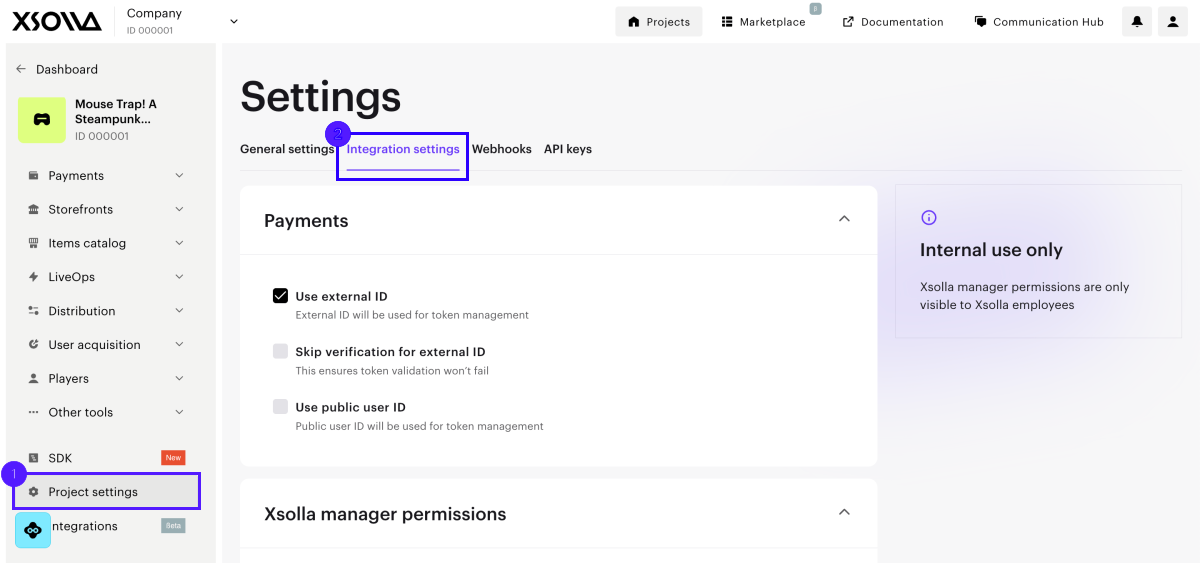
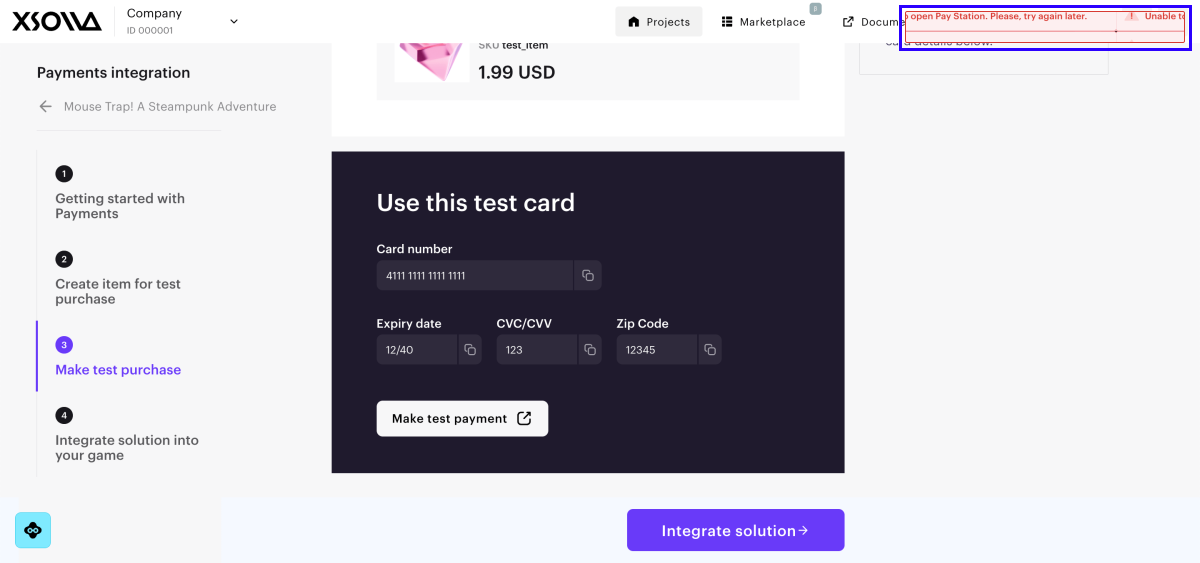
When the Use external ID setting is enabled, you can’t make a test payment through Publisher Account. To make a test payment successfully, temporarily disable this setting.
Do I need to generate a new external ID for each transaction?
Yes. The external ID has to be unique for each payment.
What value do I need to set for the setExternalPaymentId method?
The setExternalPaymentId method should have the same value as the external_id, if you have one.
What are gateways?
Once you have signed a contract with payment systems, you can use gateways to display these payment options in the payment UI. Players can still pay for their purchases using selected payment methods, and you would receive payouts directly from these payment system providers. To connect gateways, open your project in Publisher Account and go to the Payments > Payments settings > Gateways section.
Once you have signed a contract with payment systems, you can use gateways to display these payment options in the payment UI. Players can still pay for their purchases using selected payment methods, and you would receive payouts directly from these payment system providers. To connect gateways, open the project in your account and go to the Payments > Payments settings > Gateways section.
Once you have signed a contract with payment systems, you can use gateways to display these payment options in the payment UI. Players can still pay for their purchases using selected payment methods, and you would receive payouts directly from these payment system providers. To connect gateways, open the project in your account and go to the Payments > Payments settings > Gateways section.
Once you have signed a contract with payment systems, you can use gateways to display these payment options in the payment UI. Players can still pay for their purchases using selected payment methods, and you would receive payouts directly from these payment system providers. To connect gateways, open the project in your account and go to the Payments > Payments settings > Gateways section.
Once you have signed a contract with payment systems, you can use gateways to display these payment options in the payment UI. Players can still pay for their purchases using selected payment methods, and you would receive payouts directly from these payment system providers. To connect gateways, open the project in your account and go to the Payments > Payments settings > Gateways section.
Xsolla serves as a technical service provider and takes a reduced revenue share: 1.25% of the transaction amount + $0.10. You will have full access to all Xsolla solutions, but you must do the following:
- manage tax-related issues
- sign separate agreements with each payment system
- retain direct money flow from payment systems
- manage payment system fees, chargebacks and refunds, payout commissions, and operating costs
For example, if you work with PayPal and want to set it as a direct payment method, you can connect a gateway. The payment UI will not change — the changes will affect only the payout process. After processing a payment, a player’s money will be transferred to your PayPal account. In this case, Xsolla is not involved in the payout process.
How can I migrate user data (saved payment accounts, subscriptions, etc.) to Xsolla?
Contact your Customer Success Manager or email to [email protected]. Make sure you use PGP encryption to provide data security.
Xsolla PGP key parameters:
- Key ID: DA1E62CB
- Key type: RSA
- Key Length: 4096
- Fingerprint: 0209 8489 757F 4451 F431 FB0C FBFC 4D97 DA1E 62CB
- User ID: [email protected]
 1-----BEGIN PGP PUBLIC KEY BLOCK-----
 2
 3mQINBGnZA+8BEACtu+pO73jhG/5sjmkJRpMxftcQeNZRpB1QUMYYNcB6MFVuU3Oo
 4HO/hOuXWIbh1S5LWQOok5cY3eiQOKwjhwV/IpM0DJ5pxi5YlCAHwkSWO4b2J4lXF
 5pu27bb9whbaC+V1g1gE0TmLtiqKfX0QF6NZop4SrQ3f4yDoV50JKHGtW9XWL4Bfz
 6JWNyM9H4PFdzy5Pwhu5/642XSZf9MClpQzUjwPw+zSfxnweF6je3lbWvH+2fqBG/
 7Y1SeMuFW9Vo9QNCdBX9ws98CrS9bN3frXywh6B1cEEVoBbOvH/T3foKUmlr5gdHi
 8ijTKiFKHTsBcfHcaQgM1cCD0qrRCLrQ2j6KjJOjRevHLJLzdmZFiCDD11+eL338k
 9o4GVdoQR4aNeXfJEICN+79kwz/AVa6d8O934Nnfbz7e7Xx10KR/ObLt6Xnp57GmE
10zWqvtkJ/GGivCyyHR632Nb4yoj/lgf6s0Z0oTQ4Dx8u+as2T+OG+zNo4xRcU8fE2
11F2FBbYXtzp6ySrWu0YcOjS+YhH5tjJBz1dndEQ+FwfA9MWmQgNDuHfdub0CcQqb2
12AfipbGzU+cPucmiyown1WzqP824xmr2JOVJ28DD8CkuAtGQW+kGQqZzHohWgM5WS
13nZlX6rfIYtrygJFrbULGb7A4Ekj9IDzUjnpiHSf8D1jtcHPNPZ2zRvrC3wARAQAB
14tCFYc29sbGEgQWRtaW5zIDxhZG1pbnNAeHNvbGxhLmNvbT6JAlQEEwEIAD4WIQQC
15CYSJdX9EUfQx+wz7/E2X2h5iywUCadkD7wIbLwUJAeEzgAULCQgHAgYVCgkICwIE
16FgIDAQIeAQIXgAAKCRD7/E2X2h5iyxvVD/wLxBbYrNLPuEAJwL8UWDu1naQuaZHl
17/6yDUBV70l7Cxla6KEUqipuJDeD+Vgn85CqVui9eHgZpgXSxG5WogtO+Fkw3n/Ww
18gJkbZQTufWCuW/A82+aHaD0GNCLYqV6EEHQQ4hko6Z3E3zuuI0EoP9hB1BgUq0W1
19qhwrb1Q6Y8nQMgmhCgoRC8EvVFQwk6isvxDczym02/edjxgWuDZJOmZ5WMeN3Vzz
20QoYaGuChoyemigwGvJBKJKAMlgCRZNKlX7L3fOebT16jq1i5ByUqmmngq3YnBnmv
21j76HXP+MQioVr1FC4lkTkD4wWAw/l0gO0B3zLbPY8KQO4gcfLdH6wWPsfcQDmYWK
221vT9AhSPcIQCEcPCZnDBsf6FbiO3KMp0mFCJ0dZdaRJrem/7eL+P3I//H3HKo8RR
23BBGHJZCcm6MSwztUxZW2+6YiMCP9oQVU2zRnUfl/+J6maj83vz9cFQEqYyhbKjTu
24kRkAowUUA54GXnmul+sCvuJXHoKeC4EyZzNYCDxd9Y2u0jAnng2qT09b66IguOZW
250FPSzsRSeHGigwcK+/ChLk0+1CTXmO1fweIsaE1RcqgNLCR4Drtpup2Be8PA3B7i
26Uu8hDz77Lzz8M4O7jDUpS+plUrJEJ1dY+Uiav8jvkeqT9wc89jwKHxNUFNiPhFRb
27cSPnPI9I1QziyLkCDQRp2QPvARAApfXCw+EkrxXY+kOC/WKTen5Z/5hsTlupq2XR
28uF9S//LzVmgPXuVHqMUWUoNs/nfRLwDbJ7CjygL1DKMDSBzPkovaLOhnr4EMvmsP
29CUgQPXP0YUpSYBkAe5idrK2RPegNe68+wEz5r6azHS9r1QjSy+ekXGdTMrAs/On2
30FxxMLWYrEJ8M8iBDQVVOOK8YowcNV44U+ljf5VkJ8TpdNXOATLxuhNXvYTzuDGi6
31J0XCMa3CkIzxC3E4U2qWrHOjU7DjsvqiL5PbtiHjHhCoS6emdPsvqViaIafzcuE5
32eAGiHMyLRl5uwSdAmuW04W+IPM1PM3lwFjFB2lM2f1qHTJXZvG6mXYcBZgrA25te
33dRBgGgpofXutem0jM1lMDLzhAYHhAw8/uJR8yrq2A6t+rIDa1RxP8WJzLASG9rn/
34NmEgor27yhC2RIX4GwJsJ5xSCRkQPxbllVYCVpB6nFfTORbkaWdo7LSwXzUjrJBG
35++m4zQ+rcKRx9XjErls/hYXPB0tZXOP6vYM1zTLqAKtRPeQxJPK5/TbWrVgphvSi
36Yu6qMfnp2IYfyr1Zv0QjxvMUS/A9yVoH1ObY2SJDTa2Wtz1zBX76+vGj4FfeMn2C
37ROIzdvt9ndSYRk2bu/7XtflG7HomE9a/ATqOHalmLykLDgfsQLhSyLKnhOq7MmQw
38ZaQt7hkAEQEAAYkEcgQYAQgAJhYhBAIJhIl1f0RR9DH7DPv8TZfaHmLLBQJp2QPv
39AhsuBQkB4TOAAkAJEPv8TZfaHmLLwXQgBBkBCAAdFiEENKTXmM5UXELlwc4NJVnA
40zu7wAJMFAmnZA+8ACgkQJVnAzu7wAJOsLQ/9Fr7qfXD4EHX/IBrtLvhFiFRoQsUQ
41wp0aI8N2UrGfcWjRCHg7qdYfS5jZTuntNQQIHkVjs3Uqy9K06Va5pbJGCAQv50MW
42qZVKKGuaJ0aM2BsgEzCIIZYAcJpQilcU16A7FIUETMcE7HbubfD6NRW3DDYTBMLd
43Jn9idvd7bRmYCQuCwDMnLfa9JFjt+paCuySUfyCDvFqnO6EXIYQd2JFYptECFEkQ
44crZEfFlA5ygrpUSCsf5lDHgykoVziLbnW1R25dv84OV/Xu3hsjJFAY/TPP1Nh8M6
45JqZjGz5kOcIRThmT28jZdfgeqOnwIAc3rnr4B3NiXuuIJawfltnV5ujmnipcKLK8
46wPJlUAMcCOg3UD5tXjGwPBU8ryHkAZfXsqcUDllA7bGCRMPnQtfTnAr7xrieCjfn
47FDElBPsSg5C2jV9E23/n7+M0MuL/73fYGe8tDleEQHwyRbTEmI+5v4gwt1IOUlg7
485znJdXkp/Kwhmgv4GnFTB78pD+lx3CB0vPFsufhATCY8lDP+xMvUeURDF6jhGP/F
497waM/sOh9/zd4RaOxHMxGZHNs7g9rVca2AbwCTKuTvV7blUz10/j80prEyJwNj5e
50n+td7m4xLHRhSYeSXMteXIowWPE1nshYpV5sZbywE8pOwzBXbqHoNClDQh5szyFB
51CyHQR8sowp+42FLUFw/+PdDSjmI7/Z3vmtRsi+VgqbDM7CW2T8rIR/sUizBOCRah
52mBM1aA7IyJ2GerdMFGVeCRcCljUEiGnw+IvPdS72bTpfvk+8fU2o7PXsQSJfmhQS
53cA4k9uhLm87S3Ng5SX50+qTsgZgc7qywoSqCs4KC7p5zmsc+hfmdpFFmBYTP24Ai
54WdCXt1fqAAsbbO9dU5mos2Hs/L6qANKaN0wJBwf/cRnrewdV6zVhLCvkDYuXADf8
55SmgzXCESVNZNEFLWC2+syl3McSaRbjaInf1ijB8oMI7zR32bonqTEw4Vxc+mcc7H
56ck3ZtYyE8iA8TU5yyNzv0bmD5b8S7EquXekhbckC6tZw/i+O6xt6sZNnczkGbvup
57v5MNf4h8bcCkMFZ1jD27wpLUyGbxyr9t0D4DJeDYaAIyDF2IWd4kAeHvUyRvJt+b
58mbDI6b00PHMlW5JGebVvaV5opeBn2/aYTAMg5T7ohHxksM6jWfIVJPMRTik6RsGC
5937yLy8U7gcxebRwty6GxZuDdRjaBz/JcC9TshTgvbWJ392t8O3ZU6mezV2yDHTAO
60dE30NoqxiX+sZTYsyL5hkSW44LiH5sd30HxyXLQQ1Q+k3y0drKbp9UNc3E79l/mX
61r6jr1egiuYyCUk2zjaUx+UfI7Xrk2uttanFgJsTTX2wIGic5iFEecfe45V/YgOM=
62=naL7
63-----END PGP PUBLIC KEY BLOCK-----
How is a user’s country determined?
When you use the client-side API call for generating the payment token, Xsolla determines the user’s country from the IP address of the request.
When you use the server-side API call for generating the payment token, the country is determined by sequential checking of:
- the
user.country.valueparameter’s value in the request body - the IP address in the
X-User-Ipheader
If none of these values are passed, an error appears. If both of these values are passed, information from the request body is used.
Found a typo or other text error? Select the text and press Ctrl+Enter.
