How to manage game streams and pricing
Glossary
Game stream
A game uploaded to the cloud and available to users for a seamless game experience. Setting up game streams allows you to manage your game’s regional availability and prices.
Coverage
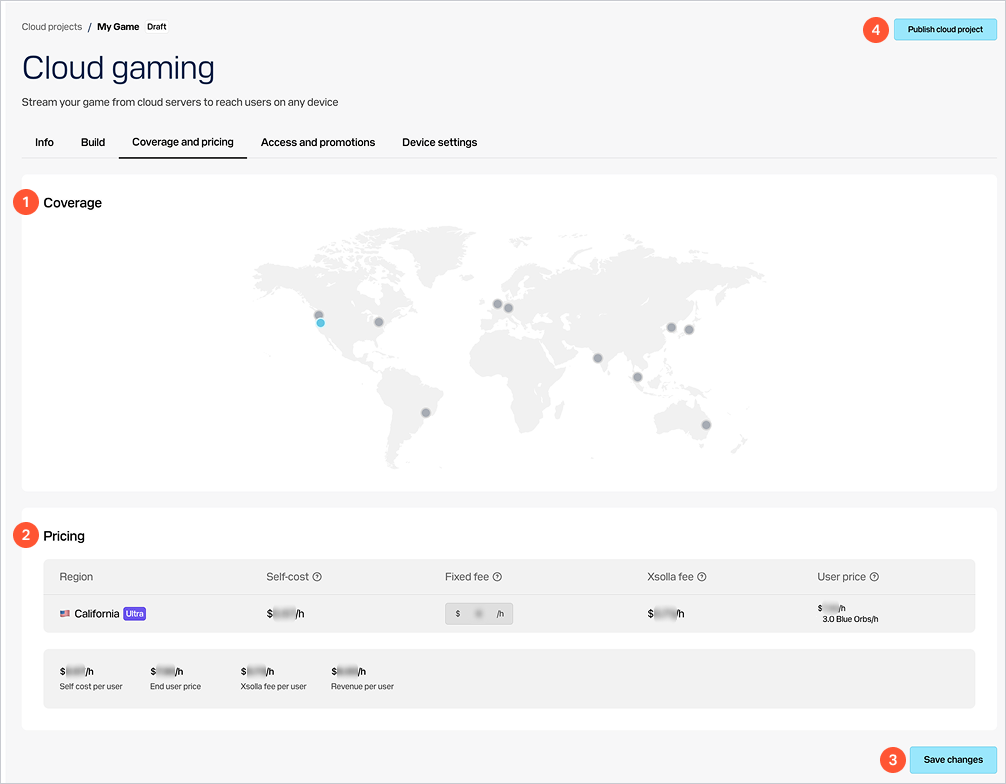
Geographical areas where your game is available with a lower ping. This setting enables you to ensure seamless gaming experiences for users in regions where you are planning to reach your target audience.
User price
The end user price in US dollars per 1 hour of playtime. Based on your needs and streaming server costs, you can allocate different pricing across regions.
The end user price is calculated using the formula:
\begin{aligned} \text{User price} = \text{Self cost} + \text{Fixed fee} + \text{Xsolla fee} \end{aligned}
Legend:
User priceSelf costFixed feeXsolla fee
How to set it up
- In your project in Publisher Account, go to the Distribution > Cloud Gaming section.
- In your project in the account, go to the Distribution > Cloud Gaming section.
- In your project in the account, go to the Distribution > Cloud Gaming section.
- In your project in the account, go to the Other tools > Cloud Gaming section.
- In the game pane, click
Edit . - Go to the
Coverage and pricing tab. - In the
Coverage block, click the dot on the map in the necessary region. - In the modal window that opens, select a server type per your game’s hardware requirement:
High orUltra . In some regions, only one server type is available. - Close the modal window. On the map, a selected coverage area is indicated by a color-filled dot.
- If you want to remove some of the areas, choose the corresponding dot on the map and click
Remove .
Note
You can’t add several servers with the same type for the same region.
- In the
Pricing block, specify the fee in US dollars you want to charge for 1 hour of playtime in the selected region. You can set this value based on a ratio of the game’s cost to its playtime. For example, if the local copy of your game costs 60 US dollars and provides an average of 30 hours of playtime, you can set the fee to 2 US dollars per hour.
Note
The end user price, Xsolla fee, and your revenue are automatically calculated and displayed below in the block.
- Click
Save changes and confirm your action. - To make changes available to users, click
Publish cloud project .
Was this article helpful?
Thank you for your feedback!
We’ll review your message and use it to help us improve your experience.Found a typo or other text error? Select the text and press Ctrl+Enter.
