Installer le SDK
Note
Cette documentation est archivée et n’est plus mise à jour. Les informations de cette page peuvent être obsolètes.
Note
Seule la dernière version du SDK est disponible via le CDN. Si vous avez besoin d’une version différente, vous pouvez la télécharger à partir de GitHub.
- Download Unity.
- Pick a personal or professional Unity license based on your preferences.
- Create a new Unity project.
- Download the SDK.
- Unzip the package.
- In the Unity editor, go to
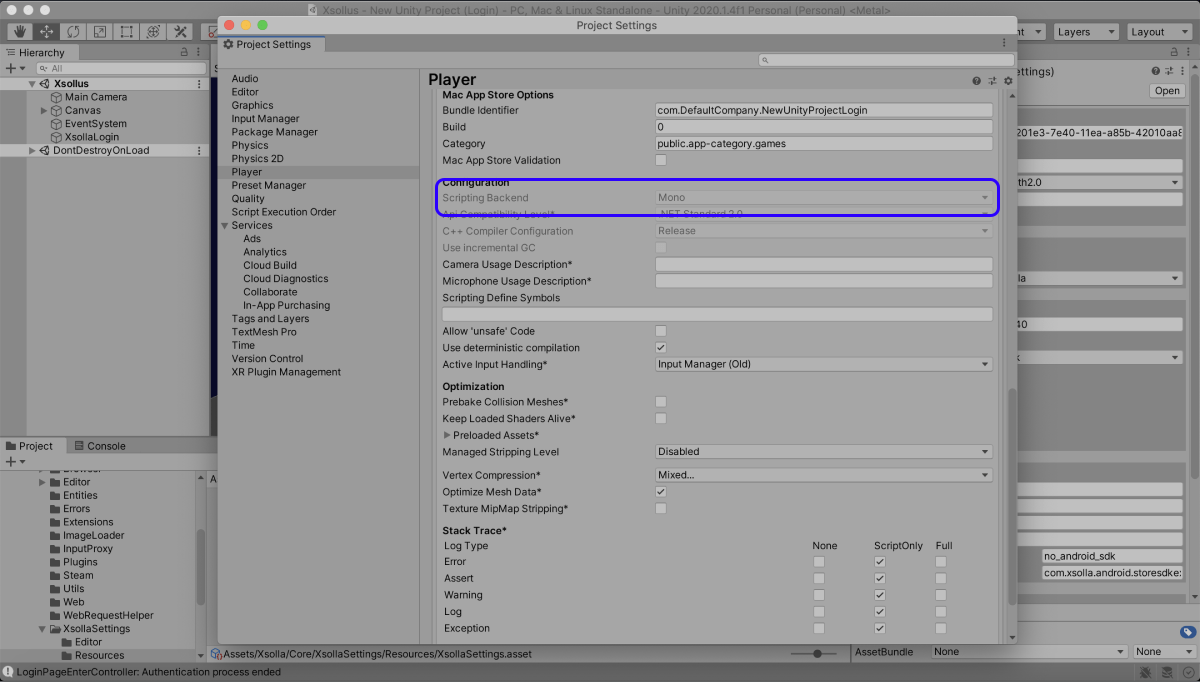
Assets > Import Package > Custom Package in the main menu and select the SDK. - Make sure that the Mono compiler is used to create a game build (for standalone builds only). To do this:
- Click
Edit > Project Settings in the main menu. - Go to the
Player > Other Settings > Configuration section. - Make sure that
Mono is selected in theScripting Backend field.
- Click
Note
We recommend you use the
You can use either
Cet article vous a été utile ?
Merci pour votre commentaire !
Nous examinerons votre message et l'utiliserons pour améliorer votre expérience.Faute de frappe ou autre erreur dans le texte ? Sélectionnez le texte concerné et appuyez sur Ctrl+Entrée.
