## 결제 및 스토어
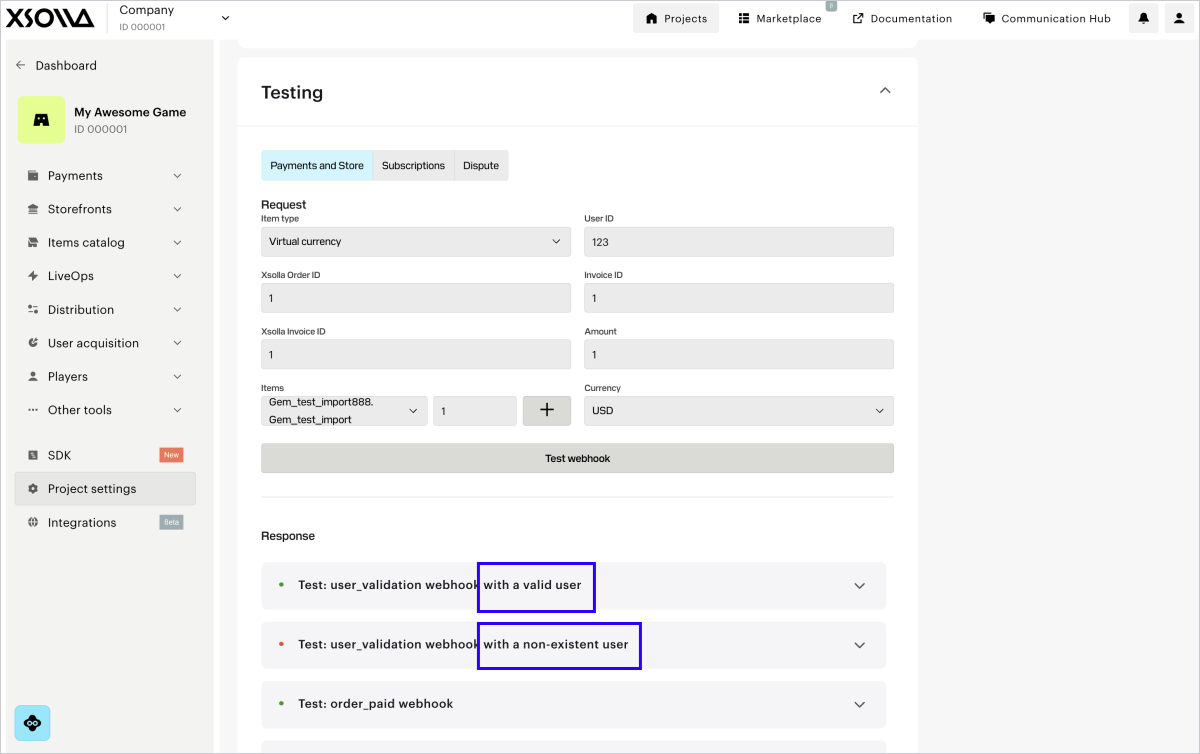
결제 및 스토어 탭에서 다음 웹훅을 테스트할 수 있습니다.
- 사용자 유효성 검사(`user_validation`)
- 주문 결제
성공(`order_paid`)
- 주문 취소(`order_canceled`)
웹훅 테스트 방법:
1. 웹훅 테스트 섹션에서 결제 및 스토어 탭으로 이동합니다.
2. In the drop-down list, select the item type. If you haven’t set up this item
type in the account yet, click the button to configure it. After creating the
item, return to the webhook testing section and proceed to the next step.
3. 필수 입력란을 기입하십시오:
* **사용자 ID** - 테스트 시 문자 및 숫자를 임의로 조합하여 사용할 수 있습니다.
* **엑솔라 주문 ID** 입력란에 아무 값이나 입력합니다.
* **엑솔라 송장 ID** - 엑솔라 측 트랜잭션 ID입니다. 테스트 시 임의의 숫자 값을 사용할 수 있습니다.
* **송장 ID** - 게임 측 트랜잭션 ID입니다. 테스트 시 문자와 숫자를 임의로 조합하여 사용할 수 있습니다. 결제 성공을 위한 필수 매개
변수는 아니지만, 게임 측 거래 ID와 엑솔라 측 거래 ID를 연결하기 위해 전달할 수 있습니다.
* **금액** - 결제 금액입니다. 테스트 시 임의의 숫자 값을 사용할 수 있습니다.
* **통화** - 드롭다운 목록에서 통화를 선택합니다.
* 드롭다운 목록에서 아이템의 SKU를 선택하고 수량을 표시합니다. **+**를 클릭하고 같은 유형의 아이템을 여러 개 선택하고 이를 새 줄에
추가할 수 있습니다.
4. **웹훅 테스트**를 클릭합니다.
사용자 유효성 검사, 주문 결제 성공 및 주문 취소 웹훅은 지정된 데이터가 포함된 웹훅을
제공된 URL로 전송합니다. 각 웹훅 유형의 테스트 결과는 웹훅 테스트 버튼 아래에 표시됩니다.
If the **Use public user ID** box is checked in your account in the **Settings
> Integration settings** section, the User search webhook will also be sent to your webhook server URL
and the testing result will be displayed.
각 웹훅에 대해 성공한 시나리오와 오류가 있는 시나리오를 모두 처리하도록 구성해야 합니다.