Managing catalog and LiveOps via canvas
Overview
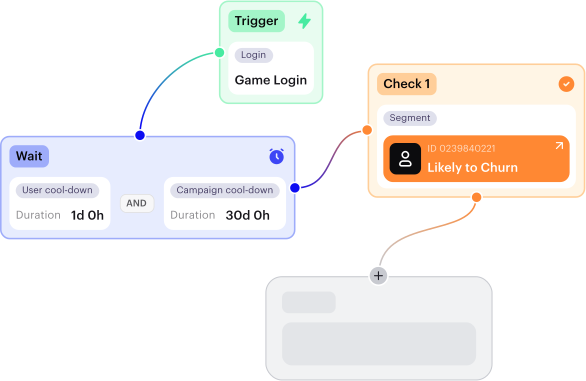
The canvas is a tool to visually manage the monetization strategy elements of your game. It is an interactive workspace where you configure items, promotions, and LiveOps activities, and link them together.
The items and LiveOps activities you create can be used across any Xsolla solutions. For example, in Web Shop or within the game client if it is integrated with the Xsolla API.
The canvas makes working with content and campaigns more transparent and visual. It is valuable for experts responsible for LiveOps, monetization, and promotion: producers, LiveOps managers, content, and localization specialists.
Operate and integrate
Canvas helps you create and manage promotions and catalog content. However, for these configurations to work inside your game, you need to complete additional integration steps on your side:
For the Web Shop, ensure the synchronization of in-game data with orders and payments by processing Xsolla webhooks.
For other implementations:
- Request the catalog from Xsolla to display items and offers in your game UI.
- Generate a payment token as part of your purchase flow.
- Track order status and grant purchases to users.
Ensure that your game client and backend are correctly integrated with Xsolla services, so that promotions and items created in the canvas are available in the store and purchases are correctly granted to users.

What’s next
Stay informed by checking our dedicated landing page. We announce upcoming features and changes ahead of time so you can prepare. Your Customer Success Manager will also communicate important changes directly and help you assess any project-specific actions.
We value your constructive feedback. If you have any ideas for improvement or need help solving a specific operational challenge, please submit a service request through your Customer Success Manager or email at [email protected].
Found a typo or other text error? Select the text and press Ctrl+Enter.
