Sign payment services agreement
Signing the payment services agreement allows you to accept real payments. You can sign it at any integration step but keep in mind that the review timeline may vary.
Note
When creating a company profile, if you indicated that you already work with Xsolla, you don’t need to sign the agreement again. Wait for an email from Xsolla that you have been granted access to the additional account features.
To sign the agreement:
- Go to the main company page.
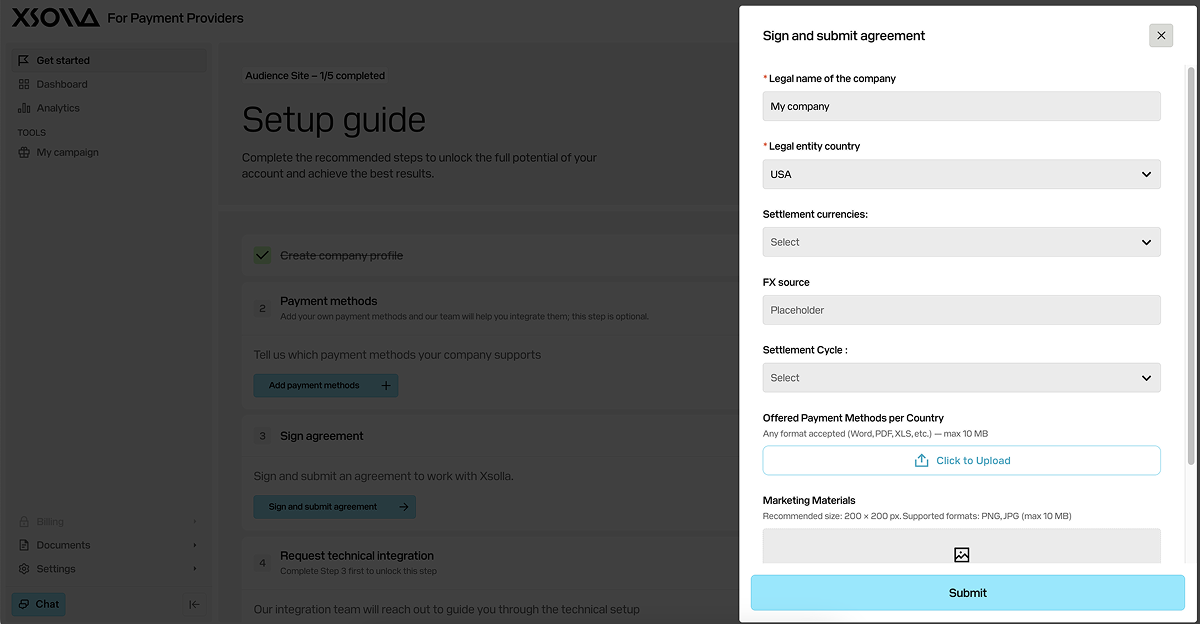
- In the block for signing the agreement, click Sign and submit agreement.
- In the page that opens, fill in the form:
- Specify the legal company name (required).
- Select the country of your company legal entity (required).
- Select the settlement currency.
- Specify the source of foreign exchange rate (FX).
- Select the settlement cycle.
- Upload the mapping of payment methods by countries.
- Upload marketing materials.
- Upload the draft agreement.
- Click Submit.
The Xsolla payment system integration team will review your application and draft agreement and if needed, suggest amendments for your review and approval. Once all details are finalized and the agreement is signed, you will receive an API key for sandbox mode that you can use to test the technical implementation.
On the main company page, the status of this step will change to Completed.

Was this article helpful?
Thank you for your feedback!
We’ll review your message and use it to help us improve your experience.Found a typo or other text error? Select the text and press Ctrl+Enter.
