Get started
How it works
When you integrate a complex solution, the following tasks are performed on the Xsolla side:
- Catalog storage and management
- Price management
- User access management
- Inventory management
- User authentication
- Transaction processing
You don’t need to configure your own server for these tasks.
The example below shows the interaction between your application and Xsolla servers for the purchase process:
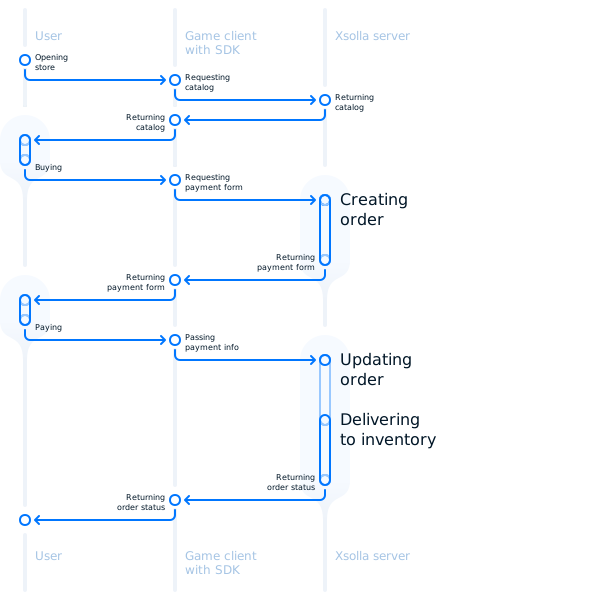
Integration flow
To integrate the complete solution based on Xsolla products, follow the steps below:
To integrate the complete solution based on Xsolla products, follow the steps below:
After integration is completed, you can test the payment process in sandbox mode and launch the project.

Contact our integration team
Click the chat icon in the bottom right corner and contact the integration team via a messenger. We’ll answer you in real time and will help to resolve the problem.
Found a typo or other text error? Select the text and press Ctrl+Enter.
