INSTALLATION
Resolving Android dependencies
To resolve the Android dependencies, follow these steps:
-
From the main menu of Unity editor, go to Assets > External Dependency Manager > Android Resolver and click on Resolve.
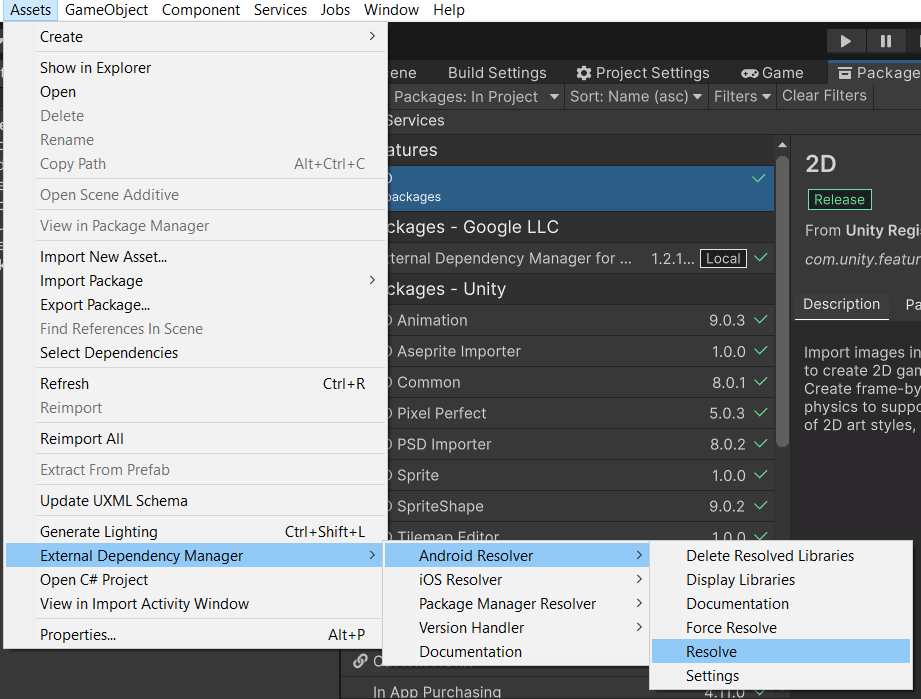
-
Wait for the dependency manager to finish.
-
Once the process is done, a popup notifying of completion will appear on the screen.

-
All dependencies are now resolved and the popup can be safely closed.
All external dependencies are resolved through Google's External Dependency Manager (EDM4U), which comes prepackaged with the SDK plugin. This helps to alleviate the need to specify any of the native Android library dependencies by editing project's Gradle template scripts directly. Preferably, EDM4U should be run every time the SDK plugin is either installed anew or updated to a newer release.