Best practices for creator campaigns
This guide explains how to structure creator campaigns, attract relevant creators, and improve conversion through creator marketing.
To set up an effective campaign, it is important to understand the creator flow:
- Creators discover campaigns in Creator Account and apply to participate.
- Once the application is approved, they receive tools to promote the game, such as a creator storefront, a tracking link, promo codes, and other promotion tools.
- Purchases made through these tools generate revenue share for the creator and are tracked within the campaign.
Campaign setup quality directly affects the number of applications and creator engagement.
  %%{init: {'themeVariables': { 'noteBkgColor': 'transparent', 'noteBorderColor': 'transparent' }}}%%
sequenceDiagram
    participant Publisher as Publisher
    participant Creator as Creator
    participant Users as Users
    activate Publisher
    Note right of Publisher: Creates campaign
    deactivate Publisher
    activate Creator
    Note right of Creator: Discovers campaign or receives invite
    deactivate Creator
    Creator ->> Publisher: Applies to campaign
    Publisher ->> Creator: Approves or declines application
    Publisher ->> Creator: Provides campaign tools
    Creator ->> Users: Shares tracking link / storefront link / promo code
    Users ->> Publisher: Makes purchase
    activate Publisher
    Note right of Publisher: Revenue share is tracked
    deactivate Publisher
    Publisher ->> Creator: Pays out revenue share
Campaign setup
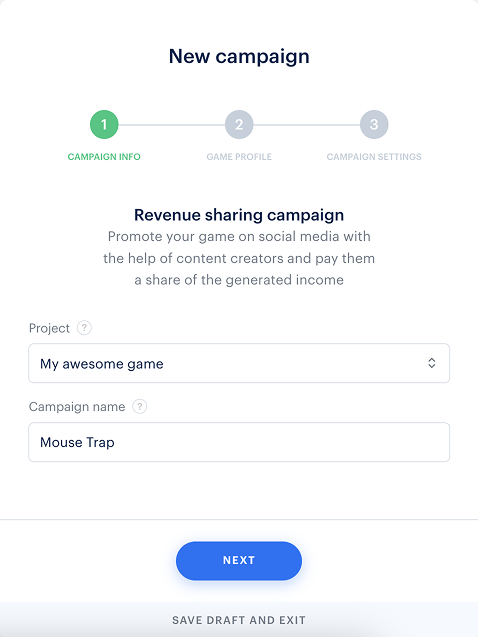
Campaign name
The campaign name is the first element creators see when browsing available campaigns.
Guidelines:
- Use a short and clear name, so creators can immediately understand the campaign content.
- Don’t include operational details such as:
- revenue share percentage
- regions
- internal notes
Use dedicated campaign fields for this information.
Good examples:
- Mouse Trap
- Escape Room II
- Fallen Tear (Early Access)
Avoid names like Mouse Trap content creator campaign 5% revenue share MENA region DLC and bonus.
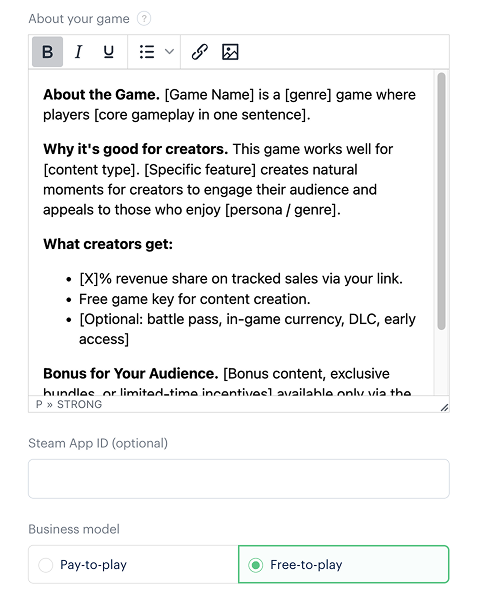
A well-written description helps creators quickly assess the game, evaluate audience fit, and understand the value of participation.
Campaign description
A clear and concise name improves readability in the creator dashboard and helps creators find the campaign more easily.
Requirements:
- Don’t use descriptions from Steam or other distribution platforms. Game page copy is written for players, not creators.
- Focus on why the game works for streaming and content creation — not on narrative or lore.
- Keep it concise. Creators skim through the content, so prioritize clarity over completeness.
- What the game is: genre and core gameplay loop in one sentence.
- Why it works for content. It can describe the following features:
- replayability,
- action density,
- cooperative gameplay tension,
- clip-worthy moments,
- visual appeal,
- and other stream-relevant qualities.
- Bonus for their audience (if applicable):
- exclusive content,
- bundles,
- incentives available only through the creator link.
- Instructions on how to participate in the campaign.
The most common mistake is copying the Steam store description into the campaign. Steam copy is written for players — it focuses on narrative, lore, and atmosphere. Creators need different information: whether the game generates engaging content and how their audience will react.
Steam copy (written for players):
Shadow of Ember is a dark fantasy action RPG set in a ruined kingdom. You explore the world, fight enemies, and uncover the source of an ancient curse.
This doesn’t help creators understand whether the game works for content creation.
Campaign description (written for creators):
Shadow of Ember is an action game with boss fights and a clear combat system, suitable for streams, challenge content, and playthroughs. Frequent combat encounters and visible progression make the game engaging to watch.
Write for creators, not for players.
- [Game title] is a [genre] game where players [core gameplay in one sentence].
- [Game title] is suitable for content creation and will appeal to audiences interested in [audience type / genre].
- [X% discount via creator promo codes, bonus content, exclusive bundles, or limited-time incentives] available only via the creator’s link.
- How to participate:
- Apply for the campaign.
- Once approved, find your creator storefront link on the Discover tab in Creator Account.
- Place the link in a stream chat, channel description, and video descriptions.
If you update elements such as revenue share, incentives, or promo codes, make sure the description reflects these changes.
Promo materials
High-quality assets help creators produce better content and reduce preparation time before publishing.
Guidelines:
- Add a folder with game logos, key visuals, promotional materials, and trailers.
- Add a link to this folder in the Link to promo materials field during campaign setup. Approved creators will see this link in the dashboard and can use the assets in their streams, videos, and posts.
Provide promo materials to ensure content quality, for example, by sharing a folder in Google Drive or Dropbox. If promo materials are not provided, creators may use low-quality or watermarked images found online. This reduces content quality and affects how the game is presented to the audience.
Campaign participation period
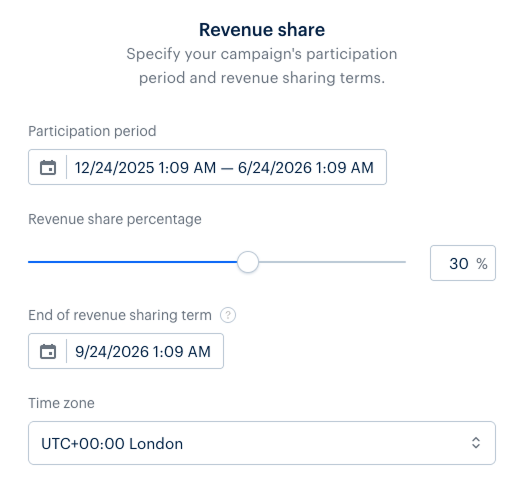
Recommended duration: 3–6 months.
The campaign participation period defines how long creators can apply and participate.
We don’t recommend setting a short campaign period for the following reasons:
- Creators plan content in advance, so short campaigns receive fewer applications.
- Campaigns lasting only a few weeks limit long-term promotion.
- The campaign may end before meaningful traction builds.
- Creators may not have enough time to generate enough revenue.
- discover the game independently
- join when it fits their content schedule
- support long-term sales through repeated content
Short campaigns should be used only for time-limited events such as major updates, DLC launches, or seasonal promotions, and should be used with caution. In most cases, longer campaigns perform better.
Revenue share
Revenue share is the primary incentive for creators to promote a game. The percentage directly affects both the number of applications and quality of creators you can attract. The percentage can be increased at any time to boost application volume or attract a specific creator tier.
Creators receive revenue share from purchases where their attribution is applied (purchases made via a link, promo code, or creator storefront). All calculations and payouts are handled automatically by Xsolla — no upfront payments are required to launch a campaign. Creators can request payouts directly through their Creator Account.
Attribution handling:
- If a creator is removed from the campaign, users can still access the link, use the promo code, and make purchases. These purchases are no longer attributed to the campaign, and the creator does not receive revenue share.
- If a purchase with creator attribution is canceled or refunded, the transaction is no longer considered confirmed:
- the revenue share is not counted and is deducted from the creator’s balance
- if the creator has already received a payout for this purchase, their balance becomes negative and is offset by future sales
- the negative balance is handled within the Partner Network system and doesn’t require expenses on your side
Creators must be over 18 years old to withdraw funds.
Payout availability may depend on the creator’s country of registration and payment provider requirements. For more details, refer to the Terms of Use or contact your customer success manager ([email protected]) or reach out to our support team ([email protected]).
Use the table below to determine a revenue share range based on the game type:
| Game type | Recommended range | Notes |
|---|---|---|
| AAA | 10–15% | Strong organic interest and existing hype. |
| AA and mid-size | 20–25% | Building awareness, growing communities. |
| Indie and lesser-known | 30%+ | Competing for creator attention. |
Recommended ranges may vary depending on the stage of the game — for example, pre-launch, live, or post-launch promotions.
Creators often compare offers across campaigns. A higher percentage makes your campaign more competitive, especially for new or lesser-known titles.
If application volume is lower than expected after launch, increasing revenue share is the fastest way to improve performance. There is no range limit, but higher percentages require careful project economics evaluation.
Game keys
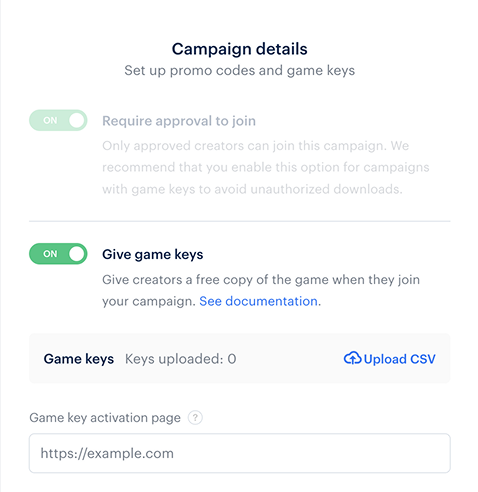
Unless the game is free-to-play, we recommend providing game keys to approved creators. Providing a free key makes the campaign more attractive and allows creators who do not yet have access to the game to produce content.
Recommended starting quantity: 50-100 keys. Restock keys in advance to avoid running out. You will receive an email when 30% of keys remain and when keys run out.
To set up:
- Turn on the Give game keys toggle during campaign setup.
- Upload a CSV file with creator keys — separate from keys used for sales.
- Approved creators can then claim keys in their accounts.
When keys run out, newly approved creators can’t claim a key and the Claim key button in Creator Account is no longer available.
Creator interest is highest immediately after approval. If a creator can’t access a key within the first 24–48 hours, they are significantly less likely to produce content, even after you restock.
Keep creator keys separate from keys used for sales to avoid attribution issues.
- Estimate the expected number of applications.
- Use the ratio of 3–5 approvals per 10 applications to estimate how many creators will be approved.
- Allocate one key per approved creator and include a buffer.
E.g., if you expect 100 applications, you will have approximately 30–50 approved creators and will need 30–50 keys.
Follower requirements
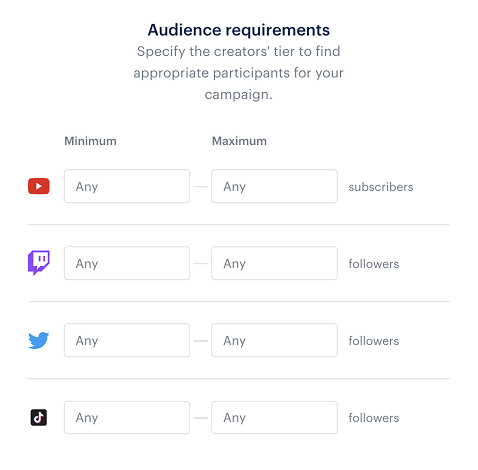
Minimum follower thresholds help filter applications and reduce manual review time. They also define the creator tier your campaign targets. These thresholds are starting points. You may choose to work with fewer creators if their content is highly relevant or if you are targeting specific audiences.
| Platform | Recommended minimum follower count |
|---|---|
| Twitch and YouTube | 3,000 |
| TikTok and Twitter/X | 300,000 |
Short-form platforms require a higher threshold because follower counts tend to be inflated relative to actual engagement. Setting thresholds too low increases the volume of low-quality applications, while setting them too high may exclude relevant niche creators. Thresholds can be adjusted at any time after the campaign launches.
If thresholds are not set, you may receive a high volume of low-quality or automated applications.
Private campaigns
Private campaigns are visible only to selected creators and are not listed in the public creator marketplace. Creators can join them only via an invitation link or allowlist.
Private campaigns are useful in several cases:
- Working with a curated group of high-profile creators.
- Running early access or preview campaigns before public launch.
- Testing campaign settings before opening the campaign publicly.
- Managing region-specific or partner-specific initiatives.
Because private campaigns are not discoverable, they require direct communication with creators.
Guidelines:
- Use private campaigns when control over creator selection is required.
- Use public campaigns when it is important to maximize reach and application volume.
Example of switching between private and public campaigns
You can change the campaign type after launch in the campaign settings:- Switching from private to public makes the campaign available in the creator marketplace.
- Switching from public to private stops new organic applications but doesn’t affect already approved creators.
Example of combining private and public campaigns
Private campaigns can be used alongside public campaigns to support specific promotion scenarios.
For example, a private campaign can be used to work with selected creators (including paid integrations) with a higher revenue share, while a public campaign remains available to a broader group of creators.
This approach allows you to control key creator partnerships while maintaining reach through the public campaign.
Special terms
Special terms appear as a pop-up when a creator clicks Apply — it is one of the first sections they read before joining the campaign.
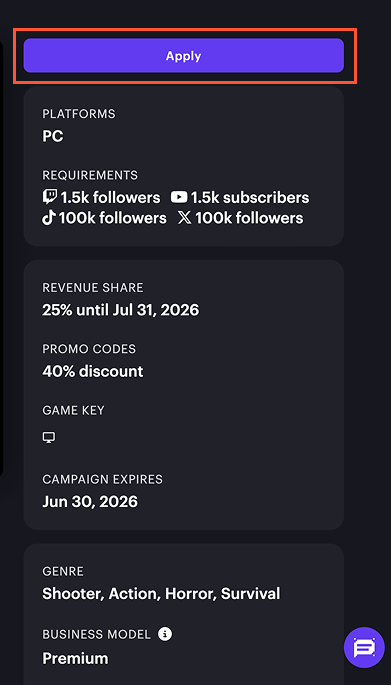
Use the Special terms field during campaign setup to define expectations regarding content deliverables, link placement, and monetization.
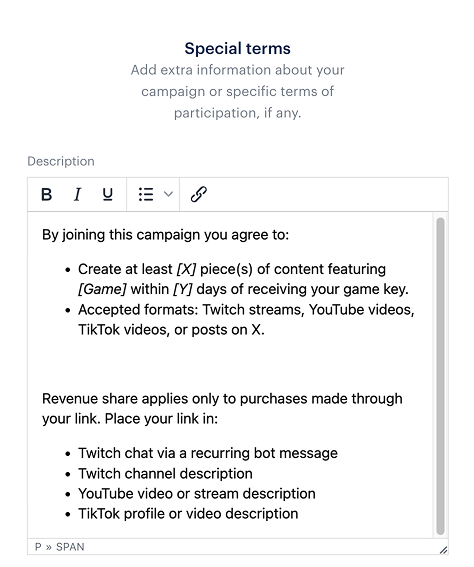
Special terms are not legally binding, but clear terms reduce questions and help ensure creators follow campaign requirements.
- Content expectations: recommended number of streams or videos during the campaign period.
- Link placement requirements.
- Revenue share reminder: applies to purchases made through the creator link, promocode, or creator storefront.
- Key game moments worth covering in the content (optional).
- Spoiler guidance (optional).
- Reminder about the audience incentive (optional).
Special terms template:
By joining this campaign you agree to:
- Create at least [X] piece(s) of content featuring [Game title] within [Y] days of receiving your game key.
- Accepted formats: Twitch streams, YouTube videos, TikTok videos, or posts on X.
- Twitch chat via a recurring bot message
- Twitch channel description
- YouTube video or stream description
- TikTok profile or video description
Special terms are not enforced automatically. If a creator doesn’t follow them, you can contact them directly or remove them from the campaign.
Creator storefront vs non-personalized shop
Creator campaigns can direct viewers either to a creator storefront or to a non-personalized shop page.
| Creator storefront | Non-personalized shop page |
|---|---|
| A personalized landing page generated for each approved creator in the campaign. Users access these pages through a unique creator link and see your offers alongside the creator’s stream, social links, and interaction buttons. The storefront shows that purchases made through the page support the creator, making the connection between the content and the purchase more visible to the audience. | A page which behaves like a standard storefront page without creator branding. |
Use when:
| Use when:
|
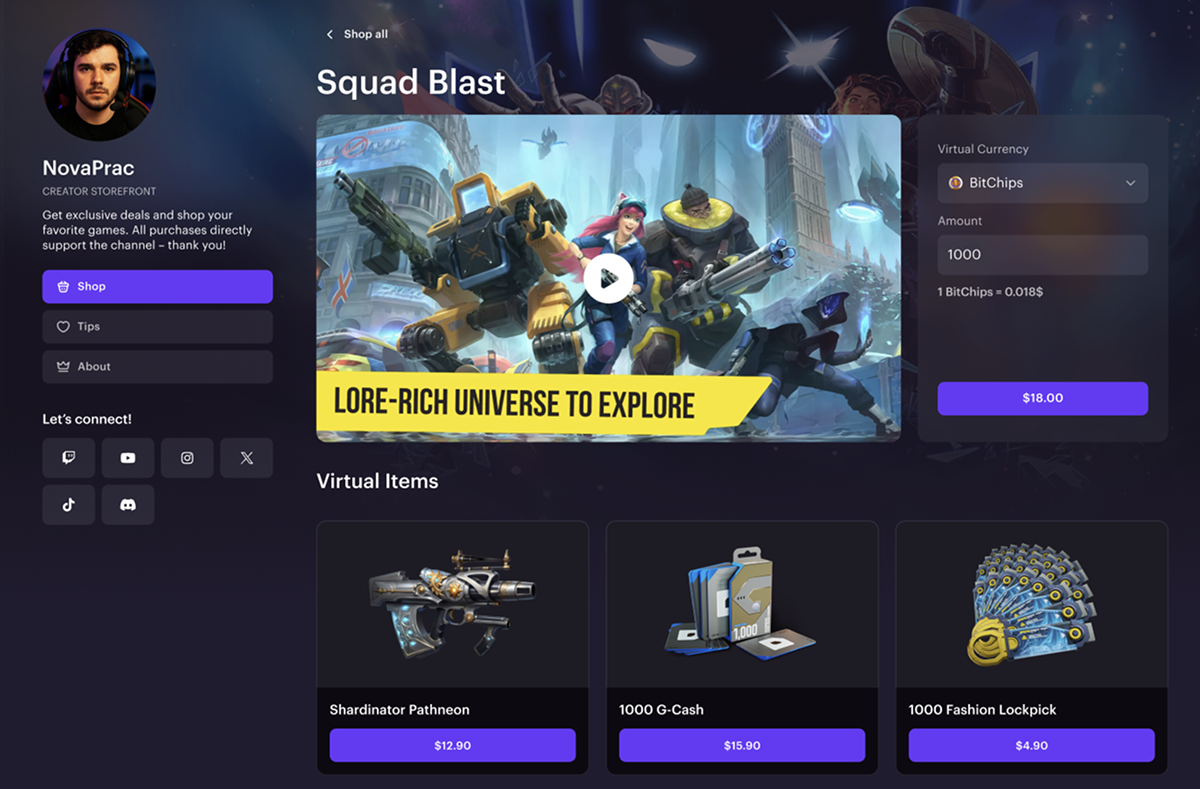
We recommend using a creator storefront. It makes the creator’s role in the purchase more visible and improves conversion. Use a non-personalized shop only for attribution or tracking focused campaigns. If you want to focus users’ attention on your main store and the creator storefront flow doesn’t work for you, use the non-personalized shop page.
Creators review and approval
Prioritize quality over volume when reviewing applications. Focus on relevance and recent activity, not follower count alone.
Evaluation criteria:
- Active content creation or streaming within the past 30 days.
- Regular content focused on games with similar genre or gameplay style.
- Focus on the same platform as the game (PC, console, or mobile).
- Audience aligned with target regions and languages.
- Alignment of the primary content format with the campaign format: live streaming, long-form video, or short-form content.
Applications review
To review applications:
- In your project in Publisher Account, go to the User acquisition > Creator marketing > Creators > Pending requests section.
- In the project in your account, go to the User acquisition > Creator marketing > Creators > Pending requests section.
- In the project in your account, go to the User acquisition > Creator marketing > Creators > Pending requests section.
- In the project in your account, go to the User acquisition > Creator marketing > Creators > Pending requests section.
- In the project in your account for mobile games, go to the Other tools > Creators marketing > Creators > Pending requests section.
- Click a creator’s name to open their detailed profile:
- Live streaming stats for Twitch and YouTube Live are available directly in the dashboard.
- For YouTube VOD creators, as well as TikTok and Twitter/X — navigate to their linked channels and review content manually.
- Click:
- Approve — for creators who meet the criteria.
- Decline — for inactive, low-quality, or suspicious accounts.
Creators without live streaming data in the dashboard may still actively publish VOD content on YouTube, TikTok and Twitter/X. Always check their channels manually before making a decision.
Red flags
When reviewing creators, pay attention to these suspicious factors:
- No content published within the past 30–60 days.
- A sudden spike in followers without corresponding activity.
- Consistently identical viewer counts across streams.
- Only 1–2 low-effort posts with minimal engagement despite a high follower count.
- Generic or AI-generated channel names.
- Broken or missing external links.
- Large follower count with very low views.
- Generic or low-quality comments.
- Recently created accounts with unusually high follower counts.
- Content published in short bursts with no long-term history.
- Approve creators who actively publish relevant content and have an engaged audience, even if their follower count is lower.
- Decline creators who show signs of inactivity, low engagement, or artificial growth.
Follower count alone is not a reliable indicator of performance.
Review cadence
To maintain creators’ engagement and interest in the campaign, we recommend following this review schedule:
- Review applications at least once per week throughout the campaign.
- During the first two weeks after launch — 2–3 times per week: this is when application volume is highest.
- Do not leave applications unreviewed for more than one week.
After applying, creators see the Pending status in their dashboard and don’t receive updates while the application is under review. Creator interest is highest immediately after discovery. Applications left unreviewed for more than a few days significantly reduce the likelihood that the creator will produce content, even after approval.
Active campaign management
Effective campaign management includes the following:
- Regular application review. Follow the criteria and cadence described above.
- Game key inventory. Restock when 20 or fewer keys remain. Available key inventory must stay ahead of the number of approved creators at all times.
The list of approved creators is available on the My creators tab. To remove a creator from the campaign or send a direct message, click ⋯ next to their name and select the appropriate option from the drop-down list.
The list of approved creators is available on the My creators tab. To remove a creator from the campaign or send a direct message, click ⋯ next to their name and select the appropriate option from the drop-down list.
The list of approved creators is available on the My creators tab. To remove a creator from the campaign or send a direct message, click ⋯ next to their name and select the appropriate option from the drop-down list.
The list of approved creators is available on the My creators tab. To remove a creator from the campaign or send a direct message, click ⋯ next to their name and select the appropriate option from the drop-down list.
The list of approved creators is available on the My creators tab. To remove a creator from the campaign or send a direct message, click ⋯ next to their name and select the appropriate option from the drop-down list.
A running campaign requires active monitoring beyond key inventory. Refer to the table below to identify possible causes of campaign issues and choose the appropriate actions:
| Campaign issue | Likely cause | Action |
|---|---|---|
| Few or no applications after 2 weeks. | Revenue share too low or description unclear. | Increase revenue share. Rewrite description. |
| Many applications, low quality. | Follower threshold too low. | Raise thresholds. Review manually. |
| Creators approved but they don’t produce content. | No special terms set or no link placement guidance. | Message creators. Add special terms. |
| Keys running low faster than expected. | Too many approvals without a sufficient key buffer. | Restock immediately. Review approval pace. |
| High traffic, low conversion. | Issues with purchase flow, pricing, or offer competitiveness. | Check the purchase flow to ensure it works correctly. Verify pricing consistency across platforms and ensure no better offers are available elsewhere. |
Campaign checklist
Review this checklist before launching the campaign.
The pre-launch items help ensure the campaign is configured correctly. Issues discovered after launch are harder to fix and may affect creator experience.
Before launch, ensure that:
- The campaign description explains what the game is and why creators should promote it.
- You’ve set the revenue share to match the project’s tier.
- You’ve uploaded game keys and ensured the quantity matches the expected number of creators.
- You’ve configured follower thresholds for each platform.
- You’ve defined special terms, including content requirements, link placement, and monetization rules.
- You’ve added a link to promo materials (logos, promotional images, trailers).
- You review creator applications regularly.
- You keep the number of available game keys higher than the number of approved creators.
- You review channels without live streams (YouTube, VOD, etc.) manually before approval.
- You decline accounts with red flags.
- You adjust revenue share if application volume is lower than expected.
- You ensure approved creators publish content.
- You follow up with inactive creators.
- You update the campaign description if application quality is low.
- You’ve included promotional materials and incentives in the campaign description and creator materials.
Found a typo or other text error? Select the text and press Ctrl+Enter.
