免费商品
工作原理
免费商品是指用户无需花费虚拟货币或真实货币即可获得的商品。
免费商品适用于以下场景:
- 销售游戏内商品⸺虚拟物品、虚拟货币套餐和捆绑包
- 通过游戏Key销售游戏和DLC
使用场景:
- 在项目里程碑、周年纪念日等特殊节点提供免费商品,用于回馈忠实用户。
- 为已购买游戏本体的用户提供免费附加内容,作为忠诚奖励。
- 在网页商城提供免费新手包,吸引新用户进入游戏。
免费虚拟物品、虚拟货币和捆绑包仅限完成身份认证的用户获取。免费游戏Key可供已完成和未完成身份认证的用户获取。免费商品数量限制仅可针对完成身份认证的用户配置。
设置免费商品
在发布商帐户中设置
在配置商品之前,建议先创建商品组,以便对商品进行分类,并管理商品在商店中的展示方式。
以下以虚拟物品为例,说明如何设置免费商品。
要创建免费虚拟物品:
- 在发布商帐户的项目中,前往Items catalog > All items部分。
在帐户中设置
在配置商品之前,建议先创建商品组,以便对商品进行分类,并管理商品在商店中的展示方式。
以下以虚拟物品为例,说明如何设置免费商品。
要创建免费虚拟物品:
- 在帐户中的项目内,前往Items catalog > All items部分。
在帐户中设置
在配置商品之前,建议先创建商品组,以便对商品进行分类,并管理商品在商店中的展示方式。
以下以虚拟物品为例,说明如何设置免费商品。
要创建免费虚拟物品:
- 在帐户中的项目内,前往Items catalog > All items部分。
在帐户中设置
在配置商品之前,建议先创建商品组,以便对商品进行分类,并管理商品在商店中的展示方式。
以下以虚拟物品为例,说明如何设置免费商品。
要创建免费虚拟物品:
- 在帐户中的项目内,前往Items catalog > All items部分。
在帐户中设置
在配置商品之前,建议先创建商品组,以便对商品进行分类,并管理商品在商店中的展示方式。
以下以虚拟物品为例,说明如何设置免费商品。
要创建免费虚拟物品:
- 在移动游戏专用帐户的项目中,前往Catalog部分。
- 点击Create manually,并在下拉列表中选择Virtual item。
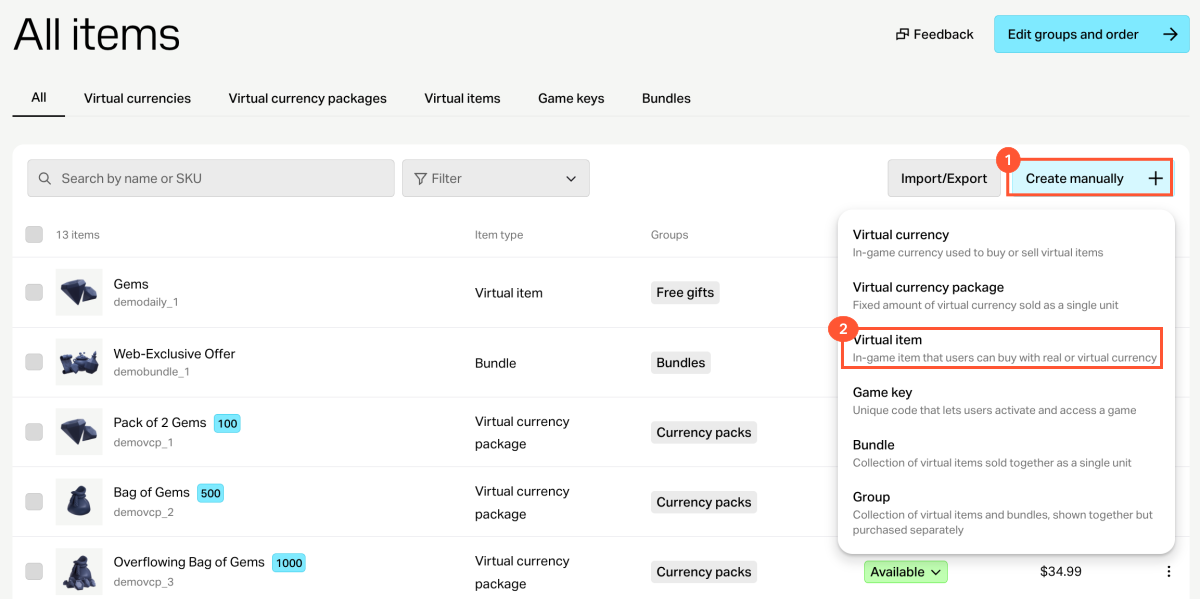
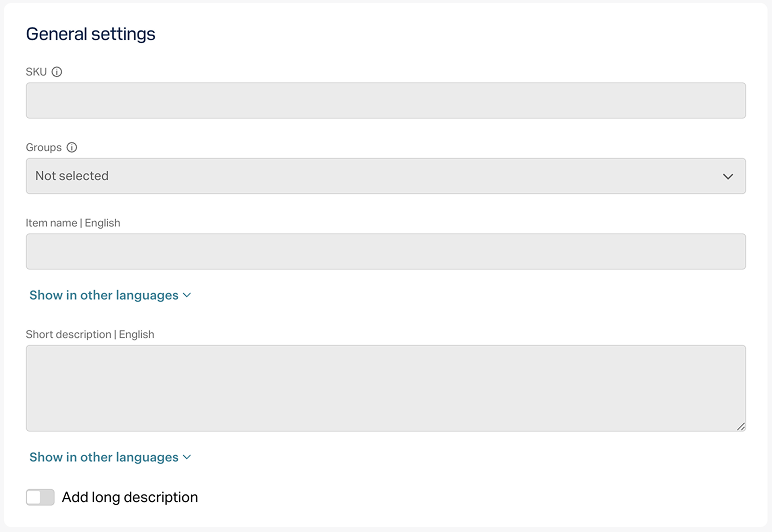
- 在General settings部分,指定以下内容:
- SKU
- 商品所属的一个或多个组(可选)
- 名称
- 简短描述
- 详细描述⸺如需添加,请打开对应开关(可选)
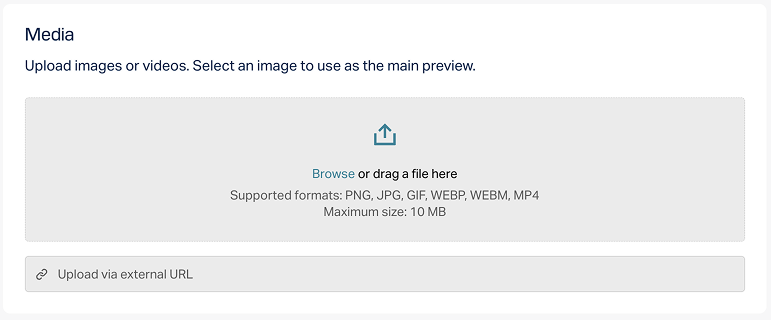
- 在Media部分,上传一张或多张图片或视频(可选)⸺可从设备上传,也可通过链接添加。对于使用艾克索拉建站器创建的商店,所有商品卡片都会显示标记为Main的文件;其余文件仅会显示在带媒体库的商品卡片中。标记为Main的文件也会在商品目录获取API调用的响应中返回。
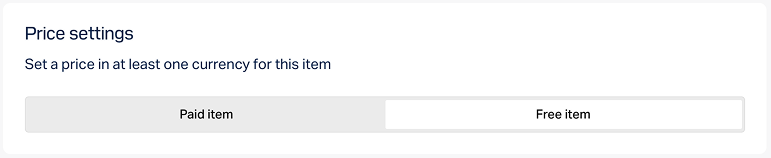
- 在Price settings部分,选择Free item。
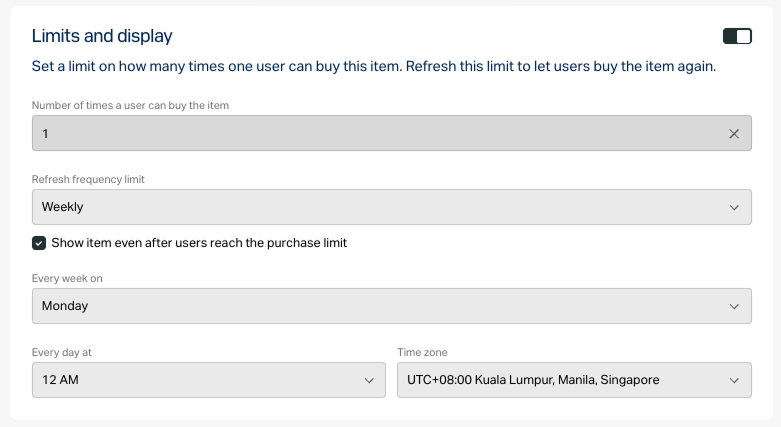
- 如需限制商品的可购买数量:
- 在Limits部分打开开关并指定数量。
- 配置限制重置频率。请从下拉列表中选择一个周期:
- Daily。
- Weekly。
- Monthly。
- Custom interval。间隔从商品在商店中的展示开始日期起计算。
- No regular refresh。
- 根据所选周期设置重置计划,并填写对应参数。
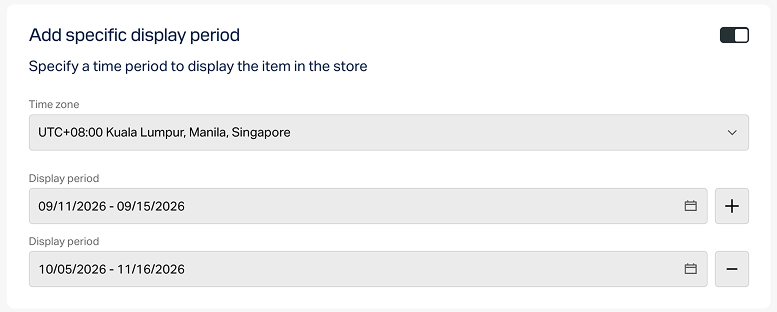
配置商品的显示时间限制(可选):
- 在Add specific display period部分打开开关。
- 指定时区以及该时间段的开始和结束时间。
如不需要指定商品显示期的结束时间,请打开No end date开关。
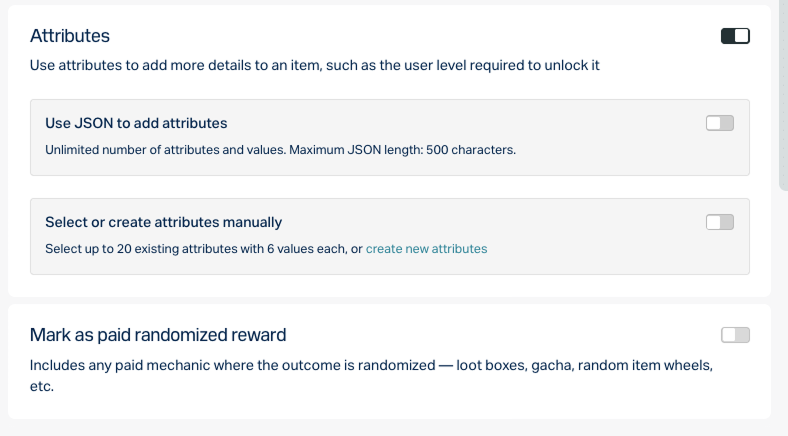
- 按以下任一方式配置属性(可选):
- 点击Create。
- 在打开的窗口中,选择商品状态,然后点击Continue。
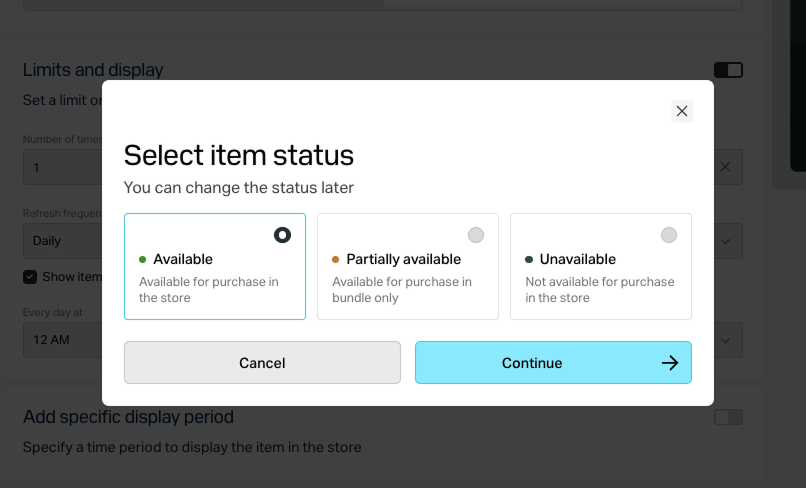
创建的商品会显示在All items部分。
通过API设置
如需将商品设置为免费,请在调用以下管理 API时,在请求正文中传入“is_free”: true:
- 创建虚拟物品或更新虚拟物品
- 创建游戏、按ID更新游戏或按SKU更新游戏
- 创建虚拟货币或更新虚拟货币
- 创建虚拟货币套餐或更新虚拟货币套餐
- 创建捆绑包或更新捆绑包
如果需要限制用户可领取的免费商品数量,请在创建或更新商品的API调用中传入以下参数:
limits,并指定数量limits.recurrent_schedule,并指定重置频率
您还可以配置商品在商店中的显示时间限制并设置区域限制。
在商品目录中显示免费商品
免费商品在商品目录中的显示方式取决于具体实现方式⸺通过建站器实现或通过API实现。
通过建站器显示
要在网站上显示免费商品:
- 在发布商帐户的项目中,前往Storefronts > Websites部分。
- 在目标网站的窗格中,点击Open Site Builder。
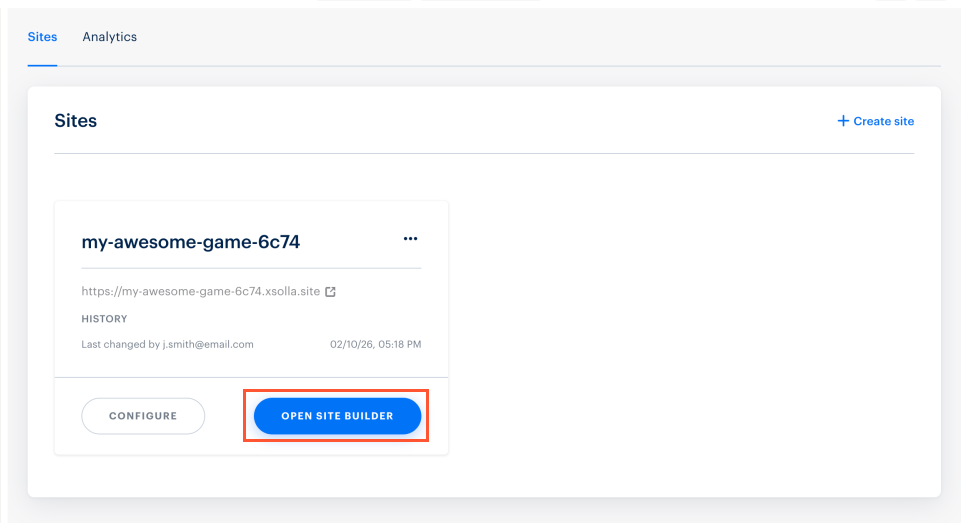
- 在帐户中的项目内,前往Storefronts > Websites部分。
- 在目标网站的窗格中,点击Open Site Builder。
- 在帐户中的项目内,前往Storefronts > Websites部分。
- 在目标网站的窗格中,点击Open Site Builder。
- 在帐户中的项目内,前往Storefronts > Websites部分。
- 在目标网站的窗格中,点击Open Site Builder。
- 在移动游戏专用帐户的项目中,前往Web Shop部分。
- 点击目标网站的窗格。
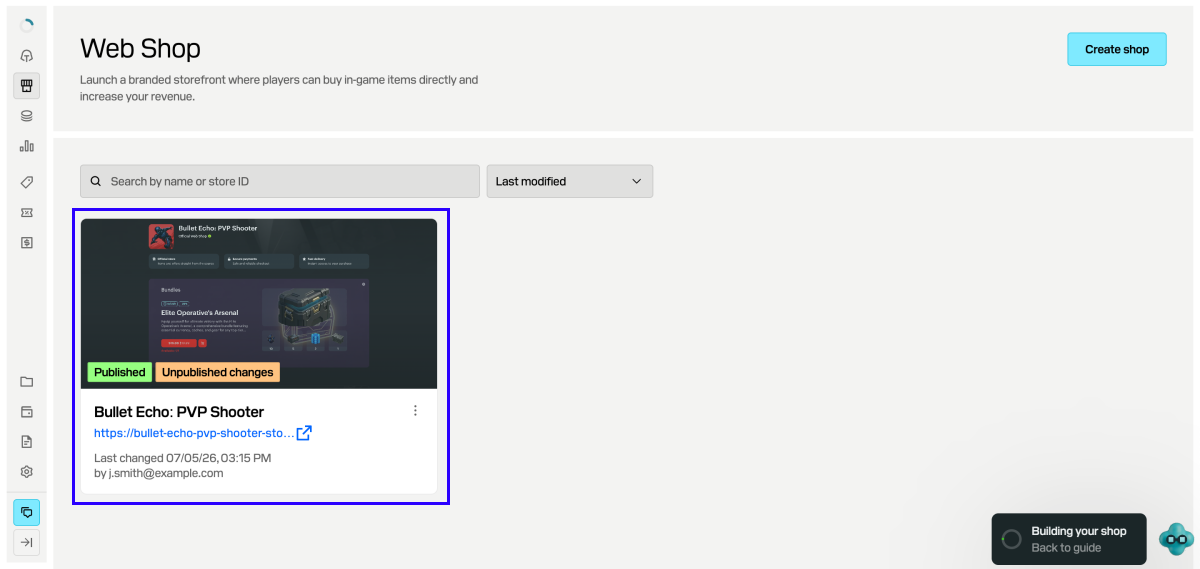
- 如果网站包含多个页面,请选择所需页面:
- 点击建站器顶部的当前页面标题。
- 从下拉列表中选择所需页面。
- 在Store部分的Item type字段中,选择免费商品类型;如适用,请指定其所在组。
- 配置商品卡片布局。
- 完成所有必要更改并准备发布网站后:
- 在建站器的右上角,点击Publish。
- 勾选要发布的页面。
- 点击Publish。
如果无法发布网站,请确认是否满足以下所有条件:
- 网站中没有空白区段(以红色标记提示)。
- 已与艾克索拉签署许可协议。
- 主页已发布,或已选择发布。不能先于主页发布子页面。
网站发布后,包含免费商品的区段即可显示。如果商品未显示,请检查商品状态是否设为Available,且未启用基于时间的显示限制。
通过API获取免费商品信息
如果通过API配置商品目录,系统会通过Catalog子部分中的以下API调用返回免费商品数据:
向用户发放免费商品
包含免费商品的订单处理方式取决于购买时是否使用购物车。
如果用户未使用购物车购买商品,请使用使用指定免费商品创建订单 API调用。
如果用户使用购物车购买商品,则可能出现以下情况:
- 如果用户的购物车同时包含付费商品和免费商品,请使用以下订单创建API调用:使用特定购物车中的所有商品创建订单或使用当前购物车中的所有商品创建订单。在此场景下,用户会通过支付UI完成支付。
- 如果用户的购物车只包含免费商品,请使用使用免费购物车创建订单 或使用指定免费购物车创建订单 API调用。在此场景下,不会使用支付UI。
两种情况下,艾克索拉都会发送订单成功支付 Webhook,其中包含用于向用户发放商品的商品数据。对于免费商品,Webhook中的order.invoice_id参数会设为
null。
免费商品的order对象示例:
- json
 1{
 2  "method": "POST",
 3  "url": "https://mybestgame.com/xsolla/notification",
 4  "body": {
 5    "items": [
 6      {
 7        "sku": "gift_direct_game_reward-supercoin",
 8        "type": "virtual_currency",
 9        "is_pre_order": false,
10        "quantity": 500,
11        "amount": "0",
12        "promotions": [
13
14        ]
15      },
16      {
17        "sku": "package-500_supercoin",
18        "type": "bundle",
19        "is_pre_order": false,
20        "quantity": 1,
21        "amount": "0",
22        "promotions": [
23
24        ]
25      },
26      {
27        "sku": "xsolla-giveaway_offer_11_14_22",
28        "type": "bundle",
29        "is_pre_order": false,
30        "quantity": 1,
31        "amount": "0",
32        "promotions": [
33
34        ]
35      }
36    ],
37    "notification_type": "order_paid",
38    "order": {
39      "id": 12345678,
40      "mode": "default",
41      "currency_type": "unknown",
42      "currency": null,
43      "amount": "0",
44      "status": "paid",
45      "platform": "xsolla",
46      "comment": null,
47      "invoice_id": null,
48      "promotions": [
49
50      ]
51    },
52    "user": {
53      "external_id": "1234567812345678",
54      "email": null
55    }
56  },
57  "headers": {
58    "Authorization": "Signature 3b840ccefea111dcdfd111db1fdc6df969a3ec11",
59    "Accept": "application/json",
60    "Content-Type": "application/json"
61  },
62  "type": "webhook_payment",
63  "callback_parameters": {
64    "order_id": 12345678
65  }
66}
根据项目集成设置,商品将通过以下方式之一发放给用户:
- 如果已集成PlayFab,虚拟货币和虚拟物品会自动发放到用户的PlayFab物品库中。
- 如果使用自定义发货系统,所有虚拟物品和虚拟货币都由己侧发放。建议设置Webhook处理程序,在后端接收订单数据。所需数据包含在订单成功支付 Webhook中。
有关此方式及其他购买数据获取方式的更多信息,请参阅设置订单状态跟踪部分。
发现了错别字或其他内容错误? 请选择文本,然后按Ctrl+Enter。
