` is the user token. The token identifies the user and provides access to personalized data.
Alternatively, you can use a [token for opening the payment UI](/api/pay-station/token/create-token).
2. **Simplified mode without Authorization header.** This mode is used only for unauthorized users and can be applied only for [game key sales](/doc/buy-button/how-to/set-up-authentication/#guides_buy_button_selling_items_not_authenticated_users). Instead of a token, the request must include the following headers:
- `x-unauthorized-id` with a request ID
- `x-user` with the user's email address encoded in Base64
## Useful links {% #authentication-useful-links %}
- [API calls by interaction model](/api/getting-started/#api_interaction_model)
- [Endpoint types](/api/getting-started/#api_endpoint_types)
- [Errors handling](/api/getting-started/#api_errors_handling)
- [API keys](/api/getting-started/#api_keys_overview)
- [Webhooks](/webhooks/overview)
# Core entity structure {% #core-entity-structure %}
Items of all types (virtual items, bundles, virtual currency, and keys) use a similar data structure. Understanding the basic structure simplifies working with the API and helps you navigate the documentation more easily.
Note
Some calls may include additional fields but they don't change the basic structure.
**Identification**
- `merchant_id` — company ID in your [account](/api/catalog/business-accounts)
- `project_id` — project ID in your account
- `sku` — item SKU, unique within the project
**Store display**
- `name` — item name
- `description` — item description
- `image_url` — image URL
- `is_enabled` — item availability
- `is_show_in_store` — whether the item is displayed in the catalog
For more information about managing item availability in the catalog, see the [documentation](/items-catalog/catalog-features/items-availability/).
**Organization**
- `type` — item type, for example, a virtual item (`virtual_item`) or bundle (`bundle`)
- `groups` — groups the item belongs to
- `order` — display order in the catalog
**Sale conditions**
- `prices` — prices in real or virtual currency
- `limits` — purchase limits
- `periods` — availability periods
- `regions` — regional restrictions
**Example of core entity structure:**
```json
{
"attributes": [],
"bundle_type": "virtual_currency_package",
"content": [
{
"description": {
"en": "Main in-game currency"
},
"image_url": "https://.../image.png",
"name": {
"en": "Crystals",
"de": "Kristalle"
},
"quantity": 500,
"sku": "com.xsolla.crystal_2",
"type": "virtual_currency"
}
],
"description": {
"en": "Crystals x500"
},
"groups": [],
"image_url": "https://.../image.png",
"is_enabled": true,
"is_free": false,
"is_show_in_store": true,
"limits": {
"per_item": null,
"per_user": null,
"recurrent_schedule": null
},
"long_description": null,
"media_list": [],
"name": {
"en": "Medium crystal pack"
},
"order": 1,
"periods": [
{
"date_from": null,
"date_until": "2020-08-11T20:00:00+03:00"
}
],
"prices": [
{
"amount": 20,
"country_iso": "US",
"currency": "USD",
"is_default": true,
"is_enabled": true
}
],
"regions": [],
"sku": "com.xsolla.crystal_pack_2",
"type": "bundle",
"vc_prices": []
}
```
# Basic purchase flow {% #basic-purchase-flow %}
The Xsolla API allows you to implement in-game store logic, including retrieving the item catalog, managing the cart, creating orders, and tracking their status. Depending on the integration scenario, API calls are divided into **Admin** and **Catalog** subsections, which use different [authentication schemes](/api/catalog/authentication).
The following example shows a basic flow for setting up and operating a store, from item creation to purchase.
## Create items and groups (Admin) {% #create-items-and-groups-admin %}
Create an item catalog for your store, such as virtual items, bundles, or virtual currency.
Example API calls:
- [Create virtual item](/api/catalog/virtual-items-currency-admin/admin-create-virtual-item)
- [Create bundle](/api/catalog/bundles-admin/admin-create-bundle)
- [Create virtual currency](/api/catalog/virtual-items-currency-admin/admin-create-virtual-currency)
## Set up promotions, chains, and limits (Admin) {% #set-up-promotions-chains-and-limits-admin %}
Configure user acquisition and monetization tools, such as discounts, bonuses, daily rewards, or offer chains.
Example API calls:
- [Create bonus promotion](/api/liveops/promotions-bonuses/create-bonus-promotion)
- [Create daily reward](/api/liveops/daily-chain-admin/admin-create-daily-chain)
- [Create unique catalog offer promotion](/api/liveops/promotions-unique-catalog-offers/admin-create-unique-catalog-offer)
## Get item information (Client) {% #get-item-information-client %}
Configure item display in your application.
Notice
Do not use API calls from the Admin subsection to build a user catalog. These API calls have
rate limits and aren't intended for user traffic.
Example API calls:
- [Get virtual items list](/api/catalog/virtual-items-currency-catalog/get-virtual-items)
- [Get item group list](/api/catalog/virtual-items-currency-catalog/get-item-groups)
- [Get list of bundles](/api/catalog/bundles-catalog/get-bundle-list)
- [Get sellable items list](/api/catalog/common-catalog/get-sellable-items)
Note
By default, catalog API calls return items that are currently available in the store at the time of the request. To retrieve items that are not yet available or are no longer available, include the parameter "show_inactive_time_limited_items": 1 in the catalog request.
## Sell items {% #sell-items %}
You can sell items using the following methods:
- Fast purchase — sell one SKU multiple times.
- Cart purchase — the user adds items to the cart, removes items, and updates quantities within a single order.
If an item is purchased using virtual currency instead of real money, use the [Create order with specified item purchased by virtual currency](/api/catalog/virtual-payment/create-order-with-item-for-virtual-currency) API call. The payment UI is not required, as the charge is processed when the API call is executed.
For free item purchase, use the [Create order with specified free item](/api/catalog/free-item/create-free-order-with-item) API call or the [Create order with free cart](/api/catalog/free-item/create-free-order) API call. The payment UI is not required — the order is immediately set to the done status.
### Fast purchase {% #fast-purchase %}
Use the client-side API call to [create an order with a specified item](/api/catalog/payment-client-side/create-order-with-item). The call returns a token used to open the payment UI.
Note
Discount information is available to the user only in the payment UI. Promo codes are not supported.
### Cart purchase {% #cart-purchase %}
Cart setup and purchase can be performed on the client or on the server side.
**Set up and purchase a cart on the client**
Implement the logic of adding and removing items by yourself. Before calling the API for setting up a cart, you will not have information about which promotions will be applied to the purchase. This means that the total cost and details of the added bonus items will not be known.
Implement the following cart logic:
1. After the player has filled a cart, use the [Fill cart with items](/api/shop-builder/operation/cart-fill/) API call. The call returns the current information about the selected items (prices before and after discounts, bonus items).
2. Update the cart contents based on user actions:
- To add an item or change item quantity, use the [Update cart item by cart ID](/api/shop-builder/operation/put-item-by-cart-id/) API call.
- To remove an item, use the [Delete cart item by cart ID](/api/shop-builder/operation/delete-item-by-cart-id/) API call.
Note
To get the current status of the cart, use the Get current user's cart API call.
3. Use the [Create order with all items from current cart](/api/shop-builder/operation/create-order/) API call. The call returns the order ID and payment token. The newly created order is set to new status by default.
**Set up and purchase a cart on the server**
This setup option may take longer for setting the cart up, since each change to the cart must be accompanied by API calls.
Implement the following cart logic:
1. After the player has filled a cart, use the [Fill cart with items](/api/catalog/cart-server-side) API call. The call returns current information about the selected items (prices before and after discounts, bonus items).
2. Use the [Create order with all items from current cart](/api/shop-builder/operation/create-order/) API call. The call returns the order ID and payment token. The newly created order is set to new status by default.
## Open payment UI {% #open-payment-ui %}
Use the returned token to open the payment UI in a new window. Other ways to open the payment UI are described in the [documentation](/payment-ui-and-flow/payment-ui/how-to-open-payment-ui/#open_payment_ui).
| Action | Endpoint |
|:--------------------------------|:--------------------------------------------------------------------------|
| Open in production environment. | https://secure.xsolla.com/paystation4/?token={token} |
| Open in sandbox mode. | https://sandbox-secure.xsolla.com/paystation4/?token={token} |
Note
Use sandbox mode during development and testing. Test purchases don't charge real accounts. You can use
test bank cards.
After the first real payment is made, a strict sandbox payment policy takes effect. A payment in sandbox mode is available only to users specified in your [account](/api/catalog/business-accounts) in the **Settings > Members** section.
Buying virtual currency and items for real currency is possible only after signing a license agreement with Xsolla. To do this, in your [account](/api/catalog/business-accounts), go to the **Documents > Agreements** section, complete the agreement form, and wait for confirmation. It may take up to 3 business days to review the agreement.
To enable or disable sandbox mode, change the value of the `sandbox` parameter in the request for fast purchase and cart purchase. Sandbox mode is off by default.
Possible order statuses:
- `new` — order created
- `paid` — payment received
- `done` — item delivered
- `canceled` — order canceled
- `expired` — order expired
Track order status using one of the following methods:
- [webhooks configured on your server](/virtual-goods/own-ui/server-side-token-generation/set-up-order-tracking/#payments_integration_order_tracking)
- [short-polling](/virtual-goods/own-ui/client-side-token-generation/set-up-order-tracking/#guides_shop_builder_integrate_store_get_order_status_via_short_polling)
- [WebSocket API](/virtual-goods/own-ui/client-side-token-generation/set-up-order-tracking/#guides_shop_builder_integrate_store_get_order_status_via_websocket_api)
## Useful links {% #basic-purchase-flow-useful-links %}
- Authentication
- [API calls by interaction model](/api/catalog/authentication)
- [Payment testing](/dev-resources/testing/general-info/#general_overview)
- [Set up order status tracking](/virtual-goods/own-ui/client-side-token-generation/set-up-order-tracking/?link=200-api#payments_integration_order_tracking)
- [Webhooks](/webhooks/overview)
- [Rate limits](/api/login/rate-limits)
- [Errors handling](/api/getting-started/#api_errors_handling)
- [API keys](/api/getting-started/#api_keys_overview)
# Pagination {% #pagination %}
API calls that return large sets of records (for example, when building a catalog) return data in pages. Pagination is a mechanism that limits the number of items returned in a single API response and allows you to retrieve subsequent pages sequentially.
Use the following parameters to control the number of returned items:
- `limit` — number of items per page
- `offset` — index of the first item on the page (numbering starts from 0)
- `has_more` — indicates whether another page is available
- `total_items_count` — total number of items
Example request:
```
GET /items?limit=20&offset=40
```
Response example:
```json
{
"items": [...],
"has_more": true,
"total_items_count": 135
}
```
It is recommended to send subsequent requests until the response returns `has_more = false`.
# Date and time format {% #date-and-time-format %}
Dates and time values are passed in the [ISO 8601](https://en.wikipedia.org/wiki/ISO_8601) format.
The following are supported:
- UTC offset
- `null` value when there is no time restriction for displaying an item
- [Unix timestamp](https://www.unixtimestamp.com/) (in seconds) used in some fields
Format: `YYYY-MM-DDTHH:MM:SS±HH:MM`
Example: `2026-03-16T10:00:00+03:00`
# Localization {% #localization %}
Xsolla supports localization of user-facing fields such as item name and description. Localized values are passed as an object where the language code is used as the key. The full list of supported languages is available in the [documentation](/doc/shop-builder/references/supported-languages/).
**Supported fields**
Localization can be specified for the following parameters:
- `name`
- `description`
- `long_description`
**Locale format**
The locale key can be specified in one of the following formats:
- Two-letter language code: `en`, `ru`
- Five-letter language code: `en-US`, `ru-RU`, `de-DE`
**Examples**
Example with a two-letter language code:
```json
{
"name": {
"en": "Starter Pack",
"ru": "Стартовый набор"
}
}
```
Example with a five-letter language code:
```json
{
"description": {
"en-US": "Premium bundle",
"de-DE": "Premium-Paket"
}
}
```
# Country and currency determination {% #country-and-currency-determination %}
The user's country determines catalog prices, the payment currency, and available payment methods
in the payment UI. Depending on the API call, the country is determined as follows:
- In client-side API calls,
the country is determined by the IP address of the request.
- In server-side API calls,
the country is determined by the value of the
user.country.value parameter or by the user's IP address
from the X-User-Ip header. If both are passed, the user.country.value parameter takes precedence.
Note
Only
IPv4 addresses are supported for country determination.
Passing an
IPv6 address may result in incorrect country
and currency detection. If you use the server-side API call and cannot provide the user's IPv4 address,
pass the country in the
user.country.value parameter.
# Error response format {% #error-response-format %}
If an error occurs, the API returns an HTTP status and a JSON response body. The full list of store-related errors is available in the [documentation](/dev-resources/references/errors/store-errors/).
**Response example:**
```json
{
"errorCode": 1102,
"errorMessage": "Validation error",
"statusCode": 422,
"transactionId": "c9e1a..."
}
```
- `errorCode` — error code.
- `errorMessage` — short error description.
- `statusCode` — HTTP response status.
- `transactionId` — request ID. Returned only in some cases.
- `errorMessageExtended` — additional error details, such as request parameters. Returned only in some cases.
**Extended response example:**
```json
{
"errorCode": 7001,
"errorMessage": "Chain not found",
"errorMessageExtended": {
"chain_id": "test_chain_id",
"project_id": "test_project_id",
"step_number": 2
},
"statusCode": 404
}
```
**Common HTTP status codes**
- `400` — invalid request
- `401` — authentication error
- `403` — insufficient permissions
- `404` — resource not found
- `422` — validation error
- `429` — rate limit exceeded
**Recommendations**
- Handle the HTTP status and the response body together.
- Use `errorCode` to process errors related to application logic.
- Use `transactionId` to identify requests more quickly when analyzing errors.
Version: 2.0.0
## Servers
```
https://store.xsolla.com/api
```
## Security
### basicAuth
Server-side calls use the `basicAuth` authentication scheme. All requests to API must
contain the `Authorization: Basic `
header, where `your_authorization_basic_key` is the `project_id:api_key`
pair encoded according to the Base64 standard.
You can use `merchant_id` instead of `project_id` if you need. It doesn't affect functionality.
Go to your [account](/api/catalog/business-accounts) to find these parameters:
- `merchant_id` is shown:
- In the **Company settings > General info** section.
- In the URL of any account page. The URL has the following format: `https://xsolla.com/for//account//`.
- `api_key` is shown in your account only once when it is created and must be stored on your side. You can create a new key in the following sections:
- **Settings > API keys** (in this section, you can create an API key only for a particular project).
- **Company settings > API keys** (in this section, you can create an API key that will be applied to all projects in a particular company).
{% html name="div" attrs={"class": "notice"} %}
**Notice**
If a required API call doesn't include the `project_id` path parameter, use an API key that is valid across all company projects for authorization.
{% /html %}
- `project_id` is shown:
- Next to the project name when you click it in the account header.
- In the URL of any account page. The URL has the following format: `https://xsolla.com/for//account//projects//`.
For more information about working with API keys, see the [API reference](https://developers.xsolla.com/api/getting-started/#api_keys_overview).
Type: http
Scheme: basic
### XsollaLoginUserJWT
Client-side calls use the `XsollaLoginUserJWT` authentication scheme. The request must include the user's JWT in the `Authorization` header in the following format: Bearer ``. The token identifies the user and provides access to personalized data. For details on how to create a token, refer to the [Xsolla Login API documentation](/api/login/authentication-schemes#getting-user-token).
Alternatively, you can use a [token for opening the payment UI](/api/pay-station/token/create-token).
Type: http
Scheme: bearer
Bearer Format: JWT
### AuthForCart
The `AuthForCart` authentication scheme is used for cart purchases and supports two modes:
1. Authentication with a user's JWT. The token is passed in the Authorization header in the following format: `Authorization: Bearer `, where `` is the user token. The token identifies the user and provides access to personalized data.
Alternatively, you can use a [token for opening the payment UI](/api/pay-station/token/create-token).
2. Simplified mode without `Authorization` header. This mode is used only for unauthorized users and can be applied only for [selling game keys](/doc/buy-button/how-to/set-up-authentication/#guides_buy_button_selling_items_not_authenticated_users). Instead of a token, the request must include the following headers:
* `x-unauthorized-id` with a request ID
* `x-user` with the user’s email address encoded in Base64.
Type: http
Scheme: bearer
### basicMerchantAuth
Server-side calls use the `basicMerchantAuth` authentication scheme. All requests to API must
contain the `Authorization: Basic `
header, where `your_authorization_basic_key` is the `merchant_id:api_key`
pair encoded according to the Base64 standard.
Go to your [account](/api/catalog/business-accounts) to find these parameters:
- `merchant_id` is shown:
- In the **Company settings > General info** section.
- In the URL of any account page. The URL has the following format: `https://xsolla.com/for//account//`.
- `api_key` is shown in your account only once when it is created and must be stored on your side. You can create a new key in the **Company settings > API keys** section.
For more information about working with API keys, see the [API reference](https://developers.xsolla.com/api/getting-started/#api_keys_overview).
Type: http
Scheme: basic
## Download OpenAPI description
[Catalog API](https://xsolla.redocly.app/_bundle/api/catalog/index.yaml)
## Admin
### Get list of virtual items
- [GET /v2/project/{project_id}/admin/items/virtual_items](https://xsolla.redocly.app/api/catalog/virtual-items-currency-admin/admin-get-virtual-items-list.md): Gets the list of virtual items within a project for administration.
NoteDo not use this endpoint for building a store catalog.
### Create virtual item
- [POST /v2/project/{project_id}/admin/items/virtual_items](https://xsolla.redocly.app/api/catalog/virtual-items-currency-admin/admin-create-virtual-item.md): Creates a virtual item.
### Get list of virtual items by specified group external id
- [GET /v2/project/{project_id}/admin/items/virtual_items/group/external_id/{external_id}](https://xsolla.redocly.app/api/catalog/virtual-items-currency-admin/admin-get-virtual-items-list-by-group-external-id.md): Gets the list of virtual items within a group for administration.
NoteDo not use this endpoint for building a store catalog.
### Get list of virtual items by specified group id
- [GET /v2/project/{project_id}/admin/items/virtual_items/group/id/{group_id}](https://xsolla.redocly.app/api/catalog/virtual-items-currency-admin/admin-get-virtual-items-list-by-group-id.md): Gets the list of virtual items within a group for administration.
NoteDo not use this endpoint for building a store catalog.
### Get virtual item
- [GET /v2/project/{project_id}/admin/items/virtual_items/sku/{item_sku}](https://xsolla.redocly.app/api/catalog/virtual-items-currency-admin/admin-get-virtual-item.md): Gets the virtual item within a project for administration.
NoteDo not use this endpoint for building a store catalog.
### Update virtual item
- [PUT /v2/project/{project_id}/admin/items/virtual_items/sku/{item_sku}](https://xsolla.redocly.app/api/catalog/virtual-items-currency-admin/admin-update-virtual-item.md): Updates a virtual item.
### Delete virtual item
- [DELETE /v2/project/{project_id}/admin/items/virtual_items/sku/{item_sku}](https://xsolla.redocly.app/api/catalog/virtual-items-currency-admin/admin-delete-virtual-item.md): Deletes a virtual item.
### Get list of virtual currencies
- [GET /v2/project/{project_id}/admin/items/virtual_currency](https://xsolla.redocly.app/api/catalog/virtual-items-currency-admin/admin-get-virtual-currencies-list.md): Gets the list of virtual currencies within a project for administration.
NoteDo not use this endpoint for building a store catalog.
### Create virtual currency
- [POST /v2/project/{project_id}/admin/items/virtual_currency](https://xsolla.redocly.app/api/catalog/virtual-items-currency-admin/admin-create-virtual-currency.md): Creates a virtual currency.
### Get virtual currency
- [GET /v2/project/{project_id}/admin/items/virtual_currency/sku/{virtual_currency_sku}](https://xsolla.redocly.app/api/catalog/virtual-items-currency-admin/admin-get-virtual-currency.md): Gets the virtual currency within a project for administration.
NoteDo not use this endpoint for building a store catalog.
### Update virtual currency
- [PUT /v2/project/{project_id}/admin/items/virtual_currency/sku/{virtual_currency_sku}](https://xsolla.redocly.app/api/catalog/virtual-items-currency-admin/admin-update-virtual-currency.md): Updates a virtual currency.
### Delete virtual currency
- [DELETE /v2/project/{project_id}/admin/items/virtual_currency/sku/{virtual_currency_sku}](https://xsolla.redocly.app/api/catalog/virtual-items-currency-admin/admin-delete-virtual-currency.md): Deletes a virtual currency.
### Get list of virtual currency packages (admin)
- [GET /v2/project/{project_id}/admin/items/virtual_currency/package](https://xsolla.redocly.app/api/catalog/virtual-items-currency-admin/admin-get-virtual-currency-packages-list.md): Gets the list of virtual currency packages within a project for administration.
NoteDo not use this endpoint for building a store catalog.
### Create virtual currency package
- [POST /v2/project/{project_id}/admin/items/virtual_currency/package](https://xsolla.redocly.app/api/catalog/virtual-items-currency-admin/admin-create-virtual-currency-package.md): Creates a virtual currency package.
### Update virtual currency package
- [PUT /v2/project/{project_id}/admin/items/virtual_currency/package/sku/{item_sku}](https://xsolla.redocly.app/api/catalog/virtual-items-currency-admin/admin-update-virtual-currency-package.md): Updates a virtual currency package.
### Delete virtual currency package
- [DELETE /v2/project/{project_id}/admin/items/virtual_currency/package/sku/{item_sku}](https://xsolla.redocly.app/api/catalog/virtual-items-currency-admin/admin-delete-virtual-currency-package.md): Deletes a virtual currency package.
### Get virtual currency package
- [GET /v2/project/{project_id}/admin/items/virtual_currency/package/sku/{item_sku}](https://xsolla.redocly.app/api/catalog/virtual-items-currency-admin/admin-get-virtual-currency-package.md): Gets the virtual currency package within a project for administration.
NoteDo not use this endpoint for building a store catalog.
## Catalog
### Get virtual items list
- [GET /v2/project/{project_id}/items/virtual_items](https://xsolla.redocly.app/api/catalog/virtual-items-currency-catalog/get-virtual-items.md): Gets a virtual items list for building a catalog.
Notice
All projects have the limitation to the number of items that you can
get in the response. The default and maximum value is 50 items
per response. To get more data page by page, use limit
and offset fields.
Note
This API call returns generic item catalog data when used without
authorization. Use authorization to retrieve
personalized
user data, such as limits and promotions associated with the item.
To do this, pass the user JWT in the Authorization header.
For more information about user JWT, see the Security block
for this call.
See also: The Get all virtual items list API call for client-side search or indexing.
### Get virtual item by SKU
- [GET /v2/project/{project_id}/items/virtual_items/sku/{item_sku}](https://xsolla.redocly.app/api/catalog/virtual-items-currency-catalog/get-virtual-items-sku.md): Gets a virtual item by SKU for building a catalog.
Notice
This API call returns generic item
catalog data when used without authorization. Use authorization to retrieve
personalized
user data, such as limits and promotions associated with the item.
To do this, pass the user JWT in the Authorization header.
For more information about user JWT, see the Security block
for this call.
### Get all virtual items list
- [GET /v2/project/{project_id}/items/virtual_items/all](https://xsolla.redocly.app/api/catalog/virtual-items-currency-catalog/get-all-virtual-items.md): Gets a list of all virtual items for searching on client-side.
Notice
Returns only item SKU, name, groups and description.
Note
This API call returns generic item catalog data when used without
authorization. Use authorization to retrieve
personalized
user data, such as limits and promotions associated with the item.
To do this, pass the user JWT in the Authorization header.
For more information about user JWT, see the Security block
for this call.
See also: The Get virtual items list API call for retrieving detailed item data with pagination.
### Get virtual currency list
- [GET /v2/project/{project_id}/items/virtual_currency](https://xsolla.redocly.app/api/catalog/virtual-items-currency-catalog/get-virtual-currency.md): Gets a virtual currency list for building a catalog.
Attention
All projects have the limitation to the number of items that you can
get in the response. The default and maximum value is 50 items
per response. To get more data page by page, use limit
and offset fields.
Note
This API call returns generic item catalog data when used without
authorization. Use authorization to retrieve
personalized
user data, such as limits and promotions associated with the item.
To do this, pass the user JWT in the Authorization header.
For more information about user JWT, see the Security block
for this call.
### Get virtual currency by SKU
- [GET /v2/project/{project_id}/items/virtual_currency/sku/{virtual_currency_sku}](https://xsolla.redocly.app/api/catalog/virtual-items-currency-catalog/get-virtual-currency-sku.md): Gets a virtual currency by SKU for building a catalog.
Note
This API call returns generic item catalog data when used without
authorization. Use authorization to retrieve
personalized
user data, such as limits and promotions associated with the item.
To do this, pass the user JWT in the Authorization header.
For more information about user JWT, see the Security block
for this call.
### Get virtual currency package list
- [GET /v2/project/{project_id}/items/virtual_currency/package](https://xsolla.redocly.app/api/catalog/virtual-items-currency-catalog/get-virtual-currency-package.md): Gets a virtual currency packages list for building a catalog.
Attention
All projects have the limitation to the number of items that you can
get in the response. The default and maximum value is 50 items
per response. To get more data page by page, use limit
and offset fields.
Note
This API call returns generic item catalog data when used without
authorization. Use authorization to retrieve
personalized
user data, such as limits and promotions associated with the item.
To do this, pass the user JWT in the Authorization header.
For more information about user JWT, see the Security block
for this call.
### Get virtual currency package by SKU
- [GET /v2/project/{project_id}/items/virtual_currency/package/sku/{virtual_currency_package_sku}](https://xsolla.redocly.app/api/catalog/virtual-items-currency-catalog/get-virtual-currency-package-sku.md): Gets a virtual currency packages by SKU for building a catalog.
Note
This API call returns generic item catalog data when used without
authorization. Use authorization to retrieve
personalized
user data, such as limits and promotions associated with the item.
To do this, pass the user JWT in the Authorization header.
For more information about user JWT, see the Security block
for this call.
### Get items list by specified group
- [GET /v2/project/{project_id}/items/virtual_items/group/{external_id}](https://xsolla.redocly.app/api/catalog/virtual-items-currency-catalog/get-virtual-items-group.md): Gets an items list from the specified group for building a catalog.
Attention
All projects have the limitation to the number of items that you can
get in the response. The default and maximum value is 50 items
per response. To get more data page by page, use limit
and offset fields.
Note
This API call returns generic item catalog data when used without
authorization. Use authorization to retrieve
personalized
user data, such as limits and promotions associated with the item.
To do this, pass the user JWT in the Authorization header.
For more information about user JWT, see the Security block
for this call.
### Get virtual currency list by specified group
- [GET /v2/project/{project_id}/items/virtual_currency/group/{external_id}](https://xsolla.redocly.app/api/catalog/virtual-items-currency-catalog/get-virtual-currency-group.md): Retrieves a list of virtual currencies from the specified group for building a catalog.
Attention
All projects have the limitation to the number of items that you can
get in the response. The default and maximum value is 50 items
per response. To get more data page by page, use limit
and offset fields.
Note
This API call returns generic item catalog data when used without
authorization. Use authorization to retrieve
personalized
user data, such as limits and promotions associated with the item.
To do this, pass the user JWT in the Authorization header.
For more information about user JWT, see the Security block
for this call.
### Get virtual currency package list by specified group
- [GET /v2/project/{project_id}/items/virtual_currency/package/group/{external_id}](https://xsolla.redocly.app/api/catalog/virtual-items-currency-catalog/get-virtual-currency-package-group.md): Retrieves a list of virtual currency packages from the specified group for building a catalog.
Attention
All projects have the limitation to the number of items that you can
get in the response. The default and maximum value is 50 items
per response. To get more data page by page, use limit
and offset fields.
Note
This API call returns generic item catalog data when used without
authorization. Use authorization to retrieve
personalized
user data, such as limits and promotions associated with the item.
To do this, pass the user JWT in the Authorization header.
For more information about user JWT, see the Security block
for this call.
## Virtual payment
### Create order with specified item purchased by virtual currency
- [POST /v2/project/{project_id}/payment/item/{item_sku}/virtual/{virtual_currency_sku}](https://xsolla.redocly.app/api/catalog/virtual-payment/create-order-with-item-for-virtual-currency.md): Creates item purchase using virtual currency.
Note
This API call returns generic item catalog data when used without
authorization. Use authorization to retrieve
personalized
user data, such as limits and promotions associated with the item.
To do this, pass the user JWT in the Authorization header.
For more information about user JWT, see the Security block
for this call.
## Catalog
### Get games list
- [GET /v2/project/{project_id}/items/game](https://xsolla.redocly.app/api/catalog/game-keys-catalog/get-games-list.md): Gets a games list for building a catalog.
Attention
All projects have the limitation to the number of items that you can
get in the response. The default and maximum value is 50 items
per response. To get more data page by page, use limit
and offset fields.
Note
This API call returns generic item catalog data when used without
authorization. Use authorization to retrieve
personalized
user data, such as limits and promotions associated with the item.
To do this, pass the user JWT in the Authorization header.
For more information about user JWT, see the Security block
for this call.
### Get games list by specified group
- [GET /v2/project/{project_id}/items/game/group/{external_id}](https://xsolla.redocly.app/api/catalog/game-keys-catalog/get-games-group.md): Gets a games list from the specified group for building a catalog.
Attention
All projects have the limitation to the number of items that you can
get in the response. The default and maximum value is 50 items
per response. To get more data page by page, use limit
and offset fields.
Note
This API call returns generic item catalog data when used without
authorization. Use authorization to retrieve
personalized
user data, such as limits and promotions associated with the item.
To do this, pass the user JWT in the Authorization header.
For more information about user JWT, see the Security block
for this call.
### Get game for catalog
- [GET /v2/project/{project_id}/items/game/sku/{item_sku}](https://xsolla.redocly.app/api/catalog/game-keys-catalog/get-game-by-sku.md): Gets a game for the catalog.
Note
This API call returns generic item catalog data when used without
authorization. Use authorization to retrieve
personalized
user data, such as limits and promotions associated with the item.
To do this, pass the user JWT in the Authorization header.
For more information about user JWT, see the Security block
for this call.
### Get game key for catalog
- [GET /v2/project/{project_id}/items/game/key/sku/{item_sku}](https://xsolla.redocly.app/api/catalog/game-keys-catalog/get-game-key-by-sku.md): Gets a game key for the catalog.
Note
This API call returns generic item catalog data when used without
authorization. Use authorization to retrieve
personalized
user data, such as limits and promotions associated with the item.
To do this, pass the user JWT in the Authorization header.
For more information about user JWT, see the Security block
for this call.
### Get game keys list by specified group
- [GET /v2/project/{project_id}/items/game/key/group/{external_id}](https://xsolla.redocly.app/api/catalog/game-keys-catalog/get-game-keys-group.md): Gets a game key list from the specified group for building a catalog.
Attention
All projects have the limitation to the number of items that you can
get in the response. The default and maximum value is 50 items
per response. To get more data page by page, use limit
and offset fields.
Note
This API call returns generic item catalog data when used without
authorization. Use authorization to retrieve
personalized
user data, such as limits and promotions associated with the item.
To do this, pass the user JWT in the Authorization header.
For more information about user JWT, see the Security block
for this call.
### Get DRM list
- [GET /v2/project/{project_id}/items/game/drm](https://xsolla.redocly.app/api/catalog/game-keys-catalog/get-drm-list.md): Gets the list of available DRMs.
## Entitlement
### Get list of games owned by user
- [GET /v2/project/{project_id}/entitlement](https://xsolla.redocly.app/api/catalog/game-keys-entitlement/get-user-games.md): Get the list of games owned by the user. The response will contain an array of games owned by a particular user.
Attention
All projects have the limitation to the number of items that you can
get in the response. The default and maximum value is 50 items
per response. To get more data page by page, use limit
and offset fields.
Note
This API call returns generic item catalog data when used without
authorization. Use authorization to retrieve
personalized
user data, such as limits and promotions associated with the item.
To do this, pass the user JWT in the Authorization header.
For more information about user JWT, see the Security block
for this call.
### Redeem game code by client
- [POST /v2/project/{project_id}/entitlement/redeem](https://xsolla.redocly.app/api/catalog/game-keys-entitlement/redeem-game-pin-code.md): Grants entitlement by a provided game code.
Notice
You can redeem codes only for the DRM-free platform.
Note
This API call returns generic item catalog data when used without
authorization. Use authorization to retrieve
personalized
user data, such as limits and promotions associated with the item.
To do this, pass the user JWT in the Authorization header.
For more information about user JWT, see the Security block
for this call.
### Grant entitlement (admin)
- [POST /v2/project/{project_id}/admin/entitlement/grant](https://xsolla.redocly.app/api/catalog/game-keys-entitlement/grant-entitlement-admin.md): Grants entitlement to user.
AttentionGame codes or games for DRM free platform can be granted only.
### Revoke entitlement (admin)
- [POST /v2/project/{project_id}/admin/entitlement/revoke](https://xsolla.redocly.app/api/catalog/game-keys-entitlement/revoke-entitlement-admin.md): Revokes entitlement of user.
AttentionGame codes or games for DRM free platform can be revoked only.
## Admin
### Create game
- [POST /v2/project/{project_id}/admin/items/game](https://xsolla.redocly.app/api/catalog/game-keys-admin/admin-create-game.md): Creates a game in the project.
### Get list of games (admin)
- [GET /v2/project/{project_id}/admin/items/game](https://xsolla.redocly.app/api/catalog/game-keys-admin/admin-get-game-list.md): Gets the list of games within a project for administration.
Game consists of game keys which could be purchased by a user.
NoteDo not use this endpoint for building a store catalog.
### Get game (admin)
- [GET /v2/project/{project_id}/admin/items/game/sku/{item_sku}](https://xsolla.redocly.app/api/catalog/game-keys-admin/admin-get-game-by-sku.md): Gets a game for administration.
Game consists of game keys which could be purchased by a user.
NoteDo not use this endpoint for building a store catalog.
### Update game by SKU
- [PUT /v2/project/{project_id}/admin/items/game/sku/{item_sku}](https://xsolla.redocly.app/api/catalog/game-keys-admin/admin-update-game-by-sku.md): Updates a game in the project by SKU.
### Delete game by SKU
- [DELETE /v2/project/{project_id}/admin/items/game/sku/{item_sku}](https://xsolla.redocly.app/api/catalog/game-keys-admin/admin-delete-game-by-sku.md): Deletes a game in the project by SKU.
### Get game by ID (admin)
- [GET /v2/project/{project_id}/admin/items/game/id/{item_id}](https://xsolla.redocly.app/api/catalog/game-keys-admin/admin-get-game-by-id.md): Gets a game for administration.
Game consists of game keys which could be purchased by a user.
NoteDo not use this endpoint for building a store catalog.
### Update game by ID
- [PUT /v2/project/{project_id}/admin/items/game/id/{item_id}](https://xsolla.redocly.app/api/catalog/game-keys-admin/admin-update-game-by-id.md): Updates a game in the project by ID.
### Delete game by ID
- [DELETE /v2/project/{project_id}/admin/items/game/id/{item_id}](https://xsolla.redocly.app/api/catalog/game-keys-admin/admin-delete-game-by-id.md): Deletes a game in the project by ID.
### Upload codes
- [POST /v2/project/{project_id}/admin/items/game/key/upload/sku/{item_sku}](https://xsolla.redocly.app/api/catalog/game-keys-admin/admin-upload-codes-by-sku.md): Uploads codes by game key SKU.
### Upload codes by ID
- [POST /v2/project/{project_id}/admin/items/game/key/upload/id/{item_id}](https://xsolla.redocly.app/api/catalog/game-keys-admin/admin-upload-codes-by-id.md): Uploads codes by game key ID.
### Get codes loading session information
- [GET /v2/project/{project_id}/admin/items/game/key/upload/session/{session_id}](https://xsolla.redocly.app/api/catalog/game-keys-admin/admin-get-codes-session.md): Gets codes loading session information.
### Get codes
- [GET /v2/project/{project_id}/admin/items/game/key/request/sku/{item_sku}](https://xsolla.redocly.app/api/catalog/game-keys-admin/admin-get-codes-by-sku.md): Gets a certain number of codes by game key SKU.
### Get codes by ID
- [GET /v2/project/{project_id}/admin/items/game/key/request/id/{item_id}](https://xsolla.redocly.app/api/catalog/game-keys-admin/admin-get-codes-by-id.md): Gets a certain number of codes by game key ID.
### Delete codes
- [DELETE /v2/project/{project_id}/admin/items/game/key/delete/sku/{item_sku}](https://xsolla.redocly.app/api/catalog/game-keys-admin/admin-delete-codes-by-sku.md): Deletes all codes by game key SKU.
### Delete codes by ID
- [DELETE /v2/project/{project_id}/admin/items/game/key/delete/id/{item_id}](https://xsolla.redocly.app/api/catalog/game-keys-admin/admin-delete-codes-by-id.md): Deletes all codes by game key ID.
## Admin
### Get list of bundles
- [GET /v2/project/{project_id}/admin/items/bundle](https://xsolla.redocly.app/api/catalog/bundles-admin/admin-get-bundle-list.md): Gets the list of bundles within a project for administration.
NoteDo not use this endpoint for building a store catalog.
### Create bundle
- [POST /v2/project/{project_id}/admin/items/bundle](https://xsolla.redocly.app/api/catalog/bundles-admin/admin-create-bundle.md): Creates a bundle — a set of items sold as a single unit. A bundle can contain virtual items, virtual currency packages, game keys, and other bundles. For more information, refer to the Bundles section.
NoticeAll items in the content array must be created in your project in advance. The system returns an error if the specified SKU doesn't exist.
### Get list of bundles by specified group id
- [GET /v2/project/{project_id}/admin/items/bundle/group/id/{group_id}](https://xsolla.redocly.app/api/catalog/bundles-admin/admin-get-bundle-list-in-group-by-id.md): Gets the list of bundles within a group for administration.
NoteDo not use this endpoint for building a store catalog.
### Get list of bundles by specified group external id
- [GET /v2/project/{project_id}/admin/items/bundle/group/external_id/{external_id}](https://xsolla.redocly.app/api/catalog/bundles-admin/admin-get-bundle-list-in-group-by-external-id.md): Gets the list of bundles within a group for administration.
NoteDo not use this endpoint for building a store catalog.
### Update bundle
- [PUT /v2/project/{project_id}/admin/items/bundle/sku/{sku}](https://xsolla.redocly.app/api/catalog/bundles-admin/admin-update-bundle.md): Updates a bundle. This call fully replaces the bundle — pass all required fields in the request body, not only the fields you want to change. For more information, refer to the Bundles section.
NoticeAll items in the content array must be created in your project in advance. The system returns an error if the specified SKU doesn't exist.
### Delete bundle
- [DELETE /v2/project/{project_id}/admin/items/bundle/sku/{sku}](https://xsolla.redocly.app/api/catalog/bundles-admin/admin-delete-bundle.md): Deletes a bundle.
### Get bundle
- [GET /v2/project/{project_id}/admin/items/bundle/sku/{sku}](https://xsolla.redocly.app/api/catalog/bundles-admin/admin-get-bundle.md): Gets the bundle within a project for administration.
NoteDo not use this endpoint for building a store catalog.
### Show bundle in catalog
- [PUT /v2/project/{project_id}/admin/items/bundle/sku/{sku}/show](https://xsolla.redocly.app/api/catalog/bundles-admin/admin-show-bundle.md): Shows a bundle in a catalog.
### Hide bundle in catalog
- [PUT /v2/project/{project_id}/admin/items/bundle/sku/{sku}/hide](https://xsolla.redocly.app/api/catalog/bundles-admin/admin-hide-bundle.md): Hides a bundle in a catalog.
## Catalog
### Get list of bundles
- [GET /v2/project/{project_id}/items/bundle](https://xsolla.redocly.app/api/catalog/bundles-catalog/get-bundle-list.md): Gets a list of bundles for building a catalog.
Attention
All projects have the limitation to the number of items that you can
get in the response. The default and maximum value is 50 items
per response. To get more data page by page, use limit
and offset fields.
Note
This API call returns generic item catalog data when used without
authorization. Use authorization to retrieve
personalized
user data, such as limits and promotions associated with the item.
To do this, pass the user JWT in the Authorization header.
For more information about user JWT, see the Security block
for this call.
### Get specified bundle
- [GET /v2/project/{project_id}/items/bundle/sku/{sku}](https://xsolla.redocly.app/api/catalog/bundles-catalog/get-bundle.md): Gets a specified bundle.
Note
This API call returns generic item catalog data when used without
authorization. Use authorization to retrieve
personalized
user data, such as limits and promotions associated with the item.
To do this, pass the user JWT in the Authorization header.
For more information about user JWT, see the Security block
for this call.
### Get list of bundles by specified group
- [GET /v2/project/{project_id}/items/bundle/group/{external_id}](https://xsolla.redocly.app/api/catalog/bundles-catalog/get-bundle-list-in-group.md): Gets a list of bundles within a group for building a catalog.
Attention
All projects have the limitation to the number of items that you can
get in the response. The default and maximum value is 50 items
per response. To get more data page by page, use limit
and offset fields.
Note
This API call returns generic item catalog data when used without
authorization. Use authorization to retrieve
personalized
user data, such as limits and promotions associated with the item.
To do this, pass the user JWT in the Authorization header.
For more information about user JWT, see the Security block
for this call.
## Cart (client-side)
Use calls from this section to manage the cart on the client side.
### Get cart by cart ID
- [GET /v2/project/{project_id}/cart/{cart_id}](https://xsolla.redocly.app/api/catalog/cart-client-side/get-cart-by-id.md): Returns user’s cart by cart ID.
### Get current user's cart
- [GET /v2/project/{project_id}/cart](https://xsolla.redocly.app/api/catalog/cart-client-side/get-user-cart.md): Returns the current user's cart.
### Delete all cart items by cart ID
- [PUT /v2/project/{project_id}/cart/{cart_id}/clear](https://xsolla.redocly.app/api/catalog/cart-client-side/cart-clear-by-id.md): Deletes all cart items.
### Delete all cart items from current cart
- [PUT /v2/project/{project_id}/cart/clear](https://xsolla.redocly.app/api/catalog/cart-client-side/cart-clear.md): Deletes all cart items.
### Fill cart with items
- [PUT /v2/project/{project_id}/cart/fill](https://xsolla.redocly.app/api/catalog/cart-client-side/cart-fill.md): Fills the cart with items. If the cart already has an item with the same SKU, the existing item will be replaced by the passed value.
### Fill specific cart with items
- [PUT /v2/project/{project_id}/cart/{cart_id}/fill](https://xsolla.redocly.app/api/catalog/cart-client-side/cart-fill-by-id.md): Fills the specific cart with items. If the cart already has an item with the same SKU, the existing item position will be replaced by the passed value.
### Update cart item by cart ID
- [PUT /v2/project/{project_id}/cart/{cart_id}/item/{item_sku}](https://xsolla.redocly.app/api/catalog/cart-client-side/put-item-by-cart-id.md): Updates an existing cart item or creates the one in the cart.
### Delete cart item by cart ID
- [DELETE /v2/project/{project_id}/cart/{cart_id}/item/{item_sku}](https://xsolla.redocly.app/api/catalog/cart-client-side/delete-item-by-cart-id.md): Removes an item from the cart.
### Update cart item from current cart
- [PUT /v2/project/{project_id}/cart/item/{item_sku}](https://xsolla.redocly.app/api/catalog/cart-client-side/put-item.md): Updates an existing cart item or creates the one in the cart.
### Delete cart item from current cart
- [DELETE /v2/project/{project_id}/cart/item/{item_sku}](https://xsolla.redocly.app/api/catalog/cart-client-side/delete-item.md): Removes an item from the cart.
## Cart (server-side)
Use calls from this section to manage the cart on the server side.
### Fill cart with items
- [PUT /v2/admin/project/{project_id}/cart/fill](https://xsolla.redocly.app/api/catalog/cart-server-side/admin-cart-fill.md): Fills the current cart with items. If the cart already has an item with the same SKU, the existing item will be replaced by the passed value.
### Fill cart by cart ID with items
- [PUT /v2/admin/project/{project_id}/cart/{cart_id}/fill](https://xsolla.redocly.app/api/catalog/cart-server-side/admin-fill-cart-by-id.md): Fills the cart by cart ID with items. If the cart already has an item with the same SKU, the existing item will be replaced by the passed value.
## Payment (client-side)
Use calls from this section to create a payment token on the client side.
### Create order with all items from particular cart
- [POST /v2/project/{project_id}/payment/cart/{cart_id}](https://xsolla.redocly.app/api/catalog/payment-client-side/create-order-by-cart-id.md): Used for client-to-server integration. Creates an order with all items from the particular cart and generates a payment token for it. The created order gets the new order status.
The client IP is used to determine the user’s country, which is then used to apply the corresponding currency and available payment methods for the order.
To open the payment UI in a new window, use the following link: https://secure.xsolla.com/paystation4/?token={token}, where {token} is the received token.
For testing purposes, use this URL: https://sandbox-secure.xsolla.com/paystation4/?token={token}.
Notice As this method uses the IP to determine the user’s country and select a currency for the order, it is important to only use this method from the client side and not from the server side. Using this method from the server side may cause incorrect currency determination and affect payment methods in Pay Station.
### Create order with all items from current cart
- [POST /v2/project/{project_id}/payment/cart](https://xsolla.redocly.app/api/catalog/payment-client-side/create-order.md): Used for client-to-server integration. Creates an order with all items from the cart and generates a payment token for it. The created order gets the new order status.
The client IP is used to determine the user’s country, which is then used to apply the corresponding currency and available payment methods for the order.
To open the payment UI in a new window, use the following link: https://secure.xsolla.com/paystation4/?token={token}, where {token} is the received token.
For testing purposes, use this URL: https://sandbox-secure.xsolla.com/paystation4/?token={token}.
Notice As this method uses the IP to determine the user’s country and select a currency for the order, it is important to only use this method from the client side and not from the server side. Using this method from the server side may cause incorrect currency determination and affect payment methods in Pay Station.
### Create order with specified item
- [POST /v2/project/{project_id}/payment/item/{item_sku}](https://xsolla.redocly.app/api/catalog/payment-client-side/create-order-with-item.md): Used for client-to-server integration. Creates an order with a specified item and generates a payment token for it. The created order gets the new order status.
The client IP is used to determine the user’s country, which is then used to apply the corresponding currency and available payment methods for the order.
To open the payment UI in a new window, use the following link: https://secure.xsolla.com/paystation4/?token={token}, where {token} is the received token.
For testing purposes, use this URL: https://sandbox-secure.xsolla.com/paystation4/?token={token}.
Notice As this method uses the IP to determine the user’s country and select a currency for the order, it is important to only use this method from the client side and not from the server side. Using this method from the server side may cause incorrect currency determination and affect payment methods in Pay Station.
Notice
This API call uses a user JWT for authorization.
Include the token in the Authorization header in the following format: Bearer <user_JWT>. For more information about user JWT, see the Security block for this call.
## Payment (server-side)
Use calls from this section to create a payment token on the server side.
### Create payment token for purchase
- [POST /v3/project/{project_id}/admin/payment/token](https://xsolla.redocly.app/api/catalog/payment-server-side/admin-create-payment-token.md): Generates an order and a payment token for it. The order is generated based on the items passed in the request body.
To open the payment UI in a new window, use the following link: https://secure.xsolla.com/paystation4/?token={token}, where {token} is the received token.
For testing purposes, use this URL: https://sandbox-secure.xsolla.com/paystation4/?token={token}.
Notice
To ensure the method works correctly, pass either the user.country.value parameter (country code)
or the X-User-Ip header (the user's IPv4 address, if the country is unknown). The passed data is used to determine the payment currency. IPv6 addresses are not supported. The selected currency is used for payment methods at the Xsolla payment UI.
## Order
Use calls from this section to get information about orders.
### Get order
- [GET /v2/project/{project_id}/order/{order_id}](https://xsolla.redocly.app/api/catalog/order/get-order.md): Retrieves a specified order.
### Get orders list for specified period
- [POST /v3/project/{project_id}/admin/order/search](https://xsolla.redocly.app/api/catalog/order/admin-order-search.md): Retrieves orders list, arranged from the earliest to the latest creation date.
## Free items
Use calls from this section to grant free items to users.
### Create order with free cart
- [POST /v2/project/{project_id}/free/cart](https://xsolla.redocly.app/api/catalog/free-item/create-free-order.md): Creates an order with all items from the free cart. The created order will get a done order status.
### Create order with particular free cart
- [POST /v2/project/{project_id}/free/cart/{cart_id}](https://xsolla.redocly.app/api/catalog/free-item/create-free-order-by-cart-id.md): Creates an order with all items from the particular free cart. The created order will get a done order status.
### Create order with specified free item
- [POST /v2/project/{project_id}/free/item/{item_sku}](https://xsolla.redocly.app/api/catalog/free-item/create-free-order-with-item.md): Creates an order with a specified free item. The created order will get a done order status.
Note
This API call returns generic item catalog data when used without
authorization. Use authorization to retrieve
personalized
user data, such as limits and promotions associated with the item.
To do this, pass the user JWT in the Authorization header.
For more information about user JWT, see the Security block
for this call.
## Management
### Refresh all purchase limits for specified user
- [DELETE /v2/project/{project_id}/admin/user/limit/item/all](https://xsolla.redocly.app/api/catalog/user-limits-admin/reset-all-user-items-limit.md): Refreshes all purchase limits across all items for a specified user so they can purchase these items again.
User limit API allows you to sell an item in a limited quantity. To configure the purchase limits, go to the Admin section of the desired item type module:
* Game Keys
* Virtual Items & Currency
* Bundles
### Refresh purchase limit
- [DELETE /v2/project/{project_id}/admin/user/limit/item/sku/{item_sku}/all](https://xsolla.redocly.app/api/catalog/user-limits-admin/reset-user-item-limit.md): Refreshes the purchase limit for an item so a user can buy it again. If the user parameter is null, this call refreshes this limit for all users.
User limit API allows you to sell an item in a limited quantity. To configure the purchase limits, go to the Admin section of the desired item type module:
* Game Keys
* Virtual Items & Currency
* Bundles
### Get number of items available to specified user
- [GET /v2/project/{project_id}/admin/user/limit/item/sku/{item_sku}](https://xsolla.redocly.app/api/catalog/user-limits-admin/get-user-item-limit.md): Gets the remaining number of items available to the specified user within the limit applied.
User limit API allows you to sell an item in a limited quantity. To configure the purchase limits, go to the Admin section of the desired item type module:
* Game Keys
* Virtual Items & Currency
* Bundles
### Increase number of items available to specified user
- [POST /v2/project/{project_id}/admin/user/limit/item/sku/{item_sku}](https://xsolla.redocly.app/api/catalog/user-limits-admin/add-user-item-limit.md): Increases the remaining number of items available to the specified user within the limit applied.
User limit API allows you to sell an item in a limited quantity. To configure the purchase limits, go to the Admin section of the desired item type module:
* Game Keys
* Virtual Items & Currency
* Bundles
### Set number of items available to specified user
- [PUT /v2/project/{project_id}/admin/user/limit/item/sku/{item_sku}](https://xsolla.redocly.app/api/catalog/user-limits-admin/set-user-item-limit.md): Sets the number of items the specified user can buy within the limit applied after it was increased or decreased.
User limit API allows you to sell an item in a limited quantity. To configure the purchase limits, go to the Admin section of the desired item type module:
* Game Keys
* Virtual Items & Currency
* Bundles
### Decrease number of items available to specified user
- [DELETE /v2/project/{project_id}/admin/user/limit/item/sku/{item_sku}](https://xsolla.redocly.app/api/catalog/user-limits-admin/remove-user-item-limit.md): Decreases the remaining number of items available to the specified user within the limit applied.
User limit API allows you to sell an item in a limited quantity. To configure the purchase limits, go to the Admin section of the desired item type module:
* Game Keys
* Virtual Items & Currency
* Bundles
## Admin
### Import items via JSON file
- [POST /v1/projects/{project_id}/import/from_external_file](https://xsolla.redocly.app/api/catalog/connector-admin/import-items-from-external-file.md): Imports items into the store from a JSON file via the specified URL. Refer to the documentation for more information about import from a JSON file.
### Get status of items import
- [GET /v1/admin/projects/{project_id}/connectors/import_items/import/status](https://xsolla.redocly.app/api/catalog/connector-admin/get-items-import-status.md): Retrieves information about the progress of importing items into the project. This API call retrieves data on the last import carried out through the API or the account.
## Pre-Orders
### Get information about item pre-order limit
- [GET /v2/project/{project_id}/admin/items/pre_order/limit/item/sku/{item_sku}](https://xsolla.redocly.app/api/catalog/common-pre-orders/get-pre-order-limit.md): Get pre-order limit of the item.
Pre-Order limit API allows you to sell an item in a limited quantity. For configuring the pre-order itself, go to the Admin section of the desired item module:
* Game Keys
* Virtual Items & Currency
* Bundles
Aliases for this endpoint:
* /v2/project/{project_id}/admin/items/pre_order/limit/item/id/{item_id}
### Add quantity to item pre-order limit
- [POST /v2/project/{project_id}/admin/items/pre_order/limit/item/sku/{item_sku}](https://xsolla.redocly.app/api/catalog/common-pre-orders/add-pre-order-limit.md): Add quantity to pre-order limit of the item.
Pre-Order limit API allows you to sell an item in a limited quantity. For configuring the pre-order itself, go to the Admin section of the desired item module:
* Game Keys
* Virtual Items & Currency
* Bundles
Aliases for this endpoint:
* /v2/project/{project_id}/admin/items/pre_order/limit/item/id/{item_id}
### Set quantity of item pre-order limit
- [PUT /v2/project/{project_id}/admin/items/pre_order/limit/item/sku/{item_sku}](https://xsolla.redocly.app/api/catalog/common-pre-orders/set-pre-order-limit.md): Set quantity of pre-order limit of the item.
Pre-Order limit API allows you to sell an item in a limited quantity. For configuring the pre-order itself, go to the Admin section of the desired item module:
* Game Keys
* Virtual Items & Currency
* Bundles
Aliases for this endpoint:
* /v2/project/{project_id}/admin/items/pre_order/limit/item/id/{item_id}
### Remove quantity of item pre-order limit
- [DELETE /v2/project/{project_id}/admin/items/pre_order/limit/item/sku/{item_sku}](https://xsolla.redocly.app/api/catalog/common-pre-orders/remove-pre-order-limit.md): Remove quantity of pre-order limit of the item.
Pre-Order limit API allows you to sell an item in a limited quantity. For configuring the pre-order itself, go to the Admin section of the desired item module:
* Game Keys
* Virtual Items & Currency
* Bundles
Aliases for this endpoint:
* /v2/project/{project_id}/admin/items/pre_order/limit/item/id/{item_id}
### Toggle item's pre-order limit
- [PUT /v2/project/{project_id}/admin/items/pre_order/limit/item/sku/{item_sku}/toggle](https://xsolla.redocly.app/api/catalog/common-pre-orders/toggle-pre-order-limit.md): Enable/disable pre-order limit of the item.
Pre-Order limit API allows you to sell an item in a limited quantity. For configuring the pre-order itself, go to the admin section of the desired item module:
* Game Keys
* Virtual Items & Currency
* Bundles
Aliases for this endpoint:
* /v2/project/{project_id}/admin/items/pre_order/limit/item/id/{item_id}/toggle
### Remove all quantity of item pre-order limit
- [DELETE /v2/project/{project_id}/admin/items/pre_order/limit/item/sku/{item_sku}/all](https://xsolla.redocly.app/api/catalog/common-pre-orders/remove-all-pre-order-limit.md): Remove all quantity of pre-order limit of the item.
Pre-Order limit API allows you to sell an item in a limited quantity. For configuring the pre-order itself, go to the admin section of the desired item module:
* Game Keys
* Virtual Items & Currency
* Bundles
Aliases for this endpoint:
* /v2/project/{project_id}/admin/items/pre_order/limit/item/id/{item_id}/all
## Merchant
### Get projects
- [GET /v2/merchant/{merchant_id}/projects](https://xsolla.redocly.app/api/catalog/common-merchant/get-projects.md): Gets the list of merchant's projects.
NoticeThis API call does not contain the project_id path parameter, so you need to use the API key that is valid in all the company’s projects to set up authorization.
## Catalog
This API allows getting any kind of sellable items or specific item.
### Get sellable items list
- [GET /v2/project/{project_id}/items](https://xsolla.redocly.app/api/catalog/common-catalog/get-sellable-items.md): Gets a sellable items list for building a catalog.
Attention
All projects have the limitation to the number of items that you can
get in the response. The default and maximum value is 50 items
per response. To get more data page by page, use limit
and offset fields.
Note
This API call returns generic item catalog data when used without
authorization. Use authorization to retrieve
personalized
user data, such as limits and promotions associated with the item.
To do this, pass the user JWT in the Authorization header.
For more information about user JWT, see the Security block
for this call.
### Get sellable item by ID
- [GET /v2/project/{project_id}/items/id/{item_id}](https://xsolla.redocly.app/api/catalog/common-catalog/get-sellable-item-by-id.md): Gets a sellable item by its ID.
Note
This API call returns generic item catalog data when used without
authorization. Use authorization to retrieve
personalized
user data, such as limits and promotions associated with the item.
To do this, pass the user JWT in the Authorization header.
For more information about user JWT, see the Security block
for this call.
### Get sellable item by SKU
- [GET /v2/project/{project_id}/items/sku/{sku}](https://xsolla.redocly.app/api/catalog/common-catalog/get-sellable-item-by-sku.md): Gets a sellable item by SKU for building a catalog.
Note
This API call returns generic item catalog data when used without
authorization. Use authorization to retrieve
personalized
user data, such as limits and promotions associated with the item.
To do this, pass the user JWT in the Authorization header.
For more information about user JWT, see the Security block
for this call.
### Get sellable items list by specified group
- [GET /v2/project/{project_id}/items/group/{external_id}](https://xsolla.redocly.app/api/catalog/common-catalog/get-sellable-items-group.md): Gets a sellable items list from the specified group for building a catalog.
Attention
All projects have the limitation to the number of items that you can
get in the response. The default and maximum value is 50 items
per response. To get more data page by page, use limit
and offset fields.
Note
This API call returns generic item catalog data when used without
authorization. Use authorization to retrieve
personalized
user data, such as limits and promotions associated with the item.
To do this, pass the user JWT in the Authorization header.
For more information about user JWT, see the Security block
for this call.
## Common regions
Regional sales restrictions allow you to manage item availability in specific countries or groups of countries. For example, you can sell a game only in certain countries due to licensing restrictions.
Restrictions are configured using regions. Each region combines one or more countries under a single `region_id` identifier. You can link an item to one or more regions.
Item availability is determined as follows:
* If no regions are specified for an item, it is available for purchase in all countries.
* If regions are specified for an item and the user's country is included in one of them, the item is available to this user.
* If regions are specified for an item and the user's country is not included in any of them, the item is unavailable to this user.
The user's country is passed in the `country` parameter when requesting the catalog via API calls from the **Catalog** subsection. If the parameter is not passed, the country is determined based on the user's IP address.
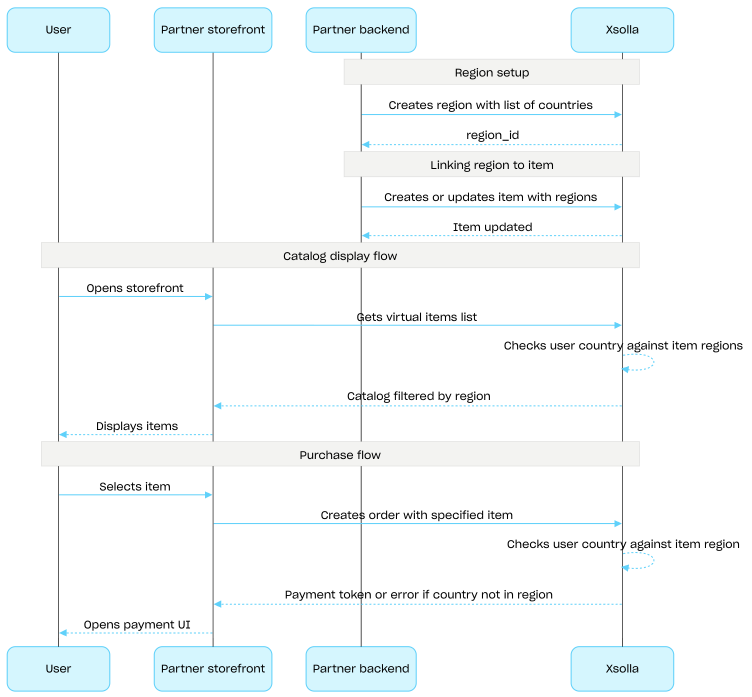
The user's country is checked against the item's regions twice: when requesting the catalog and when creating an order. Unavailable items are not included in the catalog response, and an order with such item will not be created.
Use API calls from the **Common regions** group to create, update, and delete regions.
Regional sales restrictions setup flow:
1. Create a region using the [Create region](https://developers.xsolla.com/api/catalog/common-regions/admin-create-region/) API call, specifying the list of countries. The response returns a `region_id` that is required in the next step.
2. Link a virtual item to the region by passing its `region_id` in the `regions` array when [creating](https://developers.xsolla.com/api/catalog/virtual-items-currency-admin/admin-create-virtual-item/) or [updating](https://developers.xsolla.com/api/catalog/virtual-items-currency-admin/admin-update-virtual-item/) the item.
3. Display the catalog to the user using API calls from the **Catalog** subsection, for example, the [Get virtual items list](https://developers.xsolla.com/api/catalog/virtual-items-currency-catalog/get-virtual-items) API call. The user's country is determined by the `country` parameter or, if it is not provided, based on the user's IP address. Items unavailable in the user's country are not included in the catalog response.
4. When the user proceeds to pay for an item or cart, create an order:
* If the item was added to the cart — using the [Create order with all items from particular cart](https://developers.xsolla.com/api/catalog/payment-client-side/create-order) or [Create order with all items from current cart](https://developers.xsolla.com/api/catalog/payment-client-side/create-order) API call.
* For a fast purchase of a single item — using the [Create order with specified item](https://developers.xsolla.com/api/catalog/payment-client-side/create-order-with-item) API call, passing the item SKU.
The response contains a token for opening the payment UI.
Note
Xsolla checks whether the user's country is included in the region specified for the item. If the country is not included in the item's region, the order cannot be created.
5. Implement opening the payment UI to pay for the order.
### Get list of regions
- [GET /v2/project/{project_id}/admin/region](https://xsolla.redocly.app/api/catalog/common-regions/admin-get-regions.md): Gets list of regions.
You can use a region for managing your regional restrictions.
### Create region
- [POST /v2/project/{project_id}/admin/region](https://xsolla.redocly.app/api/catalog/common-regions/admin-create-region.md): Creates region.
You can use a region for managing your regional restrictions.
### Get region
- [GET /v2/project/{project_id}/admin/region/{region_id}](https://xsolla.redocly.app/api/catalog/common-regions/admin-get-region.md): Gets particular region.
You can use a region for managing your regional restrictions.
### Update region
- [PUT /v2/project/{project_id}/admin/region/{region_id}](https://xsolla.redocly.app/api/catalog/common-regions/admin-update-region.md): Updates particular region.
You can use a region for managing your regional restrictions.
### Delete region
- [DELETE /v2/project/{project_id}/admin/region/{region_id}](https://xsolla.redocly.app/api/catalog/common-regions/admin-delete-region.md): Deletes particular region.
## Webhooks
### Update webhook version
- [PUT /v2/project/{project_id}/admin/webhook/version](https://xsolla.redocly.app/api/catalog/common-webhooks/update-webhook-version.md): Updates the webhook version for the project. In version 2, additional parameters are included in the items array.
For more information about webhooks, see the Set up order status tracking.
## Admin
### Get list of attributes (admin)
- [GET /v2/project/{project_id}/admin/attribute](https://xsolla.redocly.app/api/catalog/attribute-admin/admin-get-attribute-list.md): Gets the list of attributes from a project for administration.
### Create attribute
- [POST /v2/project/{project_id}/admin/attribute](https://xsolla.redocly.app/api/catalog/attribute-admin/admin-create-attribute.md): Creates an attribute.
### Update attribute
- [PUT /v2/project/{project_id}/admin/attribute/{external_id}](https://xsolla.redocly.app/api/catalog/attribute-admin/admin-update-attribute.md): Updates an attribute.
### Get specified attribute
- [GET /v2/project/{project_id}/admin/attribute/{external_id}](https://xsolla.redocly.app/api/catalog/attribute-admin/admin-get-attribute.md): Gets a specified attribute.
### Delete attribute
- [DELETE /v2/project/{project_id}/admin/attribute/{external_id}](https://xsolla.redocly.app/api/catalog/attribute-admin/delete-attribute.md): Deletes an attribute.
NoticeIf you delete an item attribute, all its data and connections with items will be lost.
### Create attribute value
- [POST /v2/project/{project_id}/admin/attribute/{external_id}/value](https://xsolla.redocly.app/api/catalog/attribute-admin/admin-create-attribute-value.md): Creates an attribute value.
AttentionAll projects have the limitation to the number of attribute values. The default and maximum value is 20 values per attribute.
### Delete all values of attribute
- [DELETE /v2/project/{project_id}/admin/attribute/{external_id}/value](https://xsolla.redocly.app/api/catalog/attribute-admin/admin-delete-all-attribute-value.md): Deletes all values of the attribute.
NoticeIf you delete an attribute's value, all connections between the attribute and items will be lost. To change the attribute value for an item, use the Update attribute value API call instead of deleting the value and creating a new one.
### Update attribute value
- [PUT /v2/project/{project_id}/admin/attribute/{external_id}/value/{value_external_id}](https://xsolla.redocly.app/api/catalog/attribute-admin/admin-update-attribute-value.md): Updates an attribute values.
### Delete attribute value
- [DELETE /v2/project/{project_id}/admin/attribute/{external_id}/value/{value_external_id}](https://xsolla.redocly.app/api/catalog/attribute-admin/admin-delete-attribute-value.md): Deletes an attribute value.
NoticeIf you delete an attribute's value, all connections between the attribute and items will be lost. To change the attribute value for an item, use the Update attribute value API call instead of deleting the value and creating a new one.
## Admin
### Get item group list
- [GET /v2/project/{project_id}/admin/items/groups](https://xsolla.redocly.app/api/catalog/item-groups-admin/admin-get-item-group-list.md): Retrieves the full list of item groups within a project without pagination. For administrative purposes.
NoteDo not use this endpoint for building a store catalog. Use the Get item group list client-side endpoint instead.
### Create item group
- [POST /v2/project/{project_id}/admin/items/groups](https://xsolla.redocly.app/api/catalog/item-groups-admin/admin-create-item-group.md): Creates an item group within a project.
To retrieve item groups for building a catalog, use the Get item group list client-side endpoint.
### Get item group by external ID
- [GET /v2/project/{project_id}/admin/items/groups/{external_id}](https://xsolla.redocly.app/api/catalog/item-groups-admin/admin-get-item-group.md): Retrieves an item group by its external ID for administrative purposes.
NoteDo not use this endpoint for building a store catalog. Use the Get item group list client-side endpoint instead.
### Update item group
- [PUT /v2/project/{project_id}/admin/items/groups/{external_id}](https://xsolla.redocly.app/api/catalog/item-groups-admin/admin-update-item-group.md): Updates an item group by its external ID.
### Delete item group
- [DELETE /v2/project/{project_id}/admin/items/groups/{external_id}](https://xsolla.redocly.app/api/catalog/item-groups-admin/admin-delete-item-group.md): Deletes an item group by its external ID.
### Get item group list filtered by item type
- [GET /v2/project/{project_id}/admin/items/{item_type}/groups](https://xsolla.redocly.app/api/catalog/item-groups-admin/admin-get-item-group-list-by-item-type.md): Retrieves item group list with filtering by item type. Only items of the specified type are counted for the group. This is similar to the Get item group list endpoint, with additional filtering of items by type when counting them.
### Get item group by external ID filtered by item type
- [GET /v2/project/{project_id}/admin/items/{item_type}/groups/{external_id}](https://xsolla.redocly.app/api/catalog/item-groups-admin/admin-get-item-group-by-item-type.md): Retrieves an item group by external ID. Only items of the specified type are counted for the group. This is similar to the Get item group by external ID endpoint, with additional filtering of items by type when counting them.
### Reorder item groups
- [PUT /v2/project/{project_id}/admin/group/order](https://xsolla.redocly.app/api/catalog/item-groups-admin/admin-reorder-item-groups.md): Sets the display order for item groups within a project. Pass an array of groups with their new order values.
### Reorder items within a group (by external ID)
- [PUT /v2/project/{project_id}/admin/group/{external_id}/order/item](https://xsolla.redocly.app/api/catalog/item-groups-admin/admin-reorder-items-in-group.md): Sets the display order of items within a group identified by its external ID. Pass an array of items with their new order values.
### Reorder items within a group (by ID)
- [PUT /v2/project/{project_id}/admin/group/id/{id}/order/item](https://xsolla.redocly.app/api/catalog/item-groups-admin/admin-reorder-items-in-group-by-id.md): Sets the display order of items within a group identified by its internal numeric ID. Pass an array of items with their new order values.
## Catalog
### Get item group list
- [GET /v2/project/{project_id}/items/groups](https://xsolla.redocly.app/api/catalog/item-groups-catalog/get-item-groups.md): Retrieves an item group list for building a catalog without pagination.
NoteThe use of the item catalog API calls is available without authorization, but to get a personalized catalog, you must pass the user JWT in the Authorization header.