LiveOps运营API (2.0.0)
- 版本: 2.0.0
- 服务器:
https://store.xsolla.com/api - 通过电子邮件联系我们
- 联系网址: https://xsolla.com/
- 所需 TLS 版本: 1.2
LiveOps运营是一套工具包,可通过促销活动和个性化优惠持续提升玩家互动。
使用该API管理以下功能:
- 促销活动 — 创建和管理优惠券、兑换码、折扣和买赠活动。
- 个性化 — 指定商品目录的显示条件,并仅对特定授权用户应用促销活动。
- 促销活动限制 — 限制用户可使用促销活动的次数,并为这些限制配置定时重置。
- 累充奖励链和累充积分 — 配置与累充积分积累相关的奖励进度。
- 每日奖励链 — 设置周期性每日奖励,鼓励玩家定期登录。
- 优惠链 — 构建连续购买优惠,支持按链中完成步骤阶梯定价和免费奖励选项。
- 追加销售 — 一种销售方式,向用户推荐购买具有额外价值的商品。
该API分为以下组:
Admin — 用于创建、更新、激活和删除活动及奖励链配置的调用。使用您的商户或项目凭据,通过基本访问身份认证进行身份认证。Client — 用于代表已完成身份认证的终端用户获取可用促销活动、获取有效奖励链、核销代码并领取奖励的调用。通过用户JWT进行身份认证。
当请求从浏览器、移动应用或游戏发送时,使用用户JWT身份认证。默认情况下,应用XsollaLoginUserJWT方案。有关如何创建令牌的详细信息,请参阅艾克索拉登录管理器API文档。
令牌通过Authorization请求头按以下格式传递:Authorization: Bearer <user_JWT>,其中<user_JWT>为用户令牌。该令牌用于识别用户,并授予其访问个性化数据的权限。
或者,您也可以使用用于打开支付UI的令牌。
基本HTTP身份认证用于服务器到服务器交互,即API调用直接从您的服务器发送,而不是从用户的浏览器或移动应用发送。通常使用带有API密钥的HTTP Basic身份认证。
API密钥属于机密信息,不得在客户端应用中存储或使用。
使用基本服务器侧身份认证时,所有API请求都必须包含以下请求头:
- 对于
basicAuth—Authorization: Basic <your_authorization_basic_key>,其中your_authorization_basic_key是以Base64编码的project_id:api_key对 - 对于
basicMerchantAuth—Authorization: Basic <your_authorization_basic_key>,其中your_authorization_basic_key是以Base64编码的merchant_id:api_key对
您可以在发布商帐户中找到参数值:
merchant_id显示在:- 公司设置 > 公司中。
- 任意发布商帐户页面的浏览器地址栏URL中。URL格式为:
https://publisher.xsolla.com/<merchant_id>。
project_id显示在:- 发布商帐户中项目名称旁边。
- 发布商帐户中项目页面的浏览器地址栏URL中。URL格式为:
https://publisher.xsolla.com/<merchant_id>/projects/<project_id>。
api_key仅在创建时在发布商帐户中显示,必须在己侧安全存储。您可以在以下部分创建API密钥:
如果所需的API调用不包含
project_id路径参数,请使用对公司所有项目均有效的API密钥进行授权。有关使用API密钥的更多信息,请参阅API参考。
AuthForCart身份认证方案用于购物车购买,支持两种模式:
使用用户JWT进行身份认证。 令牌通过
Authorization请求头传递,格式如下:Authorization: Bearer <user_JWT>,其中<user_JWT>为用户令牌。该令牌用于识别用户,并授予其访问个性化数据的权限。或者,您也可以使用用于打开支付UI的令牌。不带Authorization请求头的简化模式。 此模式仅适用于未完成身份认证的用户,且仅可用于游戏Key销售请求中不使用令牌,而必须包含以下请求头:
x-unauthorized-id,值为请求IDx-user,值为使用Base64编码的用户电子邮件地址
所有类型的商品(虚拟物品、捆绑包、虚拟货币和密钥)都使用类似的数据结构。了解基本结构有助于简化API使用,并帮助您更轻松地查阅文档。
部分调用可能包含其他字段,但这些字段不会改变基本结构。
标识信息
merchant_id— 发布商帐户中的公司IDproject_id— 发布商帐户中的项目IDsku— 商品SKU,在项目内唯一
商店显示
name— 商品名称description— 商品描述image_url— 图片URLis_enabled— 商品可用性is_show_in_store— 商品是否显示在商品目录中
有关在商品目录中管理商品可用性的更多信息,请参阅文档。
组织方式
type— 商品类型,例如虚拟物品(virtual_item)或捆绑包(bundle)groups— 商品所属的组order— 在商品目录中的显示顺序
销售条件
prices— 以真实货币或虚拟货币表示的价格limits— 购买限制periods— 可用时间段regions— 区域限制
核心实体结构示例:
{
  "attributes": [],
  "bundle_type": "virtual_currency_package",
  "content": [
    {
      "description": {
        "en": "Main in-game currency"
      },
      "image_url": "https://.../image.png",
      "name": {
        "en": "Crystals",
        "de": "Kristalle"
      },
      "quantity": 500,
      "sku": "com.xsolla.crystal_2",
      "type": "virtual_currency"
    }
  ],
  "description": {
    "en": "Crystals x500"
  },
  "groups": [],
  "image_url": "https://.../image.png",
  "is_enabled": true,
  "is_free": false,
  "is_show_in_store": true,
  "limits": {
    "per_item": null,
    "per_user": null,
    "recurrent_schedule": null
  },
  "long_description": null,
  "media_list": [],
  "name": {
    "en": "Medium crystal pack"
  },
  "order": 1,
  "periods": [
    {
      "date_from": null,
      "date_until": "2020-08-11T20:00:00+03:00"
    }
  ],
  "prices": [
    {
      "amount": 20,
      "country_iso": "US",
      "currency": "USD",
      "is_default": true,
      "is_enabled": true
    }
  ],
  "regions": [],
  "sku": "com.xsolla.crystal_pack_2",
  "type": "bundle",
  "vc_prices": []
}艾克索拉API可用于实现游戏内购商店逻辑,包括获取商品目录、管理购物车、创建订单以及跟踪订单状态。根据集成场景,API调用分为管理和商品目录子部分,使用不同的身份认证方案。
以下示例展示了从创建商品到完成购买的商店设置和运营基本流程。
在您的应用程序中配置商品显示。
API调用示例:
默认情况下,商品目录API调用会返回请求时商店中当前可用的商品。如需获取尚未可用或已不再可用的商品,请在商品目录请求中包含参数
"show_inactive_time_limited_items": 1。
您可以使用以下方法销售商品:
- 快速购买 — 多次销售同一SKU。
- 购物车购买 — 用户可在同一订单中向购物车添加商品、移除商品并更新数量。
如果商品使用虚拟货币而非真实货币购买,请使用创建包含指定商品的订单 API调用。由于扣款会在执行API调用时处理,因此无需支付UI。
如需购买免费商品,请使用使用指定商品创建订单 API调用或使用免费购物车创建订单 API调用。无需支付UI — 订单会立即设置为done状态。
可以在客户端或服务器侧设置购物车并完成购买。
在客户端设置和购买购物车商品
您需要自行实现添加和移除商品的逻辑。在调用用于设置购物车的API之前,您无法获知哪些促销活动会应用于本次购买。这意味着您无法提前获知总费用以及添加的赠品的详细信息。
实现以下购物车逻辑:
- 玩家在购物车加购后,使用向购物车添加商品 API调用。该调用会返回所选商品的当前信息(折扣前后价格、赠品)。
- 根据用户操作更新购物车内容:
- 如需添加商品或更改商品数量,请使用按购物车ID更新购物车商品 API调用。
- 如需移除商品,请使用按购物车ID删除购物车商品 API调用。
如需获取购物车的当前状态,请使用“获取当前用户的购物车”API调用。
- 使用创建包含当前购物车中所有商品的订单 API调用。该调用返回订单ID和支付令牌。新创建的订单默认设置为
new状态。
在服务器侧设置和购买购物车商品
这种设置方式可能需要更长的购物车设置时间,因为每次更改购物车都必须伴随API调用。
实现以下购物车逻辑:
- 玩家在购物车加购后,使用向购物车添加商品 API调用。该调用会返回所选商品的当前信息(折扣前后价格、赠品)。
- 使用创建包含当前购物车中所有商品的订单 API调用。该调用会返回订单ID和支付令牌。新创建的订单默认设置为
new状态。
使用返回的令牌在新窗口中打开支付UI。有关打开支付UI的其他方式,请参阅文档。
| 操作 | 接口 |
|---|---|
| 在生产环境中打开。 | https://secure.xsolla.com/paystation4/?token={token} |
| 在沙盒模式中打开。 | https://sandbox-secure.xsolla.com/paystation4/?token={token} |
请在开发和测试期间使用沙盒模式。测试购买不会对真实帐户扣款。您可以使用测试银行卡。
完成第一笔真实支付后,严格的沙盒支付策略将生效。沙盒模式下的支付仅对发布商帐户 > 公司设置 > 用户中指定的用户可用。
只有在与艾克索拉签署许可协议后,才能使用真实货币购买虚拟货币和商品。如需签署协议,请在发布商帐户中前往协议与税务 > 合同与协议,填写协议表单并等待确认。协议审核最多可能需要3个工作日。
如需启用或禁用沙盒模式,请在快速购买和购物车购买请求中更改sandbox参数的值。沙盒模式默认关闭。
可能的订单状态:
new— 订单已创建paid— 已收到付款done— 商品已交付canceled— 订单已取消expired— 订单已过期
使用以下任一方式跟踪订单状态:
返回大量记录的API调用(例如构建商品目录时)会按页返回数据。分页是一种限制单个API响应中返回商品数量的机制,并允许您按顺序获取后续页面。
使用以下参数控制返回的商品数量:
limit— 每页商品数量offset— 页面中第一个商品的索引(从0开始编号)has_more— 指示是否还有下一页total_items_count— 商品总数
请求示例:
GET /items?limit=20&offset=40响应示例:
{
  "items": [...],
  "has_more": true,
  "total_items_count": 135
}建议发送后续请求,直到响应返回has_more = false。
日期和时间值以ISO 8601格式传递。
支持以下内容:
- UTC偏移量
- 当商品显示没有时间限制时使用
null值 - 部分字段使用的Unix时间戳(以秒为单位)
格式:YYYY-MM-DDTHH:MM:SS±HH:MM
示例:2026-03-16T10:00:00+03:00
艾克索拉支持对商品名称、描述等面向用户的字段进行本地化。本地化值以对象形式传递,其中语言代码作为键。支持的完整语言列表,请参阅文档。
支持的字段
可为以下参数指定本地化内容:
namedescriptionlong_description
区域格式
语言区域键可使用以下任一格式指定:
- 两字母语言代码:
en、ru - 五字母语言代码:
en-US、ru-RU、de-DE
示例
两字母语言代码示例:
{
  "name": {
    "en": "Starter Pack",
    "ru": "Стартовый набор"
  }
}
五字母语言代码示例:
{
  "description": {
    "en-US": "Premium bundle",
    "de-DE": "Premium-Paket"
  }
}如果发生错误,API会返回HTTP状态和JSON响应正文。商店相关错误的完整列表,请参阅文档。
响应示例:
{
  "errorCode": 1102,
  "errorMessage": "Validation error",
  "statusCode": 422,
  "transactionId": "c9e1a..."
}errorCode— 错误代码。errorMessage— 简短的错误描述。statusCode— HTTP响应状态。transactionId— 请求ID。仅在部分情况下返回。errorMessageExtended— 其他错误详情,例如请求参数。仅在某些情况下返回。
扩展响应示例:
{
  "errorCode": 7001,
  "errorMessage": "Chain not found",
  "errorMessageExtended": {
    "chain_id": "test_chain_id",
    "project_id": "test_project_id",
    "step_number": 2
  },
  "statusCode": 404
}
常见HTTP状态代码
400— 请求无效401— 身份认证错误403— 权限不足404— 资源未找到422— 验证错误429— 超出速率限制
建议
- 结合HTTP状态和响应正文一起处理。
- 使用
errorCode处理与应用程序逻辑相关的错误。 - 分析错误时,使用
transactionId更快定位请求。
概述
促销活动是用于吸引新用户并提升销售额的营销工具。您可以使用艾克索拉API配置以下促销活动:
- 折扣 — 为所选商品提供降价优惠。
- 赠品 — 用户购买时随订单获得的商品。
- 优惠券 — 用户兑换后可获得一个或多个赠品的代码。
- 兑换码 — 用户可通过此类代码获得赠品、特定商品折扣或整个购物车折扣。优惠券会在用户输入后兑换;与之不同,兑换码会在购买过程中(结算时)兑换。
- 专属优惠 — 在商品目录中向已输入专属优惠代码的用户显示的隐藏商品。如果未输入代码,则不会显示这些商品。
配置折扣促销活动的示例流程:
- 使用虚拟物品和货币、捆绑包或游戏Key组的管理子部分中的调用创建商品。
- 使用为商品创建折扣促销活动调用创建促销活动。在
items数组中传入所需的商品SKU。 - 设置促销活动有效期。为此,请调用为商品创建折扣促销活动或更新商品促销活动方法,并将
promotion_periods字段作为对象数组传入,其中date_from定义有效期开始日期,date_until定义有效期结束日期。 - 使用更新商品促销活动调用激活促销活动。传入
"is_enabled": true参数。 - 如需获取商品价格信息(包括折后价格),请调用通用 > 商品目录、虚拟物品和货币 > 商品目录和捆绑包 > 商品目录子部分中用于获取商品目录的客户端API方法。
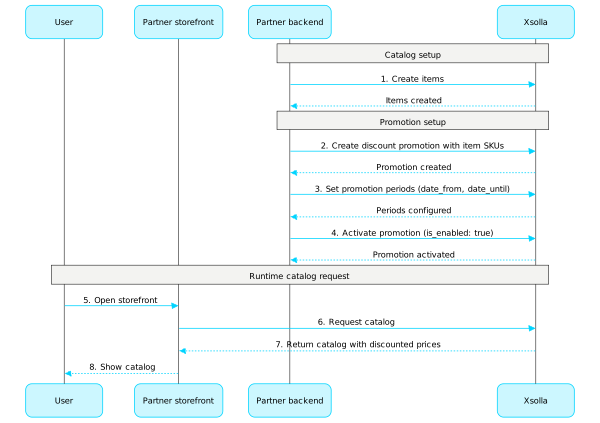
关于配置促销活动的详细信息,请参阅我们的文档:
优惠券
调用此子部分中的API方法,配置和管理优惠券促销活动。
注:
关于优惠券的详细信息,请参阅我们的文档。
项目ID。您可以在发布商帐户的项目名称旁找到此参数;使用项目时,也可以在浏览器地址栏中找到此参数。URL格式如下:https://publisher.xsolla.com/<merchant_id>/projects/<project_id>。
- https://store.xsolla.com/api/v2/project/{project_id}/admin/coupon/{external_id}/deactivate
- Mock serverhttps://xsolla.redocly.app/_mock/zh/api/liveops/v2/project/{project_id}/admin/coupon/{external_id}/deactivate
- curl
- JavaScript
- Node.js
- Python
- Java
- C#
- PHP
- Go
- Ruby
- R
- Payload
curl -i -X PUT \
  -u <username>:<password> \
https://store.xsolla.com/api/v2/project/44056/admin/coupon/coupon_44056_1/deactivate项目ID。您可以在发布商帐户的项目名称旁找到此参数;使用项目时,也可以在浏览器地址栏中找到此参数。URL格式如下:https://publisher.xsolla.com/<merchant_id>/projects/<project_id>。
- https://store.xsolla.com/api/v2/project/{project_id}/admin/coupon/{external_id}/code
- Mock serverhttps://xsolla.redocly.app/_mock/zh/api/liveops/v2/project/{project_id}/admin/coupon/{external_id}/code
- curl
- JavaScript
- Node.js
- Python
- Java
- C#
- PHP
- Go
- Ruby
- R
- Payload
curl -i -X POST \
  -u <username>:<password> \
  https://store.xsolla.com/api/v2/project/44056/admin/coupon/coupon_44056_1/code \
  -H 'Content-Type: application/json' \
  -d '{
    "coupon_code": "WINTER2021"
}'{ "code": "WINTER2021" }
项目ID。您可以在发布商帐户的项目名称旁找到此参数;使用项目时,也可以在浏览器地址栏中找到此参数。URL格式如下:https://publisher.xsolla.com/<merchant_id>/projects/<project_id>。
- https://store.xsolla.com/api/v2/project/{project_id}/admin/coupon/{external_id}/code
- Mock serverhttps://xsolla.redocly.app/_mock/zh/api/liveops/v2/project/{project_id}/admin/coupon/{external_id}/code
- curl
- JavaScript
- Node.js
- Python
- Java
- C#
- PHP
- Go
- Ruby
- R
- Payload
curl -i -X GET \
  -u <username>:<password> \
'https://store.xsolla.com/api/v2/project/44056/admin/coupon/coupon_44056_1/code?limit=50&offset=0'{ "codes": [ { … }, { … }, { … }, { … }, { … } ], "total_count": 5 }
兑换码
调用此子部分中的API方法,配置和管理兑换码促销活动。
注:
关于兑换码的详细信息,请参阅我们的文档。
专属商品目录优惠
调用此子部分中的API方法,配置和管理专属商品目录优惠。
注:
关于专属优惠的详细信息,请参阅我们的文档。
折扣
调用此子部分中的API方法,配置和管理折扣促销活动。
注:
关于折扣的详细信息,请参阅我们的文档。
买赠
调用此子部分中的API方法,配置和管理买赠促销活动。
注:
关于赠品的详细信息,请参阅我们的文档。
个性化商品目录
个性化功能允许您指定商品目录显示和促销活动应用的条件,使其仅面向特定授权用户生效。条件基于用户属性定义,可帮助您向特定用户提供最相关的商品和促销活动。
支持以下个性化类型:
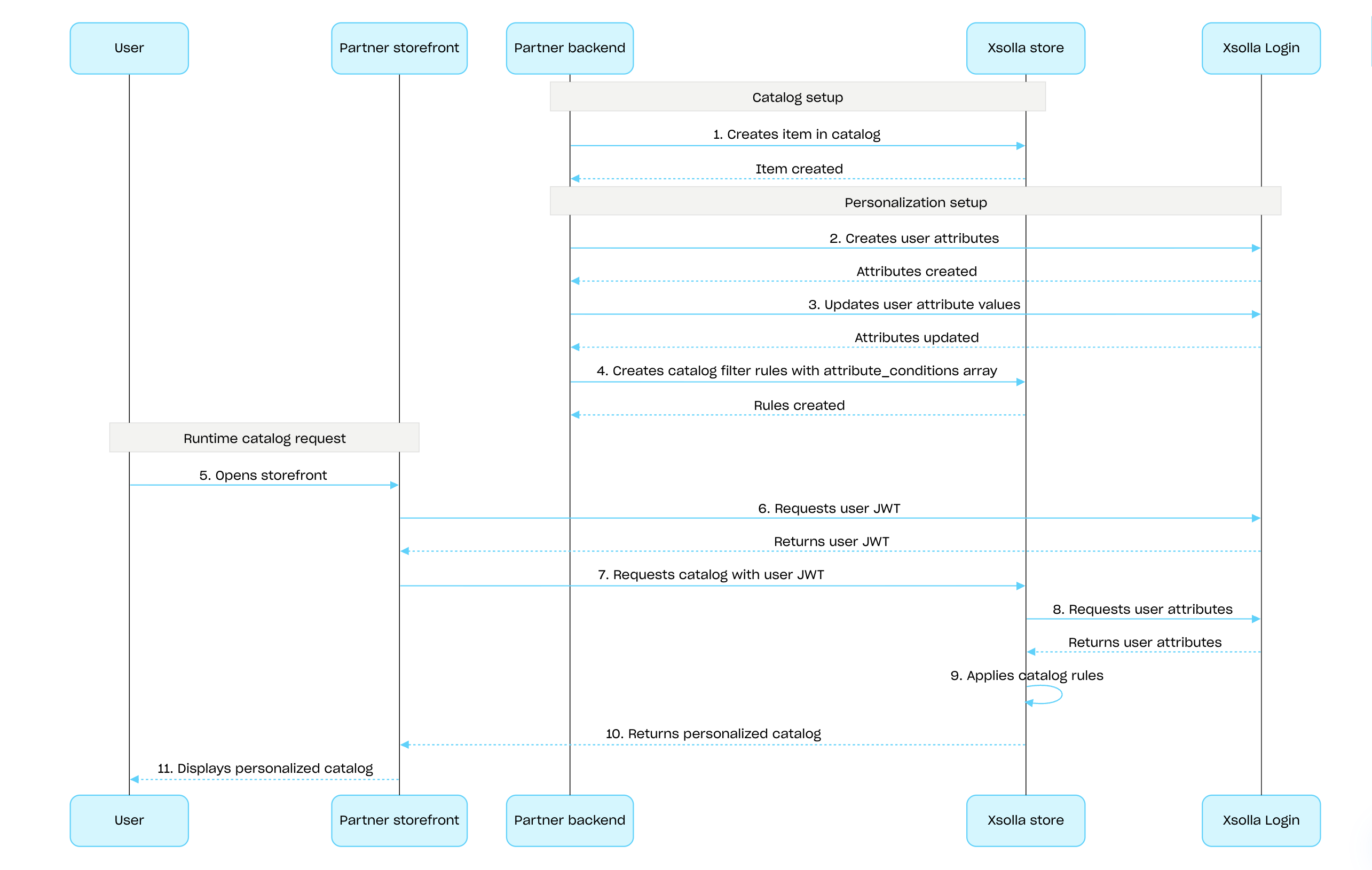
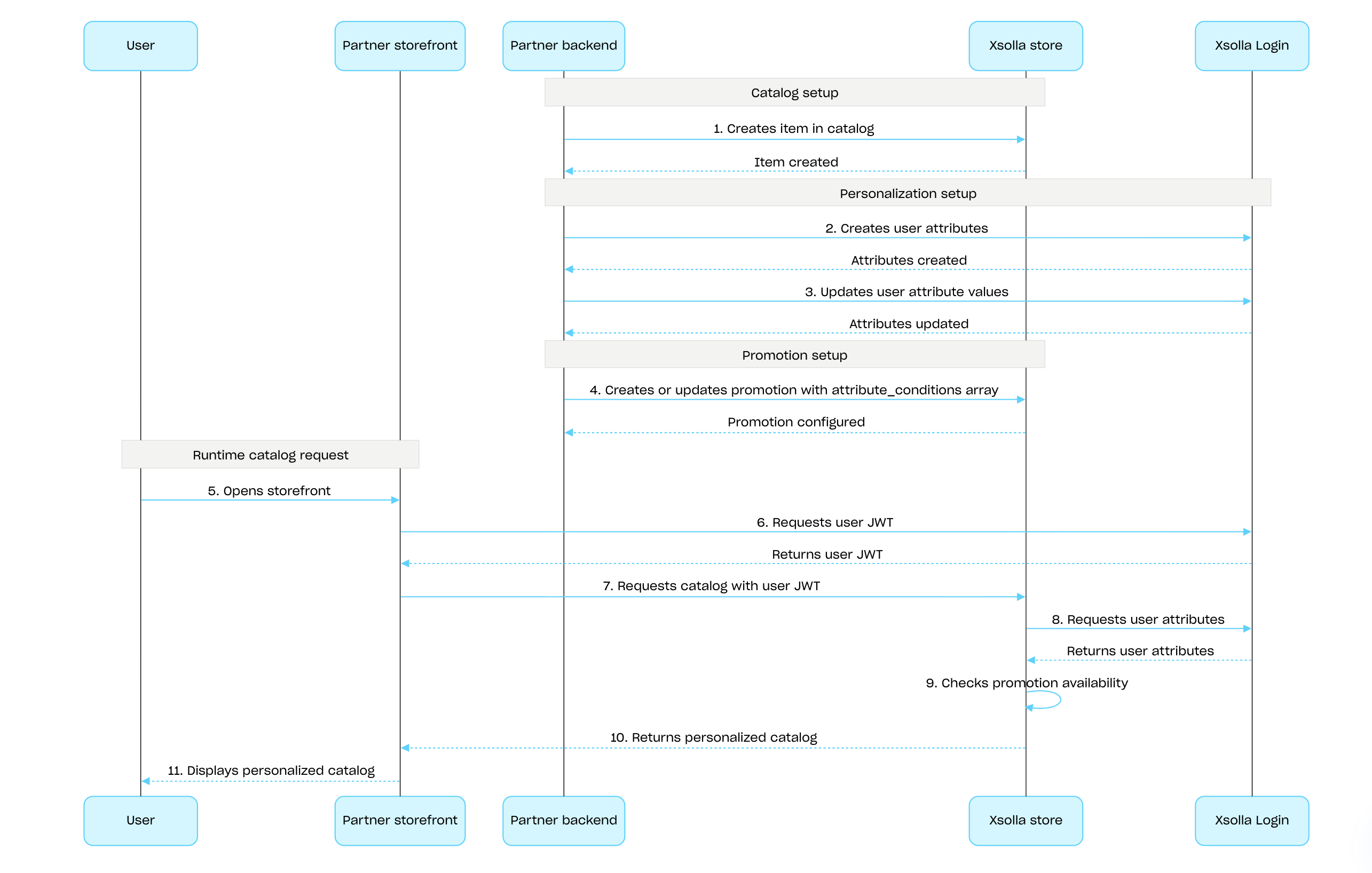
- 艾克索拉侧个性化。个性化规则和逻辑在艾克索拉侧配置并存储。您传入用户属性后,艾克索拉会使用这些属性生成个性化商品目录。
- 合作伙伴侧个性化。您在己侧配置个性化规则和逻辑,并将特定用户的最终商品目录数据载荷发送给艾克索拉。
如需使用艾克索拉API在艾克索拉侧配置个性化:
使用使用艾克索拉登录管理器API设置用户属性,并在您的游戏中发生变更时更新艾克索拉中的数据,确保数据保持同步。
为商品或促销活动配置个性化:
- 如需对商品目录进行个性化,请使用创建商品目录筛选规则 API 调用定义商品目录显示规则:
- 在attribute_conditions数组中,指定根据用户属性确定商品可用性的条件。
- 在items数组中,提供在用户属性符合指定条件时应向用户显示的商品列表。
- 如需配置个性化促销活动,请使用[所需促销活动类型的创建和更新API调用]](/zh/api/liveops/promotions-discounts/create-item-promotion)。在attribute_conditions数组中,指定基于用户属性确定促销活动可用性的条件。
- 如需对商品目录进行个性化,请使用创建商品目录筛选规则 API 调用定义商品目录显示规则:
在商品目录获取API调用中传入包含用户属性的用户JWT,以接收个性化商品目录。
为商品目录配置并应用艾克索拉侧个性化的流程:
为促销活动配置并应用艾克索拉侧个性化的流程:
概述
促销活动使用限制用于限制特定用户可使用某个促销活动的次数。您还可以配置定时重置限制。
限制数信息存储在艾克索拉侧,可在发布商帐户的促销活动设置中配置,也可以在以下API调用中通过limits对象配置:
在以下用于获取商品目录的API调用中,限制信息会在items.promotions.limits对象中返回:
限制组的管理部分中的API调用可用于获取限制的当前状态,并针对特定用户更新限制,例如在任务完成后重置计数器,或手动调整剩余数量。
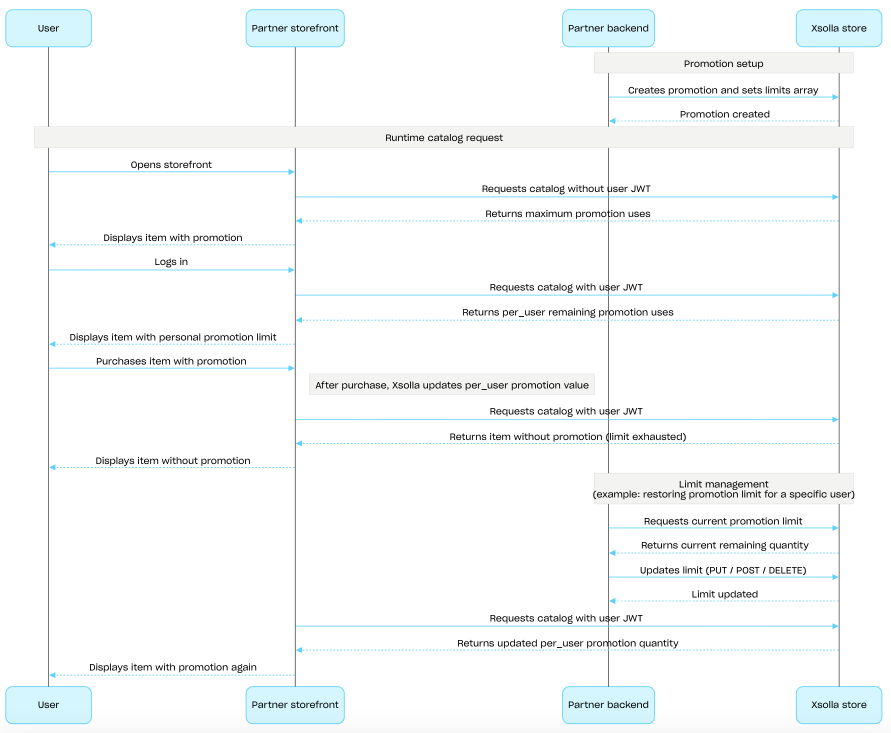
您可以配置limits.per_user,即单个用户可使用某个促销活动的次数限制。
未认证用户始终会看到促销活动的最大可使用次数。
如需显示用户在当前有效限制下剩余的促销活动可使用次数,请在请求商品目录时传入用户授权数据。
如需配置定时重置周期(日、周或月),请在创建或更新促销活动时传入limits.recurrent_schedule对象。
限制配置和执行场景
- 使用为商品创建折扣促销或创建买赠促销活动 API调用创建促销活动,并传入
limits对象。 - 为未认证用户请求商品目录⸺响应会在
items.promotions.limits对象中返回促销活动的最大可使用次数。 - 用户登录。
- 使用用户的授权令牌请求商品目录⸺响应会返回当前有效限制下的剩余可使用次数。
- 用户选择促销商品并进行购买。
- 支付成功后,艾克索拉会更新
items.promotions.limits.per_user值。当该值达到0时,后续商品目录API调用会返回该商品,但不再包含折扣或赠品。 - 您可以使用管理子部分中的API调用更新限制数:
- 在下一次使用用户授权令牌发起的商品目录请求中,您可以从
items.promotions.limits获取更新后的限制值,并将其显示给用户。
概述
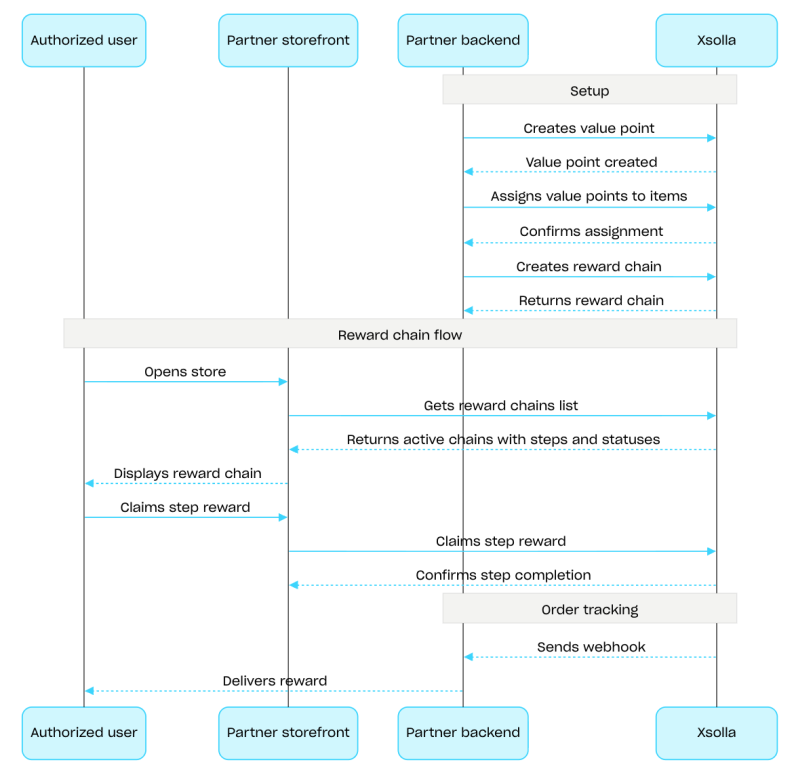
累充奖励链用于激励用户在商店中使用真实货币购买商品。用户每完成一次购买,即可获得累充积分,并推进累充奖励链进度。如果用户属于某个公会,其购买行为还会为整个公会贡献累充积分。如需了解累充奖励链配置的详细信息,请参阅奖励系统部分。
如需配置累充奖励链,请使用管理子部分中的API调用。如需显示奖励链并领取奖励,请使用客户端子部分中的API调用。如需实现公会累充奖励链相关功能,请使用公会客户端子部分中的API调用。
累充奖励链配置流程示例:
- 使用虚拟物品和货币或捆绑包组中管理子部分的API调用创建商品。
- 使用创建累充积分API调用创建累充积分。
- 使用设置商品的累充积分API调用为商品分配累充积分。用户购买这些商品后即可获得累充积分。
- 使用创建累充奖励链API调用创建奖励链。如需激活该奖励链,请传入
is_enabled: true参数。 - 实现累充奖励链显示。为此,请使用获取当前用户的累充奖励链API调用请求可用奖励链列表。响应中包含所有有效奖励链及其步骤和状态。
- 实现累充积分余额显示。为此,请使用获取当前用户的累充积分余额API调用。
- 实现步骤奖励领取。为此,请使用领取步骤奖励API调用。
- 配置订单状态跟踪,例如使用Webhook,以便及时接收已领取奖励的数据并向用户发放奖励。
概述
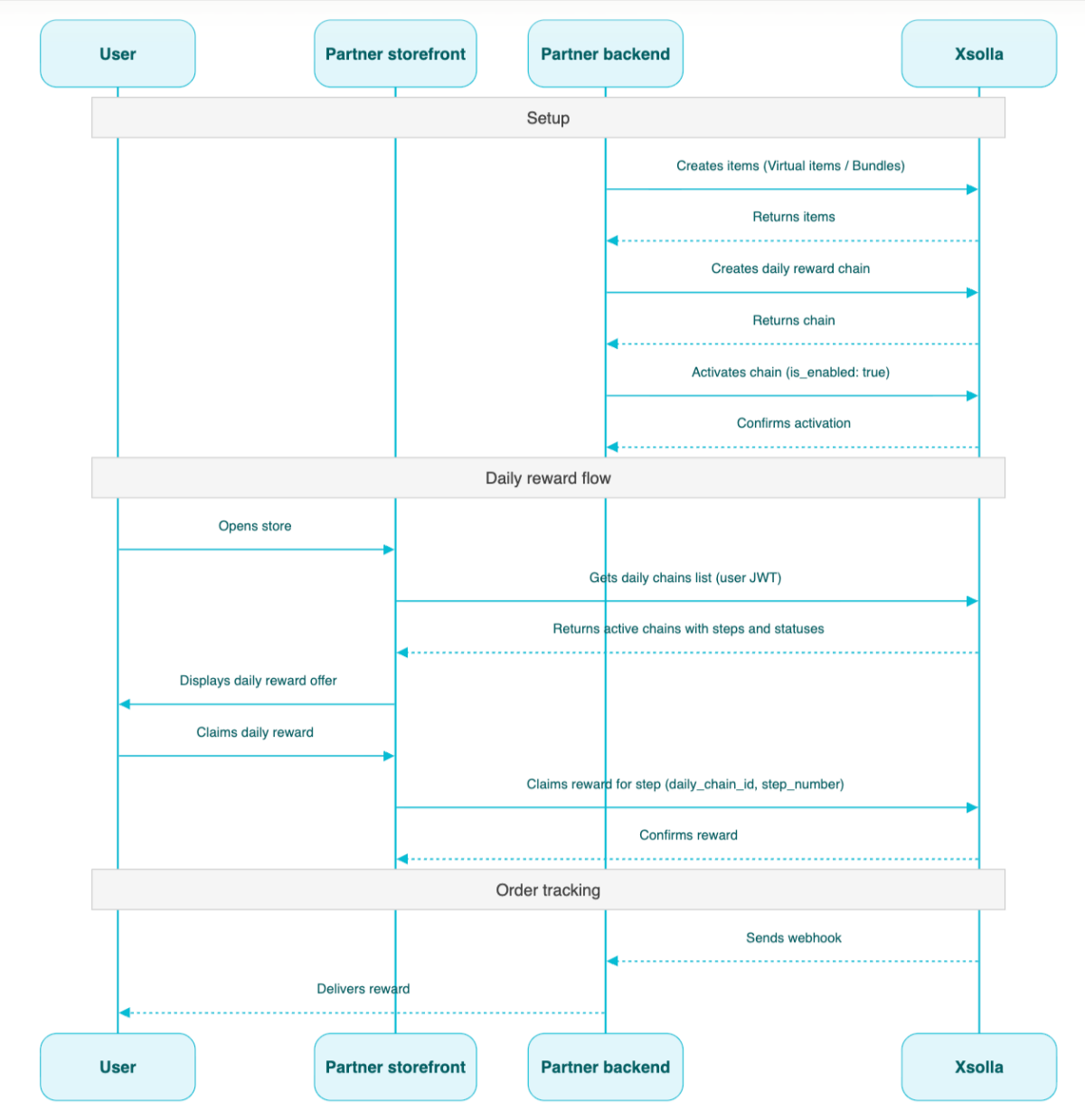
每日奖励可激励用户每天登录商店以领取免费商品。用户中断登录一天后的处理方式取决于奖励链类型。如需确保每日奖励正常使用,您需要配置用户身份认证。未认证用户可以查看完整的每日奖励链,但无法领取奖励。有关每日奖励配置的详细信息,请参阅每日奖励部分。
如需配置奖励链,请使用管理子部分中的API调用。如需发放奖励,请使用客户端子部分中的API调用。
每日奖励链配置场景:
- 使用虚拟物品和货币或捆绑包组中管理子部分的API调用创建商品。
- 使用创建每日奖励API调用创建奖励链。
- 在创建每日奖励API调用中传入
"is_enabled": true参数,以激活该奖励链。 - 使用获取当前用户的每日奖励API调用请求可用奖励链列表,并传入用户JWT。响应中包含所有有效奖励链及其步骤和状态。
- 通过Webhook设置商品发放。
- 使用领取每日奖励步骤API调用向用户发放每日奖励,并传入
daily_chain_id和step_number。
概述
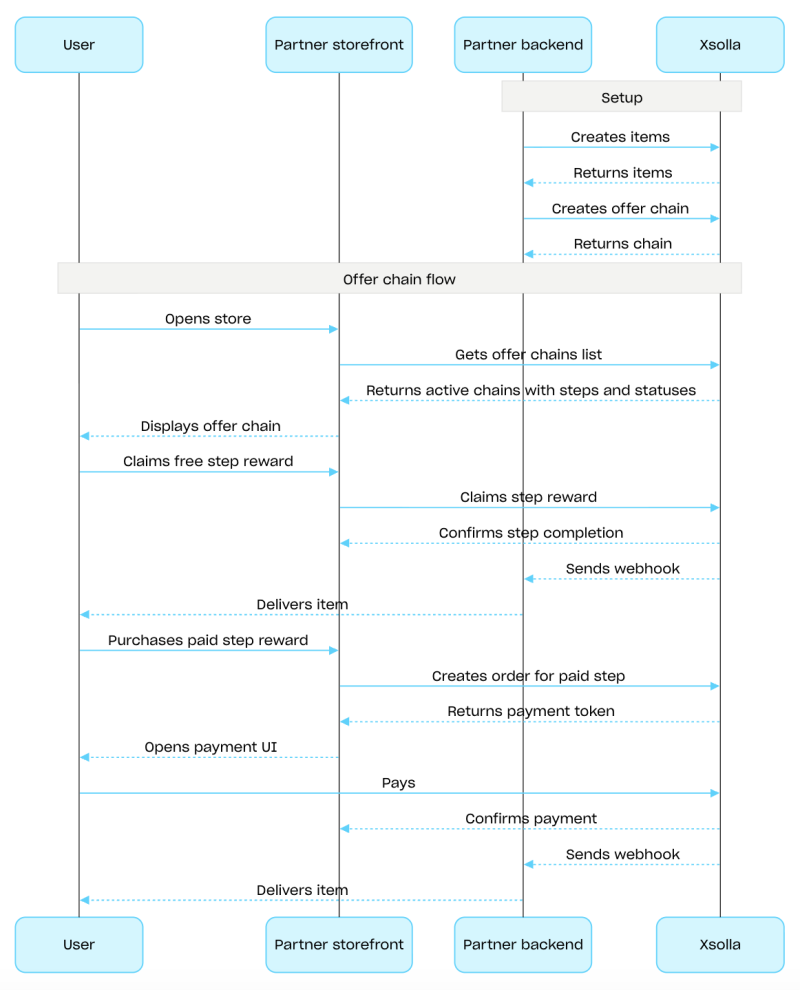
优惠链由一系列步骤组成,每个步骤都包含一个商品,用户可免费领取或使用有效优惠购买。优惠链可以包含仅在该链内可获得的专属商品,也可以包含价格低于商店价格的折扣商品。如需了解该营销工具配置的详细信息,请参阅优惠链部分。
如需配置优惠链,请使用管理子部分中的API调用。如需展示优惠链并实现用户获得商品后的处理逻辑,请使用客户端子部分中的API调用。
优惠链配置流程示例:
使用创建优惠链API调用创建优惠链。如需激活该优惠链,请传入
is_enabled: true参数。实现优惠链显示。为此,请使用获取当前用户的优惠链API调用请求可用优惠链列表。响应中包含所有有效优惠链及其步骤和状态。
实现用户所获商品的相关处理逻辑:
如果步骤商品为免费商品,请使用领取免费优惠链步骤API调用。在请求中传入
offer_chain_id和step_number。如果步骤商品为付费商品,请使用为付费优惠链步骤创建订单API调用。在请求中传入
offer_chain_id和step_number。响应将返回order_id和用于打开支付UI的令牌。
配置订单状态跟踪,例如使用Webhook,以便及时接收已领取或已购买商品的数据并向用户发放商品。
概述
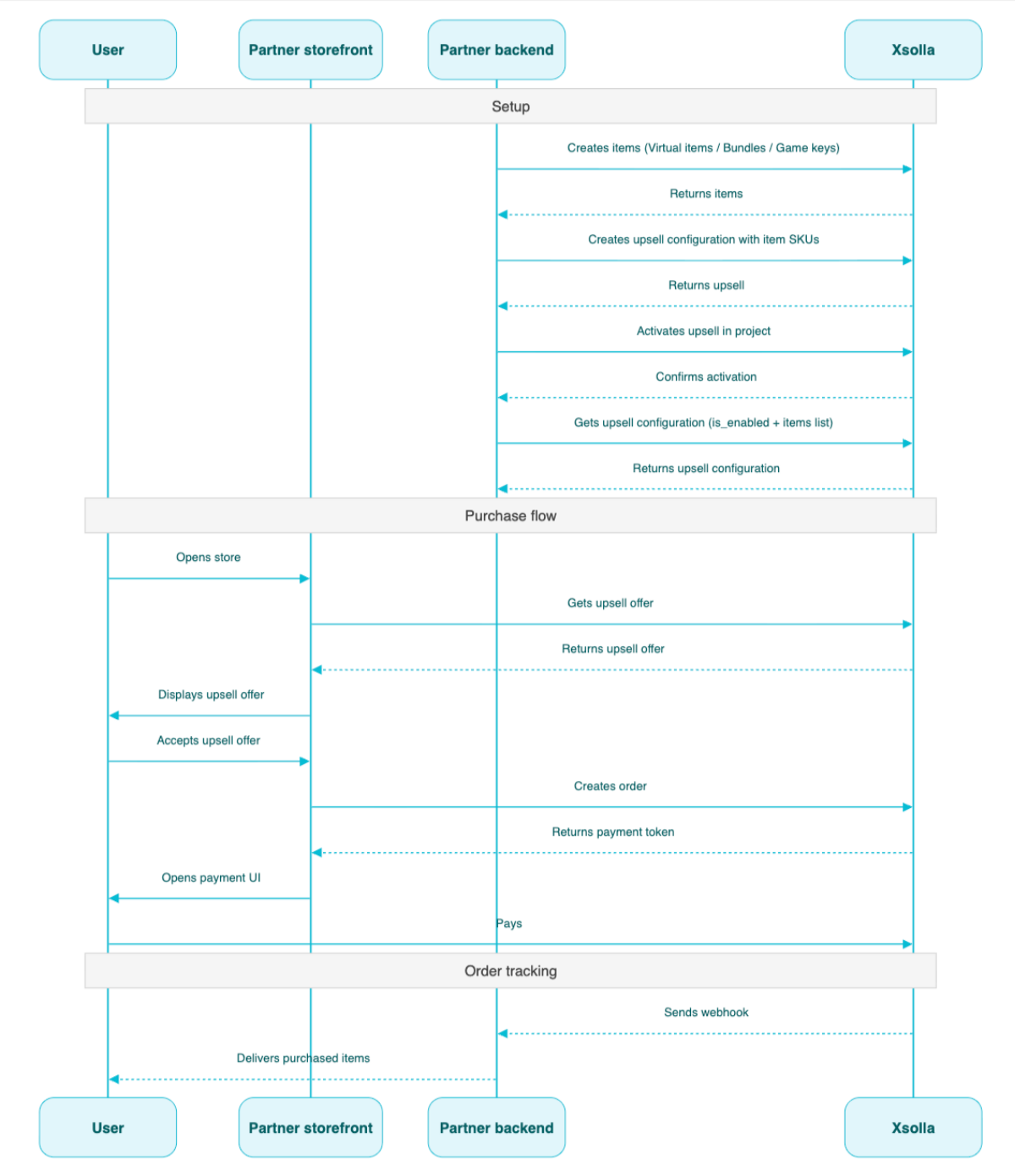
追加销售是一种销售方式,用于在合适的购买节点向用户推荐可加购的优选商品。例如,推荐其他用户需求最高的商品。您还可以为追加销售商品配置区域限制。有关详细信息,请参阅追加销售部分。
获取项目中追加销售的信息API方法会返回已配置为追加销售的商品列表,以及追加销售状态(已启用或已禁用)。在客户端侧,获取项目中追加销售商品的列表API方法会返回商品列表,您可以在购买流程中的合适节点向用户展示这些商品。
追加销售配置场景:
- 使用虚拟物品和货币、捆绑包或游戏Key组中管理子部分的API调用创建商品。
- 使用创建追加销售API调用设置追加销售。在
items数组中传入所需商品的SKU。 - 使用激活/停用项目的追加销售API调用,为项目激活追加销售。
- 使用获取项目中追加销售商品的列表API调用,在购买流程中的合适节点向用户展示追加销售优惠。
- 实现支付UI的打开逻辑,以便用户支付订单。例如,可以使用使用特定购物车中的所有商品创建订单API调用。响应会返回用于打开支付UI的令牌。
- 配置订单状态跟踪,例如使用Webhook,以便及时接收支付成功商品的数据并向用户发放商品。
概述
忠诚即服务API (Loyalty as Service API)支持您管理用户的忠诚积分余额:获取用户当前余额,以及增加或扣减忠诚积分。
忠诚即服务API的管理API调用在服务器侧执行,并且需要基本身份认证。
此API的基础URL为https://loyalty-points.xsolla.com/。
有关如何设置此营销工具的详细信息,请参阅忠诚即服务(Loyalty as Service)。