跳转到内容

Overview

  • Version: 2.0.0
  • Servers: https://store.xsolla.com/api
  • Contact Us by Email
  • Contact URL: https://xsolla.com/
  • Required TLS version: 1.2

LiveOps is a toolkit for driving ongoing player engagement through promotions and personalized offers.

Use the API to manage the following features:

  • Promotions — create and manage coupons, promo codes, discounts, and bonus campaigns.
  • Personalization — specify the conditions for displaying the item catalog and applying promotions only for certain authorized users.
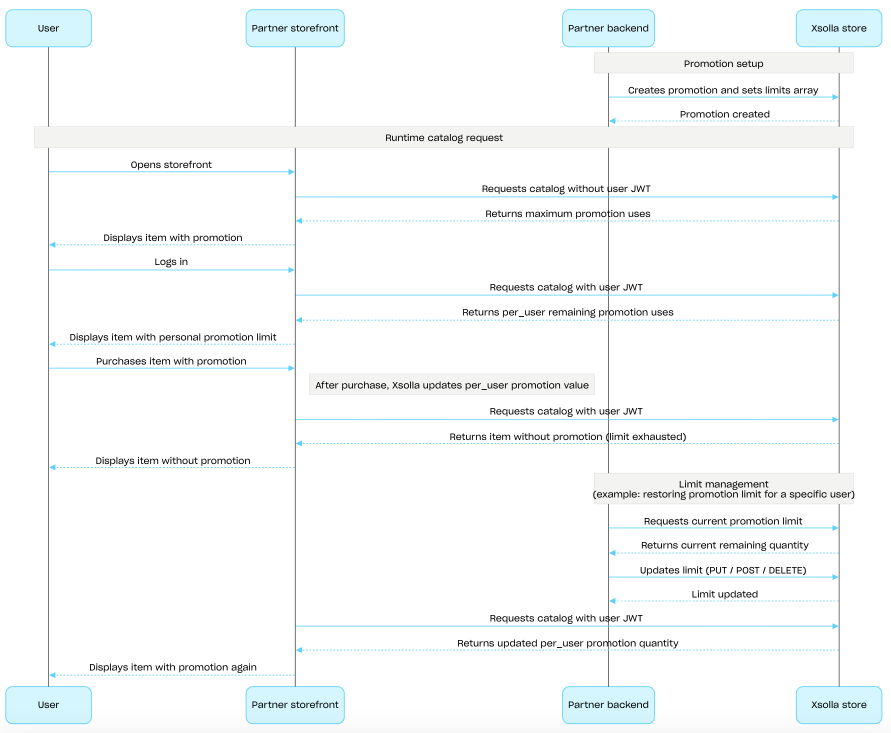
  • Promotion limits — set a limit on how many times a promotion can be used by a user and configure scheduled resets for these limits.
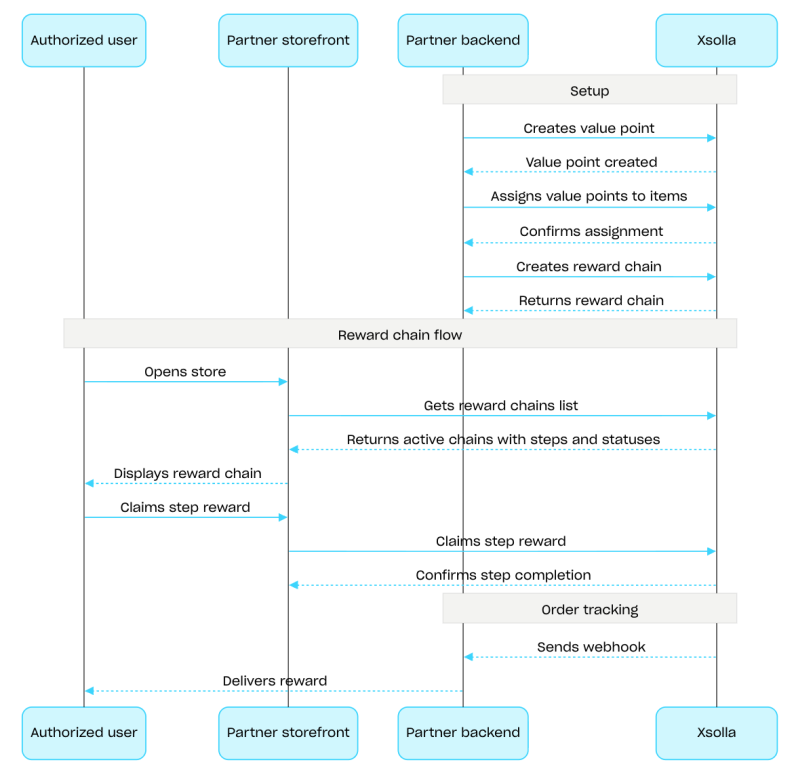
  • Reward chains & Value points — configure reward progressions tied to value point accumulation.
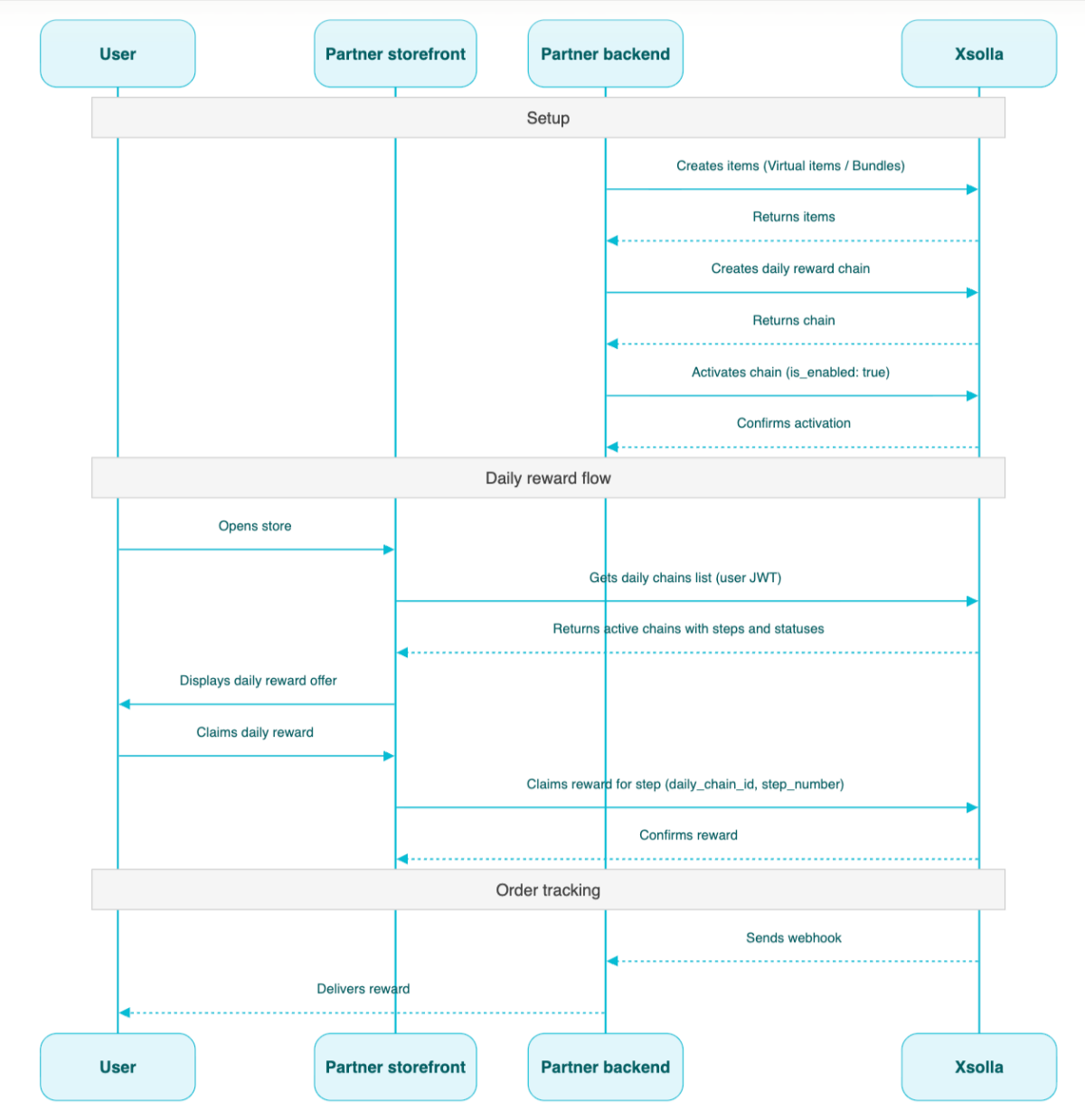
  • Daily chains — set up recurring daily rewards to motivate regular logins.
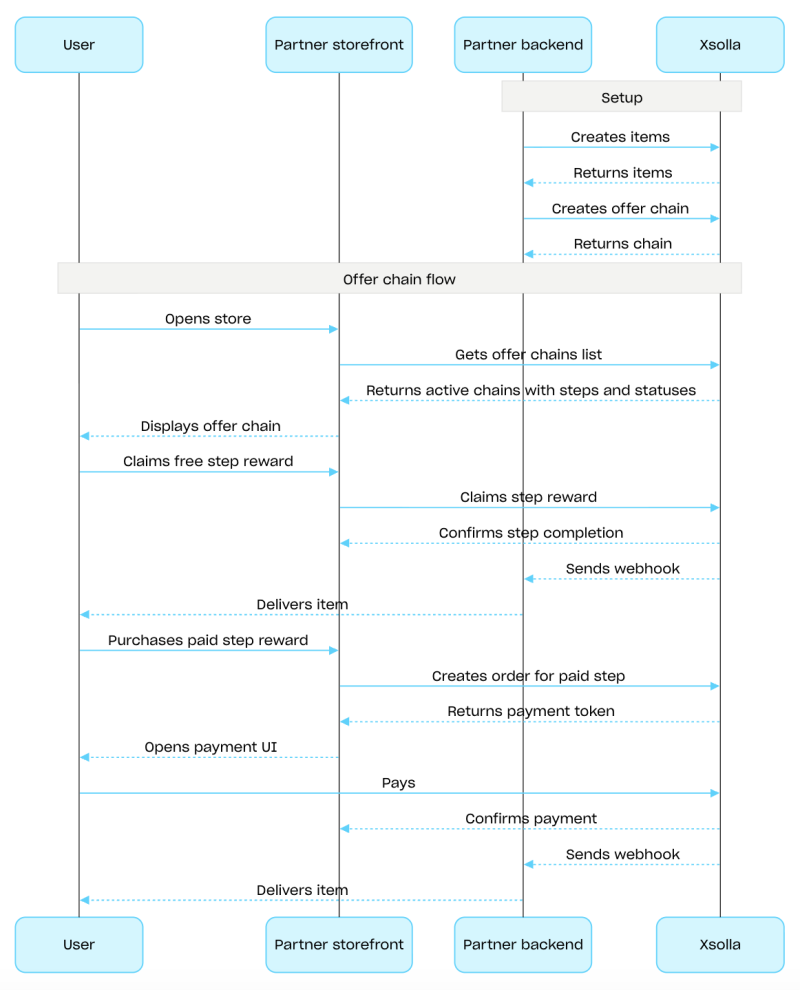
  • Offer chains — build sequential purchase offers with per-step pricing and free reward options.
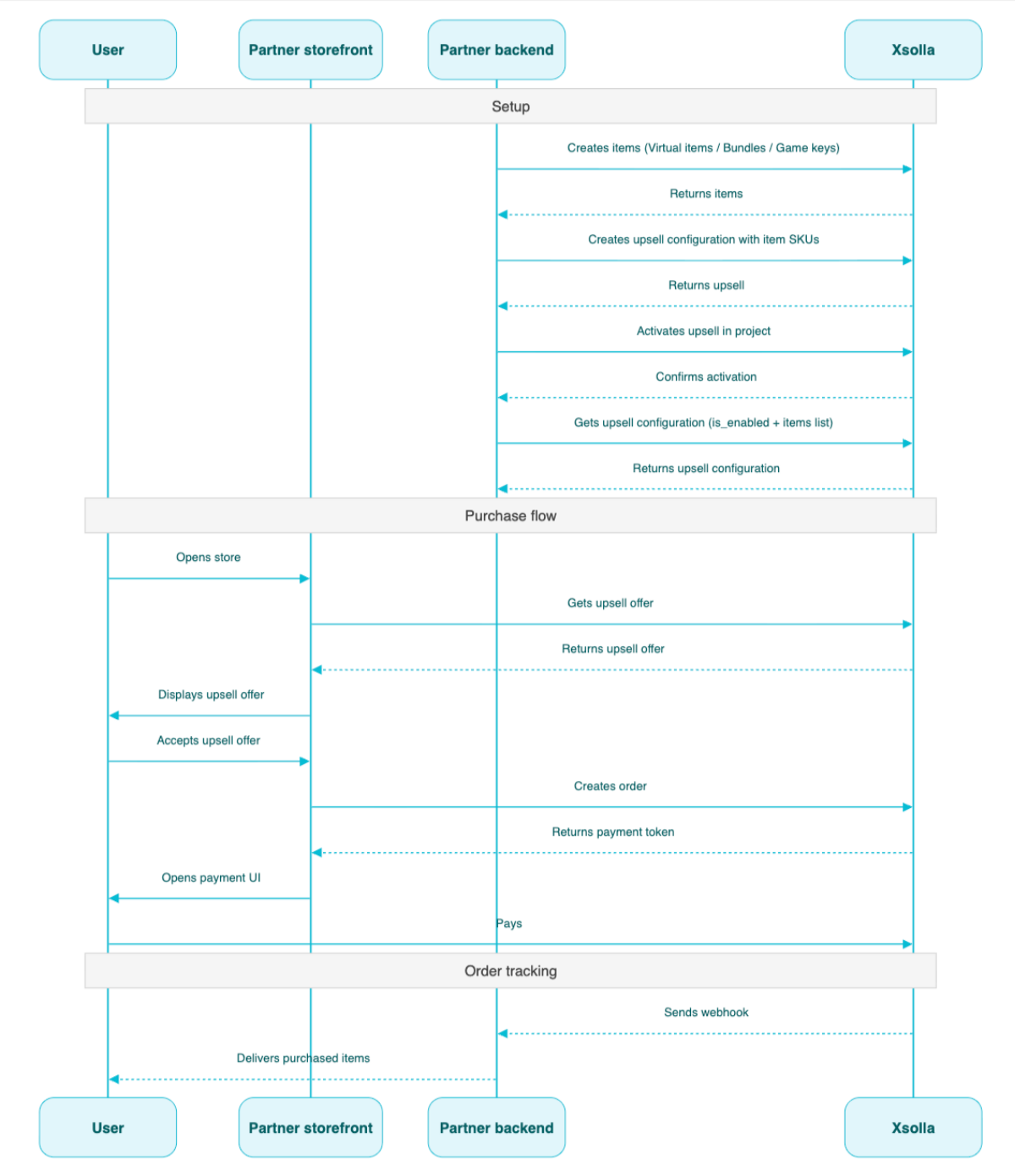
  • Upsell — a sales method in which the user is offered to buy an item with additional value.

API calls

The API is divided into the following groups:

  • Admin — calls for creating, updating, activating, and deleting campaigns and chain configurations. Authenticated via basic access authentication with your merchant or project credentials.
  • Client — calls for retrieving available promotions, getting active chains, redeeming codes, and claiming rewards on behalf of authenticated end users. Authenticated via user JWT.

Authentication

API calls require authentication either on behalf of a user or on behalf of a project. The authentication scheme used is specified in the Security section in the description of each call.

Authentication using user's JWT

User's JWT authentication is used when a request is sent from a browser, mobile application, or game. By default, the XsollaLoginUserJWT scheme is applied. For details on how to create a token, see the Xsolla Login API documentation.

The token is passed in the Authorization header in the following format: Authorization: Bearer <user_JWT>, where <user_JWT> is the user token. The token identifies the user and provides access to personalized data. You can try this call using the following test token:

eyJ0eXAiOiJKV1QiLCJhbGciOiJIUzI1NiJ9.eyJleHAiOjE5NjIyMzQwNDgsImlzcyI6Imh0dHBzOi8vbG9naW4ueHNvbGxhLmNvbSIsImlhdCI6MTU2MjE0NzY0OCwidXNlcm5hbWUiOiJ4c29sbGEiLCJ4c29sbGFfbG9naW5fYWNjZXNzX2tleSI6IjA2SWF2ZHpDeEVHbm5aMTlpLUc5TmMxVWFfTWFZOXhTR3ZEVEY4OFE3RnMiLCJzdWIiOiJkMzQyZGFkMi05ZDU5LTExZTktYTM4NC00MjAxMGFhODAwM2YiLCJlbWFpbCI6InN1cHBvcnRAeHNvbGxhLmNvbSIsInR5cGUiOiJ4c29sbGFfbG9naW4iLCJ4c29sbGFfbG9naW5fcHJvamVjdF9pZCI6ImU2ZGZhYWM2LTc4YTgtMTFlOS05MjQ0LTQyMDEwYWE4MDAwNCIsInB1Ymxpc2hlcl9pZCI6MTU5MjR9.GCrW42OguZbLZTaoixCZgAeNLGH2xCeJHxl8u8Xn2aI

Alternatively, you can use a token for opening the payment UI.

Basic HTTP authentication

Basic HTTP authentication is used for server-to-server interactions, when an API call is sent directly from your server rather than from a user's browser or mobile application. HTTP Basic authentication with an API key is typically used.

Note

The API key is confidential and must not be stored or used in client applications.

With basic server-side authentication, all API requests must include the following header:

  • for basicAuthAuthorization: Basic <your_authorization_basic_key>, where your_authorization_basic_key is the project_id:api_key pair encoded in Base64
  • for basicMerchantAuthAuthorization: Basic <your_authorization_basic_key>, where your_authorization_basic_key is the merchant_id:api_key pair encoded in Base64

You can find the parameter values in Publisher Account:

  • merchant_id is displayed:
    • In Company settings > Company.
    • In the URL in the browser address bar on any Publisher Account page. The URL has the following format: https://publisher.xsolla.com/<merchant_id>.
  • project_id is displayed:
    • Next to the project name in Publisher Account.
    • In the URL in the browser address bar when working on a project in Publisher Account. The URL has the following format: https://publisher.xsolla.com/<merchant_id>/projects/<project_id>.
  • api_key is shown in Publisher Account only at the time of creation and must be stored securely on your side. You can create an API key in the following sections:
Notice

If a required API call doesn't include the project_id path parameter, use an API key that is valid across all company projects for authorization.

For more information about working with API keys, see the API references.

Authentication with guest access support

The AuthForCart authentication scheme is used for cart purchases and supports two modes:

  1. Authentication with a user's JWT. The token is passed in the Authorization header in the following format: Authorization: Bearer <user_JWT>, where <user_JWT> is the user token. The token identifies the user and provides access to personalized data. You can try this call using the following test token:
eyJ0eXAiOiJKV1QiLCJhbGciOiJIUzI1NiJ9.eyJleHAiOjE5NjIyMzQwNDgsImlzcyI6Imh0dHBzOi8vbG9naW4ueHNvbGxhLmNvbSIsImlhdCI6MTU2MjE0NzY0OCwidXNlcm5hbWUiOiJ4c29sbGEiLCJ4c29sbGFfbG9naW5fYWNjZXNzX2tleSI6IjA2SWF2ZHpDeEVHbm5aMTlpLUc5TmMxVWFfTWFZOXhTR3ZEVEY4OFE3RnMiLCJzdWIiOiJkMzQyZGFkMi05ZDU5LTExZTktYTM4NC00MjAxMGFhODAwM2YiLCJlbWFpbCI6InN1cHBvcnRAeHNvbGxhLmNvbSIsInR5cGUiOiJ4c29sbGFfbG9naW4iLCJ4c29sbGFfbG9naW5fcHJvamVjdF9pZCI6ImU2ZGZhYWM2LTc4YTgtMTFlOS05MjQ0LTQyMDEwYWE4MDAwNCIsInB1Ymxpc2hlcl9pZCI6MTU5MjR9.GCrW42OguZbLZTaoixCZgAeNLGH2xCeJHxl8u8Xn2aI

Alternatively, you can use a token for opening the payment UI.

  1. Simplified mode without Authorization header. This mode is used only for unauthorized users and can be applied only for game key sales. Instead of a token, the request must include the following headers:
    • x-unauthorized-id with a request ID
    • x-user with the user's email address encoded in Base64

Core entity structure

Items of all types (virtual items, bundles, virtual currency, and keys) use a similar data structure. Understanding the basic structure simplifies working with the API and helps you navigate the documentation more easily.

Note

Some calls may include additional fields but they don't change the basic structure.

Identification

  • merchant_id — company ID in Publisher Account
  • project_id — project ID in Publisher Account
  • sku — item SKU, unique within the project

Store display

  • name — item name
  • description — item description
  • image_url — image URL
  • is_enabled — item availability
  • is_show_in_store — whether the item is displayed in the catalog

For more information about managing item availability in the catalog, see the documentation.

Organization

  • type — item type, for example, a virtual item (virtual_item) or bundle (bundle)
  • groups — groups the item belongs to
  • order — display order in the catalog

Sale conditions

  • prices — prices in real or virtual currency
  • limits — purchase limits
  • periods — availability periods
  • regions — regional restrictions

Example of core entity structure:

{
  "attributes": [],
  "bundle_type": "virtual_currency_package",
  "content": [
    {
      "description": {
        "en": "Main in-game currency"
      },
      "image_url": "https://.../image.png",
      "name": {
        "en": "Crystals",
        "de": "Kristalle"
      },
      "quantity": 500,
      "sku": "com.xsolla.crystal_2",
      "type": "virtual_currency"
    }
  ],
  "description": {
    "en": "Crystals x500"
  },
  "groups": [],
  "image_url": "https://.../image.png",
  "is_enabled": true,
  "is_free": false,
  "is_show_in_store": true,
  "limits": {
    "per_item": null,
    "per_user": null,
    "recurrent_schedule": null
  },
  "long_description": null,
  "media_list": [],
  "name": {
    "en": "Medium crystal pack"
  },
  "order": 1,
  "periods": [
    {
      "date_from": null,
      "date_until": "2020-08-11T20:00:00+03:00"
    }
  ],
  "prices": [
    {
      "amount": 20,
      "country_iso": "US",
      "currency": "USD",
      "is_default": true,
      "is_enabled": true
    }
  ],
  "regions": [],
  "sku": "com.xsolla.crystal_pack_2",
  "type": "bundle",
  "vc_prices": []
}

Basic purchase flow

The Xsolla API allows you to implement in-game store logic, including retrieving the item catalog, managing the cart, creating orders, and tracking their status. Depending on the integration scenario, API calls are divided into Admin and Catalog subsections, which use different authentication schemes.

The following example shows a basic flow for setting up and operating a store, from item creation to purchase.

Create items and groups (Admin)

Create an item catalog for your store, such as virtual items, bundles, or virtual currency.

Example API calls:

Set up promotions, chains, and limits (Admin)

Configure user acquisition and monetization tools, such as discounts, bonuses, daily rewards, or offer chains.

Example API calls:

Get item information (Client)

Configure item display in your application.

Notice

Do not use API calls from the Admin subsection to build a user catalog. These API calls have rate limits and aren't intended for user traffic.

Example API calls:

Note

By default, catalog API calls return items that are currently available in the store at the time of the request. To retrieve items that are not yet available or are no longer available, include the parameter "show_inactive_time_limited_items": 1 in the catalog request.

Sell items

You can sell items using the following methods:

  • Fast purchase — sell one SKU multiple times.
  • Cart purchase — the user adds items to the cart, removes items, and updates quantities within a single order.

If an item is purchased using virtual currency instead of real money, use the Create order with specified item purchased by virtual currency API call. The payment UI is not required, as the charge is processed when the API call is executed.

For free item purchase, use the Create order with specified free item API call or the Create order with free cart API call. The payment UI is not required — the order is immediately set to the done status.

Fast purchase

Use the client-side API call to create an order with a specified item. The call returns a token used to open the payment UI.

Note

Discount information is available to the user only in the payment UI. Promo codes are not supported.

Cart purchase

Cart setup and purchase can be performed on the client or on the server side.

Set up and purchase a cart on the client

Implement the logic of adding and removing items by yourself. Before calling the API for setting up a cart, you will not have information about which promotions will be applied to the purchase. This means that the total cost and details of the added bonus items will not be known.

Implement the following cart logic:

  1. After the player has filled a cart, use the Fill cart with items API call. The call returns the current information about the selected items (prices before and after discounts, bonus items).
  2. Update the cart contents based on user actions:
Note

To get the current status of the cart, use the Get current user's cart API call.
  1. Use the Create order with all items from current cart API call. The call returns the order ID and payment token. The newly created order is set to new status by default.

Set up and purchase a cart on the server

This setup option may take longer for setting the cart up, since each change to the cart must be accompanied by API calls.

Implement the following cart logic:

  1. After the player has filled a cart, use the Fill cart with items API call. The call returns current information about the selected items (prices before and after discounts, bonus items).
  2. Use the Create order with all items from current cart API call. The call returns the order ID and payment token. The newly created order is set to new status by default.

Open payment UI

Use the returned token to open the payment UI in a new window. Other ways to open the payment UI are described in the documentation.

ActionEndpoint
Open in production environment.https://secure.xsolla.com/paystation4/?token={token}
Open in sandbox mode.https://sandbox-secure.xsolla.com/paystation4/?token={token}
Note

Use sandbox mode during development and testing. Test purchases don't charge real accounts. You can use test bank cards.

After the first real payment is made, a strict sandbox payment policy takes effect. A payment in sandbox mode is available only to users specified in Publisher Account > Company settings > Users.

Buying virtual currency and items for real currency is possible only after signing a license agreement with Xsolla. To do this, in Publisher Account, go to Agreements & Taxes > Agreements, complete the agreement form, and wait for confirmation. It may take up to 3 business days to review the agreement.

To enable or disable sandbox mode, change the value of the sandbox parameter in the request for fast purchase and cart purchase. Sandbox mode is off by default.

Possible order statuses:

  • new — order created
  • paid — payment received
  • done — item delivered
  • canceled — order canceled
  • expired — payment expired

Track order status using one of the following methods:

Pagination

API calls that return large sets of records (for example, when building a catalog) return data in pages. Pagination is a mechanism that limits the number of items returned in a single API response and allows you to retrieve subsequent pages sequentially.

Use the following parameters to control the number of returned items:

  • limit — number of items per page
  • offset — index of the first item on the page (numbering starts from 0)
  • has_more — indicates whether another page is available
  • total_items_count — total number of items

Example request:

GET /items?limit=20&offset=40

Response example:

{
  "items": [...],
  "has_more": true,
  "total_items_count": 135
}

It is recommended to send subsequent requests until the response returns has_more = false.

Date and time format

Dates and time values are passed in the ISO 8601 format.

The following are supported:

  • UTC offset
  • null value when there is no time restriction for displaying an item
  • Unix timestamp (in seconds) used in some fields

Format: YYYY-MM-DDTHH:MM:SS±HH:MM

Example: 2026-03-16T10:00:00+03:00

Localization

Xsolla supports localization of user-facing fields such as item name and description. Localized values are passed as an object where the language code is used as the key. The full list of supported languages is available in the documentation.

Supported fields

Localization can be specified for the following parameters:

  • name
  • description
  • long_description

Locale format

The locale key can be specified in one of the following formats:

  • Two-letter language code: en, ru
  • Five-letter language code: en-US, ru-RU, de-DE

Examples

Example with a two-letter language code:

{
  "name": {
    "en": "Starter Pack",
    "ru": "Стартовый набор"
  }
}

Example with a five-letter language code:

{
  "description": {
    "en-US": "Premium bundle",
    "de-DE": "Premium-Paket"
  }
}

Error response format

If an error occurs, the API returns an HTTP status and a JSON response body. The full list of store-related errors is available in the documentation.

Response example:

{
  "errorCode": 1102,
  "errorMessage": "Validation error",
  "statusCode": 422,
  "transactionId": "c9e1a..."
}
  • errorCode — error code.
  • errorMessage — short error description.
  • statusCode — HTTP response status.
  • transactionId — request ID. Returned only in some cases.
  • errorMessageExtended — additional error details, such as request parameters. Returned only in some cases.

Extended response example:

{
  "errorCode": 7001,
  "errorMessage": "Chain not found",
  "errorMessageExtended": {
    "chain_id": "test_chain_id",
    "project_id": "test_project_id",
    "step_number": 2
  },
  "statusCode": 404
}

Common HTTP status codes

  • 400 — invalid request
  • 401 — authentication error
  • 403 — insufficient permissions
  • 404 — resource not found
  • 422 — validation error
  • 429 — rate limit exceeded

Recommendations

  • Handle the HTTP status and the response body together.
  • Use errorCode to process errors related to application logic.
  • Use transactionId to identify requests more quickly when analyzing errors.
下载 OpenAPI 描述
语言
服务器
https://store.xsolla.com/api/
Mock server
https://xsolla.redocly.app/_mock/zh/api/liveops/

Overview

Promotions are marketing tools designed to attract new users and increase sales. Using Xsolla API, you can configure the following promotions:

  • Discounts — reduced prices on selected items.
  • Bonuses — items granted to users along with their purchase.
  • Coupons — codes that allow users to receive one or more bonus items when redeeming.
  • Promo codes — codes that allow users to receive bonus items, a discount on a specific item, or a discount on the entire cart. Unlike coupons that are redeemed after the user enters them, promo codes are redeemed during a purchase (at checkout).
  • Unique offers — hidden items displayed in the catalog to users who have entered a unique offer code. If the code is not entered, the items are not displayed.

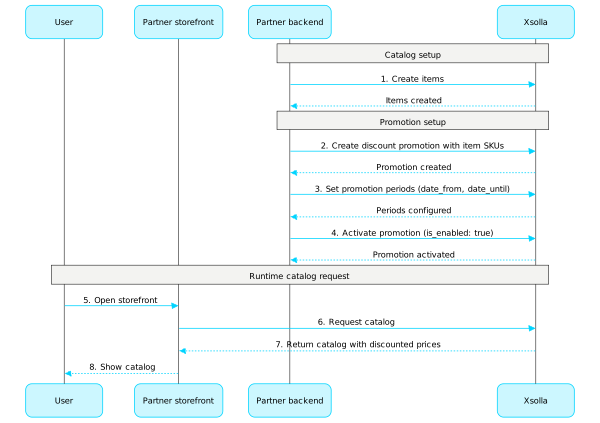
Example flow for configuring a discount promotion:

  1. Create items using the calls from the Admin subsection of the Virtual items and currency, Bundles, or Game keys groups.
  2. Create a promotion using the Create discount promotion for item call. In the items array, pass the necessary item SKUs.
  3. Set up promotion validity periods. To do this, call the Create discount promotion for item or Update item promotion methods, and pass the promotion_periods field as an array of objects where date_from defines the start, and date_until defines the end date of the validity period.
  4. Activate a promotion using the Update item promotion call. Pass the "is_enabled": true parameter.
  5. To get information about item prices, including discounted prices, call the client API methods for getting an item catalog from the Common > Catalog, Virtual Items and Currency > Catalog, and Bundles > Catalog subsections.

Promotion configuration example

Refer to our documentation for detailed information about configuring promotions:

Common API calls

You can call API methods from this subsection to manage different types of promotions.

操作

优惠券

Call API methods from this subsection to configure and manage coupon promotions.

Note

Refer to our documentation for detailed information about coupons.

操作

促销码

Call API methods from this subsection to configure and manage promo code promotions.

Note

Refer to our documentation for detailed information about promo codes.

操作

获取促销码奖励Client-side

请求

Gets promo code rewards by its code. Can be used to allow users to choose one of many items as a bonus. The usual case is choosing a DRM if the promo code contains a game as a bonus (type=unit).

Note

This API call uses a user JWT for authorization.

Include the token in the Authorization header in the following format: Bearer <user_JWT>. For more information about user JWT, see the Security block for this call.

安全
XsollaLoginUserJWT
路径
project_idinteger必需

Project ID. You can find this parameter in your Publisher Account next to the project name and in the browser address bar when working with a project. The URL has the following format: https://publisher.xsolla.com/<merchant_id>/projects/<project_id>.

示例: 44056
promocode_codestring[ 1 .. 128 ] characters必需

区分大小写的唯一券码。包含字母和数字。

示例: SO6rew99j9
curl -i -X GET \
  https://store.xsolla.com/api/v2/project/44056/promocode/code/SO6rew99j9/rewards \
  -H 'Authorization: Bearer <YOUR_JWT_HERE>'

响应

已成功接收促销码奖励列表。

正文application/json
bonusArray of objects(Promotions_200-promo-code-bonus-reward)
bonus[].​itemobject
bonus[].​item.​descriptionstring

商品描述。

示例: "Game description"
bonus[].​item.​image_urlstring

图像URL。

示例: "https://cdn.xsolla.net/img/misc/images/b79342cdf24f0f8557b63c87e8326e62.png"
bonus[].​item.​namestring

商品名称。

示例: "Game name"
bonus[].​item.​skustring

唯一商品ID。 SKU只能包含大小写英文字母和数字字符、句点、破折号和下划线。

示例: "game_01"
bonus[].​item.​typestring

商品类型:virtual_good/virtual_currency/bundle/physical_good/unit

示例: "unit"
bonus[].​item.​unit_itemsArray of objects

如果商品具有单位类型,则它包含单位中的所有商品。大多数情况下,用户应该选择其中之一作为促销码奖励。

bonus[].​item.​unit_items[].​drm_namestring

DRM名称。

示例: "Steam"
bonus[].​item.​unit_items[].​drm_skustring

唯一DRM ID。 SKU只能包含大小写英文字母和数字字符、句点、破折号和下划线。

示例: "steam"
bonus[].​item.​unit_items[].​is_freeboolean(value-is_free)

该商品是否免费。

bonus[].​item.​unit_items[].​namestring

商品名称。

示例: "Game name"
bonus[].​item.​unit_items[].​skustring

唯一商品ID。 SKU只能包含大小写英文字母和数字字符、句点、破折号和下划线。

示例: "game_01"
bonus[].​item.​unit_items[].​typestring

商品类型:game_key

示例: "game_key"
bonus[].​quantitynumber

商品数量。

默认值 1
discountobject or null(Promotions_200-coupon-discount-reward)

百分比折扣。 购物车价格将按照此百分比打折,然后四舍五入到小数点后两位。

discount.​percentstring
示例: "10.00"
discounted_itemsArray of objects or null(Promotions_discounted_items)

通过促销码打折的商品列表。

discounted_items[].​discountobject必需
discounted_items[].​discount.​percentstring(Promotions_cart_item_discount)必需

百分比折扣。

购物车商品价格将按照此百分比打折, 然后四舍五入到小数点后两位。

discounted_items[].​skustring必需

物品 SKU。

默认值 "elven_shield"
is_selectableboolean

如果为true,则用户应在兑换促销码之前选择奖励。

响应
application/json
{ "bonus": [ {}, {} ], "discount": { "percent": "10.00" }, "discounted_items": [ {} ], "is_selectable": true }

请求

兑换促销码活动的促销码。 兑换促销码后,用户将获得免费商品和/或购物车和/或特定商品的价格折扣。

安全
AuthForCart
路径
project_idinteger必需

Project ID. You can find this parameter in your Publisher Account next to the project name and in the browser address bar when working with a project. The URL has the following format: https://publisher.xsolla.com/<merchant_id>/projects/<project_id>.

示例: 44056
正文application/json
cartobject or null
cart.​idstring必需

购物车ID。

默认值 "current"
coupon_codestring[ 1 .. 128 ] characters

唯一促销码代码。包含字母和数字。

默认值 "SUMMER2021"
示例: "SUMMER2021"
selected_unit_itemsobject(Promotions_selected_unit_items)

用户选择的奖励。 对象键是单位的SKU,值是单位中一个商品的SKU。

selected_unit_items.​property name*string附加属性
curl -i -X POST \
  https://store.xsolla.com/api/v2/project/44056/promocode/redeem \
  -H 'Authorization: Bearer <YOUR_TOKEN_HERE>' \
  -H 'Content-Type: application/json' \
  -d '{
    "cart": {
      "id": "current"
    },
    "coupon_code": "SUMMER2021",
    "selected_unit_items": {
      "game_1": "game_1_steam",
      "game_2": "game_2_playstation"
    }
  }'

响应

促销码已成功兑换。

正文application/json
cart_idstring

购物车ID。

示例: "cart_id"
is_freeboolean(value-is_free)

该商品是否免费。

itemsArray of objects
示例: [{"attributes":[],"can_be_bought":true,"description":"Take it, take it all! All of Xsolla's riches in one Mega Booster.","groups":[{"external_id":"powerups","name":"Power Ups"}],"image_url":"https://cdn.xsolla.net/img/misc/images/e9f2f4a634bc96ea03b5d5ceadd7c55f.png","is_free":false,"limits":{"per_user":{"available":3,"recurrent_schedule":{"interval_type":"weekly","reset_next_date":1746057600},"total":5}},"name":"Xsolla Booster Mega","periods":[{"date_from":"2020-08-11T10:00:00+03:00","date_until":"2020-08-11T20:00:00+03:00"}],"price":{"amount":"50.0000000000000000","amount_without_discount":"100.0000000000000000","currency":"USD"},"promotions":[{"bonus":[{"image_url":"https://cdn.xsolla.net/img/misc/images/2fc5c491a47413a8e8000447889093c2.png","name":"Xsolla Minigun","quantity":1,"sku":"com.xsolla.minigun_1","type":"virtual_good"}],"date_end":"2026-04-15T16:16:00+03:00","date_start":"2020-04-15T16:16:00+03:00","discount":{"percent":"50.00"},"name":"Bonus promotion"}],"quantity":123,"sku":"com.xsolla.booster_mega_1","type":"virtual_good","virtual_item_type":"consumable","virtual_prices":[],"vp_rewards":[{"amount":130,"image_url":"https://cdn3.xsolla.com/img/misc/images/54c0cf9d345817cdacfdde198db178e0.jpg","is_clan":false,"item_id":175232,"name":"Value point","sku":"com.xsolla.value_point_1"},{"amount":50,"image_url":"https://cdn3.xsolla.com/img/misc/images/54c0cf9d345817cdacfdde198db178e0.jpg","is_clan":true,"item_id":186321,"name":"Clan Reward VP 1","sku":"com.xsolla.clan_value_point_1"}]}]
items[].​can_be_boughtboolean(Can_be_bought)

如为true,则用户可以购买商品。

items[].​descriptionstring
items[].​groupsArray of objects
items[].​groups[].​external_idstring
items[].​groups[].​namestring
items[].​image_urlstring
items[].​is_freeboolean(value-is_free)

该商品是否免费。

items[].​limitsobject or null(Catalog_item_limits)

商品限制。

items[].​limits.​per_itemobject or null

商品的购买限制。

items[].​limits.​per_item.​availableinteger

所有用户可购买的剩余商品数量。

示例: 3
items[].​limits.​per_item.​totalinteger

所有用户可购买的最大商品数量。

示例: 5
items[].​limits.​per_userobject or null

一个用户的购买数量限制。

items[].​limits.​per_user.​availableinteger

当前用户可购买的剩余商品数量。

示例: 3
items[].​limits.​per_user.​limit_exceeded_visibilitystring(limit_exceeded_visibility)

Determines the visibility of the item in the catalog after the purchase limit is reached, until the next limit reset.

Applies to items for which recurring limit resets are configured in the recurrent_schedule array.

If limit resets are not configured, the item doesn't appear in the catalog after the purchase limit is reached, regardless of the limit_exceeded_visibility value.

Possible values:

  • show — The item is returned in catalog retrieval API calls after the purchase limit is reached. In client-side catalog retrieval API calls, once the limit is reached, the item is returned with the can_be_bought: false flag. The next reset date is returned in reset_next_date.
  • hide — The item is not returned in catalog retrieval API calls after the purchase limit is reached, until the limit is reset.
枚举"show""hide"
items[].​limits.​per_user.​recurrent_schedule(object or null)(catalog_recurrent_schedule_client_response)
One of:

用户的商品限制循环刷新周期。

object or null
items[].​limits.​per_user.​totalinteger

单个用户可购买的最大商品数量。

示例: 5
items[].​namestring or null
items[].​periodsArray of objects or null(item-periods)

商品促销时间段。

items[].​periods[].​date_fromstring(date-time)

指定商品促销开始的日期。

示例: "2020-08-11T10:00:00+03:00"
items[].​periods[].​date_untilstring or null(date-time)

指定商品停止促销的日期。可以为null

示例: "2020-08-11T20:00:00+03:00"
items[].​promotionsArray of objects(Catalog_item_promotions)

应用于购物车中指定商品的促销活动。仅在以下情况下返回该数组:

  • 为某商品配置了折扣促销活动。

  • 应用了对所选商品提供折扣设置的促销码。

如果未应用任何商品级促销活动,则返回空数组。

items[].​promotions[].​bonusArray of objects
items[].​promotions[].​bonus[].​bundle_typestring

奖励捆绑包商品类型。仅适用于bundle奖励品类型。

枚举"standard""virtual_currency_package"
items[].​promotions[].​bonus[].​image_urlstring

奖励商品图片URL。不适用于physical_good奖励品类型。

items[].​promotions[].​bonus[].​namestring

奖励品名称。不适用于physical_good奖励品类型。

items[].​promotions[].​bonus[].​quantityinteger
items[].​promotions[].​bonus[].​skustring
items[].​promotions[].​bonus[].​typestring

奖励品类型。

枚举"virtual_good""virtual_currency""bundle""physical_good""game_key""nft"
items[].​promotions[].​date_endstring or null(date-time)
items[].​promotions[].​date_startstring or null(date-time)
items[].​promotions[].​discountobject or null
items[].​promotions[].​discount.​percentstring or null
items[].​promotions[].​discount.​valuestring or null
items[].​promotions[].​limitsobject
items[].​promotions[].​limits.​per_userobject
items[].​promotions[].​limits.​per_user.​availableinteger
items[].​promotions[].​limits.​per_user.​totalinteger
items[].​promotions[].​namestring
items[].​quantityinteger
items[].​skustring
items[].​typestring
items[].​vp_rewardsArray of objects(client-item-value-point-reward)

奖励积分商品奖励。

items[].​vp_rewards[].​amountinteger(value-point-amount)

奖励积分的数量。

items[].​vp_rewards[].​image_urlstring(Common_admin-image_url)

图像URL。

items[].​vp_rewards[].​is_clanboolean(is_clan)

该奖励积分是否用于公会奖励链。

items[].​vp_rewards[].​item_idinteger(item_id)

内部唯一物品ID。

items[].​vp_rewards[].​namestring(value-point-name)

奖励积分名称。

items[].​vp_rewards[].​skustring(value-point-sku)

唯一奖励积分ID。

priceobject or null

购物车价格。

示例: {"amount":"6150.0000000000000000","amount_without_discount":"6150.0000000000000000","currency":"USD"}
price.​amountstring
示例: "6150.0000000000000000"
price.​amount_without_discountstring
示例: "6150.0000000000000000"
price.​currencystring
示例: "USD"
rewardsobject(Promo_code_rewards)
rewards.​bonusArray of objects(Promotions_200-promo-code-bonus-reward)
rewards.​bonus[].​itemobject
rewards.​bonus[].​item.​descriptionstring

商品描述。

示例: "Game description"
rewards.​bonus[].​item.​image_urlstring

图像URL。

示例: "https://cdn.xsolla.net/img/misc/images/b79342cdf24f0f8557b63c87e8326e62.png"
rewards.​bonus[].​item.​namestring

商品名称。

示例: "Game name"
rewards.​bonus[].​item.​skustring

唯一商品ID。 SKU只能包含大小写英文字母和数字字符、句点、破折号和下划线。

示例: "game_01"
rewards.​bonus[].​item.​typestring

商品类型:virtual_good/virtual_currency/bundle/physical_good/unit

示例: "unit"
rewards.​bonus[].​item.​unit_itemsArray of objects

如果商品具有单位类型,则它包含单位中的所有商品。大多数情况下,用户应该选择其中之一作为促销码奖励。

rewards.​bonus[].​item.​unit_items[].​drm_namestring

DRM名称。

示例: "Steam"
rewards.​bonus[].​item.​unit_items[].​drm_skustring

唯一DRM ID。 SKU只能包含大小写英文字母和数字字符、句点、破折号和下划线。

示例: "steam"
rewards.​bonus[].​item.​unit_items[].​is_freeboolean(value-is_free)

该商品是否免费。

rewards.​bonus[].​item.​unit_items[].​namestring

商品名称。

示例: "Game name"
rewards.​bonus[].​item.​unit_items[].​skustring

唯一商品ID。 SKU只能包含大小写英文字母和数字字符、句点、破折号和下划线。

示例: "game_01"
rewards.​bonus[].​item.​unit_items[].​typestring

商品类型:game_key

示例: "game_key"
rewards.​bonus[].​quantitynumber

商品数量。

默认值 1
rewards.​discountobject or null(Promotions_200-coupon-discount-reward)

百分比折扣。 购物车价格将按照此百分比打折,然后四舍五入到小数点后两位。

rewards.​discount.​percentstring
示例: "10.00"
rewards.​discounted_itemsArray of objects or null(Promotions_discounted_items)

通过促销码打折的商品列表。

rewards.​discounted_items[].​discountobject必需
rewards.​discounted_items[].​discount.​percentstring(Promotions_cart_item_discount)必需

百分比折扣。

购物车商品价格将按照此百分比打折, 然后四舍五入到小数点后两位。

rewards.​discounted_items[].​skustring必需

物品 SKU。

默认值 "elven_shield"
rewards.​is_selectableboolean

如果为true,则用户应在兑换促销码之前选择奖励。

响应
application/json
{ "cart_id": "cart_id", "is_free": false, "items": [ {}, {} ], "price": { "amount": "6150.0000000000000000", "amount_without_discount": "12300.0000000000000000", "currency": "USD" }, "rewards": { "bonus": [], "discount": {}, "discounted_items": [], "is_selectable": false } }

移除购物车的促销码Client-side

请求

移除购物车的促销码。 删除促销码后,将重新计算购物车中所有商品的总价,去掉促销码提供的奖励和折扣。

安全
AuthForCart
路径
project_idinteger必需

Project ID. You can find this parameter in your Publisher Account next to the project name and in the browser address bar when working with a project. The URL has the following format: https://publisher.xsolla.com/<merchant_id>/projects/<project_id>.

示例: 44056
正文application/json
cartobject or null
cart.​idstring必需

购物车ID。

默认值 "current"
curl -i -X PUT \
  https://store.xsolla.com/api/v2/project/44056/promocode/remove \
  -H 'Authorization: Bearer <YOUR_TOKEN_HERE>' \
  -H 'Content-Type: application/json' \
  -d '{
    "cart": {
      "id": "current"
    }
  }'

响应

促销码已成功取消。

正文application/json
cart_idstring

购物车ID。

示例: "cart_id"
is_freeboolean(value-is_free)

该商品是否免费。

itemsArray of objects
示例: [{"attributes":[],"can_be_bought":true,"description":"Take it, take it all! All of Xsolla's riches in one Mega Booster.","groups":[{"external_id":"powerups","name":"Power Ups"}],"image_url":"https://cdn.xsolla.net/img/misc/images/e9f2f4a634bc96ea03b5d5ceadd7c55f.png","is_free":false,"limits":{"per_user":{"available":3,"recurrent_schedule":{"interval_type":"weekly","reset_next_date":1746057600},"total":5}},"name":"Xsolla Booster Mega","periods":[{"date_from":"2020-08-11T10:00:00+03:00","date_until":"2020-08-11T20:00:00+03:00"}],"price":{"amount":"50.0000000000000000","amount_without_discount":"100.0000000000000000","currency":"USD"},"promotions":[{"bonus":[{"image_url":"https://cdn.xsolla.net/img/misc/images/2fc5c491a47413a8e8000447889093c2.png","name":"Xsolla Minigun","quantity":1,"sku":"com.xsolla.minigun_1","type":"virtual_good"}],"date_end":"2026-04-15T16:16:00+03:00","date_start":"2020-04-15T16:16:00+03:00","discount":{"percent":"50.00"},"name":"Bonus promotion"}],"quantity":123,"sku":"com.xsolla.booster_mega_1","type":"virtual_good","virtual_item_type":"consumable","virtual_prices":[],"vp_rewards":[{"amount":130,"image_url":"https://cdn3.xsolla.com/img/misc/images/54c0cf9d345817cdacfdde198db178e0.jpg","item_id":175232,"name":"Value point","sku":"com.xsolla.value_point_1"},{"amount":50,"image_url":"https://cdn3.xsolla.com/img/misc/images/54c0cf9d345817cdacfdde198db178e0.jpg","is_clan":true,"item_id":186321,"name":"Clan Reward VP 1","sku":"com.xsolla.clan_value_point_1"}]}]
items[].​attributesArray of objects(client-attributes)

与商品对应的属性及其值的列表。可用于目录筛选。

items[].​attributes[].​external_idstring(admin-attribute-external_id)[ 1 .. 255 ] characters^[a-zA-Z0-9-_]+$

唯一属性ID。 external_id只能包含大小写英文字母和数字字符、破折号和下划线。

items[].​attributes[].​namestring

属性名称。

示例: "Genre"
items[].​attributes[].​valuesArray of objects
items[].​attributes[].​values[].​external_idstring(value-external_id)[ 1 .. 255 ] characters^[-_.\d\w]+$

属性的唯一值ID。 external_id只能包含小写英文字母和数字字符、破折号和下划线。

items[].​attributes[].​values[].​valuestring

属性值。

示例: "Strategy"
items[].​can_be_boughtboolean(Can_be_bought)

如为true,则用户可以购买商品。

items[].​descriptionstring
items[].​groupsArray of objects
items[].​groups[].​external_idstring
items[].​groups[].​namestring
items[].​image_urlstring
items[].​is_freeboolean(value-is_free)

该商品是否免费。

items[].​limitsobject or null(Catalog_item_limits)

商品限制。

items[].​limits.​per_itemobject or null

商品的购买限制。

items[].​limits.​per_item.​availableinteger

所有用户可购买的剩余商品数量。

示例: 3
items[].​limits.​per_item.​totalinteger

所有用户可购买的最大商品数量。

示例: 5
items[].​limits.​per_userobject or null

一个用户的购买数量限制。

items[].​limits.​per_user.​availableinteger

当前用户可购买的剩余商品数量。

示例: 3
items[].​limits.​per_user.​limit_exceeded_visibilitystring(limit_exceeded_visibility)

Determines the visibility of the item in the catalog after the purchase limit is reached, until the next limit reset.

Applies to items for which recurring limit resets are configured in the recurrent_schedule array.

If limit resets are not configured, the item doesn't appear in the catalog after the purchase limit is reached, regardless of the limit_exceeded_visibility value.

Possible values:

  • show — The item is returned in catalog retrieval API calls after the purchase limit is reached. In client-side catalog retrieval API calls, once the limit is reached, the item is returned with the can_be_bought: false flag. The next reset date is returned in reset_next_date.
  • hide — The item is not returned in catalog retrieval API calls after the purchase limit is reached, until the limit is reset.
枚举"show""hide"
items[].​limits.​per_user.​recurrent_schedule(object or null)(catalog_recurrent_schedule_client_response)
One of:

用户的商品限制循环刷新周期。

object or null
items[].​limits.​per_user.​totalinteger

单个用户可购买的最大商品数量。

示例: 5
items[].​namestring or null
items[].​periodsArray of objects or null(item-periods)

商品促销时间段。

items[].​periods[].​date_fromstring(date-time)

指定商品促销开始的日期。

示例: "2020-08-11T10:00:00+03:00"
items[].​periods[].​date_untilstring or null(date-time)

指定商品停止促销的日期。可以为null

示例: "2020-08-11T20:00:00+03:00"
items[].​priceobject or null

商品价格。

items[].​price.​amountstring

折扣后的商品价格。

示例: "2.9900"
items[].​price.​amount_without_discountstring

商品价格。

示例: "2.9900"
items[].​price.​currencystring

商品价格货币。每ISO 4217

示例: "USD"
items[].​promotionsArray of objects(Catalog_item_promotions)

应用于购物车中指定商品的促销活动。仅在以下情况下返回该数组:

  • 为某商品配置了折扣促销活动。

  • 应用了对所选商品提供折扣设置的促销码。

如果未应用任何商品级促销活动,则返回空数组。

items[].​promotions[].​bonusArray of objects
items[].​promotions[].​bonus[].​bundle_typestring

奖励捆绑包商品类型。仅适用于bundle奖励品类型。

枚举"standard""virtual_currency_package"
items[].​promotions[].​bonus[].​image_urlstring

奖励商品图片URL。不适用于physical_good奖励品类型。

items[].​promotions[].​bonus[].​namestring

奖励品名称。不适用于physical_good奖励品类型。

items[].​promotions[].​bonus[].​quantityinteger
items[].​promotions[].​bonus[].​skustring
items[].​promotions[].​bonus[].​typestring

奖励品类型。

枚举"virtual_good""virtual_currency""bundle""physical_good""game_key""nft"
items[].​promotions[].​date_endstring or null(date-time)
items[].​promotions[].​date_startstring or null(date-time)
items[].​promotions[].​discountobject or null
items[].​promotions[].​discount.​percentstring or null
items[].​promotions[].​discount.​valuestring or null
items[].​promotions[].​limitsobject
items[].​promotions[].​limits.​per_userobject
items[].​promotions[].​limits.​per_user.​availableinteger
items[].​promotions[].​limits.​per_user.​totalinteger
items[].​promotions[].​namestring
items[].​quantityinteger
items[].​skustring
items[].​typestring
items[].​virtual_item_typestring

Type of virtual item.

Possible values:

  • consumable — An item that disappears from the inventory after use (e.g., ammo).
  • non_consumable — An item that stays in the inventory for an unlimited period of time.
  • non_renewing_subscription — Time-limited item that can represent access to services or content for a limited period of time.
枚举"consumable""non_consumable""non_renewing_subscription"
示例: "non-consumable"
items[].​virtual_pricesArray of arrays
items[].​vp_rewardsArray of objects(client-item-value-point-reward)

奖励积分商品奖励。

items[].​vp_rewards[].​amountinteger(value-point-amount)

奖励积分的数量。

items[].​vp_rewards[].​image_urlstring(Common_admin-image_url)

图像URL。

items[].​vp_rewards[].​is_clanboolean(is_clan)

该奖励积分是否用于公会奖励链。

items[].​vp_rewards[].​item_idinteger(item_id)

内部唯一物品ID。

items[].​vp_rewards[].​namestring(value-point-name)

奖励积分名称。

items[].​vp_rewards[].​skustring(value-point-sku)

唯一奖励积分ID。

priceobject or null

购物车价格。

示例: {"amount":"6150.0000000000000000","amount_without_discount":"6150.0000000000000000","currency":"USD"}
price.​amountstring
默认值 "50.0000000000000000"
示例: "6150.0000000000000000"
price.​amount_without_discountstring
默认值 "100.0000000000000000"
示例: "6150.0000000000000000"
price.​currencystring
默认值 "USD"
示例: "USD"
响应
application/json
{ "cart_id": "cart_id", "is_free": false, "items": [ {} ], "price": { "amount": "6150.0000000000000000", "amount_without_discount": "6150.0000000000000000", "currency": "USD" } }

特别目录优惠

Call API methods from this subsection to configure and manage unique catalog offers.

Note

Refer to our documentation for detailed information about unique offers.

操作

折扣

Call API methods from this subsection to configure and manage discount promotions.

Note

Refer to our documentation for detailed information about discounts.

操作

奖励

Call API methods from this subsection to configure and manage bonus promotions.

Note

Refer to our documentation for detailed information about bonuses.

操作

个性化目录

Personalization allows you to specify the conditions for displaying the item catalog and applying promotions only for specific authorized users. Conditions are defined based on user attributes and allow you to offer items and promotions that are most relevant to particular users.

The following personalization types are available:

  • Xsolla-side personalization. Personalization rules and logic are configured and stored on the Xsolla side. You pass user attributes, and Xsolla uses them to generate a personalized catalog.
  • Partner-side personalization. You configure personalization rules and logic on your side and send a final catalog payload for a specific user to Xsolla.
Note

You can use only one personalization type. To change it, follow the instructions.

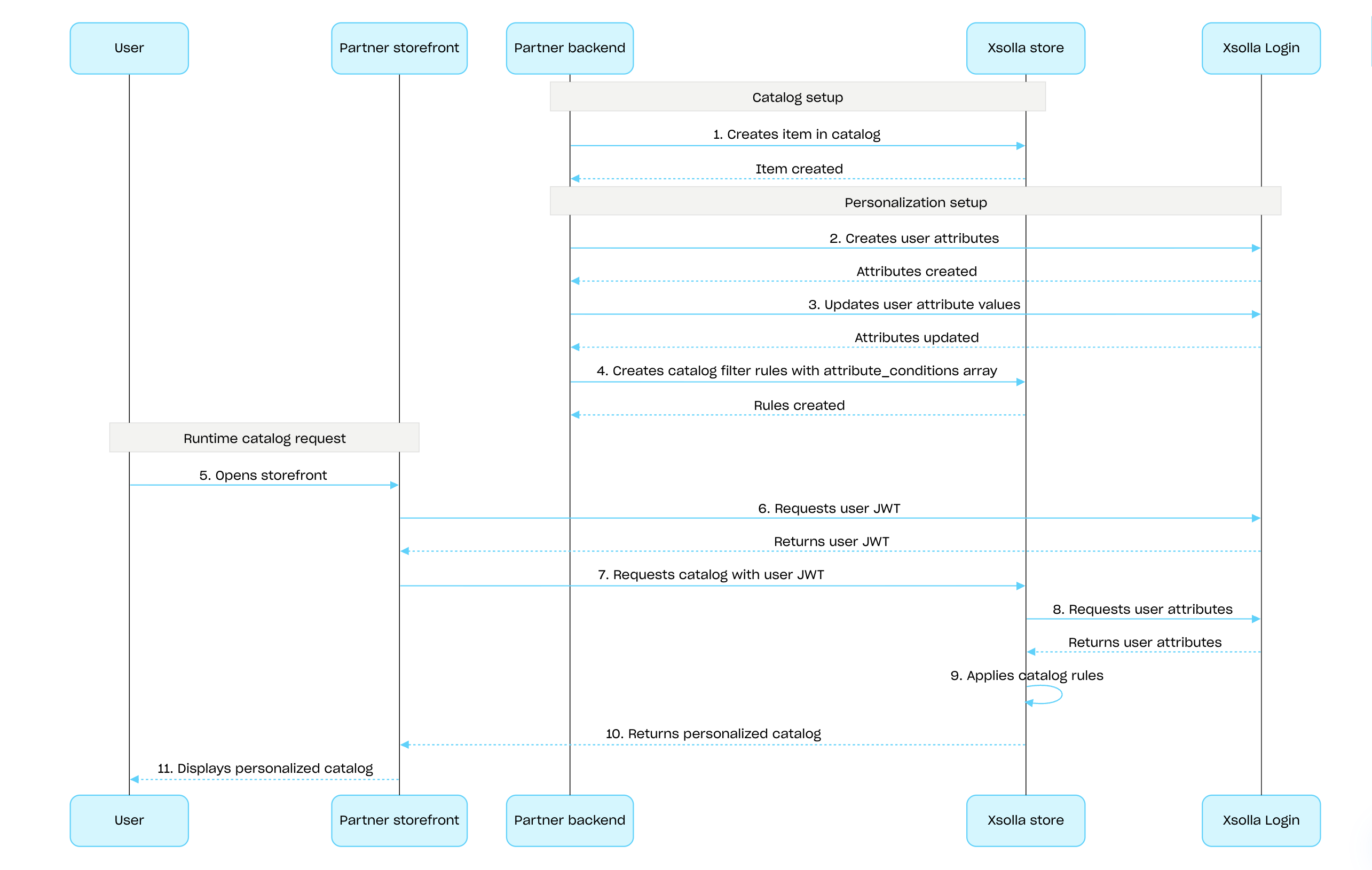
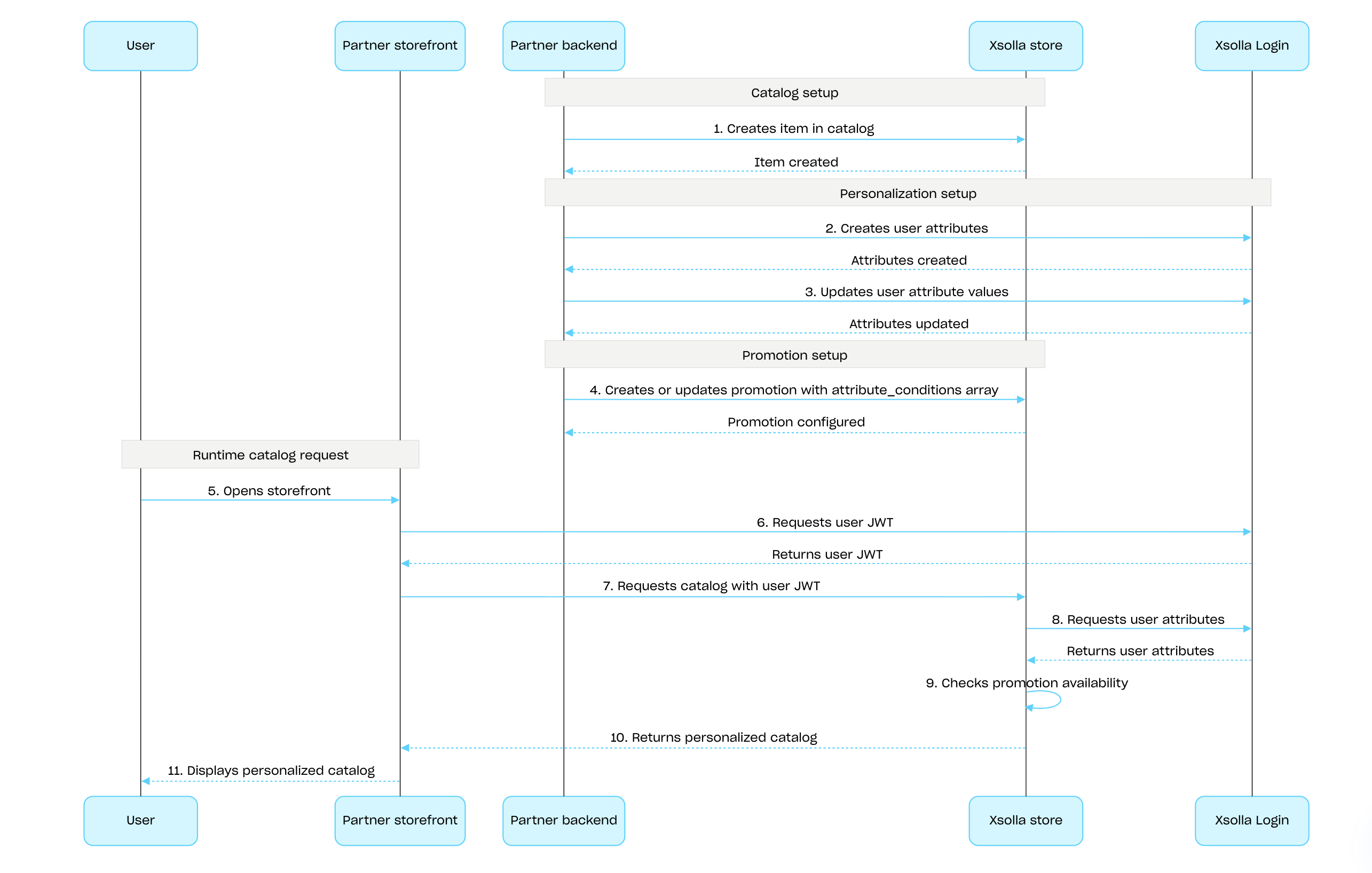
To configure personalization on the Xsolla side using the Xsolla API:

  1. Create items using the API calls from the Admin subsection of the Virtual items and currency, Bundles or Game keys groups.

  2. Set up user attributes using the Xsolla Login API and keep them synchronized by updating data in Xsolla whenever changes occur in your game.

  3. Configure personalization for items or promotions:

  4. Pass the user JWT with user attributes to the catalog retrieval API calls to receive a personalized catalog.

Sequence for configuring and applying Xsolla-side personalization for item catalog:

Personalization for item catalog

Sequence for configuring and applying Xsolla-side personalization for promotions:

Personalization for promotions

操作
操作
操作
操作
操作
操作
操作
操作
操作
操作
操作