Webhook (1.0)
Webhook是系统中发生的事件的通知。当特定事件发生时,艾克索拉会向您的应用程序发送HTTP请求,其中会传输事件数据。它通常是JSON格式的POST请求。
事件示例:
- 用户与商品目录交互
- 付款或取消订单
当发生设定事件时,艾克索拉会通过Webhook通知您的系统。然后,您可以执行以下操作:
- 补充用户余额
- 进行退款
- 向用户帐户发放或减除新商品
- 开始提供订阅
- 怀疑欺诈行为时封禁用户
支付处理Webhook工作流示例:
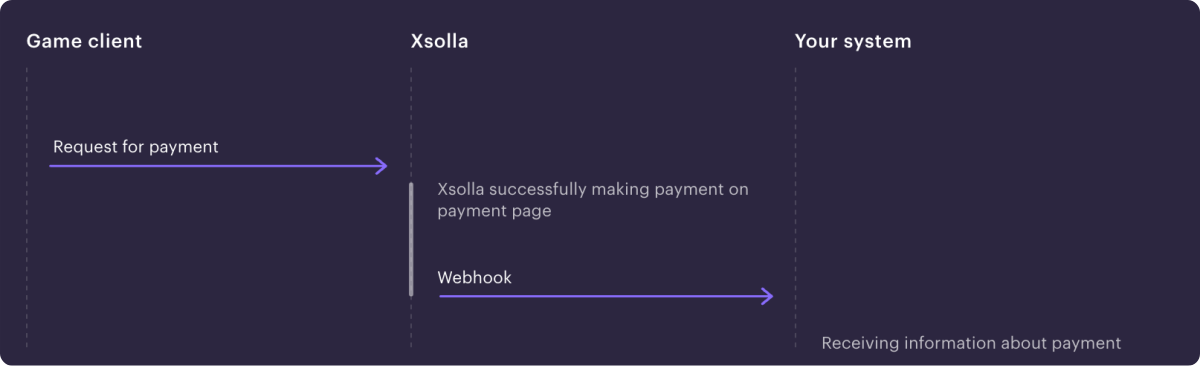
注:
根据所使用的解决方案及其集成类型,Webhook集和交互顺序可能与示例中的不同。
艾克索拉Webhook集成视频指南:
使用艾克索拉产品和解决方案时的Webhook设置:
| 产品/解决方案 | 必需/可选 | Webhook的用途是什么 |
|---|---|---|
| 付款 | 必需 |
|
| 商店 | 必需 |
|
| 游戏销售 | 可选 | 对于游戏密钥销售,用户验证和商品记入不是必需。如果想接收有关事件的信息(例如付款或订单取消),可以连接webhook。 如果连接Webhook,则必须处理所有传入的必需Webhook。 |
| 订阅 | 可选 | 接收有关创建、更新或取消订阅的信息。您也可以通过API请求信息。 |
| 网页商城 | 必需 |
|
| Digital Distribution Hub | 必需 |
请参阅文档,了解如何为Digital Distribution Hub设置Webhook。 |
| 登录管理器 | 可选 | 接收事件信息:
有关设置Webhook的详细信息,请参阅登录管理器文档。 |
Business Account is the primary tool for configuring Xsolla features, as well as for working with analytics and transactions.
Xsolla develops tools for different business categories. To simplify navigation, these tools are grouped into separate accounts by target audience:
注:
Publisher Account is a legacy tool.
If you use products and solutions that require working with webhooks, enable and test the webhooks in your account and set up their processing. When specific events occur, webhooks are sent sequentially. Therefore, if you do not process one of the webhooks, subsequent webhooks will not be sent. The list of required webhooks is presented below.
在艾克索拉侧已设置了2种Webhook发送选项,用于处理网站上的商品购买和退货——支付和交易数据信息以及已购商品信息可以分开发送,也可以合并为一个Webhook 发送。
在合并Webhook中接收信息:
If you registered in the account after January 22, 2025, you receive all the information in the Successful payment for order (order_paid) and Order cancellation (order_canceled) webhooks. In this case, you do not need to process the Payment (payment) and Refund (refund) webhooks.
在单独Webhook中接收信息:
If you registered in Publisher Account on or before January 22, 2025, you receive the following webhooks:
您需要处理所有收到的Webhook。如需切换到新的合并Webhook接收方式,请联系您的客户成功经理或发送邮件至[email protected]。
为确保游戏内商店和支付管理功能正常运行,必须实现主要Webhook的处理。
如果接收合并Webhook:
如果接收单独Webhook:
如果您的应用程序侧实现了商品目录个性化,请设置对合作伙伴侧的目录个性化Webhook的处理。
要自动管理订阅计划,需要实现主要Webhook的处理:
- 用户验证(
user_validation) — 在支付过程的不同阶段发送,以确保用户已在游戏中注册。 - 支付(
payment) — 在支付订单后发送,包含付款数据和交易详细信息。 - 创建了订阅(
create_subscription) — 支付Webhook已成功处理或用户购买了具有试用期的订阅时发送。它包含所购买的订阅 的详细信息和用户数据。使用该Webhook数据向用户添加订阅。 - 更新了订阅(
update_subscription) — 续订或更改订阅以及支付Webhook已成功 处理后发送。它包含所购买的订阅的详细信息和用户数据。使用该Webhook数据来延长用户的订阅或更改订阅参数。 - 退款(
refund) — 订单被取消后发送,包含取消的付款数据和交易详细信息。 - 取消了订阅(
cancel_subscription) — 退款Webhook已成功处理或订阅因其他原因被取消时发送。它包含有关订阅和用户数据的 信息。使用该Webhook数据扣除用户购买的订阅。
要启用接收Webhook:
- In the project in the account go to the Settings > Webhooks section.
- 在Webhook服务器字段中,指定要接收Webhook的服务器的URL,格式为
https://example.com。您还可以指定在测试Web hook的工具中找到的URL。
注:
请使用HTTPS协议传输数据,不支持HTTP协议。
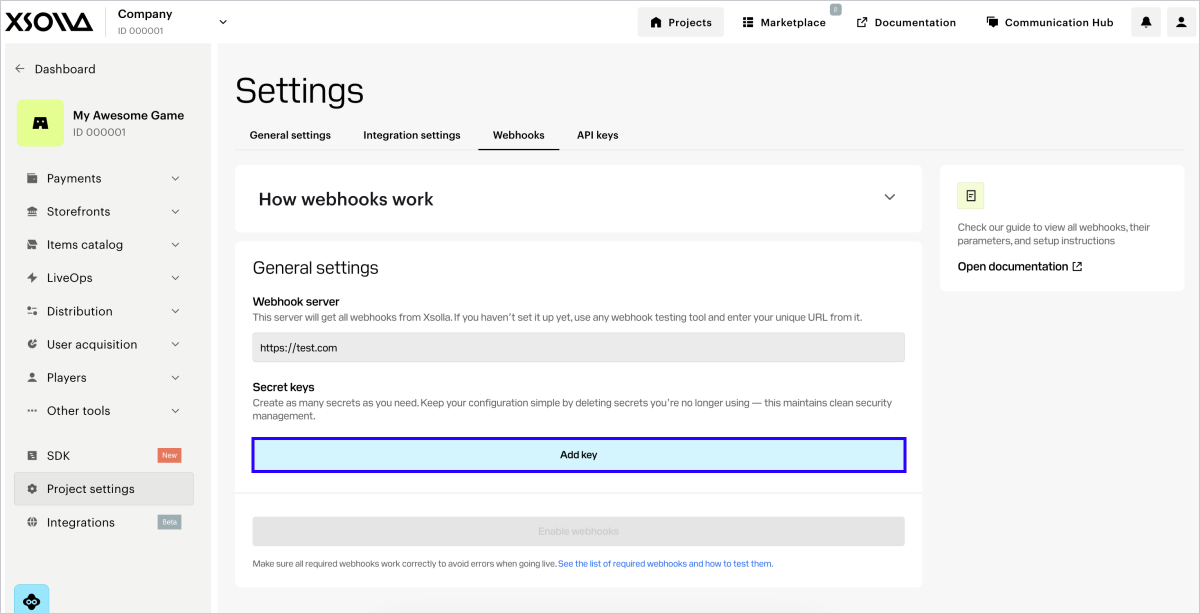
- 生成密钥:
- 在密钥部分,点击添加密钥。
- 在弹出的窗口中,输入密钥名称,便于您在列表中识别该密钥。
- 点击 创建密钥。
- 点击复制密钥,并在己侧保存创建的密钥。
- 点击完成。
- 确认您已保存密钥,然后点击是,关闭。
Notice
Key recommendations:
- Save the generated secret key on your side. You can view the key in the account only once when it is created.
- Don’t share your secret key with anyone.
- The secret key must be stored on your server and never in binaries or on the front end.
- 点击启用Webhook。
注:
要测试Webhook,可以选择任何专用网站(例如webhook.site)或平台(例如ngrok)。
Notice
You can’t simultaneously send webhooks to different URLs. What you can do in the account is specify a URL for testing first, and then replace it with the real one.
要禁用接收Webhook:
- In the project in the account, go to the Settings > Webhooks section.
- 单击禁用Webhook。
定期更新密钥可以提升集成安全性。您最多可以在项目中创建5个密钥,用于密钥轮换。操作步骤如下:
- In the Settings > Webhooks section, click Add key.
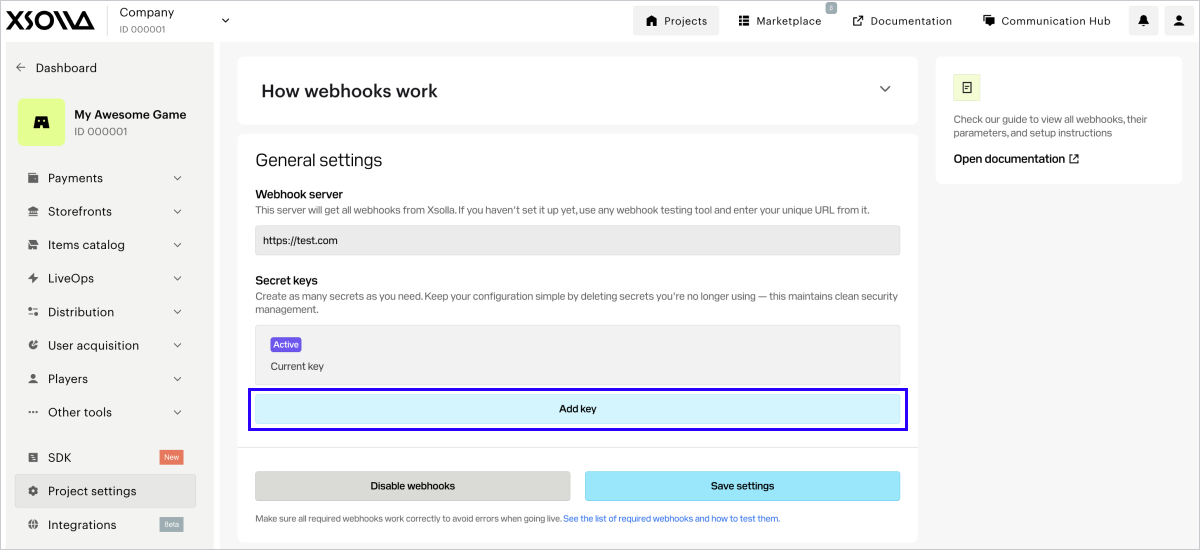
- 在弹出的窗口中,输入密钥名称,便于您在列表中识别该密钥。
- 点击创建密钥。
- 点击复制密钥,并在己侧保存创建的密钥。
- 点击完成。
- 确认您已保存密钥,然后点击是,关闭。
Notice
Key recommendations:
- Save the generated secret key on your side. You can view the key in the account only once when it is created.
- Don’t share your secret key with anyone.
- The secret key must be stored on your server and never in binaries or on the front end.
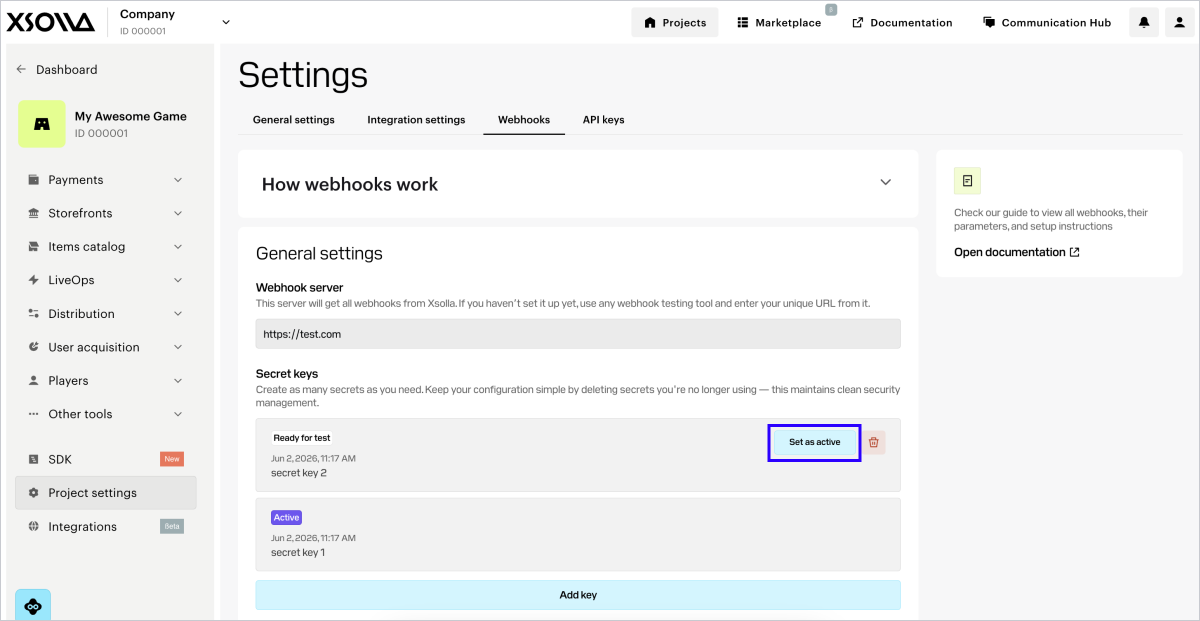
每个项目只能有一个有效密钥。如需更换,请在另一个密钥所在行点击设为有效,并确认操作。成功迁移到新密钥后,建议删除已停用的密钥。
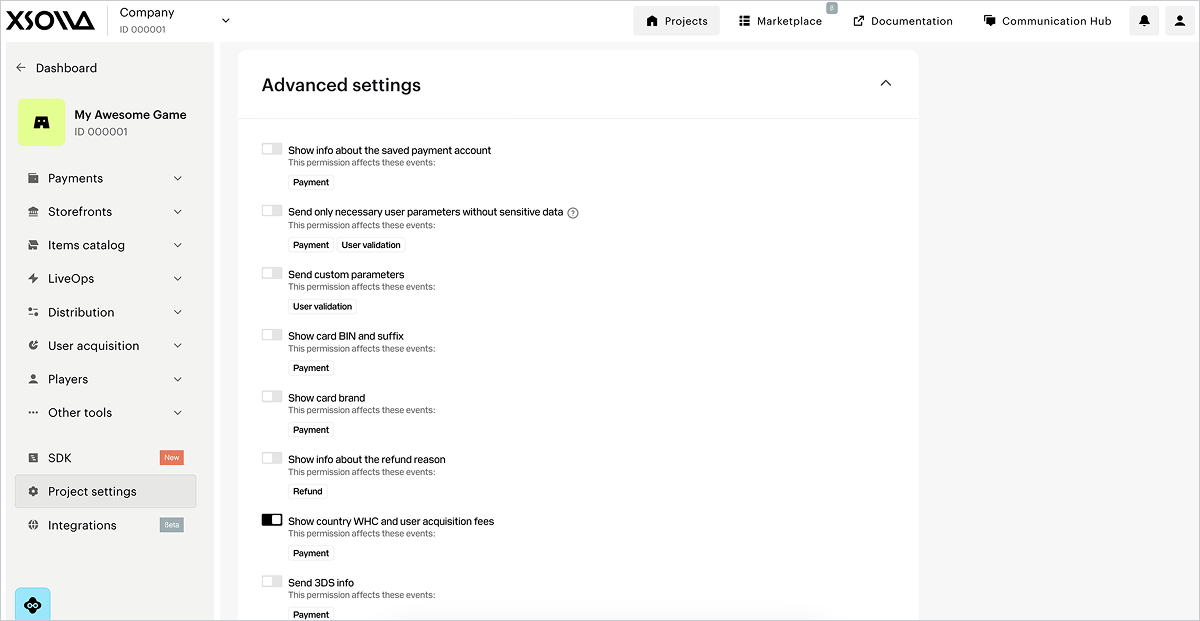
For the webhooks in the Payments and Store section, advanced settings are available. They will automatically appear under the General settings block after you click the Enable webhooks button.
注意
如果未显示高级设置,请确保已在常规设置中连接Webhook接收,且您位于测试 > 付款和商店选项卡中。
在此部分,您可以设置在Webhook中接收额外信息。要实现此目的,请将相应开关设为启用状态。每个权限的行都会标明设置变更将影响哪些Webhook。
| 开关 | 描述 |
|---|---|
| 显示已保存支付帐户的信息(仅当您在2025年1月22日或之前注册发布商帐户并接收单独Webhook时显示)。 | 有关保存的支付方式的信息在payment_account自定义对象中传递。 |
| 显示通过已保存支付方式进行的交易信息。 | 信息在Webhook的以下自定义参数中传递:
|
向Webhook添加order对象(仅当您在2025年1月22日或之前注册发布商帐户并接收单独Webhook时显示)。 | 有关订单的信息在支付Webhook的order对象中传递。 |
| 仅发送必要的用户参数,不包含敏感数据。 | Webhook中仅传递用户的以下信息:
|
| 发送自定义参数。 | 自定义令牌参数的信息在webhook中传递。 |
| 显示银行卡BIN和后缀码。 | Webhook中传递以下银行卡号的信息:
|
| 显示银行卡品牌。 | 用于付款的银行卡的品牌。例如,Mastercard或Visa。 |
| 显示退款原因信息。 | 退款原因的详细信息。 |
| 显示国家/地区预扣税和用户获取费。 | payment_details.country_wht和payment_details.user_acquisition_fee对象将通过Webhook发送。此开关默认开启。 |
| 发送3DS信息。 | 包含3-D Secure验证数据的cards对象将通过Webhook发送。 |
测试Webhook有助于确保己侧和艾克索拉侧的项目设置都正确。
If webhooks are set up successfully, a webhooks testing section is displayed below the webhooks setup section.
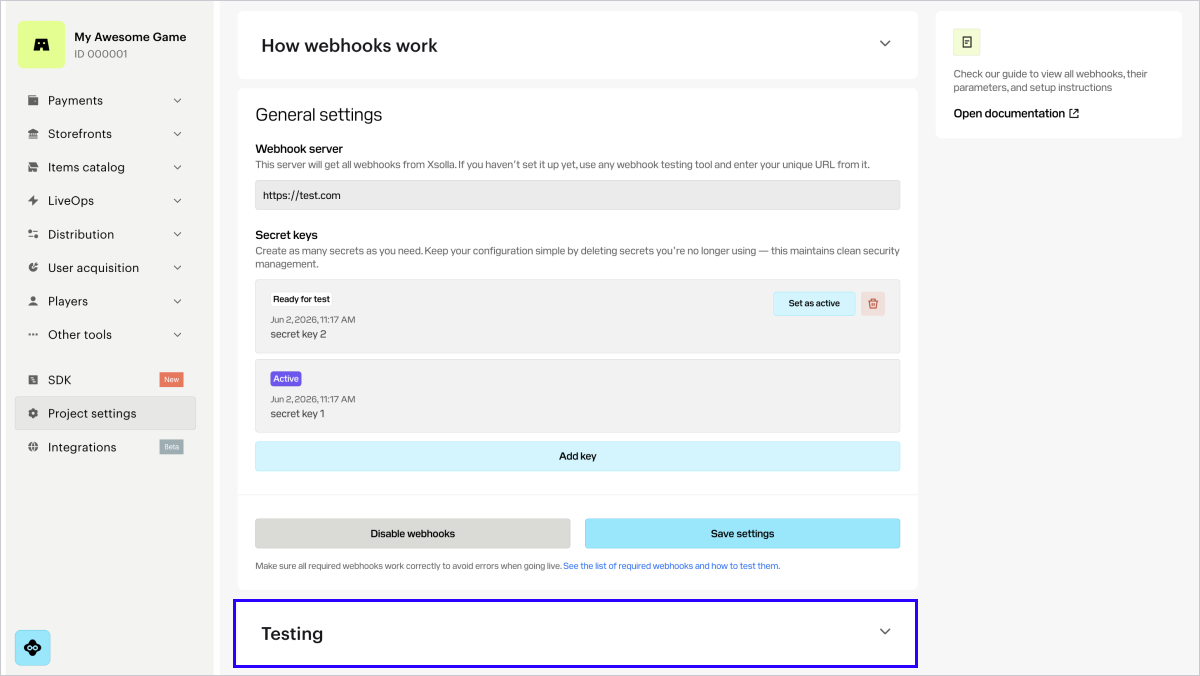
The testing section in the account varies depending on the webhook receiving option.
If you registered in the account after January 22, 2025, you receive combined webhooks:
如果您在2025年1月22日或之前注册发布商帐户,将接收单独Webhook:
注:
如果测试部分出现测试未通过的警告,请在您的Webhook侦听器中检查Webhook响应设置。测试结果中指出了测试错误的原因。
示例:
您使用专门的网站webhook.site来进行测试。
测试对无效签名的响应部分显示了一个错误。
发生这种情况是因为艾克索拉发送了带有错误签名的Webhook,并期望您的处理程序用一个指出INVALID_SIGNATURE错误代码的4xx HTTP代码进行响应。
webhook.site对所有Webhook的响应中都发送一个200 HTTP代码,包括签名不正确的Webhook。由于无法获取预期的4xxHTTP代码,因此测试结果报错。
下文将介绍合并Webhook使用场景的测试流程。
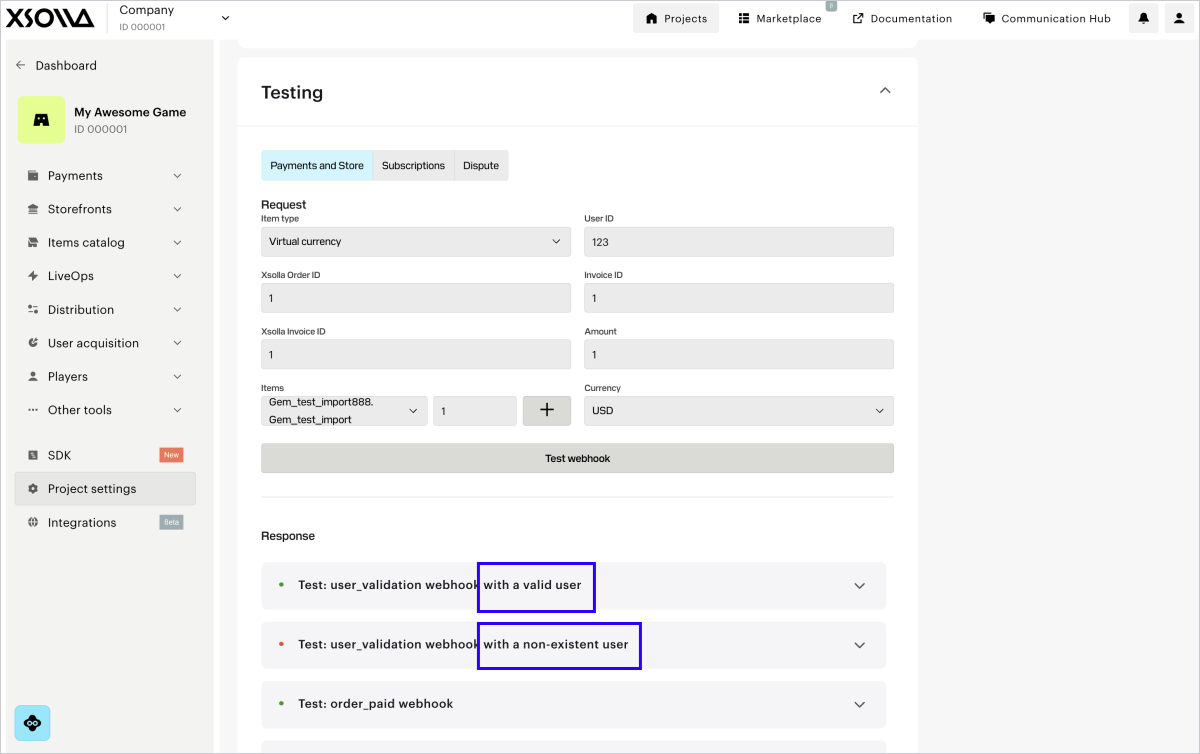
在付款和商店选项卡中,您可以测试以下Webhook:
要测试webhooks:
- 在Webhook测试部分,前往付款和商店选项卡。
- In the drop-down list, select the item type. If you haven’t set up this item type in the account yet, click the button to configure it. After creating the item, return to the webhook testing section and proceed to the next step.
- 填写必填字段:
- 用户ID — 测试时,可使用任意字母和数字组合。
- 在艾克索拉订单ID字段中输入任意值。
- 艾克索拉发票IDID — 艾克索拉侧的交易ID。测试时,可使用任意数字值。
- 发票ID — 您游戏侧的交易ID。测试时,可使用任意字母和数字组合。该参数不是成功支付的必填参数,但您可以传递该参数,将己侧的交易ID与艾克索拉侧的交易ID关联。
- 金额 — 支付金额。测试时,可使用任意数字值。
- 货币 — 从下拉列表中选择货币。
- 从下拉列表中选择商品SKU并指定金额。如需选择多个同类型商品,请点击**+**,并在新行中添加。
- 点击测试Webhook。
If the Use public user ID box is checked in your account in the **Settings
Integration settings** section, the User search webhook will also be sent to your webhook server URL and the testing result will be displayed.
对于每个Webhook,您需要配置处理两种情况:成功的情况和出现错误的情况。
Note
To test webhooks, you should have at least one subscription plan created in the account in the Items catalog > Subscriptions section.
在订阅选项卡中,您可以测试以下Webhook:
注意
您可以在集成指南中查看其他订阅管理场景的测试详情。
要测试webhooks:
- 在测试部分,前往订阅选项卡。
- 填写必填字段:
- 用户ID — 测试时,可使用任意字母和数字组合。
- 艾克索拉发票IDID — 艾克索拉侧的交易ID。测试时,可使用任意数字值。
- Public user ID — ID known to a user, e.g., an email or nickname. This field is displayed if you checked the Use public user ID box in your account in the Settings > Integration settings section.
- 金额 — 支付金额。测试时,可使用任意数字值。
- 货币 — 从下拉列表中选择货币。
- 计划ID — 订阅计划。从下拉列表中选择一个计划。
- 订阅产品 — 从下拉列表中选择一个产品(可选)。如果您的项目中已设置产品,则会显示该列表。
- 发票ID — 您游戏侧的交易ID。测试时,可使用任意字母和数字组合。该参数不是成功支付的必填参数,但您可以传递该参数,将己侧的交易ID与艾克索拉侧的交易ID关联。
- 试用期。如需测试购买无试用期的订阅,或测试 订阅续订 ,请指定值0。
- 点击测试。
您将在指定URL接收已填充数据的Webhook。每个Webhook在成功场景和错误场景下的测试结果都会显示在测试按钮下方。
注:
您可以使用Pay Station PHP SDK 库,它包含用于处理Webhook的现成类。
在您的应用程序侧,实现从以下IP地址接收Webhook:
185.30.20.0/24185.30.21.0/24185.30.22.0/24185.30.23.0/2434.102.38.17834.94.43.20735.236.73.23434.94.69.4434.102.22.197
如集成了登录管理器 产品,请另外添加对来自以下IP地址的Webhook的处理:
34.94.0.8534.94.14.9534.94.25.3334.94.115.18534.94.154.2634.94.173.13234.102.48.3035.235.99.24835.236.32.13135.236.35.10035.236.117.164
限制:
- 应用程序的数据库中不应存在具有相同ID的多个成功交易。
- 如果Webhook侦听器收到的Webhook的ID已经存在于数据库中,则需返回之前处理该交易的结果。不建议向用户发放重复购买及在数据库中创建重复记录。
为确保数据传输安全,您必须验证Webhook确实来自艾克索拉服务器,且在传输过程中未被篡改。为此,需要基于请求正文负载生成您自己的签名,并将其与传入请求的authorization标头中提供的签名进行比较。如果签名匹配,则Webhook是真实的,可以安全处理。
验证步骤:
从Webhook请求的
authorization标头中检索签名。标头格式为Signature <signature_value>。检索JSON格式的Webhook请求正文。
注意
请完全按照接收到的JSON负载使用。不要解析或重新编码负载,因为这会改变 格式并导致签名验证失败。
生成您自己的签名进行比较:
- 通过将密钥附加到字符串末尾,将JSON负载与您项目的密钥连接起来。
- 对结果字符串应用SHA-1加密哈希函数。结果将是小写十六进制字符串。
将您生成的签名与
authorization标头中的签名进行比较。如果匹配,则Webhook是真实的。
以下是C#、C++、Go、PHP和Node.js语言的签名生成实现示例。
POST /your_uri HTTP/1.1
host: your.host
accept: application/json
content-type: application/json
content-length: 165
authorization: Signature 52eac2713985e212351610d008e7e14fae46f902
{
  "notification_type":"user_validation",
  "user":{
      "ip":"127.0.0.1",
      "phone":"18777976552",
      "email":"[email protected]",
      "id":1234567,
      "name":"Xsolla User",
      "country":"US"
  }
}curl -v 'https://your.hostname/your/uri' \
-X POST \
-H 'authorization: Signature 52eac2713985e212351610d008e7e14fae46f902' \
-d '{
"notification_type":
"user_validation",
"user":
{
"ip": "127.0.0.1",
"phone": "18777976552",
"email": "[email protected]",
"id": 1234567,
"name": "Xsolla User",
"country": "US"
}
}'注意
此代码示例兼容.NET Framework 4.0及更高版本,同时支持.NET Core和其他现代.NET版本。签名验证通过ConstantTimeEquals方法实现恒定时间比较,有效防止时序攻击。
using System;
using System.Security.Cryptography;
using System.Text;
public static class XsollaWebhookSignature
{
    public static string ComputeSha1(string jsonBody, string secretKey)
    {
        // Concatenation of the JSON from the request body and the project's secret key
        string dataToSign = jsonBody + secretKey;
        using (SHA1 sha1 = SHA1.Create())
        {
            byte[] hashBytes = sha1.ComputeHash(Encoding.UTF8.GetBytes(dataToSign));
            // Convert hash bytes to lowercase hexadecimal string
            var hexString = new StringBuilder(hashBytes.Length * 2);
            foreach (byte b in hashBytes)
            {
                hexString.Append(b.ToString("x2"));
            }
            return hexString.ToString();
        }
    }
    public static bool VerifySignature(string jsonBody, string secretKey, string receivedSignature)
    {
        string computedSignature = ComputeSha1(jsonBody, secretKey);
        string receivedSignatureLower = receivedSignature.ToLower();
        // Use constant-time comparison to prevent timing attacks
        return ConstantTimeEquals(computedSignature, receivedSignatureLower);
    }
    private static bool ConstantTimeEquals(string a, string b)
    {
        if (a.Length != b.Length)
        {
            return false;
        }
        int result = 0;
        for (int i = 0; i < a.Length; i++)
        {
            result |= a[i] ^ b[i];
        }
        return result == 0;
    }
}注意
使用 Convert.ToHexString方法需要.NET 5.0或更高版本。
CryptographicOperations.FixedTimeEquals方法替代ConstantTimeEquals。// For .NET 5.0 and later, you can use the more concise Convert.ToHexString method:
using System;
using System.Security.Cryptography;
using System.Text;
public static class XsollaWebhookSignature
{
public static string ComputeSha1(string jsonBody, string secretKey)
{
string dataToSign = jsonBody + secretKey;
using var sha1 = SHA1.Create();
byte[] hashBytes = sha1.ComputeHash(Encoding.UTF8.GetBytes(dataToSign));
return Convert.ToHexString(hashBytes).ToLower();
}
public static bool VerifySignature(string jsonBody, string secretKey, string receivedSignature)
{
string computedSignature = ComputeSha1(jsonBody, secretKey);
string receivedSignatureLower = receivedSignature.ToLower();
// Use constant-time comparison to prevent timing attacks
return ConstantTimeEquals(computedSignature, receivedSignatureLower);
}
private static bool ConstantTimeEquals(string a, string b)
{
if (a.Length != b.Length)
{
return false;
}
int result = 0;
for (int i = 0; i < a.Length; i++)
{
result |= a[i] ^ b[i];
}
return result == 0;
}
}注意
若您使用.NET 7.0及更高版本,可选择使用CryptographicOperations.FixedTimeEquals方法。
// For .NET 7.0+, you can use the built-in CryptographicOperations.FixedTimeEquals:
using System.Security.Cryptography;
public static bool VerifySignature(string jsonBody, string secretKey, string receivedSignature)
{
    string computedSignature = ComputeSha1(jsonBody, secretKey);
    byte[] computedBytes = Encoding.UTF8.GetBytes(computedSignature);
    byte[] receivedBytes = Encoding.UTF8.GetBytes(receivedSignature.ToLower());
    return CryptographicOperations.FixedTimeEquals(computedBytes, receivedBytes);
}#include <string>
#include <sstream>
#include <iomanip>
#include <openssl/sha.h>
class XsollaWebhookSignature {
public:
static std::string computeSha1(const std::string& jsonBody, const std::string& secretKey) {
// Concatenation of the JSON from the request body and the project's secret key
std::string dataToSign = jsonBody + secretKey;
unsigned char digest[SHA_DIGEST_LENGTH];
// Create SHA1 hash
SHA1(reinterpret_cast<const unsigned char*>(dataToSign.c_str()),
dataToSign.length(), digest);
// Convert to lowercase hexadecimal string
std::ostringstream hexStream;
hexStream << std::hex << std::setfill('0');
for (int i = 0; i < SHA_DIGEST_LENGTH; ++i) {
hexStream << std::setw(2) << static_cast<unsigned int>(digest[i]);
}
return hexStream.str();
}
static bool verifySignature(const std::string& jsonBody, const std::string& secretKey, const std::string& receivedSignature) {
std::string computedSignature = computeSha1(jsonBody, secretKey);
// Timing-safe comparison
if (computedSignature.length() != receivedSignature.length()) {
return false;
}
volatile unsigned char result = 0;
for (size_t i = 0; i < computedSignature.length(); ++i) {
result |= (computedSignature[i] ^ receivedSignature[i]);
}
return result == 0;
}
};package main
import (
"crypto/sha1"
"crypto/subtle"
"encoding/hex"
"strings"
)
type XsollaWebhookSignature struct{}
func (x *XsollaWebhookSignature) ComputeSha1(jsonBody, secretKey string) string {
// Concatenation of the JSON from the request body and the project's secret key
dataToSign := jsonBody + secretKey
// Create SHA1 hash
h := sha1.New()
h.Write([]byte(dataToSign))
signature := h.Sum(nil)
// Convert to lowercase hexadecimal string
return strings.ToLower(hex.EncodeToString(signature))
}
func (x *XsollaWebhookSignature) VerifySignature(jsonBody, secretKey, receivedSignature string) bool {
computedSignature := x.ComputeSha1(jsonBody, secretKey)
receivedSignatureLower := strings.ToLower(receivedSignature)
// Use constant time comparison to prevent timing attacks
return subtle.ConstantTimeCompare([]byte(computedSignature), []byte(receivedSignatureLower)) == 1
}<?php
class XsollaWebhookSignature
{
/**
* Compute SHA1 signature from webhook JSON body and secret key
*
* @param string $jsonBody The raw JSON body from webhook
* @param string $secretKey The project's secret key
* @return string The lowercase SHA1 signature
*/
public static function computeSha1(string $jsonBody, string $secretKey): string
{
// Concatenation of the JSON from the request body and the project's secret key
$dataToSign = $jsonBody . $secretKey;
// Generate SHA1 signature
$signature = sha1($dataToSign);
return strtolower($signature);
}
/**
* Verify webhook signature using timing-safe comparison
*
* @param string $jsonBody The raw JSON body from webhook
* @param string $secretKey The project's secret key
* @param string $receivedSignature The signature from authorization header
* @return bool True if signature is valid, false otherwise
*/
public static function verifySignature(string $jsonBody, string $secretKey, string $receivedSignature): bool
{
$computedSignature = self::computeSha1($jsonBody, $secretKey);
// Use hash_equals for timing-safe comparison
return hash_equals($computedSignature, strtolower($receivedSignature));
}
}
?>const crypto = require('crypto');
class XsollaWebhookSignature {
// IMPORTANT: jsonBody must be the raw JSON string exactly as received from Xsolla
static computeSha1(jsonBody, secretKey) {
// Concatenation of the JSON from the request body and the project's secret key
const dataToSign = jsonBody + secretKey;
// Create SHA1 hash
const hash = crypto.createHash('sha1');
hash.update(dataToSign, 'utf8');
// Convert to lowercase hexadecimal string
return hash.digest('hex').toLowerCase();
}
static verifySignature(jsonBody, secretKey, receivedSignature) {
const computedSignature = this.computeSha1(jsonBody, secretKey);
const cleanReceivedSignature = receivedSignature.toLowerCase();
// Check if signatures have the same length before using timingSafeEqual
if (computedSignature.length !== cleanReceivedSignature.length) {
return false;
}
try {
return crypto.timingSafeEqual(
Buffer.from(computedSignature, 'hex'),
Buffer.from(cleanReceivedSignature, 'hex')
);
} catch (error) {
// Return false if there's any error (e.g., invalid hex characters)
return false;
}
}
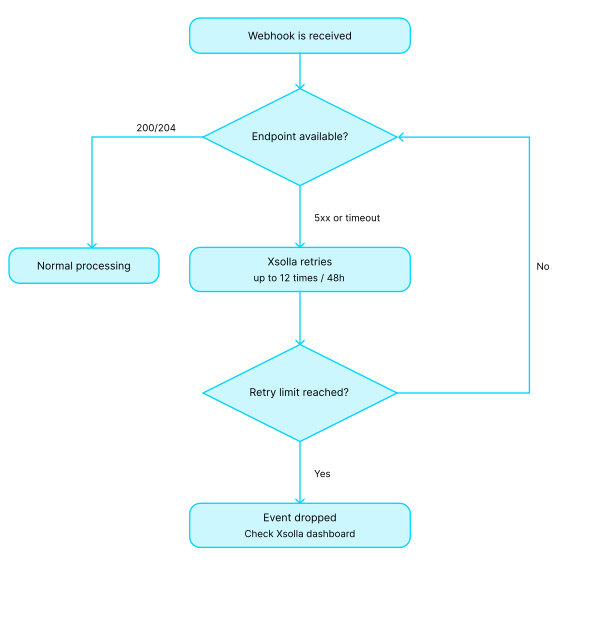
}要确认收到Webhook,您的服务器必须返回:
- 如果响应成功,返回
200、201或204HTTP代码。 - 如果未找到指定的用户或传递了无效的签名,返回
400HTTP代码和问题描述。如果您的服务器出现临时问题,您的Webhook处理程序还可 以返回5xxHTTP 代码。
- 尝试2次,间隔5分钟
- 尝试7次,间隔15分钟
- 尝试10次,间隔60分钟
在首次尝试后的12小时内最多尝试发送20次Webhook。
注意
如满足以下所有条件,款项仍将退还给用户:
- 退款由艾克索拉发起。
- Webhook响应返回
4xx状态码,或在所有重试后未收到响应,或返回5xx状态码。
HTTP代码400的错误代码:
| 代码 | 消息 |
|---|---|
| INVALID_USER | 无效用户 |
| INVALID_PARAMETER | 无效参数 |
| INVALID_SIGNATURE | 无效签名 |
| INCORRECT_AMOUNT | 金额不正确 |
| INCORRECT_INVOICE | 发票不正确 |
HTTP/1.1 400 Bad Request
{
    "error":{
        "code":"INVALID_USER",
        "message":"Invalid user"
    }
}请遵循以下准则:
请遵循以下准则:
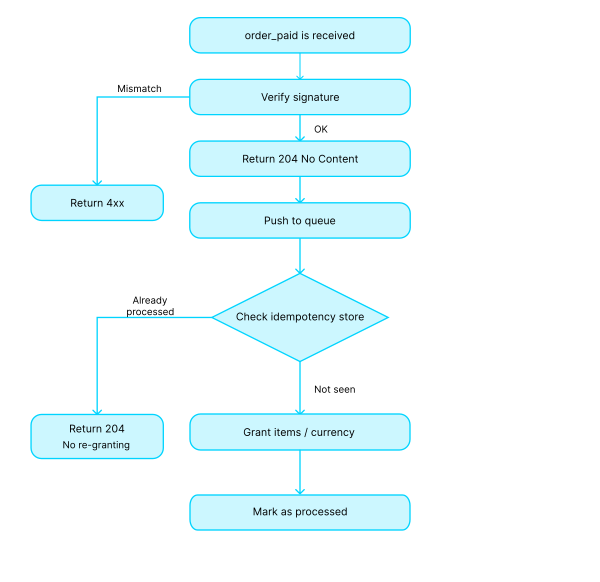
- 接受
POST请求时保持正文和标头原样,不做任何修改。 - 验证Webhook签名并返回相应的状态码:
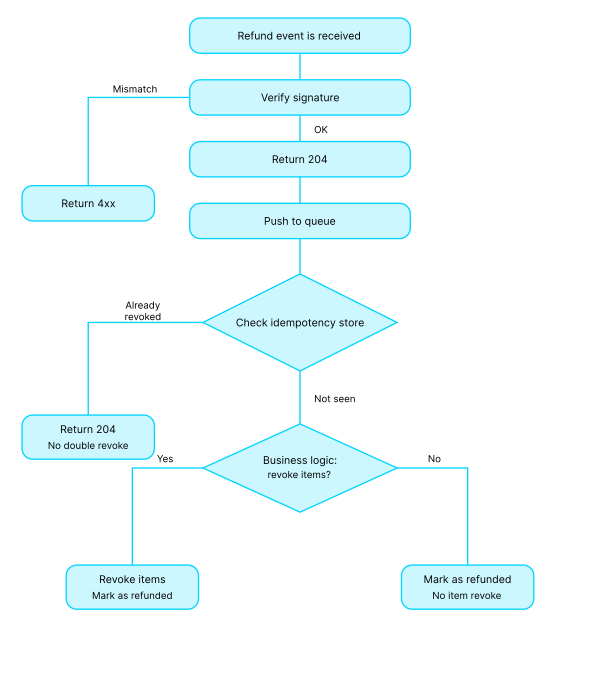
4xx— 签名不匹配时返回;2xx— 成功时返回。我们建议在执行主要业务逻辑之前返回204 No Content,也可以使用200 OK。
- 将有效负载传递给异步作业或队列以进行后续处理。
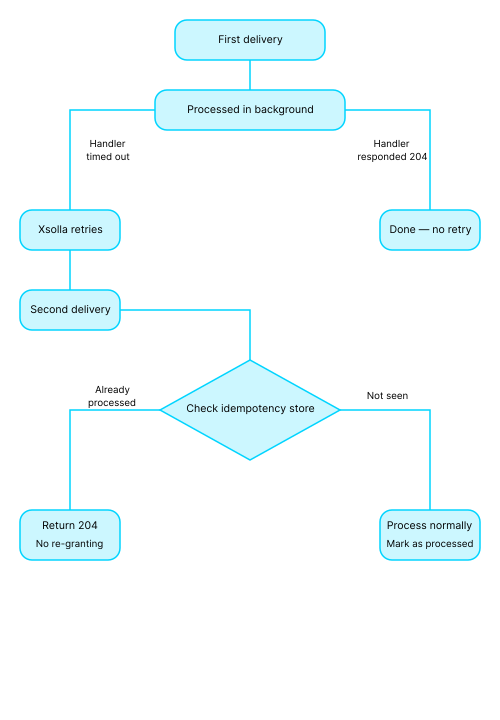
- 实现幂等性。您必须确 保系统能够处理多次接收同一Webhook的情况。
流程示例:
HTTP POST /webhooks/xsolla
  read raw_body, headers
  if !verify_signature(raw_body, headers['authorization']):
     return 400 {"error":{"code":"INVALID_SIGNATURE","message":"Invalid signature"}}
  enqueue(raw_body)
return 204 # or 200请遵循以下准则:
- 使用交易ID和/或外部ID、订单ID作为幂等性键。
- 存储已处理的ID,如果收到重复请求则返回先前的结果。
- 避免重复发放商品、重复数据库条目和重复扣费。
- 请注意:在顺序交付模式下,较早事件处理失败会阻塞所有后续事件的处理。
请遵循以下准则:
- 对资源密集型操作使用队列和异步处理,例如第三方API调用、计费和商品发放。
- 为Webhook处理程序设置超时时间(1–3秒)。对于瞬时故障,依赖艾克索拉重试机制即可。
- 不要在Webhook处理程序中实现重试逻辑,重新交付由艾克索拉负责处理。
- 记录Webhook交付时间戳和处理状态;为
5xx错误和重新交付的激增设置告警。 - 将关联ID从Webhook传播到您的日志和监控系统(APM)中。
- 设置错误日志记录和监控。对于不可恢复的故障,将作业移至死信队列(DLQ)。开发一个受幂等性机制保护的安全工具用于重放事件。
不能。支付Webhook使用服务器到服务器协议,仅发送到项目设置中指定的单个URL。如果您希望在游戏、网站或移动应用中接收通知,需要在您的服务器上设置Webhook转发,以便在艾克索拉和您的游戏之间传递数据。 您也可以从开发者控制台测试Webhook。
Note
If you are testing the integration locally, POST requests from Xsolla don’t reach URLs like http://localhost:3000/my-webhook-endpoint. Use services such as Ngrok that allow you to create a tunnel for external access, enabling you to receive requests from Xsolla locally. E.g., you can read more about this in the ngrok documentation.
使用外部ID,即您游戏中的交易ID,它会分配给您系统中的订单。在艾克索拉侧,外部ID与交易ID关联,可以防止同一交易的重复支付。有关配置详情,请参阅相关文档 。
我们建议:
- 在签名验证后立即返回
204或200。 - 针对原始请求正文验证Webhook签名,不做任何修改。
- 为所有操作实现幂等性。
- 记录所有事件并设置错误监控。
- 避免在URL中传递敏感数据,不在错误消息中暴露技术细节。
有关详细信息,请参阅最佳实践部分。
为确保Webhook正常工作,请在上线前确认以下事项:
注:
通知类型在notification_type参数中发送。
| Webhook | 通知类型 | 描述 |
|---|---|---|
| 用户验证 | user_validation | 发送以检查用户是否存在于游戏中。 |
| 用户搜索 | user_search | 发送以根据公共用户ID获取用户信息。 |
| 支付 | payment | 用户完成支付流程时发送。 |
| 退款 | refund | 出于某些原因需要取消支付时发送。 |
| 部分退款 | partial_refund | 出于某些原因需要部分取消支付时发送。 |
| 付款被拒 | ps_declined | 当付款被支付系统拒绝时发送。 |
| AFS拒绝交易 | afs_reject | 交易在AFS检查过程中被拒绝时发送。 |
| AFS更新的拦截列表 | afs_black_list | AFS拦截列表发生更新时发送。 |
| 创建了订阅 | create_subscription | 用户创建订阅时发送。 |
| 更新了订阅 | update_subscription | 订阅发生续订或更改时发送。 |
| 取消了订阅 | cancel_subscription | 取消订阅时发送。 |
| 非续订订阅 | non_renewal_subscription | 状态设置为非续订时发送。 |
| 添加支付账户 | payment_account_add | 当用户添加或保存支付帐户时发送。 |
| 删除支付账户 | payment_account_remove | 用户从已保存的帐户中删除了支付帐户时发送。 |
| Web商店中的用户验证 | - | 从Web商店网站发送以检查游戏中是否存在该用户。 |
| 合作伙伴侧目录个性化 | partner_side_catalog | 用户与商店交互时发送。 |
| 订单成功支付 | order_paid | 订单付款后发送。 |
| 订单取消 | order_canceled | 订单取消时发送。 |
| 争议 | dispute | 当提出新争议时发送。 |
交易和付款详细信息。
带有支付详细信息的对象。
对象,包含因跨境交易而在具体国家/地区产生的预扣费用数据。
货币。符合ISO 4217的三字母货币代码。
直接预扣税。
货币。符合ISO 4217的三字母货币代码。
带有用户支付相关数据的对象。
货币。符合ISO 4217的三字母货币代码。
支付系统佣金的大小。
货币。符合ISO 4217的三字母货币代码。
带有通过支付方式收费的金额相关数据的对象。
货币。符合ISO 4217的三字母货币代码。
带有支出详细信息的对象。
货币。符合ISO 4217的三字母货币代码。
包含汇回本国费用数据的对象,该费用是第三方对艾克索拉收取的费用。
货币。符合ISO 4217的三字母货币代码。
销售税(对象;仅适用于美国和加拿大)。
货币。符合ISO 4217的三字母货币代码。
从通过联盟网络和圈内达人完成的购买中扣除的用户获取费用总额(对象)。
货币。符合ISO 4217的三字母货币代码。
增值税大小(仅适用于欧盟)。
货币。符合ISO 4217的三字母货币代码。
计入艾克索拉余额的金额。
货币。符合ISO 4217的三字母货币代码。
艾克索拉费用(对象)。
货币。符合ISO 4217的三字母货币代码。
带有购买相关数据的对象。
退款详情(对象)。
退款发起人。根据下表传入字段值:
| 退款发起人 | 字段值 |
|---|---|
| 游戏(通过API)。 | API |
| Account user (automatic refund). | 用户邮箱 |
| Account user (with assistance from Xsolla customer support). | [email protected] |
| 艾克索拉(通过艾克索拉客户支持的帮助)。 | [email protected] |
带有自定义项目设置的对象。
Project ID. You can find this parameter in your account next to the name of the project.
用户所购商品的列表。
The set of parameters included in the array depends on the webhook version. Version 2 includes additional parameters: is_free, is_bonus, and is_bundle_content. To switch the version, pass its number in the version parameter in the Update webhook version API call.
对订单中的特定商品应用促销活动。 在下列情况下返回该数组:
- 特定商品配置了折扣促销。
- 使用了具有对所选商品提供折扣设置的促销码。
如果没有应用任何商品级促销活动,则返回一个空数组。
商品类型。 对于bundle类型商品,包括虚拟货币套餐,items数组将显示:
- 捆绑包或虚拟货币套餐的参数
- 捆绑包中包含的商品或套餐中包含的货币
value_point类型用于忠诚积分操作,即积分被消费或奖励时。
订单信息。
应用的优惠券。如未应用优惠券,则不会返回该数组。
订单货币。虚拟货币使用SKU,真实货币使用三个字母的ISO 4217代码。
支付货币类型。对于免费订单,则值指定为unknown。
| Enum 值 | 描述 |
|---|---|
| loyalty_point | 忠诚积分 |
| real | 真实货币 |
| unknown | 免费订单 |
| virtual | 虚拟货币 |
支付平台。 xsolla值用于通过艾克索拉进行的支付。其他支付使用游戏发布平台名称对应的值:playstation_network、xbox_live、pc_standalone、nintendo_shop、google_play、app_store_ios、android_standalone、ios_standalone、android_other、ios_other、pc_other。
应用的促销码。如未应用促销码,则不会返回该数组。
对整个订单应用促销活动。 在下列情况下返回该数组:
- 促销活动会影响总订单金额,例如具有对购买项提供折扣设置的促代码。
- 购买时不享受折扣,但订单中会添加赠品。在这种情况下,由于未应用折扣,将返回含折扣的价格(amount_with_discount)和不含折扣的价格值(amount_without_discount)且两个值相同。
如果未应用任何订单级促销活动,将返回一个空数组。
用户信息。
用户所在国家/地区。使用ISO 3166-1 alpha-2 标准规定的2字母组合表示国家/地区。
- https://api.xsolla.com/merchant/v2/order-cancellation
- Mock serverhttps://xsolla.redocly.app/_mock/zh/webhooks/order-cancellation
- CURL
- Payload
curl -v 'https://your.hostname/your/uri' \
-X POST \
-H 'accept: application/json' \
-H 'content-type: application/json' \
-H 'authorization: Signature d09695066c52c1b8bdae92f2d6eb59f5b5f89843' \
-d '{
    "notification_type": "order_canceled",
    "items": [
      {
        "sku": "com.xsolla.v.item_1",
        "type": "virtual_good",
        "is_pre_order": false,
        "quantity": 3,
        "amount": "1000",
        "promotions": [
          {
            "amount_without_discount": "6000",
            "amount_with_discount": "5000",
            "sequence": 1
          },
          {
            "amount_without_discount": "5000",
            "amount_with_discount": "4000",
            "sequence": 2
          }
        ],
        "custom_attributes": {
            "purchased": 0,
            "attr": "value"
          }
      },
      {
        "sku": "com.xsolla.v.item_new_1",
        "type": "bundle",
        "is_pre_order": false,
        "quantity": 1,
        "amount": "1000",
        "promotions": []
      },
      {
        "sku": "com.xsolla.gold_1",
        "type": "virtual_currency",
        "is_pre_order": false,
        "quantity": 1500,
        "amount": null,
        "promotions": []
      }
    ],
    "order": {
      "id": 1,
      "mode": "default",
      "currency_type": "virtual",
      "currency": "sku_currency",
      "amount": "2000",
      "status": "paid",
      "platform": "xsolla",
      "comment": null,
      "invoice_id": "1",
      "promotions": [
        {
          "amount_without_discount": "4000",
          "amount_with_discount": "2000",
          "sequence": 1
        }
      ],
      "promocodes": [
        {
          "code": "promocode_some_code",
          "external_id": "promocode_sku"
        }
      ],
      "coupons": [
        {
          "code": "WINTER2021",
          "external_id": "coupon_sku"
        }
      ]
    },
    "user": {
      "external_id": "id_xsolla_login_1",
      "email": "[email protected]",
      "country": "US"
    },
    "billing": {
      "notification_type": "refund",
      "settings": {
        "project_id": 18404,
        "merchant_id": 2340
      },
      "purchase": {
              "subscription": {
                  "plan_id": "b5dac9c8",
                  "subscription_id": "10",
                  "date_create": "2014-09-22T19:25:25+04:00",
                  "currency": "USD",
                  "amount": 9.99
              },
              "total":{
                  "currency": "USD",
                  "amount": 200
              }
          },
      "transaction": {
              "id": 1,
              "external_id": 1,
              "dry_run": 1,
              "agreement": 1
          },
      "refund_details": {
              "code": 4,
              "reason": "Potential fraud"
          },
      "payment_details": {
              "sales_tax": {
                  "currency": "USD",
                  "amount": 0
              },
              "direct_wht": {
                  "currency": "USD",
                  "amount": 0.70
              },
              "xsolla_fee": {
                  "currency": "USD",
                  "amount": "10"
              },
              "payout": {
                  "currency": "USD",
                  "amount": "200"
              },
              "payment_method_fee": {
                  "currency": "USD",
                  "amount": "20"
              },
              "payment": {
                  "currency": "USD",
                  "amount": "230"
              },
              "repatriation_commission": {
                  "currency": "USD",
                  "amount": 10
              }
          }
    }
}请求
当用户订单支付成功时艾克索拉发送order_paid webhook到指定的URL。
order_paid webhook包含所购商品、付款数据和交易详细信息。
如果付款不成功,则不会发送order_paid webhook,例如:
- 打开了支付表单,但用户没有为订单付款
- 打开了支付表单,但付款过程中出现错误
建议order_paid webhook的处理时间小于3秒。
Notice
The set of fields sent in a webhook depends on the following settings:
- the ones you configured in the account in the Settings > Webhooks > Advanced settings section
- the ones configured on the Xsolla side
If you have any questions, contact your Customer Success Manager or email to [email protected].
响应部分描述了预期的回答。您可以使用其他响应代码。根据响应码和自动退款功能的连接,艾克索拉侧的webhook处理逻辑如下:
| 响应代码 | 禁用了自动退款(默认) | 启用了自动退款 |
|---|---|---|
400、401、402、403、404、409、422、415 | 无操作 | 自动退款给用户 |
200、201、204 | 无操作 | 无操作 |
| 不同代码或对webhook无响应 | 在指定的时间间隔内发送多个webhook:2次间隔5分钟的尝试,7次间隔15分钟的尝试,10次间隔60分钟的尝试。 | 在指定的时间间隔内发送多个webhook:2次间隔5分钟的尝试,7次间隔15分钟的尝试,10次间隔60分钟的尝试。如果发送了所有webhook后仍未收到成功响应,则会向用户自动退款。 |
要连接自动退款功能,请联系您的客户成功经理或发送电子邮件至[email protected]。
交易和付款详细信息。
带有支付详细信息的对象。
对象,包含因跨境交易而在具体国家/地区产生的预扣费用数据。
货币。符合ISO 4217的三字母货币代码。
直接预扣税。
货币。符合ISO 4217的三字母货币代码。
带有用户支付相关数据的对象。
货币。符合ISO 4217的三字母货币代码。
支付系统佣金的大小。
货币。符合ISO 4217的三字母货币代码。
带有通过支付方式收费的金额相关数据的对象。
货币。符合ISO 4217的三字母货币代码。
带有支出详细信息的对象。
货币。符合ISO 4217的三字母货币代码。
包含汇回本国费用数据的对象,该费用是第三方对艾克索拉收取的费用。
货币。符合ISO 4217的三字母货币代码。
销售税(对象;仅适用于美国和加拿大)。
货币。符合ISO 4217的三字母货币代码。
从通过联盟网络和圈内达人完成的购买中扣除的用户获取费用总额(对象)。
货币。符合ISO 4217的三字母货币代码。
增值税大小(仅适用于欧盟)。
货币。符合ISO 4217的三字母货币代码。
计入艾克索拉余额的金额。
货币。符合ISO 4217的三字母货币代码。
艾克索拉费用(对象)。
货币。符合ISO 4217的三字母货币代码。
带有购买相关数据的对象。
带有自定义项目设置的对象。
Project ID. You can find this parameter in your account next to the name of the project.
交易ID。
交易外部ID。详细信息请参阅常见问答。
用户所购商品的列表。
The set of parameters included in the array depends on the webhook version. Version 2 includes additional parameters: is_free, is_bonus, and is_bundle_content. To switch the version, pass its number in the version parameter in the Update webhook version API call.
对订单中的特定商品应用促销活动。 在下列情况下返回该数组:
- 特定商品配置了折扣促销。
- 使用了具有对所选商品提供折扣设置的促销码。
如果没有应用任何商品级促销活动,则返回一个空数组。
商品类型。 对于bundle类型商品,包括虚拟货币套餐,items数组将显示:
- 捆绑包或虚拟货币套餐的参数
- 捆绑包中包含的商品或套餐中包含的货币
value_point类型用于忠诚积分操作,即积分被消费或奖励时。
订单信息。
应用的优惠券。如未应用优惠券,则不会返回该数组。
订单货币。虚拟货币使用SKU,真实货币使用三个字母的ISO 4217代码。
支付货币类型。对于免费订单,则值指定为unknown。
| Enum 值 | 描述 |
|---|---|
| loyalty_point | 忠诚积分 |
| real | 真实货币 |
| unknown | 免费订单 |
| virtual | 虚拟货币 |
支付平台。 xsolla值用于通过艾克索拉进行的支付。其他支付使用与游戏发布平台名称对应的值。
应用的促销码。如未应用促销码,则不会返回该数组。
对整个订单应用促销活动。 在下列情况下返回该数组:
- 促销活动会影响总订单金额,例如具有对购买项提供折扣设置的促代码。
- 购买时不享受折扣,但订单中会添加赠品。在这种情况下,由于未应用折扣,将返回含折扣的价格(amount_with_discount)和不含折扣的价格值(amount_without_discount)且两个值相同。
如果未应用任何订单级促销活动,将返回一个空数组。
用户信息。
用户所在国家/地区。使用ISO 3166-1 alpha-2 标准规定的2字母组合表示国家/地区。
- https://api.xsolla.com/merchant/v2/successful-order-payment
- Mock serverhttps://xsolla.redocly.app/_mock/zh/webhooks/successful-order-payment
- CURL
- Payload
curl -v 'https://your.hostname/your/uri' \
-X POST \
-H 'accept: application/json' \
-H 'content-type: application/json' \
-H 'authorization: Signature d09695066c52c1b8bdae92f2d6eb59f5b5f89843' \
-d '{
    "notification_type": "order_paid",
    "items": [
      {
        "sku": "com.xsolla.item_1",
        "type": "virtual_good",
        "is_pre_order": false,
        "quantity": 3,
        "amount": "1000",
        "promotions": [
          {
            "amount_without_discount": "6000",
            "amount_with_discount": "5000",
            "sequence": 1
          },
          {
            "amount_without_discount": "5000",
            "amount_with_discount": "4000",
            "sequence": 2
          }
        ],
        "custom_attributes":
          {
            "purchased": 0,
            "attr": "value"
          }
      },
      {
        "sku": "com.xsolla.item_new_1",
        "type": "bundle",
        "is_pre_order": false,
        "quantity": 1,
        "amount": "1000",
        "promotions": []
      },
      {
        "sku": "com.xsolla.gold_1",
        "type": "virtual_currency",
        "is_pre_order": false,
        "quantity": 1500,
        "amount": null,
        "promotions": []
      }
    ],
    "order": {
      "id": 1,
      "mode": "default",
      "currency_type": "virtual",
      "currency": "sku_currency",
      "amount": "2000",
      "status": "paid",
      "platform": "xsolla",
      "comment": null,
      "invoice_id": "1",
      "promotions": [
        {
          "amount_without_discount": "4000",
          "amount_with_discount": "2000",
          "sequence": 1
        }
      ],
      "promocodes": [
        {
          "code": "promocode_some_code",
          "external_id": "promocode_sku"
        }
      ],
      "coupons": [
        {
          "code": "WINTER2021",
          "external_id": "coupon_sku"
        }
      ]
    },
    "user": {
      "external_id": "id_xsolla_login_1",
      "email": "[email protected]",
      "country": "US"
    },
    "billing": {
      "notification_type": "payment",
      "settings": {
        "project_id": 18404,
        "merchant_id": 2340
      },
      "purchase": {
          "subscription": {
              "plan_id": "b5dac9c8",
              "subscription_id": "10",
              "product_id": "Demo Product",
              "date_create": "2014-09-22T19:25:25+04:00",
              "date_next_charge": "2014-10-22T19:25:25+04:00",
              "currency": "USD",
              "amount": 9.99
          },
          "total": {
              "currency": "USD",
              "amount": 200
          },
          "promotions": [{
              "technical_name": "Demo Promotion",
              "id": 853
          }],
          "coupon": {
              "coupon_code": "ICvj45S4FUOyy",
              "campaign_code": "1507"
          }
        },
      "transaction": {
          "id": 1,
          "external_id": 1,
          "payment_date": "2014-09-24T20:38:16+04:00",
          "payment_method": 1,
          "payment_method_name": "PayPal",
          "payment_method_order_id": 1234567890123456789,
          "dry_run": 1,
          "agreement": 1
      },
      "payment_details": {
          "payment": {
              "currency": "USD",
              "amount": 230
          },
          "vat": {
              "currency": "USD",
              "amount": 0,
              "percent": 20
          },
          "sales_tax": {
              "currency": "USD",
              "amount": 0,
              "percent": 0
          },
          "direct_wht": {
              "currency": "USD",
              "amount": 0,
              "percent": 0
          },
          "payout_currency_rate": "1",
          "payout": {
              "currency": "USD",
              "amount": 200
          },
          "country_wht": {
              "currency": "USD",
              "amount": 2,
              "percent": 10
          },
          "user_acquisition_fee": {
              "currency": "USD",
              "amount": 2,
              "percent": 1
          },
          "xsolla_fee": {
              "currency": "USD",
              "amount": 10
          },
          "payment_method_fee": {
              "currency": "USD",
              "amount": 20
          },
          "repatriation_commission": {
              "currency": "USD",
              "amount": 10
          }
      }
    }
 ,
  "custom_parameters": {
    "parameter1": "value1",
    "parameter2": "value2"
  }
}