Warenkorb-ID.
- Promocode aus Warenkorb entfernen
Promocode einlösen
Promocode-Belohnungen abrufen
Promocode-Aktion erstellen
Liste der Promocode-Aktionen abrufen
Promocode-Aktion aktualisieren
Promocode-Aktion abrufen
Promocode löschen
Promocode-Aktion aktivieren
Promocode-Aktion deaktivieren
Code für Promocode-Aktion erstellen
Codes von Promocode-Aktion abrufen
Codes für eine Promocode-Aktion generieren
Promo-Code-Limit für den angegebenen Benutzer abrufen
Promocode-Limit für Codes abrufen
Promocode aus Warenkorb e...
LiveOps-API (2.0.0)
- Version: 2.0.0
- Server:
https://store.xsolla.com/api - Kontaktieren Sie uns per E-Mail
- Kontakt-URL: https://xsolla.com/
- Erforderliche TLS-Version: 1.2
LiveOps ist ein Toolkit, mit dem sich die Spielerbindung durch Werbeaktionen und personalisierte Angebote steigern lässt.
Mit der API lassen sich die folgenden Funktionen steuern:
- Werbeaktionen – Erstellen und Verwalten von Gutscheinen, Promocodes, Rabatten und Bonuskampagnen.
- Personalisierung – Festlegen von Bedingungen für die Anzeige des Artikelkatalogs und die Inanspruchnahme von Werbeaktionen für bestimmte autorisierte Nutzer.
- Werbeaktionslimits – Festlegen, wie oft eine Werbeaktion von einem Nutzer in Anspruch genommen werden darf und wann diese Limits zurückgesetzt werden.
- Belohnungsketten und Wertpunkte — Konfigurieren von Belohnungsketten, wobei das Durchlaufen dieser Ketten an das Sammeln von Wertpunkten gekoppelt ist.
- Tägliche Ketten – Einrichten von wiederkehrenden täglichen Belohnungen, um Nutzer zu motivieren, sich regelmäßig anzumelden.
- Angebotsketten – Erstellen von aufeinanderfolgenden Kaufangeboten mit gestaffelten Preisen und kostenlosen Belohnungen.
- Upselling – Verkaufsmethode, bei der dem Nutzer ein Artikel mit zusätzlichem Mehrwert zum Kauf angeboten wird.
Die API ist in die folgenden Gruppen unterteilt:
Admin – Aufrufe zum Erstellen, Aktualisieren, Aktivieren und Löschen von Kampagnen und Kettenkonfigurationen. Die Authentifizierung erfolgt über Basisauthentifizierung mit Ihren Händler- oder Projektanmeldedaten.Client – Aufrufe zum Abrufen verfügbarer Werbeaktionen, zum Abrufen aktiver Ketten, zum Einlösen von Codes und zum Beanspruchen von Belohnungen im Namen authentifizierter Endnutzer. Die Authentifizierung erfolgt über den Benutzer-JWT.
API-Aufrufe erfordern eine Authentifizierung entweder im Namen eines Nutzers oder im Namen eines Projekts. Das verwendete Authentifizierungsschema ist im Abschnitt Sicherheit – in der Beschreibung des jeweiligen Aufrufs – angegeben.
Die Authentifizierung mit Benutzer-JWT kommt zum Einsatz, wenn eine Anfrage von einem Browser, einer App oder einem Spiel gesendet wird. Standardmäßig wird das Schema XsollaLoginUserJWT angewendet. Weitere Informationen zum Erstellen eines Tokens finden Sie in der Dokumentation zur Xsolla-Login-API.
Der Token wird im Authorization-Header im folgenden Format übermittelt: Authorization: Bearer <user_JWT>, wobei <user_JWT> der Benutzertoken ist. Der Token dient dazu, den Nutzer zu identifizieren und ihm Zugriff auf personalisierte Daten zu ermöglichen.
Alternativ können Sie einen Token zum Öffnen des Zahlungsportals verwenden.
Die HTTP-Basisauthentifizierung wird für Server-zu-Server-Interaktionen verwendet, wenn ein API-Aufruf direkt von Ihrem Server und nicht von einem Browser oder einer App gesendet wird. Typischerweise wird die HTTP-Basisauthentifizierung gemeinsam mit einem API-Schlüssel verwendet.
Hinweis
Der API-Schlüssel ist vertraulich und darf nicht in Client-Anwendungen gespeichert oder verwendet werden.
Der API-Schlüssel ist vertraulich und darf nicht in Client-Anwendungen gespeichert oder verwendet werden.
Bei der serverseitigen Basisauthentifizierung müssen alle API-Anfragen den folgenden Header enthalten:
- für
basicAuth–Authorization: Basic <your_authorization_basic_key>, wobeiyour_authorization_basic_keydas gemäß Base64-Verfahren kodierteproject_id:api_key-Paar ist - für
basicMerchantAuth–Authorization: Basic <your_authorization_basic_key>, wobeiyour_authorization_basic_keydas gemäß Base64-Verfahren kodiertemerchant_id:api_keyPaar ist
Die Parameterwerte finden Sie im Kundenportal an folgenden Orten:
merchant_idwird angezeigt:- unter Firmeneinstellungen > Firma.
- in der URL in der Adressleiste des Browsers auf einer beliebigen Seite im Kundenportal. Die URL hat das folgende Format:
https://publisher.xsolla.com/<merchant_id>.
project_idwird angezeigt:- neben dem Projektnamen im Kundenportal.
- in der URL in der Adressleiste des Browsers, wenn Sie im Kundenportal ein Projekt geöffnet haben. Die URL hat das folgende Format:
https://publisher.xsolla.com/<merchant_id>/projects/<project_id>.
api_keywird im Kundenportal nur einmal angezeigt, nämlich dann, wenn er erstellt wird. Sie sind selbst dafür verantwortlich, den Schlüssel in Ihrem System zu speichern. Einen API-Schlüssel können Sie an den folgenden Orten erstellen:
Hinweis
Falls bei einem erforderlichen API-Aufruf der Pfadparameter
Falls bei einem erforderlichen API-Aufruf der Pfadparameter
project_id fehlt, müssen Sie einen API-Schlüssel verwenden, der für alle Projekte der Firma gültig ist.Weitere Informationen zur Arbeit mit API-Schlüsseln finden Sie in den API-Referenzen.
Das Authentifizierungsschema AuthForCart wird für Warenkorbkäufe verwendet und unterstützt zwei Modi:
Authentifizierung mit einem Benutzer-JWT. Der Token wird im
Authorization-Header im folgenden Format übermittelt:Authorization: Bearer <user_JWT>, wobei<user_JWT>der Benutzertoken ist. Der Token dient dazu, den Nutzer zu identifizieren und ihm Zugriff auf personalisierte Daten zu ermöglichen. Alternativ können Sie einen Token zum Öffnen des Zahlungsportals verwenden.Vereinfachter Modus ohne Autorisierungs-Header. Dieser Modus ist nur für nicht autorisierte Nutzer vorgesehen und kann lediglich für den Verkauf von Spielschlüsseln genutzt werden. Anstelle eines Tokens muss die Anfrage die folgenden Header enthalten:
x-unauthorized-idsamt Anfrage-IDx-usersamt der E-Mail-Adresse des Nutzers, kodiert in Base64
Alle Artikeltypen (virtuelle Gegenstände, Bundles, virtuelle Währung und Schlüssel) haben eine ähnliche Datenstruktur. Kenntnisse über die Grundstruktur vereinfachen die Arbeit mit der API und erleichtern das Navigieren in der Dokumentation.
Hinweis
Einige Aufrufe können zusätzliche Felder enthalten, doch diese ändern nichts an der Grundstruktur.
Einige Aufrufe können zusätzliche Felder enthalten, doch diese ändern nichts an der Grundstruktur.
Identifikation
merchant_id– Firmen-ID im Kundenportalproject_id– Projekt-ID im Kundenportalsku– Artikel-SKU, einzigartig innerhalb des Projekts
Shop-Anzeige
name– Artikelnamedescription– Artikelbeschreibungimage_url– Bild-URLis_enabled– Artikelverfügbarkeitis_show_in_store– ob der Artikel im Katalog angezeigt wird
Weitere Informationen zur Verwaltung der Artikelverfügbarkeit im Katalog finden Sie in der Dokumentation.
Organisation
type– Artikeltyp, zum Beispiel ein virtueller Gegenstand (virtual_item) oder Bundle (bundle)groups– Gruppen, zu denen der Artikel gehörtorder– Anzeigereihenfolge im Katalog
Verkaufsbedingungen
prices– Preise in echter oder virtueller Währunglimits– Kauflimitsperiods– Verfügbarkeitszeiträumeregions– regionale Beschränkungen
Grundstruktur einer Entität (Beispiel):
{
  "attributes": [],
  "bundle_type": "virtual_currency_package",
  "content": [
    {
      "description": {
        "en": "Main in-game currency"
      },
      "image_url": "https://.../image.png",
      "name": {
        "en": "Crystals",
        "de": "Kristalle"
      },
      "quantity": 500,
      "sku": "com.xsolla.crystal_2",
      "type": "virtual_currency"
    }
  ],
  "description": {
    "en": "Crystals x500"
  },
  "groups": [],
  "image_url": "https://.../image.png",
  "is_enabled": true,
  "is_free": false,
  "is_show_in_store": true,
  "limits": {
    "per_item": null,
    "per_user": null,
    "recurrent_schedule": null
  },
  "long_description": null,
  "media_list": [],
  "name": {
    "en": "Medium crystal pack"
  },
  "order": 1,
  "periods": [
    {
      "date_from": null,
      "date_until": "2020-08-11T20:00:00+03:00"
    }
  ],
  "prices": [
    {
      "amount": 20,
      "country_iso": "US",
      "currency": "USD",
      "is_default": true,
      "is_enabled": true
    }
  ],
  "regions": [],
  "sku": "com.xsolla.crystal_pack_2",
  "type": "bundle",
  "vc_prices": []
}Über die Xsolla-API lässt sich die Logik für einen Ingame-Shop implementieren, darunter das Abrufen des Artikelkatalogs, die Verwaltung des Warenkorbs, das Anlegen von Bestellungen und die Verfolgung des Bestellstatus. Je nach Integrationsszenario sind die API-Aufrufe in die Unterbereiche Verwaltung und Katalog unterteilt, die unterschiedliche Authentifizierungsschemen verwenden.
Das folgende Beispiel zeigt den grundlegenden Ablauf für die Einrichtung und den Betrieb eines Shops, von der Artikelerstellung bis zum Kauf.
Erstellen Sie für Ihren Shop einen Katalog mit Artikeln wie etwa virtuellen Gegenständen, Bundles oder virtueller Währung.
API-Aufrufe (Beispiele):
Konfigurieren Sie Tools für die Nutzergewinnung und Monetarisierung, wie etwa Rabatte, Boni, tägliche Belohnungen oder Angebotsketten.
API-Aufrufe (Beispiele):
Konfigurieren Sie, wie Artikel in Ihrer Anwendung angezeigt werden sollen.
Hinweis
Verwenden Sie keine API-Aufrufe aus dem Unterabschnitt "Verwaltung", um einen Nutzerkatalog zu erstellen. Diese API-Aufrufe unterliegen Ratenbegrenzungen und sind nicht für Nutzer-Traffic vorgesehen.
Verwenden Sie keine API-Aufrufe aus dem Unterabschnitt "Verwaltung", um einen Nutzerkatalog zu erstellen. Diese API-Aufrufe unterliegen Ratenbegrenzungen und sind nicht für Nutzer-Traffic vorgesehen.
API-Aufrufe (Beispiele):
Hinweis
Standardmäßig geben katalogbezogene API-Aufrufe Artikel zurück, die zum Zeitpunkt der Anfrage im Shop verfügbar sind. Um Artikel abzurufen, die noch nicht verfügbar oder nicht mehr verfügbar sind, müssen Sie den Parameter
Standardmäßig geben katalogbezogene API-Aufrufe Artikel zurück, die zum Zeitpunkt der Anfrage im Shop verfügbar sind. Um Artikel abzurufen, die noch nicht verfügbar oder nicht mehr verfügbar sind, müssen Sie den Parameter
"show_inactive_time_limited_items": 1 in der Kataloganfrage ergänzen.
Artikel können Sie mit den folgenden Methoden verkaufen:
- Schnellkauf – Verkauf einer einzelnen SKU in beliebiger Menge.
- Warenkorbkauf – der Nutzer kann im Rahmen einer Bestellung Artikel in den Warenkorb legen, Artikel aus dem Warenkorb entfernen und die Menge jedes einzelnen Artikels ändern.
Wird ein Artikel mit virtueller Währung anstelle von echtem Geld gekauft, müssen Sie den API-Aufruf Bestellung mit einem angegebenen, in virtueller Währung gekauften Artikel anlegen verwenden. Das Zahlungsportal muss nicht aufgerufen werden, da die Zahlungsabwicklung bei Ausführung des API-Aufrufs erfolgt.
Beim Kauf eines kostenlosen Artikels müssen Sie den API-Aufruf Bestellung mit angegebenem kostenlosen Artikel anlegen oder den API-Aufruf Bestellung mit einem kostenlosen Warenkorb anlegen verwenden. as Zahlungsportal muss nicht aufgerufen werden – der Bestellung wird sofort der Status done zugewiesen.
Verwenden Sie den clientseitigen API-Aufruf, um eine Bestellung mit einem angegebenen Artikel anzulegen. Der Aufruf gibt einen Token zurück, mit dem sich das Zahlungsportal öffnen lässt.
Hinweis
Rabattinformationen sind für den Nutzer nur im Zahlungsportal verfügbar. Promocodes werden nicht unterstützt.
Rabattinformationen sind für den Nutzer nur im Zahlungsportal verfügbar. Promocodes werden nicht unterstützt.
Die Einrichtung des Warenkorbs und der Kaufvorgang können sowohl client- als auch serverseitg erfolgen.
Warenkorb clientseitig einrichten und Artikel kaufen
Implementieren Sie die Logik für das Hinzufügen und Entfernen von Artikeln selbst. Bevor Sie die API zum Einrichten eines Warenkorbs aufrufen, liegen Ihnen keine Informationen darüber vor, welche Werbeaktionen auf den Kauf angewendet werden. Die Gesamtkosten und die Details der hinzugefügten Bonusartikel sind Ihnen also unbekannt.
Implementieren Sie die folgende Warenkorblogik:
- Verwenden Sie den API-Aufruf Artikel in den Warenkorb legen, nachdem der Spieler einen Warenkorb zusammengestellt hat. Der Aufruf gibt die aktuellen Informationen zu den ausgewählten Artikeln zurück (Preise mit und ohne Rabatt, Bonusartikel).
- Aktualisieren Sie den Warenkorbinhalt basierend auf den Aktionen des Nutzers:
- Verwenden Sie den API-Aufruf Warenkorbartikel anhand von Warenkorb-ID aktualisieren, um einen Artikel in den Warenkorb zu legen oder die Artikelmenge zu ändern.
- Verwenden Sie den API-Aufruf Warenkorbartikel anhand von Warenkorb-ID löschen, um einen Artikel zu entfernen.
Hinweis
Mit dem API-Aufruf "Warenkorb des aktuellen Benutzers abrufen" können Sie den aktuellen Status des Warenkorbs abrufen.
Mit dem API-Aufruf "Warenkorb des aktuellen Benutzers abrufen" können Sie den aktuellen Status des Warenkorbs abrufen.
- Verwenden Sie den API-Aufruf Bestellung mit allen Artikeln aus dem aktuellen Warenkorb anlegen. Der Aufruf gibt die Bestell-ID und den Zahlungstoken zurück. Der neu angelegten Bestellung wird standardmäßig der Status
newzugewiesen.
Warenkorb serverseitig einrichten und Artikel kaufen
Diese Einrichtungsoption kann länger dauern, da jede Änderung am Warenkorb durch API-Aufrufe vorgenommen werden muss.
Implementieren Sie die folgende Warenkorblogik:
- Verwenden Sie den API-Aufruf Artikel in den Warenkorb legen, nachdem der Spieler einen Warenkorb zusammengestellt hat. Der Aufruf gibt die aktuellen Informationen zu den ausgewählten Artikeln zurück (Preise mit und ohne Rabatt, Bonusartikel).
- Verwenden Sie den API-Aufruf Bestellung mit allen Artikeln aus dem aktuellen Warenkorb anlegen. Der Aufruf gibt die Bestell-ID und den Zahlungstoken zurück. Der neu angelegten Bestellung wird standardmäßig der Status
newzugewiesen.
Verwenden Sie den zurückgegebenen Token, um das Zahlungsportal in einem neuen Fenster zu öffnen. Weitere Möglichkeiten, das Zahlungsportal zu öffnen, sind in der Dokumentation beschrieben.
| Aktion | Endpunkt |
|---|---|
| In der Produktionsumgebung öffnen. | https://secure.xsolla.com/paystation4/?token={token} |
| In der Testumgebung öffnen. | https://sandbox-secure.xsolla.com/paystation4/?token={token} |
Hinweis
Nutzen Sie die Testumgebung während der Entwicklung und zum Testen. Es stehenn Test-Bankkarten bereit. Bei Testkäufen wird kein Geld von echten Konten abgebucht.
Nutzen Sie die Testumgebung während der Entwicklung und zum Testen. Es stehenn Test-Bankkarten bereit. Bei Testkäufen wird kein Geld von echten Konten abgebucht.
Sobald die erste tatsächliche Zahlung erfolgt ist, tritt eine strenge Zahlungsrichtlinie für die Testumgebung in Kraft: Ab dann dürfen nur noch die unter Kundenportal > Firmeneinstellungen > Nutzer angegebenen Nutzer ein Zahlung in der Testumgebung tätigen .
Der Kauf von virtueller Währung und Gegenständen gegen echtes Geld ist erst nach Unterzeichnung einer Lizenzvereinbarung möglich. Navigieren Sie dazu im Kundenportal zu Vereinbarungen und Steuern > Vereinbarungen, füllen Sie das Formular aus, und warten Sie auf die Bestätigung. Die Prüfung kann bis zu drei Werktage dauern.
Die Testumgebung können Sie aktivieren oder deaktivieren. Ändern Sie dazu einfach den Wert des Parameters sandbox in der Schnellkauf- bzw. Warenkorbkauf-Anfrage. Die Testumgebung ist standardmäßig deaktiviert.
Mögliche Bestellstatus:
new– Bestellung angelegtpaid– Zahlung erhaltendone– Artikel geliefertcanceled– Bestellung storniertexpired– Bestellung abgelaufen
Tracken Sie den Bestellstatus mit einer der folgenden Methoden:
API-Aufrufe, die umfangreiche Datensätze zurückgeben (beispielsweise beim Erstellen eines Katalogs), liefern Daten seitenweise. Die Paginierung ist ein Mechanismus, der die Anzahl der in einer einzelnen API-Antwort zurückgegebenen Elemente begrenzt und es ermöglicht, aufeinanderfolgende Seiten der Reihe nach abzurufen.
Mithilfe der folgenden Parameter können Sie die Anzahl der zurückgegebenen Elemente steuern:
limit– Anzahl der Elemente pro Seiteoffset– Index des ersten Elements auf der Seite (Nummerierung beginnt bei 0)has_more– gibt an, ob eine weitere Seite verfügbar isttotal_items_count– Gesamtanzahl der Elemente
Beispielanfrage:
GET /items?limit=20&offset=40Beispielantwort:
{
  "items": [...],
  "has_more": true,
  "total_items_count": 135
}
Es wird empfohlen, nachfolgende Anfragen zu senden, bis die Antwort has_more = false zurückgibt.
Datums- und Zeitwerte werden im ISO 8601-Format übermittelt.
Folgende Formate werden unterstützt:
- UTC-Offset
null-Wert, wenn keine zeitliche Einschränkung für die Anzeige eines Artikels besteht- Unix-Zeitstempel (in Sekunden), der in einigen Feldern verwendet wird
Format: YYYY-MM-DDTHH:MM:SS±HH:MM
Beispiel: 2026-03-16T10:00:00+03:00
Xsolla unterstützt die Lokalisierung von benutzerseitigen Feldern wie Artikelname und Beschreibung. Lokalisierte Werte werden als Objekt übermittelt, wobei der Sprachcode als Schlüssel verwendet wird. Die vollständige Liste der unterstützten Sprachen ist in der Dokumentation verfügbar.
Unterstützte Felder
Für die folgenden Parameter kann eine Lokalisierung festgelegt werden:
namedescriptionlong_description
Gebietsschemaformat
Der Gebietsschemaschlüssel kann in einem der folgenden Formate angegeben werden:
- Sprachencode bestehend aus zwei Buchstaben:
en,ru - Sprachencode bestehend aus fünf Buchstaben:
en-US,ru-RU,de-DE
Beispiele
Zweistelliger Sprachencode (Beispiel):
{
  "name": {
    "en": "Starter Pack",
    "ru": "Стартовый набор"
  }
}
Fünfstelliger Sprachencode (Beispiel):
{
  "description": {
    "en-US": "Premium bundle",
    "de-DE": "Premium-Paket"
  }
}Wenn ein Fehler auftritt, gibt die API einen HTTP-Statuscode und einen JSON-Antwortrumpf zurück. Die vollständige Liste der shopbezogenen Fehler ist in der Dokumentation verfügbar.
Antwort (Beispiel):
{
  "errorCode": 1102,
  "errorMessage": "Validation error",
  "statusCode": 422,
  "transactionId": "c9e1a..."
}errorCode– Fehlercode.errorMessage– kurze Fehlerbeschreibung.statusCode– HTTP-Antwortstatus.transactionId– Anfrage-ID. Wird nur in einigen Fällen zurückgegeben.errorMessageExtended– zusätzliche Fehlerdetails, wie z. B. Anfrageparameter. Wird nur in einigen Fällen zurückgegeben.
Erweiterte Antwort (Beispiel):
{
  "errorCode": 7001,
  "errorMessage": "Chain not found",
  "errorMessageExtended": {
    "chain_id": "test_chain_id",
    "project_id": "test_project_id",
    "step_number": 2
  },
  "statusCode": 404
}
Gängige HTTP-Statuscodes
400– ungültige Anfrage401– Authentifizierungsfehler403– mangelnde Berechtigungen404– Ressource nicht gefunden422– Validierungsfehler429– Ratenlimit überschritten
Empfehlungen
- Verarbeiten Sie den HTTP-Statuscode und den Antwortrumpf gemeinsam.
- Verwenden Sie
errorCode, um Fehler im Zusammenhang mit der Anwendungslogik zu verarbeiten. - Verwenden Sie
transactionId, um Anfragen bei der Fehleranalyse schneller zu identifizieren.
OpenAPI-Beschreibung herunterladen
Sprachen
Server
https://store.xsolla.com/api/
Mock server
https://xsolla.redocly.app/_mock/de/api/liveops/
Übersicht
Werbeaktionen sind Marketinginstrumente, die darauf abzielen, neue Nutzer zu gewinnen und den Umsatz zu steigern. Mithilfe der Xsolla-API können Sie folgende Werbeaktionen einrichten:
- Rabatte – reduzierte Preise auf ausgewählte Artikel.
- Boni – Artikel, die Nutzer bei einem Kauf als Dreingabe erhalten.
- Gutscheine – Codes, mit denen Nutzer einen oder mehrere Bonusartikel beim Einlösen erhalten.
- Promocodes – Codes, mit denen Nutzer Bonusartikel, einen Rabatt auf einen bestimmten Artikel oder einen Rabatt auf den gesamten Warenkorb erhalten können. Im Gegensatz zu Gutscheinen, die erst nach Eingabe durch den Nutzer eingelöst werden, werden Promocodes während des Kaufvorgangs (an der Kasse) eingelöst.
- Sonderangebote – versteckte Artikel, die den Nutzern erst nach Eingabe eines exklusiven Angebotscode im Katalog angezeigt werden. Wird der Code nicht eingegeben, bleiben die Artikel ausgeblendet.
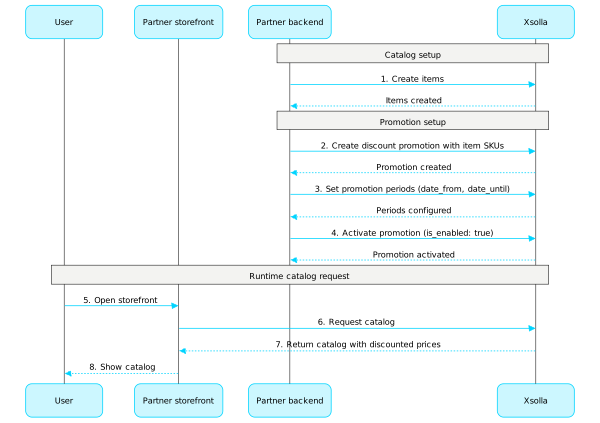
Konfiguration einer Rabattaktion (Beispielhafter Ablauf):
- Erstellen Sie Artikel mit den Aufrufen aus dem Unterabschnitt Verwaltung der Gruppen Virtuelle Gegenstände und Währung, Bundles oder Spielschlüssel.
- Erstellen Sie eine Werbeaktion mit dem Aufruf Rabattaktion für Artikel erstellen. Übermitteln Sie im
items-Array die erforderlichen Artikel-SKUs. - Legen Sie die Gültigkeitszeiträume der Werbeaktion fest. Rufen Sie dazu die Methoden Rabattaktion für Artikel erstellen oder Artikelaktion aktualisieren auf, und übermitteln Sie das
promotion_periods-Feld als Objekt-Array, wobeidate_fromdas Startdatum unddate_untildas Enddatum des Gültigkeitszeitraums definiert. - Aktivieren Sie eine Werbeaktion mit dem Aufruf Artikelaktion aktualisieren. Übermitteln Sie den Parameter
"is_enabled": true. - Um Informationen über Artikelpreise (einschließlich ermäßigter Preise) zu erhalten, müssen Sie die clientseitigen API-Methoden für den Abruf eines Artikelkatalogs aus den Unterabschnitten Allgemeines > Katalog, Virtuelle Gegenstände und Währung > Katalog und Bundles > Katalog aufrufen.
Weitere Informationen zur Konfiguration von Werbeaktionen finden Sie in unserer Dokumentation:
Gutscheine
Mit den API-Methoden aus diesem Unterabschnitt können Sie Gutscheinaktionen konfigurieren und verwalten.
Hinweis
Weitere Informationen zu Gutscheinen finden Sie in unserer Dokumentation.
Operationen
Promocodes
Mit den API-Methoden aus diesem Unterabschnitt können Sie Promocode-Aktionen konfigurieren und verwalten.
Hinweis
Weitere Informationen zu Promocodes finden Sie in unserer Dokumentation.
Operationen
Pfad
Bodyapplication/jsonProjekt-ID. Dieser Parameter wird im Kundenportal neben dem Projektnamen angezeigt sowie in der Adressleiste des Browsers, wenn Sie im Kundenportal ein Projekt geöffnet haben. Die URL hat das folgende Format: https://publisher.xsolla.com/<merchant_id>/projects/<project_id>.
Beispiel: 44056
Eindeutiger Code des Promocodes. Enthält Buchstaben und Ziffern.
Standard "SUMMER2021"
Beispiel: "SUMMER2021"
Vom Nutzer als Bonus ausgewählter plattformspezifischer Spielschlüssel. Übermitteln Sie die erhaltene bonus.item.sku als Schlüssel und die ausgewählte bonus.item.unit_items.sku als Schlüsselwert.
- https://store.xsolla.com/api/v2/project/{project_id}/promocode/redeem
- Mock serverhttps://xsolla.redocly.app/_mock/de/api/liveops/v2/project/{project_id}/promocode/redeem
- curl
- JavaScript
- Node.js
- Python
- Java
- C#
- PHP
- Go
- Ruby
- R
- Payload
curl -i -X POST \
  https://store.xsolla.com/api/v2/project/44056/promocode/redeem \
  -H 'Authorization: Bearer <YOUR_TOKEN_HERE>' \
  -H 'Content-Type: application/json' \
  -d '{
    "coupon_code": "SUMMER2021",
    "cart": {
      "id": "current"
    },
    "selected_unit_items": {
      "game_1": "game_1_steam",
      "game_2": "game_2_playstation"
    }
}'Promocode wurde erfolgreich eingelöst.
Warenkorbpreis.
Beispiel: {"amount":"6150.0000000000000000","amount_without_discount":"6150.0000000000000000","currency":"USD"}
Beispiel: [{"attributes":[],"description":"Take it, take it all! All of Xsolla's riches in one Mega Booster.","groups":[{"external_id":"powerups","name":"Power Ups"}],"image_url":"https://cdn.xsolla.net/img/misc/images/e9f2f4a634bc96ea03b5d5ceadd7c55f.png","is_free":false,"name":"Xsolla Booster Mega","price":{"amount":"50.0000000000000000","amount_without_discount":"100.0000000000000000","currency":"USD"},"quantity":123,"sku":"com.xsolla.booster_mega_1","type":"virtual_good","virtual_item_type":"consumable","virtual_prices":[],"promotions":[{"name":"Bonus promotion","date_start":"2020-04-15T16:16:00+03:00","date_end":"2026-04-15T16:16:00+03:00","discount":{"percent":"50.00"},"bonus":[{"quantity":1,"name":"Xsolla Minigun","image_url":"https://cdn.xsolla.net/img/misc/images/2fc5c491a47413a8e8000447889093c2.png","sku":"com.xsolla.minigun_1","type":"virtual_good"}]}],"can_be_bought":true,"vp_rewards":[{"item_id":175232,"sku":"com.xsolla.value_point_1","amount":130,"name":"Value point","image_url":"https://cdn3.xsolla.com/img/misc/images/54c0cf9d345817cdacfdde198db178e0.jpg","is_clan":false},{"item_id":186321,"sku":"com.xsolla.clan_value_point_1","amount":50,"name":"Clan Reward VP 1","image_url":"https://cdn3.xsolla.com/img/misc/images/54c0cf9d345817cdacfdde198db178e0.jpg","is_clan":true}],"limits":{"per_user":{"available":3,"recurrent_schedule":{"interval_type":"weekly","reset_next_date":1746057600},"total":5}},"periods":[{"date_from":"2020-08-11T10:00:00+03:00","date_until":"2020-08-11T20:00:00+03:00"}]}]
Auf bestimmte Artikel im Warenkorb angewandte Werbeaktionen. Das array wird in den folgenden Fällen zurückgegeben:
Für einen bestimmten Artikel ist eine Rabattaktion konfiguriert.
Ein Promocode mit der Einstellung Rabatt auf ausgewählte Artikel ist angewandt.
Werden keine Werbeaktionen auf Artikelebene angewandt, wird ein leeres Array zurückgegeben.
Typ des Bonusartikels.
Enum"virtual_good""virtual_currency""bundle""physical_good""game_key""nft"
Name des Bonusartikels. Nicht verfügbar für Bonusartikel vom Typ physical_good.
Bild-URL des Bonusartikels. Nicht verfügbar für Bonusartikel vom Typ physical_good.
Liste Wertpunktbelohnungen für den Artikel.
Treuepunkte, die der Nutzer als Belohnung für den Kauf des Artikels erhält.
Treuepunkte-SKU. Übermittelnn Sie diesen Wert im Parameter loyalty_point_sku anderer API-Aufrufe, beispielsweise beim Anlegen einer mit Treuepunkten bezahlten Bestellung.
Artikelbeschränkungen.
Artikelbeschränkungen für einen Nutzer.
Höchstzahl von Artikeln, die ein einzelner Nutzer kaufen kann.
Beispiel: 5
Verbleibende Anzahl von Artikeln, die der aktuelle Nutzer kaufen kann.
Beispiel: 3
One of:
Tägliche Aktualisierung der Nutzerlimits.
Steuert die Sichtbarkeit des Artikels im Katalog nach Erreichen des Kauflimits, und zwar bis das Limit das nächste Mal zurückgesetzt wird.
Gilt für Artikel, bei denen im Array recurrent_schedule Limits konfiguriert sind, die regelmäßig zurückgesetzt werden.
Wenn festgelegt ist, dass das Kauflimit nicht zurückgesetzt wird, wird der Artikel nach Erreichen des Kauflimits nicht mehr im Katalog angezeigt, unabhängig davon, welcher Wert für limit_exceeded_visibility festgelegt ist.
Mögliche Wert:
show– Der Artikel wird in API-Aufrufen zur Katalogabfrage zurückgegeben, auch wenn das Kauflimit bereits erreicht wurde. Bei clientseitigen API-Aufrufen zur Katalogabfrage wird der Artikel nach Erreichen des Limits mit dem Flagcan_be_bought: falsezurückgegeben. Das Datum, an dem das Limit das nächste Mal zurückgesetzt wird, wird im Parameterreset_next_datezurückgegeben.hide– nachdem das Kauflimit erreicht wurde, wird der Artikel bei API-Aufrufen zur Katalogabfrage nicht mehr zurückgegeben, bis das Limit zurückgesetzt wird.
Enum"show""hide"
Artikelbeschränkungen für einen Artikel.
Artikelangebotszeitraum.
Datum, an dem der angegebene Artikel zum Verkauf angeboten wird.
Beispiel: "2020-08-11T10:00:00+03:00"
Eindeutige Artikel-ID. Die SKU darf nur lateinische Klein- und Großbuchstaben, Ziffern, Punkte, Bindestriche und Unterstriche enthalten.
Beispiel: "game_01"
Artikeltyp. Mögliche Werte:
virtual_good– virtuelle Gegenständevirtual_currency– virtuelle Währungbundle– Bundleunit– Spielschlüsselpaket
Beispiel: "unit"
Bild-URL.
Beispiel: "https://cdn.xsolla.net/img/misc/images/b79342cdf24f0f8557b63c87e8326e62.png"
Ein Array plattformspezifischer Spielschlüssel. Wird nur beim Artikeltyp unit (bonus.item.type = 'unit') genutzt. Wenn das Spielschlüsselpaket plattformspezifische Schlüssel enthält, kann der Nutzer eine davon als Bonus auswählen.
Eindeutige plattformspezifische Spielschlüsselpaket-ID. Zulässige Zeichen: a–z, A–Z, 0–9, Punkt (.), Bindestrich (-), Unterstrich (_). Setzt sich aus den beiden Werten bonus.item.sku und bonus.item.unit_items.drm_sku zusammen. Wenn beispielsweisebonus.item.sku = 'cool_game' und bonus.item.unit_items.drm_sku = 'steam' festgelegt sind, lautet der Wert cool_game_steam.
Beispiel: "cool_game_steam"
Gibt an, dass es sich bei dem Artikel um einen Spielschlüssel handelt.
Wert"game_key"
Prozentualer Rabatt. Der Preis des Warenkorbs wird um einen Wert verringert, der anhand dieses Prozentsatzes berechnet und dann auf zwei Dezimalstellen gerundet wird.
Liste der Artikel, die durch einen Promocode rabattiert werden.
Antwort
application/json
{
  "cart_id": "cart_id",
  "is_free": false,
  "items": [
    { … },
    { … }
  ],
  "price": {
    "amount": "6150.0000000000000000",
    "amount_without_discount": "12300.0000000000000000",
    "currency": "USD"
  },
  "rewards": {
    "bonus": [ … ],
    "discount": { … },
    "discounted_items": [ … ],
    "is_selectable": false
  }
}
Pfad
Bodyapplication/jsonProjekt-ID. Dieser Parameter wird im Kundenportal neben dem Projektnamen angezeigt sowie in der Adressleiste des Browsers, wenn Sie im Kundenportal ein Projekt geöffnet haben. Die URL hat das folgende Format: https://publisher.xsolla.com/<merchant_id>/projects/<project_id>.
Beispiel: 44056
- https://store.xsolla.com/api/v2/project/{project_id}/promocode/remove
- Mock serverhttps://xsolla.redocly.app/_mock/de/api/liveops/v2/project/{project_id}/promocode/remove
- curl
- JavaScript
- Node.js
- Python
- Java
- C#
- PHP
- Go
- Ruby
- R
- Payload
curl -i -X PUT \
  https://store.xsolla.com/api/v2/project/44056/promocode/remove \
  -H 'Authorization: Bearer <YOUR_TOKEN_HERE>' \
  -H 'Content-Type: application/json' \
  -d '{
    "cart": {
      "id": "current"
    }
}'Promocode wurde erfolgreich storniert.
Warenkorbpreis.
Beispiel: {"amount":"6150.0000000000000000","amount_without_discount":"6150.0000000000000000","currency":"USD"}
Beispiel: [{"attributes":[],"description":"Take it, take it all! All of Xsolla's riches in one Mega Booster.","groups":[{"external_id":"powerups","name":"Power Ups"}],"image_url":"https://cdn.xsolla.net/img/misc/images/e9f2f4a634bc96ea03b5d5ceadd7c55f.png","is_free":false,"name":"Xsolla Booster Mega","price":{"amount":"50.0000000000000000","amount_without_discount":"100.0000000000000000","currency":"USD"},"quantity":123,"sku":"com.xsolla.booster_mega_1","type":"virtual_good","virtual_item_type":"consumable","virtual_prices":[],"promotions":[{"name":"Bonus promotion","date_start":"2020-04-15T16:16:00+03:00","date_end":"2026-04-15T16:16:00+03:00","discount":{"percent":"50.00"},"bonus":[{"quantity":1,"name":"Xsolla Minigun","image_url":"https://cdn.xsolla.net/img/misc/images/2fc5c491a47413a8e8000447889093c2.png","sku":"com.xsolla.minigun_1","type":"virtual_good"}]}],"can_be_bought":true,"vp_rewards":[{"item_id":175232,"sku":"com.xsolla.value_point_1","amount":130,"name":"Value point","image_url":"https://cdn3.xsolla.com/img/misc/images/54c0cf9d345817cdacfdde198db178e0.jpg"},{"item_id":186321,"sku":"com.xsolla.clan_value_point_1","amount":50,"name":"Clan Reward VP 1","image_url":"https://cdn3.xsolla.com/img/misc/images/54c0cf9d345817cdacfdde198db178e0.jpg","is_clan":true}],"limits":{"per_user":{"available":3,"recurrent_schedule":{"interval_type":"weekly","reset_next_date":1746057600},"total":5}},"periods":[{"date_from":"2020-08-11T10:00:00+03:00","date_until":"2020-08-11T20:00:00+03:00"}]}]
Art des virtuellen Gegenstands.
Mögliche Werte:
consumable– ein Gegenstand, der nach dem Gebrauch aus dem Inventar verschwindet (z. B. Munition).non_consumable– ein Gegenstand, der unbegrenzt lange im Inventar verbleibt.non_renewing_subscription– ein zeitlich begrenzter Artikel, der den Zugang zu Services oder Inhalten für einen begrenzten Zeitraum gewährt.
Enum"consumable""non_consumable""non_renewing_subscription"
Beispiel: "non-consumable"
Liste der Attribute und ihrer Werte, die dem Artikel zugeordnet sind. Kann für die Katalogfilterung verwendet werden.
Eindeutige Attribut-ID. Die external_id darf nur lateinische Klein- und Großbuchstaben, Ziffern, Bindestriche und Unterstriche enthalten.
Eindeutige Wert-ID für ein Attribut. Die external_id darf nur lateinische Kleinbuchstaben, alphanumerische Zeichen, Binde- und Unterstriche enthalten.
Artikelpreise.
Währung des Artikelpreises. Dreistelliger Code pro ISO 4217.
Beispiel: "USD"
Auf bestimmte Artikel im Warenkorb angewandte Werbeaktionen. Das array wird in den folgenden Fällen zurückgegeben:
Für einen bestimmten Artikel ist eine Rabattaktion konfiguriert.
Ein Promocode mit der Einstellung Rabatt auf ausgewählte Artikel ist angewandt.
Werden keine Werbeaktionen auf Artikelebene angewandt, wird ein leeres Array zurückgegeben.
Typ des Bonusartikels.
Enum"virtual_good""virtual_currency""bundle""physical_good""game_key""nft"
Name des Bonusartikels. Nicht verfügbar für Bonusartikel vom Typ physical_good.
Bild-URL des Bonusartikels. Nicht verfügbar für Bonusartikel vom Typ physical_good.
Liste Wertpunktbelohnungen für den Artikel.
Artikelbeschränkungen.
Artikelbeschränkungen für einen Nutzer.
Höchstzahl von Artikeln, die ein einzelner Nutzer kaufen kann.
Beispiel: 5
Verbleibende Anzahl von Artikeln, die der aktuelle Nutzer kaufen kann.
Beispiel: 3
One of:
Tägliche Aktualisierung der Nutzerlimits.
Steuert die Sichtbarkeit des Artikels im Katalog nach Erreichen des Kauflimits, und zwar bis das Limit das nächste Mal zurückgesetzt wird.
Gilt für Artikel, bei denen im Array recurrent_schedule Limits konfiguriert sind, die regelmäßig zurückgesetzt werden.
Wenn festgelegt ist, dass das Kauflimit nicht zurückgesetzt wird, wird der Artikel nach Erreichen des Kauflimits nicht mehr im Katalog angezeigt, unabhängig davon, welcher Wert für limit_exceeded_visibility festgelegt ist.
Mögliche Wert:
show– Der Artikel wird in API-Aufrufen zur Katalogabfrage zurückgegeben, auch wenn das Kauflimit bereits erreicht wurde. Bei clientseitigen API-Aufrufen zur Katalogabfrage wird der Artikel nach Erreichen des Limits mit dem Flagcan_be_bought: falsezurückgegeben. Das Datum, an dem das Limit das nächste Mal zurückgesetzt wird, wird im Parameterreset_next_datezurückgegeben.hide– nachdem das Kauflimit erreicht wurde, wird der Artikel bei API-Aufrufen zur Katalogabfrage nicht mehr zurückgegeben, bis das Limit zurückgesetzt wird.
Enum"show""hide"
Artikelbeschränkungen für einen Artikel.
Artikelangebotszeitraum.
Datum, an dem der angegebene Artikel zum Verkauf angeboten wird.
Beispiel: "2020-08-11T10:00:00+03:00"
Antwort
application/json
{
  "cart_id": "cart_id",
  "is_free": false,
  "items": [
    { … }
  ],
  "price": {
    "amount": "6150.0000000000000000",
    "amount_without_discount": "6150.0000000000000000",
    "currency": "USD"
  }
}
Anfrage
Ruft Promocode-Belohnungen anhand des Codes ab. Dadurch können Nutzer aus mehreren Bonusartikeln wählen. In der Regel wird ein DRM-System ausgewählt, wenn der Promocode ein Spiel als Bonus gewährt (type=unit).
Hinweis
Dieser API-Aufruf verwendet einen Benutzer-JWT zur Autorisierung.
Fügen Sie den Token im
Dieser API-Aufruf verwendet einen Benutzer-JWT zur Autorisierung.
Fügen Sie den Token im
Authorization-Header im folgenden Format ein: Bearer <user_JWT>. Weitere Informationen zum Benutzer-JWT finden Sie im Block Sicherheit dieses Aufrufs.
Sicherheit
XsollaLoginUserJWT
Pfad
Projekt-ID. Dieser Parameter wird im Kundenportal neben dem Projektnamen angezeigt sowie in der Adressleiste des Browsers, wenn Sie im Kundenportal ein Projekt geöffnet haben. Die URL hat das folgende Format: https://publisher.xsolla.com/<merchant_id>/projects/<project_id>.
Beispiel: 44056
- https://store.xsolla.com/api/v2/project/{project_id}/promocode/code/{promocode_code}/rewards
- Mock serverhttps://xsolla.redocly.app/_mock/de/api/liveops/v2/project/{project_id}/promocode/code/{promocode_code}/rewards
- curl
- JavaScript
- Node.js
- Python
- Java
- C#
- PHP
- Go
- Ruby
- R
- Payload
curl -i -X GET \
  https://store.xsolla.com/api/v2/project/44056/promocode/code/SO6rew99j9/rewards \
-H 'Authorization: Bearer <YOUR_JWT_HERE>'Die Liste der Promocode-Prämien wurde erfolgreich empfangen.
Eindeutige Artikel-ID. Die SKU darf nur lateinische Klein- und Großbuchstaben, Ziffern, Punkte, Bindestriche und Unterstriche enthalten.
Beispiel: "game_01"
Artikeltyp. Mögliche Werte:
virtual_good– virtuelle Gegenständevirtual_currency– virtuelle Währungbundle– Bundleunit– Spielschlüsselpaket
Beispiel: "unit"
Bild-URL.
Beispiel: "https://cdn.xsolla.net/img/misc/images/b79342cdf24f0f8557b63c87e8326e62.png"
Ein Array plattformspezifischer Spielschlüssel. Wird nur beim Artikeltyp unit (bonus.item.type = 'unit') genutzt. Wenn das Spielschlüsselpaket plattformspezifische Schlüssel enthält, kann der Nutzer eine davon als Bonus auswählen.
Eindeutige plattformspezifische Spielschlüsselpaket-ID. Zulässige Zeichen: a–z, A–Z, 0–9, Punkt (.), Bindestrich (-), Unterstrich (_). Setzt sich aus den beiden Werten bonus.item.sku und bonus.item.unit_items.drm_sku zusammen. Wenn beispielsweisebonus.item.sku = 'cool_game' und bonus.item.unit_items.drm_sku = 'steam' festgelegt sind, lautet der Wert cool_game_steam.
Beispiel: "cool_game_steam"
Gibt an, dass es sich bei dem Artikel um einen Spielschlüssel handelt.
Wert"game_key"
Prozentualer Rabatt. Der Preis des Warenkorbs wird um einen Wert verringert, der anhand dieses Prozentsatzes berechnet und dann auf zwei Dezimalstellen gerundet wird.
Liste der Artikel, die durch einen Promocode rabattiert werden.
Antwort
application/json
{
  "bonus": [
    { … },
    { … }
  ],
  "discount": {
    "percent": "10.00"
  },
  "is_selectable": true,
  "discounted_items": [
    { … }
  ]
}
Katalogsonderangebote
Mit den API-Methoden aus diesem Unterabschnitt können Sie Katalogsonderangebote konfigurieren und verwalten.
Hinweis
Weitere Informationen zu Sonderangeboten finden Sie in unserer Dokumentation.
Operationen
Rabatte
Mit den API-Methoden aus diesem Unterabschnitt können Sie Rabattaktionen konfigurieren und verwalten.
Hinweis
Weitere Informationen zu Rabatten finden Sie in unserer Dokumentation.
Operationen
Boni
Mit den API-Methoden aus diesem Unterabschnitt können Sie Bonusaktionen konfigurieren und verwalten.
Hinweis
Weitere Informationen zu Boni finden Sie in unserer Dokumentation.
Operationen
Personalisierter Katalog
Mithilfe der Personalisierung können Sie die Bedingungen festlegen, unter denen der Artikelkatalog und Werbeaktionen bestimmten autorisierten Nutzern angezeigt werden. Die Bedingungen werden auf der Grundlage von Nutzerattributen definiert und ermöglichen es Ihnen, Artikeln und Werbeaktionen anzubieten, die für bestimmte Nutzer am relevantesten sind.
Die folgenden Personalisierungstypen sind verfügbar:
- Personalisierung aufseiten von Xsolla. Personalisierungsregeln und ‑logik werden aufseiten von Xsolla konfiguriert und gespeichert. Sie übermitteln die Nutzerattribute, und basierend darauf erstellt Xsolla einen personalisierten Katalog.
- Personalisierung aufseiten des Partners. Sie konfigurieren die Personalisierungsregeln und ‑logik in Ihrem System und senden eine endgültige Katalog-Payload für einen bestimmten Nutzer an Xsolla.
Hinweis
Sie können nur einen Personalisierungstyp verwenden. Wie Sie den Personalisierungstyp ändern, erfahren Sie in der Anleitung.
Sie können nur einen Personalisierungstyp verwenden. Wie Sie den Personalisierungstyp ändern, erfahren Sie in der Anleitung.
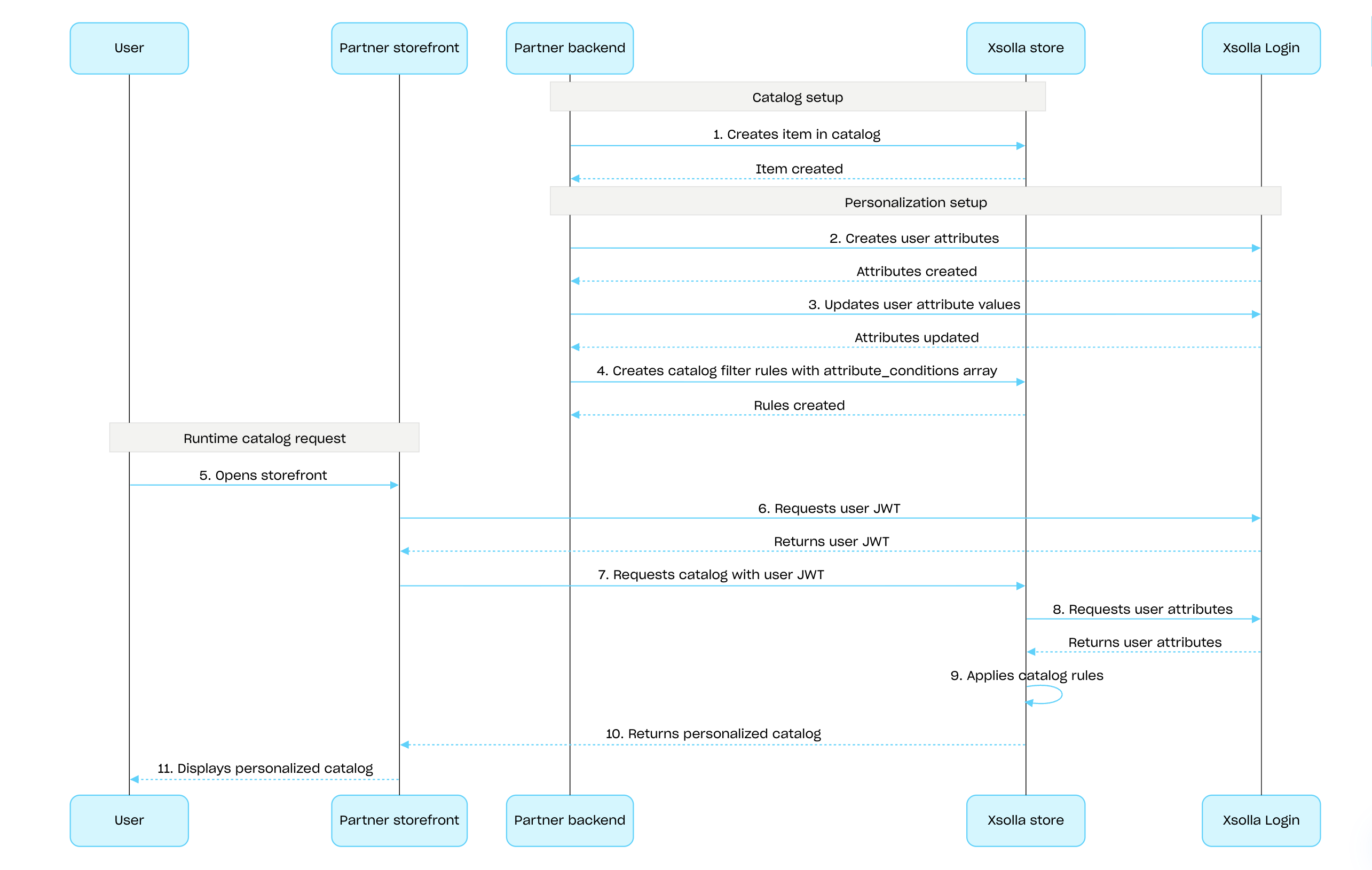
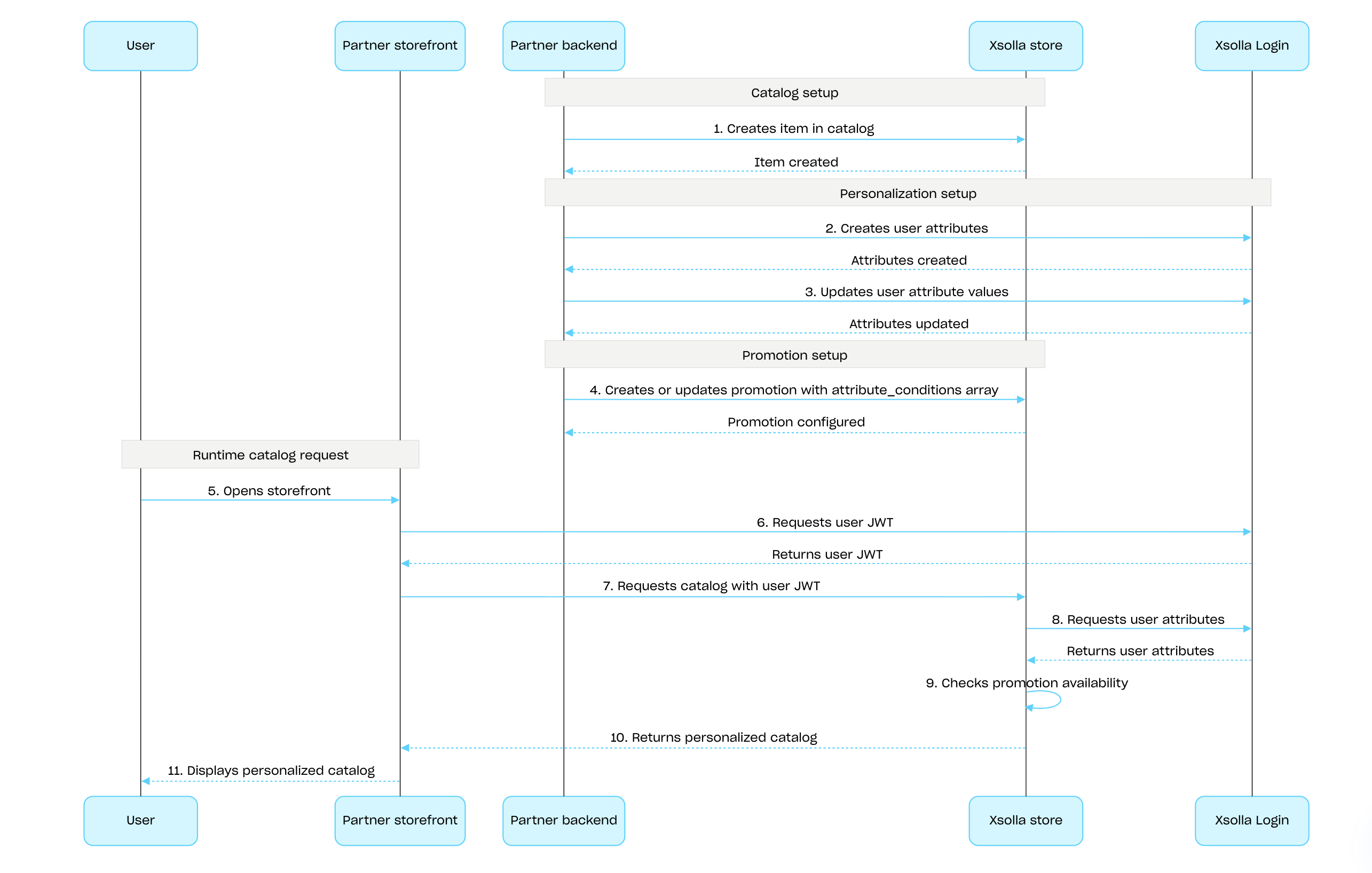
So konfigurieren Sie die Personalisierung aufseiten von Xsolla mithilfe der Xsolla-API:
Erstellen Sie Artikel mit den API-Aufrufen aus dem Unterabschnitt Verwaltung der Gruppen Virtuelle Gegenstände und Währung, Bundles oder Spielschlüssel.
Richten Sie Nutzerattribute mit der Xsolla-Login-API ein, und halten Sie diese synchron, indem Sie die Daten in Xsolla aktualisieren, sobald sich in Ihrem Spiel Änderungen ergeben.
Konfigurieren Sie die Personalisierung für Artikel oder Werbeaktionen:
- Um den Artikelkatalog zu personalisieren, müssen Sie Kataloganzeigeregeln mit dem API-Aufruf Katalogfilterregel erstellen definieren:
- Legen Sie im Array attribute_conditions die Bedingungen (auf Basis von Nutzerattributen) fest, unter denen die Artikel verfügbar sind.
- Geben Sie im Array items die Liste der Artikel an, die dem Nutzer angezeigt werden sollen, wenn dessen Attribute den festgelegten Bedingungen entsprechen
- Verwenden Sie die API-Aufrufe zum Erstellen und Aktualisieren des gewünschten Werbeaktionstyp, um personalisierte Werbeaktionen zu konfigurieren. Legen Sie im Array attribute_conditions die Bedingungen (auf Basis von Nutzerattributen) fest, unter denen die Werbeaktion verfügbar ist.
- Um den Artikelkatalog zu personalisieren, müssen Sie Kataloganzeigeregeln mit dem API-Aufruf Katalogfilterregel erstellen definieren:
Übermitteln Sie den Benutzer-JWT mitsamt der Nutzerattribute an die API-Aufrufe zur Katalogabfrage, um einen personalisierten Katalog abzurufen.
Konfiguration und Anwendung der Xsolla-seitigen Personalisierung für den Artikelkatalog (Ablauf):
Konfiguration und Anwendung der Xsolla-seitigen Personalisierung für Werbeaktionen (Ablauf):
Hinweis
Detaillierte Informationen finden Sie:
Detaillierte Informationen finden Sie:
- im Leitfaden zur Konfiguration der Personalisierung aufseiten von Xsolla und aufseiten des Partners
- im Schritt-für-Schritt-Tutorial zur Personalisierung des Artikelkatalogs aufseiten von Xsolla
Operationen
Übersicht
Mit Werbeaktionslimits können Sie begrenzen, wie oft ein bestimmter Nutzer eine Werbeaktion in Anspruch nehmen darf. Zudem können Sie festlegen, wann das Limit zurückgesetzt wird.
Limits werden aufseiten von Xsolla gespeichert und in den Werbeaktionseinstellungen im Kundenportal oder über das limits-Objekt in den folgenden API-Aufrufen konfiguriert:
- Rabattaktion für Artikel erstellen oder Rabattaktion aktualisieren
- Bonusaktion erstellen oder Bonusaktion aktualisieren
Informationen zu den Limits werden in den folgenden API-Aufrufen zum Abrufen des Artikelkatalogs im Objekt items.promotions.limits zurückgegeben:
- Liste virtueller Gegenstände abrufen
- Liste virtueller Währungen abrufen
- Liste virtueller Währungspakete abrufen
- Liste der Bundles abrufen
- Spieleliste abrufen
Mit den API-Aufrufen im Unterabschnitt Verwaltung der Gruppe Limits können Sie den aktuellen Status der Limits abrufen und diese für einen bestimmten Nutzer aktualisieren – beispielsweise den Zähler nach Abschluss einer Quest zurücksetzen oder die verbleibende Menge manuell anpassen.
Hinweis
Ausführliche Informationen zur Konfiguration von Limits im Katalog finden Sie im Abschnitt Werbeaktionslimits.
Ausführliche Informationen zur Konfiguration von Limits im Katalog finden Sie im Abschnitt Werbeaktionslimits.
Sie können limits.per_user konfigurieren, d. h., wie häufig ein Nutzer eine Werbeaktion in Anspruch nehmen darf.
Nicht authentifizierten Nutzern wird stets die Höchstzahl angezeigt, also wie oft man die Werbeaktion maximal in Anspruch nehmen darf.
Um anzuzeigen, wie oft der Nutzer die Werbeaktion unter Berücksichtigung des geltenden Limits noch in Anspruch nehmen darf, müssen Sie bei der Abfrage des Artikelkatalogs die Autorisierungsdaten des Nutzers übermitteln.
Um zu konfigurieren, wie häufig das Limit zurückgesetzt werden soll (täglich, wöchentlich oder monatlich), müssen Sie das limits.recurrent_schedule-Objekt beim Erstellen oder Aktualisieren der Werbeaktion übermitteln.
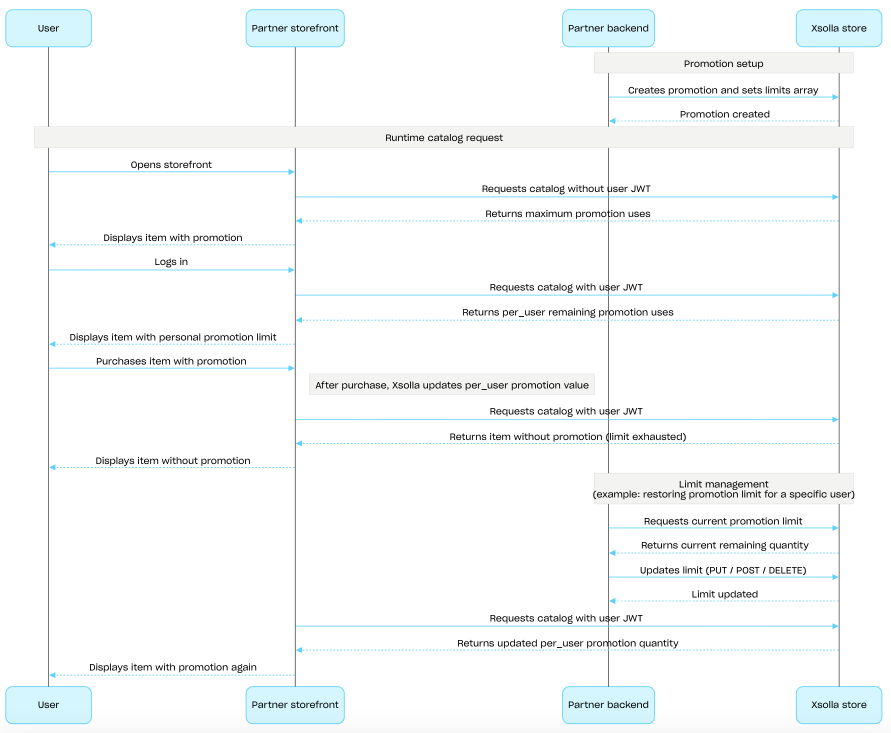
Konfiguration und Durchsetzung von Limits (Anwendungsszenario)
- Sie erstellen eine Werbeaktion mit dem API-Aufruf Rabattaktion für Artikel erstellen oder Bonusaktion erstellen und übermitteln das
limits-Objekt. - Sie rufen den Katalog für einen nicht authentifizierten Nutzer ab – in der Antwort ist das
items.promotions.limits-Objekt enthalten, darin ist angegeben, wie oft die Werbeaktion maximal in Anspruch genommen werden darf. - Der Nutzer meldet sich an.
- Sie rufen den Katalog mit dem Autorisierungstoken des Nutzers ab – in der Antwort ist angegeben, wie oft der Nutzer die Werbeaktion unter Berücksichtigung des aktiven Limits noch in Anspruch nehmen darf.
- Der Nutzer wählt einen Aktionsartikel aus und kauft ihn.
- Nach erfolgreicher Bezahlung aktualisiert Xsolla den Wert des Parameters
items.promotions.limits.per_user. Wenn der Parameter den Wert0erreicht, wird der Artikel in den Katalog-API-Aufrufen ohne Rabatt oder Bonus zurückgegeben. - Sie können das Limit mit den API-Aufrufen aus dem Unterabschnitt Verwaltung aktualisieren:
- Sie rufen den aktualisierten Limitwert (
items.promotions.limits) bei der nächsten Katalogabfrage mit dem Autorisierungstoken des Nutzers ab und zeigen ihn dem Nutzer an.
Übersicht
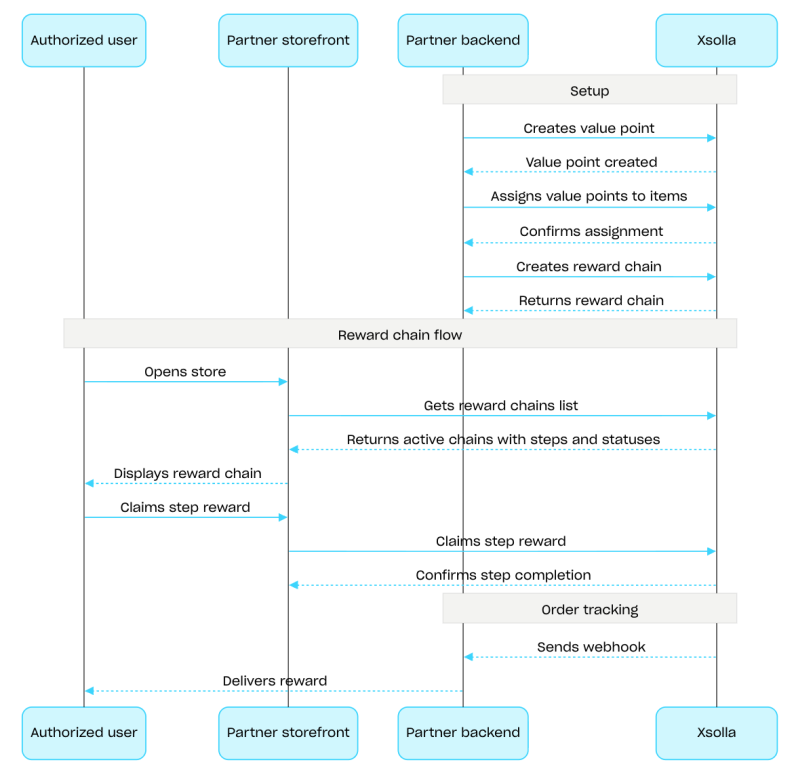
Belohnungsketten motivieren die Nutzer dazu, im Shop mit echtem Geld einzukaufen. Bei jedem Kauf erhalten die Nutzer Wertpunkte und durchlaufen dabei die einzelnen Schritte einer Belohnungskette. Sind die Nutzer Mitglieder eines Clans, fließen die Wertpunkte aus den Käufen dem gesamten Clan zu. Ausführliche Informationen zur Konfiguration der Belohnungsketten finden Sie im Abschnitt Belohnungssystem.
Verwenden Sie zur Konfiguration von Belohnungsketten die API-Aufrufe aus dem Unterabschnitt Verwaltung. Zur Anzeige von Ketten und zur Inanspruchnahme von Belohnungen verwenden Sie die API-Aufrufe aus dem Unterabschnitt Client. Für die Arbeit mit Clan-Belohnungsketten verwenden Sie die API-Aufrufe aus dem Unterabschnitt Clans-Client.
Konfiguration einer Belohnungskette (Beispielhafter Ablauf):
- Erstellen Sie Artikel mithilfe der API-Aufrufe aus dem Unterabschnitt Verwaltung der Gruppen Virtuelle Gegenstände und Währung oder Bundles.
- Erstellen Sie Wertpunkte mithilfe des API-Aufrufs Wertpunkt erstellen.
- Weisen Sie Artikeln Wertpunkte zu, indem Sie den API-Aufruf Wertpunkte für Artikel festlegen verwenden. Beim Kauf dieser Artikel erhalten die Nutzer Wertpunkte.
- Erstellen Sie eine Belohnungskette mithilfe des API-Aufrufs Belohnungskette erstellen. Übermitteln Sie den Parameter
is_enabled: true, um die Kette zu aktivieren. - Implementieren Sie die Anzeige der Belohnungsketten. Fordern Sie dazu die Liste der verfügbaren Ketten mithilfe des API-Aufrufs Belohnungsketten des aktuellen Nutzers abrufen an. In der Antwort sind alle aktiven Ketten und deren Schritte und Statusangaben enthalten.
- Implementieren Sie die Anzeige des Wertpunktguthabens. Verwenden Sie dazu den API-Aufruf Wertpunktestand des aktuellen Nutzers abrufen.
- Implementieren Sie die Inanspruchnahme von Schrittbelohnungen. Verwenden Sie dazu den API-Aufruf Schrittbelohnung gewähren.
- Konfigurieren Sie das Bestellstatus-Tracking, z. B. mithilfe von Webhooks, um Daten zu in Anspruch genommenen Belohnungen umgehend zu erhalten und diese dem Nutzer zu gewähren.
Übersicht
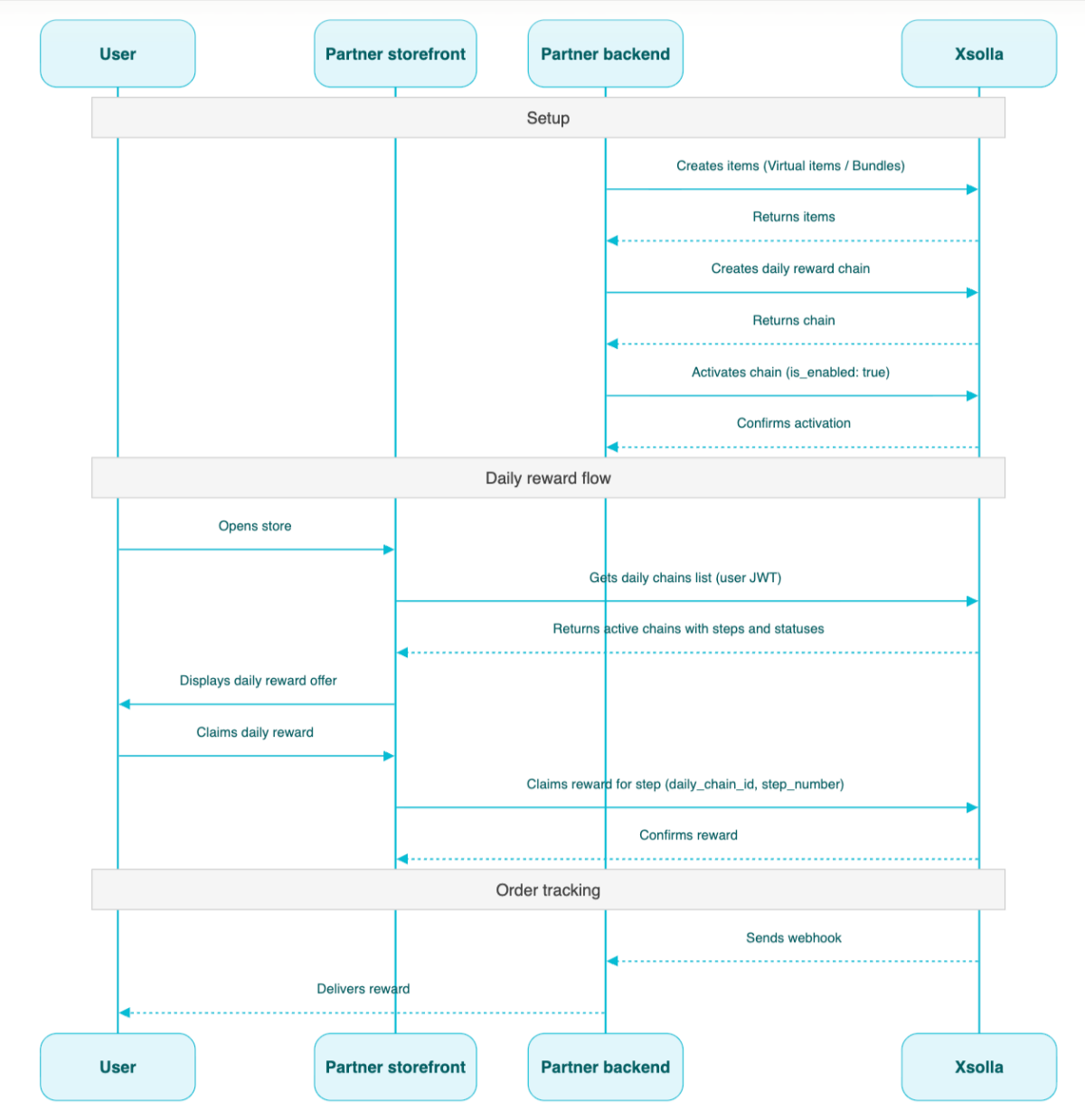
Tägliche Belohnungen motivieren Nutzer dazu, sich jeden Tag beim Shop anzumelden, um kostenlose Artikel zu bekommen. Das Verhalten, wenn ein Tag übersprungen wird, hängt vom Kettentyp ab. Damit die täglichen Belohnungen richtig funktionieren, müssen Sie die Benutzerauthentifizierung konfigurieren. Nicht authentifizierte Nutzer können zwar die vollständigen tägliche Belohnungskette einsehen, jedoch keine Belohnungen einlösen. Weitere Informationen in Bezug auf die Konfiguration von täglichen Belohnungen finden Sie unter tägliche Belohnungen.
Ketten werden mithilfe von API-Aufrufen aus dem Unterabschnitt Verwaltung konfiguriert. Um Belohnungen zu vergeben, verwenden Sie die API-Aufrufe aus dem Unterabschnitt Client.
Konfigurationsszenario für tägliche Ketten:
1.Erstellen Sie Artikel mit den API-Aufrufen aus dem Unterabschnitt Verwaltung der Gruppen Virtuelle Gegenstände und Währung oder Bundles. 2. Erstellen Sie eine Kette mithilfe des API-Aufrufs Tägliche Belohnung erstellen. 3. Aktivieren Sie die Kette, indem Sie den Parameter "is_enabled": true an den API-Aufruf Tägliche Belohnung erstellen übermitteln. 4. Fordern Sie die Liste verfügbarer Ketten mithilfe des API-Aufrufs Tägliche Belohnungen des aktuellen Nutzers abrufen an, indem Sie den Nutzer-JWT übermitteln. In der Antwort sind alle aktiven Ketten und deren Schritte und Statusangaben enthalten. 5. Richten Sie die Gewährleistung der Artikel über webhooks ein. 6. Gewähren Sie den Nutzern ihre täglichen Belohnungen mithilfe des API-Aufrufs Täglichen Belohnungsschritt beanspruchen mit der Übermittlung der daily_chain_id und step_number.
Übersicht
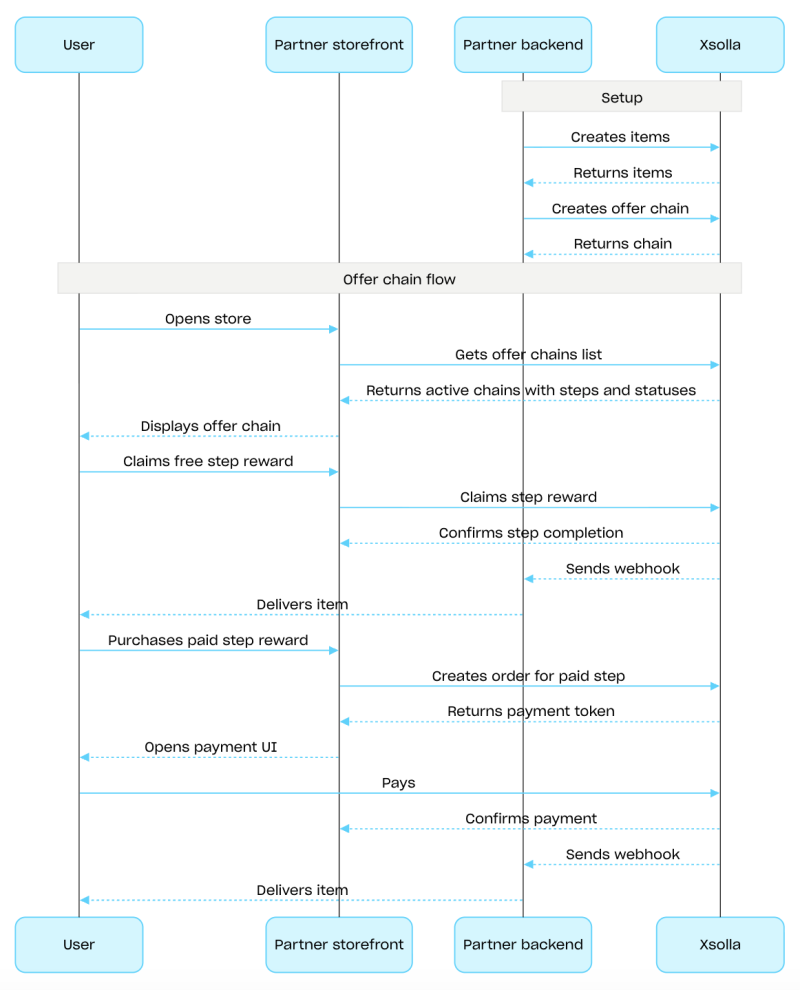
Angebotsketten sind eine Abfolge von Schritten mit jeweils einem Artikel, den Nutzer im Rahmen eines aktiven Angebots kaufen oder kostenlos erhalten können. Angebotsketten können exklusive Artikel umfassen, die nur im Rahmen der Kette erhältlich sind, sowie Artikel zu vergünstigten Preisen (verglichen mit den Preisen im Shop). Ausführliche Informationen zur Konfiguration dieses Marketingtools finden Sie im Abschnitt Angebotsketten.
Verwenden Sie zur Konfiguration von Angebotsketten die API-Aufrufe aus dem Unterabschnitt Verwaltung. Mit den API-Aufrufen aus dem Unterabschnitt Client können Sie die Ketten anzeigen und die Logik für die Arbeit mit den Artikeln implementieren.
Konfiguration einer Angebotskette (Beispielhafter Ablauf):
Erstellen Sie Artikel mithilfe der API-Aufrufe aus dem Unterabschnitt Verwaltung der Gruppe Virtuelle Gegenstände und Währung oder Bundles.
Erstellen Sie eine Kette mithilfe des API-Aufrufs Angebotskette erstellen. Übermitteln Sie den Parameter
is_enabled: true, um die Kette zu aktivieren.Implementieren Sie die Anzeige der Angebotskette. Fordern Sie dazu die Liste der verfügbaren Ketten mithilfe des API-Aufrufs Angebotsketten des aktuellen Nutzers abrufen an. In der Antwort sind alle aktiven Ketten und deren Schritte und Statusangaben enthalten.
Implementieren Sie die Logik für den Umgang mit Artikeln, die Nutzer erhalten:
Wenn es sich um einen kostenlosen Artikel handelt, verwenden Sie den API-Aufruf Kostenlosen Angebotskettenschritt sichern. Übermitteln Sie
offer_chain_idundstep_numberin der Anfrage.Wenn es sich um einen kostenpflichtigen Artikel handelt, verwenden Sie den API-Aufruf Bestellung für kostenpflichtigen Angebotskettenschritt anlegen. Übermitteln Sie
offer_chain_idundstep_numberin der Anfrage. In der Antwort ist dieorder_idund der Token zum Öffnen des Zahlungsportals enthalten.
Konfigurieren Sie das Bestellstatus-Tracking, z. B. mithilfe von Webhooks, um Daten zu in Anspruch genommenen oder gekauften Artikeln umgehend zu erhalten und diese dem Nutzer zu gewähren.
Übersicht
Upselling ist eine Verkaufsmethode, bei der dem Nutzer ein Artikel mit zusätzlichem Mehrwert zum Kauf angeboten wird. Das könnte beispielsweise der Artikel sein, der bei anderen Nutzern am meisten gefragt ist. Sie können für Upselling-Artikel auch regionale Einschränkungen festlegen. Weitere Informationen dazu finden Sie unter Upsell.
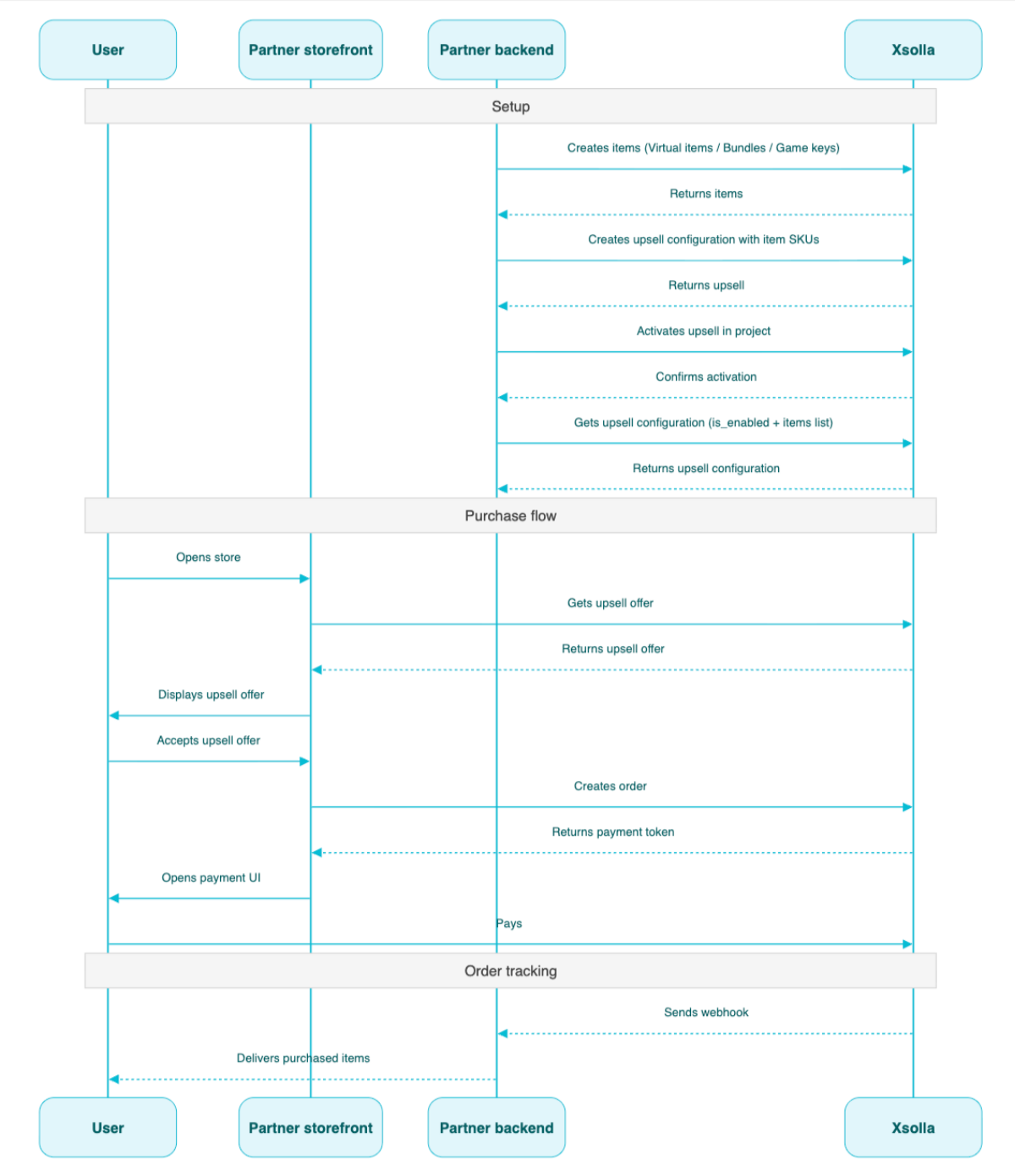
Die Liste, die für Upselling konfiguriert wurde, und der Upselling Status (aktiviert oder deaktiviert) werden von der API-Methode Informationen zum Upselling im Projekt abrufen zurückgegeben. Clientseitig wird die Liste der Artikel von der API-Methode Liste der Upselling-Artikel im Projekt abrufen zurückgegeben und dem Nutzer an der entsprechenden Stelle im Kaufprozess angezeigt.
Konfigurationsszenario für Upselling:
- Erstellen Sie Artikel mit den API-Aufrufen aus dem Unterabschnitt Verwaltung der Gruppen Virtuelle Gegenstände und Währung, Bundles oder Spielschlüssel.
- Richten Sie das Upselling mithilfe des API-Aufrufs Upselling erstellen. Übermitteln Sie die SKU der erforderlichen Artikel im Array
items. - Aktivieren Sie Upselling für das Projekt mithilfe des API-Aufrufs Upselling-Artikel des Projekts aktivieren/deaktivieren.
- Zeigen Sie dem Nutzer die Upselling-Angebote im geeigneten Zeitpunkt im Kaufablauf mithilfe des API-Aufrufs Liste der Upselling-Artikel im Projekt abrufen.
- Implementieren Sie das Öffnen des Zahlungsportals, um die Bestellung zu bezahlen. Sie können beispielsweise den API-Aufruf Bestellung mit allen Artikeln aus einem angegebenen Warenkorb anlegen. Die Antwort gibt einen Token für die Öffnung des Zahlungsportals zurück.
- Konfigurieren Sie das Bestellstatus-Tracking (z. B. mittels Webhooks, um zeitnah Daten über erfolgreich bezahlte Artikel zu erhalten und diese dem Nutzer zu gewähren.
Übersicht
Mit der Loyalty-as-Service-API können Sie die Treuepunktguthaben der Nutzer verwalten, z. B. das aktuelle Guthaben eines Nutzers abrufen oder Treuepunkte gutschreiben bzw. abbuchen.
Die Aufrufe aus der Gruppe "Verwaltung" der Loyalty-as-Service-API erfolgen serverseitig und erfordern eine Basisauthentifizierung.
Die Basis-URL für diese API lautet: https://loyalty-points.xsolla.com/.
Ausführliche Informationen zur Einrichtung dieses Marketingtools finden Sie unter Loyalty as Service.