跳转到内容

Overview

  • Version: 2.0.0
  • Servers: https://store.xsolla.com/api
  • Contact Us by Email
  • Contact URL: https://xsolla.com/
  • Required TLS version: 1.2

The Catalog API allows you to configure a catalog of in-game items on the Xsolla side and display the catalog to users in your store.

The API allows you to manage the following catalog entities:

  • Virtual items — in-game items such as weapons, skins, boosters.
  • Virtual currency — virtual money used to purchase virtual goods.
  • Virtual currency packages — predefined bundles of virtual currency.
  • Bundles — combined packages of virtual items, currency, or game keys sold as a single SKU.
  • Game keys — keys for games and DLCs distributed via platforms like Steam or other DRM providers.
  • Groups — logical groupings for organizing and sorting items within the catalog.

API calls

The API is divided into the following groups:

  • Admin — calls for creating, updating, deleting, and configuring catalog items and groups. Authenticated via basic access authentication with your merchant or project credentials. Not intended for storefront use.
  • Catalog — calls for retrieving items and building custom storefronts for end users. Designed to handle high-load scenarios. Support optional user JWT authorization to return personalized data such as user-specific limits and active promotions.

Authentication

API calls require authentication either on behalf of a user or on behalf of a project. The authentication scheme used is specified in the Security section in the description of each call.

Authentication using user's JWT

User's JWT authentication is used when a request is sent from a browser, mobile application, or game. By default, the XsollaLoginUserJWT scheme is applied. For details on how to create a token, see the Xsolla Login API documentation.

The token is passed in the Authorization header in the following format: Authorization: Bearer <user_JWT>, where <user_JWT> is the user token. The token identifies the user and provides access to personalized data. You can try this call using the following test token:

eyJ0eXAiOiJKV1QiLCJhbGciOiJIUzI1NiJ9.eyJleHAiOjE5NjIyMzQwNDgsImlzcyI6Imh0dHBzOi8vbG9naW4ueHNvbGxhLmNvbSIsImlhdCI6MTU2MjE0NzY0OCwidXNlcm5hbWUiOiJ4c29sbGEiLCJ4c29sbGFfbG9naW5fYWNjZXNzX2tleSI6IjA2SWF2ZHpDeEVHbm5aMTlpLUc5TmMxVWFfTWFZOXhTR3ZEVEY4OFE3RnMiLCJzdWIiOiJkMzQyZGFkMi05ZDU5LTExZTktYTM4NC00MjAxMGFhODAwM2YiLCJlbWFpbCI6InN1cHBvcnRAeHNvbGxhLmNvbSIsInR5cGUiOiJ4c29sbGFfbG9naW4iLCJ4c29sbGFfbG9naW5fcHJvamVjdF9pZCI6ImU2ZGZhYWM2LTc4YTgtMTFlOS05MjQ0LTQyMDEwYWE4MDAwNCIsInB1Ymxpc2hlcl9pZCI6MTU5MjR9.GCrW42OguZbLZTaoixCZgAeNLGH2xCeJHxl8u8Xn2aI

Alternatively, you can use a token for opening the payment UI.

Basic HTTP authentication

Basic HTTP authentication is used for server-to-server interactions, when an API call is sent directly from your server rather than from a user's browser or mobile application. HTTP Basic authentication with an API key is typically used.

Note

The API key is confidential and must not be stored or used in client applications.

With basic server-side authentication, all API requests must include the following header:

  • for basicAuthAuthorization: Basic <your_authorization_basic_key>, where your_authorization_basic_key is the project_id:api_key pair encoded in Base64
  • for basicMerchantAuthAuthorization: Basic <your_authorization_basic_key>, where your_authorization_basic_key is the merchant_id:api_key pair encoded in Base64

You can find the parameter values in Publisher Account:

  • merchant_id is displayed:
    • In Company settings > Company.
    • In the URL in the browser address bar on any Publisher Account page. The URL has the following format: https://publisher.xsolla.com/<merchant_id>.
  • project_id is displayed:
    • Next to the project name in Publisher Account.
    • In the URL in the browser address bar when working on a project in Publisher Account. The URL has the following format: https://publisher.xsolla.com/<merchant_id>/projects/<project_id>.
  • api_key is shown in Publisher Account only at the time of creation and must be stored securely on your side. You can create an API key in the following sections:
Notice

If a required API call doesn't include the project_id path parameter, use an API key that is valid across all company projects for authorization.

For more information about working with API keys, see the API references.

Authentication with guest access support

The AuthForCart authentication scheme is used for cart purchases and supports two modes:

  1. Authentication with a user's JWT. The token is passed in the Authorization header in the following format: Authorization: Bearer <user_JWT>, where <user_JWT> is the user token. The token identifies the user and provides access to personalized data. You can try this call using the following test token:
eyJ0eXAiOiJKV1QiLCJhbGciOiJIUzI1NiJ9.eyJleHAiOjE5NjIyMzQwNDgsImlzcyI6Imh0dHBzOi8vbG9naW4ueHNvbGxhLmNvbSIsImlhdCI6MTU2MjE0NzY0OCwidXNlcm5hbWUiOiJ4c29sbGEiLCJ4c29sbGFfbG9naW5fYWNjZXNzX2tleSI6IjA2SWF2ZHpDeEVHbm5aMTlpLUc5TmMxVWFfTWFZOXhTR3ZEVEY4OFE3RnMiLCJzdWIiOiJkMzQyZGFkMi05ZDU5LTExZTktYTM4NC00MjAxMGFhODAwM2YiLCJlbWFpbCI6InN1cHBvcnRAeHNvbGxhLmNvbSIsInR5cGUiOiJ4c29sbGFfbG9naW4iLCJ4c29sbGFfbG9naW5fcHJvamVjdF9pZCI6ImU2ZGZhYWM2LTc4YTgtMTFlOS05MjQ0LTQyMDEwYWE4MDAwNCIsInB1Ymxpc2hlcl9pZCI6MTU5MjR9.GCrW42OguZbLZTaoixCZgAeNLGH2xCeJHxl8u8Xn2aI

Alternatively, you can use a token for opening the payment UI.

  1. Simplified mode without Authorization header. This mode is used only for unauthorized users and can be applied only for game key sales. Instead of a token, the request must include the following headers:
    • x-unauthorized-id with a request ID
    • x-user with the user's email address encoded in Base64

Core entity structure

Items of all types (virtual items, bundles, virtual currency, and keys) use a similar data structure. Understanding the basic structure simplifies working with the API and helps you navigate the documentation more easily.

Note

Some calls may include additional fields but they don't change the basic structure.

Identification

  • merchant_id — company ID in Publisher Account
  • project_id — project ID in Publisher Account
  • sku — item SKU, unique within the project

Store display

  • name — item name
  • description — item description
  • image_url — image URL
  • is_enabled — item availability
  • is_show_in_store — whether the item is displayed in the catalog

For more information about managing item availability in the catalog, see the documentation.

Organization

  • type — item type, for example, a virtual item (virtual_item) or bundle (bundle)
  • groups — groups the item belongs to
  • order — display order in the catalog

Sale conditions

  • prices — prices in real or virtual currency
  • limits — purchase limits
  • periods — availability periods
  • regions — regional restrictions

Example of core entity structure:

{
  "attributes": [],
  "bundle_type": "virtual_currency_package",
  "content": [
    {
      "description": {
        "en": "Main in-game currency"
      },
      "image_url": "https://.../image.png",
      "name": {
        "en": "Crystals",
        "de": "Kristalle"
      },
      "quantity": 500,
      "sku": "com.xsolla.crystal_2",
      "type": "virtual_currency"
    }
  ],
  "description": {
    "en": "Crystals x500"
  },
  "groups": [],
  "image_url": "https://.../image.png",
  "is_enabled": true,
  "is_free": false,
  "is_show_in_store": true,
  "limits": {
    "per_item": null,
    "per_user": null,
    "recurrent_schedule": null
  },
  "long_description": null,
  "media_list": [],
  "name": {
    "en": "Medium crystal pack"
  },
  "order": 1,
  "periods": [
    {
      "date_from": null,
      "date_until": "2020-08-11T20:00:00+03:00"
    }
  ],
  "prices": [
    {
      "amount": 20,
      "country_iso": "US",
      "currency": "USD",
      "is_default": true,
      "is_enabled": true
    }
  ],
  "regions": [],
  "sku": "com.xsolla.crystal_pack_2",
  "type": "bundle",
  "vc_prices": []
}

Basic purchase flow

The Xsolla API allows you to implement in-game store logic, including retrieving the item catalog, managing the cart, creating orders, and tracking their status. Depending on the integration scenario, API calls are divided into Admin and Catalog subsections, which use different authentication schemes.

The following example shows a basic flow for setting up and operating a store, from item creation to purchase.

Create items and groups (Admin)

Create an item catalog for your store, such as virtual items, bundles, or virtual currency.

Example API calls:

Set up promotions, chains, and limits (Admin)

Configure user acquisition and monetization tools, such as discounts, bonuses, daily rewards, or offer chains.

Example API calls:

Get item information (Client)

Configure item display in your application.

Notice

Do not use API calls from the Admin subsection to build a user catalog. These API calls have rate limits and aren't intended for user traffic.

Example API calls:

Note

By default, catalog API calls return items that are currently available in the store at the time of the request. To retrieve items that are not yet available or are no longer available, include the parameter "show_inactive_time_limited_items": 1 in the catalog request.

Sell items

You can sell items using the following methods:

  • Fast purchase — sell one SKU multiple times.
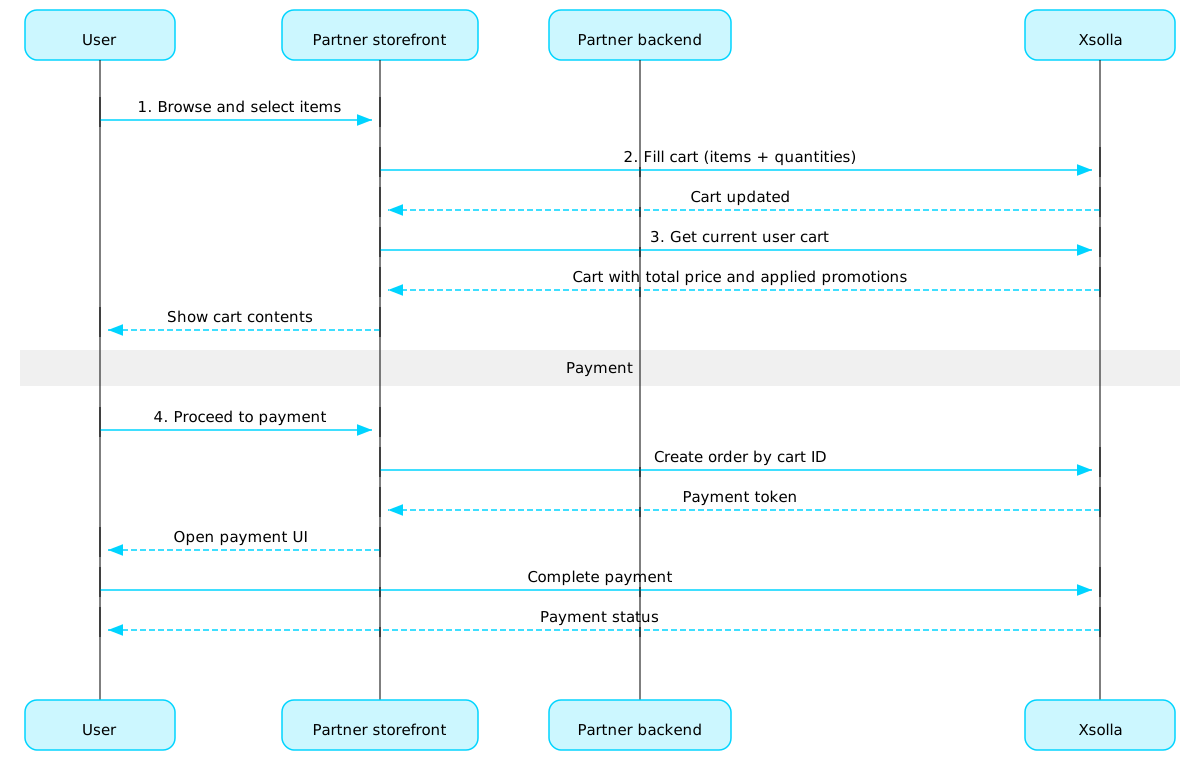
  • Cart purchase — the user adds items to the cart, removes items, and updates quantities within a single order.

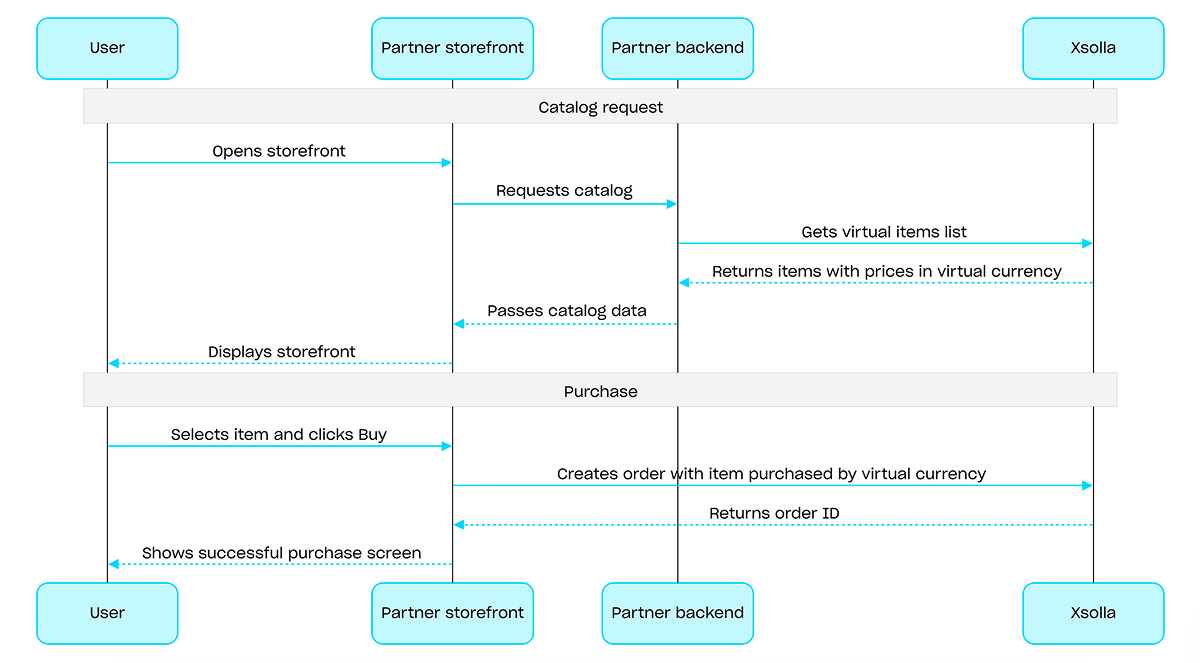
If an item is purchased using virtual currency instead of real money, use the Create order with specified item purchased by virtual currency API call. The payment UI is not required, as the charge is processed when the API call is executed.

For free item purchase, use the Create order with specified free item API call or the Create order with free cart API call. The payment UI is not required — the order is immediately set to the done status.

Fast purchase

Use the client-side API call to create an order with a specified item. The call returns a token used to open the payment UI.

Note

Discount information is available to the user only in the payment UI. Promo codes are not supported.

Cart purchase

Cart setup and purchase can be performed on the client or on the server side.

Set up and purchase a cart on the client

Implement the logic of adding and removing items by yourself. Before calling the API for setting up a cart, you will not have information about which promotions will be applied to the purchase. This means that the total cost and details of the added bonus items will not be known.

Implement the following cart logic:

  1. After the player has filled a cart, use the Fill cart with items API call. The call returns the current information about the selected items (prices before and after discounts, bonus items).
  2. Update the cart contents based on user actions:
Note

To get the current status of the cart, use the Get current user's cart API call.
  1. Use the Create order with all items from current cart API call. The call returns the order ID and payment token. The newly created order is set to new status by default.

Set up and purchase a cart on the server

This setup option may take longer for setting the cart up, since each change to the cart must be accompanied by API calls.

Implement the following cart logic:

  1. After the player has filled a cart, use the Fill cart with items API call. The call returns current information about the selected items (prices before and after discounts, bonus items).
  2. Use the Create order with all items from current cart API call. The call returns the order ID and payment token. The newly created order is set to new status by default.

Open payment UI

Use the returned token to open the payment UI in a new window. Other ways to open the payment UI are described in the documentation.

ActionEndpoint
Open in production environment.https://secure.xsolla.com/paystation4/?token={token}
Open in sandbox mode.https://sandbox-secure.xsolla.com/paystation4/?token={token}
Note

Use sandbox mode during development and testing. Test purchases don't charge real accounts. You can use test bank cards.

After the first real payment is made, a strict sandbox payment policy takes effect. A payment in sandbox mode is available only to users specified in Publisher Account > Company settings > Users.

Buying virtual currency and items for real currency is possible only after signing a license agreement with Xsolla. To do this, in Publisher Account, go to Agreements & Taxes > Agreements, complete the agreement form, and wait for confirmation. It may take up to 3 business days to review the agreement.

To enable or disable sandbox mode, change the value of the sandbox parameter in the request for fast purchase and cart purchase. Sandbox mode is off by default.

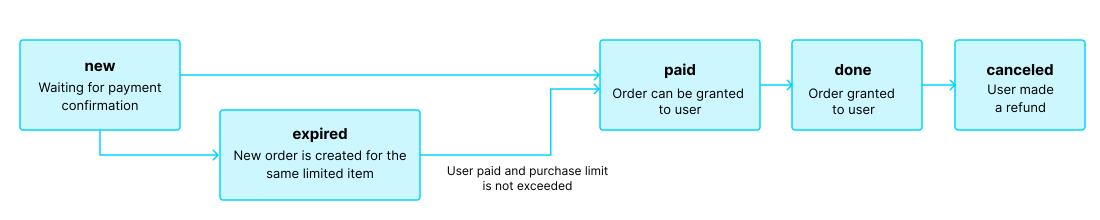
Possible order statuses:

  • new — order created
  • paid — payment received
  • done — item delivered
  • canceled — order canceled
  • expired — payment expired

Track order status using one of the following methods:

Pagination

API calls that return large sets of records (for example, when building a catalog) return data in pages. Pagination is a mechanism that limits the number of items returned in a single API response and allows you to retrieve subsequent pages sequentially.

Use the following parameters to control the number of returned items:

  • limit — number of items per page
  • offset — index of the first item on the page (numbering starts from 0)
  • has_more — indicates whether another page is available
  • total_items_count — total number of items

Example request:

GET /items?limit=20&offset=40

Response example:

{
  "items": [...],
  "has_more": true,
  "total_items_count": 135
}

It is recommended to send subsequent requests until the response returns has_more = false.

Date and time format

Dates and time values are passed in the ISO 8601 format.

The following are supported:

  • UTC offset
  • null value when there is no time restriction for displaying an item
  • Unix timestamp (in seconds) used in some fields

Format: YYYY-MM-DDTHH:MM:SS±HH:MM

Example: 2026-03-16T10:00:00+03:00

Localization

Xsolla supports localization of user-facing fields such as item name and description. Localized values are passed as an object where the language code is used as the key. The full list of supported languages is available in the documentation.

Supported fields

Localization can be specified for the following parameters:

  • name
  • description
  • long_description

Locale format

The locale key can be specified in one of the following formats:

  • Two-letter language code: en, ru
  • Five-letter language code: en-US, ru-RU, de-DE

Examples

Example with a two-letter language code:

{
  "name": {
    "en": "Starter Pack",
    "ru": "Стартовый набор"
  }
}

Example with a five-letter language code:

{
  "description": {
    "en-US": "Premium bundle",
    "de-DE": "Premium-Paket"
  }
}

Error response format

If an error occurs, the API returns an HTTP status and a JSON response body. The full list of store-related errors is available in the documentation.

Response example:

{
  "errorCode": 1102,
  "errorMessage": "Validation error",
  "statusCode": 422,
  "transactionId": "c9e1a..."
}
  • errorCode — error code.
  • errorMessage — short error description.
  • statusCode — HTTP response status.
  • transactionId — request ID. Returned only in some cases.
  • errorMessageExtended — additional error details, such as request parameters. Returned only in some cases.

Extended response example:

{
  "errorCode": 7001,
  "errorMessage": "Chain not found",
  "errorMessageExtended": {
    "chain_id": "test_chain_id",
    "project_id": "test_project_id",
    "step_number": 2
  },
  "statusCode": 404
}

Common HTTP status codes

  • 400 — invalid request
  • 401 — authentication error
  • 403 — insufficient permissions
  • 404 — resource not found
  • 422 — validation error
  • 429 — rate limit exceeded

Recommendations

  • Handle the HTTP status and the response body together.
  • Use errorCode to process errors related to application logic.
  • Use transactionId to identify requests more quickly when analyzing errors.
下载 OpenAPI 描述
语言
服务器
https://store.xsolla.com/api/
Mock server
https://xsolla.redocly.app/_mock/zh/api/catalog/
操作
操作
操作
操作
操作
操作

通过ID更新游戏Server-sideAdmin

请求

通过ID更新项目中的游戏。

安全
basicAuth
路径
project_idinteger必需

Project ID. You can find this parameter in your Publisher Account next to the project name and in the browser address bar when working with a project. The URL has the following format: https://publisher.xsolla.com/<merchant_id>/projects/<project_id>.

示例: 44056
item_idstring必需

物品ID。

示例: 656
正文application/json必需

包含游戏数据的对象。

attributesArray of objects(Game-Keys_admin-post-put-attributes)<= 20 items

属性列表。

注意:为每个商品指定的属性不能超过20个。任何超出限制的尝试都会导致错误。
attributes[].​external_idstring(admin-attribute-external_id)[ 1 .. 255 ] characters^[a-zA-Z0-9-_]+$必需

唯一属性ID。 external_id只能包含大小写英文字母和数字字符、破折号和下划线。

attributes[].​nameobject(admin-attribute-name)

包含本地化属性名称的对象。编码按照ISO 3166-1的规定。

attributes[].​name.​property name*string附加属性
attributes[].​valuesArray of objects(attribute-value)必需
注意:为每个属性创建的值不能超过6个。任何超出限制的尝试都会导致错误。
示例: [{"external_id":"strategy","value":{"de":"Strategie","en":"Strategy"}},{"external_id":"action","value":{"de":"Aktion","en":"Action"}}]
attributes[].​values[].​external_idstring(value-external_id)[ 1 .. 255 ] characters^[-_.\d\w]+$必需

属性的唯一值ID。 external_id只能包含小写英文字母和数字字符、破折号和下划线。

示例: "value_external_id"
attributes[].​values[].​valueobject(value-name)必需

包含本地化值名称的对象。编码按照ISO 3166-1的规定。

attributes[].​values[].​value.​property name*string附加属性
description(two-letter (object or null)) or (five-letter (object or null))(description-localization-object)

包含本地化商品描述的对象。值接受以下两种格式之一:两个小写字母的语言代码(例如,en)或五个字符的区域设置代码(例如,en-US)。虽然两种格式都可作为输入接受,但响应会返回两个小写字母的语言代码。当为同一种语言提供了两种输入时(例如:enen-US),将存储最后提供的值。您可以在文档中找到支持语言的完整列表。

示例: {"en-US":"Game description","ru-RU":"Краткое описание игры"}
Any of:

两个小写字母的语言代码。

description.​arstring or null

阿拉伯语

description.​bgstring or null

保加利亚语

description.​cnstring or null

中文(简体)

description.​csstring or null

捷克语

description.​destring or null

德语

description.​enstring or null

英语

description.​esstring or null

西班牙语(西班牙)

description.​frstring or null

法语

description.​hestring or null

希伯来语

description.​idstring or null

印度尼西亚语

description.​itstring or null

意大利语

description.​jastring or null

日语

description.​kmstring or null

高棉语

description.​kostring or null

韩语

description.​lostring or null

老挝语

description.​mystring or null

缅甸语

description.​nestring or null

尼泊尔语

description.​phstring or null

菲律宾语

description.​plstring or null

波兰语

description.​ptstring or null

葡萄牙语

description.​rostring or null

罗马尼亚语

description.​rustring or null

俄语

description.​thstring or null

泰语

description.​trstring or null

土耳其语

description.​twstring or null

中文(繁体)

description.​vistring or null

越南语

groupsArray of objects

商品所属分组。

示例: ["new_games"]
groups[].​external_idstring必需
示例: "horror"
image_urlstring

图像URL。

示例: "http://image.png"
is_enabledboolean

如果禁用,则无法通过物品库购买和访问商品。

示例: true
is_show_in_storeboolean

商品可供购买。

示例: true
long_description(two-letter (object or null)) or (five-letter (object or null))(long-description-localization-object)

包含商品详细本地化描述的对象。值接受以下两种格式之一:两个小写字母的语言代码(例如,en)或五个字符的区域设置代码(例如,en-US)。虽然两种格式都可作为输入接受,但响应会返回两个小写字母的语言代码。当为同一种语言提供了两种输入时(例如:enen-US),将存储最后提供的值。您可以在文档中找到支持语言的完整列表。

示例: {"en-US":"Game long description","ru-RU":"Полное описание игры"}
Any of:

两个小写字母的语言代码。

long_description.​arstring or null

阿拉伯语

long_description.​bgstring or null

保加利亚语

long_description.​cnstring or null

中文(简体)

long_description.​csstring or null

捷克语

long_description.​destring or null

德语

long_description.​enstring or null

英语

long_description.​esstring or null

西班牙语(西班牙)

long_description.​frstring or null

法语

long_description.​hestring or null

希伯来语

long_description.​idstring or null

印度尼西亚语

long_description.​itstring or null

意大利语

long_description.​jastring or null

日语

long_description.​kmstring or null

高棉语

long_description.​kostring or null

韩语

long_description.​lostring or null

老挝语

long_description.​mystring or null

缅甸语

long_description.​nestring or null

尼泊尔语

long_description.​phstring or null

菲律宾语

long_description.​plstring or null

波兰语

long_description.​ptstring or null

葡萄牙语

long_description.​rostring or null

罗马尼亚语

long_description.​rustring or null

俄语

long_description.​thstring or null

泰语

long_description.​trstring or null

土耳其语

long_description.​twstring or null

中文(繁体)

long_description.​vistring or null

越南语

media_listArray of objects

游戏附加资源,例如屏幕截图、游戏视频等。

示例: [{"type":"image","url":"http://image.png"},{"type":"video","url":"http://video.png"}]
media_list[].​typestring

媒体类型:image/video

枚举"image""video"
示例: "image"
media_list[].​urlstring

资源文件。

示例: "https://cdn3.xsolla.com/img/misc/images/71ab1e12126f2103e1868076f0acb21a.jpg"
name(two-letter (object or null)) or (five-letter (object or null))(name-localization-object)必需

包含商品本地化名称的对象。值接受以下两种格式之一:两个小写字母的语言代码(例如,en)或五个字符的语言代码(例如,en-US)。虽然两种格式都可作为输入接受,但响应会返回两个小写字母的语言代码。当为同一种语言提供了两种输入时(例如:enen-US),将存储最后提供的值。您可以在文档中找到支持语言的完整列表。

示例: {"en-US":"Game name","ru-RU":"Название игры"}
Any of:

两个小写字母的语言代码。

name.​arstring or null

阿拉伯语

name.​bgstring or null

保加利亚语

name.​cnstring or null

中文(简体)

name.​csstring or null

捷克语

name.​destring or null

德语

name.​enstring or null

英语

name.​esstring or null

西班牙语(西班牙)

name.​frstring or null

法语

name.​hestring or null

希伯来语

name.​idstring or null

印度尼西亚语

name.​itstring or null

意大利语

name.​jastring or null

日语

name.​kmstring or null

高棉语

name.​kostring or null

韩语

name.​lostring or null

老挝语

name.​mystring or null

缅甸语

name.​nestring or null

尼泊尔语

name.​phstring or null

菲律宾语

name.​plstring or null

波兰语

name.​ptstring or null

葡萄牙语

name.​rostring or null

罗马尼亚语

name.​rustring or null

俄语

name.​thstring or null

泰语

name.​trstring or null

土耳其语

name.​twstring or null

中文(繁体)

name.​vistring or null

越南语

orderinteger

列表中的游戏顺序优先级。

示例: 1
skustring[ 1 .. 255 ] characters^[a-zA-Z0-9_\-–.]*$必需

唯一商品ID。 SKU只能包含大小写英文字母和数字字符、句点、破折号和下划线。

示例: "com.xsolla.game_1"
unit_itemsArray of objects必需

用于不同DRM的游戏密钥。

示例: [{"drm_sku":"steam_key_1","is_enabled":true,"is_free":false,"is_show_in_store":true,"limits":{"per_item":{"available":5000,"reserved":500,"sold":4500,"total":10000},"per_user":{"total":5}},"name":{"en-US":"Game key name","ru-RU":"Название игрового ключа"},"periods":[{"date_from":"2020-08-11T10:00:00+03:00","date_until":"2020-08-11T20:00:00+03:00"}],"pre_order":{"description":"Some description","is_enabled":true,"release_date":"2020-08-11T10:00:00+03:00"},"prices":[{"amount":35.5,"currency":"USD","is_default":true,"is_enabled":true}],"regions":[{"id":12},{"id":64}],"sku":"com.xsolla.game_key_1","vc_prices":[{"amount":35.5,"is_default":true,"is_enabled":true,"sku":"com.xsolla.gold_1"}]}]
unit_items[].​attributesArray of objects(Game-Keys_admin-attributes)

属性列表。

示例: [{"external_id":"attribute_external_id","name":{"de":"Attributname","en":"Attribute name"},"values":[{"external_id":"value_1","name":{"de":"wert 1","en":"value 1"}},{"external_id":"value_2","name":{"de":"wert 2","en":"value 2"}}]}]
unit_items[].​attributes[].​external_idstring(admin-attribute-external_id)[ 1 .. 255 ] characters^[a-zA-Z0-9-_]+$必需

唯一属性ID。 external_id只能包含大小写英文字母和数字字符、破折号和下划线。

示例: "attribute_external_id"
unit_items[].​attributes[].​nameobject(admin-attribute-name)

包含本地化属性名称的对象。编码按照ISO 3166-1的规定。

示例: {"de":"Attributname","en":"Attribute name"}
unit_items[].​attributes[].​name.​property name*string附加属性
unit_items[].​attributes[].​valuesArray of objects(attribute-value)必需
示例: [{"external_id":"value_1","name":{"de":"wert 1","en":"value 1"}},{"external_id":"value_2","name":{"de":"wert 2","en":"value 2"}}]
unit_items[].​attributes[].​values[].​external_idstring(value-external_id)[ 1 .. 255 ] characters^[-_.\d\w]+$必需

属性的唯一值ID。 external_id只能包含小写英文字母和数字字符、破折号和下划线。

示例: "value_external_id"
unit_items[].​attributes[].​values[].​valueobject(value-name)必需

包含本地化值名称的对象。编码按照ISO 3166-1的规定。

unit_items[].​attributes[].​values[].​value.​property name*string附加属性
unit_items[].​drm_skustring必需

DRM唯一ID。

示例: "steam"
unit_items[].​groupsArray of objects

商品所属分组。

unit_items[].​groups[].​external_idstring必需
示例: "horror"
unit_items[].​is_enabledboolean

如果禁用,则无法通过物品库购买和访问商品。

unit_items[].​is_freeboolean(value-is_free)

该商品是否免费。

unit_items[].​is_show_in_storeboolean

商品可供购买。

unit_items[].​limitsobject(Game-key-item-limit)

商品限制。

unit_items[].​limits.​per_iteminteger or null(limit_per_item)

全局商品限制。

unit_items[].​limits.​per_userlimit_per_user (null) or limit_per_user (integer) or limit_per_user (object)(limit_per_user)

用于单独用户的商品限制。

Any of:

用于单独用户的商品限制。

null(limit_per_user)
unit_items[].​limits.​recurrent_scheduleobject or null(game_key_recurrent_schedule)

限制次数刷新周期。

unit_items[].​limits.​recurrent_schedule.​per_userinterval_type = daily (object) or interval_type = weekly (object) or interval_type = monthly (object)
One of:

每天类型的用户限制次数刷新。

unit_items[].​limits.​recurrent_schedule.​per_user.​interval_typestring必需

循环刷新周期。

"daily"
unit_items[].​limits.​recurrent_schedule.​per_user.​timestring((0[0-9]|1[0-9]|2[0-3]):00:00)(\+|-)(0[0-9]|1...必需

所需时区的限制次数刷新时间(四舍五入到小时)。

示例: "02:00:00+03:00"
unit_items[].​name(two-letter (object or null)) or (five-letter (object or null))(name-localization-object)

包含商品本地化名称的对象。值接受以下两种格式之一:两个小写字母的语言代码(例如,en)或五个字符的语言代码(例如,en-US)。虽然两种格式都可作为输入接受,但响应会返回两个小写字母的语言代码。当为同一种语言提供了两种输入时(例如:enen-US),将存储最后提供的值。您可以在文档中找到支持语言的完整列表。

Any of:

两个小写字母的语言代码。

unit_items[].​name.​arstring or null

阿拉伯语

unit_items[].​name.​bgstring or null

保加利亚语

unit_items[].​name.​cnstring or null

中文(简体)

unit_items[].​name.​csstring or null

捷克语

unit_items[].​name.​destring or null

德语

unit_items[].​name.​enstring or null

英语

unit_items[].​name.​esstring or null

西班牙语(西班牙)

unit_items[].​name.​frstring or null

法语

unit_items[].​name.​hestring or null

希伯来语

unit_items[].​name.​idstring or null

印度尼西亚语

unit_items[].​name.​itstring or null

意大利语

unit_items[].​name.​jastring or null

日语

unit_items[].​name.​kmstring or null

高棉语

unit_items[].​name.​kostring or null

韩语

unit_items[].​name.​lostring or null

老挝语

unit_items[].​name.​mystring or null

缅甸语

unit_items[].​name.​nestring or null

尼泊尔语

unit_items[].​name.​phstring or null

菲律宾语

unit_items[].​name.​plstring or null

波兰语

unit_items[].​name.​ptstring or null

葡萄牙语

unit_items[].​name.​rostring or null

罗马尼亚语

unit_items[].​name.​rustring or null

俄语

unit_items[].​name.​thstring or null

泰语

unit_items[].​name.​trstring or null

土耳其语

unit_items[].​name.​twstring or null

中文(繁体)

unit_items[].​name.​vistring or null

越南语

unit_items[].​orderinteger

列表中的游戏顺序优先级。

示例: 1
unit_items[].​periodsArray of objects or null(item-periods)

商品促销时间段。

unit_items[].​periods[].​date_fromstring(date-time)

指定商品促销开始的日期。

示例: "2020-08-11T10:00:00+03:00"
unit_items[].​periods[].​date_untilstring or null(date-time)

指定商品停止促销的日期。可以为null

示例: "2020-08-11T20:00:00+03:00"
unit_items[].​pre_orderobject

预订设置。

unit_items[].​pre_order.​descriptionstring

预订的附加信息,将通过电子邮件发送。

unit_items[].​pre_order.​is_enabledboolean必需

如果禁用,则该商品不是预订商品。

unit_items[].​pre_order.​release_datestring必需

游戏密钥发行日期按照ISO 8601规定的格式。

unit_items[].​pricesArray of objects必需

以真实货币表示的价格。

unit_items[].​prices[].​amountnumber必需
示例: 1299.99
unit_items[].​prices[].​currencystring必需

商品价格货币。每ISO 4217。请查看文档以获取有关Xsolla 支持的货币

示例: "RUB"
unit_items[].​prices[].​is_defaultboolean必需

如果未指定以用户货币为单位的价格,则使用默认价格来生成目录。

unit_items[].​prices[].​is_enabledboolean必需
unit_items[].​regionsArray of objects(Game-Keys_regions)
unit_items[].​regions[].​idinteger
示例: 1
unit_items[].​skustring[ 1 .. 255 ] characters必需

唯一商品ID。 SKU只能包含大小写英文字母和数字字符、句点、破折号和下划线。

示例: "game_1"
unit_items[].​vc_pricesArray of objects
unit_items[].​vc_prices[].​amountnumber必需
unit_items[].​vc_prices[].​is_defaultboolean必需
unit_items[].​vc_prices[].​is_enabledboolean必需
unit_items[].​vc_prices[].​skustring

唯一商品ID。 SKU只能包含大小写英文字母和数字字符、句点、破折号和下划线。

示例: "gold"
curl -i -X PUT \
  -u <username>:<password> \
  https://store.xsolla.com/api/v2/project/44056/admin/items/game/id/656 \
  -H 'Content-Type: application/json' \
  -d '{
    "description": {
      "en-US": "Game description",
      "ru-RU": "Краткое описание игры"
    },
    "groups": [
      "new_games"
    ],
    "image_url": "http://image.png",
    "is_enabled": true,
    "is_show_in_store": true,
    "long_description": {
      "en-US": "Game long description",
      "ru-RU": "Полное описание игры"
    },
    "media_list": [
      {
        "type": "image",
        "url": "http://image.png"
      },
      {
        "type": "video",
        "url": "http://video.png"
      }
    ],
    "name": {
      "en-US": "Game name",
      "ru-RU": "Название игры"
    },
    "sku": "com.xsolla.game_1",
    "unit_items": [
      {
        "drm_sku": "steam_key_1",
        "is_enabled": true,
        "is_free": false,
        "is_show_in_store": true,
        "limits": {
          "per_item": {
            "available": 5000,
            "reserved": 500,
            "sold": 4500,
            "total": 10000
          },
          "per_user": {
            "total": 5
          }
        },
        "name": {
          "en-US": "Game key name",
          "ru-RU": "Название игрового ключа"
        },
        "periods": [
          {
            "date_from": "2020-08-11T10:00:00+03:00",
            "date_until": "2020-08-11T20:00:00+03:00"
          }
        ],
        "pre_order": {
          "description": "Some description",
          "is_enabled": true,
          "release_date": "2020-08-11T10:00:00+03:00"
        },
        "prices": [
          {
            "amount": 35.5,
            "currency": "USD",
            "is_default": true,
            "is_enabled": true
          }
        ],
        "regions": [
          {
            "id": 12
          },
          {
            "id": 64
          }
        ],
        "sku": "com.xsolla.game_key_1",
        "vc_prices": [
          {
            "amount": 35.5,
            "is_default": true,
            "is_enabled": true,
            "sku": "com.xsolla.gold_1"
          }
        ]
      }
    ]
  }'

响应

游戏更新成功。

响应
无内容

按ID删除密钥Server-sideAdmin

请求

按游戏密钥ID删除所有密钥。

安全
basicAuth
路径
project_idinteger必需

Project ID. You can find this parameter in your Publisher Account next to the project name and in the browser address bar when working with a project. The URL has the following format: https://publisher.xsolla.com/<merchant_id>/projects/<project_id>.

示例: 44056
item_idstring必需

物品ID。

示例: 656
查询
user_emailstring必需

用户电子邮件。

示例: user_email=email@email.com
reasonstring必需

收到密钥的原因。

示例: reason=Very important
region_idinteger

区域ID。

默认值 1
curl -i -X DELETE \
  -u <username>:<password> \
  'https://store.xsolla.com/api/v2/project/44056/admin/items/game/key/delete/id/656?user_email=email%40email.com&reason=Very+important&region_id=1'

响应

密钥已成功接收。

正文text/plain
string
响应
text/plain
PIN-CODE-ALL PIN-CODE-ALL-3

请求

按游戏密钥SKU删除所有密钥。

安全
basicAuth
路径
project_idinteger必需

Project ID. You can find this parameter in your Publisher Account next to the project name and in the browser address bar when working with a project. The URL has the following format: https://publisher.xsolla.com/<merchant_id>/projects/<project_id>.

示例: 44056
item_skustring必需

商品SKU。

示例: booster_mega_1
查询
user_emailstring必需

用户电子邮件。

示例: user_email=email@email.com
reasonstring必需

收到密钥的原因。

示例: reason=Very important
region_idinteger

区域ID。

默认值 1
curl -i -X DELETE \
  -u <username>:<password> \
  'https://store.xsolla.com/api/v2/project/44056/admin/items/game/key/delete/sku/booster_mega_1?user_email=email%40email.com&reason=Very+important&region_id=1'

响应

密钥已成功接收。

正文text/plain
string
响应
text/plain
PIN-CODE-ALL PIN-CODE-ALL-3
操作
操作
操作
操作
操作
操作
操作
操作
操作
操作
操作
操作

目录

本API允许获取任意类型的可售商品或指定商品。

操作
操作
操作
操作
操作