Webhook (1.0)
Webhook是系统中发生的事件的通知。当特定事件发生时,艾克索拉会向您的应用程序发送HTTP请求,其中会传输事件数据。它通常是JSON格式的POST请求。
事件示例:
- 用户与商品目录交互
- 付款或取消订单
当发生设定事件时,艾克索拉会通过Webhook通知您的系统。然后,您可以执行以下操作:
- 补充用户余额
- 进行退款
- 向用户帐户发放或减除新商品
- 开始提供订阅
- 怀疑欺诈行为时封禁用户
支付处理Webhook工作流示例:
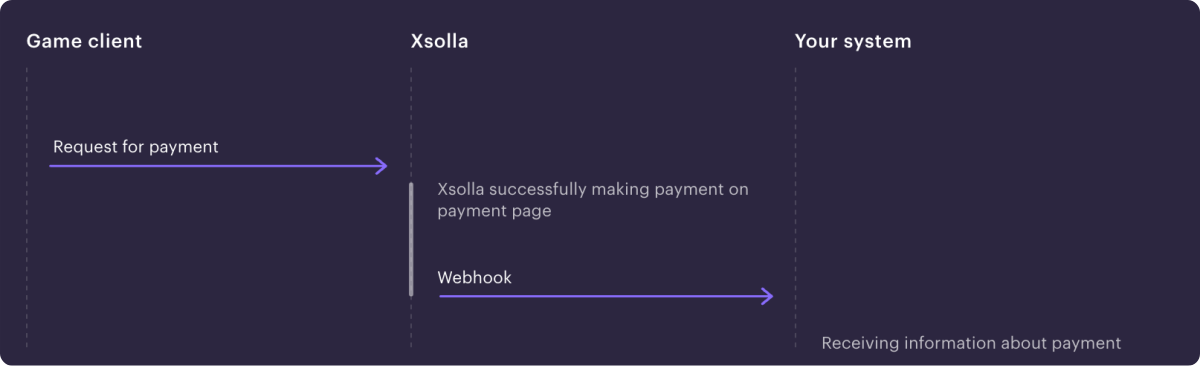
注:
根据所使用的解决方案及其集成类型,Webhook集和交互顺序可能与示例中的不同。
艾克索拉Webhook集成视频指南:
使用艾克索拉产品和解决方案时的Webhook设置:
| 产品/解决方案 | 必需/可选 | Webhook的用途是什么 |
|---|---|---|
| 付款 | 必需 |
|
| 商店 | 必需 |
|
| 游戏销售 | 可选 | 对于游戏密钥销售,用户验证和商品记入不是必需。如果想接收有关事件的信息(例如付款或订单取消),可以连接webhook。 如果连接Webhook,则必须处理所有传入的必需Webhook。 |
| 订阅 | 可选 | 接收有关创建、更新或取消订阅的信息。您也可以通过API请求信息。 |
| 网页商城 | 必需 |
|
| Digital Distribution Hub | 必需 |
请参阅文档,了解如何为Digital Distribution Hub设置Webhook。 |
| 登录管理器 | 可选 | 接收事件信息:
有关设置Webhook的详细信息,请参阅登录管理器文档。 |
如果使用需要与Webhook交互的产品和解决方案,请在您的帐户中启用并测试Webhook并设置Webhook处理。当特定事件发生时,Webhook会按顺序发送。因此,如果您不处理其中一个Webhook,则不会发送后续Web hook。下面列出了必需Webhook的列表。
在艾克索拉侧已设置了2种Webhook发送选项,用于处理网站上的商品购买和退货——支付和交易数据信息以及已购商品信息可以分开发送,也可以合并为一个Webhook 发送。
在合并Webhook中接收信息:
在单独Webhook中接收信息:
如果您在2025年1月22日或之前注册发布商帐户,将接收以下Webhook:
您需要处理所有收到的Webhook。如需切换到新的合并Webhook接收方式,请联系您的客户成功经理或发送邮件至[email protected]。
为确保游戏内商店和支付管理功能正常运行,必须实现主要Webhook的处理。
如果接收合并Webhook:
如果接收单独Webhook:
如果您的应用程序侧实现了商品目录个性化,请设置对合作伙伴侧的目录个性化Webhook的处理。
要自动管理订阅计划,需要实现主要Webhook的处理:
- 用户验证(
user_validation) — 在支付过程的不同阶段发送,以确保用户已在游戏中注册。 - 支付(
payment) — 在支付订单后发送,包含付款数据和交易详细信息。 - 创建了订阅(
create_subscription) — 支付Webhook已成功处理或用户购买了具有试用期的订阅时发送。它包含所购买的订阅 的详细信息和用户数据。使用该Webhook数据向用户添加订阅。 - 更新了订阅(
update_subscription) — 续订或更改订阅以及支付Webhook已成功 处理后发送。它包含所购买的订阅的详细信息和用户数据。使用该Webhook数据来延长用户的订阅或更改订阅参数。 - 退款(
refund) — 订单被取消后发送,包含取消的付款数据和交易详细信息。 - 取消了订阅(
cancel_subscription) — 退款Webhook已成功处理或订阅因其他原因被取消时发送。它包含有关订阅和用户数据的 信息。使用该Webhook数据扣除用户购买的订阅。
要启用接收Webhook:
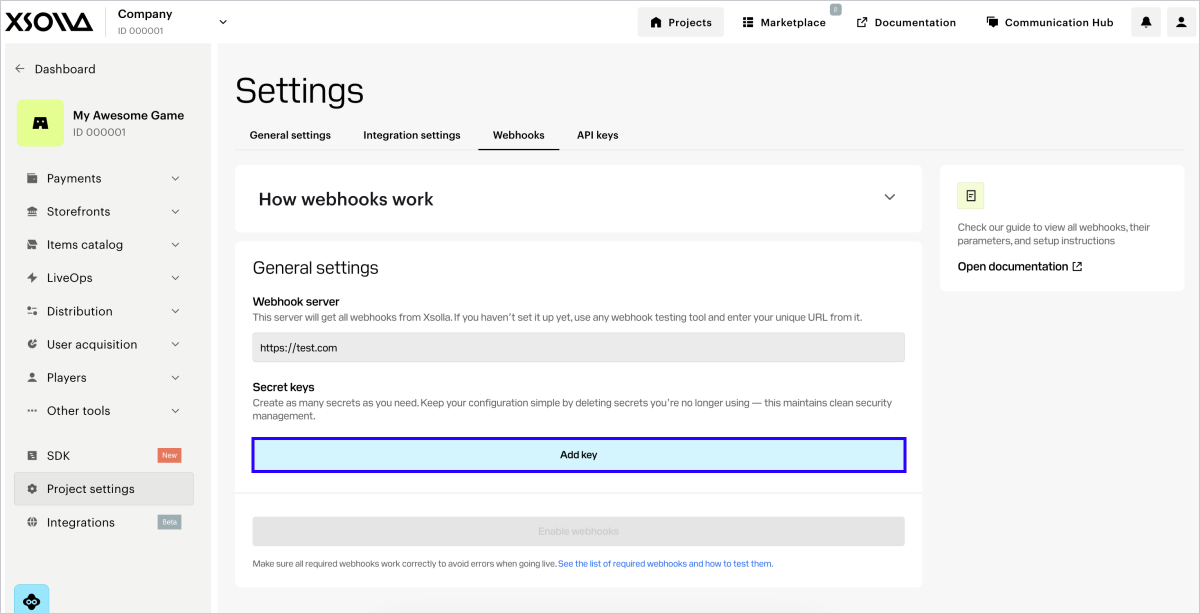
- 在帐户中进入项目,前往设置 > Webhook部分。
- 在Webhook服务器字段中,指定要接收Webhook的服务器的URL,格式为
https://example.com。您还可以指定在测试Web hook的工具中找到的URL。
注:
请使用HTTPS协议传输数据,不支持HTTP协议。
- 生成密钥:
- 在密钥部分,点击添加密钥。
- 在弹出的窗口中,输入密钥名称,便于您在列表中识别该密钥。
- 点击 创建密钥。
- 点击复制密钥,并在己侧保存创建的密钥。
- 点击完成。
- 确认您已保存密钥,然后点击是,关闭。
注意
密钥建议:
- 请在己侧保存生成的密钥。密钥只能在创建时在帐户中看到一次。
- 请勿向任何人透露您的密钥。
- 密钥必须存储在您的服务器上,不得存储在代码或前端中。
- 点击启用Webhook。
注:
要测试Webhook,可以选择任何专用网站(例如webhook.site)或平台(例如ngrok)。
提示
无法同时向不同的URL发送Webhook。您可以在帐户中先指定用于测试的URL,之后再将其替换为正式URL。
要禁用接收Webhook:
- 在帐户中进入项目,前往设置 > Webhook部分。
- 单击禁用Webhook。
定期更新密钥可以提升集成安全性。您最多可以在项目中创建5个密钥,用于密钥轮换。操作步骤如下:
- 在设置 > Webhook部分中,点击添加密钥。
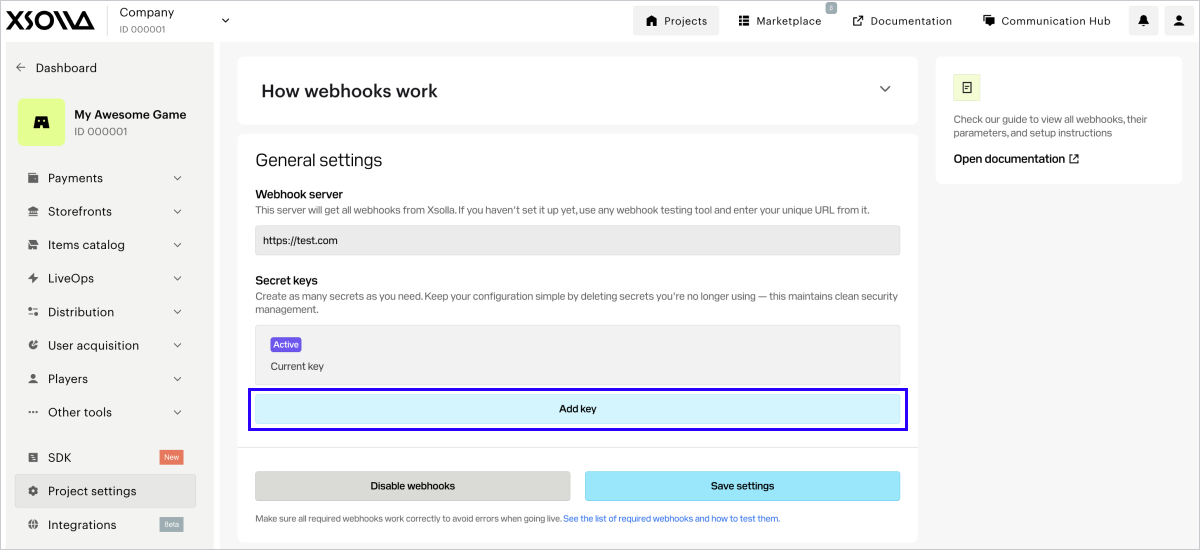
- 在弹出的窗口中,输入密钥名称,便于您在列表中识别该密钥。
- 点击创建密钥。
- 点击复制密钥,并在己侧保存创建的密钥。
- 点击完成。
- 确认您已保存密钥,然后点击是,关闭。
注意
密钥建议:
- 请在己侧保存生成的密钥。密钥只能在创建时在帐户中看到一次。
- 请勿向任何人透露您的密钥。
- 密钥必须存储在您的服务器上,不得存储在代码或前端中。
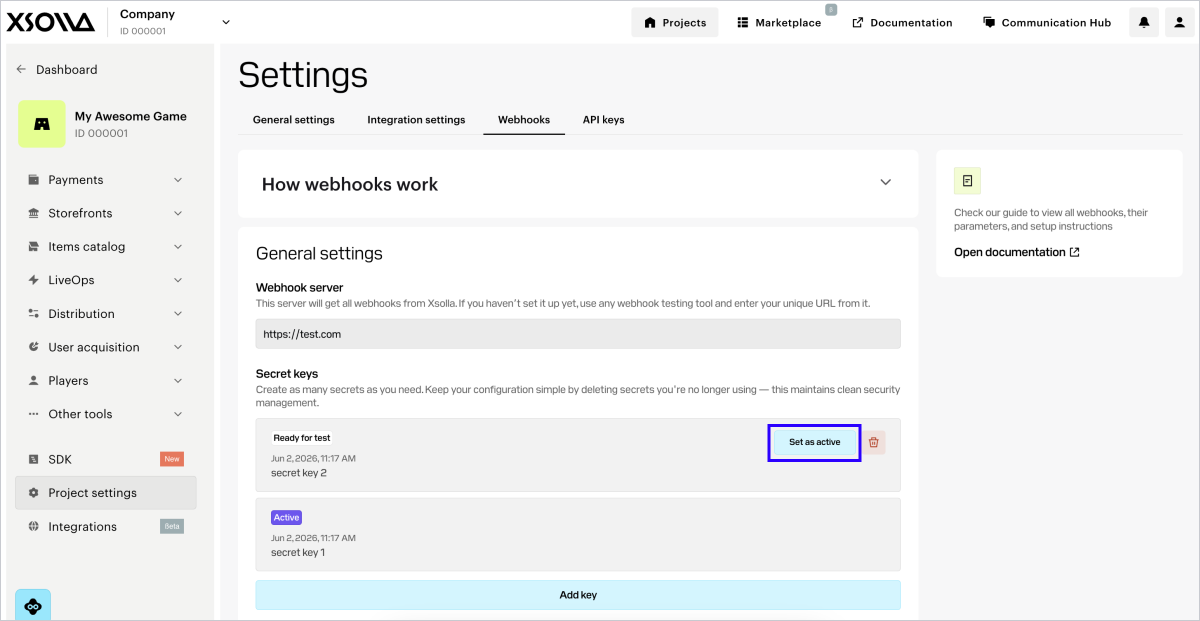
每个项目只能有一个有效密钥。如需更换,请在另一个密钥所在行点击设为有效,并确认操作。成功迁移到新密钥后,建议删除已停用的密钥。
注意
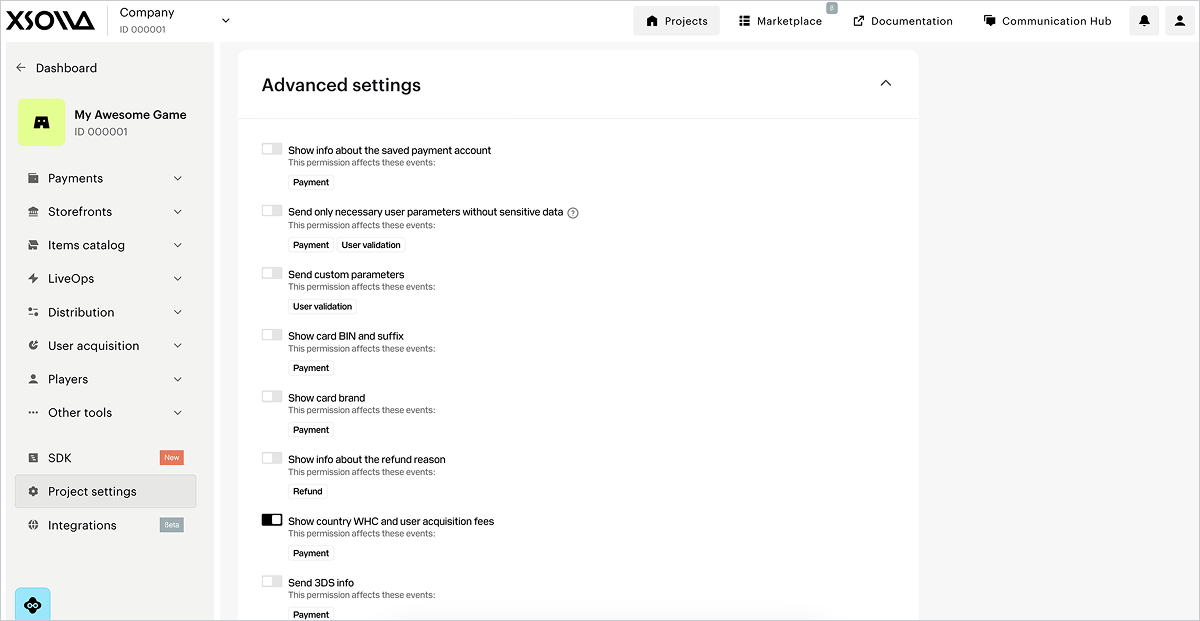
如果未显示高级设置,请确保已在常规设置中连接Webhook接收,且您位于测试 > 付款和商店选项卡中。
在此部分,您可以设置在Webhook中接收额外信息。要实现此目的,请将相应开关设为启用状态。每个权限的行都会标明设置变更将影响哪些Webhook。
| 开关 | 描述 |
|---|---|
| 显示已保存支付帐户的信息(仅当您在2025年1月22日或之前注册发布商帐户并接收单独Webhook时显示)。 | 有关保存的支付方式的信息在payment_account自定义对象中传递。 |
| 显示通过已保存支付方式进行的交易信息。 | 信息在Webhook的以下自定义参数中传递:
|
向Webhook添加order对象(仅当您在2025年1月22日或之前注册发布商帐户并接收单独Webhook时显示)。 | 有关订单的信息在支付Webhook的order对象中传递。 |
| 仅发送必要的用户参数,不包含敏感数据。 | Webhook中仅传递用户的以下信息:
|
| 发送自定义参数。 | 自定义令牌参数的信息在webhook中传递。 |
| 显示银行卡BIN和后缀码。 | Webhook中传递以下银行卡号的信息:
|
| 显示银行卡品牌。 | 用于付款的银行卡的品牌。例如,Mastercard或Visa。 |
| 显示退款原因信息。 | 退款原因的详细信息。 |
| 显示国家/地区预扣税和用户获取费。 | payment_details.country_wht和payment_details.user_acquisition_fee对象将通过Webhook发送。此开关默认开启。 |
| 发送3DS信息。 | 包含3-D Secure验证数据的cards对象将通过Webhook发送。 |
测试Webhook有助于确保己侧和艾克索拉侧的项目设置都正确。
如果Webhook设置成功,Webhook设置部分下方将显示Webhook测试版块。
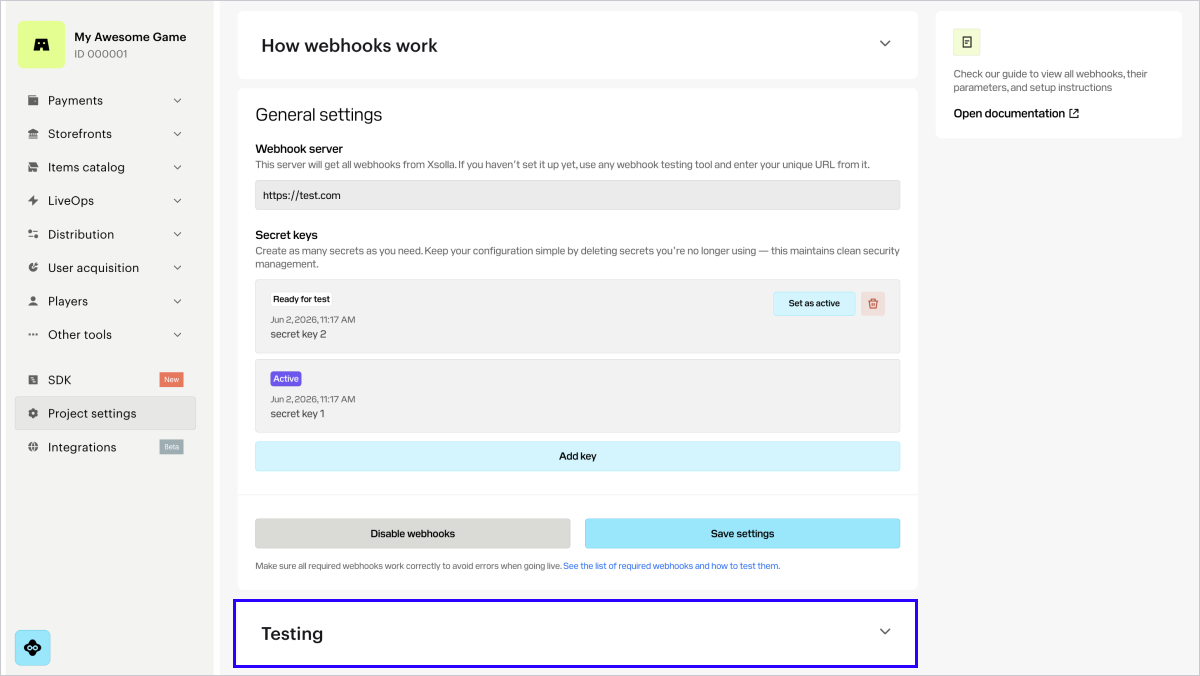
帐户中的测试版块会根据Webhook接收方式显示不同内容。
如果您在2025年1月22日之后注册帐户,将接收合并Webhook:
如果您在2025年1月22日或之前注册发布商帐户,将接收单独Webhook:
注:
如果测试部分出现测试未通过的警告,请在您的Webhook侦听器中检查Webhook响应设置。测试结果中指出了测试错误的原因。
示例:
您使用专门的网站webhook.site来进行测试。
测试对无效签名的响应部分显示了一个错误。
发生这种情况是因为艾克索拉发送了带有错误签名的Webhook,并期望您的处理程序用一个指出INVALID_SIGNATURE错误代码的4xx HTTP代码进行响应。
webhook.site对所有Webhook的响应中都发送一个200 HTTP代码,包括签名不正确的Webhook。由于无法获取预期的4xxHTTP代码,因此测试结果报错。
下文将介绍合并Webhook使用场景的测试流程。
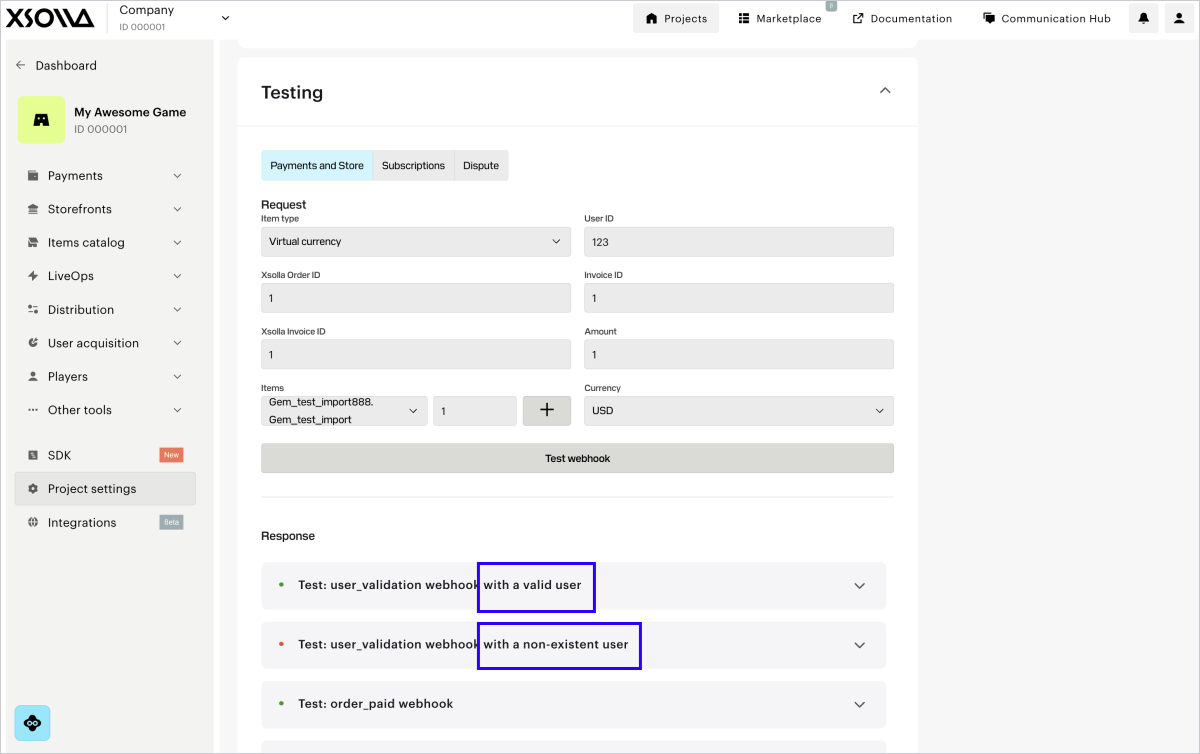
在付款和商店选项卡中,您可以测试以下Webhook:
要测试webhooks:
- 在Webhook测试部分,前往付款和商店选项卡。
- 在下拉列表中选择商品类型。如果您尚未在帐户中设置该商品类型,请点击按钮进行配置。创建商品后,返回Webhook测试部分并继续下一步。
- 填写必填字段:
- 用户ID — 测试时,可使用任意字母和数字组合。
- 在艾克索拉订单ID字段中输入任意值。
- 艾克索拉发票IDID — 艾克索拉侧的交易ID。测试时,可使用任意数字值。
- 发票ID — 您游戏侧的交易ID。测试时,可使用任意字母和数字组合。该参数不是成功支付的必填参数,但您可以传递该参数,将己侧的交易ID与艾克索拉侧的交易ID关联。
- 金额 — 支付金额。测试时,可使用任意数字值。
- 货币 — 从下拉列表中选择货币。
- 从下拉列表中选择商品SKU并指定金额。如需选择多个同类型商品,请点击**+**,并在新行中添加。
- 点击测试Webhook。
如果您在帐户的设置 > 集成设置部分中勾选了使用公共用户ID复选框,则用户搜索Webhook也会发送到您的Webhook服务器URL,并显示测试结果。
对于每个Webhook,您需要配置处理两种情况:成功的情况和出现错误的情况。
在订阅选项卡中,您可以测试以下Webhook:
注意
您可以在集成指南中查看其他订阅管理场景的测试详情。
要测试webhooks:
- 在测试部分,前往订阅选项卡。
- 填写必填字段:
- 用户ID — 测试时,可使用任意字母和数字组合。
- 艾克索拉发票IDID — 艾克索拉侧的交易ID。测试时,可使用任意数字值。
- 公共用户ID — 用户可识别的ID,例如电子邮件地址或昵称。如果您在设置 > 集成设置部分勾选了使用公共用户ID复选框,则会显示此字段。
- 金额 — 支付金额。测试时,可使用任意数字值。
- 货币 — 从下拉列表中选择货币。
- 计划ID — 订阅计划。从下拉列表中选择一个计划。
- 订阅产品 — 从下拉列表中选择一个产品(可选)。如果您的项目中已设置产品,则会显示该列表。
- 发票ID — 您游戏侧的交易ID。测试时,可使用任意字母和数字组合。该参数不是成功支付的必填参数,但您可以传递该参数,将己侧的交易ID与艾克索拉侧的交易ID关联。
- 试用期。如需测试购买无试用期的订阅,或测试 订阅续订 ,请指定值0。
- 点击测试。
您将在指定URL接收已填充数据的Webhook。每个Webhook在成功场景和错误场景下的测试结果都会显示在测试按钮下方。
注:
您可以使用Pay Station PHP SDK 库,它包含用于处理Webhook的现成类。
在您的应用程序侧,实现从以下IP地址接收Webhook:
185.30.20.0/24185.30.21.0/24185.30.22.0/24185.30.23.0/2434.102.38.17834.94.43.20735.236.73.23434.94.69.4434.102.22.197
如集成了登录管理器 产品,请另外添加对来自以下IP地址的Webhook的处理:
34.94.0.8534.94.14.9534.94.25.3334.94.115.18534.94.154.2634.94.173.13234.102.48.3035.235.99.24835.236.32.13135.236.35.10035.236.117.164
限制:
- 应用程序的数据库中不应存在具有相同ID的多个成功交易。
- 如果Webhook侦听器收到的Webhook的ID已经存在于数据库中,则需返回之前处理该交易的结果。不建议向用户发放重复购买及在数据库中创建重复记录。
为确保数据传输安全,您必须验证Webhook确实来自艾克索拉服务器,且在传输过程中未被篡改。为此,需要基于请求正文负载生成您自己的签名,并将其与传入请求的authorization标头中提供的签名进行比较。如果签名匹配,则Webhook是真实的,可以安全处理。
验证步骤:
从Webhook请求的
authorization标头中检索签名。标头格式为Signature <signature_value>。检索JSON格式的Webhook请求正文。
注意
请完全按照接收到的JSON负载使用。不要解析或重新编码负载,因为这会改变 格式并导致签名验证失败。
生成您自己的签名进行比较:
- 通过将密钥附加到字符串末尾,将JSON负载与您项目的密钥连接起来。
- 对结果字符串应用SHA-1加密哈希函数。结果将是小写十六进制字符串。
将您生成的签名与
authorization标头中的签名进行比较。如果匹配,则Webhook是真实的。
以下是C#、C++、Go、PHP和Node.js语言的签名生成实现示例。
POST /your_uri HTTP/1.1
host: your.host
accept: application/json
content-type: application/json
content-length: 165
authorization: Signature 52eac2713985e212351610d008e7e14fae46f902
{
  "notification_type":"user_validation",
  "user":{
      "ip":"127.0.0.1",
      "phone":"18777976552",
      "email":"[email protected]",
      "id":1234567,
      "name":"Xsolla User",
      "country":"US"
  }
}curl -v 'https://your.hostname/your/uri' \
-X POST \
-H 'authorization: Signature 52eac2713985e212351610d008e7e14fae46f902' \
-d '{
"notification_type":
"user_validation",
"user":
{
"ip": "127.0.0.1",
"phone": "18777976552",
"email": "[email protected]",
"id": 1234567,
"name": "Xsolla User",
"country": "US"
}
}'注意
此代码示例兼容.NET Framework 4.0及更高版本,同时支持.NET Core和其他现代.NET版本。签名验证通过ConstantTimeEquals方法实现恒定时间比较,有效防止时序攻击。
using System;
using System.Security.Cryptography;
using System.Text;
public static class XsollaWebhookSignature
{
    public static string ComputeSha1(string jsonBody, string secretKey)
    {
        // Concatenation of the JSON from the request body and the project's secret key
        string dataToSign = jsonBody + secretKey;
        using (SHA1 sha1 = SHA1.Create())
        {
            byte[] hashBytes = sha1.ComputeHash(Encoding.UTF8.GetBytes(dataToSign));
            // Convert hash bytes to lowercase hexadecimal string
            var hexString = new StringBuilder(hashBytes.Length * 2);
            foreach (byte b in hashBytes)
            {
                hexString.Append(b.ToString("x2"));
            }
            return hexString.ToString();
        }
    }
    public static bool VerifySignature(string jsonBody, string secretKey, string receivedSignature)
    {
        string computedSignature = ComputeSha1(jsonBody, secretKey);
        string receivedSignatureLower = receivedSignature.ToLower();
        // Use constant-time comparison to prevent timing attacks
        return ConstantTimeEquals(computedSignature, receivedSignatureLower);
    }
    private static bool ConstantTimeEquals(string a, string b)
    {
        if (a.Length != b.Length)
        {
            return false;
        }
        int result = 0;
        for (int i = 0; i < a.Length; i++)
        {
            result |= a[i] ^ b[i];
        }
        return result == 0;
    }
}注意
使用 Convert.ToHexString方法需要.NET 5.0或更高版本。
CryptographicOperations.FixedTimeEquals方法替代ConstantTimeEquals。// For .NET 5.0 and later, you can use the more concise Convert.ToHexString method:
using System;
using System.Security.Cryptography;
using System.Text;
public static class XsollaWebhookSignature
{
public static string ComputeSha1(string jsonBody, string secretKey)
{
string dataToSign = jsonBody + secretKey;
using var sha1 = SHA1.Create();
byte[] hashBytes = sha1.ComputeHash(Encoding.UTF8.GetBytes(dataToSign));
return Convert.ToHexString(hashBytes).ToLower();
}
public static bool VerifySignature(string jsonBody, string secretKey, string receivedSignature)
{
string computedSignature = ComputeSha1(jsonBody, secretKey);
string receivedSignatureLower = receivedSignature.ToLower();
// Use constant-time comparison to prevent timing attacks
return ConstantTimeEquals(computedSignature, receivedSignatureLower);
}
private static bool ConstantTimeEquals(string a, string b)
{
if (a.Length != b.Length)
{
return false;
}
int result = 0;
for (int i = 0; i < a.Length; i++)
{
result |= a[i] ^ b[i];
}
return result == 0;
}
}注意
若您使用.NET 7.0及更高版本,可选择使用CryptographicOperations.FixedTimeEquals方法。
// For .NET 7.0+, you can use the built-in CryptographicOperations.FixedTimeEquals:
using System.Security.Cryptography;
public static bool VerifySignature(string jsonBody, string secretKey, string receivedSignature)
{
    string computedSignature = ComputeSha1(jsonBody, secretKey);
    byte[] computedBytes = Encoding.UTF8.GetBytes(computedSignature);
    byte[] receivedBytes = Encoding.UTF8.GetBytes(receivedSignature.ToLower());
    return CryptographicOperations.FixedTimeEquals(computedBytes, receivedBytes);
}#include <string>
#include <sstream>
#include <iomanip>
#include <openssl/sha.h>
class XsollaWebhookSignature {
public:
static std::string computeSha1(const std::string& jsonBody, const std::string& secretKey) {
// Concatenation of the JSON from the request body and the project's secret key
std::string dataToSign = jsonBody + secretKey;
unsigned char digest[SHA_DIGEST_LENGTH];
// Create SHA1 hash
SHA1(reinterpret_cast<const unsigned char*>(dataToSign.c_str()),
dataToSign.length(), digest);
// Convert to lowercase hexadecimal string
std::ostringstream hexStream;
hexStream << std::hex << std::setfill('0');
for (int i = 0; i < SHA_DIGEST_LENGTH; ++i) {
hexStream << std::setw(2) << static_cast<unsigned int>(digest[i]);
}
return hexStream.str();
}
static bool verifySignature(const std::string& jsonBody, const std::string& secretKey, const std::string& receivedSignature) {
std::string computedSignature = computeSha1(jsonBody, secretKey);
// Timing-safe comparison
if (computedSignature.length() != receivedSignature.length()) {
return false;
}
volatile unsigned char result = 0;
for (size_t i = 0; i < computedSignature.length(); ++i) {
result |= (computedSignature[i] ^ receivedSignature[i]);
}
return result == 0;
}
};package main
import (
"crypto/sha1"
"crypto/subtle"
"encoding/hex"
"strings"
)
type XsollaWebhookSignature struct{}
func (x *XsollaWebhookSignature) ComputeSha1(jsonBody, secretKey string) string {
// Concatenation of the JSON from the request body and the project's secret key
dataToSign := jsonBody + secretKey
// Create SHA1 hash
h := sha1.New()
h.Write([]byte(dataToSign))
signature := h.Sum(nil)
// Convert to lowercase hexadecimal string
return strings.ToLower(hex.EncodeToString(signature))
}
func (x *XsollaWebhookSignature) VerifySignature(jsonBody, secretKey, receivedSignature string) bool {
computedSignature := x.ComputeSha1(jsonBody, secretKey)
receivedSignatureLower := strings.ToLower(receivedSignature)
// Use constant time comparison to prevent timing attacks
return subtle.ConstantTimeCompare([]byte(computedSignature), []byte(receivedSignatureLower)) == 1
}<?php
class XsollaWebhookSignature
{
/**
* Compute SHA1 signature from webhook JSON body and secret key
*
* @param string $jsonBody The raw JSON body from webhook
* @param string $secretKey The project's secret key
* @return string The lowercase SHA1 signature
*/
public static function computeSha1(string $jsonBody, string $secretKey): string
{
// Concatenation of the JSON from the request body and the project's secret key
$dataToSign = $jsonBody . $secretKey;
// Generate SHA1 signature
$signature = sha1($dataToSign);
return strtolower($signature);
}
/**
* Verify webhook signature using timing-safe comparison
*
* @param string $jsonBody The raw JSON body from webhook
* @param string $secretKey The project's secret key
* @param string $receivedSignature The signature from authorization header
* @return bool True if signature is valid, false otherwise
*/
public static function verifySignature(string $jsonBody, string $secretKey, string $receivedSignature): bool
{
$computedSignature = self::computeSha1($jsonBody, $secretKey);
// Use hash_equals for timing-safe comparison
return hash_equals($computedSignature, strtolower($receivedSignature));
}
}
?>const crypto = require('crypto');
class XsollaWebhookSignature {
// IMPORTANT: jsonBody must be the raw JSON string exactly as received from Xsolla
static computeSha1(jsonBody, secretKey) {
// Concatenation of the JSON from the request body and the project's secret key
const dataToSign = jsonBody + secretKey;
// Create SHA1 hash
const hash = crypto.createHash('sha1');
hash.update(dataToSign, 'utf8');
// Convert to lowercase hexadecimal string
return hash.digest('hex').toLowerCase();
}
static verifySignature(jsonBody, secretKey, receivedSignature) {
const computedSignature = this.computeSha1(jsonBody, secretKey);
const cleanReceivedSignature = receivedSignature.toLowerCase();
// Check if signatures have the same length before using timingSafeEqual
if (computedSignature.length !== cleanReceivedSignature.length) {
return false;
}
try {
return crypto.timingSafeEqual(
Buffer.from(computedSignature, 'hex'),
Buffer.from(cleanReceivedSignature, 'hex')
);
} catch (error) {
// Return false if there's any error (e.g., invalid hex characters)
return false;
}
}
}要确认收到Webhook,您的服务器必须返回:
- 如果响应成功,返回
200、201或204HTTP代码。 - 如果未找到指定的用户或传递了无效的签名,返回
400HTTP代码和问题描述。如果您的服务器出现临时问题,您的Webhook处理程序还可 以返回5xxHTTP 代码。
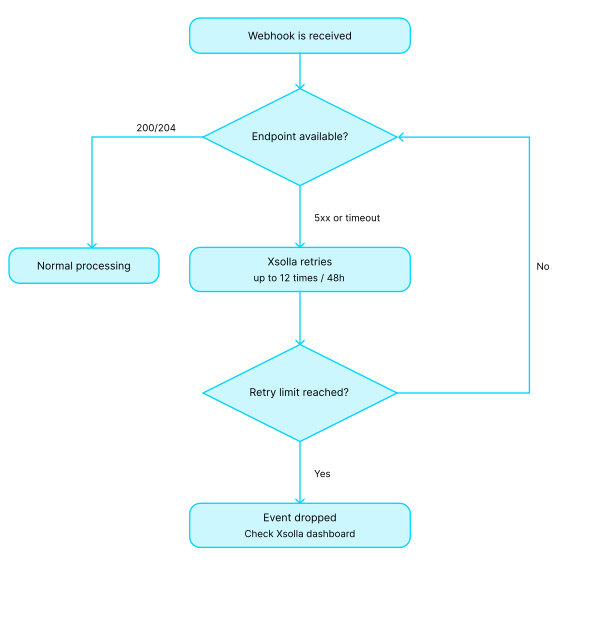
- 尝试2次,间隔5分钟
- 尝试7次,间隔15分钟
- 尝试10次,间隔60分钟
在首次尝试后的12小时内最多尝试发送20次Webhook。
注意
如满足以下所有条件,款项仍将退还给用户:
- 退款由艾克索拉发起。
- Webhook响应返回
4xx状态码,或在所有重试后未收到响应,或返回5xx状态码。
HTTP代码400的错误代码:
| 代码 | 消息 |
|---|---|
| INVALID_USER | 无效用户 |
| INVALID_PARAMETER | 无效参数 |
| INVALID_SIGNATURE | 无效签名 |
| INCORRECT_AMOUNT | 金额不正确 |
| INCORRECT_INVOICE | 发票不正确 |
HTTP/1.1 400 Bad Request
{
    "error":{
        "code":"INVALID_USER",
        "message":"Invalid user"
    }
}请遵循以下准则:
请遵循以下准则:
- 接受
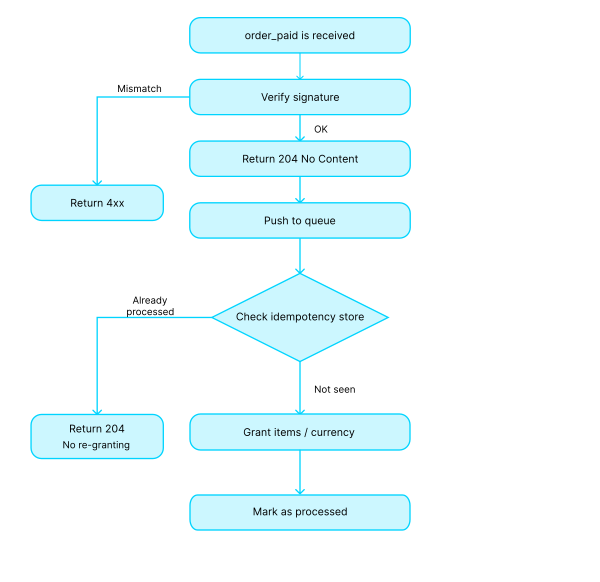
POST请求时保持正文和标头原样,不做任何修改。 - 验证Webhook签名并返回相应的状态码:
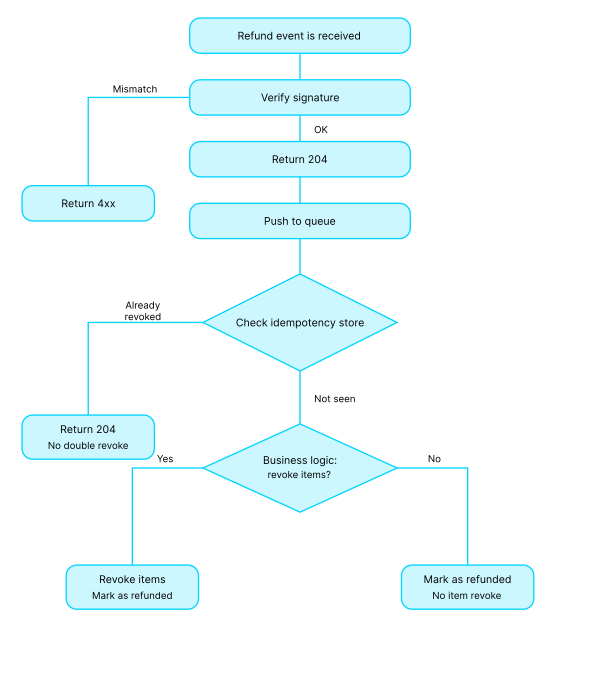
4xx— 签名不匹配时返回;2xx— 成功时返回。我们建议在执行主要业务逻辑之前返回204 No Content,也可以使用200 OK。
- 将有效负载传递给异步作业或队列以进行后续处理。
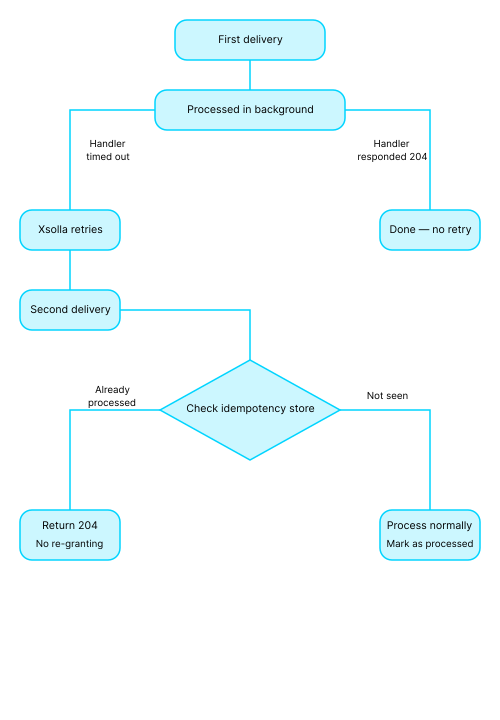
- 实现幂等性。您必须确 保系统能够处理多次接收同一Webhook的情况。
流程示例:
HTTP POST /webhooks/xsolla
  read raw_body, headers
  if !verify_signature(raw_body, headers['authorization']):
     return 400 {"error":{"code":"INVALID_SIGNATURE","message":"Invalid signature"}}
  enqueue(raw_body)
return 204 # or 200请遵循以下准则:
- 使用交易ID和/或外部ID、订单ID作为幂等性键。
- 存储已处理的ID,如果收到重复请求则返回先前的结果。
- 避免重复发放商品、重复数据库条目和重复扣费。
- 请注意:在顺序交付模式下,较早事件处理失败会阻塞所有后续事件的处理。
请遵循以下准则:
- 对资源密集型操作使用队列和异步处理,例如第三方API调用、计费和商品发放。
- 为Webhook处理程序设置超时时间(1–3秒)。对于瞬时故障,依赖艾克索拉重试机制即可。
- 不要在Webhook处理程序中实现重试逻辑,重新交付由艾克索拉负责处理。
- 记录Webhook交付时间戳和处理状态;为
5xx错误和重新交付的激增设置告警。 - 将关联ID从Webhook传播到您的日志和监控系统(APM)中。
- 设置错误日志记录和监控。对于不可恢复的故障,将作业移至死信队列(DLQ)。开发一个受幂等性机制保护的安全工具用于重放事件。
不能。支付Webhook使用服务器到服务器协议,仅发送到项目设置中指定的单个URL。如果您希望在游戏、网站或移动应用中接收通知,需要在您的服务器上设置Webhook转发,以便在艾克索拉和您的游戏之间传递数据。 您也可以从开发者控制台测试Webhook。
使用外部ID,即您游戏中的交易ID,它会分配给您系统中的订单。在艾克索拉侧,外部ID与交易ID关联,可以防止同一交易的重复支付。有关配置详情,请参阅相关文档 。
我们建议:
- 在签名验证后立即返回
204或200。 - 针对原始请求正文验证Webhook签名,不做任何修改。
- 为所有操作实现幂等性。
- 记录所有事件并设置错误监控。
- 避免在URL中传递敏感数据,不在错误消息中暴露技术细节。
有关详细信息,请参阅最佳实践部分。
为确保Webhook正常工作,请在上线前确认以下事项:
注:
通知类型在notification_type参数中发送。
| Webhook | 通知类型 | 描述 |
|---|---|---|
| 用户验证 | user_validation | 发送以检查用户是否存在于游戏中。 |
| 用户搜索 | user_search | 发送以根据公共用户ID获取用户信息。 |
| 支付 | payment | 用户完成支付流程时发送。 |
| 退款 | refund | 出于某些原因需要取消支付时发送。 |
| 部分退款 | partial_refund | 出于某些原因需要部分取消支付时发送。 |
| 付款被拒 | ps_declined | 当付款被支付系统拒绝时发送。 |
| AFS拒绝交易 | afs_reject | 交易在AFS检查过程中被拒绝时发送。 |
| AFS更新的拦截列表 | afs_black_list | AFS拦截列表发生更新时发送。 |
| 创建了订阅 | create_subscription | 用户创建订阅时发送。 |
| 更新了订阅 | update_subscription | 订阅发生续订或更改时发送。 |
| 取消了订阅 | cancel_subscription | 取消订阅时发送。 |
| 非续订订阅 | non_renewal_subscription | 状态设置为非续订时发送。 |
| 添加支付账户 | payment_account_add | 当用户添加或保存支付帐户时发送。 |
| 删除支付账户 | payment_account_remove | 用户从已保存的帐户中删除了支付帐户时发送。 |
| Web商店中的用户验证 | - | 从Web商店网站发送以检查游戏中是否存在该用户。 |
| 合作伙伴侧目录个性化 | partner_side_catalog | 用户与商店交互时发送。 |
| 订单成功支付 | order_paid | 订单付款后发送。 |
| 订单取消 | order_canceled | 订单取消时发送。 |
| 争议 | dispute | 当提出新争议时发送。 |
用户所购商品的列表。
The set of parameters included in the array depends on the webhook version. Version 2 includes additional parameters: is_free, is_bonus, and is_bundle_content. To switch the version, pass its number in the version parameter in the Update webhook version API call.
对订单中的特定商品应用促销活动。 在下列情况下返回该数组:
- 特定商品配置了折扣促销。
- 使用了具有对所选商品提供折扣设置的促销码。
如果没有应用任何商品级促销活动,则返回一个空数组。
商品类型。 对于bundle类型商品,包括虚拟货币套餐,items数组将显示:
- 捆绑包或虚拟货币套餐的参数
- 捆绑包中包含的商品或套餐中包含的货币
value_point类型用于忠诚积分操作,即积分被消费或奖励时。
订单信息。
应用的优惠券。如未应用优惠券,则不会返回该数组。
订单货币。虚拟货币使用SKU,真实货币使用三个字母的ISO 4217代码。
支付货币类型。对于免费订单,则值指定为unknown。
| Enum 值 | 描述 |
|---|---|
| loyalty_point | 忠诚积分 |
| real | 真实货币 |
| unknown | 免费订单 |
| virtual | 虚拟货币 |
支付平台。 xsolla值用于通过艾克索拉进行的支付。其他支付使用游戏发布平台名称对应的值:playstation_network、xbox_live、pc_standalone、nintendo_shop、google_play、app_store_ios、android_standalone、ios_standalone、android_other、ios_other、pc_other。
应用的促销码。如未应用促销码,则不会返回该数组。
对整个订单应用促销活动。 在下列情况下返回该数组:
- 促销活动会影响总订单金额,例如具有对购买项提供折扣设置的促代码。
- 购买时不享受折扣,但订单中会添加赠品。在这种情况下,由于未应用折扣,将返回含折扣的价格(amount_with_discount)和不含折扣的价格值(amount_without_discount)且两个值相同。
如果未应用任何订单级促销活动,将返回一个空数组。
用户信息。
用户所在国家/地区。使用ISO 3166-1 alpha-2 标准规定的2字母组合表示国家/地区。
- https://api.xsolla.com/merchant/v2/order-cancellation-separate
- Mock serverhttps://xsolla.redocly.app/_mock/zh/webhooks/order-cancellation-separate
- CURL
- Payload
curl -v 'https://your.hostname/your/uri' \
-X POST \
-H 'accept: application/json' \
-H 'content-type: application/json' \
-H 'authorization: Signature d09695066c52c1b8bdae92f2d6eb59f5b5f89843' \
-d '{
    "notification_type": "order_canceled",
    "items": [
      {
        "sku": "com.xsolla.v.item_1",
        "type": "virtual_good",
        "is_pre_order": false,
        "quantity": 3,
        "amount": "1000",
        "promotions": [
          {
            "amount_without_discount": "6000",
            "amount_with_discount": "5000",
            "sequence": 1
          },
          {
            "amount_without_discount": "5000",
            "amount_with_discount": "4000",
            "sequence": 2
          }
        ],
        "custom_attributes": {
            "purchased": 0,
            "attr": "value"
          }
      },
      {
        "sku": "com.xsolla.v.item_new_1",
        "type": "bundle",
        "is_pre_order": false,
        "quantity": 1,
        "amount": "1000",
        "promotions": []
      },
      {
        "sku": "com.xsolla.gold_1",
        "type": "virtual_currency",
        "is_pre_order": false,
        "quantity": 1500,
        "amount": "[null]",
        "promotions": []
      }
    ],
    "order": {
      "id": 1,
      "mode": "default",
      "currency_type": "virtual",
      "currency": "sku_currency",
      "amount": "2000",
      "status": "paid",
      "platform": "xsolla",
      "comment": null,
      "invoice_id": "1",
      "promotions": [
        {
          "amount_without_discount": "4000",
          "amount_with_discount": "2000",
          "sequence": 1
        }
      ],
      "promocodes": [
        {
          "code": "promocode_some_code",
          "external_id": "promocode_sku"
        }
      ],
      "coupons": [
        {
          "code": "WINTER2021",
          "external_id": "coupon_sku"
        }
      ]
    },
    "user": {
      "external_id": "id_xsolla_login_1",
      "email": "[email protected]",
      "country": "US"
    }

}'请求
当满足以下条件时,艾克索拉将order_paid webhook发送到指定的 URL:
- 用户成功支付订单。
- 艾克索拉收到成功处理支付 Webhook的响应。
order_paid webhook包含所购商品和交易详细信息。
如果出现以下情况,则不发送order_paid webhook:
- 支付不成功,例如:
- 打开了支付表单,但用户没有为订单付款
- 打开了支付表单,但付款过程中出现错误
- 尚未收到成功处理支付 Webhook的响应。
建议order_paid webhook的处理时间小于3秒。
响应部分描述了预期的回答。您可以使用其他响应代码。根据响应码和自动退款功能的连接,艾克索拉侧的webhook处理逻辑如下:
| 响应代码 | 禁用了自动退款(默认) | 启用了自动退款 |
|---|---|---|
400、401、402、403、404、409、422、415 | 无操作 | 自动退款给用户 |
200、201、204 | 无操作 | 无操作 |
| 不同代码或对webhook无响应 | 在指定的时间间隔内发送多个webhook:2次间隔5分钟的尝试,7次间隔15分钟的尝试,10次间隔60分钟的尝试。 | 在指定的时间间隔内发送多个webhook:2次间隔5分钟的尝试,7次间隔15分钟的尝试,10次间隔60分钟的尝试。如果发送了所有webhook后仍未收到成功响应,则会向用户自动退款。 |
要连接自动退款功能,请联系您的客户成功经理或发送电子邮件至[email protected]。
用户所购商品的列表。
The set of parameters included in the array depends on the webhook version. Version 2 includes additional parameters: is_free, is_bonus, and is_bundle_content. To switch the version, pass its number in the version parameter in the Update webhook version API call.
对订单中的特定商品应用促销活动。 在下列情况下返回该数组:
- 特定商品配置了折扣促销。
- 使用了具有对所选商品提供折扣设置的促销码。
如果没有应用任何商品级促销活动,则返回一个空数组。
商品类型。 对于bundle类型商品,包括虚拟货币套餐,items数组将显示:
- 捆绑包或虚拟货币套餐的参数
- 捆绑包中包含的商品或套餐中包含的货币
value_point类型用于忠诚积分操作,即积分被消费或奖励时。
订单信息。
应用的优惠券。如未应用优惠券,则不会返回该数组。
订单货币。虚拟货币使用SKU,真实货币使用三个字母的ISO 4217代码。
支付货币类型。对于免费订单,则值指定为unknown。
| Enum 值 | 描述 |
|---|---|
| loyalty_point | 忠诚积分 |
| real | 真实货币 |
| unknown | 免费订单 |
| virtual | 虚拟货币 |
支付平台。 xsolla值用于通过艾克索拉进行的支付。其他支付使用与游戏发布平台名称对应的值。
应用的促销码。如未应用促销码,则不会返回该数组。
对整个订单应用促销活动。 在下列情况下返回该数组:
- 促销活动会影响总订单金额,例如具有对购买项提供折扣设置的促代码。
- 购买时不享受折扣,但订单中会添加赠品。在这种情况下,由于未应用折扣,将返回含折扣的价格(amount_with_discount)和不含折扣的价格值(amount_without_discount)且两个值相同。
如果未应用任何订单级促销活动,将返回一个空数组。
用户信息。
用户所在国家/地区。使用ISO 3166-1 alpha-2 标准规定的2字母组合表示国家/地区。
- https://api.xsolla.com/merchant/v2/successful-order-payment-separate
- Mock serverhttps://xsolla.redocly.app/_mock/zh/webhooks/successful-order-payment-separate
- CURL
- Payload
curl -v 'https://your.hostname/your/uri' \
-X POST \
-H 'accept: application/json' \
-H 'content-type: application/json' \
-H 'authorization: Signature d09695066c52c1b8bdae92f2d6eb59f5b5f89843' \
-d '{
    "notification_type": "order_paid",
    "items": [
      {
        "sku": "com.xsolla.v.item_1",
        "type": "virtual_good",
        "is_pre_order": false,
        "quantity": 3,
        "amount": "1000",
        "promotions": [
          {
            "amount_without_discount": "6000",
            "amount_with_discount": "5000",
            "sequence": 1
          },
          {
            "amount_without_discount": "5000",
            "amount_with_discount": "4000",
            "sequence": 2
          }
        ],
        "custom_attributes":
          {
            "purchased": 0,
            "attr": "value"
          }
      },
      {
        "sku": "com.xsolla.v.item_new_1",
        "type": "bundle",
        "is_pre_order": false,
        "quantity": 1,
        "amount": "1000",
        "promotions": []
      },
      {
        "sku": "com.xsolla.gold_1",
        "type": "virtual_currency",
        "is_pre_order": false,
        "quantity": 1500,
        "amount": "[null]",
        "promotions": []
      }
    ],
    "order": {
      "id": 1,
      "mode": "default",
      "currency_type": "virtual",
      "currency": "sku_currency",
      "amount": "2000",
      "status": "paid",
      "platform": "xsolla",
      "comment": null,
      "invoice_id": "1",
      "promotions": [
        {
          "amount_without_discount": "4000",
          "amount_with_discount": "2000",
          "sequence": 1
        }
      ],
      "promocodes": [
        {
          "code": "promocode_some_code",
          "external_id": "promocode_sku"
        }
      ],
      "coupons": [
        {
          "code": "WINTER2021",
          "external_id": "coupon_sku"
        }
      ]
    },
    "user": {
      "external_id": "id_xsolla_login_1",
      "email": "[email protected]",
      "country": "US"
    }

}'