PUBLISHER ACCOUNT
Create Project from Store Page
Link your Google Play or App Store listing — Xsolla automatically pulls your game's imagery, title, developer information, and color scheme to pre-populate your Publisher Account project and Web Shop.
SETUP STEPS
-
Sign up or log in to your Publisher Account.
To sign up, visit publisher.xsolla.com ↗ (https://publisher.xsolla.com/).
-
Create a project in the Publisher Account (if you haven't already).
-
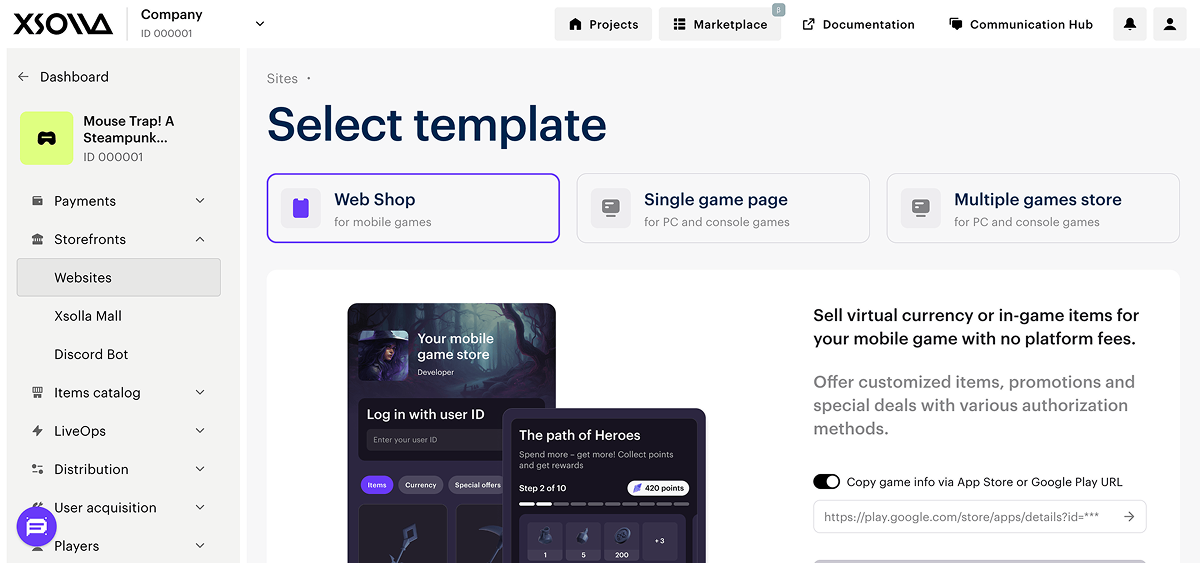
Navigate to Storefronts > Websites section within your project.
-
Click the Create site button and select the Web Shop template.
-
Add a URL to an external platform where your game is available (Google Play Store or Apple App Store).
-
Click Create Web Shop.
Xsolla automatically fetches your app's information from the store and populates your project and Web Shop with the game data.
The Web Shop template is styled to match your game and pairs directly with your Xsolla SDK integration.
WHAT'S NEXT
Set Up Authentication
Enable Device ID login for your project — sign-in with no player credentials required. Continue to Setting up authentication.