PUBLISHER ACCOUNT
Webhooks
When a payment or user validation occurs, Xsolla sends an HTTP request with the event data to your backend.
How webhook validation works
Server-side validation means Xsolla notifies your backend about each purchase, refund, and chargeback, and your backend grants or revokes the entitlement accordingly. The game client never decides fulfillment.
- Player completes a purchase through the SDK.
- Xsolla sends a webhook (HTTP POST) to your backend.
- Your backend verifies the signature, then processes the event.
- Your backend grants the entitlement and returns a success code (
200/201/204) to Xsolla. - Your backend notifies the game through your own channel — the SDK is not involved in this step.
For the client side of this flow — launching the purchase and treating the SDK's purchase-completed callback as UI feedback — see the purchase guide for your platform: Android, iOS, Unity, Windows.
The SDK has no knowledge of your Publisher Account webhook settings, so its purchase-completed callback still fires on the client after a purchase. When you handle fulfillment through webhooks, treat that callback as UI feedback only — granting the item there as well would award the purchase twice. Client-side handling (purchase callback → validate → consume) is the alternative model, used only when you have no backend.
The purchase-completed callback differs by SDK. Whichever one your client uses, leave it as UI feedback when webhooks own fulfillment:
| Platform | Purchase-completed callback | Client-side validate → consume (alternative model) |
|---|---|---|
| Android | onPurchasesUpdated() | validateAsync() → consumeAsync() — Client-side validation |
| iOS | paymentQueue(_:updatedTransactions:) (.purchased) | validateTransaction(_:completion:) → finishTransaction(_:) — Client-side validation |
| Unity (with / without IAP) | ProcessPurchase(...) / PurchaseProduct(...) | ValidatePurchase(...) → ConsumeProduct(...) — Client-side validation |
| Windows | PurchaseProduct(...) | ValidatePurchase(...) → ConsumeProduct(...) — Client-side validation |
Setting up webhooks in Publisher Account
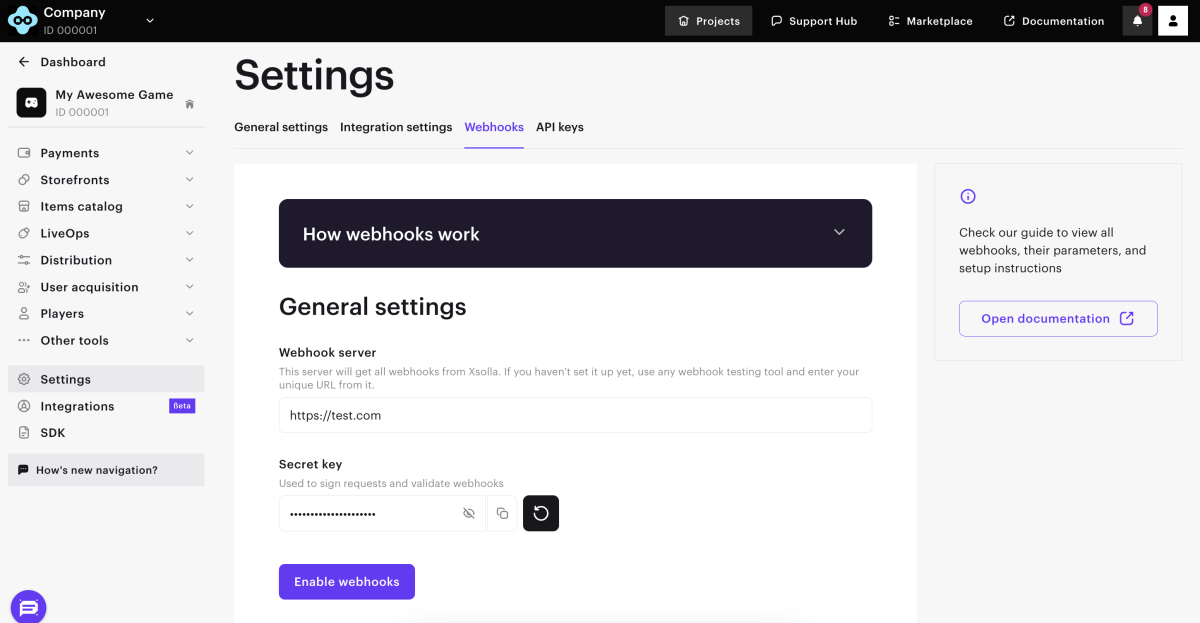
Enabling webhooks
- Open your project in the Publisher Account.
- In the side menu, go to Settings and select Webhooks.
- In the Webhook server field, specify the URL of your server where you want webhooks to be sent (e.g.
https://www.my-backend.com/webhooks). - A secret key for signing webhooks is generated by default. To add or rotate keys:
- In the Secret key section, click Add key.
- Enter a name and click Create key.
- Copy the generated value (shown once).
- When rotating: click Set as active on the new key. Up to 5 keys can exist per project; remove the old key after confirming signatures pass.
- Click Enable webhooks.
Disabling webhooks
- Open your project in the Publisher Account.
- In the side menu, go to Settings and select Webhooks.
- Click Disable webhooks.
Which webhooks will you receive?
The webhook types your project receives depend on when the project was registered. Newer projects use a combined order model, while legacy projects use separate payment and refund notifications.
| Project registered | You receive | Notes |
|---|---|---|
| After Jan 22, 2025 | order_paid, order_canceled (combined) | Do not process payment / refund. |
| Before Jan 22, 2025 | payment, refund (separate) + order_paid / order_canceled with item data | Legacy separate model. |
In Publisher Account → Project Settings → Webhooks, if the test section only shows order_paid examples, you're on the new (combined) model.
Verifying the signature
Every webhook carries an Authorization: Signature <value> header. Verify it before processing any event.
- Read the signature from the
Authorizationheader (format:Signature <value>). - Take the raw request body exactly as received. Do not parse or re-serialize the JSON — re-encoding changes the bytes and the signature will not match.
- Concatenate:
raw_body + secret_key. - Apply SHA-1; take the lowercase hex digest.
- Compare to the header value using constant-time comparison to prevent timing attacks.
Signature verification must run on the exact bytes Xsolla sent. Capture the raw body before any JSON middleware parses it — parsing and re-serializing changes the bytes and the signature will never match. Each framework below shows how to get the raw body.
- Node.js (Express)
- PHP
- C# (ASP.NET Core)
- Python
- Go
- Java
const crypto = require('crypto');

// Capture the RAW body, not parsed JSON:
//   app.use('/webhooks', express.raw({ type: 'application/json' }));
function verifyXsollaSignature(rawBody, authHeader, secretKey) {
  const provided = String(authHeader || '').replace(/^Signature\s+/i, '').trim();
  const expected = crypto
    .createHash('sha1')
    .update(rawBody.toString('utf8') + secretKey)
    .digest('hex');
  const a = Buffer.from(provided);
  const b = Buffer.from(expected);
  return a.length === b.length && crypto.timingSafeEqual(a, b);
}
function verifyXsollaSignature(string $rawBody, string $authHeader, string $secretKey): bool {
    $provided = trim(preg_replace('/^Signature\s+/i', '', $authHeader));
    $expected = sha1($rawBody . $secretKey);
    return hash_equals($expected, $provided); // constant-time
}
using System.Security.Cryptography;
using System.Text;

static bool VerifyXsollaSignature(string rawBody, string authHeader, string secretKey)
{
    var provided = (authHeader ?? "").Replace("Signature ", "").Trim();
    var hash = SHA1.HashData(Encoding.UTF8.GetBytes(rawBody + secretKey)); // .NET 5+
    var expected = Convert.ToHexString(hash).ToLowerInvariant();           // .NET 5+
    return CryptographicOperations.FixedTimeEquals(
        Encoding.UTF8.GetBytes(provided),
        Encoding.UTF8.GetBytes(expected));
}
For .NET Framework / pre-.NET 5, replace SHA1.HashData(...) with using var sha1 = SHA1.Create(); var hash = sha1.ComputeHash(...); and Convert.ToHexString(hash) with BitConverter.ToString(hash).Replace("-", "").ToLowerInvariant().
import hashlib
import hmac

def verify_xsolla_signature(raw_body: bytes, auth_header: str, secret_key: str) -> bool:
    provided = auth_header.replace('Signature ', '').strip()
    expected = hashlib.sha1((raw_body.decode('utf-8') + secret_key).encode('utf-8')).hexdigest()
    return hmac.compare_digest(provided, expected)
import (
    "crypto/sha1"
    "crypto/subtle"
    "encoding/hex"
    "strings"
)

func verifyXsollaSignature(rawBody []byte, authHeader, secretKey string) bool {
    provided := strings.TrimSpace(strings.TrimPrefix(authHeader, "Signature "))

    h := sha1.New()
    h.Write(rawBody)
    h.Write([]byte(secretKey))
    expected := hex.EncodeToString(h.Sum(nil))

    return subtle.ConstantTimeCompare([]byte(provided), []byte(expected)) == 1
}
import java.nio.charset.StandardCharsets;
import java.security.MessageDigest;
import java.security.NoSuchAlgorithmException;

static boolean verifyXsollaSignature(final byte[] rawBody, final String authHeader, final String secretKey)
        throws NoSuchAlgorithmException {
    final String provided = authHeader.replaceFirst("(?i)^Signature\\s+", "").trim();

    final MessageDigest sha1 = MessageDigest.getInstance("SHA-1");
    sha1.update(rawBody);
    sha1.update(secretKey.getBytes(StandardCharsets.UTF_8));
    final byte[] hash = sha1.digest();

    final StringBuilder hex = new StringBuilder(hash.length * 2);
    for (final byte b : hash) {
        hex.append(String.format("%02x", b));
    }

    // MessageDigest.isEqual is constant-time on modern JDKs.
    return MessageDigest.isEqual(
        provided.getBytes(StandardCharsets.UTF_8),
        hex.toString().getBytes(StandardCharsets.UTF_8)
    );
}
Responding to webhooks
Your handler must reply with the right HTTP code.
| Response | Meaning |
|---|---|
200 / 201 / 204 | Success — webhook accepted. |
400 (any 4xx) + error code | Problem with the request. Include an error body with code and message. Common codes: INVALID_SIGNATURE, INVALID_USER, INVALID_PARAMETER. |
5xx | Temporary problem on your side — Xsolla will retry. |
When you reject with a 4xx, include an error body alongside the status code. It follows this shape — set code and message to whatever fits the rejection:
{
  "error": {
    "code": "INVALID_SIGNATURE",
    "message": "Signature mismatch"
  }
}
If automatic refunds are enabled for your project, a 4xx response to order_paid triggers an automatic refund to the player. Reject with 4xx only when you genuinely want to decline the purchase — for transient problems on your side, return 5xx so Xsolla retries instead.
Retries
order_paid/order_canceled: if your endpoint doesn't return success, Xsolla retries on an increasing schedule (2 attempts every 5 minutes, 7 every 15 minutes, then 10 every 60 minutes), for up to 20 delivery attempts (the initial one plus retries) within 12 hours.payment/refund(legacy model): also retried on an increasing schedule within 12 hours. See the webhooks reference ↗ for the exact counts.user_validationis a gate, not a retry: if you return400/5xxor don't respond, the webhook is not resent, the player sees an error, and the subsequentpayment/order_paidwebhooks are not sent. Return success only for users you actually accept.
Working with webhooks
Each webhook tells you to do something specific. Verify the signature on every request first (see Verifying the signature), then act on the notification_type.
User Validation (user_validation)
A gate sent before payment to confirm the user may purchase. Return 204 to allow the purchase to proceed, or 400 with INVALID_USER to block it. This webhook is not retried, and no payment webhook follows a rejected validation — so return success only for users that exist in your system.
The player's id is in user.id here and in the legacy payment webhook. The combined order_paid webhook identifies the player by user.external_id instead — key your logic off the right field per webhook type.
Example
{
  "notification_type": "user_validation",
  "settings": {
    "project_id": 18404,
    "merchant_id": 2340
  },
  "user": {
    "ip": "127.0.0.1",
    "phone": "18777976552",
    "email": "[email protected]",
    "id": "1234567",
    "name": "John Smith",
    "country": "US"
  }
}
For the full field list, see the user_validation reference ↗.
Order Paid (order_paid)
This is your fulfillment trigger and the primary webhook for projects registered after Jan 22, 2025. In the combined model it carries both the items to grant and the payment data. Read items[] (each has a sku, type, and quantity), grant them to user.external_id, and return 204. Skip an order.id you've already handled, so retries never grant twice. Test orders arrive with order.mode: "sandbox" — skip real state changes for those.
Orders carrying a Google external transaction token additionally get a billing.ucb_report object — a pre-built Google externalTransactions report payload. See Reporting External Transactions to Google Play.
Example
{
  "notification_type": "order_paid",
  "items": [
    {
      "sku": "money.100",
      "type": "virtual_good",
      "quantity": 1,
      "amount": "9.99",
      "promotions": [
        {
          "amount_without_discount": "19.99",
          "amount_with_discount": "9.99",
          "sequence": 1
        }
      ],
      "is_pre_order": false,
      "custom_attributes": {}
    }
  ],
  "order": {
    "id": 123456789,
    "mode": "default",
    "currency_type": "real",
    "currency": "USD",
    "amount": "9.99",
    "status": "paid",
    "platform": "xsolla",
    "invoice_id": "inv_12345",
    "promotions": [],
    "coupons": [],
    "promocodes": []
  },
  "user": {
    "external_id": "user_12345",
    "email": "[email protected]",
    "country": "US"
  },
  "billing": {
    "notification_type": "payment",
    "settings": {
      "project_id": 18404,
      "merchant_id": 2340
    },
    "purchase": {
      "total": {
        "currency": "USD",
        "amount": 9.99
      }
    },
    "transaction": {
      "id": 555666777,
      "external_id": "ext_trans_001",
      "payment_date": "2025-01-15T14:22:10+00:00"
    },
    "payment_details": {
      "payment": {
        "currency": "USD",
        "amount": 9.99
      },
      "vat": {
        "currency": "USD",
        "amount": 0,
        "percent": 0
      },
      "sales_tax": {
        "currency": "USD",
        "amount": 0.87,
        "percent": 9.5
      },
      "payout": {
        "currency": "USD",
        "amount": 8.5
      }
    }
  }
}
Subscription and gift purchases include additional billing.purchase.subscription / billing.purchase.gift objects. For the exhaustive field list, see the order_paid reference ↗.
Order Canceled (order_canceled)
The reversal trigger for projects registered after Jan 22, 2025, sent on a refund or chargeback. It mirrors the order_paid structure: look up the original grant by order.id, revoke or claw back the entitlement, and return 204. It is retried on the same schedule as order_paid, so dedupe on order.id to avoid double-revoking. Test reversals arrive with order.mode: "sandbox".
Like order_paid, this carries a billing.ucb_report object when the order has a Google external transaction token — see Reporting External Transactions to Google Play.
Example
{
  "notification_type": "order_canceled",
  "items": [
    {
      "sku": "money.100",
      "type": "virtual_good",
      "quantity": 1,
      "amount": "9.99",
      "is_pre_order": false,
      "custom_attributes": {}
    }
  ],
  "order": {
    "id": 123456789,
    "mode": "default",
    "currency_type": "real",
    "currency": "USD",
    "amount": "9.99",
    "status": "canceled",
    "platform": "xsolla",
    "invoice_id": "inv_12345"
  },
  "user": {
    "external_id": "user_12345",
    "email": "[email protected]",
    "country": "US"
  },
  "billing": {
    "notification_type": "refund",
    "settings": {
      "project_id": 18404,
      "merchant_id": 2340
    },
    "transaction": {
      "id": 555666777,
      "external_id": "ext_trans_001"
    }
  }
}
For the full payload, see the order_canceled reference ↗.
Payment (payment)
This webhook carries the financial record (with a line-item summary) in the legacy (separate) model — projects registered before Jan 22, 2025. A separate order_paid carries the authoritative item-grant data. Newer projects don't receive payment at all. Skip a transaction.id you've already handled; test transactions arrive with transaction.dry_run: 1. The legacy reversal counterpart is the refund webhook.
Orders carrying a Google external transaction token additionally get a ucb_report object — a pre-built Google externalTransactions report payload. See Reporting External Transactions to Google Play.
Example
{
  "notification_type": "payment",
  "settings": {
    "project_id": 18404,
    "merchant_id": 2340
  },
  "purchase": {
    "subscription": {
      "plan_id": "b5dac9c8",
      "subscription_id": "10",
      "product_id": "Demo Product",
      "date_create": "2014-09-22T19:25:25+04:00",
      "date_next_charge": "2014-10-22T19:25:25+04:00",
      "currency": "USD",
      "amount": 9.99
    },
    "checkout": {
      "currency": "USD",
      "amount": 50
    },
    "total": {
      "currency": "USD",
      "amount": 200
    },
    "promotions": [
      {
        "technical_name": "Demo Promotion",
        "id": 853
      }
    ],
    "coupon": {
      "coupon_code": "ICvj45S4FUOyy",
      "campaign_code": "1507"
    },
    "order": {
      "id": 1234,
      "lineitems": [
        {
          "sku": "ticket.10",
          "quantity": 1,
          "price": {
            "currency": "EUR",
            "amount": 6.5
          }
        }
      ]
    }
  },
  "user": {
    "ip": "127.0.0.1",
    "phone": "18777976552",
    "email": "[email protected]",
    "id": "1234567",
    "name": "John Smith",
    "country": "US"
  },
  "transaction": {
    "id": 1,
    "external_id": 1,
    "payment_date": "2014-09-24T20:38:16+04:00",
    "payment_method": 1,
    "payment_method_name": "PayPal",
    "payment_method_order_id": 1234567890123456789,
    "dry_run": 1,
    "agreement": 1
  },
  "payment_details": {
    "payment": {
      "currency": "USD",
      "amount": 230
    },
    "vat": {
      "currency": "USD",
      "amount": 0,
      "percent": 20
    },
    "sales_tax": {
      "currency": "USD",
      "amount": 0,
      "percent": 0
    },
    "direct_wht": {
      "currency": "USD",
      "amount": 0,
      "percent": 0
    },
    "payout_currency_rate": "1",
    "payout": {
      "currency": "USD",
      "amount": 200
    },
    "xsolla_fee": {
      "currency": "USD",
      "amount": 10
    },
    "payment_method_fee": {
      "currency": "USD",
      "amount": 20
    },
    "repatriation_commission": {
      "currency": "USD",
      "amount": 10
    }
  },
  "custom_parameters": {
    "parameter1": "value1",
    "parameter2": "value2"
  }
}
For the full field list, see the payment reference ↗.
Refund (refund)
The reversal trigger in the legacy (separate) model, and the counterpart to payment, sent on a refund or chargeback. Look up the original grant by transaction.id, revoke or claw back the entitlement, and return 204. Skip a transaction.id you've already handled, so retries never revoke twice. Test refunds arrive with transaction.dry_run: 1. Newer projects receive order_canceled instead and don't get refund at all.
Like payment, this carries a ucb_report object when the order has a Google external transaction token — see Reporting External Transactions to Google Play.
Example
{
  "notification_type": "refund",
  "settings": {
    "project_id": 18404,
    "merchant_id": 2340
  },
  "purchase": {
    "total": {
      "currency": "USD",
      "amount": 9.99
    },
    "order": {
      "id": 1234,
      "lineitems": [
        {
          "sku": "ticket.10",
          "quantity": 1,
          "price": {
            "currency": "USD",
            "amount": 9.99
          }
        }
      ]
    }
  },
  "user": {
    "id": "1234567",
    "email": "[email protected]",
    "country": "US"
  },
  "transaction": {
    "id": 1,
    "external_id": "ext_trans_001",
    "payment_date": "2014-09-24T20:38:16+04:00",
    "dry_run": 1
  },
  "refund_details": {
    "code": 1,
    "reason": "Test refund"
  }
}
For the exhaustive field list, see the refund reference ↗.
Putting it together
Below is a minimal handler that verifies the signature, routes on notification_type, and responds with the right codes. Each language tab reuses the verifyXsollaSignature() function from Verifying the signature:
- Key off the right field.
user_validationidentifies the player byuser.id;order_paid/order_canceleduseuser.external_id. Using the wrong one is the most common integration bug. - Don't return
4xxfor transient failures. If automatic refunds are enabled, a4xxtoorder_paidcan trigger a refund. Return5xxfor problems on your side so Xsolla retries.
- Node.js (Express)
- PHP
- C# (ASP.NET Core)
- Python
- Go
- Java
const express = require('express');
const app = express();

// Raw body is required for signature verification.
app.use('/webhooks', express.raw({ type: 'application/json' }));

app.post('/webhooks', (req, res) => {
  const secretKey = process.env.XSOLLA_WEBHOOK_SECRET;

  if (!verifyXsollaSignature(req.body, req.get('authorization'), secretKey)) {
    return res.status(400).json({
      error: { code: 'INVALID_SIGNATURE', message: 'Signature mismatch' },
    });
  }

  const event = JSON.parse(req.body.toString('utf8'));

  switch (event.notification_type) {
    case 'user_validation':
      return userExists(event.user.id)
        ? res.sendStatus(204)
        : res.status(400).json({
            error: { code: 'INVALID_USER', message: 'User not found' },
          });

    case 'order_paid':
      if (event.order.mode !== 'sandbox') {
        enqueueFulfillment(event); // grant items async; dedupe on event.order.id
      }
      return res.sendStatus(204);

    case 'order_canceled':
      if (event.order.mode !== 'sandbox') {
        enqueueRevocation(event); // revoke entitlement async; dedupe on event.order.id
      }
      return res.sendStatus(204);

    default:
      // Acknowledge unhandled types so Xsolla doesn't retry them.
      return res.sendStatus(204);
  }
});
<?php
// Raw body is required for signature verification.
$rawBody = file_get_contents('php://input');
$authHeader = $_SERVER['HTTP_AUTHORIZATION'] ?? '';
$secretKey = getenv('XSOLLA_WEBHOOK_SECRET');

header('Content-Type: application/json');

if (!verifyXsollaSignature($rawBody, $authHeader, $secretKey)) {
    http_response_code(400);
    echo json_encode(['error' => ['code' => 'INVALID_SIGNATURE', 'message' => 'Signature mismatch']]);
    exit;
}

$event = json_decode($rawBody, true);

switch ($event['notification_type']) {
    case 'user_validation':
        if (userExists($event['user']['id'])) {
            http_response_code(204);
        } else {
            http_response_code(400);
            echo json_encode(['error' => ['code' => 'INVALID_USER', 'message' => 'User not found']]);
        }
        break;

    case 'order_paid':
        if ($event['order']['mode'] !== 'sandbox') {
            enqueueFulfillment($event); // grant items async; dedupe on order.id
        }
        http_response_code(204);
        break;

    case 'order_canceled':
        if ($event['order']['mode'] !== 'sandbox') {
            enqueueRevocation($event); // revoke entitlement async; dedupe on order.id
        }
        http_response_code(204);
        break;

    default:
        http_response_code(204); // acknowledge unhandled types so Xsolla doesn't retry
        break;
}
app.MapPost("/webhooks", async (HttpRequest request) =>
{
    var secretKey = Environment.GetEnvironmentVariable("XSOLLA_WEBHOOK_SECRET");

    using var reader = new StreamReader(request.Body);
    var rawBody = await reader.ReadToEndAsync();
    var authHeader = request.Headers.Authorization.ToString();

    if (!VerifyXsollaSignature(rawBody, authHeader, secretKey))
    {
        return Results.BadRequest(new { error = new { code = "INVALID_SIGNATURE", message = "Signature mismatch" } });
    }

    var evt = JsonSerializer.Deserialize<JsonElement>(rawBody);

    switch (evt.GetProperty("notification_type").GetString())
    {
        case "user_validation":
            return UserExists(evt.GetProperty("user").GetProperty("id").GetString())
                ? Results.StatusCode(204)
                : Results.BadRequest(new { error = new { code = "INVALID_USER", message = "User not found" } });

        case "order_paid":
            if (evt.GetProperty("order").GetProperty("mode").GetString() != "sandbox")
                EnqueueFulfillment(evt); // grant items async; dedupe on order.id
            return Results.StatusCode(204);

        case "order_canceled":
            if (evt.GetProperty("order").GetProperty("mode").GetString() != "sandbox")
                EnqueueRevocation(evt); // revoke entitlement async; dedupe on order.id
            return Results.StatusCode(204);

        default:
            return Results.StatusCode(204); // acknowledge unhandled types
    }
});
import os
from flask import Flask, request, jsonify

app = Flask(__name__)

@app.post('/webhooks')
def webhooks():
    secret_key = os.environ['XSOLLA_WEBHOOK_SECRET']
    raw_body = request.get_data()  # raw bytes, not parsed
    auth_header = request.headers.get('Authorization', '')

    if not verify_xsolla_signature(raw_body, auth_header, secret_key):
        return jsonify(error={'code': 'INVALID_SIGNATURE', 'message': 'Signature mismatch'}), 400

    event = request.get_json()
    notification_type = event['notification_type']

    if notification_type == 'user_validation':
        if user_exists(event['user']['id']):
            return '', 204
        return jsonify(error={'code': 'INVALID_USER', 'message': 'User not found'}), 400

    elif notification_type == 'order_paid':
        if event['order']['mode'] != 'sandbox':
            enqueue_fulfillment(event)  # grant items async; dedupe on order.id
        return '', 204

    elif notification_type == 'order_canceled':
        if event['order']['mode'] != 'sandbox':
            enqueue_revocation(event)  # revoke entitlement async; dedupe on order.id
        return '', 204

    else:
        return '', 204  # acknowledge unhandled types so Xsolla doesn't retry
func webhookHandler(w http.ResponseWriter, r *http.Request) {
    secretKey := os.Getenv("XSOLLA_WEBHOOK_SECRET")
    rawBody, _ := io.ReadAll(r.Body)

    w.Header().Set("Content-Type", "application/json")

    if !verifyXsollaSignature(rawBody, r.Header.Get("Authorization"), secretKey) {
        w.WriteHeader(http.StatusBadRequest)
        json.NewEncoder(w).Encode(map[string]any{
            "error": map[string]string{"code": "INVALID_SIGNATURE", "message": "Signature mismatch"},
        })
        return
    }

    var event struct {
        NotificationType string `json:"notification_type"`
        User             struct{ ID string `json:"id"` }   `json:"user"`
        Order            struct{ Mode string `json:"mode"` } `json:"order"`
    }
    json.Unmarshal(rawBody, &event)

    switch event.NotificationType {
    case "user_validation":
        if userExists(event.User.ID) {
            w.WriteHeader(http.StatusNoContent)
        } else {
            w.WriteHeader(http.StatusBadRequest)
            json.NewEncoder(w).Encode(map[string]any{
                "error": map[string]string{"code": "INVALID_USER", "message": "User not found"},
            })
        }
    case "order_paid":
        if event.Order.Mode != "sandbox" {
            enqueueFulfillment(rawBody) // grant items async; dedupe on order.id
        }
        w.WriteHeader(http.StatusNoContent)
    case "order_canceled":
        if event.Order.Mode != "sandbox" {
            enqueueRevocation(rawBody) // revoke entitlement async; dedupe on order.id
        }
        w.WriteHeader(http.StatusNoContent)
    default:
        w.WriteHeader(http.StatusNoContent) // acknowledge unhandled types
    }
}
@RestController
public class WebhookController {

    @PostMapping("/webhooks")
    public ResponseEntity<?> handle(
            @RequestBody final byte[] rawBody,
            @RequestHeader(value = "Authorization", required = false) final String authHeader)
            throws Exception {
        final String secretKey = System.getenv("XSOLLA_WEBHOOK_SECRET");

        if (!verifyXsollaSignature(rawBody, authHeader, secretKey)) {
            return ResponseEntity.badRequest().body(
                Map.of("error", Map.of("code", "INVALID_SIGNATURE", "message", "Signature mismatch"))
            );
        }

        final JsonNode event = new ObjectMapper().readTree(rawBody);

        switch (event.get("notification_type").asText()) {
            case "user_validation":
                return userExists(event.get("user").get("id").asText())
                    ? ResponseEntity.noContent().build()
                    : ResponseEntity.badRequest().body(
                        Map.of("error", Map.of("code", "INVALID_USER", "message", "User not found")));

            case "order_paid":
                if (!"sandbox".equals(event.get("order").get("mode").asText())) {
                    enqueueFulfillment(event); // grant items async; dedupe on order.id
                }
                return ResponseEntity.noContent().build();

            case "order_canceled":
                if (!"sandbox".equals(event.get("order").get("mode").asText())) {
                    enqueueRevocation(event); // revoke entitlement async; dedupe on order.id
                }
                return ResponseEntity.noContent().build();

            default:
                return ResponseEntity.noContent().build(); // acknowledge unhandled types
        }
    }
}
Best practices & testing
- Verify the signature before doing anything else. Reject mismatches with
400INVALID_SIGNATURE. - Respond fast, process async. Return
204immediately after verification, then do business logic (granting items, DB writes) in a background queue. Xsolla recommends handlers respond within 1–3 s; on failure they retry up to 20 times over 12 hours. - Expect the same webhook twice. Xsolla may deliver it more than once, for example after a timeout. Keep track of the
transaction.idororder.idyou've handled and ignore repeats, so a player is never granted an item twice. - Handle test transactions. Publisher Account can send real webhooks for testing —
paymentmarks them withtransaction.dry_run: 1, andorder_paidmarks them withorder.mode: "sandbox". The signature is real, but no money moves. Skip state changes (item grants, DB writes) for these, or route them to a sandbox path. - Restrict by source IP as defense in depth alongside signature checks. Xsolla sends webhooks from
185.30.20.0/24–185.30.23.0/24plus a set of Google Cloud IPs; see the official list ↗ for the authoritative, current set before relying on it. - Testing gotcha: if you use
webhook.siteor a similar request inspector, it returns200to everything — it can't produce the400Xsolla expects for a bad signature. Use a real handler to test signature rejection.
Alternative: serverless via Events API
The Xsolla Events API is an alternative to webhooks for projects without a backend. Instead of Xsolla POSTing events to your server, Xsolla stores the event payloads on its side and the SDK retrieves them directly from the app — so the entire transaction flow can run client-side.
Opting for the Xsolla Events API disables your project's webhooks — you cannot use both simultaneously.
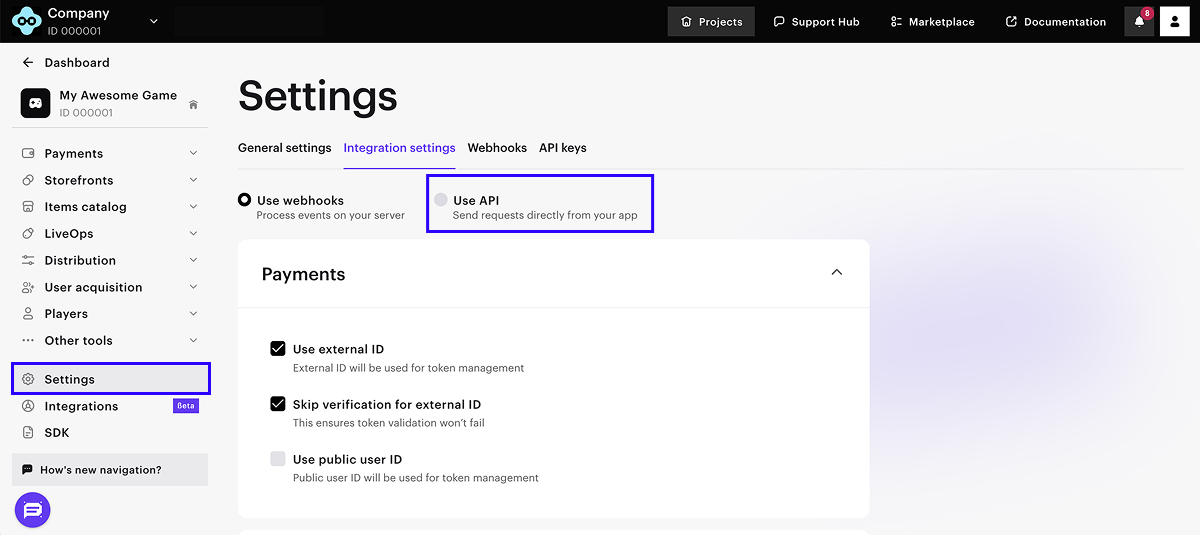
To enable the Events API for your project:
- Open your project in the Publisher Account.
- In the side menu, select Project settings.
- Open the Integration settings tab.
- Select Use API and click Save.
To initialize the SDK in Events API mode, see the platform-specific guides:
For the complete list of supported webhook types, see the Xsolla webhooks reference ↗.