## Payments and Store
In the Payments and Store tab, you can test the following webhooks:
- User validation (`user_validation`)
- Successful payment for order (`order_paid`)
- Order cancellation (`order_canceled`)
To test webhooks:
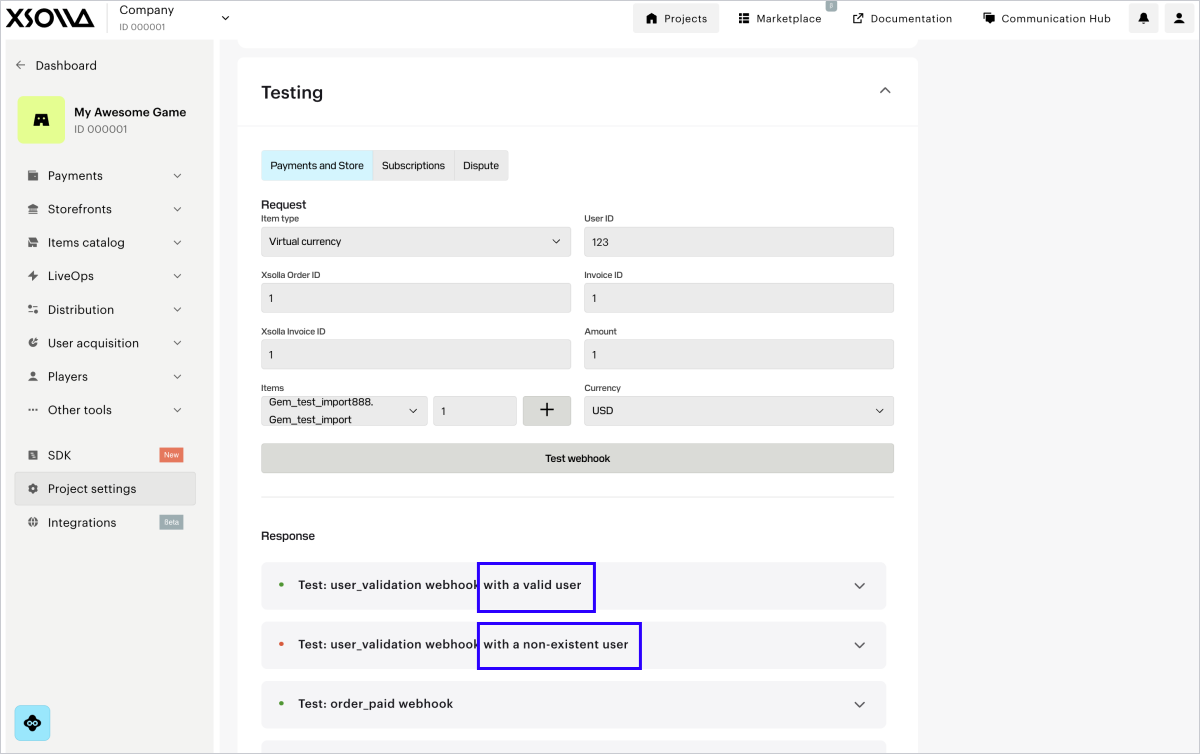
1. In the webhooks testing section, go to the Payments and Store tab.
2. In the drop-down list, select the item type. If you haven’t set up this item type in the account yet, click the button to configure it. After creating the item, return to the webhook testing section and proceed to the next step.
3. Fill in the necessary fields:
* **User ID** — when testing, you can use any combination of letters and digits.
* Enter any value in the **Xsolla order ID** field.
* **Xsolla invoice ID** — transaction ID on Xsolla side. When testing, you can use any numeric value.
* **Invoice ID** — transaction ID on your game’s side. When testing, you can use any combination of letters and digits. It is not a required parameter for a successful payment, but you can pass it to link the transaction ID on your side to the transaction ID on Xsolla side.
* **Amount** — payment amount. When testing, you can use any numeric value.
* **Currency** — select a currency from the drop-down list.
* Select the items’ SKU from the drop-down list and indicate the amount. You can choose multiple items of the same type by clicking **+** and adding them in a new line.
4. Click **Test webhooks**.
User validation, Successful payment for order and Order cancellation webhooks with the specified data are sent to the provided URL. The results of testing each webhook type are displayed below the Test webhooks button.
If the **Use public user ID** box is checked in your account in the **Settings > Integration settings** section, the User search webhook will also be sent to your webhook server URL and the testing result will be displayed.
For each webhook, you need to configure processing both scenarios: a successful one and the one with an error.