Chino (simplificado)
- Borrar artículo virtual
Obtener lista de artículos virtuales
Crear artículo virtual
Obtener lista de artículos virtuales por ID externo del grupo especificado
Obtener la lista de artículos virtuales por ID del grupo especificado
Obtener artículo virtual
Actualizar artículo virtual
Obtener lista de monedas virtuales
Crear moneda virtual
Obtener moneda virtual
Actualizar la moneda virtual
Eliminar moneda virtual
Obtener lista de paquetes de moneda virtual (admin)
Crear un paquete de moneda virtual
Actualizar el paquete de moneda virtual
Eliminar el paquete de moneda virtual
Obtener el paquete de moneda virtual
Borrar artículo virtual
API de catálogo (2.0.0)
- Versión: 2.0.0
- Servidores:
https://store.xsolla.com/api - Contacte con nosotros por correo electrónico
- URL de contacto: https://xsolla.com/
- Versión TLS requerida: 1.2
La API de catálogo le permite configurar un catálogo de artículos de juego en el lado de Xsolla y mostrar dicho catálogo a los usuarios de su tienda.
La API le permite gestionar las siguientes entidades de catálogo:
- Artículos virtuales: artículos de juego, como armas, apariencias o potenciadores.
- Moneda virtual: dinero virtual que se utiliza para comprar productos virtuales.
- Paquetes de moneda virtual: lotes predefinidos de moneda virtual.
- Lotes: paquetes combinados de artículos virtuales, moneda o claves de juego que se venden como un único SKU.
- Claves de juego: claves para juegos y DLC distribuidos a través de plataformas como Steam u otros proveedores de DRM.
- Grupos: agrupaciones lógicas para organizar y clasificar artículos dentro del catálogo.
La API se divide en los siguientes grupos:
Admin : llamadas para crear, actualizar, eliminar y configurar artículos de catálogo y grupos. La autenticación se realiza mediante autenticación de acceso básica con sus credenciales de comerciante o de proyecto. No está diseñado para uso en escaparates.Catalog : llamadas para buscar artículos y crear escaparates personalizados para los usuarios finales. Diseñado para gestionar situaciones de alta carga. Admite la autorización JWT opcional de usuarios para devolver datos personalizados, como límites específicos para determinados usuarios y promociones activas.
Las llamadas API requieren autenticación ya sea en nombre de un usuario o en nombre de un proyecto. El esquema de autenticación utilizado se especifica en la sección Seguridad en la descripción de cada llamada.
La autenticación mediante el JWT del usuario se utiliza cuando se envía una solicitud desde un navegador, aplicación móvil o juego. Por defecto, se aplica el esquema XsollaLoginUserJWT. Para obtener más detalles sobre cómo crear un token, consulte la documentación del API de Xsolla Login.
El token se transmite en el encabezado Authorization con el siguiente formato: Authorization: Bearer <user_JWT>, en el que <user_JWT> es el token de usuario. El token identifica al usuario y proporciona acceso a datos personalizados.
También puede utilizar un token para abrir la interfaz de pago.
La autenticación HTTP básica se utiliza para interacciones de servidor a servidor, cuando una llamada API se envía directamente desde su servidor en lugar de desde el navegador de un usuario o aplicación móvil. Normalmente, se usa la autenticación HTTP básica con una clave de API.
Nota:
La clave de API es confidencial y no debe almacenarse ni usarse en aplicaciones cliente.
La clave de API es confidencial y no debe almacenarse ni usarse en aplicaciones cliente.
Con la autenticación básica del lado del servidor, todas las solicitudes de API deben incluir el siguiente encabezado:
- para
basicAuth—Authorization: Basic <your_authorization_basic_key>, en las queyour_authorization_basic_keyes el parproject_id:api_keycodificado en Base64 - para
basicMerchantAuth—Authorization: Basic <your_authorization_basic_key>, en las queyour_authorization_basic_keyes el parmerchant_id:api_keycodificado en Base64
Puede encontrar los valores de parámetro en Cuenta del editor:
- Se muestra
merchant_id:- En Configuración de la empresa > Empresa.
- En la URL en la barra de direcciones del navegador en cualquier página de Cuenta del editor. La URL tiene el siguiente formato:
https://publisher.xsolla.com/<merchant_id>.
- Se muestra
project_id:- Junto al nombre del proyecto en Cuenta del editor.
- En la URL en la barra de direcciones del navegador al trabajar en un proyecto en la Cuenta del editor. La URL tiene el siguiente formato:
https://publisher.xsolla.com/<merchant_id>/projects/<project_id>.
api_keyse muestra en Cuenta del editor solo en el momento de la creación y debe almacenarse de forma segura en su servidor. Puede crear una clave de API en las siguientes secciones:
Aviso:
Si una llamada API requerida no incluye el parámetro de ruta
Si una llamada API requerida no incluye el parámetro de ruta
project_id, utilice una clave de API que sea válida para todos los proyectos de la empresa para la autorización.Para obtener más información sobre cómo trabajar con claves de API, consulte las referencias de la API.
El esquema de autenticación AuthForCart se utiliza para las compras con cesta y admite dos modos:
Autenticación mediante el JWT del usuario. El token se transmite en el encabezado
Authorizationcon el siguiente formato:Authorization: Bearer <user_JWT>, en el cual<user_JWT>es el token del usuario. El token identifica al usuario y proporciona acceso a datos personalizados. Como alternativa, puede utilizar un token para abrir la interfaz de pago.Modo simplificado sin encabezado "Authorization". Este modo se utiliza solo para usuarios no autorizados y puede aplicarse solo para ventas de claves de juego. En lugar de un token, la solicitud debe incluir los siguientes encabezados:
x-unauthorized-idcon un ID de solicitudx-usercon la dirección de correo electrónico del usuario codificada en Base64
Los artículos de todos los tipos (artículos virtuales, lotes, moneda virtual y claves) emplean una estructura de datos similar. Comprender la estructura básica simplifica el trabajo con la API y le ayuda a orientarse más fácilmente en la documentación.
Nota:
Algunas llamadas pueden incluir campos adicionales, pero no cambian la estructura básica.
Algunas llamadas pueden incluir campos adicionales, pero no cambian la estructura básica.
Identificación
merchant_id— ID de la empresa en Cuenta del editorproject_id— ID del proyecto en Cuenta del editorsku— SKU del artículo, único dentro del proyecto
Visualización en la tienda
name— nombre del artículodescription— descripción del artículoimage_url— URL de la imagenis_enabled— disponibilidad del artículois_show_in_store— si el artículo se muestra o no en el catálogo
Para obtener más información sobre la gestión de la disponibilidad de artículos en el catálogo, consulte la documentación.
Organización
type— tipo de artículo, p. ej., un artículo virtual (virtual_item) o lote (bundle)groups— grupos a los que pertenece el artículoorder— orden de visualización en el catálogo
Condiciones de venta
prices— precios en moneda real o virtuallimits— límites de compraperiods— periodos de disponibilidadregions— restricciones regionales
Ejemplo de estructura de entidad principal:
{
  "attributes": [],
  "bundle_type": "virtual_currency_package",
  "content": [
    {
      "description": {
        "en": "Main in-game currency"
      },
      "image_url": "https://.../image.png",
      "name": {
        "en": "Crystals",
        "de": "Kristalle"
      },
      "quantity": 500,
      "sku": "com.xsolla.crystal_2",
      "type": "virtual_currency"
    }
  ],
  "description": {
    "en": "Crystals x500"
  },
  "groups": [],
  "image_url": "https://.../image.png",
  "is_enabled": true,
  "is_free": false,
  "is_show_in_store": true,
  "limits": {
    "per_item": null,
    "per_user": null,
    "recurrent_schedule": null
  },
  "long_description": null,
  "media_list": [],
  "name": {
    "en": "Medium crystal pack"
  },
  "order": 1,
  "periods": [
    {
      "date_from": null,
      "date_until": "2020-08-11T20:00:00+03:00"
    }
  ],
  "prices": [
    {
      "amount": 20,
      "country_iso": "US",
      "currency": "USD",
      "is_default": true,
      "is_enabled": true
    }
  ],
  "regions": [],
  "sku": "com.xsolla.crystal_pack_2",
  "type": "bundle",
  "vc_prices": []
}La API de Xsolla le permite implementar la lógica de una tienda en el juego, incluyendo la recuperación del catálogo de artículos, la gestión de la cesta, la creación de pedidos y el seguimiento de su estado. Dependiendo del escenario de integración, las llamadas API se dividen en subsecciones de Admin y Catálogo, que usan diferentes esquemas de autenticación.
El siguiente ejemplo muestra un flujo básico para establecer y operar una tienda, desde la creación de artículos hasta la compra.
Cree un catálogo de artículos para su tienda, como artículos virtuales, lotes o moneda virtual.
Ejemplos de llamadas API:
Configure herramientas de adquisición de usuarios y monetización, como descuentos, bonificaciones, recompensas diarias o cadenas de ofertas.
Ejemplos de llamadas API:
Configure la visualización de artículos en su aplicación.
Aviso:
No utilice llamadas API de la subsección Admin para crear un catálogo de usuarios. Estas llamadas API tienen límites de frecuencia y no están destinadas para el tráfico de usuarios.
No utilice llamadas API de la subsección Admin para crear un catálogo de usuarios. Estas llamadas API tienen límites de frecuencia y no están destinadas para el tráfico de usuarios.
Ejemplos de llamadas a la API:
Nota:
Por defecto, las llamadas API del catálogo devuelven artículos que están actualmente disponibles en la tienda en el momento de la solicitud. Para recuperar artículos que aún no están disponibles o que ya no lo están, incluya el parámetro
Por defecto, las llamadas API del catálogo devuelven artículos que están actualmente disponibles en la tienda en el momento de la solicitud. Para recuperar artículos que aún no están disponibles o que ya no lo están, incluya el parámetro
"show_inactive_time_limited_items": 1 en la solicitud del catálogo.
Puede vender artículos utilizando los siguientes métodos:
- Compra rápida: venda un código de artículo (SKU) varias veces.
- Compra con cesta: el usuario añade artículos a la cesta, elimina artículos y actualiza cantidades dentro de un solo pedido.
Si un artículo se compra utilizando moneda virtual en lugar de dinero real, utilice la llamada API Crear pedido con artículo especificado comprado con moneda virtual. La interfaz de pago no es necesaria, ya que el cargo se procesa cuando se ejecuta la llamada API.
Para la compra de artículos gratuitos, utilice la llamada API Crear pedido con artículo gratuito especificado o la llamada API Crear pedido con cesta gratuita. La interfaz de pago no es necesaria: el pedido se establece inmediatamente con el estado done.
Utilice la llamada API del lado del cliente para crear un pedido con un artículo especificado. La llamada devuelve un token utilizado para abrir la interfaz de pago.
Nota:
La información de descuento está disponible para el usuario únicamente en la interfaz de pago. Los códigos promocionales no son compatibles.
La información de descuento está disponible para el usuario únicamente en la interfaz de pago. Los códigos promocionales no son compatibles.
La configuración y compra de la cesta se puede realizar en el cliente o en el lado del servidor.
Configurar y comprar una cesta en el cliente
Implemente la lógica de añadir y eliminar artículos por usted mismo. Antes de llamar a la API para establecer una cesta, no tendrá información sobre qué promociones se aplicarán a la compra. Esto implica que el coste total y los detalles de los artículos de bonificación añadidos no se conocerán.
Implemente la siguiente lógica de cesta:
- Después de que el jugador haya llenado una cesta, utilice la llamada API Llenar la cesta con artículos. La llamada devuelve la información actual sobre los artículos seleccionados (precios antes y después de descuentos y artículos de bonificación).
- Actualice el contenido de la cesta basándose en las acciones de los usuarios:
- Para añadir un artículo o cambiar la cantidad del artículo, utilice la llamada API Actualizar artículo de la cesta por ID de la cesta.
- Para eliminar un artículo, utilice la llamada API Eliminar artículo de la cesta por ID de la cesta.
Nota:
Para obtener el estado actual de la cesta, utilice la llamada API Obtener la cesta del usuario actual.
Para obtener el estado actual de la cesta, utilice la llamada API Obtener la cesta del usuario actual.
- Utilice la llamada API Crear pedido con todos los artículos de la cesta actual. La llamada devuelve el ID del pedido y el token de pago. El pedido recién creado se establece por defecto con el estado
new.
Configurar y comprar una cesta en el servidor
Esta opción de configuración puede requerir más tiempo para configurar la cesta, ya que cada modificación que se realice en ella debe ir acompañada de llamadas API.
Implemente la siguiente lógica de cesta:
- Después de que el jugador haya llenado una cesta, utilice la llamada API Llenar la cesta con artículos. La llamada devuelve la información actual sobre los artículos seleccionados (precios antes y después de descuentos, y artículos de bonificación).
- Utilice la llamada API Crear pedido con todos los artículos de la cesta actual. La llamada devuelve el ID del pedido y el token de pago. El pedido recién creado se establece por defecto con el estado
new.
Utilice el token devuelto para abrir la interfaz de pago en una nueva ventana. Otras formas de abrir la interfaz de pago se describen en la documentación.
| Acción | Punto final |
|---|---|
| Abrir en entorno de producción. | https://secure.xsolla.com/paystation4/?token={token} |
| Abrir en modo sandbox. | https://sandbox-secure.xsolla.com/paystation4/?token={token} |
Nota:
Utilice el modo sandbox durante el desarrollo y las pruebas. Las compras de prueba no hacen cargos en cuentas reales. Puede usar tarjetas bancarias de prueba.
Utilice el modo sandbox durante el desarrollo y las pruebas. Las compras de prueba no hacen cargos en cuentas reales. Puede usar tarjetas bancarias de prueba.
Tras realizar el primer pago real, se aplica una política estricta de pagos en aislador de proceso (sandbox). Un pago en modo sandbox está disponible solo para los usuarios especificados en Cuenta del Editor > Configuración de la empresa > Usuarios.
Comprar moneda virtual y artículos con moneda real es posible solamente después de firmar un acuerdo de licencia con Xsolla. Para hacerlo, en Cuenta del editor, vaya a Acuerdos e impuestos > Acuerdos, rellene el formulario de acuerdo y espere la confirmación. La revisión del acuerdo puede tardar hasta tres días laborables.
Para habilitar o deshabilitar el modo sandbox, cambie el valor del parámetro sandbox en la solicitud para compra rápida y compra con cesta. El modo sandbox está desactivado por defecto.
Posibles estados del pedido:
new: pedido creadopaid: pago recibidodone: artículo entregadocanceled: pedido canceladoexpired: pedido expirado
Haga un seguimiento del estado del pedido usando uno de los siguientes métodos:
Las llamadas API que devuelven grandes conjuntos de registros (p. ej., al crear un catálogo) devuelven datos en páginas. La paginación es un mecanismo que limita el número de artículos devueltos en una sola respuesta de API y le permite recuperar páginas posteriores de manera secuencial.
Utilice los siguientes artículos para controlar el número de artículos devueltos:
limit— número de artículos por páginaoffset— índice del primer artículo de la página (la numeración comienza desde 0)has_more— indica si hay otra página disponibletotal_items_count— número total de artículos
Ejemplo de solicitud:
GET /items?limit=20&offset=40Ejemplo de respuesta:
{
  "items": [...],
  "has_more": true,
  "total_items_count": 135
}
Se recomienda enviar solicitudes posteriores hasta que la respuesta devuelva has_more = false.
Las fechas y valores de tiempo se transmiten en el formato ISO 8601.
Se admiten los siguientes:
- Desfase UTC (tiempo universal coordinado)
- Valor
nullcuando no hay restricción de tiempo para mostrar un artículo - Marca de tiempo Unix (en segundos) utilizada en algunos campos
Formato: AAAA-MM-DDTHH:MM:SS±HH:MM
Ejemplo: 2026-03-16T10:00:00+03:00
Xsolla admite la localización de campos visibles por el usuario, como el nombre y la descripción del artículo. Los valores localizados se transmiten como un objeto en el que el código de idioma se utiliza como la clave. La lista completa de idiomas admitidos está disponible en la documentación.
Campos admitidos
La localización puede especificarse para los siguientes parámetros:
namedescriptionlong_description
Formato de configuración regional
La clave de configuración regional puede especificarse en uno de los siguientes formatos:
- Código de idioma de dos letras:
en,ru - Código de idioma de cinco letras:
en-US,ru-RU,de-DE
Ejemplos
Ejemplo con un código de idioma de dos letras:
{
  "name": {
    "en": "Starter Pack",
    "ru": "Стартовый набор"
  }
}
Ejemplo con un código de idioma de cinco letras:
{
  "description": {
    "en-US": "Premium bundle",
    "de-DE": "Premium-Paket"
  }
}El país del usuario determina los precios del catálogo, la moneda de pago y los métodos de pago disponibles en la interfaz de pago. Dependiendo de la llamada API, el país se determina de la siguiente forma:
- En las llamadas API del lado del cliente, el país se determina mediante la dirección IP de la solicitud.
- En las llamadas API del lado del servidor,
el país se determina mediante el valor del parámetro
user.country.valueo mediante la dirección IP del usuario del encabezadoX-User-Ip. Si se transmiten ambos, tiene prioridad el parámetrouser.country.value.
Nota
Solo se admiten direcciones IPv4 para determinar el país. Si se transmite una dirección IPv6, la detección del país y la moneda podría ser incorrecta. Si utiliza la llamada API del lado del servidor y no puede proporcionar la dirección IPv4 del usuario, transmita el país en el parámetro
Solo se admiten direcciones IPv4 para determinar el país. Si se transmite una dirección IPv6, la detección del país y la moneda podría ser incorrecta. Si utiliza la llamada API del lado del servidor y no puede proporcionar la dirección IPv4 del usuario, transmita el país en el parámetro
user.country.value.
Si ocurre un error, la API devuelve un estado HTTP y un cuerpo de respuesta JSON. La lista completa de errores relacionados con la tienda está disponible en la documentación.
Ejemplo de respuesta:
{
  "errorCode": 1102,
  "errorMessage": "Validation error",
  "statusCode": 422,
  "transactionId": "c9e1a..."
}errorCode— código de error.errorMessage— descripción breve del error.statusCode— estado de la respuesta HTTP.transactionId— ID de la solicitud. Se devuelve solo en algunos casos.errorMessageExtended— detalles adicionales del error, como los parámetros de la solicitud. Se devuelve solo en algunos casos.
Ejemplo de respuesta ampliada:
{
  "errorCode": 7001,
  "errorMessage": "Chain not found",
  "errorMessageExtended": {
    "chain_id": "test_chain_id",
    "project_id": "test_project_id",
    "step_number": 2
  },
  "statusCode": 404
}
Códigos de estado HTTP habituales
400— solicitud no válida401— error de autenticación403— permisos insuficientes404— recurso no encontrado422— error de validación429— límite de frecuencia excedido
Recomendaciones
- Gestione el estado HTTP y el cuerpo de la respuesta juntos.
- Utilice
errorCodepara procesar errores relacionados con la lógica de la aplicación. - Utilice
transactionIdpara identificar solicitudes más rápidamente al analizar errores.
Descargar descripción de OpenAPI
Idiomas
Servidores
https://store.xsolla.com/api/
Mock server
https://xsolla.redocly.app/_mock/es/api/catalog/
Descripción general
Puede usar artículos virtuales y moneda virtual para crear una tienda dentro del juego y configurar cómo se muestra a los usuarios. Los siguientes tipos de artículos están disponibles:
- Artículos virtuales: productos dentro del juego como armas, apariencias o potenciadores. Pueden venderse por dinero real o moneda virtual.
- Moneda virtual: moneda del juego utilizada para comprar artículos virtuales. Puede venderse por dinero real o moneda virtual.
- Paquetes de moneda virtual: una cantidad fija de moneda virtual. Puede venderse por dinero real o moneda virtual.
Los grupos sirven para organizar los artículos en el catálogo. Permiten agrupar de forma lógica los artículos y gestionar cómo se muestran.
Utilice las llamadas API de la subsección Admin para crear, actualizar y eliminar artículos.
Utilice las llamadas API de la subsección Catálogo para recuperar listas de artículos y mostrarlas a los usuarios.
Aviso
No utilice las llamadas API de la subsección Admin para crear un catálogo de tienda.
No utilice las llamadas API de la subsección Admin para crear un catálogo de tienda.
Nota:
La llamada API Obtener lista de artículos virtuales devuelve datos detallados de los artículos, incluidos precios y atributos, y admite paginación. Utilícela para mostrar páginas de catálogo en la tienda.
La llamada API Obtener lista de todos los artículos virtuales devuelve SKU, nombre y descripción del artículo, así como ID de grupo y nombre sin paginación. Úsela para la búsqueda o indexación en el lado del cliente.
La llamada API Obtener lista de artículos virtuales devuelve datos detallados de los artículos, incluidos precios y atributos, y admite paginación. Utilícela para mostrar páginas de catálogo en la tienda.
La llamada API Obtener lista de todos los artículos virtuales devuelve SKU, nombre y descripción del artículo, así como ID de grupo y nombre sin paginación. Úsela para la búsqueda o indexación en el lado del cliente.
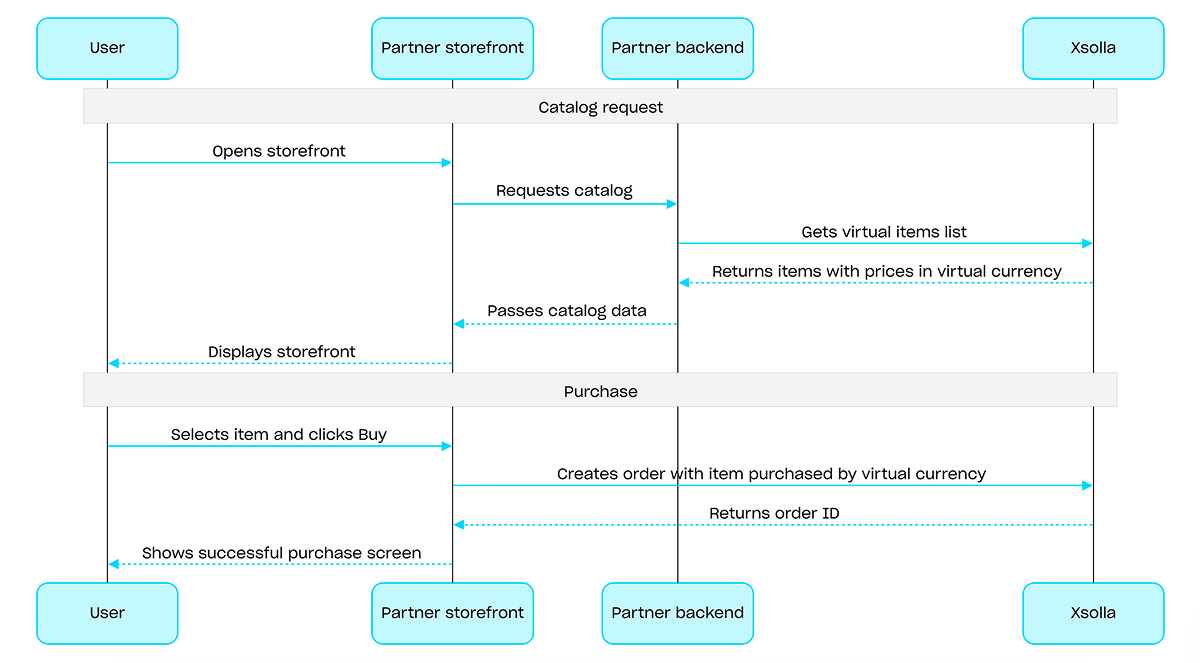
Para hacer compras con moneda virtual, utilice la llamada API Crear pedido con artículo especificado comprado mediante moneda virtual. La interfaz de pago no es necesaria: el cargo se procesa cuando se ejecuta la llamada API.
Ejemplo de un flujo de compra con moneda virtual:
Ruta
Cuerpoapplication/jsonID del proyecto. Encontrará este parámetro en su Cuenta del editor junto al nombre del proyecto y en la barra de direcciones del navegador cuando se trabaja en un proyecto. La URL tiene el siguiente formato: https://publisher.xsolla.com/<merchant_id>/projects/<project_id>.
Ejemplo: 44056
Nota:
El esquema del cuerpo de la solicitud incluye tanto parámetros obligatorios como opcionales para casos de uso avanzados, como el establecimiento de precios regionales, límites de compra y disponibilidad por tiempo limitado.
El esquema del cuerpo de la solicitud incluye tanto parámetros obligatorios como opcionales para casos de uso avanzados, como el establecimiento de precios regionales, límites de compra y disponibilidad por tiempo limitado.
Aviso:
Transmita todos los parámetros del artículo, incluidos aquellos que no requieren actualización. Los parámetros que se omitan en la solicitud serán eliminados.
Transmita todos los parámetros del artículo, incluidos aquellos que no requieren actualización. Los parámetros que se omitan en la solicitud serán eliminados.
ID único del artículo. El SKU solo puede contener caracteres alfanuméricos latinos en minúsculas y mayúsculas, puntos, guiones y guiones bajos.
Objeto con traducciones para la descripción del artículo. Acepta valores en uno de estos dos formatos: códigos de idioma de dos letras en minúscula (p. ej., en) o códigos de idioma de cinco caracteres (p. ej., en-US). Aunque ambos formatos se aceptan como entradas, las respuestas devuelven códigos de idioma de dos letras en minúscula. Cuando se facilitan ambas opciones para el mismo idioma (p. ej. en y en-US), se almacena el último valor proporcionado. Puede consultar la lista completa de idiomas admitidos en la documentación.
Any of:
Códigos lingüísticos de dos letras minúsculas.
Objeto con traducciones para la descripción del artículo. Acepta valores en uno de dos formatos: códigos de idioma de dos letras en minúscula (p. ej., en) o códigos de configuración regional de cinco caracteres (p. ej., en-US). Aunque ambos formatos se aceptan como entradas, las respuestas devuelven códigos de idioma de dos letras en minúscula. Cuando se facilitan ambas opciones para el mismo idioma (p. ej. en y en-US), se almacena el último valor proporcionado. Puede consultar la lista completa de idiomas admitidos en la documentación.
Any of:
Códigos lingüísticos de dos letras minúsculas.
Objeto con traducciones para la descripción larga del artículo. Acepta valores en uno de estos dos formatos: códigos de idioma de dos letras en minúscula (p. ej., en) o códigos de configuración regional de cinco caracteres (p. ej., en-US). Aunque ambos formatos se aceptan como entradas, las respuestas devuelven códigos de idioma de dos letras en minúscula. Cuando se facilitan ambas opciones para el mismo idioma (p. ej. en y en-US), se almacena el último valor proporcionado. Puede consultar la lista completa de idiomas admitidos en la documentación.
Any of:
Códigos lingüísticos de dos letras minúsculas.
URL de la imagen. Para que la imagen se visualice correctamente y se cargue con rapidez en la interfaz de pago, consulte nuestras directrices sobre imágenes y URL:
- Formatos compatibles: WebP (recomendado), PNG y JPG.
- Tamaño del archivo: ≤ 50 KB (para WebP) o ≤ 150 KB (para PNG y JPG).
- Tamaño de la imagen: 280 x 280 píxeles.
- Espacio de color: sRGB.
- Protocolo: HTTPS con almacenamiento en caché de larga duración para las URL versionadas.
Recursos adicionales del artículo como capturas de pantalla, vídeos de partidas del juego, etc.
Lista de los ID externo del grupo a los que pertenece el artículo.
Ejemplo: ["horror", "action"]
Lista de atributos.
Atención. No puede especificar más de 20 atributos para el artículo. Cualquier intento de superar el límite provocará un error.
ID único del atributo. external_id solo puede contener caracteres alfanuméricos latinos en minúsculas y mayúsculas, guiones y guiones bajos.
Objeto con traducciones para el nombre del atributo. Las claves se especifican en la norma ISO 3166-1.
Atención. No puede crear más de 6 valores para cada atributo. Cualquier intento de exceder el límite resultará en un error.
Ejemplo: [{"external_id":"strategy","value":{"en":"Strategy","de":"Strategie"}},{"external_id":"action","value":{"en":"Action","de":"Aktion"}}]
ID del valor único para un atributo. external_id solo puede contener caracteres alfanuméricos latinos en minúsculas, guiones y guiones bajos.
Ejemplo: "value_external_id"
Ejemplo: [{"currency":"USD","amount":10.5,"is_default":true,"is_enabled":true}]
Divisa del precio del artículo. Código de tres letras según ISO 4217. Consulte la documentación para obtener información detallada sobre monedas soportadas por Xsolla.
Ejemplo: "USD"
Código de país de dos letras mayúsculas de conformidad con la norma ISO 3166-1 alpha-2. Consulte la documentación para obtener información detallada sobre los países admitidos por Xsolla.
Ejemplo: country=US
Ejemplo: "US"
Matriz de precios en moneda virtual.
Ejemplo: [{"sku":"com.xsolla.gold_1","amount":10,"is_default":true,"is_enabled":true}]
ID único del artículo. El SKU solo puede contener caracteres alfanuméricos latinos en minúsculas y mayúsculas, puntos, guiones y guiones bajos.
Ejemplo: "com.xsolla.gold_1"
Si es o no el precio predeterminado en moneda virtual.
Predeterminado false
Ejemplo: true
Si el artículo está disponible. Si es false, el artículo no se puede comprar en la tienda ni obtener como parte de un lote o en el contexto de una campaña de marketing. Consulte nuestra documentación para obtener información detallada sobre la disponibilidad del artículo.
Si el artículo aparece o no en el catálogo. Si es false y is_enabled: true, el artículo no es visible en el catálogo, pero puede obtenerse como parte de un lote o en el marco de campañas de marketing. Consulte nuestra documentation para obtener información detallada sobre la disponibilidad del artículo.
Si el artículo es o no una recompensa de pago aleatoria, p. ej., una caja de botín.
Orden de visualización de los artículos en el catálogo. Cuanto mayor sea el valor, más abajo aparecerá el artículo en la lista. Si los valores son iguales, los artículos se ordenan por fecha de creación, y los más recientes aparecerán más arriba.
Matriz de regiones en las que el artículo está disponible. Si la matriz está vacía o no se ha transmitido, el artículo está disponible en todas las regiones.
ID de región dentro del proyecto.
Consulte la documentación sobre restricciones de venta regionales y las llamadas API de gestión regional para obtener información detallada.
Ejemplo: 1
Límites del artículo.
Limitación de artículos para un usuario independiente.
Any of:
Limitación de artículos para un usuario independiente.
null
Periodo de actualización del límite.
Reinicio del límite de compra en el intervalo especificado en horas.
One of:
Reinicio del límite de compra en el intervalo especificado en horas.
Periodo de actualización recurrente.
Valor"daily"
Periodo de venta del artículo.
Fecha en la que el artículo especificado estará disponible para la venta.
Ejemplo: "2020-08-11T10:00:00+03:00"
Un objeto JSON que contiene atributos y valores de artículos. Los artículos le permiten añadir más información a los artículos, tal como el nivel requerido del jugador para usar el artículo. Los atributos enriquecen la lógica interna del juego y son accesibles a través de métodos GET y webhooks específicos.
- https://store.xsolla.com/api/v2/project/{project_id}/admin/items/virtual_items/sku/{item_sku}
- Mock serverhttps://xsolla.redocly.app/_mock/es/api/catalog/v2/project/{project_id}/admin/items/virtual_items/sku/{item_sku}
- curl
- JavaScript
- Node.js
- Python
- Java
- C#
- PHP
- Go
- Ruby
- R
- Payload
curl -i -X PUT \
  -u <username>:<password> \
  https://store.xsolla.com/api/v2/project/44056/admin/items/virtual_items/sku/booster_mega_1 \
  -H 'Content-Type: application/json' \
  -d '{
    "sku": "booster_mega_1",
    "name": {
      "en": "Mega Booster"
    },
    "description": {
      "en": "Temporarily doubles the experience points earned in battle."
    }
}'Ruta
ID del proyecto. Encontrará este parámetro en su Cuenta del editor junto al nombre del proyecto y en la barra de direcciones del navegador cuando se trabaja en un proyecto. La URL tiene el siguiente formato: https://publisher.xsolla.com/<merchant_id>/projects/<project_id>.
Ejemplo: 44056
- https://store.xsolla.com/api/v2/project/{project_id}/admin/items/virtual_items/sku/{item_sku}
- Mock serverhttps://xsolla.redocly.app/_mock/es/api/catalog/v2/project/{project_id}/admin/items/virtual_items/sku/{item_sku}
- curl
- JavaScript
- Node.js
- Python
- Java
- C#
- PHP
- Go
- Ruby
- R
- Payload
curl -i -X DELETE \
  -u <username>:<password> \
https://store.xsolla.com/api/v2/project/44056/admin/items/virtual_items/sku/booster_mega_1Ruta
ID del proyecto. Encontrará este parámetro en su Cuenta del editor junto al nombre del proyecto y en la barra de direcciones del navegador cuando se trabaja en un proyecto. La URL tiene el siguiente formato: https://publisher.xsolla.com/<merchant_id>/projects/<project_id>.
Ejemplo: 44056
- https://store.xsolla.com/api/v2/project/{project_id}/admin/items/virtual_currency
- Mock serverhttps://xsolla.redocly.app/_mock/es/api/catalog/v2/project/{project_id}/admin/items/virtual_currency
- curl
- JavaScript
- Node.js
- Python
- Java
- C#
- PHP
- Go
- Ruby
- R
- Payload
curl -i -X GET \
  -u <username>:<password> \
'https://store.xsolla.com/api/v2/project/44056/admin/items/virtual_currency?limit=50&offset=0'La lista de monedas virtuales se recibió correctamente.
ID único del artículo. El SKU solo puede contener caracteres alfanuméricos latinos en minúsculas y mayúsculas, puntos, guiones y guiones bajos.
Objeto con traducciones para la descripción del artículo. Acepta valores en uno de estos dos formatos: códigos de idioma de dos letras en minúscula (p. ej., en) o códigos de idioma de cinco caracteres (p. ej., en-US). Aunque ambos formatos se aceptan como entradas, las respuestas devuelven códigos de idioma de dos letras en minúscula. Cuando se facilitan ambas opciones para el mismo idioma (p. ej. en y en-US), se almacena el último valor proporcionado. Puede consultar la lista completa de idiomas admitidos en la documentación.
Any of:
Códigos lingüísticos de dos letras minúsculas.
Objeto con traducciones para la descripción del artículo. Acepta valores en uno de dos formatos: códigos de idioma de dos letras en minúscula (p. ej., en) o códigos de configuración regional de cinco caracteres (p. ej., en-US). Aunque ambos formatos se aceptan como entradas, las respuestas devuelven códigos de idioma de dos letras en minúscula. Cuando se facilitan ambas opciones para el mismo idioma (p. ej. en y en-US), se almacena el último valor proporcionado. Puede consultar la lista completa de idiomas admitidos en la documentación.
Any of:
Códigos lingüísticos de dos letras minúsculas.
Objeto con traducciones para la descripción larga del artículo. Acepta valores en uno de estos dos formatos: códigos de idioma de dos letras en minúscula (p. ej., en) o códigos de configuración regional de cinco caracteres (p. ej., en-US). Aunque ambos formatos se aceptan como entradas, las respuestas devuelven códigos de idioma de dos letras en minúscula. Cuando se facilitan ambas opciones para el mismo idioma (p. ej. en y en-US), se almacena el último valor proporcionado. Puede consultar la lista completa de idiomas admitidos en la documentación.
Any of:
Códigos lingüísticos de dos letras minúsculas.
Grupos a los que pertenece el artículo.
Nombre del artículo. Debe contener pares clave/valor en los cuales clave es una configuración regional con formato "^[a-z]{2}", valor es una cadena (string).
Predeterminado {"en":"Horror"}
Ejemplo: {"en":"Horror","de":"Horror"}
Lista de atributos.
Ejemplo: [{"external_id":"attribute_external_id","name":{"en":"Attribute name","de":"Attributname"},"values":[{"external_id":"value_1","name":{"en":"value 1","de":"wert 1"}},{"external_id":"value_2","name":{"en":"value 2","de":"wert 2"}}]}]
ID único del atributo. external_id solo puede contener caracteres alfanuméricos latinos en minúsculas y mayúsculas, guiones y guiones bajos.
Ejemplo: "attribute_external_id"
Objeto con traducciones para el nombre del atributo. Las claves se especifican en la norma ISO 3166-1.
Ejemplo: {"en":"Attribute name","de":"Attributname"}
Ejemplo: [{"external_id":"value_1","name":{"en":"value 1","de":"wert 1"}},{"external_id":"value_2","name":{"en":"value 2","de":"wert 2"}}]
ID del valor único para un atributo. external_id solo puede contener caracteres alfanuméricos latinos en minúsculas, guiones y guiones bajos.
Ejemplo: "value_external_id"
Recursos adicionales del artículo como capturas de pantalla, vídeos de partidas del juego, etc.
Ejemplo: [{"currency":"USD","amount":10.5,"is_default":true,"is_enabled":true,"country_iso":"US"}]
Divisa del precio del artículo. Código de tres letras según ISO 4217. Consulte la documentación para obtener información detallada sobre monedas soportadas por Xsolla.
Ejemplo: "USD"
Si es o no el precio predeterminado en moneda real. Consulte nuestra documentación para obtener información detallada sobre la configuración de precios.
Predeterminado false
Ejemplo: true
Si este precio se utiliza o no para mostrarlo en el catálogo y para la compra del artículo. Si es false, no se utilizará este precio y se aplicará otro. Consulte nuestra documentación para obtener información detallada sobre la configuración de precios.
Predeterminado true
Ejemplo: true
País en el que está disponible este precio. Código de dos letras según la norma ISO 3166-1 alfa 2.
Ejemplo: "US"
Ejemplo: [{"sku":"com.xsolla.gold_1","amount":10,"is_default":true}]
ID único del artículo. El SKU solo puede contener caracteres alfanuméricos latinos en minúsculas y mayúsculas, puntos, guiones y guiones bajos.
Ejemplo: "com.xsolla.gold_1"
URL de la imagen. Para que la imagen se visualice correctamente y se cargue con rapidez en la interfaz de pago, consulte nuestras directrices sobre imágenes y URL:
- Formatos compatibles: WebP (recomendado), PNG y JPG.
- Tamaño del archivo: ≤ 50 KB (para WebP) o ≤ 150 KB (para PNG y JPG).
- Tamaño de la imagen: 280 x 280 píxeles.
- Espacio de color: sRGB.
- Protocolo: HTTPS con almacenamiento en caché de larga duración para las URL versionadas.
Si el artículo está disponible. Si es false, el artículo no se puede comprar en la tienda ni obtener como parte de un lote o en el contexto de una campaña de marketing. Consulte nuestra documentación para obtener información detallada sobre la disponibilidad del artículo.
Si el artículo es o no una recompensa de pago aleatoria, p. ej., una caja de botín.
Orden de visualización de los artículos en el catálogo. Cuanto mayor sea el valor, más abajo aparecerá el artículo en la lista. Si los valores son iguales, los artículos se ordenan por fecha de creación, y los más recientes aparecerán más arriba.
Si el artículo aparece o no en el catálogo. Si es false y is_enabled: true, el artículo no es visible en el catálogo, pero puede obtenerse como parte de un lote o en el marco de campañas de marketing. Consulte nuestra documentation para obtener información detallada sobre la disponibilidad del artículo.
Matriz de regiones en las que el artículo está disponible. Si la matriz está vacía o no se ha transmitido, el artículo está disponible en todas las regiones.
ID de región dentro del proyecto.
Consulte la documentación sobre restricciones de venta regionales y las llamadas API de gestión regional para obtener información detallada.
Ejemplo: 1
Límites del artículo.
Limitación de artículos para un usuario independiente.
Número máximo de artículos que un mismo usuario puede comprar.
Determina la visibilidad del artículo en el catálogo tras alcanzar el límite de compra, hasta el siguiente restablecimiento del límite.
Se aplica a los artículos para los que se han configurado restablecimientos periódicos del límite en la matriz recurrent_schedule.
Si no están configurados los restablecimientos del límite, el artículo no aparecerá en el catálogo cuando se haya alcanzado el límite de compra, independientemente del valor de limit_exceeded_visibility.
Valores posibles:
show— El artículo se devuelve en las llamadas API de recuperación del catálogo tras alcanzar el límite de compra. En las llamadas API de recuperación del catálogo en el lado del cliente, tras alcanzar el límite, el artículo se devuelve con el indicadorcan_be_bought: false. La La próxima fecha de restablecimiento se devuelve el díareset_next_date.hide— El artículo no se devuelve en las llamadas API de recuperación del catálogo tras alcanzar el límite de compra, hasta que se restablezca ese límite.
Enum"show""hide"
Limitación global de artículos.
Periodo de actualización del límite.
Periodo de actualización del límite del usuario.
One of:
Periodo de actualización del límite del usuario.
Tipo de periodo de actualización recurrente.
Valor"daily"
Hora de actualización del límite en la zona horaria deseada (redondeo a horas).
Ejemplo: "11:00:00+03:00"
Fecha y hora de actualización de los límites (Marca de tiempo Unix).
Ejemplo: 1677553200
Fecha y hora de la primera actualización del límite (ISO 8601).
Ejemplo: "2023-02-28T11:00:00+08:00"
Periodo de venta del artículo.
Fecha en la que el artículo especificado estará disponible para la venta.
Ejemplo: "2020-08-11T10:00:00+03:00"
Respuesta
application/json
{
  "items": [
    { … },
    { … }
  ]
}
Descripción general
Las claves de juego son códigos alfanuméricos únicos de un solo uso que permiten a los usuarios acceder a un juego o a contenido descargable (DLC) en las plataformas de videojuegos. Puede vender claves de juego a través de un enlace directo, mediante la interfaz de la tienda o mediante un widget. También puede configurar restricciones regionales para vender claves de juego en países específicos. Para obtener información detallada, consulte la sección Paquetes de claves de juego.
No es necesario autenticarse para vender claves de juego: las claves se envían a la dirección de correo electrónico que el usuario haya indicado al realizar la compra. Puede configurar la autenticación para habilitar otras opciones: personalización, límites de compra o un sistema de derechos. Para obtener información detallada, consulte la sección Cómo establecer la autenticación al vender claves de juego.
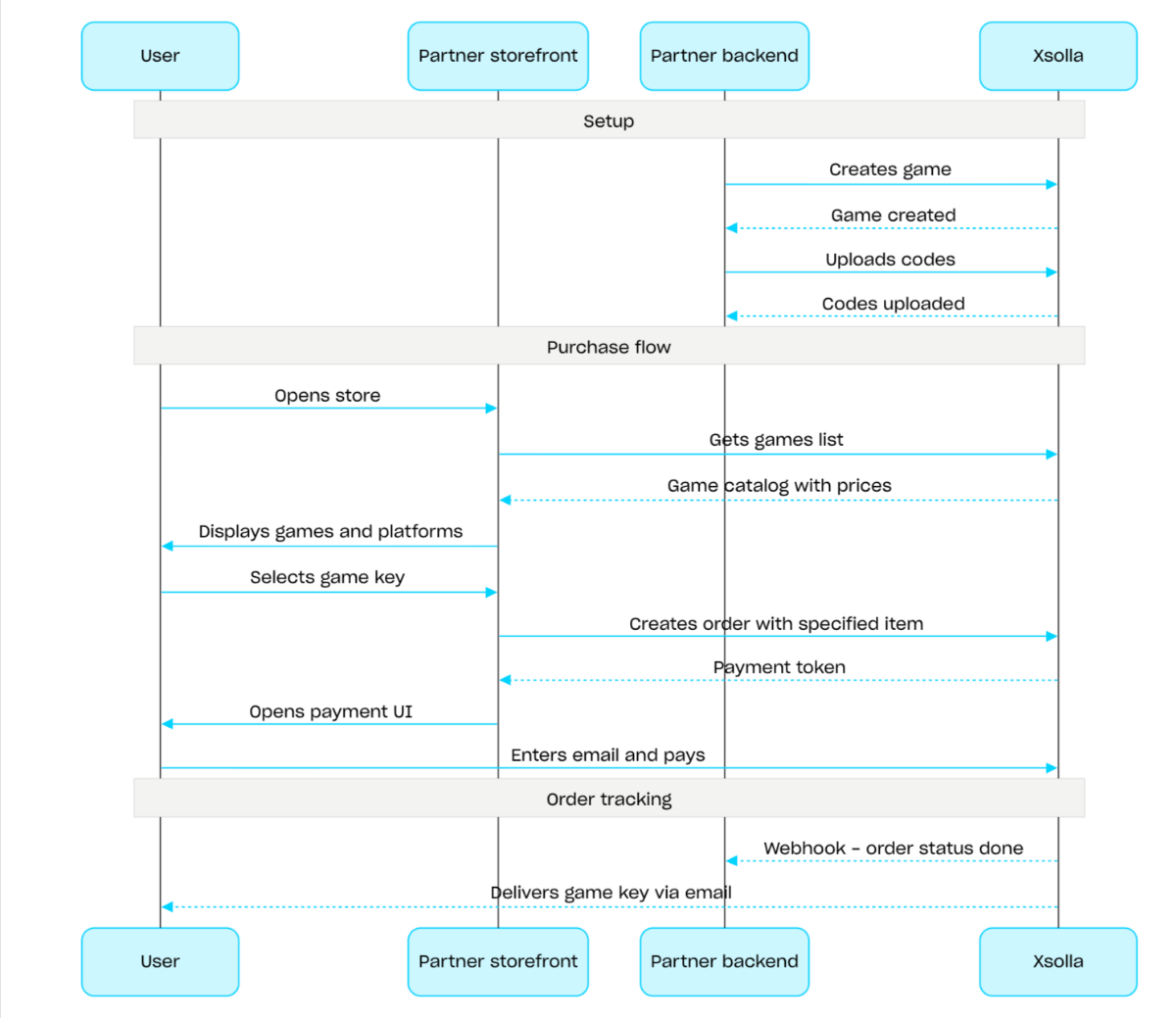
Flujo de ventas de claves de juego:
- Cree un juego mediante la llamada API Crear juego.
- Configure restricciones regionales.
- Suba las claves a un paquete de claves de juego mediante la llamada API Cargar códigos para que estén disponibles para su compra.
- Muestre el catálogo de juegos con los precios correspondientes a la región del usuario mediante la llamada API Obtener lista de juegos.
- Cree un pedido. Para una compra rápida, puede utilizar la llamada API Crear pedido con todos los artículos de la cesta actual, transmitiendo el SKU de la clave de juego. La respuesta devuelve un token para abrir la interfaz de pago.
- Implemente la apertura de la interfaz de pago para pagar el pedido.
Para recibir notificaciones inmediatas de los pagos completados y entregar los artículos al usuario, configure el seguimiento del estado de los pedidos, por ejemplo, mediante webhooks. Las claves se envían al correo electrónico que el usuario ha indicado al realizar la compra y el pedido pasa al estado done.
Descripción general
Los lotes son conjuntos de artículos que se venden como una sola unidad. Un lote puede incluir artículos virtuales, moneda virtual, paquetes de moneda virtual, claves de juego y otros lotes. Utilice los lotes para crear paquetes de bienvenida, ofertas de temporada y promociones especiales.
Utilice los siguientes grupos de llamadas API para trabajar con lotes:
- Utilice las llamadas API de la subsección Admin para crear, actualizar y eliminar lotes, así como para gestionar su visibilidad.
- Utilice las llamadas API de la subsección Catalog para obtener lotes.
Los límites de compra se configuran a través del objeto limits al crear o actualizar un lote. Para obtener más información, consulte la descripción general de Límites. También puede configurar restricciones regionales para vender artículos en países específicos.
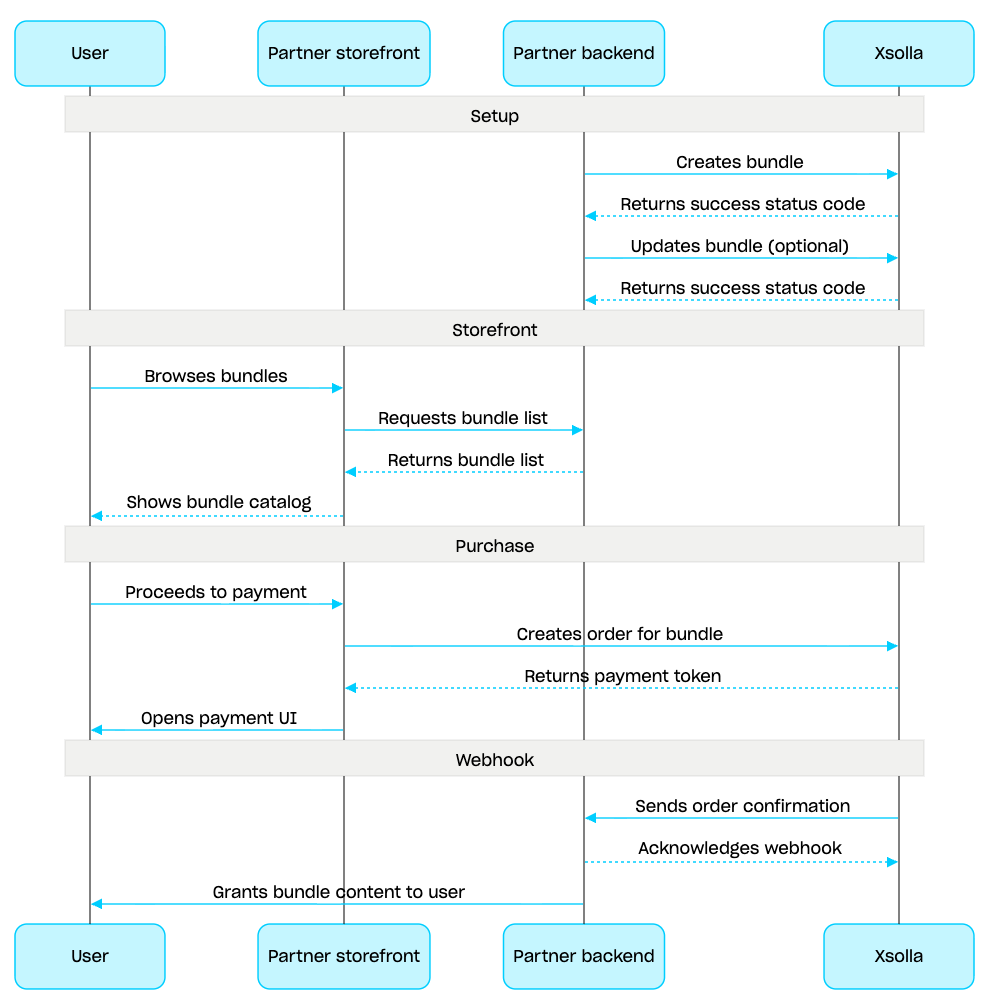
Gestión de lotes:
- Cree un lote mediante la llamada API Crear lote. Para comprobar el lote creado, utilice la llamada API Obtener lote. Para obtener todos los lotes del proyecto, utilice la llamada API Obtener lista de lotes.
- Si es necesario, utilice la llamada API Actualizar lote para modificar el contenido o la configuración del lote.
- Implemente la lógica de visualización de los lotes en su escaparate utilizando la llamada API Obtener lista de lotes, Obtener lote especificado u Obtener lista de lotes por grupo especificado.
- Cree un pedido utilizando la sección Cesta y pago. Por ejemplo, para una compra rápida, puede utilizar la llamada API Crear pedido con un artículo especificado, transmitiendo el SKU del lote. La respuesta contiene un token para abrir la interfaz de pago.
- Implemente la apertura de la interfaz de pago para pagar el pedido.
- Configure el seguimiento del estado del pedido, por ejemplo, utilizando webhooks, para recibir rápidamente los datos sobre los artículos pagados y concedérselos al usuario.
Descripción general
La cesta es un mecanismo de compra que permite combinar múltiples artículos en un solo pedido. Un usuario puede comprar artículos de cualquier tipo en cualquier cantidad con moneda real, así como usar códigos promocionales.
La cesta se almacena en el lado de Xsolla. El almacenamiento de la cesta entre sesiones depende de si el usuario está autorizado:
En el caso de los usuarios autorizados, la cesta está vinculada a un usuario concreto y se guarda entre sesiones siempre que las solicitudes se envíen en nombre del mismo usuario.
Para los usuarios no autorizados, guardar la cesta depende de que se transmita el encabezado
x-unauthorized-id. Para guardar la cesta de un usuario no autorizado entre sesiones, transmita el mismox-unauthorized-iden cada solicitud. Esta opción solo está disponible para la venta de claves de juego.
Puede identificar la cesta de dos formas: automáticamente mediante el JWT del usuario o mediante el ID de la cesta (cart_id).
La gestión de la cesta está disponible tanto en el lado del cliente como en el lado del servidor.
En el lado del servidor, puede llenar la cesta con artículos; p. ej., al restaurar una sesión de usuario. Las siguientes acciones están disponibles en el lado del cliente:
- recuperar el carrito del usuario actual o una cesta mediante ID
- llenar la cesta
- actualizar artículos en la cesta
- eliminar artículos de la cesta
Para comprar artículos de la cesta, se usan llamadas del cliente y del servidor para la creación de pedidos.
El tiempo de vida (TTL) de la cesta es de 72 horas por defecto. Si su contenido cambia, por ejemplo, al añadir un artículo nuevo, el TTL se prolonga.
Una vez realizado el pago correctamente, la cesta no se vacía automáticamente. Para vaciar la cesta, utilice las siguientes llamadas API del lado del cliente:
Eliminar todos los artículos de la cesta por el ID de la cesta.
Eliminar artículo de la cesta por ID de la cesta y Eliminar artículo de la cesta actual: la cesta se vacía cuando se elimina el último artículo de la misma.
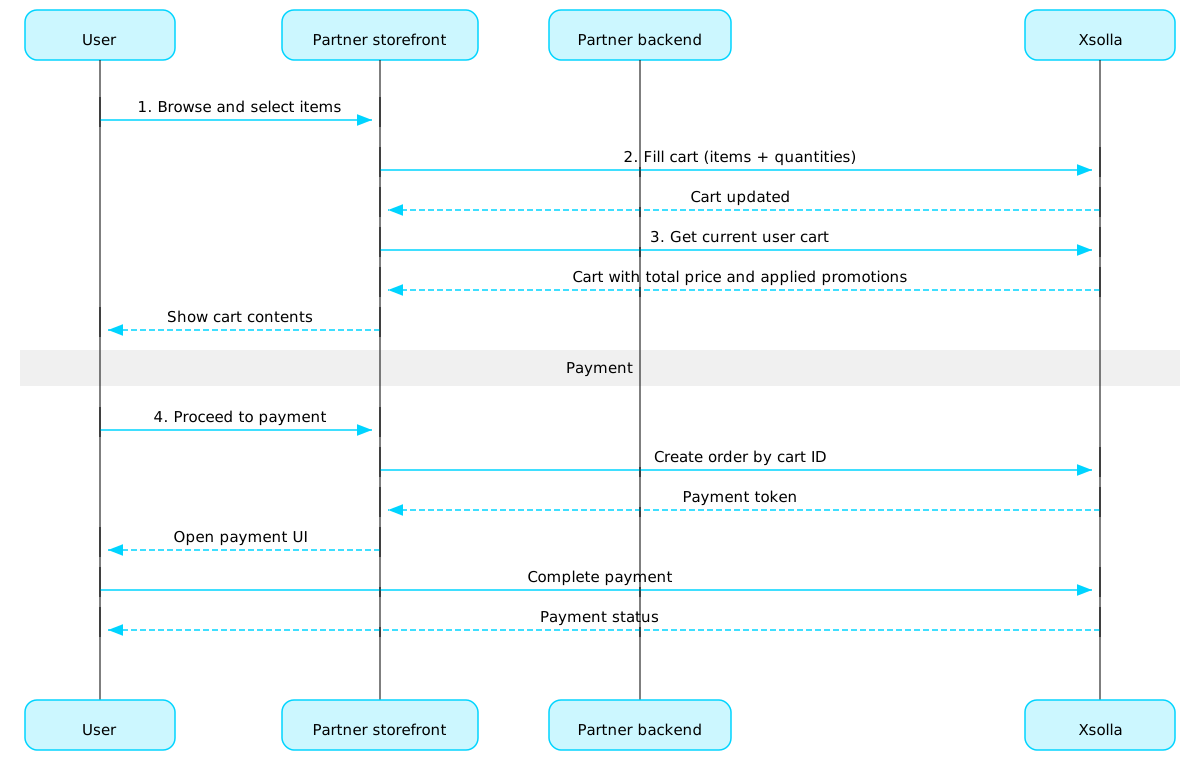
Escenario de uso de la cesta:
Implemente una interfaz de tienda en la que el usuario pueda seleccionar artículos.
Cuando el usuario seleccione artículos en la tienda, añádalos a la cesta, por ejemplo, utilizando la llamada Llenar la cesta con artículos. En la matriz de artículos, debe transmitir los SKU y la cantidad requerida de artículos.
Implemente la interfaz de visualización de la cesta. Cuando el usuario acceda a la cesta, muestre su contenido mediante la llamada Obtener la cesta del usuario actual. La respuesta proporcionará información sobre el precio final de los artículos, incluidos los descuentos y las promociones aplicadas.
Implemente la apertura de la interfaz de pago para abonar el pedido. Por ejemplo, puede utilizar la llamada Crear pedido con todos los artículos de la cesta. La respuesta devuelve un token para abrir la interfaz de pago.
Configure el seguimiento del estado de los pedidos, por ejemplo, mediante webhooks, para recibir sin demora los datos sobre los artículos cuyo pago se ha completado correctamente y concedérselos al usuario.
Nota:
Para implementar la venta de artículos dentro del juego y en línea, consulte la guía de integración.
Ciclo de vida del pedido
Comprender el ciclo de vida de un pedido le ayuda a hacer un seguimiento de los pedidos y a aplicar correctamente la lógica posterior a la compra, como, p. ej., la entrega de los artículos.
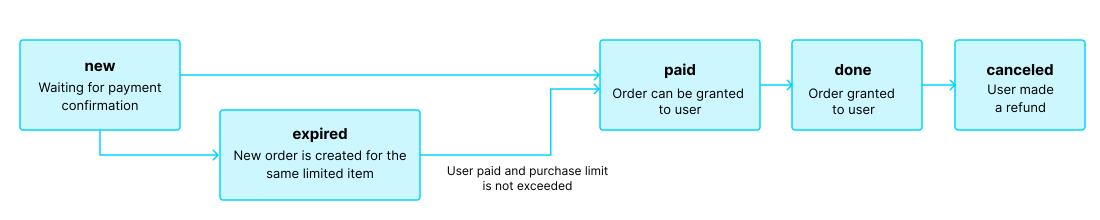
El pedido atraviesa los siguientes estados:
| Estado | Descripción | Notas |
new | Se creó el pedido. El sistema está a la espera de la confirmación del pago. | Las descripciones del estado de las transacciones pueden encontrarse en la documentación de la API de Pay Station. |
paid | El pedido se ha pagado (la transacción ha pasado al estado done), y ya se puede entregar el artículo al usuario. | El pedido seguirá en el estado new hasta que se confirme el pago. |
done | El artículo se concede al usuario. | — |
canceled | TSe reembolsó el pago. | El pedido pasa a este estado cuando el estado de la transacción cambia a refunded. |
expired | Al crear un nuevo pedido que incluya un artículo limitado, un código promocional o una promoción, cualquier pedido anterior pendiente de pago que contenga dicho artículo pasará al estado expired status. Solo se podrá pagar el pedido más reciente. | Si un usuario intenta pagar un pedido expirado, la interfaz de pago mostrará un error 2002, y el pago será rechazado. |
Nota:
Cuando el pedido pasa al estado expired mientras el usuario está realizando el pago, pero el pago se realiza correctamente, el pedido pasa de expired al estado paid. Esto solamente se aplica si, al realizar el pago, no se supera el límite de compra del artículo del pedido.
Artículos gratuitos
Utilice las llamadas de esta sección para conceder artículos gratuitos a los usuarios.
Operaciones
Descripción general
Los límites de compra permiten restringir la cantidad de artículos disponibles para la compra por un solo usuario o por todos los usuarios. También puede configurar restablecimientos programados de límites.
Los límites se almacenan en el lado de Xsolla y se configuran a nivel de artículo individual en la Cuenta del editor o a través del objeto limits en las siguientes llamadas API:
La información de los límites se devuelve en el objeto items.limits en las siguientes llamadas API para recuperar el catálogo de artículos:
- Obtener lista de artículos virtuales
- Obtener lista de monedas virtuales
- Obtener lista de paquetes de moneda virtual
- Obtener lista de lotes
- Obtener lista de juegos
Las llamadas de API en la subsección Gestión del grupo Límites le permiten recuperar el estado actual de los límites y actualizarlos para un usuario específico; por ejemplo, reiniciar el contador después de realizar una misión o ajustar manualmente la cantidad restante.
Nota:
Para obtener información detallada sobre cómo configurar límites en el catálogo, consulte la sección Límites de compra de artículos.
Para obtener información detallada sobre cómo configurar límites en el catálogo, consulte la sección Límites de compra de artículos.
Regiones comunes
Las restricciones de venta regionales le permiten gestionar la disponibilidad de los artículos en países concretos o grupos de países. Por ejemplo, puede vender un videojuego únicamente en algunos países por restricciones de licencia.
Las restricciones se configuran mediante regiones. Cada región agrupa uno o varios países bajo un único identificador region_id. Puede vincular un artículo a una o varias regiones.
La disponibilidad de los artículos se determina de la siguiente forma:
- Si no se especifican regiones para un artículo, este está disponible para su compra en todos los países. * Si se especifican regiones para un artículo y el país del usuario está incluido en alguna de ellas, el artículo está disponible para este usuario. * Si se especifican regiones para un artículo y el país del usuario no está incluido en ninguna de ellas, el artículo no está disponible para este usuario.
El país del usuario se transmite en el parámetro country al solicitar el catálogo mediante llamadas API desde la subsección Catalog. Si no se transmite dicho parámetro, el país se determina en función de la dirección IP del usuario.
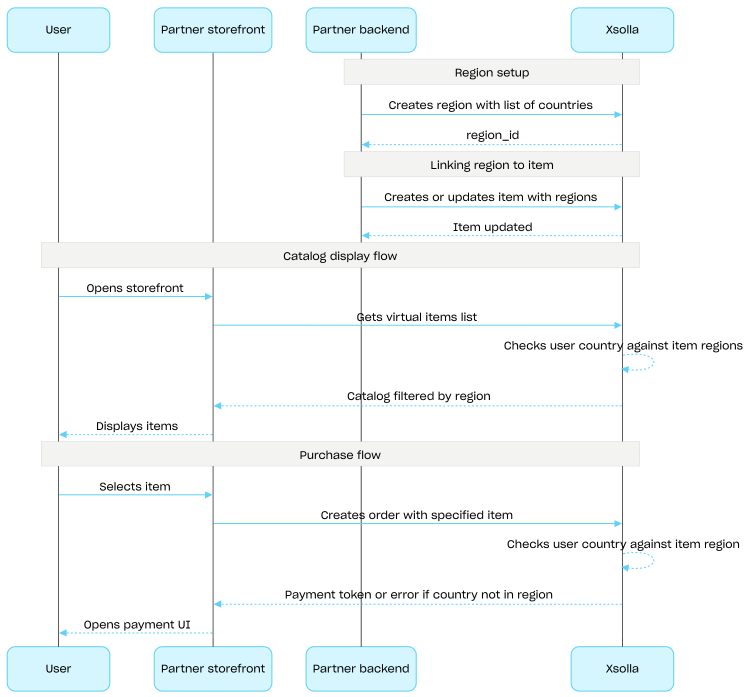
El país del usuario se coteja con las regiones del artículo en dos ocasiones: al solicitar el catálogo y al crear un pedido. Los artículos no disponibles no se incluyen en la respuesta del catálogo y no se creará ningún pedido que contenga dichos artículos.
Utilice las llamadas API del grupo Common regions para crear, actualizar y eliminar regiones.
Proceso de configuración de las restricciones de ventas regionales:
- Cree una región mediante la llamada API Crear región, especificando la lista de países. La respuesta devuelve un
region_idque se necesita en el siguiente paso. - Vincule un artículo virtual a la región transmitiendo su
region_iden la matrizregionsal crear o actualizar el artículo. - Muestre el catálogo al usuario mediante llamadas API de la subsección Catalog, por ejemplo, la llamada API Obtener lista de artículos virtuales. El país del usuario se determina mediante el parámetro
countryo, si no se proporciona, a partir de la dirección IP del usuario. Los artículos no disponibles en el país del usuario no se incluyen en la respuesta del catálogo. - Cuando el usuario proceda a pagar un artículo o la cesta, cree un pedido:
- Si el artículo se ha añadido a la cesta, mediante la llamada API Crear pedido con todos los artículos de la cesta o Crear pedido con todos los artículos de la cesta actual.
- Para una compra rápida de un único artículo, mediante la llamada API Crear pedido con un artículo especificado, transmitiendo el SKU del artículo.
La respuesta contiene un token para abrir la interfaz de pago.
Nota
Xsolla comprueba si el país del usuario está incluido en la región especificada para el artículo. Si el país no está incluido en la región del artículo, no se podrá crear el pedido.
Xsolla comprueba si el país del usuario está incluido en la región especificada para el artículo. Si el país no está incluido en la región del artículo, no se podrá crear el pedido.
- Implemente la apertura de la interfaz de pago para pagar el pedido.
Operaciones