コンテンツへスキップ

Catalog API (2.0.0)

Overview

  • Version: 2.0.0
  • Servers: https://store.xsolla.com/api
  • Contact Us by Email
  • Contact URL: https://xsolla.com/
  • Required TLS version: 1.2

The Catalog API allows you to configure a catalog of in-game items on the Xsolla side and display the catalog to users in your store.

The API allows you to manage the following catalog entities:

  • Virtual items — in-game items such as weapons, skins, boosters.
  • Virtual currency — virtual money used to purchase virtual goods.
  • Virtual currency packages — predefined bundles of virtual currency.
  • Bundles — combined packages of virtual items, currency, or game keys sold as a single SKU.
  • Game keys — keys for games and DLCs distributed via platforms like Steam or other DRM providers.
  • Groups — logical groupings for organizing and sorting items within the catalog.

API calls

The API is divided into the following groups:

  • Admin — calls for creating, updating, deleting, and configuring catalog items and groups. Authenticated via basic access authentication with your merchant or project credentials. Not intended for storefront use.
  • Catalog — calls for retrieving items and building custom storefronts for end users. Designed to handle high-load scenarios. Support optional user JWT authorization to return personalized data such as user-specific limits and active promotions.

Authentication

API calls require authentication either on behalf of a user or on behalf of a project. The authentication scheme used is specified in the Security section in the description of each call.

Authentication using user's JWT

User's JWT authentication is used when a request is sent from a browser, mobile application, or game. By default, the XsollaLoginUserJWT scheme is applied. For details on how to create a token, see the Xsolla Login API documentation.

The token is passed in the Authorization header in the following format: Authorization: Bearer <user_JWT>, where <user_JWT> is the user token. The token identifies the user and provides access to personalized data. You can try this call using the following test token:

eyJ0eXAiOiJKV1QiLCJhbGciOiJIUzI1NiJ9.eyJleHAiOjE5NjIyMzQwNDgsImlzcyI6Imh0dHBzOi8vbG9naW4ueHNvbGxhLmNvbSIsImlhdCI6MTU2MjE0NzY0OCwidXNlcm5hbWUiOiJ4c29sbGEiLCJ4c29sbGFfbG9naW5fYWNjZXNzX2tleSI6IjA2SWF2ZHpDeEVHbm5aMTlpLUc5TmMxVWFfTWFZOXhTR3ZEVEY4OFE3RnMiLCJzdWIiOiJkMzQyZGFkMi05ZDU5LTExZTktYTM4NC00MjAxMGFhODAwM2YiLCJlbWFpbCI6InN1cHBvcnRAeHNvbGxhLmNvbSIsInR5cGUiOiJ4c29sbGFfbG9naW4iLCJ4c29sbGFfbG9naW5fcHJvamVjdF9pZCI6ImU2ZGZhYWM2LTc4YTgtMTFlOS05MjQ0LTQyMDEwYWE4MDAwNCIsInB1Ymxpc2hlcl9pZCI6MTU5MjR9.GCrW42OguZbLZTaoixCZgAeNLGH2xCeJHxl8u8Xn2aI

Alternatively, you can use a token for opening the payment UI.

Basic HTTP authentication

Basic HTTP authentication is used for server-to-server interactions, when an API call is sent directly from your server rather than from a user's browser or mobile application. HTTP Basic authentication with an API key is typically used.

Note

The API key is confidential and must not be stored or used in client applications.

With basic server-side authentication, all API requests must include the following header:

  • for basicAuthAuthorization: Basic <your_authorization_basic_key>, where your_authorization_basic_key is the project_id:api_key pair encoded in Base64
  • for basicMerchantAuthAuthorization: Basic <your_authorization_basic_key>, where your_authorization_basic_key is the merchant_id:api_key pair encoded in Base64

You can find the parameter values in Publisher Account:

  • merchant_id is displayed:
    • In Company settings > Company.
    • In the URL in the browser address bar on any Publisher Account page. The URL has the following format: https://publisher.xsolla.com/<merchant_id>.
  • project_id is displayed:
    • Next to the project name in Publisher Account.
    • In the URL in the browser address bar when working on a project in Publisher Account. The URL has the following format: https://publisher.xsolla.com/<merchant_id>/projects/<project_id>.
  • api_key is shown in Publisher Account only at the time of creation and must be stored securely on your side. You can create an API key in the following sections:
Notice

If a required API call doesn't include the project_id path parameter, use an API key that is valid across all company projects for authorization.

For more information about working with API keys, see the API references.

Authentication with guest access support

The AuthForCart authentication scheme is used for cart purchases and supports two modes:

  1. Authentication with a user's JWT. The token is passed in the Authorization header in the following format: Authorization: Bearer <user_JWT>, where <user_JWT> is the user token. The token identifies the user and provides access to personalized data. You can try this call using the following test token:
eyJ0eXAiOiJKV1QiLCJhbGciOiJIUzI1NiJ9.eyJleHAiOjE5NjIyMzQwNDgsImlzcyI6Imh0dHBzOi8vbG9naW4ueHNvbGxhLmNvbSIsImlhdCI6MTU2MjE0NzY0OCwidXNlcm5hbWUiOiJ4c29sbGEiLCJ4c29sbGFfbG9naW5fYWNjZXNzX2tleSI6IjA2SWF2ZHpDeEVHbm5aMTlpLUc5TmMxVWFfTWFZOXhTR3ZEVEY4OFE3RnMiLCJzdWIiOiJkMzQyZGFkMi05ZDU5LTExZTktYTM4NC00MjAxMGFhODAwM2YiLCJlbWFpbCI6InN1cHBvcnRAeHNvbGxhLmNvbSIsInR5cGUiOiJ4c29sbGFfbG9naW4iLCJ4c29sbGFfbG9naW5fcHJvamVjdF9pZCI6ImU2ZGZhYWM2LTc4YTgtMTFlOS05MjQ0LTQyMDEwYWE4MDAwNCIsInB1Ymxpc2hlcl9pZCI6MTU5MjR9.GCrW42OguZbLZTaoixCZgAeNLGH2xCeJHxl8u8Xn2aI

Alternatively, you can use a token for opening the payment UI.

  1. Simplified mode without Authorization header. This mode is used only for unauthorized users and can be applied only for game key sales. Instead of a token, the request must include the following headers:
    • x-unauthorized-id with a request ID
    • x-user with the user's email address encoded in Base64

Core entity structure

Items of all types (virtual items, bundles, virtual currency, and keys) use a similar data structure. Understanding the basic structure simplifies working with the API and helps you navigate the documentation more easily.

Note

Some calls may include additional fields but they don't change the basic structure.

Identification

  • merchant_id — company ID in Publisher Account
  • project_id — project ID in Publisher Account
  • sku — item SKU, unique within the project

Store display

  • name — item name
  • description — item description
  • image_url — image URL
  • is_enabled — item availability
  • is_show_in_store — whether the item is displayed in the catalog

For more information about managing item availability in the catalog, see the documentation.

Organization

  • type — item type, for example, a virtual item (virtual_item) or bundle (bundle)
  • groups — groups the item belongs to
  • order — display order in the catalog

Sale conditions

  • prices — prices in real or virtual currency
  • limits — purchase limits
  • periods — availability periods
  • regions — regional restrictions

Example of core entity structure:

{
  "attributes": [],
  "bundle_type": "virtual_currency_package",
  "content": [
    {
      "description": {
        "en": "Main in-game currency"
      },
      "image_url": "https://.../image.png",
      "name": {
        "en": "Crystals",
        "de": "Kristalle"
      },
      "quantity": 500,
      "sku": "com.xsolla.crystal_2",
      "type": "virtual_currency"
    }
  ],
  "description": {
    "en": "Crystals x500"
  },
  "groups": [],
  "image_url": "https://.../image.png",
  "is_enabled": true,
  "is_free": false,
  "is_show_in_store": true,
  "limits": {
    "per_item": null,
    "per_user": null,
    "recurrent_schedule": null
  },
  "long_description": null,
  "media_list": [],
  "name": {
    "en": "Medium crystal pack"
  },
  "order": 1,
  "periods": [
    {
      "date_from": null,
      "date_until": "2020-08-11T20:00:00+03:00"
    }
  ],
  "prices": [
    {
      "amount": 20,
      "country_iso": "US",
      "currency": "USD",
      "is_default": true,
      "is_enabled": true
    }
  ],
  "regions": [],
  "sku": "com.xsolla.crystal_pack_2",
  "type": "bundle",
  "vc_prices": []
}

Basic purchase flow

The Xsolla API allows you to implement in-game store logic, including retrieving the item catalog, managing the cart, creating orders, and tracking their status. Depending on the integration scenario, API calls are divided into Admin and Catalog subsections, which use different authentication schemes.

The following example shows a basic flow for setting up and operating a store, from item creation to purchase.

Create items and groups (Admin)

Create an item catalog for your store, such as virtual items, bundles, or virtual currency.

Example API calls:

Set up promotions, chains, and limits (Admin)

Configure user acquisition and monetization tools, such as discounts, bonuses, daily rewards, or offer chains.

Example API calls:

Get item information (Client)

Configure item display in your application.

Notice

Do not use API calls from the Admin subsection to build a user catalog. These API calls have rate limits and aren't intended for user traffic.

Example API calls:

Note

By default, catalog API calls return items that are currently available in the store at the time of the request. To retrieve items that are not yet available or are no longer available, include the parameter "show_inactive_time_limited_items": 1 in the catalog request.

Sell items

You can sell items using the following methods:

  • Fast purchase — sell one SKU multiple times.
  • Cart purchase — the user adds items to the cart, removes items, and updates quantities within a single order.

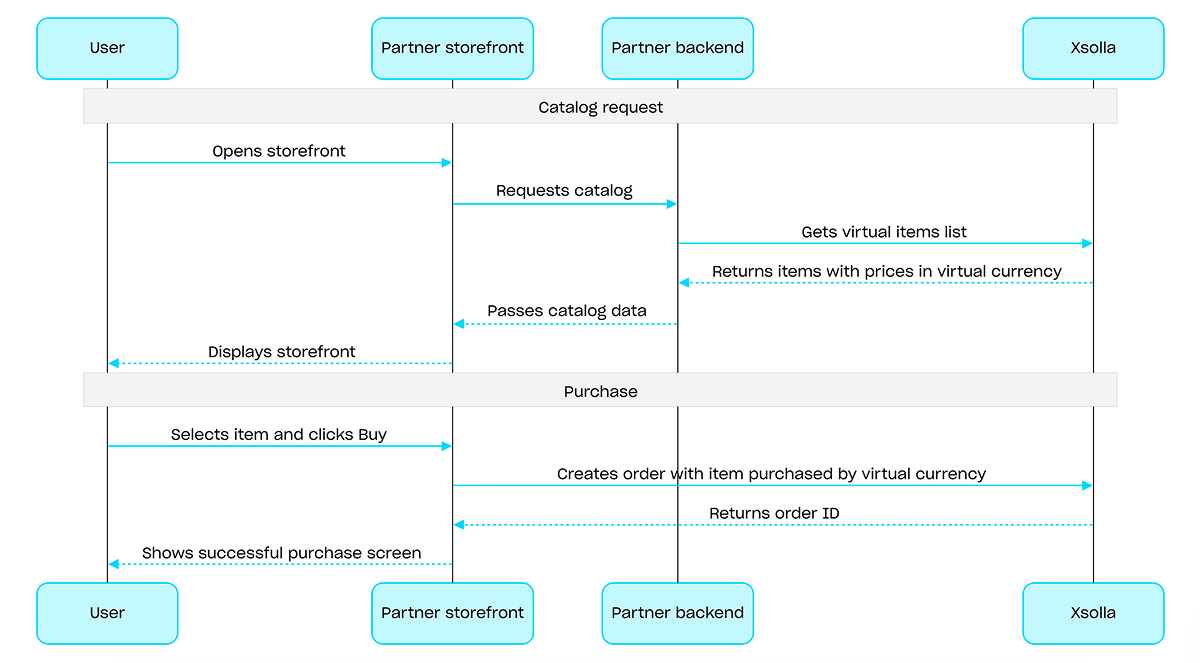
If an item is purchased using virtual currency instead of real money, use the Create order with specified item purchased by virtual currency API call. The payment UI is not required, as the charge is processed when the API call is executed.

For free item purchase, use the Create order with specified free item API call or the Create order with free cart API call. The payment UI is not required — the order is immediately set to the done status.

Fast purchase

Use the client-side API call to create an order with a specified item. The call returns a token used to open the payment UI.

Note

Discount information is available to the user only in the payment UI. Promo codes are not supported.

Cart purchase

Cart setup and purchase can be performed on the client or on the server side.

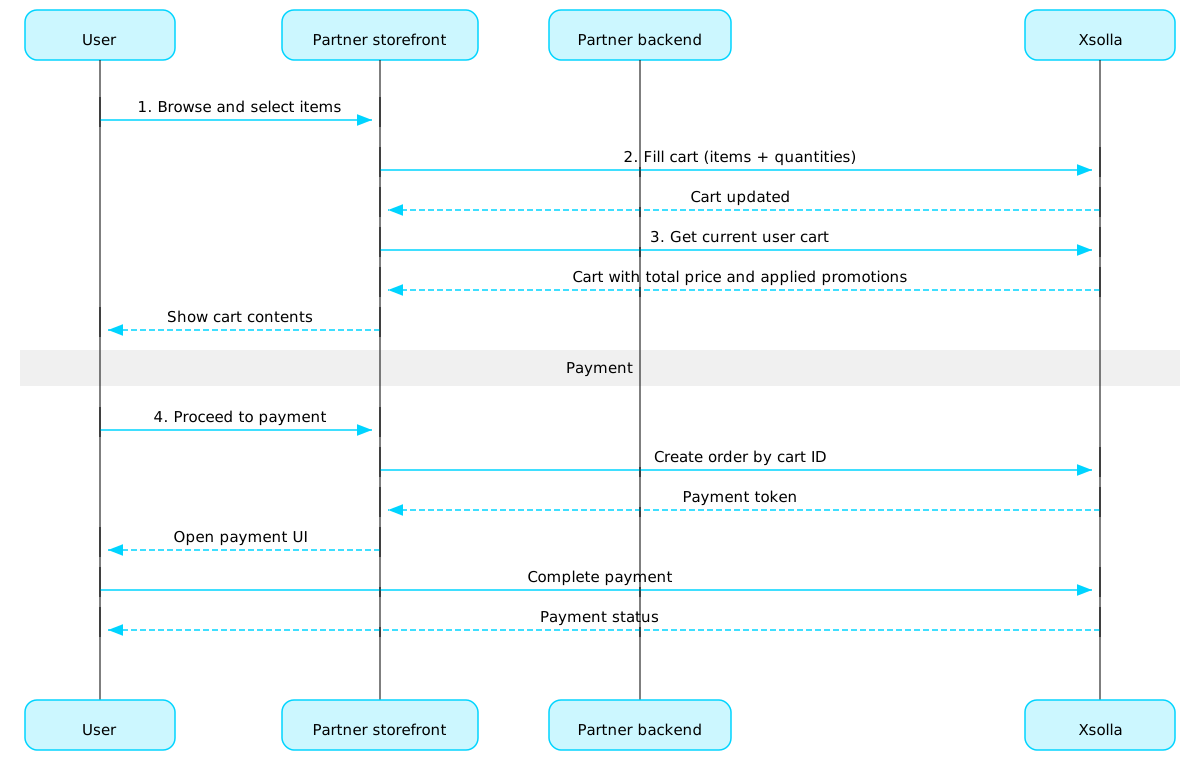
Set up and purchase a cart on the client

Implement the logic of adding and removing items by yourself. Before calling the API for setting up a cart, you will not have information about which promotions will be applied to the purchase. This means that the total cost and details of the added bonus items will not be known.

Implement the following cart logic:

  1. After the player has filled a cart, use the Fill cart with items API call. The call returns the current information about the selected items (prices before and after discounts, bonus items).
  2. Update the cart contents based on user actions:
Note

To get the current status of the cart, use the Get current user's cart API call.
  1. Use the Create order with all items from current cart API call. The call returns the order ID and payment token. The newly created order is set to new status by default.

Set up and purchase a cart on the server

This setup option may take longer for setting the cart up, since each change to the cart must be accompanied by API calls.

Implement the following cart logic:

  1. After the player has filled a cart, use the Fill cart with items API call. The call returns current information about the selected items (prices before and after discounts, bonus items).
  2. Use the Create order with all items from current cart API call. The call returns the order ID and payment token. The newly created order is set to new status by default.

Open payment UI

Use the returned token to open the payment UI in a new window. Other ways to open the payment UI are described in the documentation.

ActionEndpoint
Open in production environment.https://secure.xsolla.com/paystation4/?token={token}
Open in sandbox mode.https://sandbox-secure.xsolla.com/paystation4/?token={token}
Note

Use sandbox mode during development and testing. Test purchases don't charge real accounts. You can use test bank cards.

After the first real payment is made, a strict sandbox payment policy takes effect. A payment in sandbox mode is available only to users specified in Publisher Account > Company settings > Users.

Buying virtual currency and items for real currency is possible only after signing a license agreement with Xsolla. To do this, in Publisher Account, go to Agreements & Taxes > Agreements, complete the agreement form, and wait for confirmation. It may take up to 3 business days to review the agreement.

To enable or disable sandbox mode, change the value of the sandbox parameter in the request for fast purchase and cart purchase. Sandbox mode is off by default.

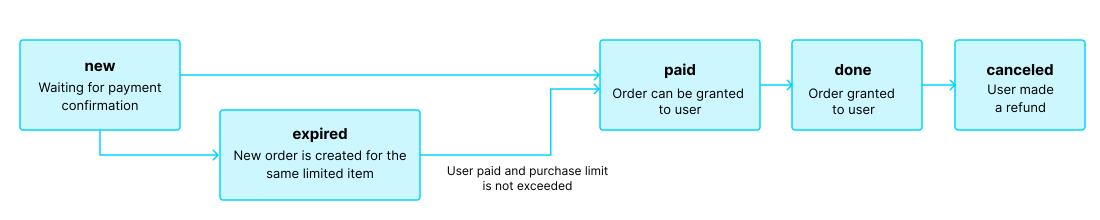
Possible order statuses:

  • new — order created
  • paid — payment received
  • done — item delivered
  • canceled — order canceled
  • expired — payment expired

Track order status using one of the following methods:

Pagination

API calls that return large sets of records (for example, when building a catalog) return data in pages. Pagination is a mechanism that limits the number of items returned in a single API response and allows you to retrieve subsequent pages sequentially.

Use the following parameters to control the number of returned items:

  • limit — number of items per page
  • offset — index of the first item on the page (numbering starts from 0)
  • has_more — indicates whether another page is available
  • total_items_count — total number of items

Example request:

GET /items?limit=20&offset=40

Response example:

{
  "items": [...],
  "has_more": true,
  "total_items_count": 135
}

It is recommended to send subsequent requests until the response returns has_more = false.

Date and time format

Dates and time values are passed in the ISO 8601 format.

The following are supported:

  • UTC offset
  • null value when there is no time restriction for displaying an item
  • Unix timestamp (in seconds) used in some fields

Format: YYYY-MM-DDTHH:MM:SS±HH:MM

Example: 2026-03-16T10:00:00+03:00

Localization

Xsolla supports localization of user-facing fields such as item name and description. Localized values are passed as an object where the language code is used as the key. The full list of supported languages is available in the documentation.

Supported fields

Localization can be specified for the following parameters:

  • name
  • description
  • long_description

Locale format

The locale key can be specified in one of the following formats:

  • Two-letter language code: en, ru
  • Five-letter language code: en-US, ru-RU, de-DE

Examples

Example with a two-letter language code:

{
  "name": {
    "en": "Starter Pack",
    "ru": "Стартовый набор"
  }
}

Example with a five-letter language code:

{
  "description": {
    "en-US": "Premium bundle",
    "de-DE": "Premium-Paket"
  }
}

Error response format

If an error occurs, the API returns an HTTP status and a JSON response body. The full list of store-related errors is available in the documentation.

Response example:

{
  "errorCode": 1102,
  "errorMessage": "Validation error",
  "statusCode": 422,
  "transactionId": "c9e1a..."
}
  • errorCode — error code.
  • errorMessage — short error description.
  • statusCode — HTTP response status.
  • transactionId — request ID. Returned only in some cases.
  • errorMessageExtended — additional error details, such as request parameters. Returned only in some cases.

Extended response example:

{
  "errorCode": 7001,
  "errorMessage": "Chain not found",
  "errorMessageExtended": {
    "chain_id": "test_chain_id",
    "project_id": "test_project_id",
    "step_number": 2
  },
  "statusCode": 404
}

Common HTTP status codes

  • 400 — invalid request
  • 401 — authentication error
  • 403 — insufficient permissions
  • 404 — resource not found
  • 422 — validation error
  • 429 — rate limit exceeded

Recommendations

  • Handle the HTTP status and the response body together.
  • Use errorCode to process errors related to application logic.
  • Use transactionId to identify requests more quickly when analyzing errors.
OpenAPI記述をダウンロード
言語
サーバー
https://store.xsolla.com/api/
Mock server
https://xsolla.redocly.app/_mock/ja/api/catalog/
操作

仮想通貨パッケージを削除Server-sideAdmin

リクエスト

仮想通貨パッケージを削除します。

セキュリティ
basicAuth
パス
project_idinteger必須

Project ID. You can find this parameter in your Publisher Account next to the project name and in the browser address bar when working with a project. The URL has the following format: https://publisher.xsolla.com/<merchant_id>/projects/<project_id>.

例: 44056
item_skustring必須

アイテムSKU。

例: booster_mega_1
curl -i -X DELETE \
  -u <username>:<password> \
  https://store.xsolla.com/api/v2/project/44056/admin/items/virtual_currency/package/sku/booster_mega_1

レスポンス

仮想通貨パッケージが正常に更新されました。

レスポンス
コンテンツなし

仮想通貨パッケージを取得Server-sideAdmin

リクエスト

管理用のプロジェクト内の仮想通貨パッケージを取得します。


このエンドポイントは、ストアカタログの構築に使用しないでください。
セキュリティ
basicAuth
パス
project_idinteger必須

Project ID. You can find this parameter in your Publisher Account next to the project name and in the browser address bar when working with a project. The URL has the following format: https://publisher.xsolla.com/<merchant_id>/projects/<project_id>.

例: 44056
item_skustring必須

アイテムSKU。

例: booster_mega_1
curl -i -X GET \
  -u <username>:<password> \
  https://store.xsolla.com/api/v2/project/44056/admin/items/virtual_currency/package/sku/booster_mega_1

レスポンス

指定された仮想通貨パッケージは正常に受信されました。

ボディapplication/json
attributesArray of objects(Virtual-Items-Currency_admin-attributes)

属性リスト。

例: [{"external_id":"attribute_external_id","name":{"de":"Attributname","en":"Attribute name"},"values":[{"external_id":"value_1","name":{"de":"wert 1","en":"value 1"}},{"external_id":"value_2","name":{"de":"wert 2","en":"value 2"}}]}]
attributes[].​external_idstring(admin-attribute-external_id)[ 1 .. 255 ] characters^[a-zA-Z0-9-_]+$必須

一意の属性ID。external_idには、小文字と大文字のラテン英数字、ダッシュ、およびアンダースコアのみが含まれます。

例: "attribute_external_id"
attributes[].​nameobject(admin-attribute-name)

属性用のローカライズされたオブジェクト。キーはISO 3166-1で指定されています。

例: {"de":"Attributname","en":"Attribute name"}
attributes[].​name.​property name*string追加プロパティ
attributes[].​valuesArray of objects(attribute-value)必須
例: [{"external_id":"value_1","name":{"de":"wert 1","en":"value 1"}},{"external_id":"value_2","name":{"de":"wert 2","en":"value 2"}}]
attributes[].​values[].​external_idstring(value-external_id)[ 1 .. 255 ] characters^[-_.\d\w]+$必須

属性の一意の値ID。external_idには、英小文字、ダッシュ、およびアンダースコアのみが含まれます。

例: "value_external_id"
attributes[].​values[].​valueobject(value-name)必須

値名がローカライズされたオブジェクト。キーはISO 3166-1で指定されています。

attributes[].​values[].​value.​property name*string追加プロパティ
bundle_typestring
デフォルト "virtual_currency_package"
例: "virtual_currency_package"
contentArray of objects
content[].​description(two-letter (object or null)) or (five-letter (object or null))(description-localization-object)

アイテムの説明に関するローカライズ用オブジェクト。2文字の小文字の言語コード(例:en)または5文字のロケールコード(例:en-US)のいずれかの形式で値を受け入れます。どちらの形式も入力として受け入れられますが、応答は2文字の小文字の言語コードを返します。同じ言語に対して両方のオプションが提供された場合(例:enen-US)、最後に提供された値が保存されます。サポートされている言語の完全なリストは、ドキュメントで確認できます。

Any of:

2文字の小文字の言語コード。

content[].​description.​arstring or null

アラビア語

content[].​description.​bgstring or null

ブルガリア語

content[].​description.​cnstring or null

中国語(簡体字)

content[].​description.​csstring or null

チェコ語

content[].​description.​destring or null

ドイツ語

content[].​description.​enstring or null

英語

content[].​description.​esstring or null

スペイン語(スペイン)

content[].​description.​frstring or null

フランス語

content[].​description.​hestring or null

ヘブライ語

content[].​description.​idstring or null

インドネシア語

content[].​description.​itstring or null

イタリア語

content[].​description.​jastring or null

日本語

content[].​description.​kmstring or null

クメール語

content[].​description.​kostring or null

韓国語

content[].​description.​lostring or null

ラオス語

content[].​description.​mystring or null

ビルマ語

content[].​description.​nestring or null

ネパール語

content[].​description.​phstring or null

フィリピン語

content[].​description.​plstring or null

ポーランド語

content[].​description.​ptstring or null

ポルトガル語

content[].​description.​rostring or null

ルーマニア語

content[].​description.​rustring or null

ロシア語

content[].​description.​thstring or null

タイ語

content[].​description.​trstring or null

トルコ語

content[].​description.​twstring or null

中国語(繁体字)

content[].​description.​vistring or null

ベトナム語

content[].​image_urlstring(Virtual-Items-Currency_admin-image_url)

画像URL。

content[].​name(two-letter (object or null)) or (five-letter (object or null))(name-localization-object)

アイテム名に関するローカライズ用オブジェクト。2文字の小文字の言語コード(例:en)または5文字の言語コード(例:en-US)のいずれかの形式で値を受け入れます。どちらの形式も入力として受け入れられますが、応答は2文字の小文字の言語コードを返します。同じ言語に対して両方のオプションが提供された場合(例:enen-US)、最後に提供された値が保存されます。サポートされている言語の完全なリストは、ドキュメントで確認できます。

Any of:

2文字の小文字の言語コード。

content[].​name.​arstring or null

アラビア語

content[].​name.​bgstring or null

ブルガリア語

content[].​name.​cnstring or null

中国語(簡体字)

content[].​name.​csstring or null

チェコ語

content[].​name.​destring or null

ドイツ語

content[].​name.​enstring or null

英語

content[].​name.​esstring or null

スペイン語(スペイン)

content[].​name.​frstring or null

フランス語

content[].​name.​hestring or null

ヘブライ語

content[].​name.​idstring or null

インドネシア語

content[].​name.​itstring or null

イタリア語

content[].​name.​jastring or null

日本語

content[].​name.​kmstring or null

クメール語

content[].​name.​kostring or null

韓国語

content[].​name.​lostring or null

ラオス語

content[].​name.​mystring or null

ビルマ語

content[].​name.​nestring or null

ネパール語

content[].​name.​phstring or null

フィリピン語

content[].​name.​plstring or null

ポーランド語

content[].​name.​ptstring or null

ポルトガル語

content[].​name.​rostring or null

ルーマニア語

content[].​name.​rustring or null

ロシア語

content[].​name.​thstring or null

タイ語

content[].​name.​trstring or null

トルコ語

content[].​name.​twstring or null

中国語(繁体字)

content[].​name.​vistring or null

ベトナム語

content[].​quantityinteger
content[].​skustring(Virtual-Items-Currency_sku)[ 1 .. 255 ] characters^[a-zA-Z0-9_\-–.]*$

一意のアイテムID。SKUには、小文字と大文字のラテン英数字、ピリオド、ダッシュ、およびアンダースコアのみが含まれます。

content[].​typestring(Virtual-Items-Currency_type)

アイテムタイプ:virtual_good/virtual_currency/bundle/physical_good/unit

custom_attributesobject(json)(item-custom-attributes)<= 500 characters

アイテムの属性と値を含むJSONオブジェクト。属性により、アイテムを使用するために必要なプレイヤーのレベルなど、より詳細な情報をアイテムに追加することができます。属性はゲームの内部ロジックを豊かにし、専用の「取得」メソッドやウェブフックからアクセスできます。

description(two-letter (object or null)) or (five-letter (object or null))(description-localization-object)

アイテムの説明に関するローカライズ用オブジェクト。2文字の小文字の言語コード(例:en)または5文字のロケールコード(例:en-US)のいずれかの形式で値を受け入れます。どちらの形式も入力として受け入れられますが、応答は2文字の小文字の言語コードを返します。同じ言語に対して両方のオプションが提供された場合(例:enen-US)、最後に提供された値が保存されます。サポートされている言語の完全なリストは、ドキュメントで確認できます。

Any of:

2文字の小文字の言語コード。

description.​arstring or null

アラビア語

description.​bgstring or null

ブルガリア語

description.​cnstring or null

中国語(簡体字)

description.​csstring or null

チェコ語

description.​destring or null

ドイツ語

description.​enstring or null

英語

description.​esstring or null

スペイン語(スペイン)

description.​frstring or null

フランス語

description.​hestring or null

ヘブライ語

description.​idstring or null

インドネシア語

description.​itstring or null

イタリア語

description.​jastring or null

日本語

description.​kmstring or null

クメール語

description.​kostring or null

韓国語

description.​lostring or null

ラオス語

description.​mystring or null

ビルマ語

description.​nestring or null

ネパール語

description.​phstring or null

フィリピン語

description.​plstring or null

ポーランド語

description.​ptstring or null

ポルトガル語

description.​rostring or null

ルーマニア語

description.​rustring or null

ロシア語

description.​thstring or null

タイ語

description.​trstring or null

トルコ語

description.​twstring or null

中国語(繁体字)

description.​vistring or null

ベトナム語

groupsArray of objects(Virtual-Items-Currency_admin-groups-response)

アイテムが所属するグループ。

groups[].​external_idstring
例: "horror"
groups[].​nameobject

アイテム名。キーと値のペアを含める必要があり、 キーは "^[a-z]" 書式のロケール{2}で、値は文字列です。

デフォルト {"en":"Horror"}
例: {"de":"Horror","en":"Horror"}
groups[].​name.​property name*string追加プロパティ
image_urlstring(Virtual-Items-Currency_admin-image_url)

画像URL。

is_enabledboolean(Virtual-Items-Currency_is_enabled)

Whether the item is available. If false, the item can't be purchased in the store or obtained as part of a bundle or within a marketing campaign. Refer to our documentation for detailed information about item availability.

is_freeboolean(value-is_free)

アイテムが無料かどうか。

is_paid_randomized_rewardboolean(value-is_paid_randomized_reward)

アイテムが、ルートボックスなどのランダムな有料報酬であるかどうか。

is_show_in_storeboolean(Virtual-Items-Currency_is_show_in_store)

Whether the item is displayed in the catalog. If false and is_enabled: true, the item is not visible in the catalog but can be obtained as part of a bundle or within marketing campaigns. Refer to our documentation for detailed information about item availability.

limitsobject or null(admin-item-limit-response)

アイテム制限。

limits.​per_itemobject or null

グローバルアイテム制限。

limits.​per_item.​availableinteger

すべてのユーザーが購入できるアイテムの残り数。

limits.​per_item.​reservedinteger
limits.​per_item.​soldinteger
limits.​per_item.​totalinteger

すべてのユーザーが購入できるアイテムの最大数。

limits.​per_userobject or null

別ユーザーのアイテム制限。

limits.​per_user.​limit_exceeded_visibilitystring(limit_exceeded_visibility)

Determines the visibility of the item in the catalog after the purchase limit is reached, until the next limit reset.

Applies to items for which recurring limit resets are configured in the recurrent_schedule array.

If limit resets are not configured, the item doesn't appear in the catalog after the purchase limit is reached, regardless of the limit_exceeded_visibility value.

Possible values:

  • show — The item is returned in catalog retrieval API calls after the purchase limit is reached. In client-side catalog retrieval API calls, once the limit is reached, the item is returned with the can_be_bought: false flag. The next reset date is returned in reset_next_date.
  • hide — The item is not returned in catalog retrieval API calls after the purchase limit is reached, until the limit is reset.
列挙型"show""hide"
limits.​per_user.​totalinteger

1ユーザーあたりのユーザーが購入できるアイテムの最大数。

limits.​recurrent_scheduleobject or null(admin_recurrent_schedule_response)

制限更新期間。

limits.​recurrent_schedule.​per_userinterval_type = 毎日 (object) or interval_type = 毎週 (object) or interval_type = 毎月 (object) or interval_type = 毎時間 (object)

ユーザー制限更新期間。

One of:

ユーザー制限の日次更新タイプ。

limits.​recurrent_schedule.​per_user.​displayable_reset_next_datestring(date-time)

制限をリセットする日時(ISO 8601)。

例: "2023-02-28T11:00:00+08:00"
limits.​recurrent_schedule.​per_user.​displayable_reset_start_datestring(date-time)

最初の制限更新の日時(ISO 8601)。

例: "2023-02-28T11:00:00+08:00"
limits.​recurrent_schedule.​per_user.​interval_typestring

定期更新期間のタイプ。

"daily"
limits.​recurrent_schedule.​per_user.​reset_next_dateinteger

制限が更新された日時(UNIXタイムスタンプ)。

例: 1677553200
limits.​recurrent_schedule.​per_user.​timestring(full-time)

希望するタイムゾーンでのリミットの更新時刻(時間単位で四捨五入)。

例: "11:00:00+03:00"
long_description(two-letter (object or null)) or (five-letter (object or null))(long-description-localization-object)

アイテムの長文説明のローカライズを含むオブジェクト。2文字の小文字の言語コード(例:en)または5文字のロケールコード(例:en-US)のいずれかの形式で値を受け入れます。どちらの形式も入力として受け入れられますが、応答は2文字の小文字の言語コードを返します。同じ言語に対して両方のバリアント(例:enen-US)が提供された場合、最後に提供された値が保存されます。サポートされている言語の完全なリストは、ドキュメントで確認できます。

Any of:

2文字の小文字の言語コード。

long_description.​arstring or null

アラビア語

long_description.​bgstring or null

ブルガリア語

long_description.​cnstring or null

中国語(簡体字)

long_description.​csstring or null

チェコ語

long_description.​destring or null

ドイツ語

long_description.​enstring or null

英語

long_description.​esstring or null

スペイン語(スペイン)

long_description.​frstring or null

フランス語

long_description.​hestring or null

ヘブライ語

long_description.​idstring or null

インドネシア語

long_description.​itstring or null

イタリア語

long_description.​jastring or null

日本語

long_description.​kmstring or null

クメール語

long_description.​kostring or null

韓国語

long_description.​lostring or null

ラオス語

long_description.​mystring or null

ビルマ語

long_description.​nestring or null

ネパール語

long_description.​phstring or null

フィリピン語

long_description.​plstring or null

ポーランド語

long_description.​ptstring or null

ポルトガル語

long_description.​rostring or null

ルーマニア語

long_description.​rustring or null

ロシア語

long_description.​thstring or null

タイ語

long_description.​trstring or null

トルコ語

long_description.​twstring or null

中国語(繁体字)

long_description.​vistring or null

ベトナム語

media_listArray of objects(Virtual-Items-Currency_admin-media_list)

スクリーンショット、ゲームプレイ動画などのアイテム追加アセット。

media_list[].​typestring

メディアタイプ:image/video

列挙型"image""video"
例: "image"
media_list[].​urlstring

リソースファイル。

例: "https://cdn3.xsolla.com/img/misc/images/71ab1e12126f2103e1868076f0acb21a.jpg"
name(two-letter (object or null)) or (five-letter (object or null))(name-localization-object)

アイテム名に関するローカライズ用オブジェクト。2文字の小文字の言語コード(例:en)または5文字の言語コード(例:en-US)のいずれかの形式で値を受け入れます。どちらの形式も入力として受け入れられますが、応答は2文字の小文字の言語コードを返します。同じ言語に対して両方のオプションが提供された場合(例:enen-US)、最後に提供された値が保存されます。サポートされている言語の完全なリストは、ドキュメントで確認できます。

Any of:

2文字の小文字の言語コード。

name.​arstring or null

アラビア語

name.​bgstring or null

ブルガリア語

name.​cnstring or null

中国語(簡体字)

name.​csstring or null

チェコ語

name.​destring or null

ドイツ語

name.​enstring or null

英語

name.​esstring or null

スペイン語(スペイン)

name.​frstring or null

フランス語

name.​hestring or null

ヘブライ語

name.​idstring or null

インドネシア語

name.​itstring or null

イタリア語

name.​jastring or null

日本語

name.​kmstring or null

クメール語

name.​kostring or null

韓国語

name.​lostring or null

ラオス語

name.​mystring or null

ビルマ語

name.​nestring or null

ネパール語

name.​phstring or null

フィリピン語

name.​plstring or null

ポーランド語

name.​ptstring or null

ポルトガル語

name.​rostring or null

ルーマニア語

name.​rustring or null

ロシア語

name.​thstring or null

タイ語

name.​trstring or null

トルコ語

name.​twstring or null

中国語(繁体字)

name.​vistring or null

ベトナム語

orderinteger(Virtual-Items-Currency_order)

Item display order in the catalog. The higher the value, the lower the item appears in the list. If the values are the same, items are sorted by creation date, with newer items displayed higher.

periodsArray of objects(item-periods-response)

アイテム販売期間。

periods[].​date_fromstring or null(date-time)

指定されたアイテムの販売開始日。

例: "2020-08-11T10:00:00+03:00"
periods[].​date_untilstring or null(date-time)

指定されたアイテムが販売できなくなる日付。nullを指定することもできます。

例: "2020-08-11T20:00:00+03:00"
pricesArray of objects(Virtual-Items-Currency_admin-prices)
例: [{"amount":10.5,"country_iso":"US","currency":"USD","is_default":true,"is_enabled":true}]
prices[].​amountnumber> 0必須

Item price in real currency.

例: 10.5
prices[].​country_isostring or null

この価格が利用可能な国。ISO 3166-1 alpha 2に基づく2文字コード。

例: "US"
prices[].​currencystring必須

商品価格の通貨。3文字のコードISO4217 規格詳細については、ドキュメントを参照してください。エクソーラでサポートされている通貨

例: "USD"
prices[].​is_defaultboolean

Whether it is the default price in real currency. Refer to our documentation for detailed information on price settings.

デフォルト false
例: true
prices[].​is_enabledboolean

Whether this price is used for displaying in the catalog and for purchasing the item. If false, the price is not used and another price is applied. Refer to our documentation for detailed information on price settings.

デフォルト true
例: true
regionsArray of objects(Virtual-Items-Currency_admin-regions)

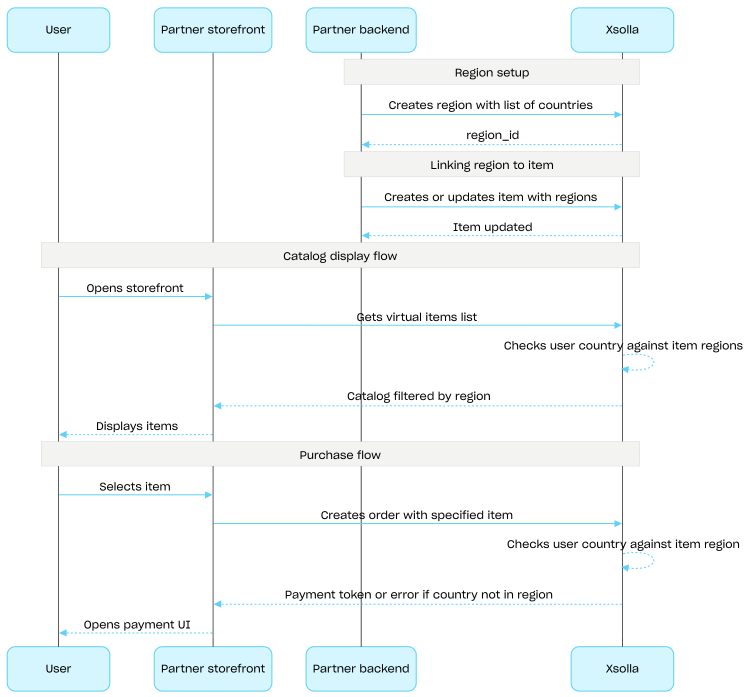
Array of regions where the item is available. If the array is empty or not passed, the item is available in all regions.

regions[].​idinteger>= 1

Region ID within the project.

Refer to the regional sale restriction documentation and region management API calls for detailed information.

例: 1
skustring(Virtual-Items-Currency_sku)[ 1 .. 255 ] characters^[a-zA-Z0-9_\-–.]*$

一意のアイテムID。SKUには、小文字と大文字のラテン英数字、ピリオド、ダッシュ、およびアンダースコアのみが含まれます。

typestring(Virtual-Items-Currency_type)

アイテムタイプ:virtual_good/virtual_currency/bundle/physical_good/unit

vc_pricesArray of objects(Virtual-Items-Currency_admin-get-vc_prices)
例: [{"amount":10,"is_default":true,"sku":"com.xsolla.gold_1"}]
vc_prices[].​amountnumber> 0必須

金額。

例: 10
vc_prices[].​is_defaultboolean
デフォルト false
例: true
vc_prices[].​skustring(Virtual-Items-Currency_schemas-sku)必須

一意のアイテムID。SKUには、小文字と大文字のラテン英数字、ピリオド、ダッシュ、およびアンダースコアのみが含まれます。

例: "com.xsolla.gold_1"
レスポンス
application/json
{ "attributes": [ {} ], "bundle_type": "virtual_currency_package", "content": [ {} ], "custom_attributes": { "attr": "value", "purchased": 0 }, "description": { "en": "Crystals x100" }, "groups": [], "image_url": "https://cdn3.xsolla.com/img/misc/images/a8682cea328afda0bd127d59eb5b9077.png", "is_enabled": true, "is_free": false, "is_paid_randomized_reward": true, "is_show_in_store": true, "limits": { "per_item": null, "per_user": null, "recurrent_schedule": null }, "long_description": null, "media_list": [], "name": { "en": "Small crystal pack" }, "order": 1, "periods": [], "prices": [ {} ], "regions": [], "sku": "com.xsolla.crystal_pack_1", "type": "bundle", "vc_prices": [] }

仮想通貨パッケージを更新Server-sideAdmin

リクエスト

仮想通貨パッケージを更新します。

セキュリティ
basicAuth
パス
project_idinteger必須

Project ID. You can find this parameter in your Publisher Account next to the project name and in the browser address bar when working with a project. The URL has the following format: https://publisher.xsolla.com/<merchant_id>/projects/<project_id>.

例: 44056
item_skustring必須

アイテムSKU。

例: booster_mega_1
ボディapplication/json
Any of:
attributesArray of objects(Virtual-Items-Currency_admin-post-put-attributes)<= 20 items

属性のリスト。

注意。アイテムの属性は20個以上指定することはできません。制限を超えようとすると、エラーが発生します。
attributes[].​external_idstring(admin-attribute-external_id)[ 1 .. 255 ] characters^[a-zA-Z0-9-_]+$必須

一意の属性ID。external_idには、小文字と大文字のラテン英数字、ダッシュ、およびアンダースコアのみが含まれます。

attributes[].​nameobject(admin-attribute-name)

属性用のローカライズされたオブジェクト。キーはISO 3166-1で指定されています。

attributes[].​name.​property name*string追加プロパティ
attributes[].​valuesArray of objects(attribute-value)必須
注意。各属性に6つ以上の値を作成することはできません。制限を超えようとすると、エラーが発生します。
例: [{"external_id":"strategy","value":{"de":"Strategie","en":"Strategy"}},{"external_id":"action","value":{"de":"Aktion","en":"Action"}}]
attributes[].​values[].​external_idstring(value-external_id)[ 1 .. 255 ] characters^[-_.\d\w]+$必須

属性の一意の値ID。external_idには、英小文字、ダッシュ、およびアンダースコアのみが含まれます。

例: "value_external_id"
attributes[].​values[].​valueobject(value-name)必須

値名がローカライズされたオブジェクト。キーはISO 3166-1で指定されています。

attributes[].​values[].​value.​property name*string追加プロパティ
contentArray of objects= 1 characters必須

仮想通貨パッケージには、1ポジションの仮想通貨のみが含まれている必要があります。

content[].​quantityinteger
content[].​skustring(Virtual-Items-Currency_sku)[ 1 .. 255 ] characters^[a-zA-Z0-9_\-–.]*$

一意のアイテムID。SKUには、小文字と大文字のラテン英数字、ピリオド、ダッシュ、およびアンダースコアのみが含まれます。

custom_attributesobject(json)(item-custom-attributes)<= 500 characters

アイテムの属性と値を含むJSONオブジェクト。属性により、アイテムを使用するために必要なプレイヤーのレベルなど、より詳細な情報をアイテムに追加することができます。属性はゲームの内部ロジックを豊かにし、専用の「取得」メソッドやウェブフックからアクセスできます。

description(two-letter (object or null)) or (five-letter (object or null))(description-localization-object)必須

アイテムの説明に関するローカライズ用オブジェクト。2文字の小文字の言語コード(例:en)または5文字のロケールコード(例:en-US)のいずれかの形式で値を受け入れます。どちらの形式も入力として受け入れられますが、応答は2文字の小文字の言語コードを返します。同じ言語に対して両方のオプションが提供された場合(例:enen-US)、最後に提供された値が保存されます。サポートされている言語の完全なリストは、ドキュメントで確認できます。

Any of:

2文字の小文字の言語コード。

description.​arstring or null

アラビア語

description.​bgstring or null

ブルガリア語

description.​cnstring or null

中国語(簡体字)

description.​csstring or null

チェコ語

description.​destring or null

ドイツ語

description.​enstring or null

英語

description.​esstring or null

スペイン語(スペイン)

description.​frstring or null

フランス語

description.​hestring or null

ヘブライ語

description.​idstring or null

インドネシア語

description.​itstring or null

イタリア語

description.​jastring or null

日本語

description.​kmstring or null

クメール語

description.​kostring or null

韓国語

description.​lostring or null

ラオス語

description.​mystring or null

ビルマ語

description.​nestring or null

ネパール語

description.​phstring or null

フィリピン語

description.​plstring or null

ポーランド語

description.​ptstring or null

ポルトガル語

description.​rostring or null

ルーマニア語

description.​rustring or null

ロシア語

description.​thstring or null

タイ語

description.​trstring or null

トルコ語

description.​twstring or null

中国語(繁体字)

description.​vistring or null

ベトナム語

groupsArray of strings(Virtual-Items-Currency_admin-groups-create)

List of group external IDs the item belongs to.

Example: ["horror", "action"]

image_urlstring(Virtual-Items-Currency_admin-image_url)

画像URL。

is_enabledboolean(Virtual-Items-Currency_is_enabled)

Whether the item is available. If false, the item can't be purchased in the store or obtained as part of a bundle or within a marketing campaign. Refer to our documentation for detailed information about item availability.

is_freeboolean(value-is_free)

アイテムが無料かどうか。

is_paid_randomized_rewardboolean(value-is_paid_randomized_reward)

アイテムが、ルートボックスなどのランダムな有料報酬であるかどうか。

is_show_in_storeboolean(Virtual-Items-Currency_is_show_in_store)

Whether the item is displayed in the catalog. If false and is_enabled: true, the item is not visible in the catalog but can be obtained as part of a bundle or within marketing campaigns. Refer to our documentation for detailed information about item availability.

limitsobject(Virtual-Currency-Package-item-limit)

アイテム制限。

limits.​per_iteminteger or null(limit_per_item)

グローバルアイテム制限。

limits.​per_userlimit_per_user (null) or limit_per_user (integer) or limit_per_user (object)(limit_per_user)

別ユーザーのアイテム制限。

Any of:

別ユーザーのアイテム制限。

null(limit_per_user)
limits.​recurrent_scheduleobject or null(virtual_currency_package_recurrent_schedule)

制限更新期間。

limits.​recurrent_schedule.​per_userinterval_type = 毎日 (object) or interval_type = 毎週 (object) or interval_type = 毎月 (object) or interval_type = 毎時間 (object)

購入制限のリセットは、指定された時間間隔で実行されます。

One of:

購入制限のリセットは、指定された時間間隔で実行されます。

limits.​recurrent_schedule.​per_user.​interval_typestring必須

定期更新期間。

"daily"
limits.​recurrent_schedule.​per_user.​timestring((0[0-9]|1[0-9]|2[0-3]):00:00)(\+|-)(0[0-9]|1...必須

希望するタイムゾーンでのリミットの更新時刻(時間単位で四捨五入)。

例: "02:00:00+03:00"
long_description(two-letter (object or null)) or (five-letter (object or null))(long-description-localization-object)

アイテムの長文説明のローカライズを含むオブジェクト。2文字の小文字の言語コード(例:en)または5文字のロケールコード(例:en-US)のいずれかの形式で値を受け入れます。どちらの形式も入力として受け入れられますが、応答は2文字の小文字の言語コードを返します。同じ言語に対して両方のバリアント(例:enen-US)が提供された場合、最後に提供された値が保存されます。サポートされている言語の完全なリストは、ドキュメントで確認できます。

Any of:

2文字の小文字の言語コード。

long_description.​arstring or null

アラビア語

long_description.​bgstring or null

ブルガリア語

long_description.​cnstring or null

中国語(簡体字)

long_description.​csstring or null

チェコ語

long_description.​destring or null

ドイツ語

long_description.​enstring or null

英語

long_description.​esstring or null

スペイン語(スペイン)

long_description.​frstring or null

フランス語

long_description.​hestring or null

ヘブライ語

long_description.​idstring or null

インドネシア語

long_description.​itstring or null

イタリア語

long_description.​jastring or null

日本語

long_description.​kmstring or null

クメール語

long_description.​kostring or null

韓国語

long_description.​lostring or null

ラオス語

long_description.​mystring or null

ビルマ語

long_description.​nestring or null

ネパール語

long_description.​phstring or null

フィリピン語

long_description.​plstring or null

ポーランド語

long_description.​ptstring or null

ポルトガル語

long_description.​rostring or null

ルーマニア語

long_description.​rustring or null

ロシア語

long_description.​thstring or null

タイ語

long_description.​trstring or null

トルコ語

long_description.​twstring or null

中国語(繁体字)

long_description.​vistring or null

ベトナム語

media_listArray of objects(Virtual-Items-Currency_admin-media_list)

スクリーンショット、ゲームプレイ動画などのアイテム追加アセット。

media_list[].​typestring

メディアタイプ:image/video

列挙型"image""video"
例: "image"
media_list[].​urlstring

リソースファイル。

例: "https://cdn3.xsolla.com/img/misc/images/71ab1e12126f2103e1868076f0acb21a.jpg"
name(two-letter (object or null)) or (five-letter (object or null))(name-localization-object)必須

アイテム名に関するローカライズ用オブジェクト。2文字の小文字の言語コード(例:en)または5文字の言語コード(例:en-US)のいずれかの形式で値を受け入れます。どちらの形式も入力として受け入れられますが、応答は2文字の小文字の言語コードを返します。同じ言語に対して両方のオプションが提供された場合(例:enen-US)、最後に提供された値が保存されます。サポートされている言語の完全なリストは、ドキュメントで確認できます。

Any of:

2文字の小文字の言語コード。

name.​arstring or null

アラビア語

name.​bgstring or null

ブルガリア語

name.​cnstring or null

中国語(簡体字)

name.​csstring or null

チェコ語

name.​destring or null

ドイツ語

name.​enstring or null

英語

name.​esstring or null

スペイン語(スペイン)

name.​frstring or null

フランス語

name.​hestring or null

ヘブライ語

name.​idstring or null

インドネシア語

name.​itstring or null

イタリア語

name.​jastring or null

日本語

name.​kmstring or null

クメール語

name.​kostring or null

韓国語

name.​lostring or null

ラオス語

name.​mystring or null

ビルマ語

name.​nestring or null

ネパール語

name.​phstring or null

フィリピン語

name.​plstring or null

ポーランド語

name.​ptstring or null

ポルトガル語

name.​rostring or null

ルーマニア語

name.​rustring or null

ロシア語

name.​thstring or null

タイ語

name.​trstring or null

トルコ語

name.​twstring or null

中国語(繁体字)

name.​vistring or null

ベトナム語

orderinteger(Virtual-Items-Currency_order)

Item display order in the catalog. The higher the value, the lower the item appears in the list. If the values are the same, items are sorted by creation date, with newer items displayed higher.

periodsArray of objects or null(item-periods)

アイテム販売期間。

periods[].​date_fromstring(date-time)

指定されたアイテムの販売開始日。

例: "2020-08-11T10:00:00+03:00"
periods[].​date_untilstring or null(date-time)

指定されたアイテムが販売できなくなる日付。nullを指定することもできます。

例: "2020-08-11T20:00:00+03:00"
pricesArray of objects(Virtual-Items-Currency_admin-prices)必須
例: [{"amount":10.5,"country_iso":"US","currency":"USD","is_default":true,"is_enabled":true}]
prices[].​amountnumber> 0必須

Item price in real currency.

例: 10.5
prices[].​country_isostring or null

この価格が利用可能な国。ISO 3166-1 alpha 2に基づく2文字コード。

例: "US"
prices[].​currencystring必須

商品価格の通貨。3文字のコードISO4217 規格詳細については、ドキュメントを参照してください。エクソーラでサポートされている通貨

例: "USD"
prices[].​is_defaultboolean

Whether it is the default price in real currency. Refer to our documentation for detailed information on price settings.

デフォルト false
例: true
prices[].​is_enabledboolean

Whether this price is used for displaying in the catalog and for purchasing the item. If false, the price is not used and another price is applied. Refer to our documentation for detailed information on price settings.

デフォルト true
例: true
regionsArray of objects(Virtual-Items-Currency_admin-regions)

Array of regions where the item is available. If the array is empty or not passed, the item is available in all regions.

regions[].​idinteger>= 1

Region ID within the project.

Refer to the regional sale restriction documentation and region management API calls for detailed information.

例: 1
skustring(Virtual-Items-Currency_sku)[ 1 .. 255 ] characters^[a-zA-Z0-9_\-–.]*$必須

一意のアイテムID。SKUには、小文字と大文字のラテン英数字、ピリオド、ダッシュ、およびアンダースコアのみが含まれます。

vc_pricesArray of objects or null(Virtual-Items-Currency_admin-create-vc_prices)

Array of virtual currency prices.

例: [{"amount":10,"is_default":true,"is_enabled":true,"sku":"com.xsolla.gold_1"}]
vc_prices[].​amountinteger必須

仮想通貨建てのアイテム価格。

例: 10
vc_prices[].​is_defaultboolean必須

Whether it is the default price in virtual currency.

デフォルト false
例: true
vc_prices[].​is_enabledboolean必須

Whether this price is used for displaying in the catalog and for purchasing the item. If false, the price is not used.

デフォルト true
例: true
vc_prices[].​skustring(Virtual-Items-Currency_schemas-sku)必須

一意のアイテムID。SKUには、小文字と大文字のラテン英数字、ピリオド、ダッシュ、およびアンダースコアのみが含まれます。

例: "com.xsolla.gold_1"
curl -i -X PUT \
  -u <username>:<password> \
  https://store.xsolla.com/api/v2/project/44056/admin/items/virtual_currency/package/sku/booster_mega_1 \
  -H 'Content-Type: application/json' \
  -d '{
    "attributes": [
      {
        "external_id": "event",
        "name": {
          "en-US": "Event"
        },
        "values": [
          {
            "external_id": "10-anniversary",
            "value": {
              "en-US": "10th anniversary"
            }
          },
          {
            "external_id": "christmas",
            "value": {
              "en-US": "Christmas"
            }
          }
        ]
      }
    ],
    "content": [
      {
        "quantity": 500,
        "sku": "com.xsolla.novigrad_crown"
      }
    ],
    "custom_attributes": {
      "attr": "value",
      "purchased": 0
    },
    "description": {
      "en-US": "The Crown (also known as the Novigradian crown) is a monetary unit which is used in some Northern Kingdoms",
      "ru-RU": "Крона (Также известна как Новиградская крона) - платежная единица, используемая в северных королевствах"
    },
    "groups": [
      "witcher"
    ],
    "image_url": "https://vignette.wikia.nocookie.net/witcher/images/7/7c/Items_Orens.png/revision/latest?cb=20081113120917",
    "is_enabled": true,
    "is_free": false,
    "is_paid_randomized_reward": true,
    "limits": {
      "per_item": null,
      "per_user": null
    },
    "long_description": {
      "en-US": "Long Test new",
      "ru-RU": "Длинное описание"
    },
    "media_list": [
      {
        "type": "image",
        "url": "https://test.com/image0"
      },
      {
        "type": "image",
        "url": "https://test.com/image1"
      }
    ],
    "name": {
      "en-US": "500x Novigradian crown",
      "ru-RU": "500x Новиградских крон"
    },
    "order": 1,
    "periods": [
      {
        "date_from": "2020-08-11T10:00:00+03:00",
        "date_until": "2020-08-11T20:00:00+03:00"
      }
    ],
    "prices": [
      {
        "amount": 99.99,
        "currency": "USD",
        "is_default": true
      },
      {
        "amount": 80.03,
        "currency": "EUR",
        "is_enabled": false
      }
    ],
    "sku": "com.xsolla.novigrad_crown_500",
    "vc_prices": null
  }'

レスポンス

仮想アイテムは正常に更新されました。

レスポンス
コンテンツなし
操作
操作
操作
操作
操作
操作
操作

カート(クライアント側)

操作

カート(サーバー側)

操作

決済(クライアント側)

操作

決済(サーバー側)

操作
操作

無料アイテム

操作
操作
操作
操作

マーチャント

操作

カタログ

このAPIは販売可能なアイテムや特定のアイテムを取得することができます。

操作
操作
操作
操作
操作