Tcheco
/
Excluir recompensa diária
API LiveOps (2.0.0)
- Versão: 2.0.0
- Servidores:
https://store.xsolla.com/api - Entre em contato por e-mail
- URL de contato: https://xsolla.com/
- Versão TLS necessária: 1.2
LiveOps é um conjunto de ferramentas para impulsionar o engajamento contínuo dos jogadores por meio de promoções e ofertas personalizadas.
Use a API para gerenciar os seguintes recursos:
- Promoções — crie e gerencie cupons, códigos promocionais, descontos e campanhas de bônus.
- Personalização — especifique as condições para exibir o catálogo de itens e aplicar promoções apenas para determinados usuários autorizados.
- Limites de promoção — defina um limite de quantas vezes uma promoção pode ser usada por um usuário e configure redefinições programadas para esses limites.
- Cadeias de recompensas e Pontos de valor — configure progressões de recompensas vinculadas à acumulação de pontos de valor.
- Cadeias diárias — configure recompensas diárias recorrentes para motivar logins regulares.
- Cadeias de ofertas — construa ofertas de compra sequenciais com preços por etapa e opções de recompensa gratuita.
- Venda cruzada — um método de vendas em que o usuário é oferecido para comprar um item com valor adicional.
A API é dividida nos seguintes grupos:
Admin — chamadas para criar, atualizar, ativar e excluir campanhas e configurações de cadeias. Autenticado via autenticação de acesso básico com suas credenciais de comerciante ou projeto.Client — chamadas para recuperar promoções disponíveis, obter cadeias ativas, resgatar códigos e reivindicar recompensas em nome de usuários finais autenticados. Autenticado via JWT de usuário.
Chamadas de API requerem autenticação em nome de um usuário ou de um projeto. O esquema de autenticação utilizado é especificado na seção Segurança na descrição de cada chamada.
A autenticação JWT do usuário é usada quando uma solicitação é enviada de um navegador, aplicativo móvel ou jogo. Por padrão, o esquema XsollaLoginUserJWT é aplicado. Para detalhes sobre como criar um token, consulte a documentação Xsolla Login API.
O token é passado no cabeçalho Authorization no seguinte formato: Authorization: Bearer <user_JWT>, onde <user_JWT> é o token do usuário. O token identifica o usuário e fornece acesso a dados personalizados.
Alternativamente, você pode usar um token para abrir a interface de pagamento.
A autenticação HTTP básica é usada para interações de servidor para servidor, quando uma chamada de API é enviada diretamente do seu servidor em vez de um navegador ou aplicativo móvel do usuário. A autenticação HTTP básica com uma chave de API normalmente é utilizada.
Nota
A chave API é confidencial e não deve ser armazenada ou usada em aplicativos de usuários finais.
A chave API é confidencial e não deve ser armazenada ou usada em aplicativos de usuários finais.
Com a autenticação básica do lado do servidor, todas as solicitações de API devem incluir o seguinte cabeçalho:
- para
basicAuth—Authorization: Basic <your_authorization_basic_key>, ondeyour_authorization_basic_keyé o parproject_id:api_keycodificado em Base64 - para
basicMerchantAuth—Authorization: Basic <your_authorization_basic_key>, ondeyour_authorization_basic_keyé o parmerchant_id:api_keycodificado em Base64
Você pode encontrar os valores dos parâmetros em Conta de Distribuidor:
merchant_idé exibido:- Em Configurações da empresa > Empresa.
- No URL na barra de endereço do navegador em qualquer página da Conta de Distribuidor. O URL tem o seguinte formato:
https://publisher.xsolla.com/<merchant_id>.
project_idé exibido:- Ao lado do nome do projeto na Conta de Distribuidor.
- No URL na barra de endereço do navegador ao trabalhar em um projeto na Conta de Distribuidor. O URL tem o seguinte formato:
https://publisher.xsolla.com/<merchant_id>/projects/<project_id>.
api_keyé mostrado na Conta de Distribuidor apenas no momento da criação e deve ser armazenado de forma segura do seu lado. Você pode criar uma chave de API nas seguintes seções:
Aviso
Se uma chamada de API necessária não incluir o parâmetro de caminho
Se uma chamada de API necessária não incluir o parâmetro de caminho
project_id, use uma chave de API que seja válida para todos os projetos da empresa para autorização.Para mais informações sobre como trabalhar com chaves API, consulte as referências de API.
O esquema de autenticação AuthForCart é utilizado para as compras de carrinhos e suporta dois modos:
Autenticação com o JWT de um usuário. O token é passado no cabeçalho
Authorizationno seguinte formato:Authorization: Bearer <user_JWT>, onde<user_JWT>é o token do usuário. O token identifica o usuário e fornece acesso a dados personalizados. Alternativamente, você pode usar um token para abrir a interface de pagamento.Modo simplificado sem o cabeçalho Authorization. Esse modo é usado apenas para usuários não autorizados e pode ser aplicado apenas para vendas de chaves de jogo. Em vez de um token, a solicitação deve incluir os seguintes cabeçalhos:
x-unauthorized-idcom um ID de solicitaçãox-usercom o endereço de e-mail do usuário codificado em Base64
Itens de todos os tipos (itens virtuais, pacotes, moeda virtual e chaves) usam uma estrutura de dados semelhante. Compreender a estrutura básica simplifica o trabalho com a API e ajuda a navegar na documentação com mais facilidade.
Nota
Algumas chamadas podem incluir campos adicionais, mas eles não alteram a estrutura básica.
Algumas chamadas podem incluir campos adicionais, mas eles não alteram a estrutura básica.
Identificação
merchant_id— ID da empresa na Conta de Distribuidorproject_id— ID do projeto na Conta de Distribuidorsku— SKU do item, único dentro do projeto
Exibição na loja
name— nome do itemdescription— descrição do itemimage_url— URL da imagemis_enabled— disponibilidade do itemis_show_in_store— se o item é exibido no catálogo
Para mais informações sobre como gerenciar a disponibilidade de itens no catálogo, consulte a documentação.
Organização
type— tipo de item, por exemplo, um item virtual (virtual_item) ou conjunto (bundle)groups— grupos aos quais o item pertenceorder— ordem de exibição no catálogo
Condições de venda
prices— preços em moeda real ou virtuallimits— limites de compraperiods— períodos de disponibilidaderegions— restrições regionais
Exemplo de estrutura da entidade principal:
{
  "attributes": [],
  "bundle_type": "virtual_currency_package",
  "content": [
    {
      "description": {
        "en": "Main in-game currency"
      },
      "image_url": "https://.../image.png",
      "name": {
        "en": "Crystals",
        "de": "Kristalle"
      },
      "quantity": 500,
      "sku": "com.xsolla.crystal_2",
      "type": "virtual_currency"
    }
  ],
  "description": {
    "en": "Crystals x500"
  },
  "groups": [],
  "image_url": "https://.../image.png",
  "is_enabled": true,
  "is_free": false,
  "is_show_in_store": true,
  "limits": {
    "per_item": null,
    "per_user": null,
    "recurrent_schedule": null
  },
  "long_description": null,
  "media_list": [],
  "name": {
    "en": "Medium crystal pack"
  },
  "order": 1,
  "periods": [
    {
      "date_from": null,
      "date_until": "2020-08-11T20:00:00+03:00"
    }
  ],
  "prices": [
    {
      "amount": 20,
      "country_iso": "US",
      "currency": "USD",
      "is_default": true,
      "is_enabled": true
    }
  ],
  "regions": [],
  "sku": "com.xsolla.crystal_pack_2",
  "type": "bundle",
  "vc_prices": []
}A Xsolla API permite implementar a lógica de loja no jogo, incluindo a recuperação do catálogo de itens, gerenciamento do carrinho, criação de pedidos e acompanhamento de seu status. Dependendo do cenário de integração, as chamadas de API são divididas em subseções Admin e Catalog, que usam diferentes esquemas de autenticação.
O exemplo a seguir mostra um fluxo básico para configurar e operar uma loja, desde a criação de itens até a compra.
Crie um catálogo de itens para sua loja, como itens virtuais, pacotes ou moeda virtual.
Exemplos de chamadas de API:
Configure ferramentas de aquisição de usuários e monetização, como descontos, bônus, recompensas diárias ou cadeias de ofertas.
Exemplos de chamadas de API:
Configure a exibição do item em sua aplicação.
Aviso
Não use chamadas de API da subseção Admin para construir um catálogo de usuários. Essas chamadas de API têm limites de taxa e não são destinadas para tráfego de usuários.
Não use chamadas de API da subseção Admin para construir um catálogo de usuários. Essas chamadas de API têm limites de taxa e não são destinadas para tráfego de usuários.
Exemplos de chamadas de API:
Nota
Por padrão, as chamadas de API do catálogo retornam itens que estão atualmente disponíveis na loja no momento da solicitação. Para recuperar itens que ainda não estão disponíveis ou que não estão mais disponíveis, inclua o parâmetro
Por padrão, as chamadas de API do catálogo retornam itens que estão atualmente disponíveis na loja no momento da solicitação. Para recuperar itens que ainda não estão disponíveis ou que não estão mais disponíveis, inclua o parâmetro
"show_inactive_time_limited_items": 1 na solicitação do catálogo.
Você pode vender itens usando os seguintes métodos:
- Compra rápida — vender um SKU várias vezes.
- Compra de carrinho — o usuário adiciona itens ao carrinho, remove itens e atualiza quantidades dentro de um único pedido.
Se um item for comprado usando moedas virtuais em vez de moedas reais, use a chamada de API Criar pedido com item especificado comprado por moeda virtual. A interface de pagamento não é necessária, pois a cobrança é processada quando a chamada de API é executada.
Para a compra de itens gratuitos, use a chamada de API Criar pedido com item gratuito especificado ou a chamada de API Criar pedido com carrinho gratuito. A interface de pagamento não é necessária — o pedido é imediatamente definido ao status done.
Use a chamada de API do lado do cliente para criar um pedido com um item especificado. A chamada retorna um token usado para abrir a interface de pagamento.
Nota
As informações de desconto estão disponíveis para o usuário apenas na interface de pagamento. Códigos promocionais não são suportados.
As informações de desconto estão disponíveis para o usuário apenas na interface de pagamento. Códigos promocionais não são suportados.
A configuração e compra do carrinho podem ser realizadas no lado do cliente ou no lado do servidor.
Configure e compre um carrinho no cliente
Implemente a lógica de adicionar e remover itens por conta própria. Antes de chamar a API para configurar um carrinho, você não terá informações sobre quais promoções serão aplicadas à compra. Isso significa que o custo total e os detalhes dos itens bônus adicionados não serão conhecidos.
Implemente a seguinte lógica de carrinho:
- Após o jogador ter preenchido um carrinho, use a chamada de API Preencher carrinho com itens. A chamada retorna as informações atuais sobre os itens selecionados (preços antes e depois dos descontos, itens bônus).
- Atualize o conteúdo do carrinho com base nas ações do usuário:
- Para adicionar um item ou alterar a quantidade de um item, use a chamada de API Atualizar item do carrinho por ID do carrinho.
- Para remover um item, use a chamada de API Excluir item do carrinho por ID do carrinho.
Nota
Para obter o status atual do carrinho, use a chamada de API Obter carrinho do usuário atual.
Para obter o status atual do carrinho, use a chamada de API Obter carrinho do usuário atual.
- Use a chamada de API Criar pedido com todos os itens do carrinho atual. A chamada retorna o ID do pedido e o token de pagamento. O pedido recém-criado é definido para o status
newpor padrão.
Configure e compre um carrinho no servidor
Esta opção de configuração pode levar mais tempo para configurar o carrinho, já que cada alteração no carrinho deve ser acompanhada por chamadas de API.
Implemente a seguinte lógica de carrinho:
- Após o jogador ter preenchido um carrinho, use a chamada de API Preencher carrinho com itens. A chamada retorna informações atuais sobre os itens selecionados (preços antes e depois dos descontos, itens bônus).
- Use a chamada de API Criar pedido com todos os itens do carrinho atual. A chamada retorna o ID do pedido e o token de pagamento. O pedido recém-criado é definido ao status
newpor padrão.
Use o token retornado para abrir a interface de pagamento em uma nova janela. Outras maneiras de abrir a interface de pagamento estão descritas na documentação.
| Ação | Endpoint |
|---|---|
| Abrir no ambiente de produção. | https://secure.xsolla.com/paystation4/?token={token} |
| Abrir no modo sandbox. | https://sandbox-secure.xsolla.com/paystation4/?token={token} |
Nota
Use o modo sandbox durante o desenvolvimento e teste. Compras de teste não fazem cobranças de contas reais. Você pode usar cartões de teste.
Use o modo sandbox durante o desenvolvimento e teste. Compras de teste não fazem cobranças de contas reais. Você pode usar cartões de teste.
Após o primeiro pagamento real, uma política de pagamento sandbox estrita entra em vigor. Um pagamento no modo sandbox está disponível apenas para usuários especificados em Conta de Distribuidor > Configurações da Empresa > Usuários.
Comprar moedas e itens virtuais por moedas reais é possível apenas após assinar um acordo de licença com a Xsolla. Para isso, na Conta de Distribuidor, acesse Contratos & Impostos > Contratos, preencha o formulário do acordo e aguarde a confirmação. Pode levar até 3 dias úteis para revisar o contrato.
Para habilitar ou desabilitar o modo sandbox, altere o valor do parâmetro sandbox na solicitação para compra rápida e compra no carrinho. O modo sandbox está desativado por padrão.
Possíveis status do pedido:
new— pedido criadopaid— pagamento recebidodone— item entreguecanceled— pedido canceladoexpired— pedido expirado
Acompanhe o status do pedido usando um dos seguintes métodos:
Chamadas de API que retornam grandes conjuntos de registros (por exemplo, ao criar um catálogo) retornam dados em páginas. A paginação é um mecanismo que limita o número de itens retornados em uma única resposta de API e permite que você recupere páginas subsequentes sequencialmente.
Use os seguintes parâmetros para controlar o número de itens retornados:
limit— número de itens por páginaoffset— índice do primeiro item na página (a numeração começa em 0)has_more— indica se outra página está disponíveltotal_items_count— número total de itens
Exemplo de solicitação:
GET /items?limit=20&offset=40Exemplo de resposta:
{
  "items": [...],
  "has_more": true,
  "total_items_count": 135
}
Recomenda-se enviar solicitações subsequentes até que a resposta retorne has_more = false.
Datas e valores de tempo são passados no formato ISO 8601.
Os seguintes são suportados:
- Deslocamento UTC
- Valor
nullquando não há restrição de tempo para exibir um item - Timestamp Unix (em segundos) usado em alguns campos
Formato: YYYY-MM-DDTHH:MM:SS±HH:MM
Exemplo: 2026-03-16T10:00:00+03:00
A Xsolla suporta a tradução de campos voltados para o usuário, como nome e descrição do item. Valores traduzidos são passados como um objeto onde o código de idioma é usado como chave. A lista completa de idiomas suportados está disponível na documentação.
Campos suportados
A localização pode ser especificada para os seguintes parâmetros:
namedescriptionlong_description
Formato de localidade
A chave de localidade pode ser especificada em um dos seguintes formatos:
- Código de idioma de duas letras:
en,ru - Código de idioma de cinco letras:
en-US,ru-RU,de-DE
Exemplos
Exemplo com um código de idioma de duas letras:
{
  "name": {
    "en": "Starter Pack",
    "ru": "Стартовый набор"
  }
}
Exemplo com um código de idioma de cinco letras:
{
  "description": {
    "en-US": "Premium bundle",
    "de-DE": "Premium-Paket"
  }
}Se ocorrer um erro, a API retorna um status HTTP e um corpo de resposta JSON. A lista completa de erros relacionados à loja está disponível na documentação.
Exemplo de resposta:
{
  "errorCode": 1102,
  "errorMessage": "Validation error",
  "statusCode": 422,
  "transactionId": "c9e1a..."
}errorCode— código de erro.errorMessage— descrição curta do erro.statusCode— status da resposta HTTP.transactionId— ID da solicitação. Retornado apenas em alguns casos.errorMessageExtended— detalhes adicionais do erro, como parâmetros da solicitação. Retornado apenas em alguns casos.
Exemplo de resposta estendida:
{
  "errorCode": 7001,
  "errorMessage": "Chain not found",
  "errorMessageExtended": {
    "chain_id": "test_chain_id",
    "project_id": "test_project_id",
    "step_number": 2
  },
  "statusCode": 404
}
Códigos de status HTTP comuns
400— solicitação inválida401— erro de autenticação403— permissões insuficientes404— recurso não encontrado422— erro de validação429— limite de taxa excedido
Recomendações
- Lide com o status HTTP e o corpo da resposta juntos.
- Use
errorCodepara processar erros relacionados à lógica da aplicação. - Use
transactionIdpara identificar solicitações mais rapidamente ao analisar erros.
Transferir a descrição da OpenAPI
Idiomas
Servidores
https://store.xsolla.com/api/
Mock server
https://xsolla.redocly.app/_mock/pt/api/liveops/
Visão geral
Promoções são ferramentas de marketing para atrair novos usuários e aumentar as vendas. Usando a Xsolla API, você pode configurar as seguintes promoções:
- Descontos — preços reduzidos nos itens selecionados.
- Bônus — itens concedidos aos usuários ao junto da compra deles.
- Cupons — códigos que permitem os usuários receberem um ou mais itens bônus ao os resgatarem.
- Códigos promocionais — códigos que permitem que os usuários recebam itens bônus, um desconto em um item específico, ou um desconto no carrinho inteiro. Diferentemente dos cupons, que são resgatados após a inserção deles pelo usuário, os códigos promocionais são resgatados durante a compra (na finalização).
- Ofertas exclusivas — itens ocultos exibidos no catálogo a usuários que inseriram um código de oferta exclusiva. Se o código não for inserido, os itens não são exibidos.
Exemplo de fluxo para configurar uma promoção de desconto:
- Crie itens usando as chamadas da subseção Admin dos grupos Itens e moedas virtuais, Conjuntos, ou Chaves de jogo.
- Crie uma promoção usando a chamada Criar promoção de desconto para item. Na matriz
items, passe os SKUs dos itens necessários. - Configure os períodos de validade da promoção. Para fazer isso, chame os métodos Criar promoção de desconto para item ou Atualizar promoção de item, e passe o campo
promotion_periodscomo uma matriz de objetos ondedate_fromdefine o começo, edate_untildefine a data final do período de validade. - Ative uma promoção usando a chamada Atualizar promoção de item. Passe o parâmetro
"is_enabled": true. - Para obter informações sobre os preços dos itens, incluindo preços com descontos, chame os métodos da API de cliente para obter um catálogo de itens das subseções Comum > Catálogo, Itens e Moedas Virtuais > Catalog e Conjuntos > Catálogo.
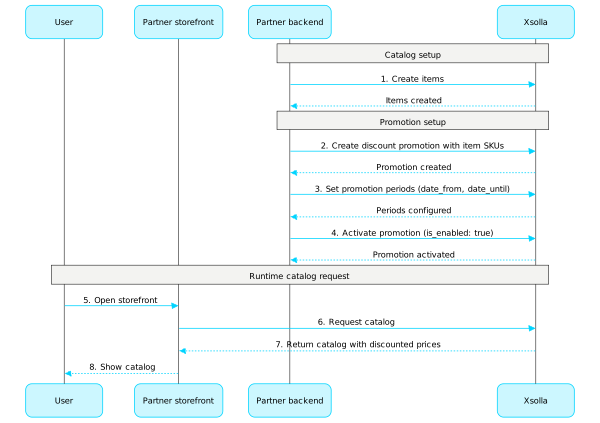
Consulte a nossa documentação para obter informações detalhadas sobre a configuração de promoções:
Cupons
Chame métodos API desta subseção para configurar e gerenciar promoções de cupons.
Observação
Consulte a nossa documentação para obter informações detalhadas sobre cupons.
Operações
Códigos promocionais
Chame métodos API desta subseção para configurar e gerenciar promoções de código promocional.
Observação
Consulte a nossa documentação para obter informações detalhadas sobre códigos promocionais.
Operações
Ofertas de catálogo exclusivas
Chame métodos API desta subseção para configurar e gerenciar ofertas de catálogo exclusivas.
Observação
Consulte a nossa documentação para obter informações detalhadas sobre ofertas exclusivas.
Operações
Descontos
Chame métodos API desta subseção para configurar e gerenciar promoções de descontos.
Observação
Consulte a nossa documentação para obter informações detalhadas sobre descontos.
Operações
Bônus
Chame métodos API desta subseção para configurar e gerenciar promoções de bônus.
Observação
Consulte a nossa documentação para obter informações detalhadas sobre bônus.
Operações
Catálogo personalizado
A personalização permite que você especifique as condições para exibir o catálogo de itens e aplicar promoções apenas para usuários autorizados específicos. As condições são definidas com base nos atributos dos usuários e permite que você ofereça itens e promoções que sejam relevantes a usuários específicos.
Os seguintes tipos de personalização estão disponíveis:
- Personalização do lado da Xsolla. Regras de personalização e lógica são configuradas e armazenadas no lado da Xsolla.
- Personalização do lado do parceiro. Você configura as regras e lógica de personalização do seu lado e envia uma carga de catálogo final para um usuário específico à Xsolla.
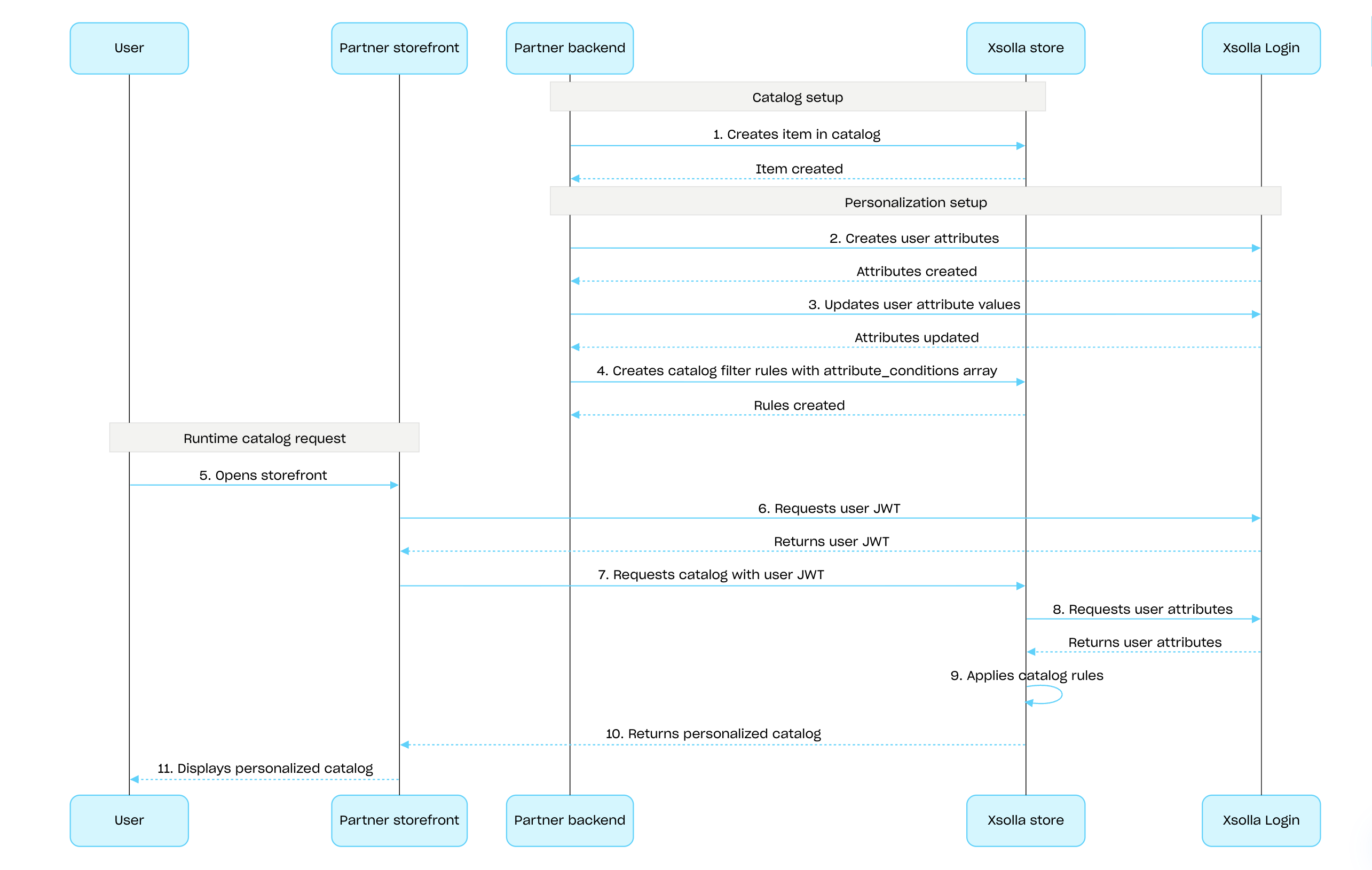
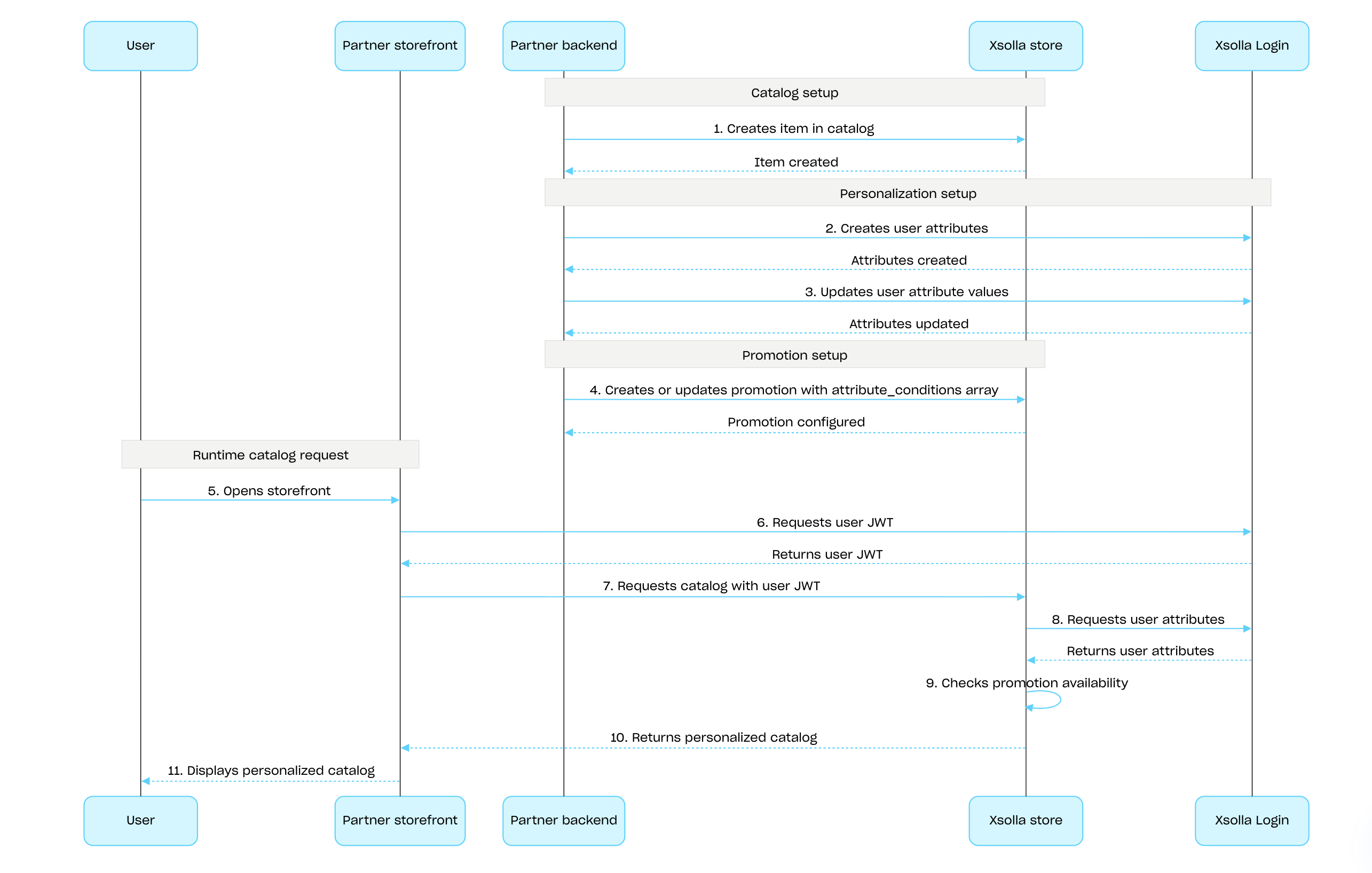
Para configurar a personalização no lado da Xsolla usando a Xsolla API:
Crie itens usando as chamadas API da subseção Admin dos grupos Itens e moedas virtuais, Conjuntos ou Chaves de jogo.
Configure os atributos dos usuários usando a Xsolla Login API e mantenha-os sincronizados atualizando os dados na Xsolla sempre que ocorrerem atualizações no seu jogo.
Configure a personalização para itens ou promoções:
- Para personalizar o catálogo de itens, define as regras de exibição de catálogos usando a chamada de API Criar regra de filtro de catálogo:
- Na matriz attribute_conditions, especifique as condições que determinam a disponibilidade do item com base nos atributos do usuário.
- Na matriz itens, forneça a lista de itens que devem permanecer visíveis ao usuário se os atributos deles corresponder às condições especificadas.
- Para configurar promoções personalizadas, use as chamadas API de criação e atualização para o tipo de promoção desejado. Na matriz attribute_conditions, especifique as condições que determinam a disponibilidade da promoção com base nos atributos de usuários.
- Para personalizar o catálogo de itens, define as regras de exibição de catálogos usando a chamada de API Criar regra de filtro de catálogo:
Passe o JWT do usuário com os atributos do usuário para as chamadas API de recuperação de catálogo para receber um catálogo personalizado.
Sequência para configurar e aplicar personalizações do lado da Xsolla para o catálogo de itens:
Sequência para configurar e aplicar personalizações do lado da Xsolla para promoções:
Observação
Informações detalhadas são fornecidas:
Informações detalhadas são fornecidas:
- no guia de configuração de personalização do laod da Xsolal e do lado do parceiro
- no tutorial passo-a-passo sobre a personalização de catálogos de itens no lado da Xsolla
Operações
Visão geral
Os limites de uso de promoção permitem restringir o número de vezes que um usuário específico pode usar uma promoção. Você também pode configurar redefinições de limite agendadas.
Os limites são armazenados no lado da Xsolla e são configurados nas configurações de promoção na Conta de Distribuidor ou através do objeto limits nas seguintes chamadas de API:
- Criar promoção de desconto para item ou Atualizar promoção de desconto
- Criar promoção de bônus ou Atualizar promoção de bônus
As informações de limite são retornadas no objeto items.promotions.limits nas seguintes chamadas de API para recuperar o catálogo de itens:
- Obter lista de itens virtuais
- Obter lista de moedas virtuais
- Obter lista de pacotes de moedas virtuais
- Obter lista de conjuntos
- Obter lista de jogos
As chamadas de API na subseção Gestão do grupo Limites permitem que você recupere o estado atual dos limites e os atualize para um usuário específico — por exemplo, redefina o contador após a conclusão de uma missão ou ajuste manualmente a quantidade restante.
Nota
Para informações detalhadas sobre como configurar limites no catálogo, consulte a seção Limites de uso de promoção.
Para informações detalhadas sobre como configurar limites no catálogo, consulte a seção Limites de uso de promoção.
Você pode configurar limits.per_user — um limite no número de vezes que uma promoção pode ser usada por um único usuário.
Usuários não autenticados sempre veem o número máximo de usos da promoção.
Para mostrar os usos restantes da promoção do usuário com o limite ativo aplicado, passe os dados de autorização do usuário ao solicitar o catálogo de itens.
Para configurar um período de redefinição agendado — diário, semanal ou mensal — passe o objeto limits.recurrent_schedule ao criar ou atualizar uma promoção.
Cenário de configuração e aplicação de limites
- Você cria uma promoção usando a chamada de API Criar promoção de desconto para item ou Criar promoção de bônus e passa o objeto
limits. - Você solicita o catálogo para um usuário não autenticado — a resposta retorna o número máximo de usos da promoção no objeto
items.promotions.limits. - O usuário faz login.
- Você solicita o catálogo com o token de autorização do usuário — a resposta retorna o número restante de usos com o limite ativo aplicado.
- O usuário seleciona um item promocional e faz uma compra.
- Após o pagamento bem-sucedido, a Xsolla atualiza o valor
items.promotions.limits.per_user. Quando atinge0, o item é retornado nas chamadas de API do catálogo sem desconto ou bônus. - Você pode atualizar o limite usando as chamadas de API da subseção Gerenciamento:
- Você recupera o valor atualizado do limite em
items.promotions.limitsna próxima solicitação de catálogo feita com o token de autorização do usuário e o exibe para o usuário.
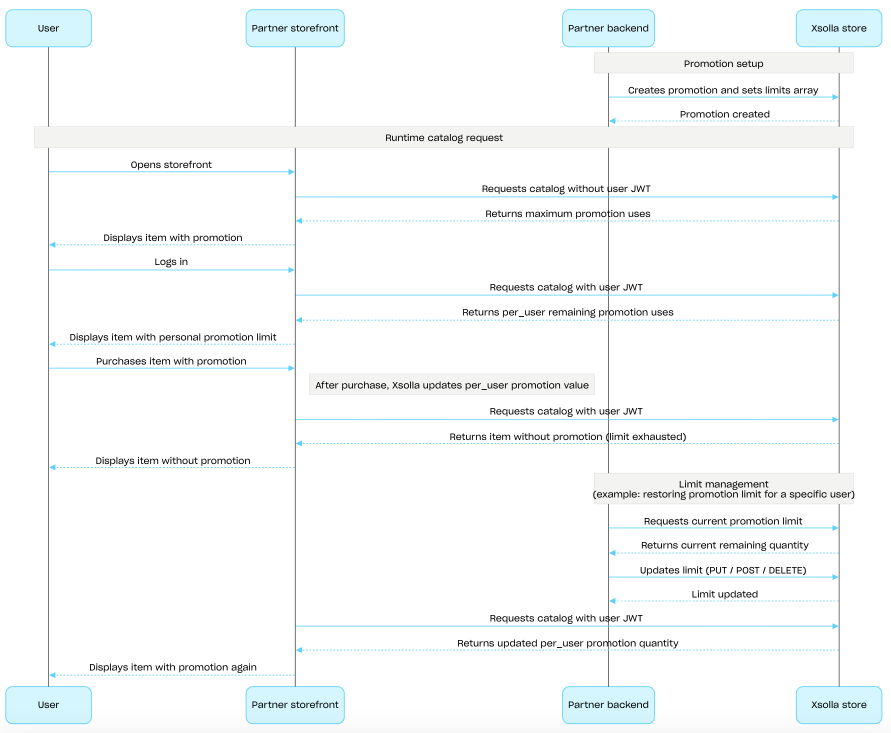
Visão geral
Cadeias de recompensas encorajam usuários a fazerem compras na loja usando moedas reais. Para cada compra, os usuários ganham pontos de valor e progridem pela cadeia de recompensas. Se os usuários fizerem partes de clãs, suas compras contribuem pontos de valor ao clã inteiro. Para informações detalhadas na configuração de cadeias de recompensas, consulte a seção Sistema de Recompensas.
Para configurar cadeias de recompensas, use chamadas de API da subseção Admin. Para exibir cadeias e resgatar recompensas, use chamadas de API da subseção Cliente. Para trabalhar com cadeias de recompensas com o clã, use chamadas de API da subseção Cliente de Clãs.
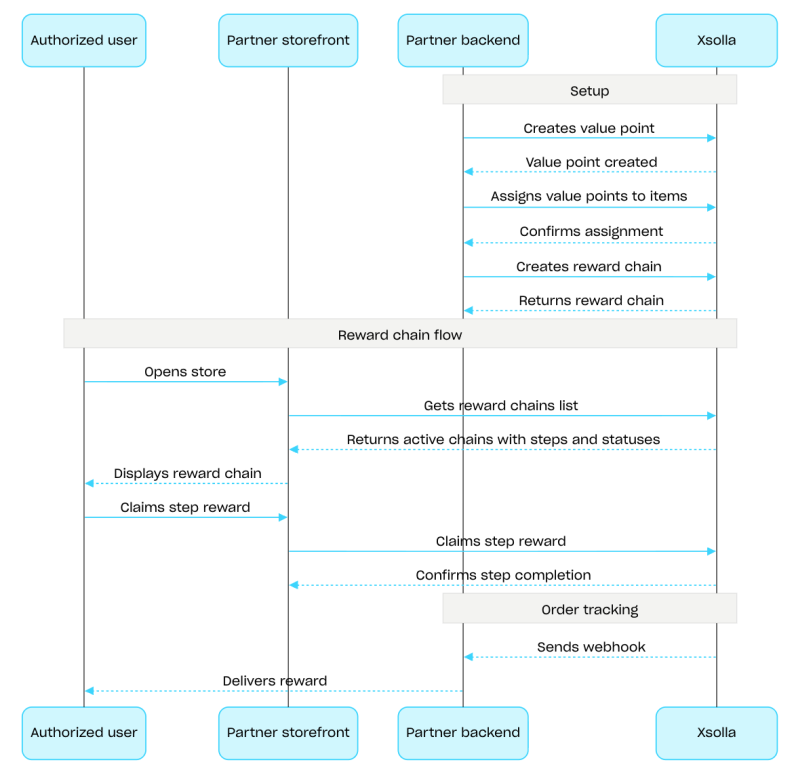
Exemplo de fluxo de configuração de cadeia de recompensas:
- Crie itens usando chamadas de API da subseção Admin dos grupos Itens e moedas virtuais ou Conjuntos.
- Crie pontos de valor usando a chamada de API Criar ponto de valor.
- Atribua pontos de valor a itens usando a chamada de API Definir pontos de valor para os itens. Os usuários recebem pontos de valor depois de comprarem esses itens.
- Crie uma cadeia usando a chamada de API Criar cadeia de recompensas. Para ativar a cadeia, passe o parâmetro
is_enabled: true. - Implemente a exibição de cadeia de recompensas. Para fazer isso, solicite a lista de cadeias disponíveis usando a chamada de API Obter cadeias de recompensa do usuário atual. A resposta contém todas as cadeias ativas com seus passos e status.
- Implemente a exibição do saldo de pontos de valor. Para fazer isso, use a chamada de API Obter saldo de pontos de valor do usuário atual.
- Implemente o resgate de recompensa de etapa. Para fazer isso, use a chamada de API Resgatar recompensa de etapa.
- Configure o rastreamento de status do pedido, ex.: usando webhooks, para prontamente receber dados nas recompensas resgatadas e conceder eles ao usuário.
Visão geral
As recompensas diárias incentivam os usuários a acessar a loja todos os dias para receber itens gratuitos. O comportamento ao pular um dia depende do tipo de sequência. Para que as recompensas diárias funcionem corretamente, é necessário configurar a autenticação de usuário. Usuários não autenticados podem visualizar a sequência completa de recompensas diárias, mas não podem resgatar as recompensas. Para obter informações detalhadas sobre a configuração de recompensas diárias, consulte a seção Recompensas diárias.
As cadeias são configuradas utilizando as chamadas de API da subseção Admin. Para conceder recompensas, utilize as chamadas de API da subseção Client.
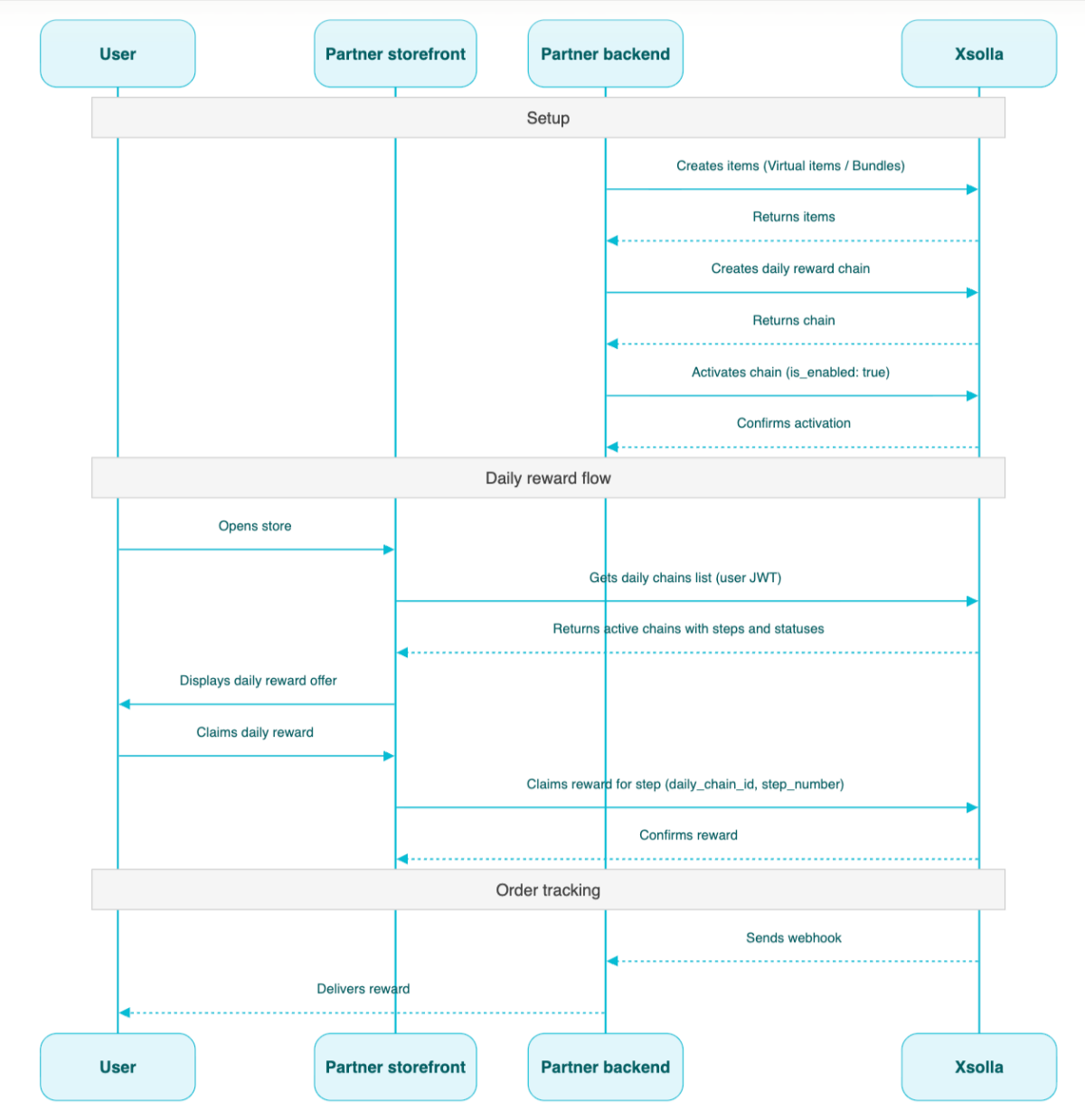
Cenário de configuração de cadeia diária:
- Crie itens usando as chamadas de API da subseção Admin dos grupos Itens e moedas virtuais ou Pacotes.
- Crie uma cadeia usando a chamada de API Criar recompensa diária.
- Ative a cadeia passando o parâmetro
"is_enabled": truepara a chamada de API Criar recompensa diária. - Solicite a lista de cadeias disponíveis usando a chamada de API Obter recompensas diárias do usuário atual, passando o JWT do usuário. A resposta contém todas as cadeias ativas, com seus respectivos passos e status.
- Configure a concessão de itens via webhooks.
- Conceda a recompensa diária ao usuário usando a chamada de API Resgatar recompensa do passo da cadeia diária, passando
daily_chain_idestep_number.
Caminho
Corpoapplication/jsonID de projeto. Você pode encontrar esse parâmetro na sua Conta de Distribuidor, próximo ao nome do projeto e na barra de endereços do navegador ao trabalhar com um projeto. O URL tem o seguinte formato: https://publisher.xsolla.com/<merchant_id>/projects/<project_id>.
Exemplo: 44056
One of:
Uma recompensa diária pelo tipo calendar_hard.
Tipo de recompensa diária que determina quando os usuários podem resgatar recompensas.
Possíveis valores:
calendar_hard— Desbloqueia a recompensa da próxima etapa a cada 24 horas. Qualquer recompensa de etapa não resgatada é permamentemente perdida quando a recompensa da próxima etapa se torna disponível.rolling_skippable— Desbloqueia a recompensa da próxima etapa a cada 24 horas com base emdate_start. A progressão é sequencial: uma nova recompensa não será desbloqueada até que a anterior seja resgatada. Se um usuário pular um ou mais dias, ele continua de onde parou. Os dias perdidos não concedem múltiplas recompensas.rolling_unskippable— Desbloqueia a recompensa da próxima etapa a cada 24 horas com base emdate_start. A progressão é sequencial: uma nova recompensa não será desbloqueada até que a anterior seja resgatada. Porém, se um usuário pular um dia, a progressão deles é redefinida, e eles devem começar novamente da primeira etapa.
Enum"calendar_hard""rolling_skippable""rolling_unskippable"
Se a recompensa diária é recorrente. Se true, a recompensa diária será redefinida automaticamente após a data de término. O próximo cronograma start_date e end_date são baseados na quantidade de etapas de recompensas diárias e no tempo inicial definido em start_date.
Objeto com traduções para o nome do item. Aceita valores em um dos dois formatos: códigos de idioma minúsculos de duas letras (por exemplo, en) ou códigos de idioma de cinco caracteres (por exemplo, en-US). Embora ambos os formatos sejam aceitos, as respostas retornam códigos de idioma minúsculos de duas letras. Quando ambas as opções para o mesmo idioma são fornecidas (por exemplo, en e en-US), o último valor fornecido é armazenado. Você pode encontrar a lista completa de idiomas suportados na documentação.
Any of:
Códigos de idioma minúsculos de duas letras.
Objeto com traduções para a descrição do item. Aceita valores em um dos dois formatos: códigos de idioma minúsculos de duas letras (por exemplo, en) ou códigos de localidade de cinco caracteres (por exemplo, en-US). Embora ambos os formatos sejam aceitos, as respostas retornam códigos de idioma minúsculos de duas letras. Quando ambas as opções para o mesmo idioma são fornecidas (por exemplo, en e en-US), o último valor fornecido é armazenado. Você pode encontrar a lista completa de idiomas suportados na documentação.
Any of:
Códigos de idioma minúsculos de duas letras.
Identificador exclusivo da etapa de recompensa diária. Especifique-o durante a atualização para reter o progresso do usuário nesta etapa.
ID de item exclusivo. O SKU só pode conter caracteres alfanuméricos latinos minúsculos e maiúsculos, pontos, traços e sublinhados.
- https://store.xsolla.com/api/v2/project/{project_id}/admin/daily_chain/id/{daily_chain_id}
- Mock serverhttps://xsolla.redocly.app/_mock/pt/api/liveops/v2/project/{project_id}/admin/daily_chain/id/{daily_chain_id}
- curl
- JavaScript
- Node.js
- Python
- Java
- C#
- PHP
- Go
- Ruby
- R
- Payload
curl -i -X PUT \
  -u <username>:<password> \
  https://store.xsolla.com/api/v2/project/44056/admin/daily_chain/id/101 \
  -H 'Content-Type: application/json' \
  -d '{
    "name": {
      "en": "Updated daily reward",
      "ru": "Обновленная ежедневная награда"
    },
    "description": {
      "en": "Updated daily reward description"
    },
    "order": 4,
    "date_start": "2023-04-15T18:16:00+05:00",
    "is_enabled": true,
    "steps": [
      {
        "step_number": 1,
        "items": [
          {
            "sku": "vg_enabled_shown_in_store_1",
            "quantity": 1
          }
        ]
      },
      {
        "step_number": 2,
        "items": [
          {
            "sku": "vg_enabled_shown_in_store_2",
            "quantity": 1
          }
        ]
      },
      {
        "step_id": 10,
        "step_number": 3,
        "items": [
          {
            "sku": "vg_not_shown_in_store",
            "quantity": 1
          }
        ]
      },
      {
        "step_id": 8,
        "step_number": 4,
        "items": [
          {
            "sku": "bundle_enabled_shown_in_store_with_2_enabled_shown_in_store_vg",
            "quantity": 1
          }
        ]
      },
      {
        "step_number": 5,
        "items": [
          {
            "sku": "vcp_enabled_shown_in_store_1_of_10_vc_enabled_shown_in_store_1",
            "quantity": 1
          }
        ]
      }
    ],
    "type": "calendar_hard"
}'Caminho
ID de projeto. Você pode encontrar esse parâmetro na sua Conta de Distribuidor, próximo ao nome do projeto e na barra de endereços do navegador ao trabalhar com um projeto. O URL tem o seguinte formato: https://publisher.xsolla.com/<merchant_id>/projects/<project_id>.
Exemplo: 44056
- https://store.xsolla.com/api/v2/project/{project_id}/admin/daily_chain/id/{daily_chain_id}
- Mock serverhttps://xsolla.redocly.app/_mock/pt/api/liveops/v2/project/{project_id}/admin/daily_chain/id/{daily_chain_id}
- curl
- JavaScript
- Node.js
- Python
- Java
- C#
- PHP
- Go
- Ruby
- R
- Payload
curl -i -X DELETE \
  -u <username>:<password> \
https://store.xsolla.com/api/v2/project/44056/admin/daily_chain/id/101Caminho
ID de projeto. Você pode encontrar esse parâmetro na sua Conta de Distribuidor, próximo ao nome do projeto e na barra de endereços do navegador ao trabalhar com um projeto. O URL tem o seguinte formato: https://publisher.xsolla.com/<merchant_id>/projects/<project_id>.
Exemplo: 44056
- https://store.xsolla.com/api/v2/project/{project_id}/admin/daily_chain/id/{daily_chain_id}/toggle
- Mock serverhttps://xsolla.redocly.app/_mock/pt/api/liveops/v2/project/{project_id}/admin/daily_chain/id/{daily_chain_id}/toggle
- curl
- JavaScript
- Node.js
- Python
- Java
- C#
- PHP
- Go
- Ruby
- R
- Payload
curl -i -X PUT \
  -u <username>:<password> \
https://store.xsolla.com/api/v2/project/44056/admin/daily_chain/id/101/toggleVisão geral
Cadeias de ofertas são uma sequência de etapas, cada uma contendo um item que os usuários recebem de graça ou compram como parte de uma oferta ativa. Cadeias de ofertas podem incluir itens exclusivos disponíveis somente dentro da cadeia, bem como itens por preços descontados quando comparados aos preços na loja. Para informações detalhadas sobre como configurar essa ferramenta de marketing, consulte a seção Cadeias de ofertas.
Para configurar cadeias de ofertas, use chamadas de API da subseção Admin. Para exibir cadeias e implementar a lógica para trabalhar com itens que os usuários recebem, use chamadas de API da subseção Cliente.
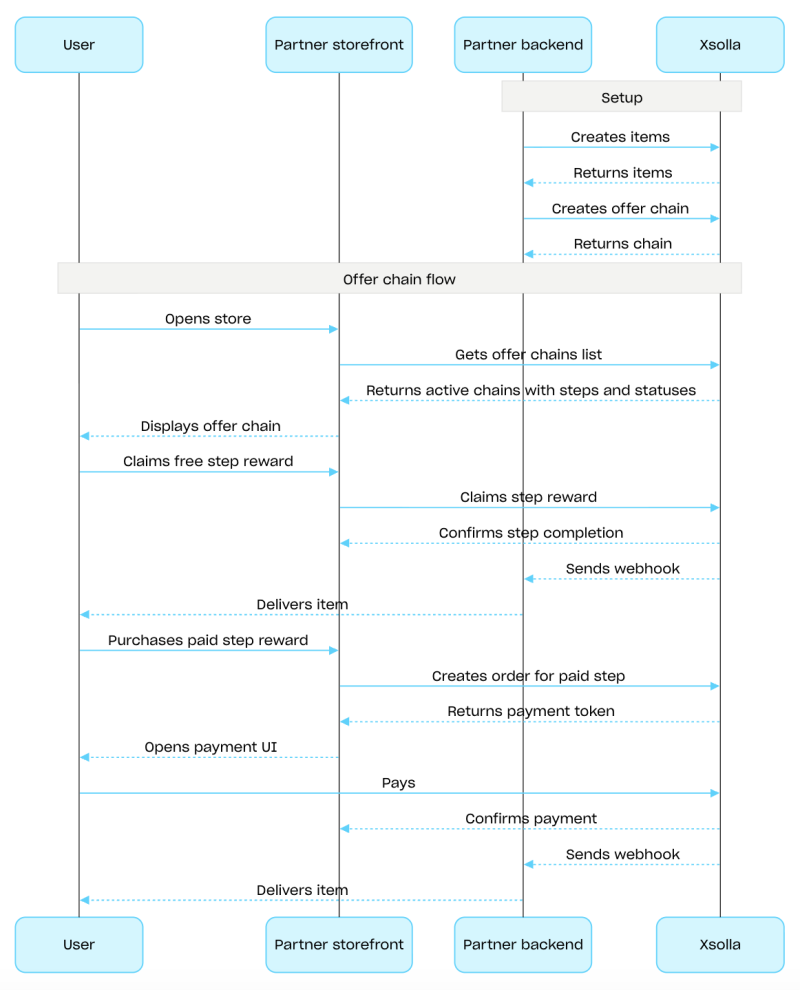
Exemplo de fluxo de configuração de cadeia de ofertas:
Crie itens usando as chamadas de API da subseção Admin dos grupos Itens e moedas virtuais ou Conjuntos.
Crie uma cadeia usando a chamada de API Criar cadeia de ofertas. Para ativar a cadeia, passe o parâmetro
is_enabled: true.Implemente a cadeia de ofertas. Para fazer isso, solicite a lista de cadeias disponíveis usando a chamada de API Obter cadeias de ofertas do usuário atual. A resposta contém todas as cadeias ativas com suas etapas e status.
Implemente a lógica para trabalhar com itens que os usuários recebem:
Se o item da etapa for gratuito, use a chamada de API Resgatar etapa gratuita da cadeia de ofertas. Passe
offer_chain_idestep_numberna solicitação.Se o item da etapa for pago, use a chamada de API Criar pedido para a etapa da cadeia de ofertas paga. Passe
offer_chain_idestep_numberna solicitação. A resposta retorna umorder_ide um token para abrir a interface de pagamento.
Configure o rastreamento do status do pedido, ex.:, usando webhooks, para prontamente receber dados sobre itens resgatados ou comprados e concedê-los ao usuário.
Visão geral
A venda cruzada é um método de vendas no qual se oferece ao usuário a compra de um item com valor agregado. Por exemplo, pode ser o item com maior demanda entre outros usuários. Você também pode configurar restrições regionais para itens de venda cruzada. Para informações detalhadas, consulte a seção Venda cruzada.
A lista de itens configurados para venda cruzada e o status de venda cruzada (habilitado ou desabilitado) são retornados pelo método de API Obter informações sobre venda cruzada no projeto. No lado do cliente, a lista de itens é retornada pelo método de API Obter lista de itens de venda cruzada no projeto e exibida ao usuário no momento apropriado do fluxo de compra.
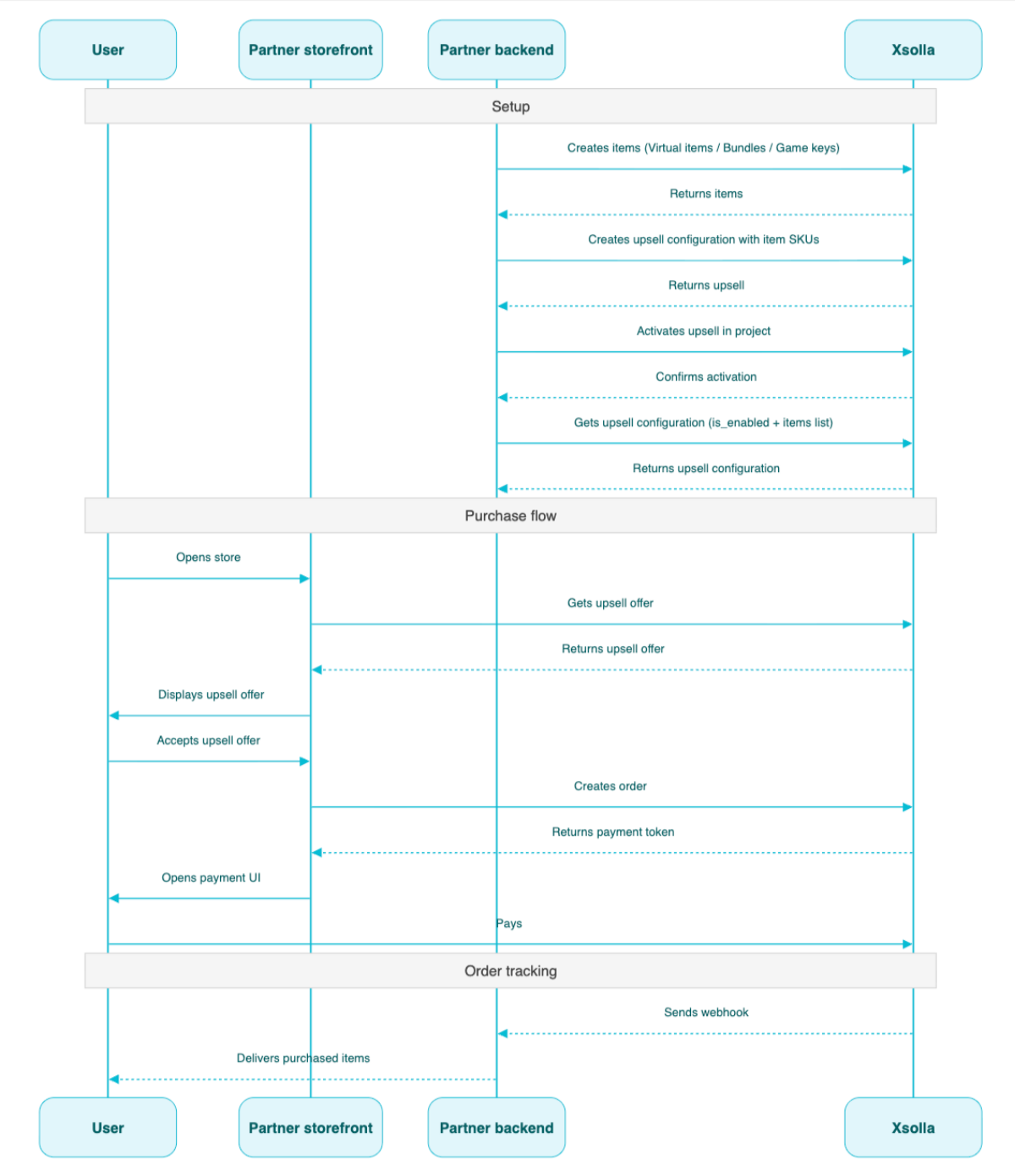
Cenário de configuração de venda cruzada:
- Crie itens usando as chamadas de API da subseção Admin dos grupos Itens e moedas virtuais, Pacotes ou Chaves de jogo.
- Configure a venda cruzada usando a chamada de API Criar venda cruzada. Passe os SKUs dos itens necessários na matriz
items. - Ative a venda cruzada para o projeto usando a chamada de API Ativar/Desativar venda cruzada do projeto.
- Exiba a oferta de venda cruzada ao usuário no ponto apropriado do fluxo de compra usando a chamada de API Obter lista de itens de venda cruzada no projeto.
- Implemente a abertura da interface de pagamento para pagar o pedido. Por exemplo, você pode usar a chamada de API Criar pedido com todos os itens de um carrinho específico. A resposta retorna um token para abrir a interface de pagamento
- Configure o rastreamento do status do pedido, por exemplo, usando webhooks para receber prontamente dados sobre itens pagos com sucesso e disponibilizá-los ao usuário.
Visão geral
A API Loyalty as Service permite que você gerencie os saldos de pontos de fidelidade dos usuários: obtenha o saldo atual de um usuário, bem como adicione ou remova pontos de fidelidade.
As chamadas de API Admin da API Loyalty as Service ocorrem do lado do servidor e exigem autenticação básica.
O URL base para essa API é https://loyalty-points.xsolla.com/.
Para informações mais detalhadas sobre como configurar essa ferramenta de marketing, veja Loyalty as Service.