Use calls from this section to manage the cart on the client side.
/
Update cart item by cart...
Catalog API (2.0.0)
- Version: 2.0.0
- Servers:
https://store.xsolla.com/api - Contact Us by Email
- Contact URL: https://xsolla.com/
- Required TLS version: 1.2
The Catalog API allows you to configure a catalog of in-game items on the Xsolla side and display the catalog to users in your store.
The API allows you to manage the following catalog entities:
- Virtual items — in-game items such as weapons, skins, boosters.
- Virtual currency — virtual money used to purchase virtual goods.
- Virtual currency packages — predefined bundles of virtual currency.
- Bundles — combined packages of virtual items, currency, or game keys sold as a single SKU.
- Game keys — keys for games and DLCs distributed via platforms like Steam or other DRM providers.
- Groups — logical groupings for organizing and sorting items within the catalog.
The API is divided into the following groups:
Admin — calls for creating, updating, deleting, and configuring catalog items and groups. Authenticated via basic access authentication with your merchant or project credentials. Not intended for storefront use.Catalog — calls for retrieving items and building custom storefronts for end users. Designed to handle high-load scenarios. Support optional user JWT authorization to return personalized data such as user-specific limits and active promotions.
API calls require authentication either on behalf of a user or on behalf of a project. The authentication scheme used is specified in the Security section in the description of each call.
User's JWT authentication is used when a request is sent from a browser, mobile application, or game. By default, the XsollaLoginUserJWT scheme is applied. For details on how to create a token, see the Xsolla Login API documentation.
The token is passed in the Authorization header in the following format: Authorization: Bearer <user_JWT>, where <user_JWT> is the user token. The token identifies the user and provides access to personalized data.
Alternatively, you can use a token for opening the payment UI.
Basic HTTP authentication is used for server-to-server interactions, when an API call is sent directly from your server rather than from a user's browser or mobile application. HTTP Basic authentication with an API key is typically used.
Note
The API key is confidential and must not be stored or used in client applications.
The API key is confidential and must not be stored or used in client applications.
With basic server-side authentication, all API requests must include the following header:
- for
basicAuth—Authorization: Basic <your_authorization_basic_key>, whereyour_authorization_basic_keyis theproject_id:api_keypair encoded in Base64 - for
basicMerchantAuth—Authorization: Basic <your_authorization_basic_key>, whereyour_authorization_basic_keyis themerchant_id:api_keypair encoded in Base64
You can find the parameter values in Publisher Account:
merchant_idis displayed:- In Company settings > Company.
- In the URL in the browser address bar on any Publisher Account page. The URL has the following format:
https://publisher.xsolla.com/<merchant_id>.
project_idis displayed:- Next to the project name in Publisher Account.
- In the URL in the browser address bar when working on a project in Publisher Account. The URL has the following format:
https://publisher.xsolla.com/<merchant_id>/projects/<project_id>.
api_keyis shown in Publisher Account only at the time of creation and must be stored securely on your side. You can create an API key in the following sections:
Notice
If a required API call doesn't include the
If a required API call doesn't include the
project_id path parameter, use an API key that is valid across all company projects for authorization.For more information about working with API keys, see the API references.
The AuthForCart authentication scheme is used for cart purchases and supports two modes:
Authentication with a user's JWT. The token is passed in the
Authorizationheader in the following format:Authorization: Bearer <user_JWT>, where<user_JWT>is the user token. The token identifies the user and provides access to personalized data. Alternatively, you can use a token for opening the payment UI.Simplified mode without Authorization header. This mode is used only for unauthorized users and can be applied only for game key sales. Instead of a token, the request must include the following headers:
x-unauthorized-idwith a request IDx-userwith the user's email address encoded in Base64
Items of all types (virtual items, bundles, virtual currency, and keys) use a similar data structure. Understanding the basic structure simplifies working with the API and helps you navigate the documentation more easily.
Note
Some calls may include additional fields but they don't change the basic structure.
Some calls may include additional fields but they don't change the basic structure.
Identification
merchant_id— company ID in Publisher Accountproject_id— project ID in Publisher Accountsku— item SKU, unique within the project
Store display
name— item namedescription— item descriptionimage_url— image URLis_enabled— item availabilityis_show_in_store— whether the item is displayed in the catalog
For more information about managing item availability in the catalog, see the documentation.
Organization
type— item type, for example, a virtual item (virtual_item) or bundle (bundle)groups— groups the item belongs toorder— display order in the catalog
Sale conditions
prices— prices in real or virtual currencylimits— purchase limitsperiods— availability periodsregions— regional restrictions
Example of core entity structure:
{
  "attributes": [],
  "bundle_type": "virtual_currency_package",
  "content": [
    {
      "description": {
        "en": "Main in-game currency"
      },
      "image_url": "https://.../image.png",
      "name": {
        "en": "Crystals",
        "de": "Kristalle"
      },
      "quantity": 500,
      "sku": "com.xsolla.crystal_2",
      "type": "virtual_currency"
    }
  ],
  "description": {
    "en": "Crystals x500"
  },
  "groups": [],
  "image_url": "https://.../image.png",
  "is_enabled": true,
  "is_free": false,
  "is_show_in_store": true,
  "limits": {
    "per_item": null,
    "per_user": null,
    "recurrent_schedule": null
  },
  "long_description": null,
  "media_list": [],
  "name": {
    "en": "Medium crystal pack"
  },
  "order": 1,
  "periods": [
    {
      "date_from": null,
      "date_until": "2020-08-11T20:00:00+03:00"
    }
  ],
  "prices": [
    {
      "amount": 20,
      "country_iso": "US",
      "currency": "USD",
      "is_default": true,
      "is_enabled": true
    }
  ],
  "regions": [],
  "sku": "com.xsolla.crystal_pack_2",
  "type": "bundle",
  "vc_prices": []
}The Xsolla API allows you to implement in-game store logic, including retrieving the item catalog, managing the cart, creating orders, and tracking their status. Depending on the integration scenario, API calls are divided into Admin and Catalog subsections, which use different authentication schemes.
The following example shows a basic flow for setting up and operating a store, from item creation to purchase.
Create an item catalog for your store, such as virtual items, bundles, or virtual currency.
Example API calls:
Configure user acquisition and monetization tools, such as discounts, bonuses, daily rewards, or offer chains.
Example API calls:
Configure item display in your application.
Notice
Do not use API calls from the Admin subsection to build a user catalog. These API calls have rate limits and aren't intended for user traffic.
Do not use API calls from the Admin subsection to build a user catalog. These API calls have rate limits and aren't intended for user traffic.
Example API calls:
Note
By default, catalog API calls return items that are currently available in the store at the time of the request. To retrieve items that are not yet available or are no longer available, include the parameter
By default, catalog API calls return items that are currently available in the store at the time of the request. To retrieve items that are not yet available or are no longer available, include the parameter
"show_inactive_time_limited_items": 1 in the catalog request.
You can sell items using the following methods:
- Fast purchase — sell one SKU multiple times.
- Cart purchase — the user adds items to the cart, removes items, and updates quantities within a single order.
If an item is purchased using virtual currency instead of real money, use the Create order with specified item purchased by virtual currency API call. The payment UI is not required, as the charge is processed when the API call is executed.
For free item purchase, use the Create order with specified free item API call or the Create order with free cart API call. The payment UI is not required — the order is immediately set to the done status.
Use the client-side API call to create an order with a specified item. The call returns a token used to open the payment UI.
Note
Discount information is available to the user only in the payment UI. Promo codes are not supported.
Discount information is available to the user only in the payment UI. Promo codes are not supported.
Cart setup and purchase can be performed on the client or on the server side.
Set up and purchase a cart on the client
Implement the logic of adding and removing items by yourself. Before calling the API for setting up a cart, you will not have information about which promotions will be applied to the purchase. This means that the total cost and details of the added bonus items will not be known.
Implement the following cart logic:
- After the player has filled a cart, use the Fill cart with items API call. The call returns the current information about the selected items (prices before and after discounts, bonus items).
- Update the cart contents based on user actions:
- To add an item or change item quantity, use the Update cart item by cart ID API call.
- To remove an item, use the Delete cart item by cart ID API call.
Note
To get the current status of the cart, use the Get current user's cart API call.
To get the current status of the cart, use the Get current user's cart API call.
- Use the Create order with all items from current cart API call. The call returns the order ID and payment token. The newly created order is set to
newstatus by default.
Set up and purchase a cart on the server
This setup option may take longer for setting the cart up, since each change to the cart must be accompanied by API calls.
Implement the following cart logic:
- After the player has filled a cart, use the Fill cart with items API call. The call returns current information about the selected items (prices before and after discounts, bonus items).
- Use the Create order with all items from current cart API call. The call returns the order ID and payment token. The newly created order is set to
newstatus by default.
Use the returned token to open the payment UI in a new window. Other ways to open the payment UI are described in the documentation.
| Action | Endpoint |
|---|---|
| Open in production environment. | https://secure.xsolla.com/paystation4/?token={token} |
| Open in sandbox mode. | https://sandbox-secure.xsolla.com/paystation4/?token={token} |
Note
Use sandbox mode during development and testing. Test purchases don't charge real accounts. You can use test bank cards.
Use sandbox mode during development and testing. Test purchases don't charge real accounts. You can use test bank cards.
After the first real payment is made, a strict sandbox payment policy takes effect. A payment in sandbox mode is available only to users specified in Publisher Account > Company settings > Users.
Buying virtual currency and items for real currency is possible only after signing a license agreement with Xsolla. To do this, in Publisher Account, go to Agreements & Taxes > Agreements, complete the agreement form, and wait for confirmation. It may take up to 3 business days to review the agreement.
To enable or disable sandbox mode, change the value of the sandbox parameter in the request for fast purchase and cart purchase. Sandbox mode is off by default.
Possible order statuses:
new— order createdpaid— payment receiveddone— item deliveredcanceled— order canceledexpired— order expired
Track order status using one of the following methods:
API calls that return large sets of records (for example, when building a catalog) return data in pages. Pagination is a mechanism that limits the number of items returned in a single API response and allows you to retrieve subsequent pages sequentially.
Use the following parameters to control the number of returned items:
limit— number of items per pageoffset— index of the first item on the page (numbering starts from 0)has_more— indicates whether another page is availabletotal_items_count— total number of items
Example request:
GET /items?limit=20&offset=40Response example:
{
  "items": [...],
  "has_more": true,
  "total_items_count": 135
}
It is recommended to send subsequent requests until the response returns has_more = false.
Dates and time values are passed in the ISO 8601 format.
The following are supported:
- UTC offset
nullvalue when there is no time restriction for displaying an item- Unix timestamp (in seconds) used in some fields
Format: YYYY-MM-DDTHH:MM:SS±HH:MM
Example: 2026-03-16T10:00:00+03:00
Xsolla supports localization of user-facing fields such as item name and description. Localized values are passed as an object where the language code is used as the key. The full list of supported languages is available in the documentation.
Supported fields
Localization can be specified for the following parameters:
namedescriptionlong_description
Locale format
The locale key can be specified in one of the following formats:
- Two-letter language code:
en,ru - Five-letter language code:
en-US,ru-RU,de-DE
Examples
Example with a two-letter language code:
{
  "name": {
    "en": "Starter Pack",
    "ru": "Стартовый набор"
  }
}
Example with a five-letter language code:
{
  "description": {
    "en-US": "Premium bundle",
    "de-DE": "Premium-Paket"
  }
}The user's country determines catalog prices, the payment currency, and available payment methods in the payment UI. Depending on the API call, the country is determined as follows:
- In client-side API calls, the country is determined by the IP address of the request.
- In server-side API calls,
the country is determined by the value of the
user.country.valueparameter or by the user's IP address from theX-User-Ipheader. If both are passed, theuser.country.valueparameter takes precedence.
If an error occurs, the API returns an HTTP status and a JSON response body. The full list of store-related errors is available in the documentation.
Response example:
{
  "errorCode": 1102,
  "errorMessage": "Validation error",
  "statusCode": 422,
  "transactionId": "c9e1a..."
}errorCode— error code.errorMessage— short error description.statusCode— HTTP response status.transactionId— request ID. Returned only in some cases.errorMessageExtended— additional error details, such as request parameters. Returned only in some cases.
Extended response example:
{
  "errorCode": 7001,
  "errorMessage": "Chain not found",
  "errorMessageExtended": {
    "chain_id": "test_chain_id",
    "project_id": "test_project_id",
    "step_number": 2
  },
  "statusCode": 404
}
Common HTTP status codes
400— invalid request401— authentication error403— insufficient permissions404— resource not found422— validation error429— rate limit exceeded
Recommendations
- Handle the HTTP status and the response body together.
- Use
errorCodeto process errors related to application logic. - Use
transactionIdto identify requests more quickly when analyzing errors.
Download OpenAPI description
Languages
Servers
https://store.xsolla.com/api/
Mock server
https://xsolla.redocly.app/_mock/api/catalog/
Overview
You can use virtual items and virtual currency to build an in-game store and configure how it is displayed to users. The following item types are available:
- Virtual items — in-game goods such as weapons, skins, or boosters. Can be sold for real money or virtual currency.
- Virtual currency — in-game currency used to purchase virtual items. Can be sold for real money or virtual currency.
- Virtual currency packages — a fixed amount of virtual currency. Can be sold for real money or virtual currency.
Groups are used to organize items in the catalog. They allow you to logically group items and manage how they are displayed.
Use API calls from the Admin subsection to create, update, and delete items.
Use API calls from the Catalog subsection to retrieve lists of items and display them to users.
Notice
Do not use API calls from the Admin subsection to build a store catalog.
Do not use API calls from the Admin subsection to build a store catalog.
Note
The Get virtual items list API call returns detailed item data, including prices and attributes, and supports pagination. Use it to display catalog pages in the storefront.
The Get all virtual items list API call returns item SKU, name, description, as well as group ID and name without pagination. Use it for client-side search or indexing.
The Get virtual items list API call returns detailed item data, including prices and attributes, and supports pagination. Use it to display catalog pages in the storefront.
The Get all virtual items list API call returns item SKU, name, description, as well as group ID and name without pagination. Use it for client-side search or indexing.
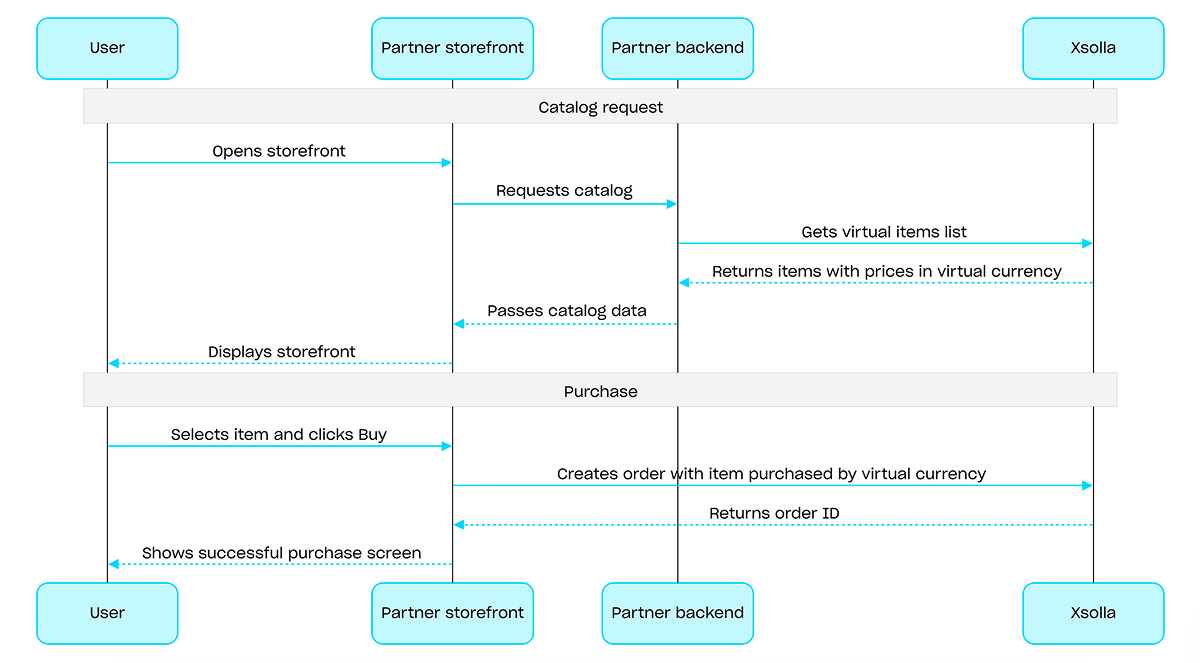
For purchases with virtual currency, use the Create order with specified item purchased by virtual currency API call. The payment UI is not required — the charge is processed when the API call is executed.
Example of a purchase flow with virtual currency:
Overview
Game keys are single-use unique alphanumeric codes that grant users access to a game or DLC on gaming platforms. You can sell game keys via a direct link, through the store UI, or via a widget. You can also configure regional restrictions to sell game keys in specific countries. For detailed information, refer to the Game keys packages section.
User authentication is not required to sell game keys — the keys are sent to the email the user specified at checkout. You can configure authentication to enable additional scenarios: personalization, purchase limits, or an entitlement system. For detailed information, refer to the How to set up authentication when selling game keys section.
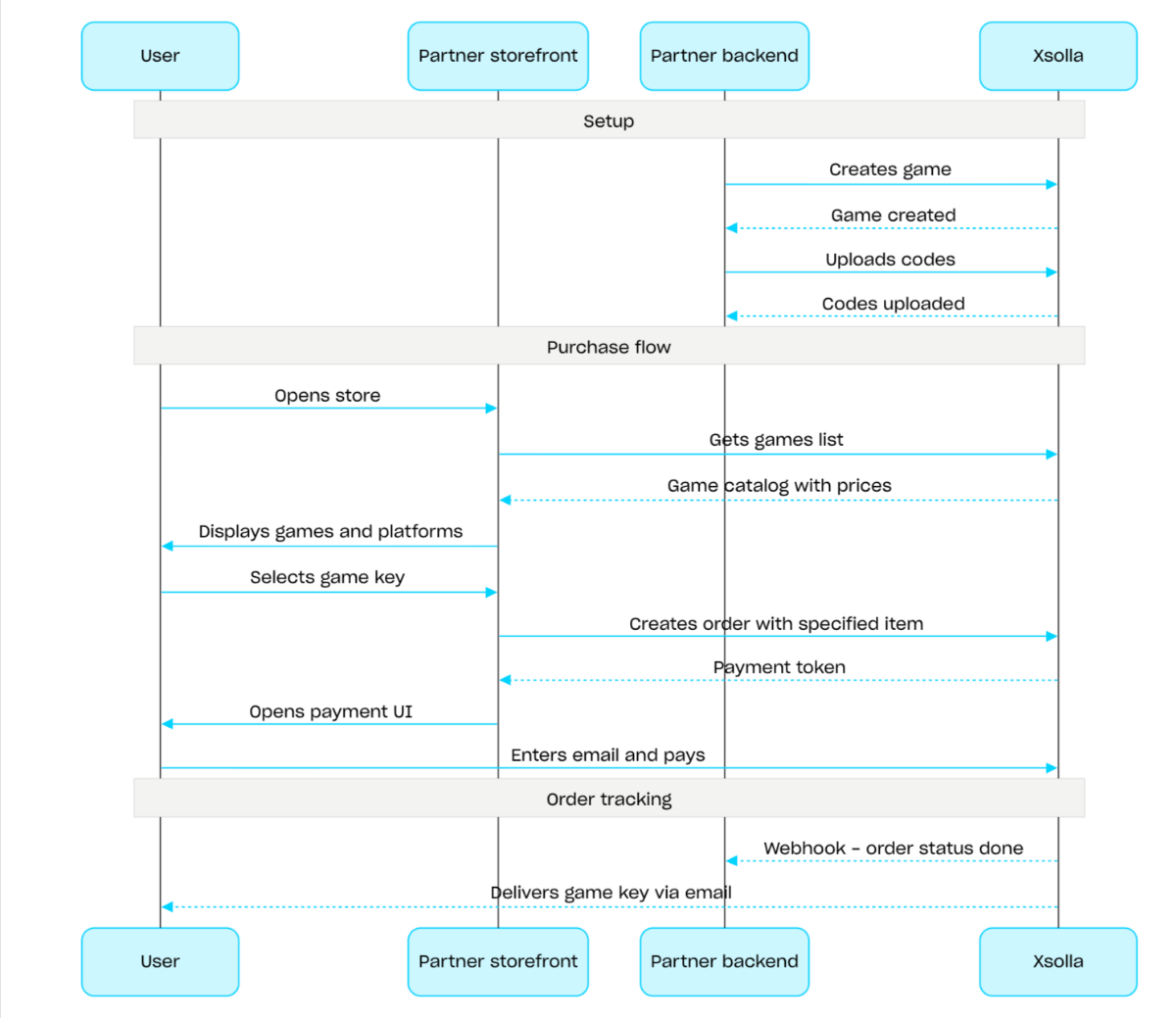
Game key sales flow:
- Create a game using the Create game API call.
- Configure regional restrictions.
- Upload keys to a game key package using the Upload codes API call to make them available for purchase.
- Display the game catalog with prices for the user's region using the Get games list API call.
- Create an order. For a fast purchase, you can use the Create order with all items from current cart API call, passing the game key SKU. The response returns a token for opening the payment UI.
- Implement the opening of the payment UI to pay for the order.
To receive timely notifications about successful payments and deliver items to the user, set up order status tracking, for example, using webhooks. The keys are sent to the email the user specified at checkout, and the order moves to the done status.
Overview
Bundles are sets of items sold as a single unit. A bundle can include virtual items, virtual currency, virtual currency packages, game keys, and other bundles. Use bundles to create starter packs, seasonal offers, and special deals.
Use the following API call groups to work with bundles:
- Use API calls from the Admin subsection to create, update, delete bundles, and manage their visibility.
- Use API calls from the Catalog subsection to retrieve bundles.
Purchase limits are configured via the limits object when creating or updating a bundle. For more information, refer to the Limits overview. You can also configure regional restrictions to sell items in specific countries.
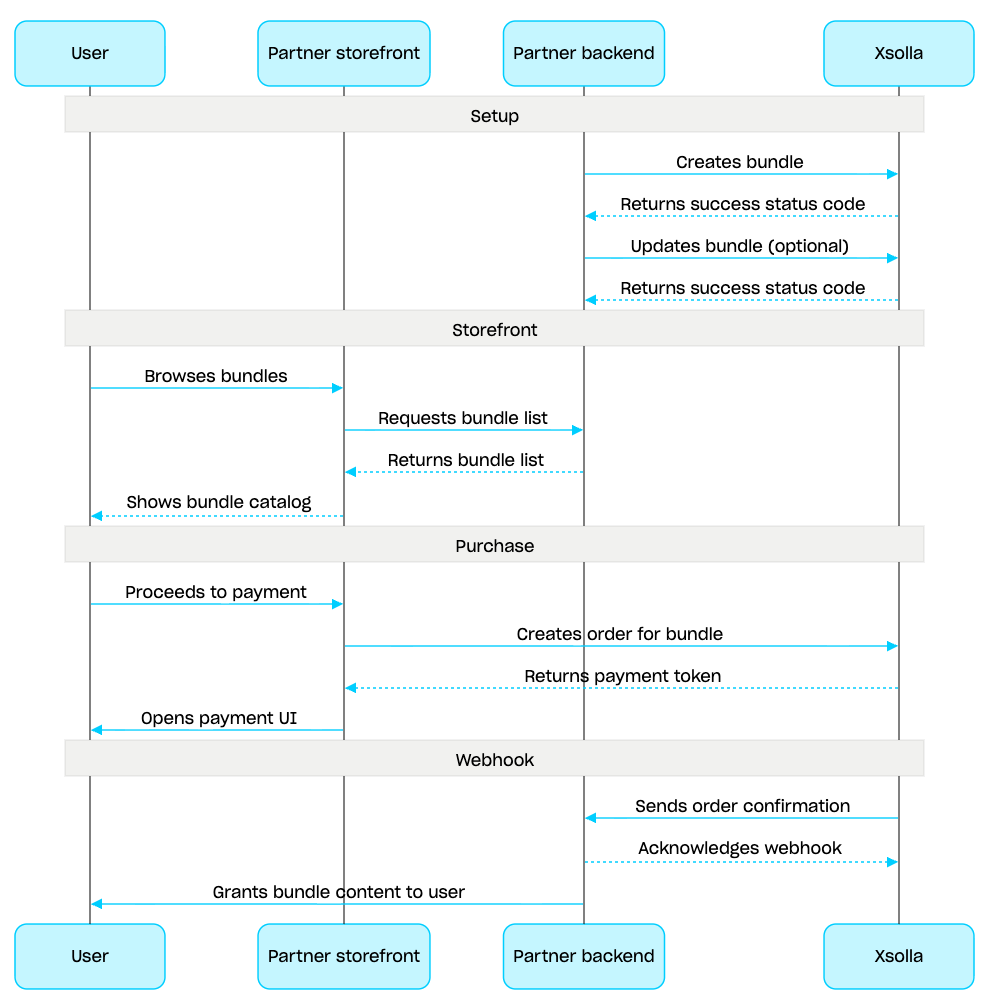
Bundle management scenario:
- Create a bundle using the Create bundle API call. To verify the created bundle, use the Get bundle API call. To retrieve all bundles in the project, use the Get list of bundles API call.
- If needed, use the Update bundle API call to modify the bundle content or settings.
- Implement bundle display logic in your storefront using the Get list of bundles, Get specified bundle, or Get list of bundles by specified group API call.
- Create an order using the Cart and payment section. For example, for a fast purchase you can use the Create order with specified item API call, passing the bundle SKU. The response contains a token for opening the payment UI.
- Implement opening the payment UI to pay for the order.
- Set up order status tracking, for example using webhooks, to promptly receive data on successfully paid items and grant them to the user.
Overview
The cart is a purchasing mechanism that enables combining multiple items into a single order. A user can buy items of any type in any quantity for real currency, as well as use promo codes.
The cart is stored on the Xsolla side. Saving the cart across sessions depends on whether the user is authorized:
For authorized users, the cart is linked to a specific user and is saved across sessions as long as requests are sent on behalf of the same user.
For unauthorized users, saving the cart depends on passing the
x-unauthorized-idheader. To save the cart of an unauthorized user across sessions, pass the samex-unauthorized-idin every request. This option is available only for game key sales.
You can identify the cart in two ways: automatically by user's JWT or by cart ID (cart_id).
Cart management is available both on the client side and on the server side.
On the server side, you can fill the cart with items, e.g., when restoring a user session. The following actions are available on the client side:
- retrieve the current user's cart or a cart by ID
- fill the cart
- update items in the cart
- delete items from the cart
To purchase items from the cart, the client and server calls for order creation are used.
The cart’s time to live (TTL) is 72 hours by default. If its content changes, e.g., when a new item is added, the TTL is extended.
After successful payment, the cart isn’t cleared automatically. To clear the cart, use the following client-side API calls:
Delete cart item by cart ID and Delete cart item from current cart — the cart is cleared when you delete the last item from it.
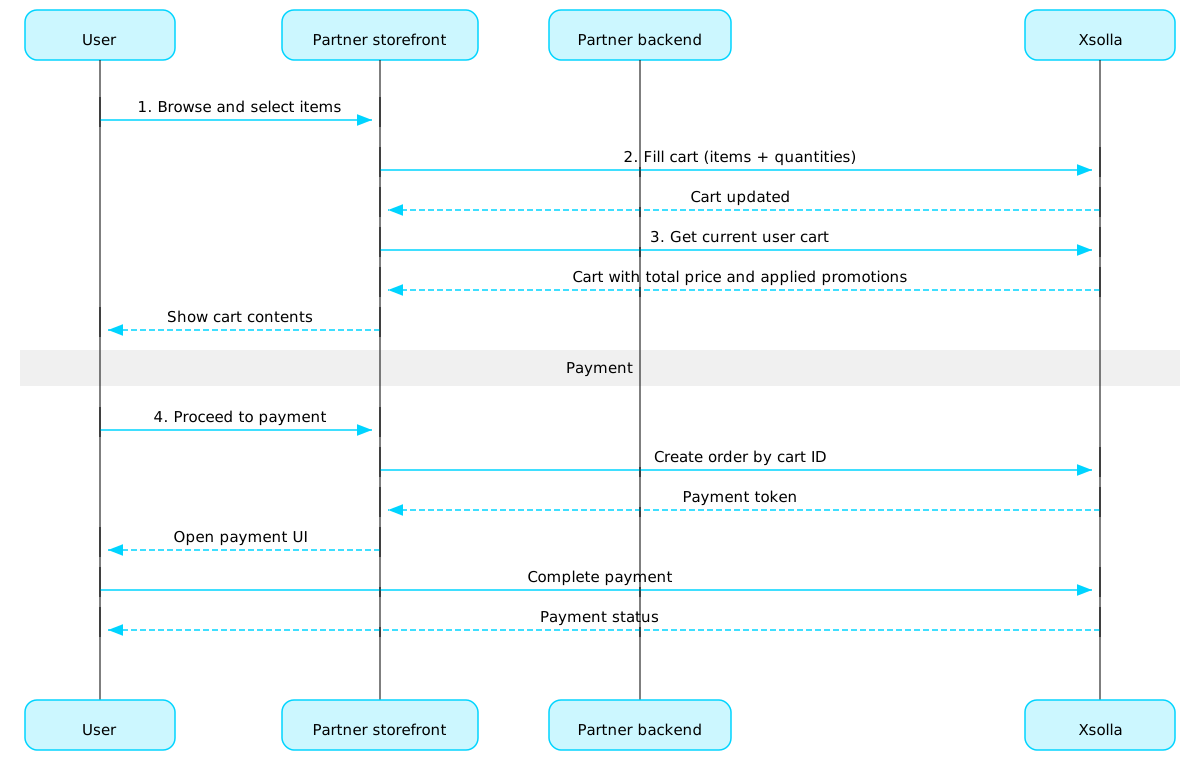
Cart usage scenario:
Implement a store UI where the user will select items.
When the user selects items in the store, add them to the cart, e.g., using the Fill cart with items call. In the items array, you need to pass the SKUs and the required quantity of items.
Implement the cart viewing UI. When the user navigates to the cart, display its contents using the Get current user's cart call. The response will return information about the final price of the items, including discounts and applied promotions.
Implement the opening of the payment UI to pay for the order. For example, you can use the Create order with all items from particular cart call. The response returns a token to open the payment UI.
Configure order status tracking, e.g., using webhooks, to promptly receive data about successfully paid items and grant them to the user.
Note
To implement selling items in-game and online, refer to the integration guide.
Order life cycle
Understanding of the order life cycle helps you to track orders and correctly implement post-purchase logic, e.g., item delivery.
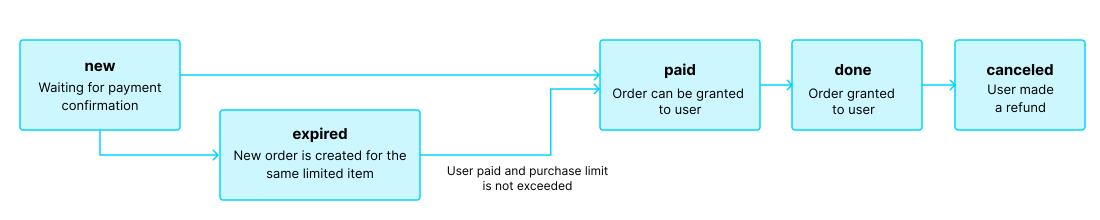
The order moves through the following statuses:
| Status | Description | Notes |
new | Order is created. The system is waiting for payment confirmation. | Transaction status descriptions can be found in Pay Station API documentation. |
paid | Order is paid (the transaction moved to the done status), and the item can be granted to the user. | The order remains in the new status until the payment is confirmed. |
done | Item is granted to the user. | — |
canceled | The payment was refunded. | The order moves to this status when the transaction status changes to refunded. |
expired | Creating a new order for a limited item, promo code, or promotion moves any previous unpaid order containing that item to the expired status. Only the most recent order can be paid for. | If a user attempts to pay for an expired order, the payment UI will display a 2002 error, and the payment will fail. |
Note
When the order moves to the expired status while the user is completing a payment, but the payment is successful, the order moves from expired to paid status. This applies only if the purchase limit for the order’s item won’t be exceeded upon payment.
Path
Bodyapplication/jsonProject ID. You can find this parameter in your Publisher Account next to the project name and in the browser address bar when working with a project. The URL has the following format: https://publisher.xsolla.com/<merchant_id>/projects/<project_id>.
Example: 44056
- https://store.xsolla.com/api/v2/project/{project_id}/cart/{cart_id}/fill
- Mock serverhttps://xsolla.redocly.app/_mock/api/catalog/v2/project/{project_id}/cart/{cart_id}/fill
- curl
- JavaScript
- Node.js
- Python
- Java
- C#
- PHP
- Go
- Ruby
- R
- Payload
curl -i -X PUT \
  https://store.xsolla.com/api/v2/project/44056/cart/custom_id/fill \
  -H 'Authorization: Bearer <YOUR_TOKEN_HERE>' \
  -H 'Content-Type: application/json' \
  -d '{
    "items": [
      {
        "sku": "com.xsolla.booster_mega_1",
        "quantity": 123
      }
    ]
}'The cart with items was successfully returned.
Cart price.
Example: {"amount":"6150.0000000000000000","amount_without_discount":"6150.0000000000000000","currency":"USD"}
List of attributes and their values corresponding to the item. Can be used for catalog filtering.
Unique attribute ID. The external_id may contain only lowercase and uppercase Latin alphanumeric characters, dashes, and underscores.
Unique value ID for an attribute. The external_id may only contain lowercase Latin alphanumeric characters, dashes, and underscores.
Item price.
Example: {"amount":"6150.0000000000000000","amount_without_discount":"6150.0000000000000000","currency":"USD"}
Virtual prices.
Item price in virtual currency without discount. Always equal to amount since discounts are not applied to prices in virtual currency.
Example: 200
Whether it is the default price in virtual currency.
Example: true
Virtual currency image URL.
Example: "http://image.png"
Item type. For virtual currency, it is virtual_currency.
Example: "virtual_currency"
Applied promotions for specific items in the cart. The array is returned in the following cases:
A discount promotion is configured for a specific item.
A promo code with the Discount on selected items setting is applied.
If no item-level promotions are applied, an empty array is returned.
Bonus item type.
Enum"virtual_good""virtual_currency""bundle""physical_good""game_key""nft"
Bonus item name. Not available for physical_good bonus item type.
Bonus item image URL. Not available for physical_good bonus item type.
List of value point rewards for the item.
Loyalty points the user receives as a reward for purchasing the item.
Loyalty point SKU. Pass this value in the loyalty_point_sku parameter of other API calls, for example, when creating an order paid with loyalty points.
Item limits.
Item limits for a user.
Maximum number of items a single user can purchase.
Example: 5
Remaining number of items the current user can purchase.
Example: 3
One of:
Item limits recurrent refresh period for a user.
Determines the visibility of the item in the catalog after the purchase limit is reached, until the next limit reset.
Applies to items for which recurring limit resets are configured in the recurrent_schedule array.
If limit resets are not configured, the item doesn't appear in the catalog after the purchase limit is reached, regardless of the limit_exceeded_visibility value.
Possible values:
show— The item is returned in catalog retrieval API calls after the purchase limit is reached. In client-side catalog retrieval API calls, once the limit is reached, the item is returned with thecan_be_bought: falseflag. The next reset date is returned inreset_next_date.hide— The item is not returned in catalog retrieval API calls after the purchase limit is reached, until the limit is reset.
Enum"show""hide"
Item sales period.
Date when the specified item will be available for sale.
Example: "2020-08-11T10:00:00+03:00"
Applied promotions for the entire cart. The array is returned in the following cases:
A promotion affects the total cart amount, such as a promo code with the Discount on purchase setting.
A promotion adds bonus items to the cart.
If no order-level promotions are applied, an empty array is returned.
Bonus item type.
Enum"virtual_good""virtual_currency""bundle""physical_good""game_key""nft"
Bonus item image URL. Not available for physical_good bonus item type.
Response
application/json
{
  "cart_id": "cart_id",
  "is_free": false,
  "items": [
    { … }
  ],
  "warnings": [
    { … }
  ],
  "price": {
    "amount": "6150.0000000000000000",
    "amount_without_discount": "6150.0000000000000000",
    "currency": "USD"
  },
  "promotions": [
    { … }
  ]
}
Path
Bodyapplication/jsonProject ID. You can find this parameter in your Publisher Account next to the project name and in the browser address bar when working with a project. The URL has the following format: https://publisher.xsolla.com/<merchant_id>/projects/<project_id>.
Example: 44056
- https://store.xsolla.com/api/v2/project/{project_id}/cart/{cart_id}/item/{item_sku}
- Mock serverhttps://xsolla.redocly.app/_mock/api/catalog/v2/project/{project_id}/cart/{cart_id}/item/{item_sku}
- curl
- JavaScript
- Node.js
- Python
- Java
- C#
- PHP
- Go
- Ruby
- R
- Payload
curl -i -X PUT \
  https://store.xsolla.com/api/v2/project/44056/cart/custom_id/item/booster_mega_1 \
  -H 'Authorization: Bearer <YOUR_TOKEN_HERE>' \
  -H 'Content-Type: application/json' \
  -d '{
    "quantity": 123
}'Path
Project ID. You can find this parameter in your Publisher Account next to the project name and in the browser address bar when working with a project. The URL has the following format: https://publisher.xsolla.com/<merchant_id>/projects/<project_id>.
Example: 44056
- https://store.xsolla.com/api/v2/project/{project_id}/cart/{cart_id}/item/{item_sku}
- Mock serverhttps://xsolla.redocly.app/_mock/api/catalog/v2/project/{project_id}/cart/{cart_id}/item/{item_sku}
- curl
- JavaScript
- Node.js
- Python
- Java
- C#
- PHP
- Go
- Ruby
- R
- Payload
curl -i -X DELETE \
  https://store.xsolla.com/api/v2/project/44056/cart/custom_id/item/booster_mega_1 \
-H 'Authorization: Bearer <YOUR_TOKEN_HERE>'Free items
Use calls from this section to grant free items to users.
Operations
Overview
Purchase limits allow you to restrict the quantity of items available for purchase by a single user or all users. You can also configure scheduled limit resets.
Limits are stored on the Xsolla side and are configured at the individual item level in Publisher Account or via the limits object in the following API calls:
Limit information is returned in the items.limits object in the following API calls for retrieving the items catalog:
- Get virtual items list
- Get virtual currency list
- Get virtual currency packages list
- Get bundles list
- Get games list
The API calls in the Management subsection of the Limits group allow you to retrieve the current state of limits and update them for a specific user — for example, reset the counter after a quest is completed or manually adjust the remaining quantity.
Note
For detailed information on configuring limits in the catalog, refer to the Item purchase limits section.
For detailed information on configuring limits in the catalog, refer to the Item purchase limits section.
Common regions
Regional sales restrictions allow you to manage item availability in specific countries or groups of countries. For example, you can sell a game only in certain countries due to licensing restrictions.
Restrictions are configured using regions. Each region combines one or more countries under a single region_id identifier. You can link an item to one or more regions.
Item availability is determined as follows:
- If no regions are specified for an item, it is available for purchase in all countries.
- If regions are specified for an item and the user's country is included in one of them, the item is available to this user.
- If regions are specified for an item and the user's country is not included in any of them, the item is unavailable to this user.
The user's country is passed in the country parameter when requesting the catalog via API calls from the Catalog subsection. If the parameter is not passed, the country is determined based on the user's IP address.
The user's country is checked against the item's regions twice: when requesting the catalog and when creating an order. Unavailable items are not included in the catalog response, and an order with such item will not be created.
Use API calls from the Common regions group to create, update, and delete regions.
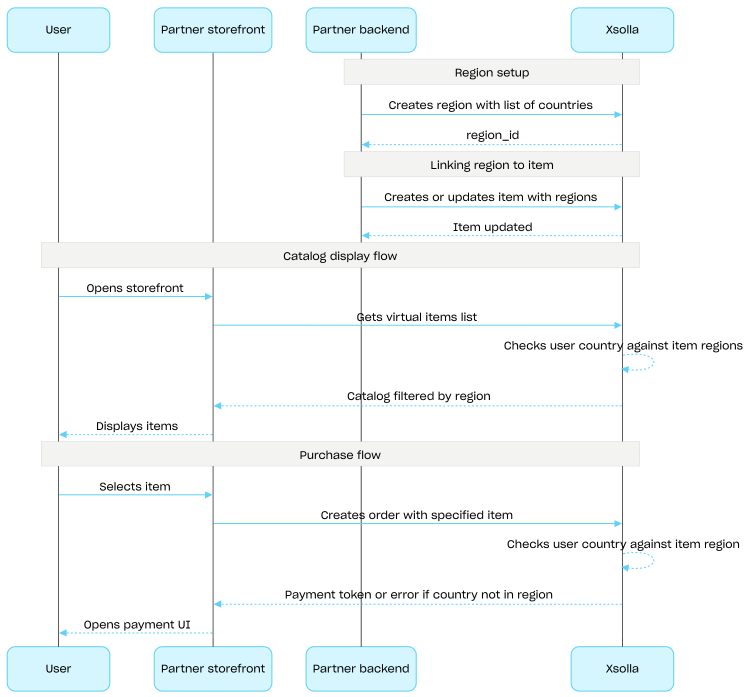
Regional sales restrictions setup flow:
- Create a region using the Create region API call, specifying the list of countries. The response returns a
region_idthat is required in the next step. - Link a virtual item to the region by passing its
region_idin theregionsarray when creating or updating the item. - Display the catalog to the user using API calls from the Catalog subsection, for example, the Get virtual items list API call. The user's country is determined by the
countryparameter or, if it is not provided, based on the user's IP address. Items unavailable in the user's country are not included in the catalog response. - When the user proceeds to pay for an item or cart, create an order:
- If the item was added to the cart — using the Create order with all items from particular cart or Create order with all items from current cart API call.
- For a fast purchase of a single item — using the Create order with specified item API call, passing the item SKU.
The response contains a token for opening the payment UI.
Note
Xsolla checks whether the user's country is included in the region specified for the item. If the country is not included in the item's region, the order cannot be created.
Xsolla checks whether the user's country is included in the region specified for the item. If the country is not included in the item's region, the order cannot be created.
- Implement opening the payment UI to pay for the order.
Operations