コンテンツへスキップ

カタログAPI (2.0.0)

Overview

  • Version: 2.0.0
  • Servers: https://store.xsolla.com/api
  • Contact Us by Email
  • Contact URL: https://xsolla.com/
  • Required TLS version: 1.2

The Catalog API allows you to configure a catalog of in-game items on the Xsolla side and display the catalog to users in your store.

The API allows you to manage the following catalog entities:

  • Virtual items — in-game items such as weapons, skins, boosters.
  • Virtual currency — virtual money used to purchase virtual goods.
  • Virtual currency packages — predefined bundles of virtual currency.
  • Bundles — combined packages of virtual items, currency, or game keys sold as a single SKU.
  • Game keys — keys for games and DLCs distributed via platforms like Steam or other DRM providers.
  • Groups — logical groupings for organizing and sorting items within the catalog.

API calls

The API is divided into the following groups:

  • Admin — calls for creating, updating, deleting, and configuring catalog items and groups. Authenticated via basic access authentication with your merchant or project credentials. Not intended for storefront use.
  • Catalog — calls for retrieving items and building custom storefronts for end users. Designed to handle high-load scenarios. Support optional user JWT authorization to return personalized data such as user-specific limits and active promotions.

Authentication

API calls require authentication either on behalf of a user or on behalf of a project. The authentication scheme used is specified in the Security section in the description of each call.

Authentication using user's JWT

User's JWT authentication is used when a request is sent from a browser, mobile application, or game. By default, the XsollaLoginUserJWT scheme is applied. For details on how to create a token, see the Xsolla Login API documentation.

The token is passed in the Authorization header in the following format: Authorization: Bearer <user_JWT>, where <user_JWT> is the user token. The token identifies the user and provides access to personalized data.

別の方法として、決済UIを開くためのトークンを使用することも可能です。

Basic HTTP authentication

Basic HTTP authentication is used for server-to-server interactions, when an API call is sent directly from your server rather than from a user's browser or mobile application. HTTP Basic authentication with an API key is typically used.

Note

The API key is confidential and must not be stored or used in client applications.

With basic server-side authentication, all API requests must include the following header:

  • for basicAuthAuthorization: Basic <your_authorization_basic_key>, where your_authorization_basic_key is the project_id:api_key pair encoded in Base64
  • for basicMerchantAuthAuthorization: Basic <your_authorization_basic_key>, where your_authorization_basic_key is the merchant_id:api_key pair encoded in Base64

You can find the parameter values in Publisher Account:

  • merchant_id is displayed:
    • In Company settings > Company.
    • In the URL in the browser address bar on any Publisher Account page. The URL has the following format: https://publisher.xsolla.com/<merchant_id>.
  • project_id is displayed:
    • Next to the project name in Publisher Account.
    • In the URL in the browser address bar when working on a project in Publisher Account. The URL has the following format: https://publisher.xsolla.com/<merchant_id>/projects/<project_id>.
  • api_key is shown in Publisher Account only at the time of creation and must be stored securely on your side. You can create an API key in the following sections:
Notice

If a required API call doesn't include the project_id path parameter, use an API key that is valid across all company projects for authorization.

For more information about working with API keys, see the API references.

Authentication with guest access support

AuthForCart認証スキームはカートでの購入用であり、以下の2つのモードに対応しています:

  1. Authentication with a user's JWT. The token is passed in the Authorization header in the following format: Authorization: Bearer <user_JWT>, where <user_JWT> is the user token. The token identifies the user and provides access to personalized data. Alternatively, you can use a token for opening the payment UI.

  2. Simplified mode without Authorization header. This mode is used only for unauthorized users and can be applied only for game key sales. Instead of a token, the request must include the following headers:

    • x-unauthorized-id with a request ID
    • x-user with the user's email address encoded in Base64

Core entity structure

Items of all types (virtual items, bundles, virtual currency, and keys) use a similar data structure. Understanding the basic structure simplifies working with the API and helps you navigate the documentation more easily.

Note

Some calls may include additional fields but they don't change the basic structure.

Identification

  • merchant_id — company ID in Publisher Account
  • project_id — project ID in Publisher Account
  • sku — item SKU, unique within the project

Store display

  • name — item name
  • description — item description
  • image_url — image URL
  • is_enabled — item availability
  • is_show_in_store — whether the item is displayed in the catalog

For more information about managing item availability in the catalog, see the documentation.

Organization

  • type — item type, for example, a virtual item (virtual_item) or bundle (bundle)
  • groups — groups the item belongs to
  • order — display order in the catalog

Sale conditions

  • prices — prices in real or virtual currency
  • limits — purchase limits
  • periods — availability periods
  • regions — regional restrictions

Example of core entity structure:

{
  "attributes": [],
  "bundle_type": "virtual_currency_package",
  "content": [
    {
      "description": {
        "en": "Main in-game currency"
      },
      "image_url": "https://.../image.png",
      "name": {
        "en": "Crystals",
        "de": "Kristalle"
      },
      "quantity": 500,
      "sku": "com.xsolla.crystal_2",
      "type": "virtual_currency"
    }
  ],
  "description": {
    "en": "Crystals x500"
  },
  "groups": [],
  "image_url": "https://.../image.png",
  "is_enabled": true,
  "is_free": false,
  "is_show_in_store": true,
  "limits": {
    "per_item": null,
    "per_user": null,
    "recurrent_schedule": null
  },
  "long_description": null,
  "media_list": [],
  "name": {
    "en": "Medium crystal pack"
  },
  "order": 1,
  "periods": [
    {
      "date_from": null,
      "date_until": "2020-08-11T20:00:00+03:00"
    }
  ],
  "prices": [
    {
      "amount": 20,
      "country_iso": "US",
      "currency": "USD",
      "is_default": true,
      "is_enabled": true
    }
  ],
  "regions": [],
  "sku": "com.xsolla.crystal_pack_2",
  "type": "bundle",
  "vc_prices": []
}

Basic purchase flow

The Xsolla API allows you to implement in-game store logic, including retrieving the item catalog, managing the cart, creating orders, and tracking their status. Depending on the integration scenario, API calls are divided into Admin and Catalog subsections, which use different authentication schemes.

The following example shows a basic flow for setting up and operating a store, from item creation to purchase.

Create items and groups (Admin)

Create an item catalog for your store, such as virtual items, bundles, or virtual currency.

Example API calls:

Set up promotions, chains, and limits (Admin)

Configure user acquisition and monetization tools, such as discounts, bonuses, daily rewards, or offer chains.

Example API calls:

Get item information (Client)

Configure item display in your application.

Notice

Do not use API calls from the Admin subsection to build a user catalog. These API calls have rate limits and aren't intended for user traffic.

Example API calls:

Note

By default, catalog API calls return items that are currently available in the store at the time of the request. To retrieve items that are not yet available or are no longer available, include the parameter "show_inactive_time_limited_items": 1 in the catalog request.

Sell items

You can sell items using the following methods:

  • Fast purchase — sell one SKU multiple times.
  • Cart purchase — the user adds items to the cart, removes items, and updates quantities within a single order.

If an item is purchased using virtual currency instead of real money, use the Create order with specified item purchased by virtual currency API call. The payment UI is not required, as the charge is processed when the API call is executed.

For free item purchase, use the Create order with specified free item API call or the Create order with free cart API call. The payment UI is not required — the order is immediately set to the done status.

Fast purchase

Use the client-side API call to create an order with a specified item. The call returns a token used to open the payment UI.

Note

Discount information is available to the user only in the payment UI. Promo codes are not supported.

Cart purchase

Cart setup and purchase can be performed on the client or on the server side.

Set up and purchase a cart on the client

Implement the logic of adding and removing items by yourself. Before calling the API for setting up a cart, you will not have information about which promotions will be applied to the purchase. This means that the total cost and details of the added bonus items will not be known.

Implement the following cart logic:

  1. After the player has filled a cart, use the Fill cart with items API call. The call returns the current information about the selected items (prices before and after discounts, bonus items).
  2. Update the cart contents based on user actions:
Note

To get the current status of the cart, use the Get current user's cart API call.
  1. Use the Create order with all items from current cart API call. The call returns the order ID and payment token. The newly created order is set to new status by default.

Set up and purchase a cart on the server

This setup option may take longer for setting the cart up, since each change to the cart must be accompanied by API calls.

Implement the following cart logic:

  1. After the player has filled a cart, use the Fill cart with items API call. The call returns current information about the selected items (prices before and after discounts, bonus items).
  2. Use the Create order with all items from current cart API call. The call returns the order ID and payment token. The newly created order is set to new status by default.

Open payment UI

Use the returned token to open the payment UI in a new window. Other ways to open the payment UI are described in the documentation.

ActionEndpoint
Open in production environment.https://secure.xsolla.com/paystation4/?token={token}
Open in sandbox mode.https://sandbox-secure.xsolla.com/paystation4/?token={token}
Note

Use sandbox mode during development and testing. Test purchases don't charge real accounts. You can use test bank cards.

After the first real payment is made, a strict sandbox payment policy takes effect. A payment in sandbox mode is available only to users specified in Publisher Account > Company settings > Users.

Buying virtual currency and items for real currency is possible only after signing a license agreement with Xsolla. To do this, in Publisher Account, go to Agreements & Taxes > Agreements, complete the agreement form, and wait for confirmation. It may take up to 3 business days to review the agreement.

To enable or disable sandbox mode, change the value of the sandbox parameter in the request for fast purchase and cart purchase. Sandbox mode is off by default.

Possible order statuses:

  • new — order created
  • paid — payment received
  • done — item delivered
  • canceled — order canceled
  • expired — order expired

Track order status using one of the following methods:

Pagination

API calls that return large sets of records (for example, when building a catalog) return data in pages. Pagination is a mechanism that limits the number of items returned in a single API response and allows you to retrieve subsequent pages sequentially.

Use the following parameters to control the number of returned items:

  • limit — number of items per page
  • offset — index of the first item on the page (numbering starts from 0)
  • has_more — indicates whether another page is available
  • total_items_count — total number of items

Example request:

GET /items?limit=20&offset=40

Response example:

{
  "items": [...],
  "has_more": true,
  "total_items_count": 135
}

It is recommended to send subsequent requests until the response returns has_more = false.

Date and time format

Dates and time values are passed in the ISO 8601 format.

The following are supported:

  • UTC offset
  • null value when there is no time restriction for displaying an item
  • Unix timestamp (in seconds) used in some fields

Format: YYYY-MM-DDTHH:MM:SS±HH:MM

Example: 2026-03-16T10:00:00+03:00

Localization

Xsolla supports localization of user-facing fields such as item name and description. Localized values are passed as an object where the language code is used as the key. The full list of supported languages is available in the documentation.

Supported fields

Localization can be specified for the following parameters:

  • name
  • description
  • long_description

Locale format

The locale key can be specified in one of the following formats:

  • Two-letter language code: en, ru
  • Five-letter language code: en-US, ru-RU, de-DE

Examples

Example with a two-letter language code:

{
  "name": {
    "en": "Starter Pack",
    "ru": "Стартовый набор"
  }
}

Example with a five-letter language code:

{
  "description": {
    "en-US": "Premium bundle",
    "de-DE": "Premium-Paket"
  }
}

Country and currency determination

The user's country determines catalog prices, the payment currency, and available payment methods in the payment UI. Depending on the API call, the country is determined as follows:

  • In client-side API calls, the country is determined by the IP address of the request.
  • In server-side API calls, the country is determined by the value of the user.country.value parameter or by the user's IP address from the X-User-Ip header. If both are passed, the user.country.value parameter takes precedence.
Note

Only IPv4 addresses are supported for country determination. Passing an IPv6 address may result in incorrect country and currency detection. If you use the server-side API call and cannot provide the user's IPv4 address, pass the country in the user.country.value parameter.

Error response format

If an error occurs, the API returns an HTTP status and a JSON response body. The full list of store-related errors is available in the documentation.

Response example:

{
  "errorCode": 1102,
  "errorMessage": "Validation error",
  "statusCode": 422,
  "transactionId": "c9e1a..."
}
  • errorCode — error code.
  • errorMessage — short error description.
  • statusCode — HTTP response status.
  • transactionId — request ID. Returned only in some cases.
  • errorMessageExtended — additional error details, such as request parameters. Returned only in some cases.

Extended response example:

{
  "errorCode": 7001,
  "errorMessage": "Chain not found",
  "errorMessageExtended": {
    "chain_id": "test_chain_id",
    "project_id": "test_project_id",
    "step_number": 2
  },
  "statusCode": 404
}

Common HTTP status codes

  • 400 — invalid request
  • 401 — authentication error
  • 403 — insufficient permissions
  • 404 — resource not found
  • 422 — validation error
  • 429 — rate limit exceeded

Recommendations

  • Handle the HTTP status and the response body together.
  • Use errorCode to process errors related to application logic.
  • Use transactionId to identify requests more quickly when analyzing errors.
OpenAPI記述をダウンロード
言語
サーバー
https://store.xsolla.com/api/
Mock server
https://xsolla.redocly.app/_mock/ja/api/catalog/

概要

仮想アイテムと仮想通貨を使用してインゲームストアを構築し、ユーザーへの表示方法を設定できます。以下のアイテムタイプが利用可能です:

  • 仮想アイテム — 武器、スキン、ブースターなどのゲーム内アイテム。実際のお金または仮想通貨で販売できます。
  • 仮想通貨 — 仮想アイテムの購入に使用されるゲーム内通貨。実際のお金または仮想通貨で販売できます。
  • 仮想通貨パッケージ — 仮想通貨の固定数量パック。実際のお金または仮想通貨で販売できます。

グループは、カタログ内のアイテムを整理するために使用されます。アイテムを論理的にグループ化し、表示方法を管理することができます。

管理者サブセクションのAPIコールを使用して、アイテムの作成、更新、削除を行います。

カタログサブセクションのAPIコールを使用して、アイテムのリストを取得し、ユーザーに表示します。

注意

管理者サブセクションのAPIコールを使用してストアカタログを構築しないでください。

注意

仮想アイテムリストを取得するAPIコールは、価格や属性を含む詳細なアイテムデータを返し、ページネーションをサポートします。ストアフロントでカタログページを表示するために使用してください。

すべての仮想アイテムリストを取得するAPIコールは、ページネーションなしでアイテムSKU、名前、説明、グループIDと名前を返します。クライアント側の検索やインデックス作成に使用してください。

仮想通貨で購入する場合、仮想通貨で購入された指定アイテムで注文を作成するAPIコールを使用してください。当該APIコールの実行時に課金処理が行われるため、決済UIを表示する必要はありません。

仮想通貨での購入フローの例:
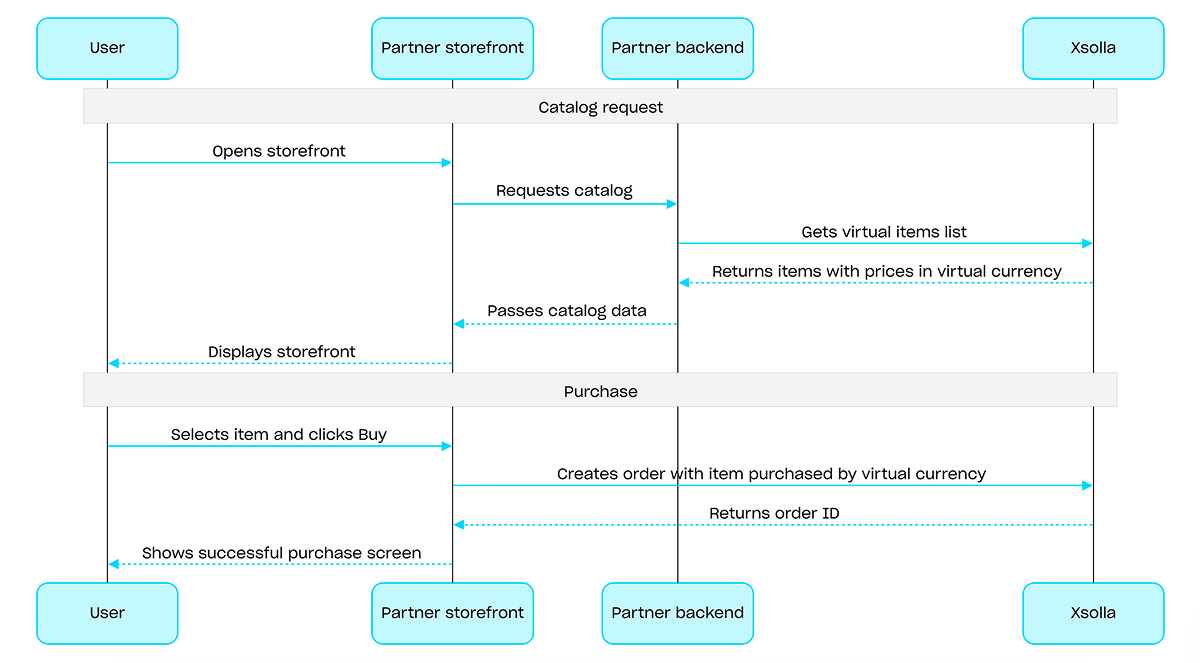
仮想通貨での購入フローの例:

操作
操作
操作

概要

ゲームキーは、ユーザーがゲームプラットフォーム上でゲームやDLCにアクセスできるようにするための、使い切りのユニークな半角英数字コードです。ゲームキーは、ダイレクトリンクストアUI、またはウィジェットを介して販売することができます。また、特定の国でゲームキーを販売するために、地域別制限を設定することも可能です。詳細については、ゲームキーパッケージセクションを参照してください。

ゲームキーを販売する際、ユーザー認証は必須ではありません。キーは、ユーザーがチェックアウト時に指定したメールアドレス宛に送信されます。また、認証を設定することで、個人用設定購入制限エンタイトルメントシステムといった追加のシナリオを有効にすることも可能です。詳細については、ゲームキー販売時の認証設定方法セクションを参照してください。

ゲームキーの販売フロー:

  1. ゲームを作成するAPIコールを使用して、ゲームを作成します。
  2. 地域制限を設定します。
  3. コードをアップロードするAPIコールを使用してゲームキーパッケージにキーをアップロードし、購入可能な状態にします。
  4. ゲームリストを取得するAPIコールを使用して、ユーザーの地域に応じた価格とともにゲームカタログを表示します。
  5. 注文を作成します。素早く購入できるようにするには、ゲームキーのSKUを渡し、現在のカート内の全アイテムを含む注文を作成するAPIコールを使用できます。レスポンスとして、決済UIを開くためのトークンが返されます。
  6. 注文の支払いを行うために、決済UIを開く処理を実装します。

決済完了の通知をタイムリーに受け取り、ユーザーにアイテムを付与するには、たとえば、ウェブフックを使用して注文ステータスのトラッキングを設定してください。キーは、ユーザーがチェックアウト時に指定したメールアドレス宛に送信され、注文ステータスはdoneに移行します。
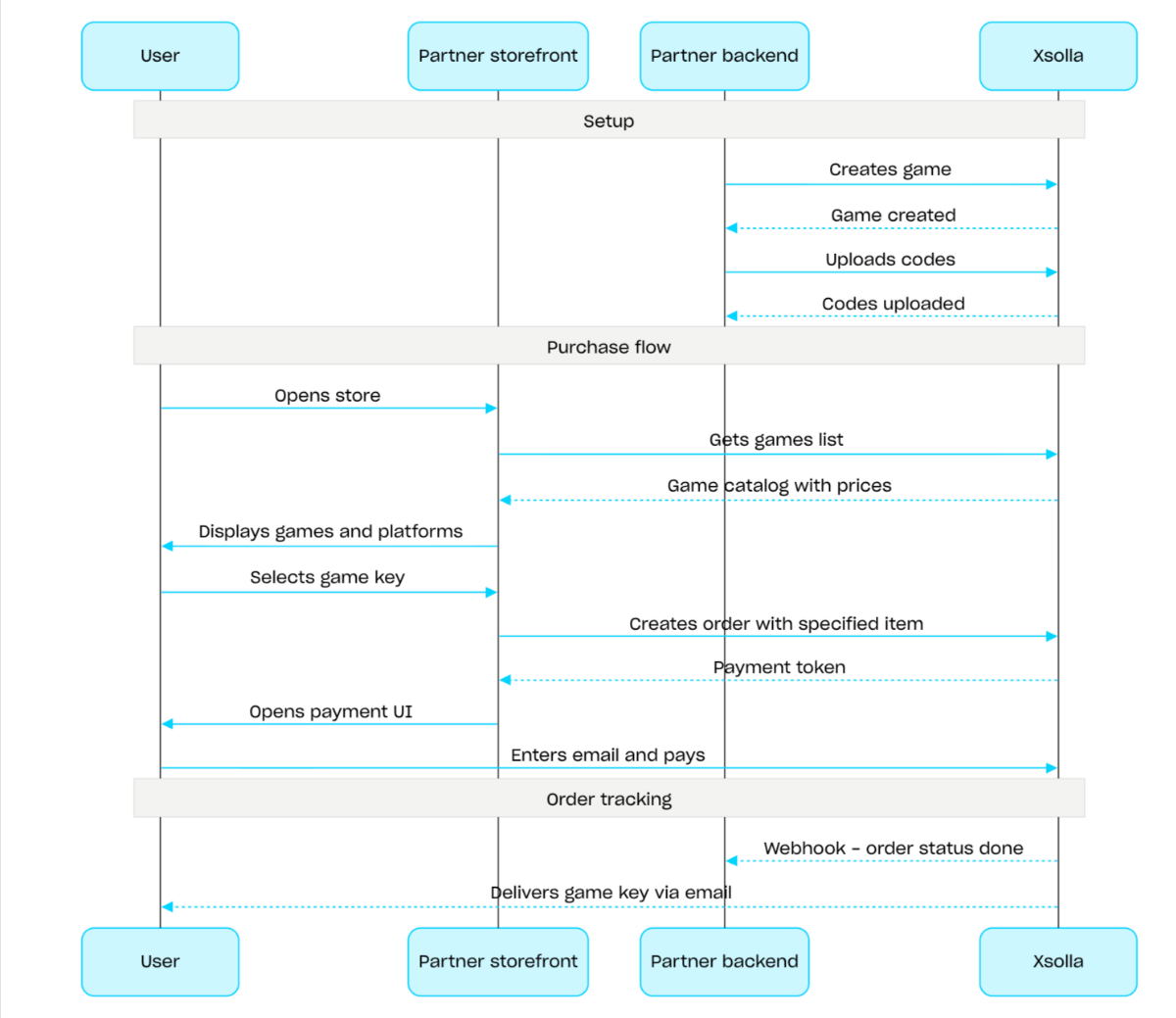
ゲームキー

操作
操作
操作

概要

バンドルとは、複数のアイテムを1つの単位としてセット販売するものです。バンドルには、仮想アイテム、仮想通貨、仮想通貨パッケージ、ゲームキー、および他のバンドルを含めることができます。バンドルを活用することで、スターターパック、季節限定オファー、特別セールなどを作成できます。

バンドルを操作するには、以下のAPIコールグループを使用します:

  • バンドルの作成、更新、削除、およびそれらの公開状態を管理するには、管理者サブセクションのAPIコールを使用します。
  • バンドルの情報取得には、カタログサブセクションのAPIコールを使用します。

購入制限は、バンドルの作成または更新時にlimitsオブジェクトを介して設定します。詳細については、制限の概要を参照してください。また、特定の国でアイテムを販売するために、地域制限を設定することも可能です。

注意

バンドルの設定に関する詳細情報については、バンドルセクションを参照してください。

バンドル管理のシナリオ:

  1. バンドルを作成する APIコールを使用して、バンドルを作成します。作成したバンドルを検証するには、バンドルを取得するAPIコールを使用します。プロジェクト内のすべてのバンドルを取得するには、バンドルリストを取得するAPIコールを使用します。
  2. 必要に応じて、バンドルを更新するAPIコールを使用し、バンドルの内容や設定を変更します。
  3. バンドルリストを取得する指定したバンドルを取得する、または指定したグループのバンドルリストを取得するAPIコールを使用して、ストアフロントにバンドルの表示ロジックを実装します。
  4. カートと決済セクションを使用して注文を作成します。たとえば、素早く購入できるようにするには、バンドルのSKUを渡し、指定したアイテムを含む注文を作成するAPIコールを使用できます。応答には、決済UIを開くためのトークンが含まれています。
  5. 注文の支払いを行うために、決済UIを開く処理を実装します。
  6. 決済が完了したアイテムのデータをタイムリーに受け取り、ユーザーにそれらを付与するために、たとえばウェブフックを使用して注文ステータスのトラッキングを設定します。
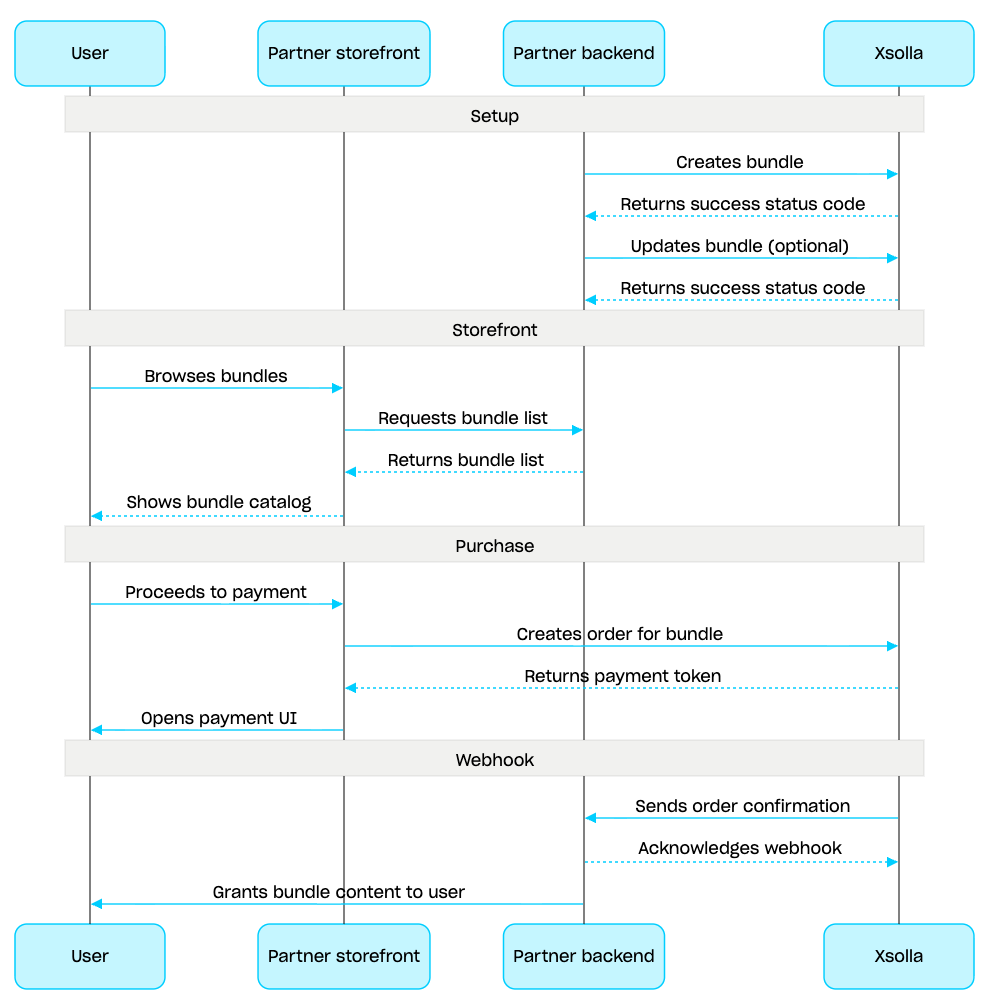
バンドル管理のシナリオ

操作
操作

概要

カートは、複数のアイテムを1つの注文にまとめることができる購入メカニズムです。ユーザーは、任意のタイプのアイテムを任意の数量で実際通貨で購入でき、プロモーションコードも使用できます。

カートはエクソーラ側で保存されます。セッションをまたいでカートを保存できるかどうかは、ユーザーが認証されているかによって異なります。

  • 認証されたユーザーの場合、カートは特定のユーザーに紐付けられ、同じユーザーとしてリクエストが送信される限り、セッションをまたいで保存されます。

  • 未認証ユーザーの場合、カートの保存はx-unauthorized-idヘッダーの成否に依存します。未認証ユーザーのカートをセッション間で保持するには、すべてのリクエストで同じx-unauthorized-idを渡してください。なお、このオプションはゲームキーの販売時のみ利用可能です。

カートを特定する方法は2つあります。ユーザーのJWTによる自動特定、またはカートID(cart_id)による特定です。

カート管理は、クライアント側とサーバー側の両方で利用可能です。

サーバー側では、ユーザーセッションを復元する場合などに、カートにアイテムを入れることができます。クライアント側では、以下の操作が利用可能です:

  • 現在のユーザーのカートまたはIDによるカートを取得する
  • カートにアイテムを追加する
  • カート内のアイテムを更新する
  • カートからアイテムを削除する

カートからアイテムを購入するには、注文作成のためのクライアントとサーバーのコールが使用されます。

カートの有効期限(TTL)は、デフォルトで72時間です。新しいアイテムが追加されるなど、カートの内容が変更されると、TTLは延長されます。

決済が成功した後も、カートは自動的にはクリアされません。カートをクリアするには、クライアントサイドの以下のAPIコールを使用してください:

カート使用シナリオ:

  1. ユーザーがアイテムを選択するストアUIを実装します。

  2. ユーザーがストアでアイテムを選択した際、たとえば カートへアイテムを追加するコールを使用してアイテムをカートに追加します。アイテム配列には、SKUと必要なアイテムの数量を渡す必要があります。

  3. カート表示UIを実装します。ユーザーがカートに移動した際、現在のユーザーのカートを取得するコールを使用してカートの内容を表示します。応答には、割引や適用されたプロモーションを含むアイテムの最終価格に関する情報が返されます。

  4. 注文の支払いを行うために、決済UIを開く処理を実装します。たとえば、特定のカートの全アイテムを含む注文を作成するコールを使用できます。応答には、決済UIを開くためのトークンが返されます。

  5. 決済が完了したアイテムのデータをタイムリーに受け取り、ユーザーにそれらを付与するために、たとえばウェブフックを使用して注文状況の追跡を設定します。

注意

ゲーム内およびオンラインでのアイテム販売を実装するには、統合ガイドを参照してください。
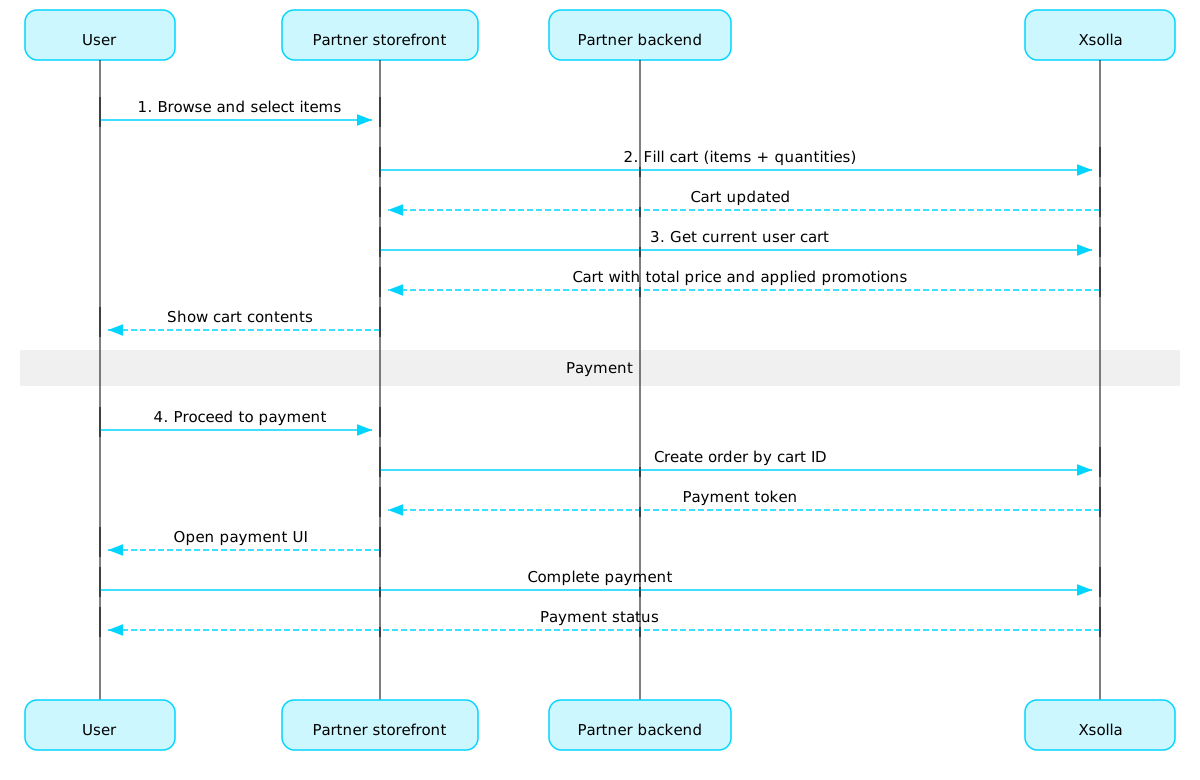
カートと決済フロー

注文のライフサイクル

注文のライフサイクルを理解することは、注文の追跡や、アイテムの付与といった購入後ロジックの正確な実装に役立ちます。

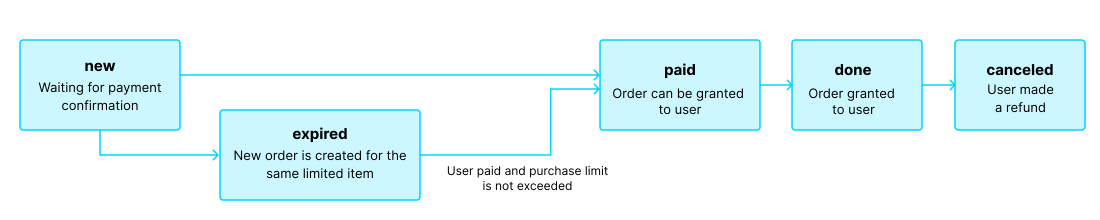
注文は以下のステータスを遷移します:

ステータス説明備考
new注文が作成されました。システムは支払い完了の確認を待っています。トランザクションステータスの説明は、ペイステーションAPIに関するドキュメントで確認できます。
paid注文の支払いが完了し(トランザクションがdoneステータスに移行)、ユーザーにアイテムを付与できる状態です支払いが確認されるまで、注文はnewステータスのままとなります。
doneアイテムがユーザーに付与されました。
canceled支払いが返金されました。トランザクションステータスrefundedに変更されると、注文はこのステータスに移行します。
expired制限 付きアイテム、プロモーションコード、またはプロモーションに対して新しい注文を作成すると、そのアイテムを含む過去の未払いの注文はすべてexpiredステータスに移行します。支払いが可能なのは最新の注文のみです。ユーザーが有効期限切れの注文に対して支払いを試みた場合、支払いUIに 2002 エラーが表示され、決済は失敗します。

注文のライフサイクル

注意

ユーザーが支払いを完了する間に注文がexpiredステータスに移行した場合でも、決済自体が成功したときは、注文はexpiredからpaidステータスに移行します。ただし、これが適用されるのは、決済時にその注文アイテムの購入制限数を超えない場合に限られます。

カート(クライアント側)

このセクションのコールを使用して、クライアント側でカートを管理します。

操作

カート(サーバー側)

このセクションのコールを使用して、サーバー側でカートを管理します。

操作

決済(クライアント側)

このセクションのコールを使用して、クライアント側で決済トークンを作成します。

操作

決済(サーバー側)

このセクションのコールを使用して、サーバー側で決済トークンを作成します。

操作

注文

このセクションのコールを使用して、注文に関する情報を取得します。

操作

無料アイテム

ユーザーに無料アイテムを付与するには、このセクションのコールを使用してください。

操作

概要

購入制限を使用すると、単一のユーザーまたはすべてのユーザーが購入できるアイテム数量を制限できます。スケジュールされた制限リセットを設定することもできます。

制限はエクソーラ側に保存され、パブリッシャーアカウントで個々のアイテムレベルで設定されるか、以下のAPIコールのlimitsオブジェクトを介して設定されます:

制限情報は、アイテムカタログを取得するための以下のAPIコールでitems.limitsオブジェクトに返されます:

制限グループの管理サブセクションに属するAPIコールにより、制限の現在状態の取得、および指定したユーザーに対する制限値の更新が可能となります(例:クエスト完了時におけるカウンターのリセット、残存数量の手動調整など)。

注意

カタログでの制限設定の詳細については、アイテム購入制限セクションを参照してください。
操作
操作
操作

マーチャント

操作

カタログ

このAPIは販売可能なアイテムや特定のアイテムを取得することができます。

操作

SKUによる販売可能なアイテムを取得Client-side

リクエスト

カタログを作成するためにSKUによる販売可能なアイテムを取得します。

注意

認証なしで使用した場合、このAPIコールは一般的なアイテムカタログデータを返します。認証を使用して、アイテムに関連する制限やプロモーションなどのパーソナライズされたユーザーデータを取得します。これを行うには、ユーザーのJWTをAuthorizationヘッダーに渡してください。ユーザーJWTの詳細については、このコールのセキュリティブロックを参照してください。
セキュリティ
XsollaLoginUserJWT
パス
project_idinteger必須

プロジェクトID。このパラメータは、パブリッシャーアカウントのプロジェクト名の横にあります。

例: 59080
skustring必須

アイテムSKU。

例: electric_shield
クエリ
promo_codestring[ 1 .. 128 ] characters

大文字と小文字を区別する一意のコードです。文字と数字が含まれます。

例: promo_code=WINTER2021
show_inactive_time_limited_itemsinteger

ユーザーに利用可能でない、期限付きアイテムを表示します。このようなアイテムの有効期間はまだ開始されていないか、すでに期限切れです。

デフォルト 0
例: show_inactive_time_limited_items=1
additional_fields[]Array of strings

応答に含める追加フィールド。デフォルトでは、これらのフィールドは返されません。追加フィールドを含めるには、必須の値を渡してください。

アイテム Enum"media_list""order""long_description""custom_attributes""item_order_in_group"
curl -i -X GET \
  'https://store.xsolla.com/api/v2/project/59080/items/sku/electric_shield?promo_code=WINTER2021&show_inactive_time_limited_items=1&additional_fields%5B%5D=media_list' \
  -H 'Authorization: Bearer <YOUR_JWT_HERE>'

レスポンス

販売可能なアイテムが正常に受信されました。

ボディapplication/json
item_idinteger

アイテム作成時に付与される内部一意のアイテムID。

例: 259774
skustring

一意のアイテムID。SKUには、小文字と大文字のラテン英数字、ピリオド、ダッシュ、およびアンダースコアのみが含まれます。

例: "electric_shield"
namestring

アイテム名。

例: "Electric shield"
groupsArray of objects

アイテムが所属するグループ。

groups[].​external_idstring

作成時に指定された外部アイテムグループID

例: "exclusive"
groups[].​namestring

グループ名。

例: "Exclusive"
groups[].​item_order_in_groupinteger

グループ内でのアイテムの配置位置は 表示順序を決定します。 additional_fields[]クエリパラメータを介してリクエストされた場合にのみ返されます。

例: 1
attributesArray of objects

アイテムに対応する属性と値のリスト。カタログのフィルタリングに使用できます。

attributes[].​external_idstring[ 1 .. 255 ] characters^[a-zA-Z0-9-_]+$

一意の属性ID。external_idには、小文字と大文字のラテン英数字、ダッシュ、およびアンダースコアのみが含まれます。

attributes[].​nameobject

属性名。

例: "Genre"
attributes[].​name.​property name*string or null追加プロパティ
attributes[].​valuesArray of objects
attributes[].​values[].​external_idstring[ 1 .. 255 ] characters^[-_.\d\w]+$

属性の一意の値ID。external_idには、半角小文字の英数字、ハイフン、アンダースコアのみを含めることができます。

attributes[].​values[].​valuestring

属性値。

例: "Strategy"
typestring

アイテムタイプ:virtual_good/virtual_currency/bundle/game_key/physical_good

Enum"virtual_good""virtual_currency""bundle""game_key""physical_good"
例: "virtual_good"
descriptionstring

アイテムの説明。

例: "Electric shield"
image_urlstring

画像URL。

例: "https://cdn3.xsolla.com/img/misc/images/d2d6b1b517e6a7f3765c3bb5a3cfb87d.png"
is_freeboolean

アイテムが無料かどうか。

priceobject

アイテム価格。

price.​amountstring

割引後のアイテム価格。

例: "9.99"
price.​amount_without_discountstring

アイテム価格。

例: "9.99"
price.​currencystring

商品価格通貨。ISO 4217 による3文字コード。

例: "USD"
virtual_pricesArray of objects

仮想価格。

virtual_prices[].​amountinteger

仮想通貨建てのアイテム価格。

例: 100
virtual_prices[].​amount_without_discountinteger

割引適用前の仮想通貨建てのアイテム価格。仮想通貨の価格には割引が適用されないため、常にamountと等しくなります。

例: 200
virtual_prices[].​calculated_priceobject
virtual_prices[].​calculated_price.​amountstring
virtual_prices[].​calculated_price.​amount_without_discountstring
virtual_prices[].​skustring

仮想通貨SKU。

例: "vc_gold"
virtual_prices[].​is_defaultboolean

仮想通貨でのデフォルト価格であるかどうか。

例: true
virtual_prices[].​image_urlstring or null

仮想通貨の画像URL。

例: "http://image.png"
virtual_prices[].​item_idinteger

エクソーラによって割り当てられた一意なアイテムID。

例: 259774
virtual_prices[].​namestring

仮想通貨名。

例: "Gold"
virtual_prices[].​typestring

アイテムタイプ。仮想通貨の場合はvirtual_currencyになります。

例: "virtual_currency"
virtual_prices[].​descriptionstring or null

仮想通貨の説明。

例: "In-game currency used to purchase weapons and upgrades"
can_be_boughtboolean

trueの場合、ユーザーはアイテムを購入することができます。

例: true
promotionsArray of objects

カート内の特定アイテムに適用されるプロモーション。この配列は、以下のケースで返されます:

  • 特定のアイテムに対して、割引キャンペーンが構成されている場合。

  • 選択されたアイテムの割引設定を持つプロモーションコードが適用された場合。

アイテムレベルのプロモーションが適用されない場合は、空の配列が返されます。

promotions[].​namestring
promotions[].​date_startstring or null(date-time)
promotions[].​date_endstring or null(date-time)
promotions[].​discountobject or null
promotions[].​discount.​percentstring or null
promotions[].​discount.​valuestring or null
promotions[].​bonusArray of objects
promotions[].​bonus[].​skustring
promotions[].​bonus[].​quantityinteger
promotions[].​bonus[].​typestring

ボーナスアイテムタイプ。

Enum"virtual_good""virtual_currency""bundle""physical_good""game_key""nft"
promotions[].​bonus[].​namestring

ボーナスアイテムの名前です。ボーナスアイテムのタイプphysical_goodでは使用できません。

promotions[].​bonus[].​image_urlstring

ボーナスアイテムの画像URLです。ボーナスアイテムのタイプ physical_good では使用できません。ー

promotions[].​bonus[].​bundle_typestring

ボーナスバンドルアイテムタイプ。ボーナスアイテムタイプbundleのみで利用可能です。

Enum"standard""virtual_currency_package"
promotions[].​limitsobject
promotions[].​limits.​per_userobject
promotions[].​limits.​per_user.​availableinteger
promotions[].​limits.​per_user.​totalinteger
virtual_item_typestring

仮想アイテムタイプ。

指定可能な値:

  • consumable — 使用後にインベントリから消滅するアイテム(例:弾薬など)。
  • non_consumable — 期間の制限なくインベントリに残り続けるアイテム。
  • non_renewing_subscription — 制限された期間内に限り、サービスやコンテンツへのアクセス権を付与する期間限定アイテム。
Enum"consumable""non_consumable""non_renewing_subscription"
例: "non-consumable"
limitsobject or null

アイテム制限。

limits.​per_userobject or null

ユーザーのアイテム制限。

limits.​per_user.​totalinteger

1ユーザーあたりのユーザーが購入できるアイテムの最大数。

例: 5
limits.​per_user.​availableinteger

現在のユーザーが購入できるアイテムの残り数。

例: 3
limits.​per_user.​recurrent_schedule(object or null)
One of:

ユーザーのアイテム制限の定期更新期間。

object or null
limits.​per_user.​limit_exceeded_visibilitystring

購入制限に達してから次回の制限リセットまでの間、カタログ内でのアイテムの表示・非表示を決定します。

これは、recurrent_schedule配列で定期的な制限リセットが設定されているアイテムに適用されます。

購入制限のリセットが設定されていない場合、購入制限に達した後は、limit_exceeded_visibilityの値に関わらず、そのアイテムはカタログに表示されなくなります。

指定可能な値:

  • show — 購入制限に達した後も、カタログ取得用のAPIコールに対してアイテム情報が返却されます。クライアントサイドのカタログ取得APIコールにおいては、制限に達した時点でアイテムにcan_be_bought: falseフラグが付与されて返されます。次回のリセット日時はreset_next_dateに格納されて返却されます。
  • hide — 購入制限に達した時点から、制限値がリセットされるまでの間、カタログ取得用のAPIコールにおいてアイテムは返されなくなります。
Enum"show""hide"
limits.​per_itemobject or null

アイテムのアイテム制限。

limits.​per_item.​totalinteger

すべてのユーザーが購入できるアイテムの最大数。

例: 5
limits.​per_item.​availableinteger

すべてのユーザーが購入できるアイテムの残り数。

例: 3
custom_attributesobject(json)

アイテムの属性と値を含むJSONオブジェクト。

vp_rewardsArray of objects

アイテムのバリューポイント報酬のリスト。

vp_rewards[].​item_idinteger

内部の一意のアイテムID。

vp_rewards[].​skustring

一意のバリューポイントID。

vp_rewards[].​amountinteger

バリューポイントの量。

vp_rewards[].​namestring

バリューポイント名。

vp_rewards[].​image_urlstring

画像URL。

vp_rewards[].​is_clanboolean

バリューポイントがクランリワードチェーンで使用されるかどうか。

レスポンス
application/json
{ "item_id": 259774, "sku": "com.xsolla.electric_shield_1", "type": "virtual_good", "name": "Electric shield", "description": "Electric shield", "image_url": "https://cdn3.xsolla.com/img/misc/images/d2d6b1b517e6a7f3765c3bb5a3cfb87d.png", "price": { "amount": "9.99", "amount_without_discount": "9.99", "currency": "USD" }, "virtual_prices": [ {}, {}, {} ], "can_be_bought": true, "promotions": [ {} ], "attributes": [], "is_free": false, "groups": [ {} ], "virtual_item_type": "non_consumable", "limits": { "per_user": {} }, "vp_rewards": [ {}, {} ], "custom_attributes": { "purchased": 0, "attr": "value" } }

指定されたグループの販売可能なアイテムリストを取得Client-side

リクエスト

カタログ構築のために、指定されたグループから販売可能なアイテムのリストを取得します。

注意

すべてのプロジェクトには、応答で取得できるアイテム数に制限があります。デフォルトおよび最大値は1応答あたり50アイテムです。ページごとにデータを取得するには、制限オフセットフィールドを使用してください。

注意

認証なしで使用した場合、このAPIコールは一般的なアイテムカタログデータを返します。認証を使用して、アイテムに関連する制限やプロモーションなどのパーソナライズされたユーザーデータを取得します。これを行うには、ユーザーのJWTをAuthorizationヘッダーに渡してください。ユーザーJWTの詳細については、このコールのセキュリティブロックを参照してください。
セキュリティ
XsollaLoginUserJWT
パス
project_idinteger必須

プロジェクトID。このパラメータは、パブリッシャーアカウントのプロジェクト名の横にあります。

例: 59080
external_idstring必須

グループexternal ID。

デフォルト "armour"
クエリ
limitinteger>= 1

ページでの要素数の制限。

例: limit=50
offsetinteger>= 0

リストが生成される要素番号(カウントは0から始まります)。

例: offset=0
localestring

応答言語。ISO 639-1に準拠した2文字の小文字の言語コード(例:en)。namedescriptionなどのローカリゼーションフィールドでは5文字のロケールコード(例:en-US)がサポートされていますが、応答内では2文字のコードに正規化されます。サポートされている言語の完全なリストは、ドキュメントで確認できます。

デフォルト "en"
additional_fields[]Array of strings

応答に含める追加フィールド。デフォルトでは、これらのフィールドは返されません。追加フィールドを含めるには、必須の値を渡してください。

アイテム Enum"media_list""order""long_description""custom_attributes""item_order_in_group"
countrystring

ISO 3166-1 alpha-2に従った2文字の大文字の国名コード。エクソーラがサポートする国国を決定するプロセスに関する詳細情報については、ドキュメントを確認してください。

例: country=US
promo_codestring[ 1 .. 128 ] characters

大文字と小文字を区別する一意のコードです。文字と数字が含まれます。

例: promo_code=WINTER2021
show_inactive_time_limited_itemsinteger

ユーザーに利用可能でない、期限付きアイテムを表示します。このようなアイテムの有効期間はまだ開始されていないか、すでに期限切れです。

デフォルト 0
例: show_inactive_time_limited_items=1
curl -i -X GET \
  'https://store.xsolla.com/api/v2/project/59080/items/group/{external_id}?limit=50&offset=0&locale=en&additional_fields%5B%5D=media_list&country=US&promo_code=WINTER2021&show_inactive_time_limited_items=1' \
  -H 'Authorization: Bearer <YOUR_JWT_HERE>'

レスポンス

指定されたグループの販売可能なアイテムのリストは正常に受信されました。

ボディapplication/json
has_moreboolean

ページ数がもっとあることを示す指標として使用されます。

itemsArray of objects
例: [{"item_id":259774,"sku":"com.xsolla.electric_shield_1","type":"virtual_good","name":"Electric shield","description":"Electric shield","image_url":"https://cdn3.xsolla.com/img/misc/images/d2d6b1b517e6a7f3765c3bb5a3cfb87d.png","price":{"amount":"9.99","amount_without_discount":"9.99","currency":"USD"},"virtual_prices":[{"description":null,"image_url":"https://cdn3.xsolla.com/img/misc/images/e2e9ce8b00eb0190c161c4258b899101.png","item_id":259765,"sku":"com.xsolla.gold_1","name":"Gold","type":"virtual_currency","amount":10,"amount_without_discount":10,"calculated_price":{"amount":"10.00","amount_without_discount":"10.00"},"is_default":true},{"description":null,"image_url":"https://cdn3.xsolla.com/img/misc/images/015e4f4ea4deb1e2c92d5c21a4d58309.png","item_id":259766,"sku":"com.xsolla.silver_1","name":"Silver","type":"virtual_currency","amount":20,"amount_without_discount":20,"calculated_price":{"amount":"20.00","amount_without_discount":"20.00"},"is_default":false},{"description":null,"image_url":"https://cdn3.xsolla.com/img/misc/images/b0beedd5763b612bd3a5631e6cb1d1ff.png","item_id":259767,"sku":"com.xsolla.bronze_1","name":"Bronze","type":"virtual_currency","amount":200,"amount_without_discount":200,"calculated_price":{"amount":"200.00","amount_without_discount":"200.00"},"is_default":false}],"can_be_bought":true,"promotions":[{"name":"Bonus promotion","date_start":"2020-04-15T16:16:00+03:00","date_end":"2026-04-15T16:16:00+03:00","discount":{"percent":"50.00"},"bonus":[{"quantity":1,"name":"Xsolla Minigun","image_url":"https://cdn.xsolla.net/img/misc/images/2fc5c491a47413a8e8000447889093c2.png","sku":"com.xsolla.minigun_1","type":"virtual_good"}]}],"attributes":[],"is_free":false,"groups":[{"external_id":"armour","name":"Armour"}],"virtual_item_type":"non_consumable","limits":{"per_user":{"total":5,"available":3,"recurrent_schedule":{"interval_type":"weekly","reset_next_date":1746057600},"limit_exceeded_visibility":"show"}},"vp_rewards":[{"item_id":175232,"sku":"com.xsolla.value_point_1","amount":130,"name":"Value point","image_url":"https://cdn3.xsolla.com/img/misc/images/54c0cf9d345817cdacfdde198db178e0.jpg"},{"item_id":186321,"sku":"clan_value_point_sku_1","amount":50,"name":"Clan Reward VP 1","image_url":"https://cdn3.xsolla.com/img/misc/images/54c0cf9d345817cdacfdde198db178e0.jpg","is_clan":true}]},{"item_id":259775,"sku":"com.xsolla.royal_shield_1","type":"virtual_good","name":"Royal shield","description":"Royal shield","image_url":"https://cdn3.xsolla.com/img/misc/images/ed417975312a52efeeab8b039ff25cb1.png","price":{"amount":"19.99","amount_without_discount":"19.99","currency":"USD"},"virtual_prices":[{"description":null,"image_url":"https://cdn3.xsolla.com/img/misc/images/e2e9ce8b00eb0190c161c4258b899101.png","item_id":259765,"sku":"com.xsolla.gold_2","name":"Gold","type":"virtual_currency","amount":20,"amount_without_discount":20,"calculated_price":{"amount":"20.00","amount_without_discount":"20.00"},"is_default":true},{"description":null,"image_url":"https://cdn3.xsolla.com/img/misc/images/015e4f4ea4deb1e2c92d5c21a4d58309.png","item_id":259766,"sku":"com.xsolla.silver_2","name":"Silver","type":"virtual_currency","amount":40,"amount_without_discount":40,"calculated_price":{"amount":"40.00","amount_without_discount":"40.00"},"is_default":false},{"description":null,"image_url":"https://cdn3.xsolla.com/img/misc/images/b0beedd5763b612bd3a5631e6cb1d1ff.png","item_id":259767,"sku":"com.xsolla.bronze_2","name":"Bronze","type":"virtual_currency","amount":400,"amount_without_discount":400,"calculated_price":{"amount":"400.00","amount_without_discount":"400.00"},"is_default":false}],"can_be_bought":true,"promotions":[],"attributes":[],"is_free":false,"groups":[{"external_id":"armour","name":"Armour"}],"virtual_item_type":"non_consumable","vp_rewards":[]},{"item_id":259776,"sku":"com.xsolla.ancient_helmet_1","type":"virtual_good","name":"Ancient helmet","description":"Ancient helmet","image_url":"https://cdn3.xsolla.com/img/misc/images/e70e16d9626f435e519fc8e1cc1e7176.png","price":{"amount":"1.99","amount_without_discount":"1.99","currency":"USD"},"virtual_prices":[{"description":null,"image_url":"https://cdn3.xsolla.com/img/misc/images/e2e9ce8b00eb0190c161c4258b899101.png","item_id":259765,"sku":"com.xsolla.gold_3","name":"Gold","type":"virtual_currency","amount":2,"amount_without_discount":2,"calculated_price":{"amount":"2.00","amount_without_discount":"2.00"},"is_default":true},{"description":null,"image_url":"https://cdn3.xsolla.com/img/misc/images/015e4f4ea4deb1e2c92d5c21a4d58309.png","item_id":259766,"sku":"com.xsolla.silver_3","name":"Silver","type":"virtual_currency","amount":4,"amount_without_discount":4,"calculated_price":{"amount":"4.00","amount_without_discount":"4.00"},"is_default":false},{"description":null,"image_url":"https://cdn3.xsolla.com/img/misc/images/b0beedd5763b612bd3a5631e6cb1d1ff.png","item_id":259767,"sku":"com.xsolla.bronze_3","name":"Bronze","type":"virtual_currency","amount":40,"amount_without_discount":40,"calculated_price":{"amount":"40.00","amount_without_discount":"40.00"},"is_default":false}],"can_be_bought":true,"promotions":[{"name":"Bonus promotion","date_start":"2020-04-15T16:16:00+03:00","date_end":"2026-04-15T16:16:00+03:00","discount":{"percent":"50.00"},"bonus":[{"quantity":1,"name":"Xsolla Minigun","image_url":"https://cdn.xsolla.net/img/misc/images/2fc5c491a47413a8e8000447889093c2.png","sku":"com.xsolla.minigun_1","type":"virtual_good"}]}],"attributes":[],"is_free":false,"groups":[{"external_id":"armour","name":"Armour"}],"virtual_item_type":"non_consumable","vp_rewards":[]},{"item_id":259777,"sku":"com.xsolla.wooden_helmet_1","type":"virtual_good","name":"Wooden helmet","description":"Wooden helmet","image_url":"https://cdn3.xsolla.com/img/misc/images/40d2812e52ad9d988ac20fc842fc66f0.png","price":{"amount":"0.99","amount_without_discount":"0.99","currency":"USD"},"virtual_prices":[{"description":null,"image_url":"https://cdn3.xsolla.com/img/misc/images/e2e9ce8b00eb0190c161c4258b899101.png","item_id":259765,"sku":"com.xsolla.gold_4","name":"Gold","type":"virtual_currency","amount":1,"amount_without_discount":1,"calculated_price":{"amount":"1.00","amount_without_discount":"1.00"},"is_default":true},{"description":null,"image_url":"https://cdn3.xsolla.com/img/misc/images/015e4f4ea4deb1e2c92d5c21a4d58309.png","item_id":259766,"sku":"com.xsolla.silver_4","name":"Silver","type":"virtual_currency","amount":2,"amount_without_discount":2,"calculated_price":{"amount":"2.00","amount_without_discount":"2.00"},"is_default":false},{"description":null,"image_url":"https://cdn3.xsolla.com/img/misc/images/b0beedd5763b612bd3a5631e6cb1d1ff.png","item_id":259767,"sku":"com.xsolla.bronze_4","name":"Bronze","type":"virtual_currency","amount":20,"amount_without_discount":20,"calculated_price":{"amount":"20.00","amount_without_discount":"20.00"},"is_default":false}],"can_be_bought":true,"promotions":[],"attributes":[],"is_free":false,"groups":[{"external_id":"armour","name":"Armour"}],"virtual_item_type":"non_consumable","vp_rewards":[]}]
items[].​item_idinteger

アイテム作成時に付与される内部一意のアイテムID。

例: 259774
items[].​skustring

一意のアイテムID。SKUには、小文字と大文字のラテン英数字、ピリオド、ダッシュ、およびアンダースコアのみが含まれます。

例: "com.xsolla.electric_shield_1"
items[].​namestring

アイテム名。

例: "Electric shield"
items[].​groupsArray of objects

アイテムが所属するグループ。

items[].​groups[].​external_idstring

作成時に指定された外部アイテムグループID

例: "exclusive"
items[].​groups[].​namestring

グループ名。

例: "Exclusive"
items[].​groups[].​item_order_in_groupinteger

グループ内でのアイテムの配置位置は 表示順序を決定します。 additional_fields[]クエリパラメータを介してリクエストされた場合にのみ返されます。

例: 1
items[].​attributesArray of objects

アイテムに対応する属性と値のリスト。カタログのフィルタリングに使用できます。

items[].​attributes[].​external_idstring[ 1 .. 255 ] characters^[a-zA-Z0-9-_]+$

一意の属性ID。external_idには、小文字と大文字のラテン英数字、ダッシュ、およびアンダースコアのみが含まれます。

items[].​attributes[].​nameobject

属性名。

例: "Genre"
items[].​attributes[].​name.​property name*string or null追加プロパティ
items[].​attributes[].​valuesArray of objects
items[].​attributes[].​values[].​external_idstring[ 1 .. 255 ] characters^[-_.\d\w]+$

属性の一意の値ID。external_idには、半角小文字の英数字、ハイフン、アンダースコアのみを含めることができます。

items[].​attributes[].​values[].​valuestring

属性値。

例: "Strategy"
items[].​typestring

アイテムタイプ:virtual_good/virtual_currency/bundle/game_key/physical_good

Enum"virtual_good""virtual_currency""bundle""game_key""physical_good"
例: "virtual_good"
items[].​descriptionstring or null

アイテムの説明。

例: "Electric shield"
items[].​image_urlstring

画像URL。

例: "https://cdn3.xsolla.com/img/misc/images/d2d6b1b517e6a7f3765c3bb5a3cfb87d.png"
items[].​is_freeboolean

アイテムが無料かどうか。

items[].​priceobject

アイテム価格。

items[].​price.​amountstring

割引後のアイテム価格。

例: "9.99"
items[].​price.​amount_without_discountstring

アイテム価格。

例: "9.99"
items[].​price.​currencystring

商品価格通貨。ISO 4217 による3文字コード。

例: "USD"
items[].​virtual_pricesArray of objects

仮想価格。

items[].​virtual_prices[].​amountinteger

仮想通貨建てのアイテム価格。

例: 100
items[].​virtual_prices[].​amount_without_discountinteger

割引適用前の仮想通貨建てのアイテム価格。仮想通貨の価格には割引が適用されないため、常にamountと等しくなります。

例: 200
items[].​virtual_prices[].​calculated_priceobject
items[].​virtual_prices[].​calculated_price.​amountstring
items[].​virtual_prices[].​calculated_price.​amount_without_discountstring
items[].​virtual_prices[].​skustring

仮想通貨SKU。

例: "vc_gold"
items[].​virtual_prices[].​is_defaultboolean

仮想通貨でのデフォルト価格であるかどうか。

例: true
items[].​virtual_prices[].​image_urlstring or null

仮想通貨の画像URL。

例: "http://image.png"
items[].​virtual_prices[].​item_idinteger

エクソーラによって割り当てられた一意なアイテムID。

例: 259774
items[].​virtual_prices[].​namestring

仮想通貨名。

例: "Gold"
items[].​virtual_prices[].​typestring

アイテムタイプ。仮想通貨の場合はvirtual_currencyになります。

例: "virtual_currency"
items[].​virtual_prices[].​descriptionstring or null

仮想通貨の説明。

例: "In-game currency used to purchase weapons and upgrades"
items[].​virtual_item_typestring

仮想アイテムタイプ。

指定可能な値:

  • consumable — 使用後にインベントリから消滅するアイテム(例:弾薬など)。
  • non_consumable — 期間の制限なくインベントリに残り続けるアイテム。
  • non_renewing_subscription — 制限された期間内に限り、サービスやコンテンツへのアクセス権を付与する期間限定アイテム。
Enum"consumable""non_consumable""non_renewing_subscription"
例: "non_consumable"
items[].​can_be_boughtboolean

trueの場合、ユーザーはアイテムを購入することができます。

例: true
items[].​promotionsArray of objects

カート内の特定アイテムに適用されるプロモーション。この配列は、以下のケースで返されます:

  • 特定のアイテムに対して、割引キャンペーンが構成されている場合。

  • 選択されたアイテムの割引設定を持つプロモーションコードが適用された場合。

アイテムレベルのプロモーションが適用されない場合は、空の配列が返されます。

items[].​promotions[].​namestring
items[].​promotions[].​date_startstring or null(date-time)
items[].​promotions[].​date_endstring or null(date-time)
items[].​promotions[].​discountobject or null
items[].​promotions[].​discount.​percentstring or null
items[].​promotions[].​discount.​valuestring or null
items[].​promotions[].​bonusArray of objects
items[].​promotions[].​bonus[].​skustring
items[].​promotions[].​bonus[].​quantityinteger
items[].​promotions[].​bonus[].​typestring

ボーナスアイテムタイプ。

Enum"virtual_good""virtual_currency""bundle""physical_good""game_key""nft"
items[].​promotions[].​bonus[].​namestring

ボーナスアイテムの名前です。ボーナスアイテムのタイプphysical_goodでは使用できません。

items[].​promotions[].​bonus[].​image_urlstring

ボーナスアイテムの画像URLです。ボーナスアイテムのタイプ physical_good では使用できません。ー

items[].​promotions[].​bonus[].​bundle_typestring

ボーナスバンドルアイテムタイプ。ボーナスアイテムタイプbundleのみで利用可能です。

Enum"standard""virtual_currency_package"
items[].​promotions[].​limitsobject
items[].​promotions[].​limits.​per_userobject
items[].​promotions[].​limits.​per_user.​availableinteger
items[].​promotions[].​limits.​per_user.​totalinteger
items[].​limitsobject or null

アイテム制限。

items[].​limits.​per_userobject or null

ユーザーのアイテム制限。

items[].​limits.​per_user.​totalinteger

1ユーザーあたりのユーザーが購入できるアイテムの最大数。

例: 5
items[].​limits.​per_user.​availableinteger

現在のユーザーが購入できるアイテムの残り数。

例: 3
items[].​limits.​per_user.​recurrent_schedule(object or null)
One of:

ユーザーのアイテム制限の定期更新期間。

object or null
items[].​limits.​per_user.​limit_exceeded_visibilitystring

購入制限に達してから次回の制限リセットまでの間、カタログ内でのアイテムの表示・非表示を決定します。

これは、recurrent_schedule配列で定期的な制限リセットが設定されているアイテムに適用されます。

購入制限のリセットが設定されていない場合、購入制限に達した後は、limit_exceeded_visibilityの値に関わらず、そのアイテムはカタログに表示されなくなります。

指定可能な値:

  • show — 購入制限に達した後も、カタログ取得用のAPIコールに対してアイテム情報が返却されます。クライアントサイドのカタログ取得APIコールにおいては、制限に達した時点でアイテムにcan_be_bought: falseフラグが付与されて返されます。次回のリセット日時はreset_next_dateに格納されて返却されます。
  • hide — 購入制限に達した時点から、制限値がリセットされるまでの間、カタログ取得用のAPIコールにおいてアイテムは返されなくなります。
Enum"show""hide"
items[].​limits.​per_itemobject or null

アイテムのアイテム制限。

items[].​limits.​per_item.​totalinteger

すべてのユーザーが購入できるアイテムの最大数。

例: 5
items[].​limits.​per_item.​availableinteger

すべてのユーザーが購入できるアイテムの残り数。

例: 3
items[].​custom_attributesobject(json)

アイテムの属性と値を含むJSONオブジェクト。

items[].​vp_rewardsArray of objects

アイテムのバリューポイント報酬のリスト。

items[].​vp_rewards[].​item_idinteger

内部の一意のアイテムID。

items[].​vp_rewards[].​skustring

一意のバリューポイントID。

items[].​vp_rewards[].​amountinteger

バリューポイントの量。

items[].​vp_rewards[].​namestring

バリューポイント名。

items[].​vp_rewards[].​image_urlstring

画像URL。

items[].​vp_rewards[].​is_clanboolean

バリューポイントがクランリワードチェーンで使用されるかどうか。

レスポンス
application/json
{ "has_more": true, "items": [ {}, {}, {}, {} ] }

共通地域

地域別の販売制限を使用すると、特定の国または国グループにおけるアイテムの可用性を管理できます。例えば、ライセンスの制約により、特定の国だけでゲームを販売するといったことが可能です。

制限の設定には「地域」を使用します。各地域は、1つ以上の国を単一のregion_idでまとめたものです。アイテムを1つ以上の地域に関連付けることができます。

アイテムの可用性は、以下のように判定されます:

  • アイテムに地域の指定がない場合、すべての国で購入可能です。
  • アイテムに地域が指定されており、ユーザーの国がそのいずれかに含まれている場合、そのユーザーはアイテムを購入できます。
  • アイテムに地域が指定されており、ユーザーの国がどの地域にも含まれていない場合、そのユーザーはアイテムを購入できません。

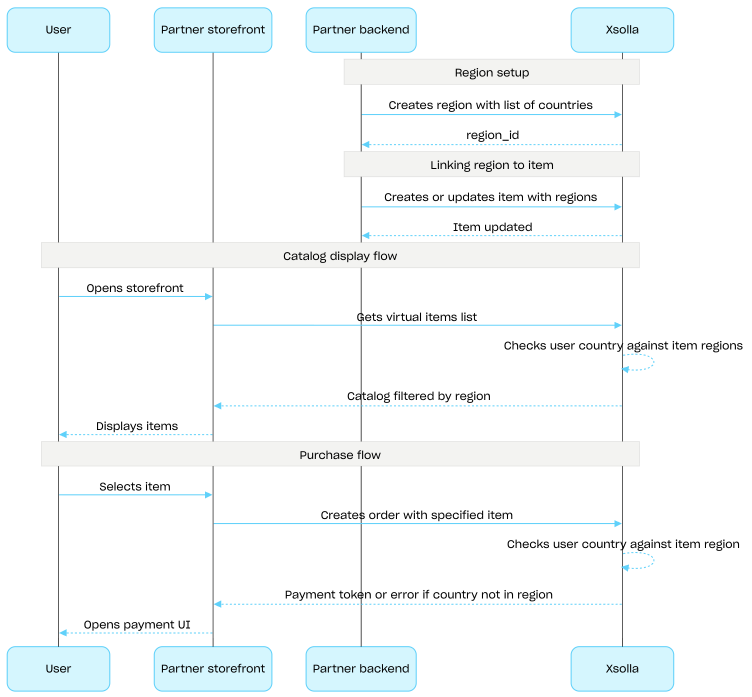
ユーザーの国は、カタログセクションからのAPIコールを通じてカタログをリクエストする際、countryパラメータとして渡されます。このパラメータが渡されない場合は、ユーザーのIPアドレスに基づいて国が判定されます。

ユーザーの国とアイテムの地域との照合は、カタログのリクエスト時と注文作成時の2回行われます。購入不可のアイテムはカタログのレスポンスには含まれず、そのようなアイテムを含む注文が作成されることはありません。

地域の作成、更新、および削除には、共通地域グループのAPIコールを使用します。

地域別の販売制限のセットアップフロー:

  1. 地域を作成するAPIコールを使用して、対象となる国のリストを指定して地域を作成します。レスポンスには、次のステップで必要となるregion_idが返されます。
  2. アイテムを作成する際、または更新する際に、regions配列にそのregion_idを渡すことで、仮想アイテムを地域に関連付けます。
  3. カタログセクションのAPIコール(例:仮想アイテムリストを取得するAPIコール)を使用して、ユーザーにカタログを表示します。ユーザーの国はcountryパラメータによって決定されます。このパラメータが提供されない場合は、ユーザーのIPアドレスに基づいて判定されます。ユーザーの国で利用不可のアイテムは、カタログの応答には含まれません。
  4. ユーザーがアイテムまたはカートの決済に進む際に、注文を作成します:

レスポンスには、決済UIを開くためのトークンが含まれています。

注意

エクソーラは、ユーザーの国がアイテムに指定された地域に含まれているかを確認します。国がアイテムの地域に含まれていない場合、注文を作成することはできません。

  1. 注文を支払うための決済UIを開く処理を実装します。

Common regions

操作

ウェブフック

操作
操作
操作
操作