- Получение цепочки наград текущего пользователя
LiveOps API (2.0.0)
- Версия: 2.0.0
- Серверы:
https://store.xsolla.com/api - Свяжитесь с нами по электронной почте
- Адрес для связи: https://xsolla.com/
- Требуемая версия TLS: 1.2
LiveOps — это набор инструментов для повышения вовлеченности пользователей с помощью акций и персонализированных предложений.
Используйте методы API, чтобы управлять такими возможностями, как:
- Промоакции — создание и управление купонами, промокодами, скидками и бонусными кампаниями.
- Персонализация — возможность задавать условия отображения каталога товаров и применения акций только для определенного круга авторизованных пользователей.
- Лимиты промоакций — настройка лимитов на количество использований акции пользователем, а также периодов автоматического обновления лимитов.
- Цепочки наград и призовые баллы — настройка цепочек наград, привязанных к накоплению призовых баллов.
- Ежедневные цепочки — настройка повторяющихся ежедневных наград для мотивации регулярных входов в игру.
- Цепочки предложений — построение последовательных предложений покупки с ценой на каждом шаге и возможностью бесплатных наград.
- Апселл — способ продаж, при котором пользователю предлагается купить товар с дополнительной ценностью.
Методы API делятся на следующие группы:
Admin — методы для создания, обновления, активации и удаления кампаний и конфигураций цепочек. Для вызова требуется базовая HTTP-аутентификация с использованием учетных данных Личного кабинета.Client — методы для получения доступных промоакций, получения активных цепочек, активации кодов и получения наград от имени аутентифицированных конечных пользователей. Аутентификация выполняется по JWT пользователя.
Методы API требуют аутентификации либо от имени пользователя, либо от имени проекта. Тип используемой схемы аутентификации указан в блоке Безопасность в описании каждого метода.
Аутентификация с помощью JWT пользователя применяется, когда запрос выполняется из браузера, мобильного приложения или игры. По умолчанию используется XsollaLoginUserJWT. Подробная информация о создании токена приведена в документации Xsolla Login API.
Токен передается в заголовке Authorization в следующем формате: Authorization: Bearer <user_JWT>, где <user_JWT> — токен пользователя. Токен идентифицирует пользователя и обеспечивает доступ к персонализированным данным.
В качестве альтернативы вы можете использовать токен для открытия платежного интерфейса.
Базовая HTTP-аутентификация применяется при взаимодействии server-to-server, когда вызов API отправляется напрямую с вашего сервера, а не из браузера пользователя или мобильного приложения. Обычно применяется базовая HTTP-аутентификация с использованием ключа API.
Ключ API является конфиденциальным и не должен храниться или использоваться в клиентских приложениях.
При базовой серверной аутентификации все запросы к API должны содержать заголовок:
- для
basicAuth—Authorization: Basic <your_authorization_basic_key>, гдеyour_authorization_basic_key— это параproject_id:api_key, закодированная по стандарту Base64; - для
basicMerchantAuth—Authorization: Basic <your_authorization_basic_key>, гдеyour_authorization_basic_key— это параmerchant_id:api_key, закодированная по стандарту Base64.
Значения параметров вы можете найти в Личном кабинете:
merchant_idотображается:- В разделе Настройки компании > Компания.
- В адресной строке браузера на любой странице Личного кабинета. URL-адрес имеет вид:
https://publisher.xsolla.com/<merchant_id>.
project_idотображается:- В Личном кабинете рядом с названием проекта.
- В адресной строке браузера при работе с проектом в Личном кабинете. URL-адрес имеет вид:
https://publisher.xsolla.com/<merchant_id>/projects/<project_id>.
api_keyотображается в Личном кабинете только при создании и должен храниться на вашей стороне. Создать ключ можно в разделах:
Если необходимый метод API не включает в себя path-параметр
project_id, используйте для авторизации ключ API, который действует во всех проектах.Подробная информация о работе с ключами API приведена в справочнике API.
Для продажи корзины используется схема аутентификации AuthForCart, которая поддерживает два режима:
Аутентификация с JWT пользователя. Токен передается в заголовке
Authorizationв следующем формате:Authorization: Bearer <user_JWT>, где<user_JWT>— это токен пользователя. Токен идентифицирует пользователя и предоставляет доступ к персонализированным данным. В качестве альтернативы вы можете использовать токен для открытия платежного интерфейса.Упрощенный режим без заголовка. Он применяется только для неавторизованных пользователей и может быть использована только для продажи игровых ключей. Вместо токена в запрос передаются заголовки:
x-unauthorized-idс ID запроса;x-userс email пользователя, закодированным в формате Base64.
Товары всех типов (виртуальные предметы, бандлы, виртуальная валюта, ключи) используют схожую структуру данных. Понимание базовой структуры упрощает работу с API и позволяет быстрее ориентироваться в документации.
В некоторых методах могут использоваться дополнительные поля, но они не изменяют базовую структуру.
Идентификация
merchant_id— ID компании в Личном кабинете;project_id— ID проекта в Личном кабинете;sku— артикул товара, уникальный в рамках проекта.
Отображение в каталоге
name— название;description— описание;image_url— ссылка на изображение;is_enabled— доступность товара;is_show_in_store— отображение в каталоге.
Подробнее об управлении доступностью товаров в каталоге – в документации.
Организация
type— тип товара, например, виртуальный предмет (virtual_item) или бандл (bundle);groups— группы, к которым относится товар;order— порядок отображения в каталоге.
Условия продажи
prices— цены в реальной или виртуальной валюте;limits— ограничения на покупку;periods— период доступности;regions— региональные ограничения.
Пример базовой структуры:
{
  "attributes": [],
  "bundle_type": "virtual_currency_package",
  "content": [
    {
      "description": {
        "en": "Main in-game currency"
      },
      "image_url": "https://.../image.png",
      "name": {
        "en": "Crystals",
        "de": "Kristalle"
      },
      "quantity": 500,
      "sku": "com.xsolla.crystal_2",
      "type": "virtual_currency"
    }
  ],
  "description": {
    "en": "Crystals x500"
  },
  "groups": [],
  "image_url": "https://.../image.png",
  "is_enabled": true,
  "is_free": false,
  "is_show_in_store": true,
  "limits": {
    "per_item": null,
    "per_user": null,
    "recurrent_schedule": null
  },
  "long_description": null,
  "media_list": [],
  "name": {
    "en": "Medium crystal pack"
  },
  "order": 1,
  "periods": [
    {
      "date_from": null,
      "date_until": "2020-08-11T20:00:00+03:00"
    }
  ],
  "prices": [
    {
      "amount": 20,
      "country_iso": "US",
      "currency": "USD",
      "is_default": true,
      "is_enabled": true
    }
  ],
  "regions": [],
  "sku": "com.xsolla.crystal_pack_2",
  "type": "bundle",
  "vc_prices": []
}Xsolla API позволяет реализовать логику магазина внутриигровых товаров, включая получение каталога, управление корзиной, создание заказов и отслеживание их статусов. В зависимости от сценария интеграции методы API делятся на подразделы Admin и Catalog, которые используют разные схемы аутентификации.
Ниже приведен пример базового сценария настройки и работы магазина — от создания товаров до их продажи пользователю.
Создайте каталог товаров для вашего магазина, например, виртуальные предметы, бандлы или виртуальную валюту.
Примеры методов:
Настройте инструменты привлечения пользователей и монетизации, например скидки, бонусы, ежедневные награды или цепочки предложений.
Примеры методов:
Настройте отображение товаров магазина в вашем приложении.
Не используйте методы подраздела Admin для построения каталога пользователям — у таких методов заданы ограничения по частоте запросов, которые не рассчитаны на пользовательский трафик.
Примеры методов:
По умолчанию в методах получения каталога возвращаются товары, которые отображаются в магазине на момент запроса. Чтобы получить информацию о товарах, период отображения которых еще не наступил или уже истек, передайте параметр
"show_inactive_time_limited_items": 1 при запросе каталога.
Вы можете продавать товары за реальную валюту следующими способами:
- Быстрая покупка — продажа одного товара, но в любом количестве.
- Покупка корзины — пользователь наполняет корзину, добавляет и удаляет товары, изменяет количество в одном заказе.
Если товар оплачивается внутриигровой валютой, а не реальными деньгами, используйте метод Создание заказа с указанным товаром, приобретенным за виртуальную валюту. Платежный интерфейс открывать не нужно — списание происходит в момент вызова метода.
Если товар бесплатный, используйте метод Создание заказа с указанным бесплатным товаром или метод Создание заказа с помощью бесплатной корзины. Платежный интерфейс открывать не нужно — заказ сразу переходит в статус done.
Используйте клиентский метод создания заказа с указанным товаром – в ответе вы получите токен, который используется для открытия платежного интерфейса.
Информация о скидке доступна пользователю только в платежном интерфейсе. Использование промокодов не предусмотрено.
Наполнение и покупка корзины может осуществляться на клиенте или на сервере.
Наполнение и покупка корзины на клиенте
Самостоятельно реализуйте логику добавления и удаления товаров. Также необходимо учитывать, что до вызова метода наполнения корзины у вас не будет информации о том, какие акции будут применены при покупке. Это означает, что итоговая стоимость и сведения о добавленных бонусных предметах будут неизвестны.
Реализуйте следующую логику работы с корзиной:
- После наполнения корзины игроком используйте метод Наполнение корзины товарами для наполнения корзины. В ответе вернется текущая информация о выбранных товарах — цены до и после применения скидок, бонусные товары.
- Обновите содержимое корзины в соответствии с действиями пользователя:
- Для добавления товара или изменения его количества используйте метод Обновление товара в корзине по ID корзины.
- Для удаления товара используйте метод Удаление товара из корзины по ID корзины.
Если вы хотите получить актуальное состояние корзины, используйте метод Получение корзины текущего пользователя.
- Используйте метод покупки корзины Создание заказа со всеми товарами из текущей корзины. В ответе вернутся ID заказа и платежный токен. Заказу будет присвоен статус
new.
Наполнение и покупка корзины на сервере
Этот вариант наполнения корзины может занимать значительное время на настройку, поскольку каждое изменение корзины может сопровождаться вызовом большего количества методов API.
Реализуйте следующую логику работы с корзиной:
- После наполнения корзины игроком используйте методс Наполнение корзины товарамидля наполнения корзины. В ответе вернется текущая информация о выбранных товарах — цены до и после применения скидок, бонусные товары.
- Используйте метод покупки корзины Создание заказа со всеми товарами из текущей корзины. В ответе вернутся ID заказа и платежный токен. Заказу будет присвоен статус
new.
Используйте полученный токен для открытия платежного интерфейса в новом окне. Другие способы открытия платежного интерфейса описаны в документации.
| Действие | Эндпоинт |
|---|---|
| Открыть в боевом окружении. | https://secure.xsolla.com/paystation4/?token={token} |
| Открыть в тестовом окружении. | https://sandbox-secure.xsolla.com/paystation4/?token={token} |
Используйте тестовый режим (sandbox-режим) при разработке и тестировании — при совершении тестовой покупки с реальных счетов не списываются деньги. Для тестирования вы можете использовать тестовые банковские карты.
После проведения первого реального платежа в силу вступает строгая политика платежей в тестовом окружении. Проведение платежа в нем будет доступно только для пользователей, которые указаны в Личном кабинете в разделе Настройки компании > Пользователи.
Покупка виртуальной валюты и виртуальных предметов за реальную валюту возможна после подписания лицензионного договора с Xsolla. Для этого в Личном кабинете перейдите в Договоры и налоги > Договоры, заполните договор и дождитесь подтверждения согласования. Согласование может занять до 3 рабочих дней.
Для включения или отключения тестового режима вам необходимо изменить значение параметра sandbox в теле запроса методов быстрой покупки и покупки корзины. По умолчанию тестовый режим выключен.
Возможные статусы заказа: - new — заказ создан; - paid — оплата получена; - done — товар начислен; - canceled — заказ отменен; - expired — истек срок оплаты.
Отслеживайте статус одним из следующих способов:
- через настройку вебхуков на сервере вашего приложения;
- через простые запросы (short-polling);
- WebSocket API.
Методы API для запроса большого количества записей (например, для построения каталога) возвращают данные постранично. Пагинация — это механизм ограничения количества элементов, возвращаемых в одном ответе API, с возможностью последовательного получения следующих страниц.
Для управления количеством возвращаемых элементов используйте следующие параметры:
limit— количество элементов на странице;offset— номер элемента, с которого выполняется вывод на странице (нумерация ведется с 0);has_more— есть ли следующая страница;total_items_count— общее количество элементов.
Пример запроса:
GET /items?limit=20&offset=40Пример ответа:
{
  "items": [...],
  "has_more": true,
  "total_items_count": 135
}
Рекомендуется выполнять последовательные запросы до тех пор, пока в ответе не вернется has_more = false.
Дата и время передаются в формате ISO 8601.
Поддерживаются:
- смещение относительно UTC;
- значение
null, когда нет ограничения времени отображения предмета; - в отдельных полях используется Unix timestamp (в секундах).
Формат: YYYY-MM-DDTHH:MM:SS±HH:MM
Пример: 2026-03-16T10:00:00+03:00
Xsolla поддерживает локализацию пользовательских полей, таких как название и описание товаров. Локализованные значения передаются в виде объекта, в котором ключом является код языка. Полный список поддерживаемых языков приведен в документации.
Поддерживаемые поля
Локализация может быть задана для следующих параметров:
namedescriptionlong_description
Формат локали
Ключ локали может быть указан в одном из следующих форматов:
- двухбуквенный код языка:
en,ru - формат язык–страна:
en-US,ru-RU,de-DE
Примеры
Пример с двухбуквенным кодом языка:
{
  "name": {
    "en": "Starter Pack",
    "ru": "Стартовый набор"
  }
}
Пример с форматом язык–страна:
{
  "description": {
    "en-US": "Premium bundle",
    "de-DE": "Premium-Paket"
  }
}При возникновении ошибки API возвращает HTTP-статус и тело ответа в формате JSON. Полный список ошибок в работе магазина приведен в документации.
Пример ответа:
{
  "errorCode": 1102,
  "errorMessage": "Validation error",
  "statusCode": 422,
  "transactionId": "c9e1a..."
}errorCode— код ошибки.errorMessage— краткое описание ошибки.statusCode— HTTP статус ответа.transactionId— ID запроса. Возвращается не во всех случаях.errorMessageExtended— дополнительные данные об ошибке, например параметры запроса. Возвращаются не во всех случаях.
Пример расширенного ответа:
{
  "errorCode": 7001,
  "errorMessage": "Chain not found",
  "errorMessageExtended": {
    "chain_id": "test_chain_id",
    "project_id": "test_project_id",
    "step_number": 2
  },
  "statusCode": 404
}
Частые HTTP-статусы
400— некорректный запрос401— ошибка аутентификации403— недостаточно прав доступа404— ресурс не найден422— ошибка валидации данных429— превышено ограничение частоты запросов
Рекомендации
- Обрабатывайте HTTP-статус и тело ответа совместно.
- Используйте
errorCodeдля обработки ошибок, связанных с логикой работы приложения. - Используйте
transactionId, чтобы быстрее идентифицировать запросы при анализе ошибок.
Основная информация
Акции — это маркетинговый инструмент для привлечения внимания потенциальных пользователей к товару и повышения уровня продаж. Используя Xsolla API, вы можете настроить следующие акции:
- Скидки — сниженная цена на выбранные товары.
- Бонусы — товары, которые начисляются пользователю вместе с покупкой другого товара.
- Купоны — коды, при вводе которых пользователю начисляется один или несколько бонусных товаров.
- Промокоды — коды, которые позволяют пользователю получить бонусный товар, скидку на определенный товар или на всю корзину. В отличие от купонов, промокоды погашаются не в момент ввода кода, а при совершения покупки.
- Уникальные предложения — скрытые товары, которые отображаются в каталоге пользователям, которые ввели код уникального предложения. Если код не введен, товары не отображаются.
Сценарий настройки акции на примере скидочной акции:
- Создайте товары с помощью методов подраздела Admin из группы Виртуальные предметы и валюта, Бандлы или Игровые ключи.
- Создайте акцию с помощью метода Создание акции со скидками для товара. В массиве
itemsпередайте артикулы нужных товаров. - Настройте периоды действия акции. Для этого вызовите метод Создание акции со скидками для товара или Обновление акции со скидками и передайте в нем поле
promotion_periodsс массивом объектов с датами, гдеdate_from— начало периода действия акции, аdate_until— окончание. - Активируйте акцию с помощью метода Обновление акции со скидками. Передайте в нем параметр
"is_enabled": true. - Чтобы получать информацию о ценах на товары, включая цены со скидкой, используйте клиентские методы API для получения каталога товаров из подразделов Общие > Catalog, Виртуальные предметы и валюта > Catalog, Бандлы > Catalog.
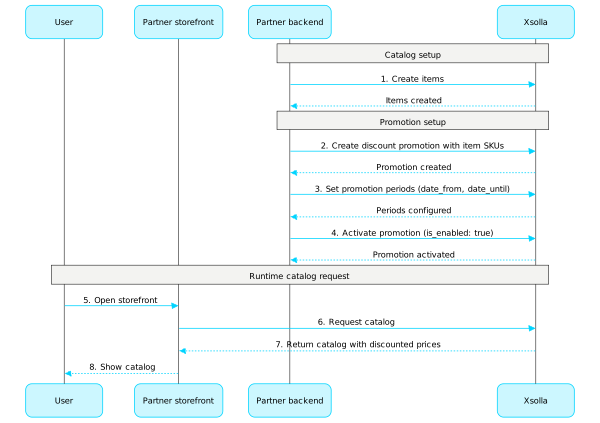
Подробная информация о работе с каждым видом акций приведена в документации:
Купоны
Используйте методы из этого подраздела для настройки и управления акциями с купонами.
Примечание
Подробная информация о работе с купонами приведена в документации.
Промокоды
Используйте методы из этого подраздела для настройки и управления акциями с промокодами.
Примечание
Подробная информация о работе с промокодами приведена в документации.
Уникальное предложение каталога
Используйте методы из этого подраздела для настройки и управления уникальными предложениями в каталоге.
Примечание
Подробная информация о работе с уникальным каталогом предложений приведена в документации.
Скидки
Используйте методы из этого подраздела для настройки и управления акциями со скидками.
Примечание
Подробная информация о работе со скидками приведена в документации.
Бонусы
Используйте методы из этого подраздела для настройки и управления акциями с бонусами.
Примечание
Подробная информация о работе с бонусами приведена в документации.
Персонализированный каталог
Персонализация позволяет задавать условия отображения каталога товаров и применения акций только для определенного круга авторизованных пользователей. Условия задаются на основе атрибутов пользователей и позволяют показывать релевантные товары, предложения и скидки.
Доступны следующие типы персонализации:
- Персонализация на стороне Xsolla. Правила и логика персонализации настраиваются и хранятся на стороне Xsolla. Вы передаете атрибуты пользователя, а Xsolla на их основе формирует персонализированный каталог.
- Персонализация на стороне партнера. Вы самостоятельно настраиваете правила и логику персонализации и передаете в Xsolla готовый каталог для конкретного пользователя.
Вы можете использовать только один тип персонализации. Чтобы изменить его, используйте инструкцию.
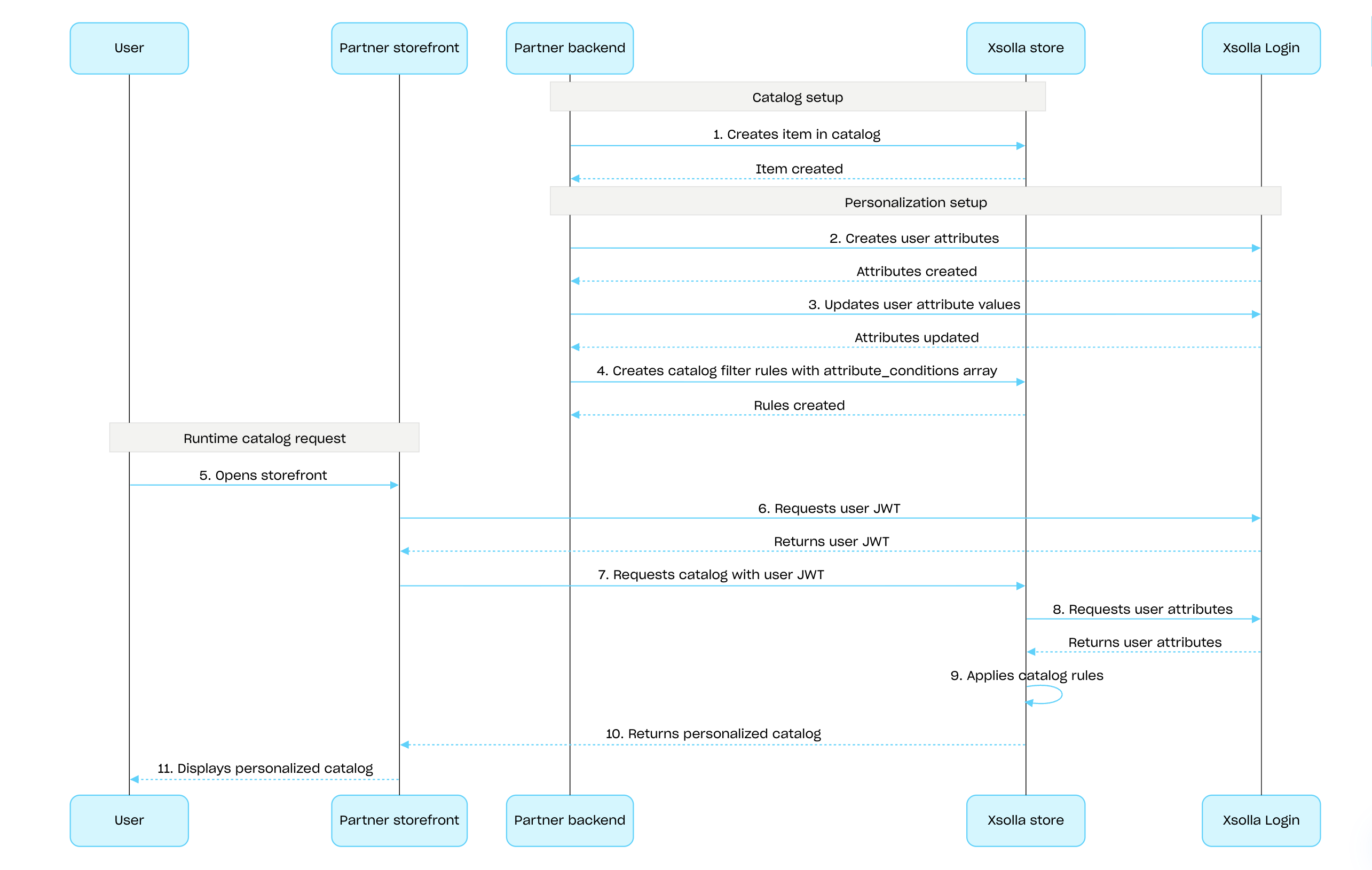
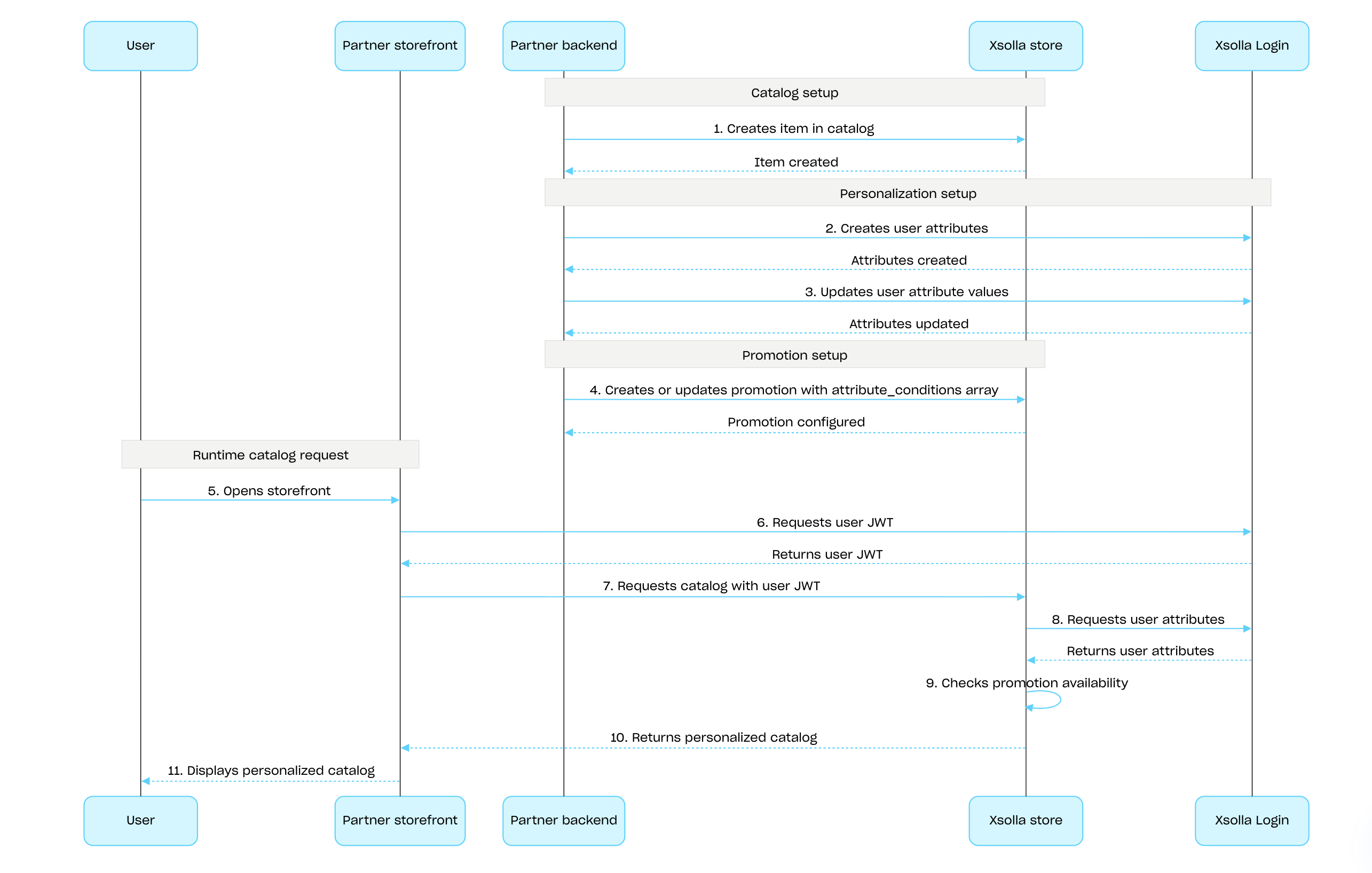
Чтобы настроить персонализацию на стороне Xsolla с помощью Xsolla API:
Создайте товары с помощью методов подраздела Admin из группы Виртуальные предметы и валюта, Бандлы или Игровые ключи.
Настройте атрибуты пользователя, используя Xsolla Login API и поддерживайте значения атрибутов в актуальном состоянии: обновляйте их в Xsolla, когда они меняются у пользователя в игре.
Настройте персонализацию для товаров или акций:
- Для персонализации каталога товаров задайте правила отображения каталога с помощью метода Создание правила фильтрации каталога:
- В массиве attribute_conditions укажите условия доступности товаров в каталоге на основе проверки атрибутов пользователя.
- В массиве items передайте список товаров, которые должен видеть пользователь, если значения его атрибутов соответствуют условиям.
- Для настройки персонализированных акций используйте методы создания и обновления акции нужного типа и в массиве attribute_conditions передайте условия, которые определяют доступность акции на основе проверки атрибутов пользователя.
- Для персонализации каталога товаров задайте правила отображения каталога с помощью метода Создание правила фильтрации каталога:
Передайте JWT пользователя с его атрибутами в методы получения каталога товаров, чтобы получить персонализированный каталог.
Процесс настройки и применения персонализации на стороне Xsolla для товаров каталога:
Процесс настройки и применения персонализации на стороне Xsolla для акций:
Подробная информация приведена:
Основная информация
Лимиты на использование акций позволяют ограничивать количество раз, которое конкретный пользователь может воспользоваться акцией. Вы также можете задавать периоды автоматического обновления лимитов.
Лимиты хранятся на стороне Xsolla и задаются в настройках каждой акции в Личном кабинете или через объект limits в следующих методах API:
- Создание акции со скидками для товара или Обновление акции со скидками
- Создание акции с бонусами или Обновление акции с бонусами
Информация о лимитах возвращается в объекте items.promotions.limits в методах API получения каталога товаров:
- Получение списка виртуальных предметов
- Получение списка виртуальных валют
- Получение списка пакетов виртуальной валюты
- Получение списка бандлов
- Получение списка игр
Методы подраздела Управление из группы методов Лимиты позволяют получать информацию о текущем состоянии лимитов и изменять их для конкретного пользователя — например, сбрасывать счетчик после выполнения квеста или корректировать остаток вручную.
Подробная информация по настройке лимитов в каталоге приведена в разделе Лимиты на количество использований акций.
Вы можете настроить limits.per_user — лимит на количество использований акции для одного пользователя.
Для неавторизованного пользователя всегда отображается максимальное количество использований акции.
Чтобы отобразить пользователю оставшееся количество с учетом действующего лимита, необходимо передавать данные авторизации при запросе каталога товаров.
Чтобы настроить период автоматического обновления — ежедневно, еженедельно или ежемесячно, передайте объект limits.recurrent_schedule при создании или обновлении акции.
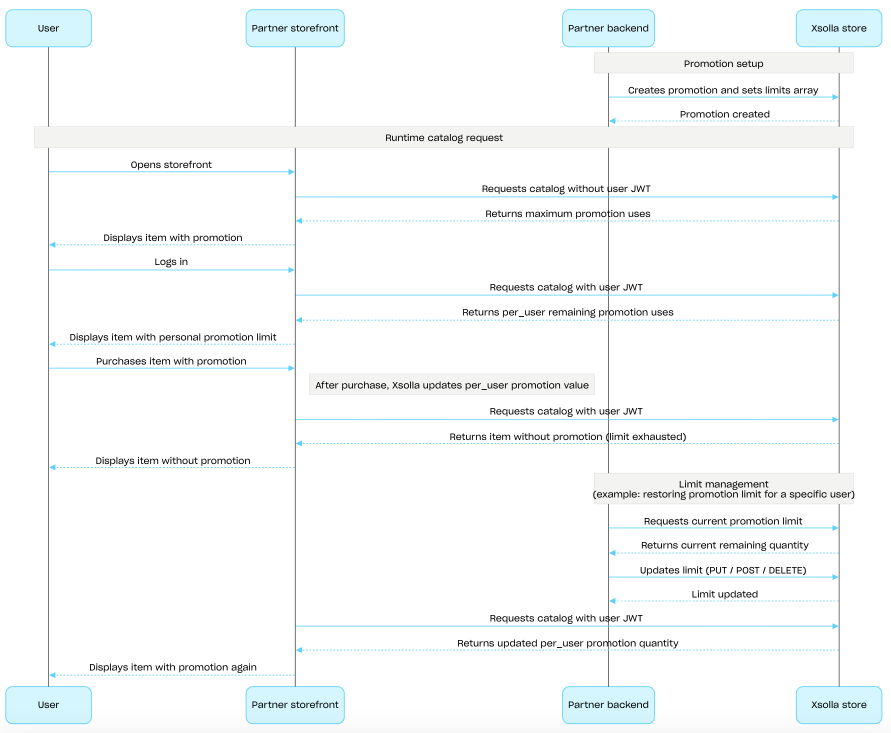
Сценарий настройки и применения лимитов
- Вы создаете акцию через методы API Создание акции со скидками для товара или Создание акции с бонусами и передаете объект
limits. - Вы запрашиваете каталог для неавторизованного пользователя — в ответе возвращается максимальное количество использований акции в объекте
items.promotions.limits. - Пользователь авторизуется.
- Вы запрашиваете каталог, передавая авторизационный токен пользователя — в ответе возвращается оставшееся количество использований с учетом действующего лимита.
- Пользователь выбирает акционный товар и совершает покупку.
- После успешного платежа Xsolla уменьшает значение параметра
items.promotions.limits.per_user. Когда значение этого параметра достигает0, товар возвращается в методах запроса каталога — без скидки или бонуса. - Вы можете обновить лимит через методы подраздела Управление:
- Вы получаете обновленное значение лимита в
items.promotions.limitsпри следующем запросе каталога с авторизационным токеном пользователя и отображаете его пользователю.
Основная информация
Цепочки наград позволяют мотивировать пользователей совершать покупки в магазине за реальную валюту. За каждую покупку пользователи получают призовые баллы и продвигаются по цепочке наград. Если пользователи объединены в кланы, их покупки приносят призовые баллы всему клану. Подробная информация о настройке цепочек наград приведена в разделе Система вознаграждений.
Цепочки настраиваются через методы подраздела Admin. Для настройки отображения цепочек и получения наград используйте методы подраздела Клиент. Для работы с клановыми цепочками наград используйте методы подраздела Клиент кланов.
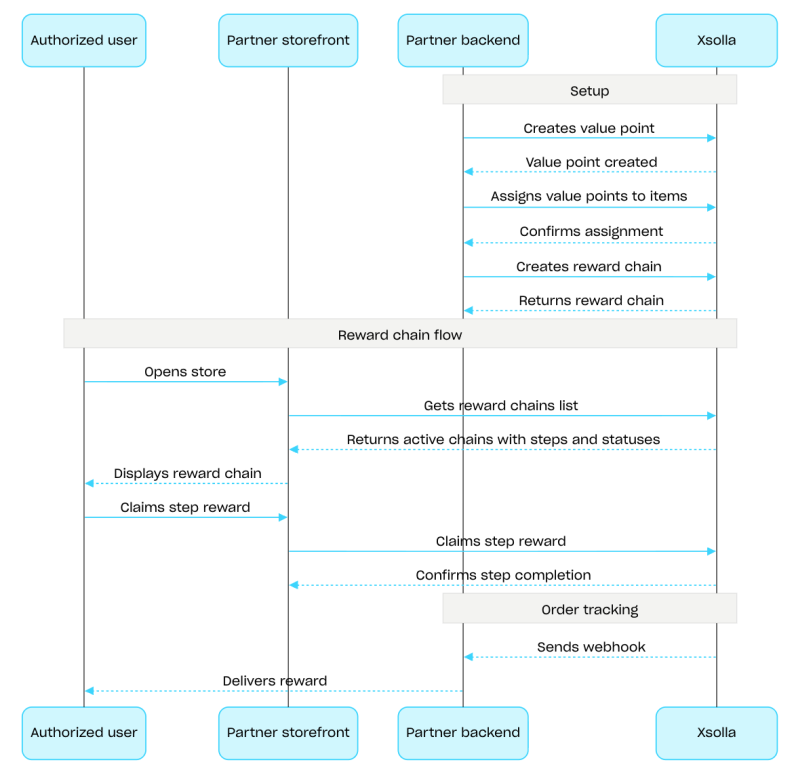
Пример сценария настройки цепочки наград:
- Создайте товары с помощью методов API из подраздела Admin групп методов Виртуальные предметы и валюта или Бандлы.
- Создайте призовые баллы с помощью метода API Создание призовых баллов.
- Привяжите призовые баллы к товарам с помощью метода API Настройка призовых баллов для товаров. Пользователи получат эти баллы после покупки товаров.
- Создайте цепочку с помощью метода API Создание цепочки наград. Чтобы активировать цепочку, передайте параметр
is_enabled: true. - Реализуйте отображение цепочек наград. Для этого запросите список доступных пользователю цепочек с помощью метода API Получение цепочек наград для текущего пользователя. В ответе содержатся все активные цепочки с шагами и их статусами.
- Реализуйте отображение текущего баланса призовых баллов. Для этого вызовите метод API Получение баланса призовых баллов для текущего пользователя.
- Реализуйте получение награды пользователем. Для этого вызовите метод API Получение награды на уровне.
- Настройте отслеживание статуса заказа, например с помощью вебхуков, чтобы своевременно получать данные о запрошенных наградах и начислять их пользователю.
Запрос
Метод клиента. Получает цепочки наград текущего пользователя.
Все проекты имеют ограничение на количество товаров, которые вы можете получить в ответе. Значение по умолчанию и максимальное значение — 50 товаров на ответ. Чтобы получить больше данных постранично, используйте поля limit и offset.
Этот метод использует JWT пользователя для авторизации.
Передайте токен в заголовке
Authorization в формате: Bearer <user_JWT>. Подробная информация о JWT пользователя приведена в блоке Безопасность для этого метода.
ID проекта. Вы можете найти этот параметр в Личном кабинете рядом с названием проекта, а также в адресной строке браузера при работе с проектом. URL-адрес имеет следующий формат: https://publisher.xsolla.com/<merchant_id>/projects/<project_id>.
- https://store.xsolla.com/api/v2/project/{project_id}/user/reward_chain
- Mock serverhttps://xsolla.redocly.app/_mock/ru/api/liveops/v2/project/{project_id}/user/reward_chain
- curl
- JavaScript
- Node.js
- Python
- Java
- C#
- PHP
- Go
- Ruby
- R
- Payload
curl -i -X GET \
  'https://store.xsolla.com/api/v2/project/44056/user/reward_chain?limit=50&offset=0' \
-H 'Authorization: Bearer <YOUR_JWT_HERE>'Цепочка наград пользователя была успешно восстановлена.
Развернутое описание цепочки наград.
Дата, когда закончится действие акции с цепочкой наград. Может быть null. Если date_end равна null, то цепочка наград не будет ограничена по времени.
Тип клана.
ID пользователя, который отправляется в Xsolla в процессе авторизации, связывает пользователя с вашим проектом Xsolla Login и отображается в качестве никнейма. Если вы используете авторизацию по ID пользователя, мы рекомендуем передать параметр name в ответе на вебхук. Этот параметр содержит имя пользователя, которое будет использоваться как никнейм.
Уникальный ID товара. Артикул может содержать только строчные и заглавные латинские буквы, цифры, точки, тире и подчеркивания.
Период регулярного сброса цепочки наград.
Частота регулярного сброса цепочки наград.
Расчетные дата и время, когда цепочка наград будет сброшена в следующий раз (Unix Timestamp).
Например, сброс цепочки наград осуществляется ежемесячно, начиная с 1 марта 2024 в 01:00 по часовому поясу Куала-Лумпура (GMT+8). Дата и время следующего сброса цепочки наград: 1 апреля 2024 в 01:00 по часовому поясу Куала-Лумпура (GMT+8), что соответствует 31 марта 2024 17:00 GMT+0 или 1711904400000 в формате Unix Timestamp.
Example: 1711904400000
Объект с локализациями для описания всплывающей подсказки в цепочке наград для клана. Двухбуквенный код языка в нижнем регистре.
Объект с локализациями для описания всплывающей подсказки в цепочке наград для клана. Двухбуквенный код языка в нижнем регистре.
{
  "has_more": false,
  "total_items_count": 1,
  "items": [
    { … },
    { … }
  ]
}
Запрос
Метод клиента. Возвращает призовые баллы текущего пользователя.
Этот метод использует JWT пользователя для авторизации.
Передайте токен в заголовке
Authorization в формате: Bearer <user_JWT>. Подробная информация о JWT пользователя приведена в блоке Безопасность для этого метода.
ID проекта. Вы можете найти этот параметр в Личном кабинете рядом с названием проекта, а также в адресной строке браузера при работе с проектом. URL-адрес имеет следующий формат: https://publisher.xsolla.com/<merchant_id>/projects/<project_id>.
- https://store.xsolla.com/api/v2/project/{project_id}/user/reward_chain/{reward_chain_id}/balance
- Mock serverhttps://xsolla.redocly.app/_mock/ru/api/liveops/v2/project/{project_id}/user/reward_chain/{reward_chain_id}/balance
- curl
- JavaScript
- Node.js
- Python
- Java
- C#
- PHP
- Go
- Ruby
- R
- Payload
curl -i -X GET \
  https://store.xsolla.com/api/v2/project/44056/user/reward_chain/101/balance \
-H 'Authorization: Bearer <YOUR_JWT_HERE>'{ "sku": "com.xsolla.value_point_1", "name": "Value point", "image_url": "https://cdn3.xsolla.com/img/misc/images/54c0cf9d345817cdacfdde198db178e0.jpg", "description": null, "long_description": null, "amount": 130, "is_clan": false }
Запрос
Метод клиента. Запрашивает награду на уровне для текущего пользователя в цепочке наград.
Этот метод использует JWT пользователя для авторизации.
Передайте токен в заголовке
Authorization в формате: Bearer <user_JWT>. Подробная информация о JWT пользователя приведена в блоке Безопасность для этого метода.
ID проекта. Вы можете найти этот параметр в Личном кабинете рядом с названием проекта, а также в адресной строке браузера при работе с проектом. URL-адрес имеет следующий формат: https://publisher.xsolla.com/<merchant_id>/projects/<project_id>.
- https://store.xsolla.com/api/v2/project/{project_id}/user/reward_chain/{reward_chain_id}/step/{step_id}/claim
- Mock serverhttps://xsolla.redocly.app/_mock/ru/api/liveops/v2/project/{project_id}/user/reward_chain/{reward_chain_id}/step/{step_id}/claim
- curl
- JavaScript
- Node.js
- Python
- Java
- C#
- PHP
- Go
- Ruby
- R
- Payload
curl -i -X POST \
  https://store.xsolla.com/api/v2/project/44056/user/reward_chain/101/step/120/claim \
-H 'Authorization: Bearer <YOUR_JWT_HERE>'Нет содержимогоОсновная информация
Ежедневные награды позволяют вам мотивировать пользователей заходить в магазин каждый день, чтобы получать бесплатные товары. Поведение при пропуске дня зависит от типа цепочки. Для корректной работы ежедневных наград у вас должна быть настроена авторизация пользователей. Неавторизованные пользователи видят всю цепочку ежедневных наград, но получать награды не могут. Подробная информация о настройке ежедневных наград приведена в разделе Ежедневные награды.
Цепочки настраиваются через методы подраздела Admin из группы методов Ежедневные цепочки. Для начисления наград используйте методы подраздела Клиент.
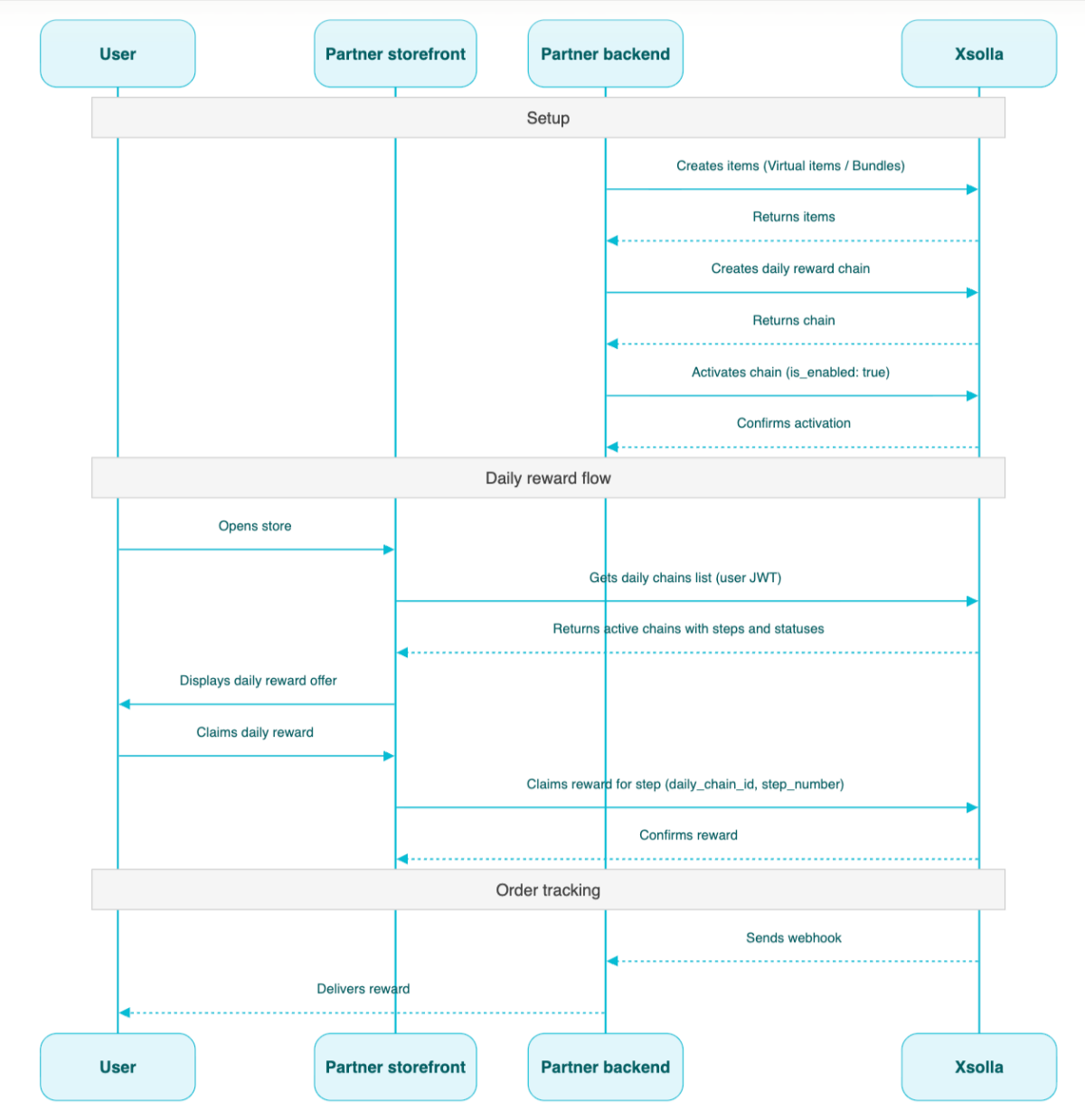
Пример сценария настройки ежедневной цепочки:
- Создайте товары с помощью методов API из подраздела Admin из групп методов Виртуальные предметы и валюта или Бандлы.
- Создайте цепочку с помощью метода API Создание ежедневной награды.
- Активируйте цепочку. Для этого передайте параметр
"is_enabled": trueв метод Создание ежедневной награды. - Запросите список доступных пользователю цепочек с помощью метода API Получение ежедневных наград для текущего пользователя, передавая JWT пользователя. В ответе содержатся все активные цепочки с шагами и их статусами.
- Настройте начисление товаров с помощью вебхуков.
- Выдайте пользователю награду дня с помощью метода API Получение ежедневной награды за уровень, передавая
daily_chain_idиstep_number.
Основная информация
Цепочка предложений — это последовательность шагов, каждый из которых содержит товар, который пользователь получает бесплатно или покупает в рамках действующего предложения. Цепочка предложений может содержать уникальные товары, доступные только в рамках цепочки, а также товары по более выгодным ценам, чем в магазине. Подробная информация о настройке этого маркетингового инструмента приведена в разделе Цепочки предложений.
Цепочки настраиваются через методы подраздела Admin. Для настройки отображения цепочек и реализации логики работы с товарами, которые получает пользователь, используйте методы подраздела Клиент.
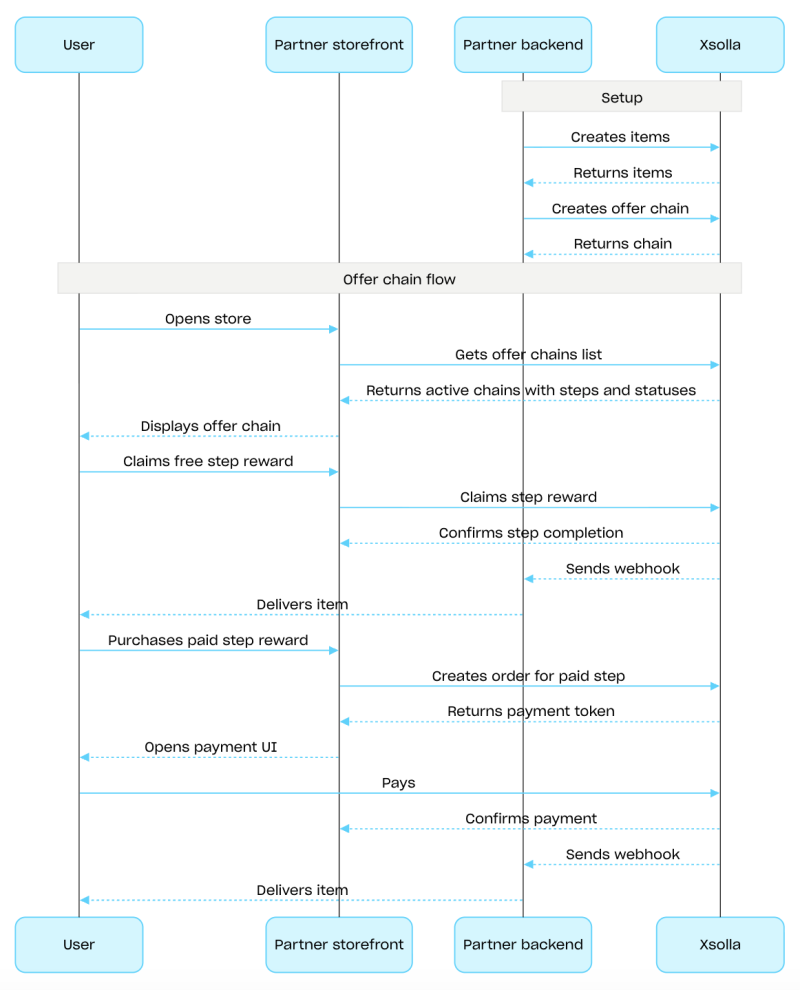
Пример сценария настройки цепочки предложений:
Создайте товары с помощью методов API из подраздела Admin групп методов Виртуальные предметы и валюта или Бандлы.
Создайте цепочку с помощью метода API Создание цепочки предложений. Чтобы активировать цепочку, передайте параметр
is_enabled: true.Реализуйте отображение цепочек предложений. Для этого запросите список доступных пользователю цепочек с помощью метода API Получение цепочек предложений для текущего пользователя. В ответе возвращаются все активные цепочки с шагами и их статусами.
Реализуйте логику работы с товарами, которые получает пользователь:
Если товар на шаге бесплатный, вызовите метод API Получение награды за шаг цепочки предложений. В запросе передайте
offer_chain_idиstep_number.Если товар на шаге платный, вызовите метод API Создание заказа на награду за шаг цепочки предложений. В запросе передайте
offer_chain_idиstep_number. В ответе возвращаетсяorder_idи токен для открытия платежного интерфейса.
Настройте отслеживание статуса заказа, например, с помощью вебхуков, чтобы своевременно получать данные о запрошенных или оплаченных товарах и начислять их пользователю.
Основная информация
Апселл — это способ продаж, при котором пользователю предлагается купить товар с дополнительной ценностью. Например, это может быть товар, который пользуется наибольшим спросом среди других пользователей. Вы также можете настроить региональные ограничения на товары для апселла. Подробная информация об апселле доступна в разделе Апселл.
Список товаров, настроенных для апселла, и статус апселла (включен или выключен) возвращаются в методе API Получение информации об апселле в проекте. На стороне клиента список товаров возвращается в методе API Получение списка товаров для апселла в проекте и отображается пользователю в нужный момент процесса покупки.
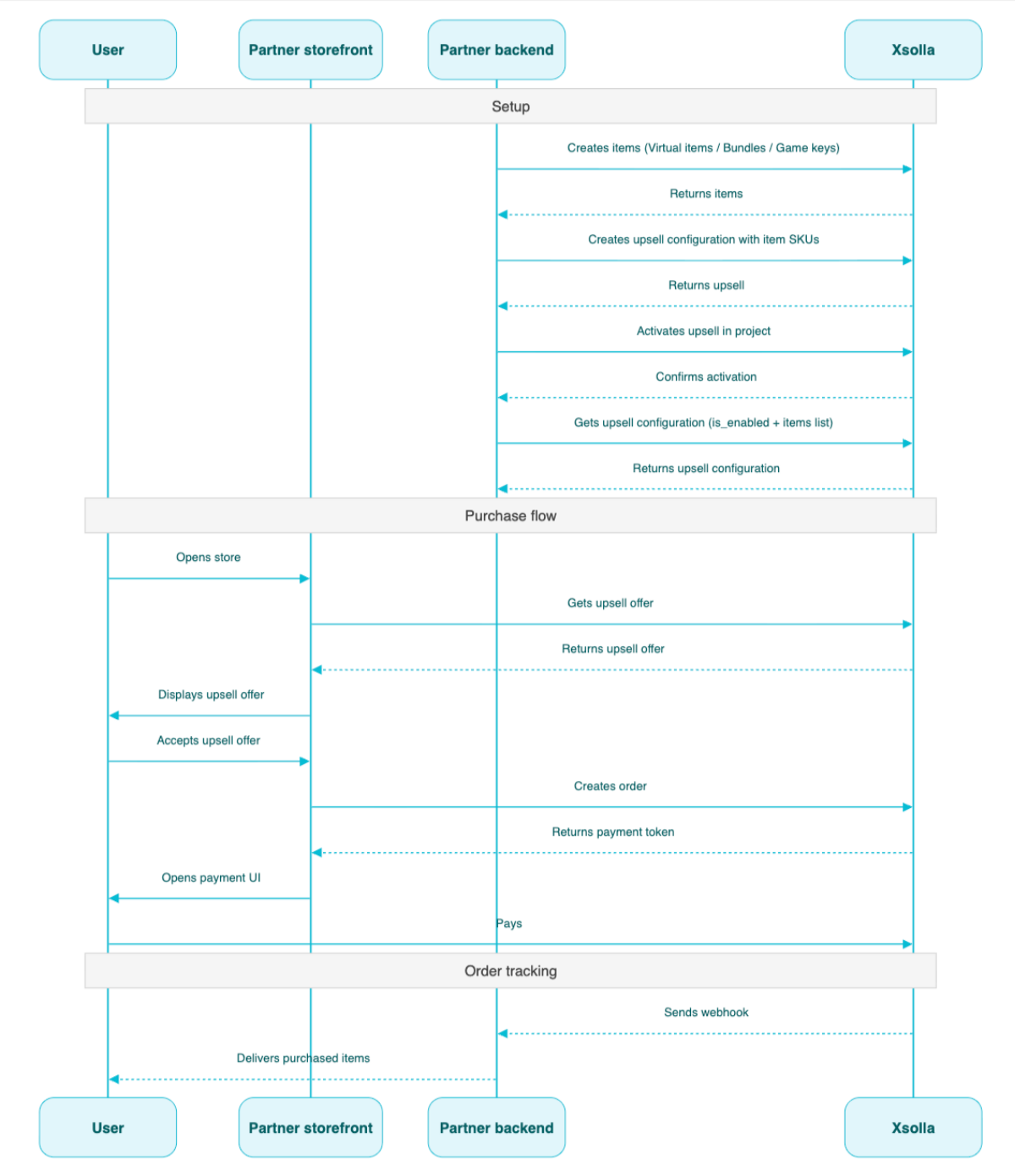
Пример сценария использования апселла:
- Создайте товары с помощью методов API из подраздела Admin групп Виртуальные предметы и валюта, Бандлы или Игровые ключи.
- Настройте апселл с помощью метода API Создание апселла. Передайте артикулы нужных товаров в массиве
items. - Активируйте апселл в проекте с помощью метода API Активация/деактивация апселла в проекте.
- Отобразите пользователю предложение апселла в нужный момент процесса покупки с помощью метода API Получение апселла.
- Реализуйте открытие платежного интерфейса для оплаты заказа. Например, вы можете вызвать метод Создание заказа со всеми товарами из определенной корзины. В ответе вы получите токен для открытия платежного интерфейса.
- Настройте отслеживание статуса заказа, например с помощью вебхуков, чтобы своевременно получать данные об успешно оплаченных товарах и начислять их пользователю.
Основная информация
Loyalty as Service API позволяет управлять балансом баллов лояльности пользователей: получать текущий баланс баллов, а также начислять и списывать баллы с баланса пользователя.
Методы Loyalty as Service API подраздела Admin являются серверными и требуют базовой аутентификации.
Базовый URL-адрес для этого API: https://loyalty-points.xsolla.com/.
Подробная информация о настройке этого маркетингового инструмента приведена в разделе Loyalty as Service.