商品目录API (2.0.0)
- 版本: 2.0.0
- 服务器:
https://store.xsolla.com/api - 通过电子邮件联系我们
- 联系网址: https://xsolla.com/
- 所需TLS版本: 1.2
商品目录API可用于在艾克索拉侧配置游戏内购商品目录,并在您的商店中向用户展示该商品目录。
该API可用于管理以下商品目录实体:
- 虚拟物品 — 武器、皮肤、加成道具等游戏内物品。
- 虚拟货币 — 用于购买虚拟物品的虚拟资金。
- 虚拟货币套餐 — 预定义的虚拟货币捆绑包。
- 捆绑包 — 将虚拟物品、货币或游戏Key组合后作为单个SKU销售的组合包。
- 游戏Key — 通过Steam等平台或其他DRM提供商分发的游戏和DLC密钥。
- 组 — 用于在商品目录中组织和排序商品的逻辑分组。
该API分为以下组别:
Admin — 用于创建、更新、删除和配置商品目录中的商品及分组的调用。通过基本访问身份认证方式进行身份认证,需使用您的商户或项目凭据。不适用于商店前端调用。Catalog — 用于检索商品并构建面向最终用户的自定义商店前端。专为高负载场景设计。支持可选的用户JWT授权,可返回个性化数据,例如用户限购额度和当前进行中的促销活动。
当请求从浏览器、移动应用或游戏发送时,使用用户JWT身份认证。默认情况下,应用XsollaLoginUserJWT方案。有关如何创建令牌的详细信息,请参阅艾克索拉登录管理器API文档。
令牌通过Authorization请求头按以下格式传递:Authorization: Bearer <user_JWT>,其中<user_JWT>为用户令牌。该令牌用于识别用户,并授予其访问个性化数据的权限。
或者,您也可以使用用于打开支付UI的令牌。
基本HTTP身份认证用于服务器到服务器交互,即API调用直接从您的服务器发送,而不是从用户的浏览器或移动应用发送。通常使用带有API密钥的HTTP Basic身份认证。
API密钥属于机密信息,不得在客户端应用中存储或使用。
使用基本服务器侧身份认证时,所有API请求都必须包含以下请求头:
- 对于
basicAuth—Authorization: Basic <your_authorization_basic_key>,其中your_authorization_basic_key是以Base64编码的project_id:api_key对 - 对于
basicMerchantAuth—Authorization: Basic <your_authorization_basic_key>,其中your_authorization_basic_key是以Base64编码的merchant_id:api_key对
您可以在发布商帐户中找到参数值:
merchant_id显示在:- 公司设置 > 公司中。
- 任意发布商帐户页面的浏览器地址栏URL中。URL格式为:
https://publisher.xsolla.com/<merchant_id>。
project_id显示在:- 发布商帐户中项目名称旁边。
- 发布商帐户中项目页面的浏览器地址栏URL中。URL格式为:
https://publisher.xsolla.com/<merchant_id>/projects/<project_id>。
api_key仅在创建时在发布商帐户中显示,必须在己侧安全存储。您可以在以下部分创建API密钥:
如果所需的API调用不包含
project_id路径参数,请使用对公司所有项目均有效的API密钥进行授权。有关使用API密钥的更多信息,请参阅API参考。
AuthForCart身份认证方案用于购物车购买,支持两种模式:
使用用户JWT进行身份认证。 令牌通过
Authorization请求头按以下格式传递:Authorization: Bearer <user_JWT>,其中<user_JWT>是用户令牌。该令牌用于识别用户,并提供对个性化数据的访问权限。 或者,您也可以使用用于打开支付UI的令牌。不带Authorization请求头的简化模式。 此模式仅适用于未完成身份认证的用户,且仅可用于游戏Key销售请求中不使用令牌,而必须包含以下请求头:
x-unauthorized-id,值为请求IDx-user,值为使用Base64编码的用户电子邮件地址
所有类型的商品(虚拟物品、捆绑包、虚拟货币和密钥)都使用类似的数据结构。了解基本结构有助于简化API使用,并帮助您更轻松地查阅文档。
部分调用可能包含其他字段,但这些字段不会改变基本结构。
标识信息
merchant_id— 发布商帐户中的公司IDproject_id— 发布商帐户中的项目IDsku— 商品SKU,在项目内唯一
商店显示
name— 商品名称description— 商品描述image_url— 图片URLis_enabled— 商品可用性is_show_in_store— 商品是否显示在商品目录中
有关在商品目录中管理商品可用性的更多信息,请参阅文档。
组织方式
type— 商品类型,例如虚拟物品(virtual_item)或捆绑包(bundle)groups— 商品所属的组order— 在商品目录中的显示顺序
销售条件
prices— 以真实货币或虚拟货币表示的价格limits— 购买限制periods— 可用时间段regions— 区域限制
核心实体结构示例:
{
  "attributes": [],
  "bundle_type": "virtual_currency_package",
  "content": [
    {
      "description": {
        "en": "Main in-game currency"
      },
      "image_url": "https://.../image.png",
      "name": {
        "en": "Crystals",
        "de": "Kristalle"
      },
      "quantity": 500,
      "sku": "com.xsolla.crystal_2",
      "type": "virtual_currency"
    }
  ],
  "description": {
    "en": "Crystals x500"
  },
  "groups": [],
  "image_url": "https://.../image.png",
  "is_enabled": true,
  "is_free": false,
  "is_show_in_store": true,
  "limits": {
    "per_item": null,
    "per_user": null,
    "recurrent_schedule": null
  },
  "long_description": null,
  "media_list": [],
  "name": {
    "en": "Medium crystal pack"
  },
  "order": 1,
  "periods": [
    {
      "date_from": null,
      "date_until": "2020-08-11T20:00:00+03:00"
    }
  ],
  "prices": [
    {
      "amount": 20,
      "country_iso": "US",
      "currency": "USD",
      "is_default": true,
      "is_enabled": true
    }
  ],
  "regions": [],
  "sku": "com.xsolla.crystal_pack_2",
  "type": "bundle",
  "vc_prices": []
}艾克索拉API可用于实现游戏内购商店逻辑,包括获取商品目录、管理购物车、创建订单以及跟踪订单状态。根据集成场景,API调用分为管理和商品目录子部分,使用不同的身份认证方案。
以下示例展示了从创建商品到完成购买的商店设置和运营基本流程。
在您的应用程序中配置商品显示。
API调用示例:
默认情况下,商品目录API调用会返回请求时商店中当前可用的商品。如需获取尚未可用或已不再可用的商品,请在商品目录请求中包含参数
"show_inactive_time_limited_items": 1。
您可以使用以下方法销售商品:
- 快速购买 — 多次销售同一SKU。
- 购物车购买 — 用户可在同一订单中向购物车添加商品、移除商品并更新数量。
如果商品使用虚拟货币而非真实货币购买,请使用创建包含指定商品的订单 API调用。由于扣款会在执行API调用时处理,因此无需支付UI。
如需购买免费商品,请使用使用指定商品创建订单 API调用或使用免费购物车创建订单 API调用。无需支付UI — 订单会立即设置为done状态。
可以在客户端或服务器侧设置购物车并完成购买。
在客户端设置和购买购物车商品
您需要自行实现添加和移除商品的逻辑。在调用用于设置购物车的API之前,您无法获知哪些促销活动会应用于本次购买。这意味着您无法提前获知总费用以及添加的赠品的详细信息。
实现以下购物车逻辑:
- 玩家在购物车加购后,使用向购物车添加商品 API调用。该调用会返回所选商品的当前信息(折扣前后价格、赠品)。
- 根据用户操作更新购物车内容:
- 如需添加商品或更改商品数量,请使用按购物车ID更新购物车商品 API调用。
- 如需移除商品,请使用按购物车ID删除购物车商品 API调用。
如需获取购物车的当前状态,请使用“获取当前用户的购物车”API调用。
- 使用创建包含当前购物车中所有商品的订单 API调用。该调用返回订单ID和支付令牌。新创建的订单默认设置为
new状态。
在服务器侧设置和购买购物车商品
这种设置方式可能需要更长的购物车设置时间,因为每次更改购物车都必须伴随API调用。
实现以下购物车逻辑:
- 玩家在购物车加购后,使用向购物车添加商品 API调用。该调用会返回所选商品的当前信息(折扣前后价格、赠品)。
- 使用创建包含当前购物车中所有商品的订单 API调用。该调用会返回订单ID和支付令牌。新创建的订单默认设置为
new状态。
使用返回的令牌在新窗口中打开支付UI。有关打开支付UI的其他方式,请参阅文档。
| 操作 | 接口 |
|---|---|
| 在生产环境中打开。 | https://secure.xsolla.com/paystation4/?token={token} |
| 在沙盒模式中打开。 | https://sandbox-secure.xsolla.com/paystation4/?token={token} |
请在开发和测试期间使用沙盒模式。测试购买不会对真实帐户扣款。您可以使用测试银行卡。
完成第一笔真实支付后,严格的沙盒支付策略将生效。沙盒模式下的支付仅对发布商帐户 > 公司设置 > 用户中指定的用户可用。
只有在与艾克索拉签署许可协议后,才能使用真实货币购买虚拟货币和商品。如需签署协议,请在发布商帐户中前往协议与税务 > 合同与协议,填写协议表单并等待确认。协议审核最多可能需要3个工作日。
如需启用或禁用沙盒模式,请在快速购买和购物车购买请求中更改sandbox参数的值。沙盒模式默认关闭。
可能的订单状态:
new— 订单已创建paid— 已收到付款done— 商品已交付canceled— 订单已取消expired— 订单已过期
使用以下任一方式跟踪订单状态:
返回大量记录的API调用(例如构建商品目录时)会按页返回数据。分页是一种限制单个API响应中返回商品数量的机制,并允许您按顺序获取后续页面。
使用以下参数控制返回的商品数量:
limit— 每页商品数量offset— 页面中第一个商品的索引(从0开始编号)has_more— 指示是否还有下一页total_items_count— 商品总数
请求示例:
GET /items?limit=20&offset=40响应示例:
{
  "items": [...],
  "has_more": true,
  "total_items_count": 135
}建议发送后续请求,直到响应返回has_more = false。
日期和时间值以ISO 8601格式传递。
支持以下内容:
- UTC偏移量
- 当商品显示没有时间限制时使用
null值 - 部分字段使用的Unix时间戳(以秒为单位)
格式:YYYY-MM-DDTHH:MM:SS±HH:MM
示例:2026-03-16T10:00:00+03:00
艾克索拉支持对商品名称、描述等面向用户的字段进行本地化。本地化值以对象形式传递,其中语言代码作为键。支持的完整语言列表,请参阅文档。
支持的字段
可为以下参数指定本地化内容:
namedescriptionlong_description
区域格式
语言区域键可使用以下任一格式指定:
- 两字母语言代码:
en、ru - 五字母语言代码:
en-US、ru-RU、de-DE
示例
两字母语言代码示例:
{
  "name": {
    "en": "Starter Pack",
    "ru": "Стартовый набор"
  }
}
五字母语言代码示例:
{
  "description": {
    "en-US": "Premium bundle",
    "de-DE": "Premium-Paket"
  }
}用户所在国家/地区决定商品目录价格、支付货币以及支付界面中的可用支付方式。根据API调用的不同,国家/地区按以下方式确定:
- 在客户端侧API调用中,国家/地区根据请求的IP地址确定。
- 在服务器侧API调用中,国家/地区根据
user.country.value参数的值或X-User-Ip标头中的用户IP地址确user.country.value参数为准。
如果发生错误,API会返回HTTP状态和JSON响应正文。商店相关错误的完整列表,请参阅文档。
响应示例:
{
  "errorCode": 1102,
  "errorMessage": "Validation error",
  "statusCode": 422,
  "transactionId": "c9e1a..."
}errorCode— 错误代码。errorMessage— 简短的错误描述。statusCode— HTTP响应状态。transactionId— 请求ID。仅在部分情况下返回。errorMessageExtended— 其他错误详情,例如请求参数。仅在某些情况下返回。
扩展响应示例:
{
  "errorCode": 7001,
  "errorMessage": "Chain not found",
  "errorMessageExtended": {
    "chain_id": "test_chain_id",
    "project_id": "test_project_id",
    "step_number": 2
  },
  "statusCode": 404
}
常见HTTP状态代码
400— 请求无效401— 身份认证错误403— 权限不足404— 资源未找到422— 验证错误429— 超出速率限制
建议
- 结合HTTP状态和响应正文一起处理。
- 使用
errorCode处理与应用程序逻辑相关的错误。 - 分析错误时,使用
transactionId更快定位请求。
概述
您可以使用虚拟物品和虚拟货币构建游戏内购商店,并配置其向用户展示的方式。可使用以下商品类型:
- 虚拟物品 — 武器、皮肤、加成道具等游戏内商品。可使用真实货币或虚拟货币销售。
- 虚拟货币 — 用于购买虚拟物品的游戏内货币。可使用真实货币或虚拟货币销售。
- 虚拟货币套餐 — 固定数量的虚拟货币。可使用真实货币或虚拟货币销售。
组(Group)用于组织商品目录中的商品。通过组,您可以按逻辑对商品进行分组,并管理商品的显示方式。
使用管理子部分中的API调用来创建、更新和删除商品。
使用商品目录子部分中的API调用获取商品列表,并向用户展示商品。
请勿使用管理子部分中的API调用来构建商店商品目录。
获取虚拟物品列表API调用会返回详细的商品数据,包括价格和属性,并支持分页。请使用该调用在商店前端显示商品目录页面。
获取所有虚拟物品列表API调用会返回商品SKU、名称、描述,以及组ID和组名称,且不分页。请将其用于客户端侧搜索或索引。
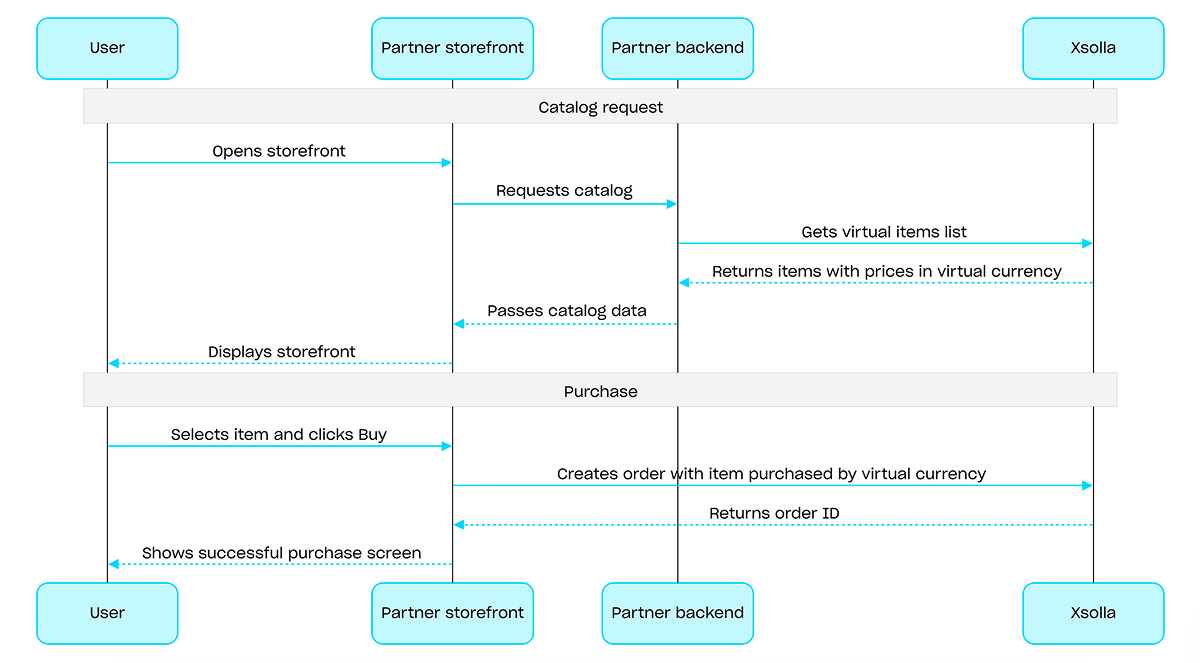
如需使用虚拟货币的购买,请使用使用以虚拟货币购买的指定商品创建订单 API调用。无需支付UI⸺扣款会在执行API调用时完成。
使用虚拟货币购买流程示例:
概述
游戏Key是一次性使用的唯一字母数字代码,可授予用户在游戏平台上访问游戏或DLC的权限。您可以通过直接链接、商店UI或小组件销售游戏Key。您还可以配置区域限制,以便在特定国家/地区销售游戏Key。有关详细信息,请参阅游戏Key套餐部分。
销售游戏Key不要求用户身份认证——游戏Key会发送到用户在结算时指定的邮箱。您可以配置身份认证,以支持更多场景:个性化、购买限制或权益系统。有关详细信息,请参阅销售游戏Key时如何设置身份认证部分。
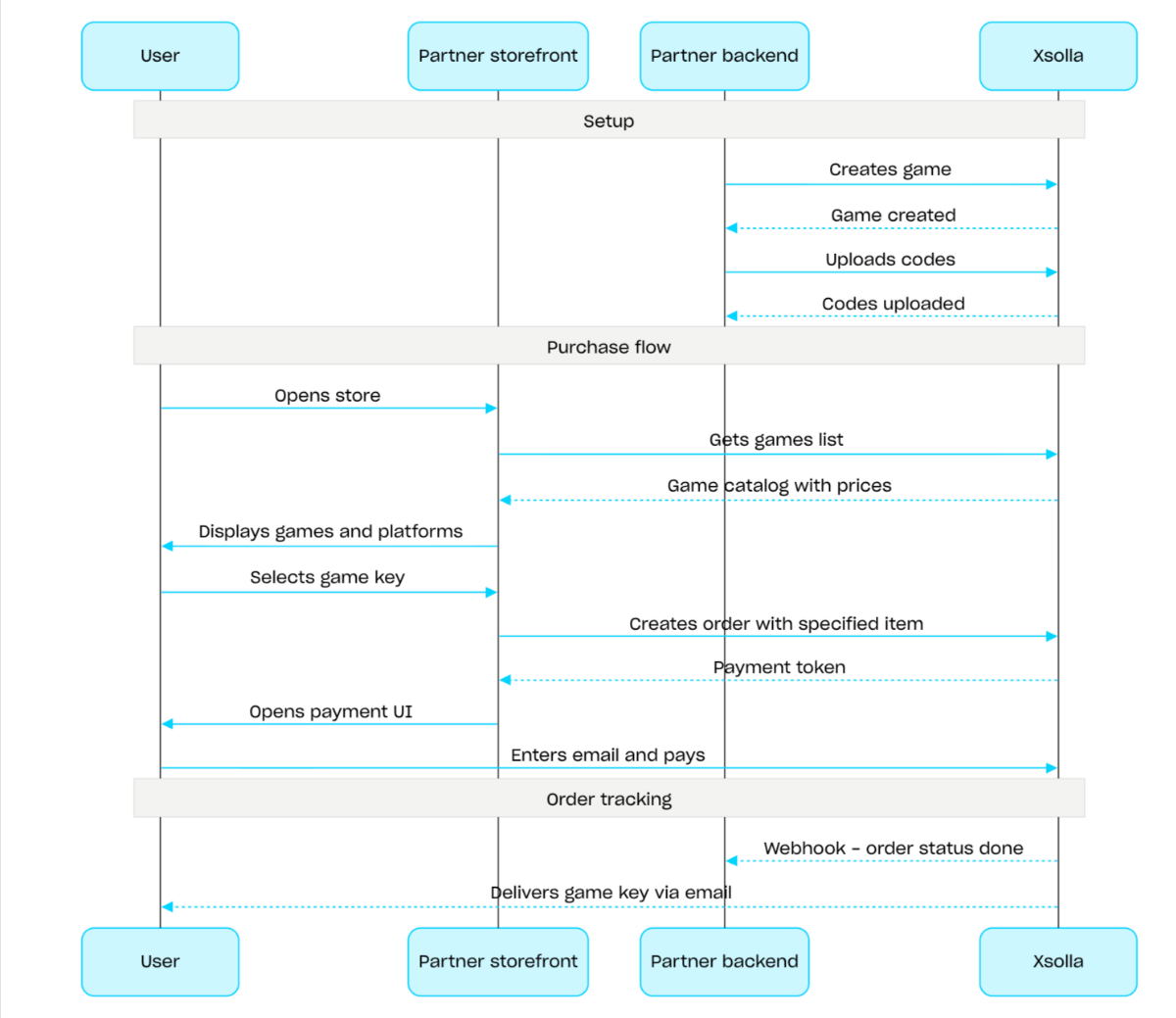
游戏Key销售流程:
- 使用创建游戏API调用创建游戏。
- 配置区域限制。
- 使用上传游戏Key API调用将游戏Key上传到游戏Key套餐,使其可供购买。
- 使用获取游戏列表API调用展示游戏目录,并显示适用于用户所在区域的价格。
- 创建订单。如需实现快速购买,可以使用使用当前购物车中的所有商品创建订单API调用,并传入游戏Key SKU。响应会返回用于打开支付UI的令牌。
- 实现支付UI的打开逻辑,以便用户支付订单。
如需及时接收支付成功通知并向用户交付商品,请设置订单状态跟踪,例如使用Webhook。游戏Key会发送到用户在结算时指定的邮箱,订单状态将变为done。
概述
捆绑包是作为一个单位销售的一组商品。捆绑包可以包含虚拟物品、虚拟货币、虚拟货币套餐、游戏Key以及其他捆绑包。您可以使用捆绑包创建新手礼包、季节性优惠和特惠活动。
如需实现捆绑包相关功能,请使用以下API调用组:
- 使用管理子部分中的API调用创建、更新、删除捆绑包,并管理其可见性。
- 使用商品目录子部分中的API调用获取捆绑包。
创建或更新捆绑包时,可通过limits对象配置购买限制。有关更多信息,请参阅限制概述。您还可以配置区域限制,以便在特定国家/地区销售商品。
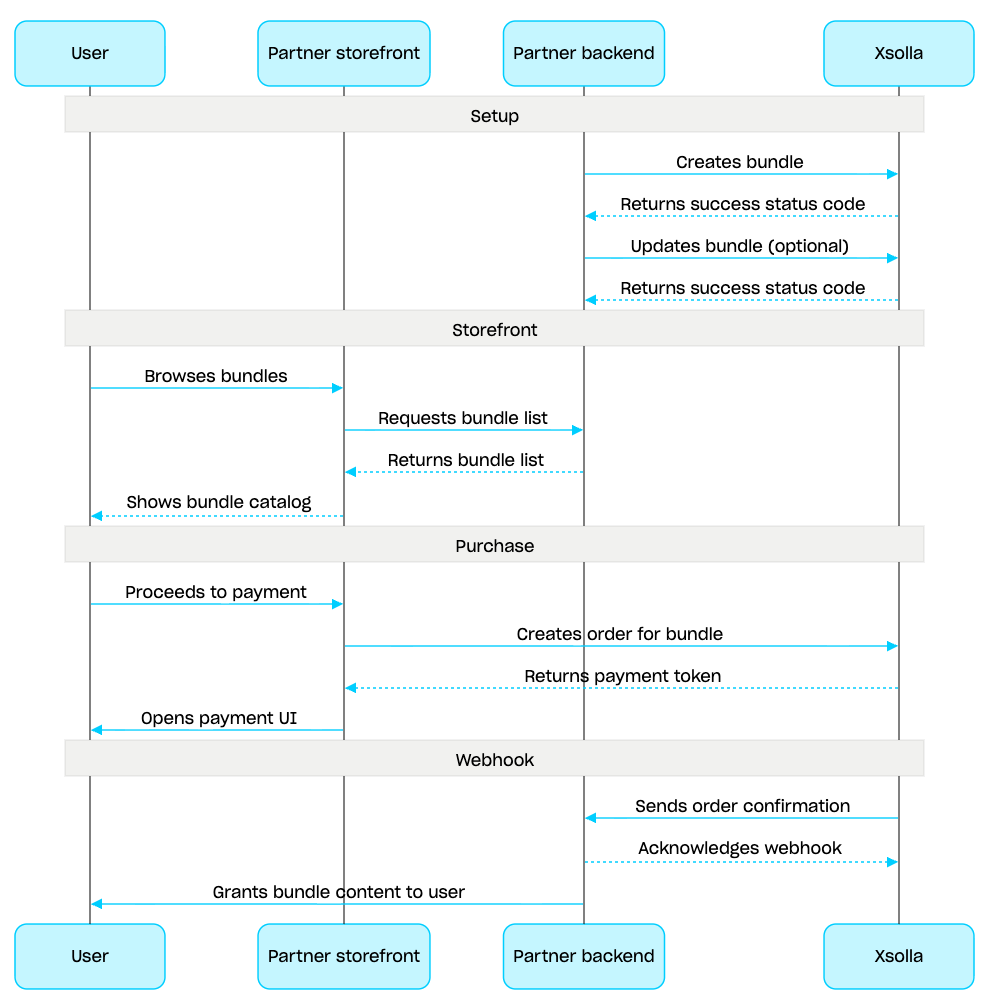
捆绑包管理场景:
- 使用创建捆绑包API调用创建捆绑包。如需验证已创建的捆绑包,请使用获取捆绑包API调用。如需获取项目中的所有捆绑包,请使用获取捆绑包列表API调用。
- 如有需要,可使用更新捆绑包API调用修改捆绑包内容或设置。
- 使用获取捆绑包列表、获取指定的捆绑包或获取指定组的捆绑包列表API调用,在您的商店前端中实现捆绑包展示逻辑。
- 使用购物车与支付部分中的API创建订单。例如,如需实现快速购买,可以使用使用指定商品创建订单API调用,并传入捆绑包SKU。响应中包含用于打开支付UI的令牌。
- 实现支付UI的打开逻辑,以便用户支付订单。
- 设置订单状态跟踪,例如使用Webhook,以便及时接收支付成功商品的数据并向用户发放商品。
概述
购物车是一种购买机制,可将多个商品合并到同一个订单中。用户可以使用真实货币购买任意类型、任意数量的商品,也可以使用兑换码。
购物车存储在艾克索拉侧。购物车能否跨会话保存取决于用户是否已授权:
对于已授权用户,购物车会关联到具体用户。只要请求始终代表同一用户发送,购物车就会跨会话保存。
对于未授权用户,购物车能否保存取决于是否传入
x-unauthorized-id请求头。如需跨会话保存未授权用户的购物车,请在每个请求中传入相同的x-unauthorized-id。此选项仅适用于游戏Key销售。
您可以通过两种方式识别购物车:通过用户JWT自动识别或通过购物车ID (cart_id)识别。
可在客户端侧和服务器侧管理购物车。
在服务器侧,您可以向购物车添加商品,例如在恢复用户会话时。客户端侧支持以下操作:
- 获取当前用户的购物车或按ID获取购物车
- 向购物车添加商品
- 更新购物车中的商品
- 从购物车中删除商品
如需购买购物车中的商品,请使用客户端和服务器的订单创建调用。
购物车的存活时间(TTL)默认为72小时。如果购物车内容发生变化,例如添加了新商品,则TTL会延长。
支付成功后,购物车不会自动清空。如需清空购物车,请使用以下客户端侧API调用:
按购物车ID删除购物车商品和从当前购物车中删除购物车商品 — 删除购物车中的最后一件商品后,购物车即被清空。
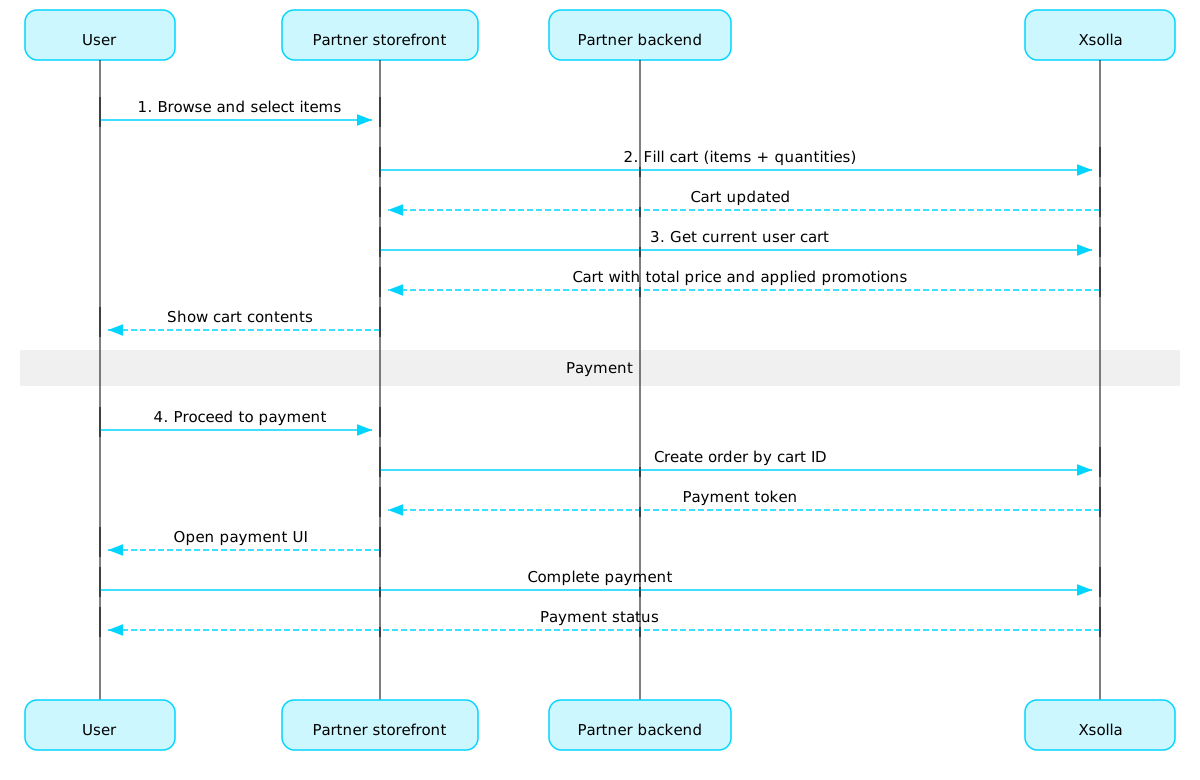
购物车使用场景:
实现商店UI,供用户选择商品。
用户在商店中选择商品后,将商品添加到购物车,例如使用在购物车里添加商品调用。在items数组中,需要传入商品SKU和所需数量。
实现购物车查看UI。用户进入购物车时,使用获取当前用户的购物车调用展示购物车内容。响应将返回商品最终价格信息,包括折扣和已应用的促销活动。
实现支付UI的打开逻辑,以便用户支付订单。例如,可以使用使用特定购物车中的所有商品创建订单调用。响应会返回用于打开支付UI的令牌。
配置订单状态跟踪,例如使用Webhook,以便及时接收支付成功商品的数据并向用户发放商品。
注:
如需实现游戏内和线上商品销售,请参阅集成指南。
订单生命周期
了解订单生命周期有助于您跟踪订单,并正确实现购买后逻辑,例如商品交付。
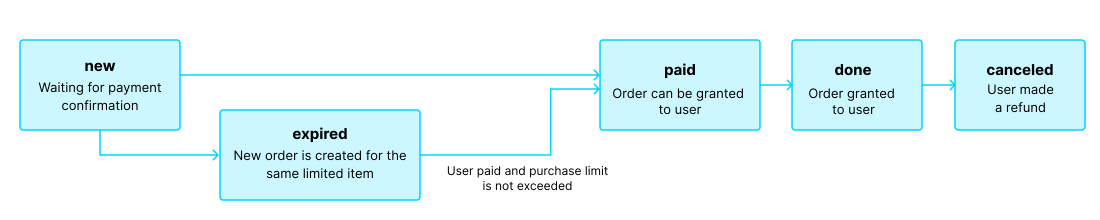
订单会经历以下状态:
| 状态 | 描述 | 备注 |
new | 订单已创建。系统正在等待付款确认。 | 交易状态说明请参阅支付收银台API文档。 |
paid | 订单已支付(交易已流转至done状态),可以向用户发放商品。 | 在付款确认前,订单会保持new状态。 |
done | 商品已发放给用户。 | — |
canceled | 付款已退款。 | 当交易状态变更为refunded时,订单会流转至此状态。 |
expired | 对于限购商品、兑换码或促销活动,创建新订单时,任何包含该商品且此前未支付的订单都会流转至expired状态。只有最新订单可以付款。 | 如果用户尝试支付已过期的订单,支付UI将显示2002错误,付款将失败。 |
注:
如果用户正在完成付款时订单流转至expired状态,但付款成功,则订单会从expired流转至paid状态。仅当付款后不会超出订单中商品的购买限制时,此规则才适用。
免费商品
使用本部分中的调用向用户发放免费商品。
概述
购买限制可用于限制单个用户或所有用户可购买的商品数量。您还可以配置定期重置限制。
限制存储在艾克索拉侧,可在发布商帐户中按单个商品进行配置,也可在以下API调用中通过limits对象进行配置:
在以下用于获取商品目录的API调用中,限制信息会在items.limits对象中返回:
限制组的管理部分中的API调用可用于获取限制的当前状态,并针对特定用户更新限制,例如在任务完成后重置计数器,或手动调整剩余数量。
通用区域
区域销售限制用于控制商品可在哪些国家/地区或国家/地区组销售。例如,受授权许可限制时,您可以将某款游戏设置为仅在特定国家/地区销售。
销售限制通过区域进行配置。每个区域使用一个region_id标识符关联一个或多个国家/地区。您可以将一个商品关联到一个或多个区域。
商品是否可售按以下规则判断:
- 如果未为商品指定区域,则该商品可在所有国家/地区购买。
- 如果为商品指定了区域,且用户所在国家/地区包含在其中任一区域内,则该商品对该用户可售。
- 如果为商品指定了区域,但用户所在国家/地区不包含在任何指定区域内,则该商品对该用户不可售。
通过商品目录子部分中的API调用请求商品目录时,可通过country参数传入用户所在国家/地区。如果未传入该参数,系统会根据用户的IP地址判断其所在国家/地区。
系统会在两个环节校验用户所在国家/地区是否符合商品的区域设置:请求商品目录时和创建订单时。不可售商品不会返回在商品目录响应中;包含不可售商品的订单也无法创建。
如需创建、更新或删除区域,请使用通用区域组中的API调用。
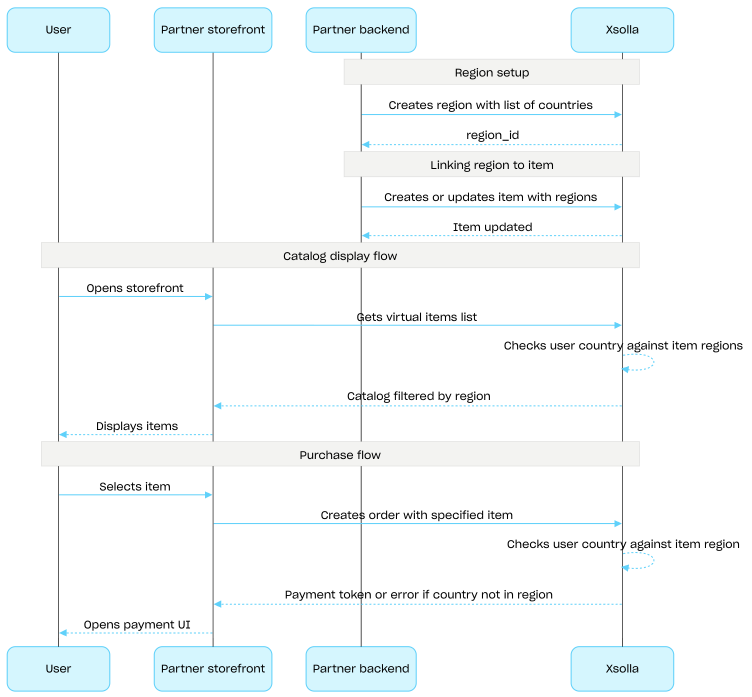
区域销售限制设置流程:
- 使用创建区域API调用创建区域,并指定国家/地区列表。响应会返回下一步需要使用的
region_id。 - 创建或更新虚拟物品时,在
regions数组中传入该区域的region_id,将虚拟物品关联到该区域。 - 使用商品目录子部分中的API调用向用户展示商品目录,例如获取虚拟物品列表API调用。系统会根据
country参数确定用户所在国家/地区;如果未提供该参数,则根据用户的IP地址判断。用户所在国家/地区不可售的商品不会包含在商品目录响应中。 - 当用户继续支付商品或购物车时,创建订单:
- 如果商品已添加到购物车,请使用使用特定购物车中的所有商品创建订单或使用当前购物车中的所有商品创建订单API调用。
- 如需快速购买单个商品,请使用使用指定商品创建订单API调用,并传入商品SKU。
响应中包含用于打开支付UI的令牌。
艾克索拉会检查用户所在国家/地区是否包含在为商品指定的区域中。如果用户所在国家/地区不在该商品的区域范围内,则无法创建订单。
- 实现支付UI的打开逻辑,以便用户支付订单。
项目ID。您可以在发布商帐户的项目名称旁找到此参数;使用项目时,也可以在浏览器地址栏中找到此参数。URL格式如下:https://publisher.xsolla.com/<merchant_id>/projects/<project_id>。
- https://store.xsolla.com/api/v2/project/{project_id}/admin/attribute/{external_id}
- Mock serverhttps://xsolla.redocly.app/_mock/zh/api/catalog/v2/project/{project_id}/admin/attribute/{external_id}
- curl
- JavaScript
- Node.js
- Python
- Java
- C#
- PHP
- Go
- Ruby
- R
- Payload
curl -i -X DELETE \
  -u <username>:<password> \
https://store.xsolla.com/api/v2/project/44056/admin/attribute/attribute_id项目ID。您可以在发布商帐户的项目名称旁找到此参数;使用项目时,也可以在浏览器地址栏中找到此参数。URL格式如下:https://publisher.xsolla.com/<merchant_id>/projects/<project_id>。
属性的唯一值ID。 external_id只能包含小写英文字母、数字、短横线和下划线。
- https://store.xsolla.com/api/v2/project/{project_id}/admin/attribute/{external_id}/value
- Mock serverhttps://xsolla.redocly.app/_mock/zh/api/catalog/v2/project/{project_id}/admin/attribute/{external_id}/value
- curl
- JavaScript
- Node.js
- Python
- Java
- C#
- PHP
- Go
- Ruby
- R
- Payload
curl -i -X POST \
  -u <username>:<password> \
  https://store.xsolla.com/api/v2/project/44056/admin/attribute/attribute_id/value \
  -H 'Content-Type: application/json' \
  -d '{
    "external_id": "weapon_class_sword_value",
    "value": {
      "en": "Sword",
      "de": "Schwert"
    }
}'{ "external_id": "rpg" }
项目ID。您可以在发布商帐户的项目名称旁找到此参数;使用项目时,也可以在浏览器地址栏中找到此参数。URL格式如下:https://publisher.xsolla.com/<merchant_id>/projects/<project_id>。
- https://store.xsolla.com/api/v2/project/{project_id}/admin/attribute/{external_id}/value
- Mock serverhttps://xsolla.redocly.app/_mock/zh/api/catalog/v2/project/{project_id}/admin/attribute/{external_id}/value
- curl
- JavaScript
- Node.js
- Python
- Java
- C#
- PHP
- Go
- Ruby
- R
- Payload
curl -i -X DELETE \
  -u <username>:<password> \
  https://store.xsolla.com/api/v2/project/44056/admin/attribute/attribute_id/value