跳转到内容

Overview

  • Version: 2.0.0
  • Servers: https://store.xsolla.com/api
  • Contact Us by Email
  • Contact URL: https://xsolla.com/
  • Required TLS version: 1.2

The Catalog API allows you to configure a catalog of in-game items on the Xsolla side and display the catalog to users in your store.

The API allows you to manage the following catalog entities:

  • Virtual items — in-game items such as weapons, skins, boosters.
  • Virtual currency — virtual money used to purchase virtual goods.
  • Virtual currency packages — predefined bundles of virtual currency.
  • Bundles — combined packages of virtual items, currency, or game keys sold as a single SKU.
  • Game keys — keys for games and DLCs distributed via platforms like Steam or other DRM providers.
  • Groups — logical groupings for organizing and sorting items within the catalog.

API calls

The API is divided into the following groups:

  • Admin — calls for creating, updating, deleting, and configuring catalog items and groups. Authenticated via basic access authentication with your merchant or project credentials. Not intended for storefront use.
  • Catalog — calls for retrieving items and building custom storefronts for end users. Designed to handle high-load scenarios. Support optional user JWT authorization to return personalized data such as user-specific limits and active promotions.

Authentication

API calls require authentication either on behalf of a user or on behalf of a project. The authentication scheme used is specified in the Security section in the description of each call.

Authentication using user's JWT

User's JWT authentication is used when a request is sent from a browser, mobile application, or game. By default, the XsollaLoginUserJWT scheme is applied. For details on how to create a token, see the Xsolla Login API documentation.

The token is passed in the Authorization header in the following format: Authorization: Bearer <user_JWT>, where <user_JWT> is the user token. The token identifies the user and provides access to personalized data.

或者,您也可以使用用于打开支付UI的令牌

Basic HTTP authentication

Basic HTTP authentication is used for server-to-server interactions, when an API call is sent directly from your server rather than from a user's browser or mobile application. HTTP Basic authentication with an API key is typically used.

Note

The API key is confidential and must not be stored or used in client applications.

With basic server-side authentication, all API requests must include the following header:

  • for basicAuthAuthorization: Basic <your_authorization_basic_key>, where your_authorization_basic_key is the project_id:api_key pair encoded in Base64
  • for basicMerchantAuthAuthorization: Basic <your_authorization_basic_key>, where your_authorization_basic_key is the merchant_id:api_key pair encoded in Base64

You can find the parameter values in Publisher Account:

  • merchant_id is displayed:
    • In Company settings > Company.
    • In the URL in the browser address bar on any Publisher Account page. The URL has the following format: https://publisher.xsolla.com/<merchant_id>.
  • project_id is displayed:
    • Next to the project name in Publisher Account.
    • In the URL in the browser address bar when working on a project in Publisher Account. The URL has the following format: https://publisher.xsolla.com/<merchant_id>/projects/<project_id>.
  • api_key is shown in Publisher Account only at the time of creation and must be stored securely on your side. You can create an API key in the following sections:
Notice

If a required API call doesn't include the project_id path parameter, use an API key that is valid across all company projects for authorization.

For more information about working with API keys, see the API references.

Authentication with guest access support

AuthForCart身份认证方案用于购物车购买,支持两种模式:

  1. Authentication with a user's JWT. The token is passed in the Authorization header in the following format: Authorization: Bearer <user_JWT>, where <user_JWT> is the user token. The token identifies the user and provides access to personalized data. Alternatively, you can use a token for opening the payment UI.

  2. Simplified mode without Authorization header. This mode is used only for unauthorized users and can be applied only for game key sales. Instead of a token, the request must include the following headers:

    • x-unauthorized-id with a request ID
    • x-user with the user's email address encoded in Base64

Core entity structure

Items of all types (virtual items, bundles, virtual currency, and keys) use a similar data structure. Understanding the basic structure simplifies working with the API and helps you navigate the documentation more easily.

Note

Some calls may include additional fields but they don't change the basic structure.

Identification

  • merchant_id — company ID in Publisher Account
  • project_id — project ID in Publisher Account
  • sku — item SKU, unique within the project

Store display

  • name — item name
  • description — item description
  • image_url — image URL
  • is_enabled — item availability
  • is_show_in_store — whether the item is displayed in the catalog

For more information about managing item availability in the catalog, see the documentation.

Organization

  • type — item type, for example, a virtual item (virtual_item) or bundle (bundle)
  • groups — groups the item belongs to
  • order — display order in the catalog

Sale conditions

  • prices — prices in real or virtual currency
  • limits — purchase limits
  • periods — availability periods
  • regions — regional restrictions

Example of core entity structure:

{
  "attributes": [],
  "bundle_type": "virtual_currency_package",
  "content": [
    {
      "description": {
        "en": "Main in-game currency"
      },
      "image_url": "https://.../image.png",
      "name": {
        "en": "Crystals",
        "de": "Kristalle"
      },
      "quantity": 500,
      "sku": "com.xsolla.crystal_2",
      "type": "virtual_currency"
    }
  ],
  "description": {
    "en": "Crystals x500"
  },
  "groups": [],
  "image_url": "https://.../image.png",
  "is_enabled": true,
  "is_free": false,
  "is_show_in_store": true,
  "limits": {
    "per_item": null,
    "per_user": null,
    "recurrent_schedule": null
  },
  "long_description": null,
  "media_list": [],
  "name": {
    "en": "Medium crystal pack"
  },
  "order": 1,
  "periods": [
    {
      "date_from": null,
      "date_until": "2020-08-11T20:00:00+03:00"
    }
  ],
  "prices": [
    {
      "amount": 20,
      "country_iso": "US",
      "currency": "USD",
      "is_default": true,
      "is_enabled": true
    }
  ],
  "regions": [],
  "sku": "com.xsolla.crystal_pack_2",
  "type": "bundle",
  "vc_prices": []
}

Basic purchase flow

The Xsolla API allows you to implement in-game store logic, including retrieving the item catalog, managing the cart, creating orders, and tracking their status. Depending on the integration scenario, API calls are divided into Admin and Catalog subsections, which use different authentication schemes.

The following example shows a basic flow for setting up and operating a store, from item creation to purchase.

Create items and groups (Admin)

Create an item catalog for your store, such as virtual items, bundles, or virtual currency.

Example API calls:

Set up promotions, chains, and limits (Admin)

Configure user acquisition and monetization tools, such as discounts, bonuses, daily rewards, or offer chains.

Example API calls:

Get item information (Client)

Configure item display in your application.

Notice

Do not use API calls from the Admin subsection to build a user catalog. These API calls have rate limits and aren't intended for user traffic.

Example API calls:

Note

By default, catalog API calls return items that are currently available in the store at the time of the request. To retrieve items that are not yet available or are no longer available, include the parameter "show_inactive_time_limited_items": 1 in the catalog request.

Sell items

You can sell items using the following methods:

  • Fast purchase — sell one SKU multiple times.
  • Cart purchase — the user adds items to the cart, removes items, and updates quantities within a single order.

If an item is purchased using virtual currency instead of real money, use the Create order with specified item purchased by virtual currency API call. The payment UI is not required, as the charge is processed when the API call is executed.

For free item purchase, use the Create order with specified free item API call or the Create order with free cart API call. The payment UI is not required — the order is immediately set to the done status.

Fast purchase

Use the client-side API call to create an order with a specified item. The call returns a token used to open the payment UI.

Note

Discount information is available to the user only in the payment UI. Promo codes are not supported.

Cart purchase

Cart setup and purchase can be performed on the client or on the server side.

Set up and purchase a cart on the client

Implement the logic of adding and removing items by yourself. Before calling the API for setting up a cart, you will not have information about which promotions will be applied to the purchase. This means that the total cost and details of the added bonus items will not be known.

Implement the following cart logic:

  1. After the player has filled a cart, use the Fill cart with items API call. The call returns the current information about the selected items (prices before and after discounts, bonus items).
  2. Update the cart contents based on user actions:
Note

To get the current status of the cart, use the Get current user's cart API call.
  1. Use the Create order with all items from current cart API call. The call returns the order ID and payment token. The newly created order is set to new status by default.

Set up and purchase a cart on the server

This setup option may take longer for setting the cart up, since each change to the cart must be accompanied by API calls.

Implement the following cart logic:

  1. After the player has filled a cart, use the Fill cart with items API call. The call returns current information about the selected items (prices before and after discounts, bonus items).
  2. Use the Create order with all items from current cart API call. The call returns the order ID and payment token. The newly created order is set to new status by default.

Open payment UI

Use the returned token to open the payment UI in a new window. Other ways to open the payment UI are described in the documentation.

ActionEndpoint
Open in production environment.https://secure.xsolla.com/paystation4/?token={token}
Open in sandbox mode.https://sandbox-secure.xsolla.com/paystation4/?token={token}
Note

Use sandbox mode during development and testing. Test purchases don't charge real accounts. You can use test bank cards.

After the first real payment is made, a strict sandbox payment policy takes effect. A payment in sandbox mode is available only to users specified in Publisher Account > Company settings > Users.

Buying virtual currency and items for real currency is possible only after signing a license agreement with Xsolla. To do this, in Publisher Account, go to Agreements & Taxes > Agreements, complete the agreement form, and wait for confirmation. It may take up to 3 business days to review the agreement.

To enable or disable sandbox mode, change the value of the sandbox parameter in the request for fast purchase and cart purchase. Sandbox mode is off by default.

Possible order statuses:

  • new — order created
  • paid — payment received
  • done — item delivered
  • canceled — order canceled
  • expired — order expired

Track order status using one of the following methods:

Pagination

API calls that return large sets of records (for example, when building a catalog) return data in pages. Pagination is a mechanism that limits the number of items returned in a single API response and allows you to retrieve subsequent pages sequentially.

Use the following parameters to control the number of returned items:

  • limit — number of items per page
  • offset — index of the first item on the page (numbering starts from 0)
  • has_more — indicates whether another page is available
  • total_items_count — total number of items

Example request:

GET /items?limit=20&offset=40

Response example:

{
  "items": [...],
  "has_more": true,
  "total_items_count": 135
}

It is recommended to send subsequent requests until the response returns has_more = false.

Date and time format

Dates and time values are passed in the ISO 8601 format.

The following are supported:

  • UTC offset
  • null value when there is no time restriction for displaying an item
  • Unix timestamp (in seconds) used in some fields

Format: YYYY-MM-DDTHH:MM:SS±HH:MM

Example: 2026-03-16T10:00:00+03:00

Localization

Xsolla supports localization of user-facing fields such as item name and description. Localized values are passed as an object where the language code is used as the key. The full list of supported languages is available in the documentation.

Supported fields

Localization can be specified for the following parameters:

  • name
  • description
  • long_description

Locale format

The locale key can be specified in one of the following formats:

  • Two-letter language code: en, ru
  • Five-letter language code: en-US, ru-RU, de-DE

Examples

Example with a two-letter language code:

{
  "name": {
    "en": "Starter Pack",
    "ru": "Стартовый набор"
  }
}

Example with a five-letter language code:

{
  "description": {
    "en-US": "Premium bundle",
    "de-DE": "Premium-Paket"
  }
}

Country and currency determination

The user's country determines catalog prices, the payment currency, and available payment methods in the payment UI. Depending on the API call, the country is determined as follows:

  • In client-side API calls, the country is determined by the IP address of the request.
  • In server-side API calls, the country is determined by the value of the user.country.value parameter or by the user's IP address from the X-User-Ip header. If both are passed, the user.country.value parameter takes precedence.
Note

Only IPv4 addresses are supported for country determination. Passing an IPv6 address may result in incorrect country and currency detection. If you use the server-side API call and cannot provide the user's IPv4 address, pass the country in the user.country.value parameter.

Error response format

If an error occurs, the API returns an HTTP status and a JSON response body. The full list of store-related errors is available in the documentation.

Response example:

{
  "errorCode": 1102,
  "errorMessage": "Validation error",
  "statusCode": 422,
  "transactionId": "c9e1a..."
}
  • errorCode — error code.
  • errorMessage — short error description.
  • statusCode — HTTP response status.
  • transactionId — request ID. Returned only in some cases.
  • errorMessageExtended — additional error details, such as request parameters. Returned only in some cases.

Extended response example:

{
  "errorCode": 7001,
  "errorMessage": "Chain not found",
  "errorMessageExtended": {
    "chain_id": "test_chain_id",
    "project_id": "test_project_id",
    "step_number": 2
  },
  "statusCode": 404
}

Common HTTP status codes

  • 400 — invalid request
  • 401 — authentication error
  • 403 — insufficient permissions
  • 404 — resource not found
  • 422 — validation error
  • 429 — rate limit exceeded

Recommendations

  • Handle the HTTP status and the response body together.
  • Use errorCode to process errors related to application logic.
  • Use transactionId to identify requests more quickly when analyzing errors.
下载 OpenAPI 描述
语言
服务器
https://store.xsolla.com/api/
Mock server
https://xsolla.redocly.app/_mock/zh/api/catalog/

概述

您可以使用虚拟物品和虚拟货币构建游戏内购商店,并配置其向用户展示的方式。可使用以下商品类型:

  • 虚拟物品 — 武器、皮肤、加成道具等游戏内商品。可使用真实货币或虚拟货币销售。
  • 虚拟货币 — 用于购买虚拟物品的游戏内货币。可使用真实货币或虚拟货币销售。
  • 虚拟货币套餐 — 固定数量的虚拟货币。可使用真实货币或虚拟货币销售。

组(Group)用于组织商品目录中的商品。通过组,您可以按逻辑对商品进行分组,并管理商品的显示方式。

使用管理子部分中的API调用来创建、更新和删除商品。

使用商品目录子部分中的API调用获取商品列表,并向用户展示商品。

提示

请勿使用管理子部分中的API调用来构建商店商品目录。

注:

获取虚拟物品列表API调用会返回详细的商品数据,包括价格和属性,并支持分页。请使用该调用在商店前端显示商品目录页面。

获取所有虚拟物品列表API调用会返回商品SKU、名称、描述,以及组ID和组名称,且不分页。请将其用于客户端侧搜索或索引。

如需使用虚拟货币的购买,请使用使用以虚拟货币购买的指定商品创建订单 API调用。无需支付UI⸺扣款会在执行API调用时完成。

使用虚拟货币购买流程示例:
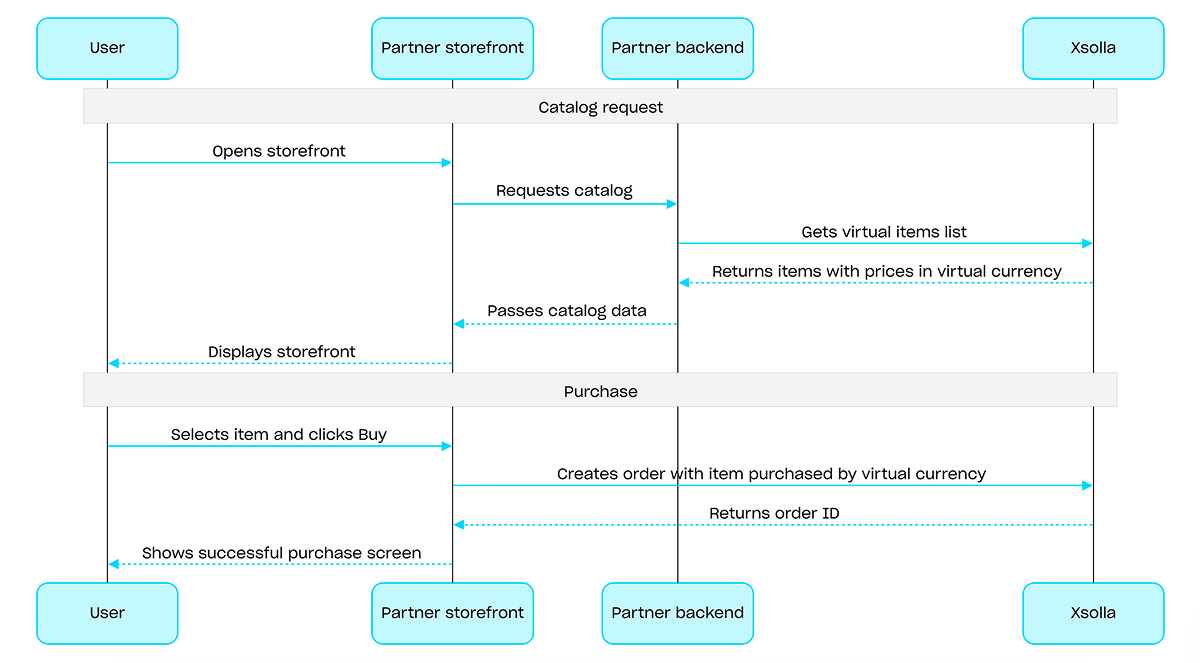
使用虚拟货币购买流程示例

操作
操作
操作

概述

游戏Key是一次性使用的唯一字母数字代码,可授予用户在游戏平台上访问游戏或DLC的权限。您可以通过直接链接商店UI小组件销售游戏Key。您还可以配置区域限制,以便在特定国家/地区销售游戏Key。有关详细信息,请参阅游戏Key套餐部分。

销售游戏Key不要求用户身份认证——游戏Key会发送到用户在结算时指定的邮箱。您可以配置身份认证,以支持更多场景:个性化购买限制权益系统。有关详细信息,请参阅销售游戏Key时如何设置身份认证部分。

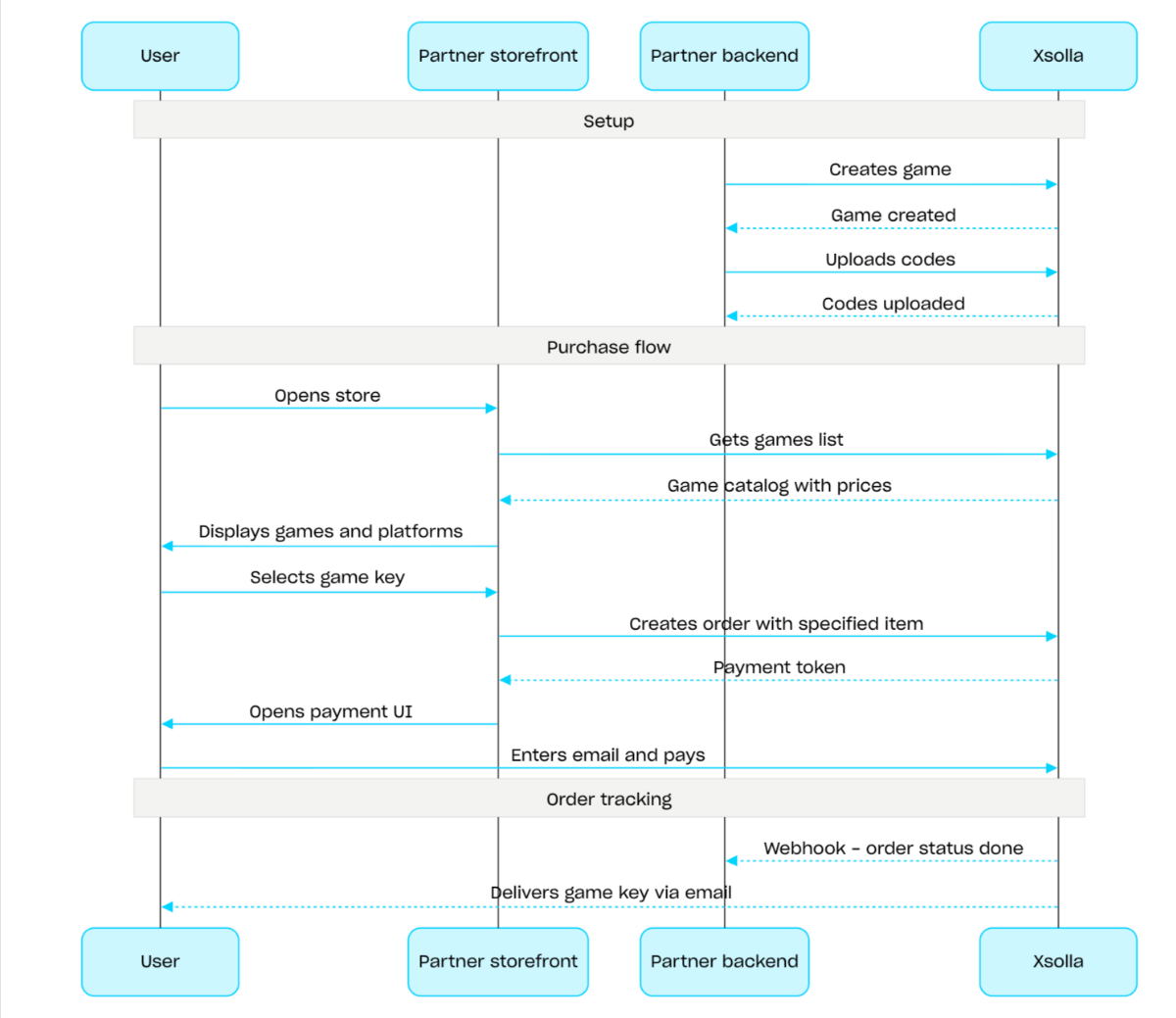
游戏Key销售流程:

  1. 使用创建游戏API调用创建游戏。
  2. 配置区域限制。
  3. 使用上传游戏Key API调用将游戏Key上传到游戏Key套餐,使其可供购买。
  4. 使用获取游戏列表API调用展示游戏目录,并显示适用于用户所在区域的价格。
  5. 创建订单。如需实现快速购买,可以使用使用当前购物车中的所有商品创建订单API调用,并传入游戏Key SKU。响应会返回用于打开支付UI的令牌。
  6. 实现支付UI的打开逻辑,以便用户支付订单。

如需及时接收支付成功通知并向用户交付商品,请设置订单状态跟踪,例如使用Webhook。游戏Key会发送到用户在结算时指定的邮箱,订单状态将变为done

游戏Key

操作
操作
操作

概述

捆绑包是作为一个单位销售的一组商品。捆绑包可以包含虚拟物品、虚拟货币、虚拟货币套餐、游戏Key以及其他捆绑包。您可以使用捆绑包创建新手礼包、季节性优惠和特惠活动。

如需实现捆绑包相关功能,请使用以下API调用组:

  • 使用管理子部分中的API调用创建、更新、删除捆绑包,并管理其可见性。
  • 使用商品目录子部分中的API调用获取捆绑包。

创建或更新捆绑包时,可通过limits对象配置购买限制。有关更多信息,请参阅限制概述。您还可以配置区域限制,以便在特定国家/地区销售商品。

注:

有关配置捆绑包的详细信息,请参阅捆绑包部分。

捆绑包管理场景:

  1. 使用创建捆绑包API调用创建捆绑包。如需验证已创建的捆绑包,请使用获取捆绑包API调用。如需获取项目中的所有捆绑包,请使用获取捆绑包列表API调用。
  2. 如有需要,可使用更新捆绑包API调用修改捆绑包内容或设置。
  3. 使用获取捆绑包列表获取指定的捆绑包获取指定组的捆绑包列表API调用,在您的商店前端中实现捆绑包展示逻辑。
  4. 使用购物车与支付部分中的API创建订单。例如,如需实现快速购买,可以使用使用指定商品创建订单API调用,并传入捆绑包SKU。响应中包含用于打开支付UI的令牌。
  5. 实现支付UI的打开逻辑,以便用户支付订单。
  6. 设置订单状态跟踪,例如使用Webhook,以便及时接收支付成功商品的数据并向用户发放商品。
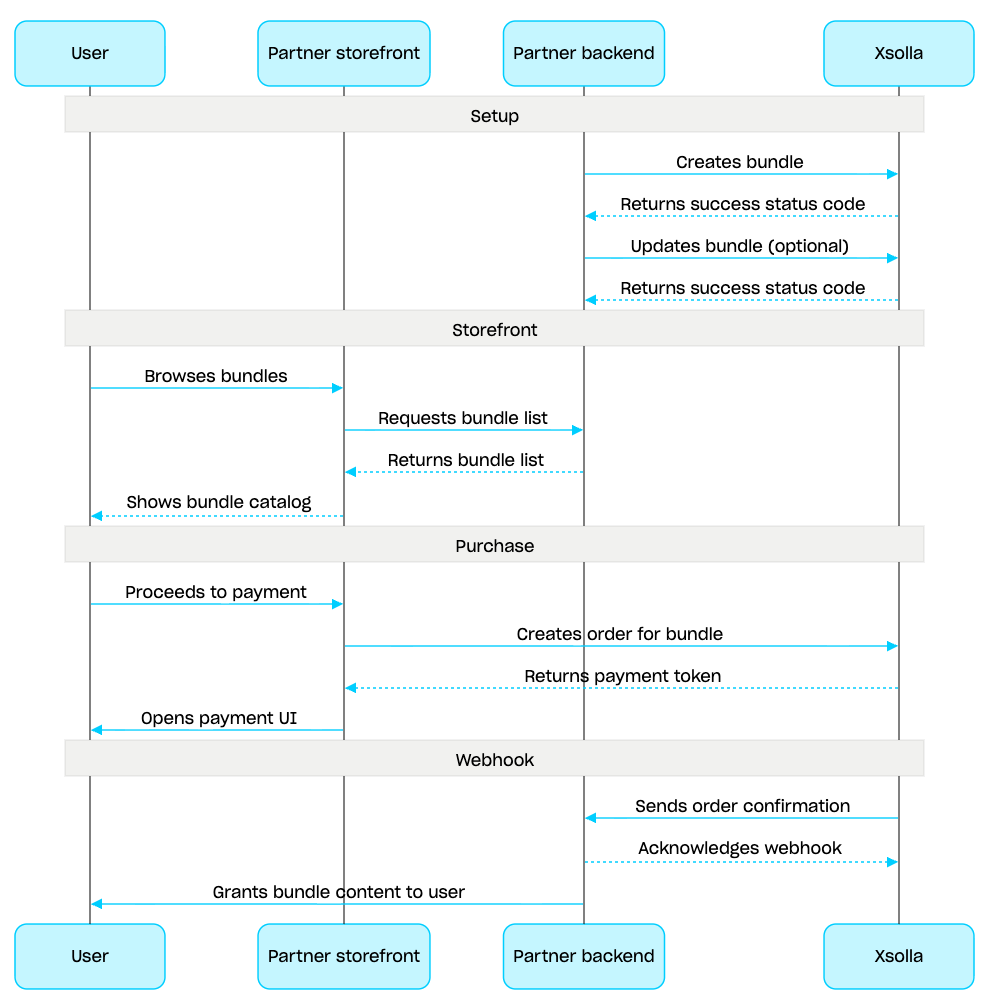
捆绑包管理场景

操作
操作

概述

购物车是一种购买机制,可将多个商品合并到同一个订单中。用户可以使用真实货币购买任意类型、任意数量的商品,也可以使用兑换码

购物车存储在艾克索拉侧。购物车能否跨会话保存取决于用户是否已授权:

  • 对于已授权用户,购物车会关联到具体用户。只要请求始终代表同一用户发送,购物车就会跨会话保存。

  • 对于未授权用户,购物车能否保存取决于是否传入x-unauthorized-id请求头。如需跨会话保存未授权用户的购物车,请在每个请求中传入相同的x-unauthorized-id。此选项仅适用于游戏Key销售。

您可以通过两种方式识别购物车:通过用户JWT自动识别或通过购物车ID (cart_id)识别。

可在客户端侧和服务器侧管理购物车。

在服务器侧,您可以向购物车添加商品,例如在恢复用户会话时。客户端侧支持以下操作:

  • 获取当前用户的购物车或按ID获取购物车
  • 向购物车添加商品
  • 更新购物车中的商品
  • 从购物车中删除商品

如需购买购物车中的商品,请使用客户端和服务器的订单创建调用。

购物车的存活时间(TTL)默认为72小时。如果购物车内容发生变化,例如添加了新商品,则TTL会延长。

支付成功后,购物车不会自动清空。如需清空购物车,请使用以下客户端侧API调用:

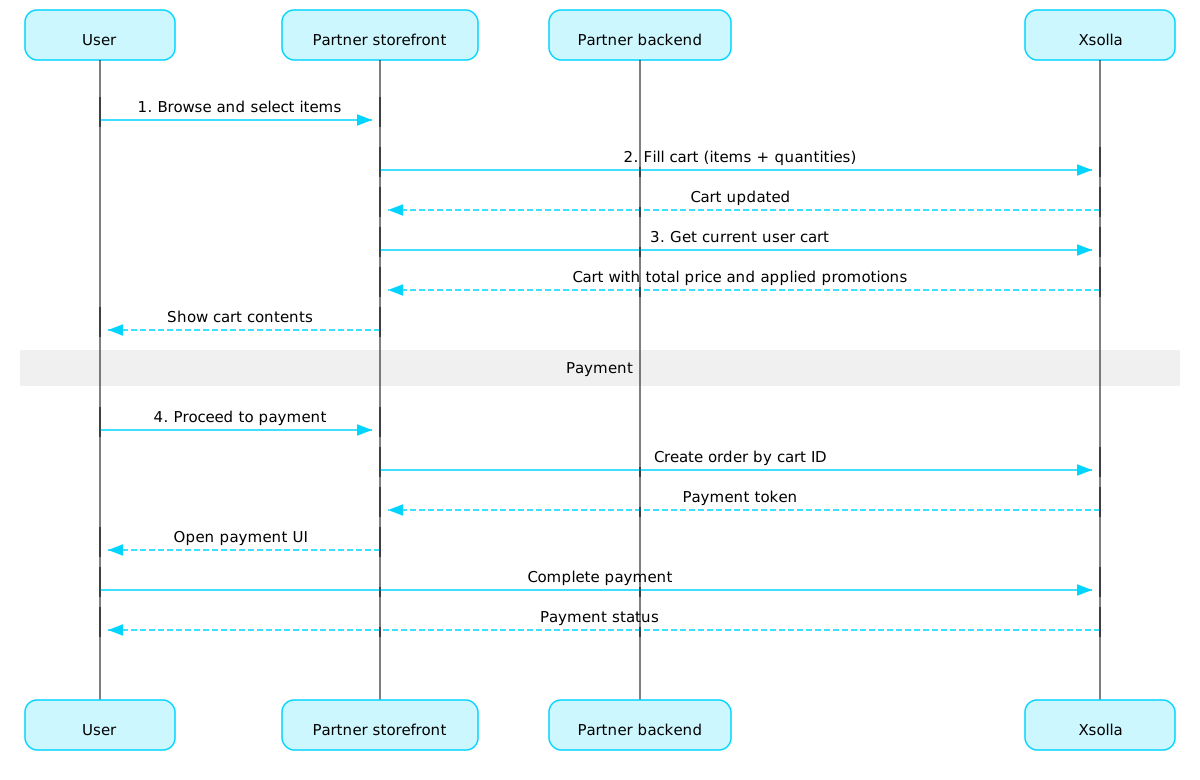
购物车使用场景:

  1. 实现商店UI,供用户选择商品。

  2. 用户在商店中选择商品后,将商品添加到购物车,例如使用在购物车里添加商品调用。在items数组中,需要传入商品SKU和所需数量。

  3. 实现购物车查看UI。用户进入购物车时,使用获取当前用户的购物车调用展示购物车内容。响应将返回商品最终价格信息,包括折扣和已应用的促销活动。

  4. 实现支付UI的打开逻辑,以便用户支付订单。例如,可以使用使用特定购物车中的所有商品创建订单调用。响应会返回用于打开支付UI的令牌。

  5. 配置订单状态跟踪,例如使用Webhook,以便及时接收支付成功商品的数据并向用户发放商品。

注:

如需实现游戏内和线上商品销售,请参阅集成指南

购物车和支付流程

订单生命周期

了解订单生命周期有助于您跟踪订单,并正确实现购买后逻辑,例如商品交付。

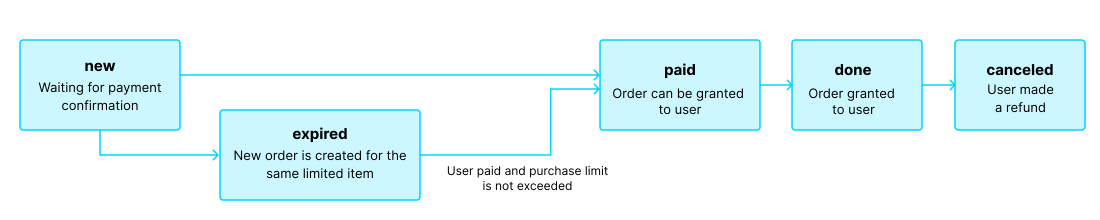
订单会经历以下状态:

状态描述备注
new订单已创建。系统正在等待付款确认。交易状态说明请参阅支付收银台API文档
paid订单已支付(交易已流转至done状态),可以向用户发放商品。 在付款确认前,订单会保持new状态。
done商品已发放给用户。
canceled付款已退款。 交易状态变更为refunded时,订单会流转至此状态。
expired 对于限购商品、兑换码或促销活动,创建新订单时,任何包含该商品且此前未支付的订单都会流转至expired状态。只有最新订单可以付款。 如果用户尝试支付已过期的订单,支付UI将显示2002错误,付款将失败。

订单生命周期

注:

如果用户正在完成付款时订单流转至expired状态,但付款成功,则订单会从expired流转至paid状态。仅当付款后不会超出订单中商品的购买限制时,此规则才适用。

购物车(客户端侧)

使用本部分中的调用在客户端侧管理购物车。

操作

购物车(服务器侧)

使用本部分中的调用在服务器侧管理购物车。

操作

支付(客户端侧)

使用本部分中的调用在客户端侧创建支付令牌。

操作

支付(服务器侧)

使用本部分中的调用在服务器侧创建支付令牌。

操作

订单

使用本部分中的调用获取订单信息。

操作

免费商品

使用本部分中的调用向用户发放免费商品

操作

概述

购买限制可用于限制单个用户或所有用户可购买的商品数量。您还可以配置定期重置限制。

限制存储在艾克索拉侧,可在发布商帐户中按单个商品进行配置,也可在以下API调用中通过limits对象进行配置:

在以下用于获取商品目录的API调用中,限制信息会在items.limits对象中返回:

限制组的管理部分中的API调用可用于获取限制的当前状态,并针对特定用户更新限制,例如在任务完成后重置计数器,或手动调整剩余数量。

注:

有关在商品目录中配置限制的详细信息,请参阅商品购买限制部分。
操作
操作
操作
操作

商品目录

此API可用于获取任意类型的可售商品或特定商品。

操作

通用区域

区域销售限制用于控制商品可在哪些国家/地区或国家/地区组销售。例如,受授权许可限制时,您可以将某款游戏设置为仅在特定国家/地区销售。

销售限制通过区域进行配置。每个区域使用一个region_id标识符关联一个或多个国家/地区。您可以将一个商品关联到一个或多个区域。

商品是否可售按以下规则判断:

  • 如果未为商品指定区域,则该商品可在所有国家/地区购买。
  • 如果为商品指定了区域,且用户所在国家/地区包含在其中任一区域内,则该商品对该用户可售。
  • 如果为商品指定了区域,但用户所在国家/地区不包含在任何指定区域内,则该商品对该用户不可售。

通过商品目录子部分中的API调用请求商品目录时,可通过country参数传入用户所在国家/地区。如果未传入该参数,系统会根据用户的IP地址判断其所在国家/地区。

系统会在两个环节校验用户所在国家/地区是否符合商品的区域设置:请求商品目录时和创建订单时。不可售商品不会返回在商品目录响应中;包含不可售商品的订单也无法创建。

如需创建、更新或删除区域,请使用通用区域组中的API调用。

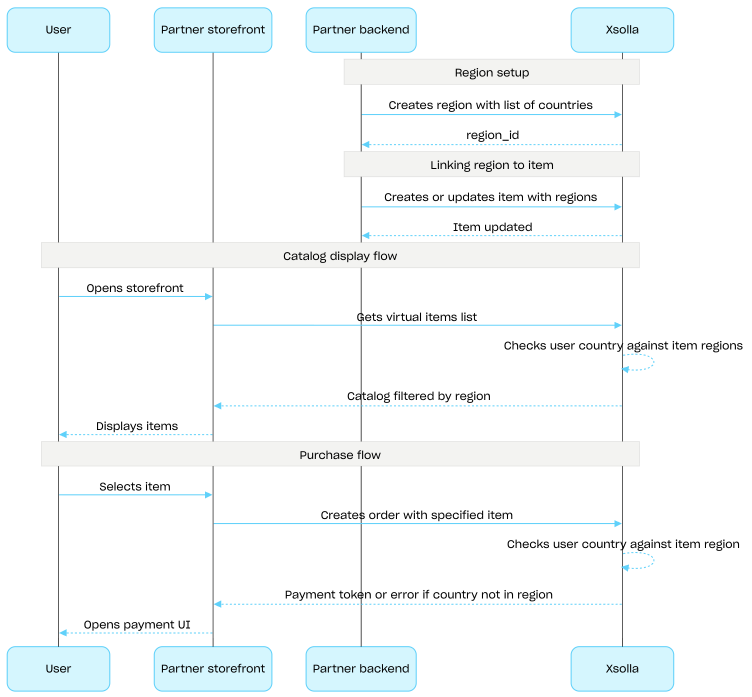
区域销售限制设置流程:

  1. 使用创建区域API调用创建区域,并指定国家/地区列表。响应会返回下一步需要使用的region_id
  2. 创建更新虚拟物品时,在regions数组中传入该区域的region_id,将虚拟物品关联到该区域。
  3. 使用商品目录子部分中的API调用向用户展示商品目录,例如获取虚拟物品列表API调用。系统会根据country参数确定用户所在国家/地区;如果未提供该参数,则根据用户的IP地址判断。用户所在国家/地区不可售的商品不会包含在商品目录响应中。
  4. 当用户继续支付商品或购物车时,创建订单:

响应中包含用于打开支付UI的令牌。

注:

艾克索拉会检查用户所在国家/地区是否包含在为商品指定的区域中。如果用户所在国家/地区不在该商品的区域范围内,则无法创建订单。

  1. 实现支付UI的打开逻辑,以便用户支付订单。

通用区域

操作
操作
操作
操作

获取按商品类型筛选的商品组列表Server-sideAdmin

请求

获取按商品类型筛选后的商品组列表。仅将指定类型的商品计入对应组。此接口类似于获取商品组列表接口,但在统计商品数量时会额外按商品类型进行筛选。

安全
basicAuth
路径
project_idinteger必需

项目ID。您可以在发布商帐户的项目名称旁找到此参数;使用项目时,也可以在浏览器地址栏中找到此参数。URL格式如下:https://publisher.xsolla.com/<merchant_id>/projects/<project_id>

示例: 44056
item_typestring必需

用于筛选组的商品类型。决定哪些商品会计入items_count。包含/的值(例如virtual_currency/packagegame/key)必须进行URL编码(例如virtual_currency%2Fpackage)。

Enum"virtual_items""virtual_currency""virtual_currency/package""game/key""bundle""game""value_points""subscription_plans"
示例: virtual_items
curl -i -X GET \
  -u <username>:<password> \
  https://store.xsolla.com/api/v2/project/44056/admin/items/virtual_items/groups

响应

已成功获取商品组列表。items_count字段仅包含指定类型的商品。

正文application/json
groupsArray of objects
groups[].​idinteger必需

由艾克索拉分配的商品组ID。

示例: 1
groups[].​external_idstring必需

创建时指定的外部商品组ID。

示例: "weapons"
groups[].​name(object or null)必需

包含本地化商品描述的对象。值接受以下两种格式之一:两个小写字母的语言代码(例如,en)或五个字符的区域设置代码(例如,en-US)。虽然两种格式都可作为输入接受,但响应会返回两个小写字母的语言代码。当为同一种语言提供了两种输入时(例如:enen-US),将存储最后提供的值。您可以在文档中找到支持语言的完整列表。

Any of:

两个小写字母的语言代码。

groups[].​name.​enstring or null

英语

groups[].​name.​arstring or null

阿拉伯语

groups[].​name.​bgstring or null

保加利亚语

groups[].​name.​cnstring or null

中文(简体)

groups[].​name.​csstring or null

捷克语

groups[].​name.​destring or null

德语

groups[].​name.​esstring or null

西班牙语(西班牙)

groups[].​name.​frstring or null

法语

groups[].​name.​hestring or null

希伯来语

groups[].​name.​itstring or null

意大利语

groups[].​name.​jastring or null

日语

groups[].​name.​kostring or null

韩语

groups[].​name.​plstring or null

波兰语

groups[].​name.​ptstring or null

葡萄牙语

groups[].​name.​rostring or null

罗马尼亚语

groups[].​name.​rustring or null

俄语

groups[].​name.​thstring or null

泰语

groups[].​name.​trstring or null

土耳其语

groups[].​name.​twstring or null

中文(繁体)

groups[].​name.​vistring or null

越南语

groups[].​name.​kmstring or null

高棉语

groups[].​name.​idstring or null

印度尼西亚语

groups[].​name.​lostring or null

老挝语

groups[].​name.​mystring or null

缅甸语

groups[].​name.​phstring or null

菲律宾语

groups[].​name.​nestring or null

尼泊尔语

groups[].​description(object or null)

包含本地化商品描述的对象。值接受以下两种格式之一:两个小写字母的语言代码(例如,en)或五个字符的区域设置代码(例如,en-US)。虽然两种格式都可作为输入接受,但响应会返回两个小写字母的语言代码。当为同一种语言提供了两种输入时(例如:enen-US),将存储最后提供的值。您可以在文档中找到支持语言的完整列表。

Any of:

两个小写字母的语言代码。

groups[].​description.​enstring or null

英语

groups[].​description.​arstring or null

阿拉伯语

groups[].​description.​bgstring or null

保加利亚语

groups[].​description.​cnstring or null

中文(简体)

groups[].​description.​csstring or null

捷克语

groups[].​description.​destring or null

德语

groups[].​description.​esstring or null

西班牙语(西班牙)

groups[].​description.​frstring or null

法语

groups[].​description.​hestring or null

希伯来语

groups[].​description.​itstring or null

意大利语

groups[].​description.​jastring or null

日语

groups[].​description.​kostring or null

韩语

groups[].​description.​plstring or null

波兰语

groups[].​description.​ptstring or null

葡萄牙语

groups[].​description.​rostring or null

罗马尼亚语

groups[].​description.​rustring or null

俄语

groups[].​description.​thstring or null

泰语

groups[].​description.​trstring or null

土耳其语

groups[].​description.​twstring or null

中文(繁体)

groups[].​description.​vistring or null

越南语

groups[].​description.​kmstring or null

高棉语

groups[].​description.​idstring or null

印度尼西亚语

groups[].​description.​lostring or null

老挝语

groups[].​description.​mystring or null

缅甸语

groups[].​description.​phstring or null

菲律宾语

groups[].​description.​nestring or null

尼泊尔语

groups[].​image_urlstring or null

商品组图片的URL。

groups[].​orderinteger

商品组在商品目录中的显示顺序。值越大,商品组在列表中的位置越靠下。如果值相同,则按创建日期排序,较新的商品组显示位置更靠上。

groups[].​is_enabledboolean必需

商品组是否在商品目录中启用。

groups[].​items_countinteger

组内商品总数。

示例: 5
groups[].​is_contains_any_itemsboolean

该组是否包含任何商品,与指定的item_type无关。对于指定类型,某个组的items_count可以为0;但如果该组包含其他类型的商品,则is_contains_any_itemstrue

响应
application/json
{ "groups": [ {}, {}, {} ] }

按外部ID获取按商品类型筛选的商品组Server-sideAdmin

请求

按外部ID获取商品组。仅将指定类型的商品计入对应组。此接口类似于按外部ID获取商品组接口,但在统计商品数量时会额外按商品类型进行筛选。

安全
basicAuth
路径
project_idinteger必需

项目ID。您可以在发布商帐户的项目名称旁找到此参数;使用项目时,也可以在浏览器地址栏中找到此参数。URL格式如下:https://publisher.xsolla.com/<merchant_id>/projects/<project_id>

示例: 44056
item_typestring必需

用于筛选组的商品类型。决定哪些商品会计入items_count。包含/的值(例如virtual_currency/packagegame/key)必须进行URL编码(例如virtual_currency%2Fpackage)。

Enum"virtual_items""virtual_currency""virtual_currency/package""game/key""bundle""game""value_points""subscription_plans"
示例: virtual_items
external_idstring必需

创建商品组时指定的外部商品组ID

示例: weapons
curl -i -X GET \
  -u <username>:<password> \
  https://store.xsolla.com/api/v2/project/44056/admin/items/virtual_items/groups/weapons

响应

已成功获取商品组,且items_count已按指定商品类型筛选。

正文application/json
idinteger必需

由艾克索拉分配的商品组ID。

示例: 1
external_idstring必需

创建时指定的外部商品组ID。

示例: "weapons"
name(object or null)必需

包含本地化商品描述的对象。值接受以下两种格式之一:两个小写字母的语言代码(例如,en)或五个字符的区域设置代码(例如,en-US)。虽然两种格式都可作为输入接受,但响应会返回两个小写字母的语言代码。当为同一种语言提供了两种输入时(例如:enen-US),将存储最后提供的值。您可以在文档中找到支持语言的完整列表。

Any of:

两个小写字母的语言代码。

name.​enstring or null

英语

name.​arstring or null

阿拉伯语

name.​bgstring or null

保加利亚语

name.​cnstring or null

中文(简体)

name.​csstring or null

捷克语

name.​destring or null

德语

name.​esstring or null

西班牙语(西班牙)

name.​frstring or null

法语

name.​hestring or null

希伯来语

name.​itstring or null

意大利语

name.​jastring or null

日语

name.​kostring or null

韩语

name.​plstring or null

波兰语

name.​ptstring or null

葡萄牙语

name.​rostring or null

罗马尼亚语

name.​rustring or null

俄语

name.​thstring or null

泰语

name.​trstring or null

土耳其语

name.​twstring or null

中文(繁体)

name.​vistring or null

越南语

name.​kmstring or null

高棉语

name.​idstring or null

印度尼西亚语

name.​lostring or null

老挝语

name.​mystring or null

缅甸语

name.​phstring or null

菲律宾语

name.​nestring or null

尼泊尔语

description(object or null)

包含本地化商品描述的对象。值接受以下两种格式之一:两个小写字母的语言代码(例如,en)或五个字符的区域设置代码(例如,en-US)。虽然两种格式都可作为输入接受,但响应会返回两个小写字母的语言代码。当为同一种语言提供了两种输入时(例如:enen-US),将存储最后提供的值。您可以在文档中找到支持语言的完整列表。

Any of:

两个小写字母的语言代码。

description.​enstring or null

英语

description.​arstring or null

阿拉伯语

description.​bgstring or null

保加利亚语

description.​cnstring or null

中文(简体)

description.​csstring or null

捷克语

description.​destring or null

德语

description.​esstring or null

西班牙语(西班牙)

description.​frstring or null

法语

description.​hestring or null

希伯来语

description.​itstring or null

意大利语

description.​jastring or null

日语

description.​kostring or null

韩语

description.​plstring or null

波兰语

description.​ptstring or null

葡萄牙语

description.​rostring or null

罗马尼亚语

description.​rustring or null

俄语

description.​thstring or null

泰语

description.​trstring or null

土耳其语

description.​twstring or null

中文(繁体)

description.​vistring or null

越南语

description.​kmstring or null

高棉语

description.​idstring or null

印度尼西亚语

description.​lostring or null

老挝语

description.​mystring or null

缅甸语

description.​phstring or null

菲律宾语

description.​nestring or null

尼泊尔语

image_urlstring or null

商品组图片的URL。

orderinteger

商品组在商品目录中的显示顺序。值越大,商品组在列表中的位置越靠下。如果值相同,则按创建日期排序,较新的商品组显示位置更靠上。

is_enabledboolean必需

商品组是否在商品目录中启用。

items_countinteger

组内商品总数。

示例: 5
is_contains_any_itemsboolean

该组是否包含任何商品,与指定的item_type无关。对于指定类型,某个组的items_count可以为0;但如果该组包含其他类型的商品,则is_contains_any_itemstrue

响应
application/json
{ "id": 1, "external_id": "weapons", "name": { "en": "Weapons" }, "description": { "en": "Player weapons" }, "image_url": "https://example.com/weapons.png", "order": 1, "is_enabled": true, "items_count": 3, "is_contains_any_items": true }

重新排列商品组Server-sideAdmin

请求

设置项目内商品组的显示顺序。传入包含新排序值的组数组。

安全
basicAuth
路径
project_idinteger必需

项目ID。您可以在发布商帐户的项目名称旁找到此参数;使用项目时,也可以在浏览器地址栏中找到此参数。URL格式如下:https://publisher.xsolla.com/<merchant_id>/projects/<project_id>

示例: 44056
正文application/json必需

包含新顺序值的组数组。所有项必须使用相同的标识方法(全部按id或全部按external_id)。

One of:
unique
Array [
idinteger>= 0必需

由艾克索拉分配的商品组ID。

示例: 1
orderinteger>= 0必需

新的显示顺序值。

示例: 1
]
curl -i -X PUT \
  -u <username>:<password> \
  https://store.xsolla.com/api/v2/project/44056/admin/group/order \
  -H 'Content-Type: application/json' \
  -d '[
    {
      "id": 1,
      "order": 1
    },
    {
      "id": 2,
      "order": 2
    },
    {
      "id": 3,
      "order": 3
    }
  ]'

响应

已成功重新排序商品组。

响应
无内容
操作