SKU do item.
- Excluir códigos por ID
Criar jogo
Obter lista de jogos (admin)
Obter jogo (admin)
Atualizar jogo por SKU
Excluir jogo por SKU
Obter jogo por ID (admin)
Atualizar jogo por ID
Excluir jogo por ID
Carregar códigos
Carregar códigos por ID
Obter códigos carregando informações da sessão
Obter códigos
Obter códigos por ID
Excluir códigos
Excluir códigos por ID
Catalog API (2.0.0)
- Versão: 2.0.0
- Servidores:
https://store.xsolla.com/api - Entre em contato por e-mail
- URL de Contato: https://xsolla.com/
- Versão TLS requerida: 1.2
A Catalog API permite que você configure um catálogo de itens de jogo no lado da Xsolla e exibir o catálogo aos usuários na sua loja.
A API permite que você gerencie as seguintes entidades de catálogo:
- Itens virtuais — itens de jogo tais como armas, visuais e reforços.
- Moedas virtuais — dinheiro virtual utilizado para comprar bens virtuais.
- Pacotes de moedas virtuais — conjuntos pré-definidos de moedas virtuais.
- Conjuntos — pacotes combinados de itens virtuais, moedas ou chaves de jogo vendidas como um único SKU.
- Chaves de jogo — chaves para jogos e DLCs distribuídos via plataformas como o Steam ou outros provedores de DRM.
- Grupos — agrupamentos lógicos para organizar e filtrar itens dentro do catálogo.
A API divide-se nos seguintes grupos:
Admin — chamadas para criar, atualizar, excluir e configurar itens de catálogo e grupos. Autenticada via autenticação de acesso básica com seu comerciante ou credenciais do projeto. Não se destina a uso em vitrines.Catalog — chamadas para recuperar itens e construir vitrines personalizadas para usuários finais. Desenvolvida para gerenciar cenários de carga alta. Suporta a autorização opcional de JWT de usuários para retornar dados personalizados, tais como limites específicos aos usuários e promoções ativas.
Chamadas de API requerem autenticação em nome de um usuário ou de um projeto. O esquema de autenticação utilizado é especificado na seção Segurança na descrição de cada chamada.
A autenticação JWT do usuário é usada quando uma solicitação é enviada de um navegador, aplicativo móvel ou jogo. Por padrão, o esquema XsollaLoginUserJWT é aplicado. Para detalhes sobre como criar um token, consulte a documentação Xsolla Login API.
O token é passado no cabeçalho Authorization no seguinte formato: Authorization: Bearer <user_JWT>, onde <user_JWT> é o token do usuário. O token identifica o usuário e fornece acesso a dados personalizados.
Alternativamente, você pode usar um token para abrir a interface de pagamento.
A autenticação HTTP básica é usada para interações de servidor para servidor, quando uma chamada de API é enviada diretamente do seu servidor em vez de um navegador ou aplicativo móvel do usuário. A autenticação HTTP básica com uma chave de API normalmente é utilizada.
Nota
A chave API é confidencial e não deve ser armazenada ou usada em aplicativos de usuários finais.
A chave API é confidencial e não deve ser armazenada ou usada em aplicativos de usuários finais.
Com a autenticação básica do lado do servidor, todas as solicitações de API devem incluir o seguinte cabeçalho:
- para
basicAuth—Authorization: Basic <your_authorization_basic_key>, ondeyour_authorization_basic_keyé o parproject_id:api_keycodificado em Base64 - para
basicMerchantAuth—Authorization: Basic <your_authorization_basic_key>, ondeyour_authorization_basic_keyé o parmerchant_id:api_keycodificado em Base64
Você pode encontrar os valores dos parâmetros em Conta de Distribuidor:
merchant_idé exibido:- Em Configurações da empresa > Empresa.
- No URL na barra de endereço do navegador em qualquer página da Conta de Distribuidor. O URL tem o seguinte formato:
https://publisher.xsolla.com/<merchant_id>.
project_idé exibido:- Ao lado do nome do projeto na Conta de Distribuidor.
- No URL na barra de endereço do navegador ao trabalhar em um projeto na Conta de Distribuidor. O URL tem o seguinte formato:
https://publisher.xsolla.com/<merchant_id>/projects/<project_id>.
api_keyé mostrado na Conta de Distribuidor apenas no momento da criação e deve ser armazenado de forma segura do seu lado. Você pode criar uma chave de API nas seguintes seções:
Aviso
Se uma chamada de API necessária não incluir o parâmetro de caminho
Se uma chamada de API necessária não incluir o parâmetro de caminho
project_id, use uma chave de API que seja válida para todos os projetos da empresa para autorização.Para mais informações sobre como trabalhar com chaves API, consulte as referências de API.
O esquema de autenticação AuthForCart é utilizado para as compras de carrinhos e suporta dois modos:
Autenticação com o JWT do usuário. O token é passado no cabeçalho
Authorizationno seguinte formato:Authorization: Bearer <user_JWT>, onde<user_JWT>é o token do usuário. O token identifica o usuário e fornece acesso a dados personalizados. Alternativamente, você pode usar um token para abrir a interface de pagamento.Modo simplificado sem o cabeçalho Authorization. Esse modo é usado apenas para usuários não autorizados e pode ser aplicado apenas para vendas de chaves de jogo. Em vez de um token, a solicitação deve incluir os seguintes cabeçalhos:
x-unauthorized-idcom um ID de solicitaçãox-usercom o endereço de e-mail do usuário codificado em Base64
Itens de todos os tipos (itens virtuais, pacotes, moeda virtual e chaves) usam uma estrutura de dados semelhante. Compreender a estrutura básica simplifica o trabalho com a API e ajuda a navegar na documentação com mais facilidade.
Nota
Algumas chamadas podem incluir campos adicionais, mas eles não alteram a estrutura básica.
Algumas chamadas podem incluir campos adicionais, mas eles não alteram a estrutura básica.
Identificação
merchant_id— ID da empresa na Conta de Distribuidorproject_id— ID do projeto na Conta de Distribuidorsku— SKU do item, único dentro do projeto
Exibição na loja
name— nome do itemdescription— descrição do itemimage_url— URL da imagemis_enabled— disponibilidade do itemis_show_in_store— se o item é exibido no catálogo
Para mais informações sobre como gerenciar a disponibilidade de itens no catálogo, consulte a documentação.
Organização
type— tipo de item, por exemplo, um item virtual (virtual_item) ou conjunto (bundle)groups— grupos aos quais o item pertenceorder— ordem de exibição no catálogo
Condições de venda
prices— preços em moeda real ou virtuallimits— limites de compraperiods— períodos de disponibilidaderegions— restrições regionais
Exemplo de estrutura da entidade principal:
{
  "attributes": [],
  "bundle_type": "virtual_currency_package",
  "content": [
    {
      "description": {
        "en": "Main in-game currency"
      },
      "image_url": "https://.../image.png",
      "name": {
        "en": "Crystals",
        "de": "Kristalle"
      },
      "quantity": 500,
      "sku": "com.xsolla.crystal_2",
      "type": "virtual_currency"
    }
  ],
  "description": {
    "en": "Crystals x500"
  },
  "groups": [],
  "image_url": "https://.../image.png",
  "is_enabled": true,
  "is_free": false,
  "is_show_in_store": true,
  "limits": {
    "per_item": null,
    "per_user": null,
    "recurrent_schedule": null
  },
  "long_description": null,
  "media_list": [],
  "name": {
    "en": "Medium crystal pack"
  },
  "order": 1,
  "periods": [
    {
      "date_from": null,
      "date_until": "2020-08-11T20:00:00+03:00"
    }
  ],
  "prices": [
    {
      "amount": 20,
      "country_iso": "US",
      "currency": "USD",
      "is_default": true,
      "is_enabled": true
    }
  ],
  "regions": [],
  "sku": "com.xsolla.crystal_pack_2",
  "type": "bundle",
  "vc_prices": []
}A Xsolla API permite implementar a lógica de loja no jogo, incluindo a recuperação do catálogo de itens, gerenciamento do carrinho, criação de pedidos e acompanhamento de seu status. Dependendo do cenário de integração, as chamadas de API são divididas em subseções Admin e Catalog, que usam diferentes esquemas de autenticação.
O exemplo a seguir mostra um fluxo básico para configurar e operar uma loja, desde a criação de itens até a compra.
Crie um catálogo de itens para sua loja, como itens virtuais, pacotes ou moeda virtual.
Exemplos de chamadas de API:
Configure ferramentas de aquisição de usuários e monetização, como descontos, bônus, recompensas diárias ou cadeias de ofertas.
Exemplos de chamadas de API:
Configure a exibição do item em sua aplicação.
Aviso
Não use chamadas de API da subseção Admin para construir um catálogo de usuários. Essas chamadas de API têm limites de taxa e não são destinadas para tráfego de usuários.
Não use chamadas de API da subseção Admin para construir um catálogo de usuários. Essas chamadas de API têm limites de taxa e não são destinadas para tráfego de usuários.
Exemplos de chamadas de API:
Nota
Por padrão, as chamadas de API do catálogo retornam itens que estão atualmente disponíveis na loja no momento da solicitação. Para recuperar itens que ainda não estão disponíveis ou que não estão mais disponíveis, inclua o parâmetro
Por padrão, as chamadas de API do catálogo retornam itens que estão atualmente disponíveis na loja no momento da solicitação. Para recuperar itens que ainda não estão disponíveis ou que não estão mais disponíveis, inclua o parâmetro
"show_inactive_time_limited_items": 1 na solicitação do catálogo.
Você pode vender itens usando os seguintes métodos:
- Compra rápida — vender um SKU várias vezes.
- Compra de carrinho — o usuário adiciona itens ao carrinho, remove itens e atualiza quantidades dentro de um único pedido.
Se um item for comprado usando moedas virtuais em vez de moedas reais, use a chamada de API Criar pedido com item especificado comprado por moeda virtual. A interface de pagamento não é necessária, pois a cobrança é processada quando a chamada de API é executada.
Para a compra de itens gratuitos, use a chamada de API Criar pedido com item gratuito especificado ou a chamada de API Criar pedido com carrinho gratuito. A interface de pagamento não é necessária — o pedido é imediatamente definido ao status done.
Use a chamada de API do lado do cliente para criar um pedido com um item especificado. A chamada retorna um token usado para abrir a interface de pagamento.
Nota
As informações de desconto estão disponíveis para o usuário apenas na interface de pagamento. Códigos promocionais não são suportados.
As informações de desconto estão disponíveis para o usuário apenas na interface de pagamento. Códigos promocionais não são suportados.
A configuração e compra do carrinho podem ser realizadas no lado do cliente ou no lado do servidor.
Configure e compre um carrinho no cliente
Implemente a lógica de adicionar e remover itens por conta própria. Antes de chamar a API para configurar um carrinho, você não terá informações sobre quais promoções serão aplicadas à compra. Isso significa que o custo total e os detalhes dos itens bônus adicionados não serão conhecidos.
Implemente a seguinte lógica de carrinho:
- Após o jogador ter preenchido um carrinho, use a chamada de API Preencher carrinho com itens. A chamada retorna as informações atuais sobre os itens selecionados (preços antes e depois dos descontos, itens bônus).
- Atualize o conteúdo do carrinho com base nas ações do usuário:
- Para adicionar um item ou alterar a quantidade de um item, use a chamada de API Atualizar item do carrinho por ID do carrinho.
- Para remover um item, use a chamada de API Excluir item do carrinho por ID do carrinho.
Nota
Para obter o status atual do carrinho, use a chamada de API Obter carrinho do usuário atual.
Para obter o status atual do carrinho, use a chamada de API Obter carrinho do usuário atual.
- Use a chamada de API Criar pedido com todos os itens do carrinho atual. A chamada retorna o ID do pedido e o token de pagamento. O pedido recém-criado é definido para o status
newpor padrão.
Configure e compre um carrinho no servidor
Esta opção de configuração pode levar mais tempo para configurar o carrinho, já que cada alteração no carrinho deve ser acompanhada por chamadas de API.
Implemente a seguinte lógica de carrinho:
- Após o jogador ter preenchido um carrinho, use a chamada de API Preencher carrinho com itens. A chamada retorna informações atuais sobre os itens selecionados (preços antes e depois dos descontos, itens bônus).
- Use a chamada de API Criar pedido com todos os itens do carrinho atual. A chamada retorna o ID do pedido e o token de pagamento. O pedido recém-criado é definido ao status
newpor padrão.
Use o token retornado para abrir a interface de pagamento em uma nova janela. Outras maneiras de abrir a interface de pagamento estão descritas na documentação.
| Ação | Endpoint |
|---|---|
| Abrir no ambiente de produção. | https://secure.xsolla.com/paystation4/?token={token} |
| Abrir no modo sandbox. | https://sandbox-secure.xsolla.com/paystation4/?token={token} |
Nota
Use o modo sandbox durante o desenvolvimento e teste. Compras de teste não fazem cobranças de contas reais. Você pode usar cartões de teste.
Use o modo sandbox durante o desenvolvimento e teste. Compras de teste não fazem cobranças de contas reais. Você pode usar cartões de teste.
Após o primeiro pagamento real, uma política de pagamento sandbox estrita entra em vigor. Um pagamento no modo sandbox está disponível apenas para usuários especificados em Conta de Distribuidor > Configurações da Empresa > Usuários.
Comprar moedas e itens virtuais por moedas reais é possível apenas após assinar um acordo de licença com a Xsolla. Para isso, na Conta de Distribuidor, acesse Contratos & Impostos > Contratos, preencha o formulário do acordo e aguarde a confirmação. Pode levar até 3 dias úteis para revisar o contrato.
Para habilitar ou desabilitar o modo sandbox, altere o valor do parâmetro sandbox na solicitação para compra rápida e compra no carrinho. O modo sandbox está desativado por padrão.
Possíveis status do pedido:
new— pedido criadopaid— pagamento recebidodone— item entreguecanceled— pedido canceladoexpired— pedido expirado
Acompanhe o status do pedido usando um dos seguintes métodos:
Chamadas de API que retornam grandes conjuntos de registros (por exemplo, ao criar um catálogo) retornam dados em páginas. A paginação é um mecanismo que limita o número de itens retornados em uma única resposta de API e permite que você recupere páginas subsequentes sequencialmente.
Use os seguintes parâmetros para controlar o número de itens retornados:
limit— número de itens por páginaoffset— índice do primeiro item na página (a numeração começa em 0)has_more— indica se outra página está disponíveltotal_items_count— número total de itens
Exemplo de solicitação:
GET /items?limit=20&offset=40Exemplo de resposta:
{
  "items": [...],
  "has_more": true,
  "total_items_count": 135
}
Recomenda-se enviar solicitações subsequentes até que a resposta retorne has_more = false.
Datas e valores de tempo são passados no formato ISO 8601.
Os seguintes são suportados:
- Deslocamento UTC
- Valor
nullquando não há restrição de tempo para exibir um item - Timestamp Unix (em segundos) usado em alguns campos
Formato: YYYY-MM-DDTHH:MM:SS±HH:MM
Exemplo: 2026-03-16T10:00:00+03:00
A Xsolla suporta a tradução de campos voltados para o usuário, como nome e descrição do item. Valores traduzidos são passados como um objeto onde o código de idioma é usado como chave. A lista completa de idiomas suportados está disponível na documentação.
Campos suportados
A localização pode ser especificada para os seguintes parâmetros:
namedescriptionlong_description
Formato de localidade
A chave de localidade pode ser especificada em um dos seguintes formatos:
- Código de idioma de duas letras:
en,ru - Código de idioma de cinco letras:
en-US,ru-RU,de-DE
Exemplos
Exemplo com um código de idioma de duas letras:
{
  "name": {
    "en": "Starter Pack",
    "ru": "Стартовый набор"
  }
}
Exemplo com um código de idioma de cinco letras:
{
  "description": {
    "en-US": "Premium bundle",
    "de-DE": "Premium-Paket"
  }
}O país do usuário determina os preços no catálogo, a moeda de pagamento e os métodos de pagamento disponíveis na interface de pagamento. Dependendo da chamada de API, o país é determinado como a seguir:
- Em chamadas API do lado do cliente, o país é determinado pelo endereço IP da solicitação.
- Em chamadas API do lado do servidor,
o país é determinado pelo valor do parâmetro
user.country.valueou pelo endereço IP do usuário a partir do cabeçalhoX-User-Ip. Se ambos forem passados, o parâmetrouser.country.valueleva precedência.
Observação
Apenas endereços IPv4 são suportados pela determinação do país. Passar um endereço IPv6 pode resultar em uma detecção incorreta de país e moeda. Se você utiliza uma chamada API do lado do servidor e não consegue fornecer o endereço IPv4 do usuário, passe o país no parâmetro
Apenas endereços IPv4 são suportados pela determinação do país. Passar um endereço IPv6 pode resultar em uma detecção incorreta de país e moeda. Se você utiliza uma chamada API do lado do servidor e não consegue fornecer o endereço IPv4 do usuário, passe o país no parâmetro
user.country.value.
Se ocorrer um erro, a API retorna um status HTTP e um corpo de resposta JSON. A lista completa de erros relacionados à loja está disponível na documentação.
Exemplo de resposta:
{
  "errorCode": 1102,
  "errorMessage": "Validation error",
  "statusCode": 422,
  "transactionId": "c9e1a..."
}errorCode— código de erro.errorMessage— descrição curta do erro.statusCode— status da resposta HTTP.transactionId— ID da solicitação. Retornado apenas em alguns casos.errorMessageExtended— detalhes adicionais do erro, como parâmetros da solicitação. Retornado apenas em alguns casos.
Exemplo de resposta estendida:
{
  "errorCode": 7001,
  "errorMessage": "Chain not found",
  "errorMessageExtended": {
    "chain_id": "test_chain_id",
    "project_id": "test_project_id",
    "step_number": 2
  },
  "statusCode": 404
}
Códigos de status HTTP comuns
400— solicitação inválida401— erro de autenticação403— permissões insuficientes404— recurso não encontrado422— erro de validação429— limite de taxa excedido
Recomendações
- Lide com o status HTTP e o corpo da resposta juntos.
- Use
errorCodepara processar erros relacionados à lógica da aplicação. - Use
transactionIdpara identificar solicitações mais rapidamente ao analisar erros.
Transferir a descrição da OpenAPI
Idiomas
Servidores
https://store.xsolla.com/api/
Mock server
https://xsolla.redocly.app/_mock/pt/api/catalog/
Visão geral
Você pode usar itens virtuais e moedas virtuais para construir uma loja no jogo e configurar como ela é exibida para os usuários. Os seguintes tipos de itens estão disponíveis:
- Itens virtuais — bens no jogo como armas, skins ou impulsionadores. Podem ser vendidos por dinheiro real ou moedas virtuais.
- Moeda virtual — moeda no jogo usada para comprar itens virtuais. Pode ser vendida por moedas reais ou moedas virtuais.
- Pacotes de moedas virtuais — uma quantidade fixa de moedas virtuais. Pode ser vendida por moedas reais ou moedas virtuais.
Grupos são usados para organizar itens no catálogo. Eles permitem agrupar logicamente os itens e gerenciar como eles são exibidos.
Use chamadas de API da subseção Admin para criar, atualizar e excluir itens.
Use chamadas de API da subseção Catálogo para recuperar listas de itens e exibi-los aos usuários.
Aviso
Não use chamadas de API da subseção Admin para construir um catálogo de loja.
Não use chamadas de API da subseção Admin para construir um catálogo de loja.
Nota
A chamada de API Obter lista de itens virtuais retorna dados detalhados dos itens, incluindo preços e atributos, e suporta paginação. Use-a para exibir páginas de catálogo na vitrine.
A chamada de API Obter lista de todos os itens virtuais retorna o SKU do item, nome, descrição, bem como ID e nome do grupo sem paginação. Use-a para busca ou indexação do lado do cliente.
A chamada de API Obter lista de itens virtuais retorna dados detalhados dos itens, incluindo preços e atributos, e suporta paginação. Use-a para exibir páginas de catálogo na vitrine.
A chamada de API Obter lista de todos os itens virtuais retorna o SKU do item, nome, descrição, bem como ID e nome do grupo sem paginação. Use-a para busca ou indexação do lado do cliente.
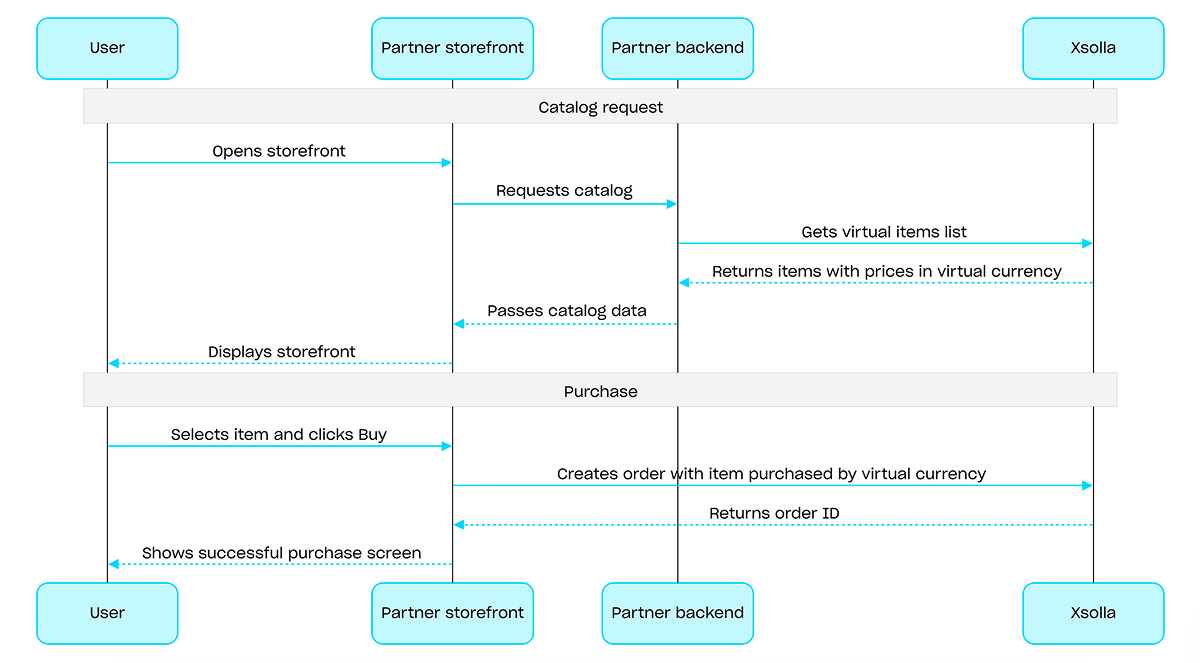
Para compras com moedas virtuais, use a chamada de API Criar pedido com item especificado comprado por moeda virtual. A interface de pagamento não é necessária — a cobrança é processada quando a chamada de API é executada.
Exemplo de fluxo de compra com moeda virtual:
Visão geral
Chaves de jogo são códigos alfanuméricos exclusivos de uso único que concedem acesso a um jogo ou DLC em plataformas de jogos para usuários. Você pode vender chaves de jogo via link direto, pela interface da loja, ou via widget. Você também pode configurar restrições regionais para vender chaves de jogo em países específicos. Para obter informações detalhadas, consulte a seção pacotes de chaves de jogo.
Não é necessário estar autenticado para vender chaves de jogo — as chaves são enviadas ao e-mail que o usuário especifica na compra. Você pode configurar a autenticação para habilitar cenários adicionais: personalização, limites de compra, ou um sistema de direitos. Para obter informações mais detalhadas, consulte a seção Como configurar a autenticação ao vender chaves de jogo.
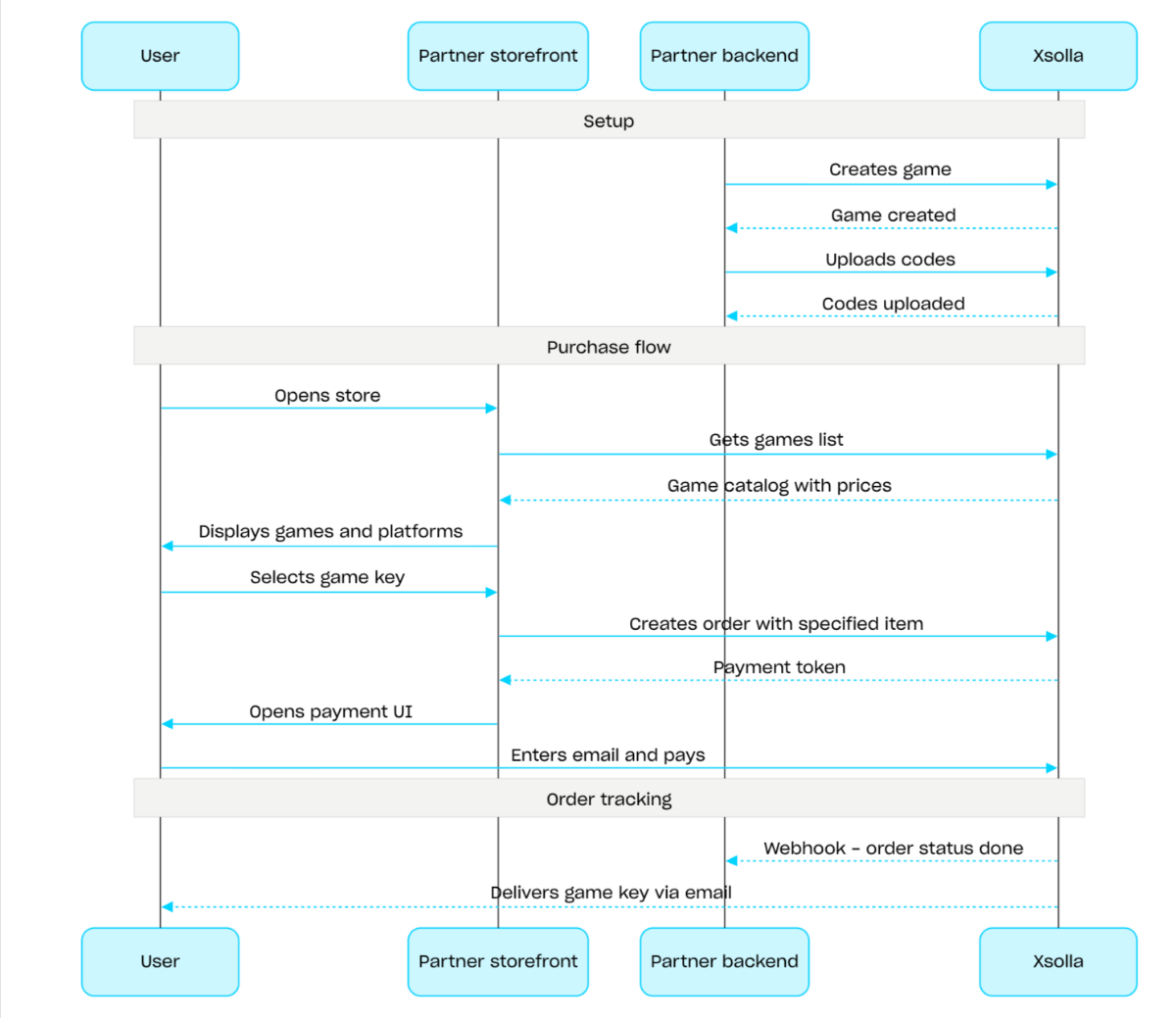
Fluxo de venda de chaves de jogo:
- Crie um jogo usando a chamada de API Criar jogo API call.
- Configure restrições regionais.
- Envie chaves a um pacote de chaves de jogo usando a chamada de API Enviar códigos para torná-las disponíveis para compra.
- Exiba o catálogo de jogos com preços para a região do usuário usando a chamada de API Obter lista de jogos API call.
- Crie um pedido. Para criar uma compra rápida, você pode usar a chamada de API Criar pedido com todos os itens do carrinho atual, passando o SKU da chave de jogo. A resposta retorna um token para abrir a interface de pagamento.
- Implemente a abertura da interface de pagamento para pagar pelo pedido.
Para receber notificações sobre pagamentos bem-sucedidos e entregar itens ao usuário, configure o rastreamento do status de pedidos, por exemplo, usando webhooks. As chaves são enviadas ao e-mail especificado pelo usuário na compra, e o pedido transita para o status done.
Caminho
ID de projeto. Você pode encontrar esse parâmetro na sua Conta de Distribuidor, próximo ao nome do projeto e na barra de endereços do navegador ao trabalhar com um projeto. O URL tem o seguinte formato: https://publisher.xsolla.com/<merchant_id>/projects/<project_id>.
Exemplo: 44056
- https://store.xsolla.com/api/v2/project/{project_id}/admin/items/game/key/delete/sku/{item_sku}
- Mock serverhttps://xsolla.redocly.app/_mock/pt/api/catalog/v2/project/{project_id}/admin/items/game/key/delete/sku/{item_sku}
- curl
- JavaScript
- Node.js
- Python
- Java
- C#
- PHP
- Go
- Ruby
- R
- Payload
curl -i -X DELETE \
-u <username>:<password> \
'https://store.xsolla.com/api/v2/project/44056/admin/items/game/key/delete/sku/booster_mega_1?user_email=email%40email.com&reason=Very+important®ion_id=1'Resposta
text/plain
PIN-CODE-ALL PIN-CODE-ALL-3Caminho
ID de projeto. Você pode encontrar esse parâmetro na sua Conta de Distribuidor, próximo ao nome do projeto e na barra de endereços do navegador ao trabalhar com um projeto. O URL tem o seguinte formato: https://publisher.xsolla.com/<merchant_id>/projects/<project_id>.
Exemplo: 44056
- https://store.xsolla.com/api/v2/project/{project_id}/admin/items/game/key/delete/id/{item_id}
- Mock serverhttps://xsolla.redocly.app/_mock/pt/api/catalog/v2/project/{project_id}/admin/items/game/key/delete/id/{item_id}
- curl
- JavaScript
- Node.js
- Python
- Java
- C#
- PHP
- Go
- Ruby
- R
- Payload
curl -i -X DELETE \
-u <username>:<password> \
'https://store.xsolla.com/api/v2/project/44056/admin/items/game/key/delete/id/656?user_email=email%40email.com&reason=Very+important®ion_id=1'Resposta
text/plain
PIN-CODE-ALL PIN-CODE-ALL-3Visão geral
Conjuntos são grupos de itens vendidos como uma unidade única. Um conjunto pode incluir itens virtuais, moedas virtuais, pacotes de moedas virtuais, chaves de jogo, e outros conjuntos. Use conjuntos para criar pacotes de iniciantes, ofertas sazonais e ofertas especiais.
Use os seguintes grupos de chamada de API com conjuntos:
- Use chamadas de API da subseção Admin para criar, atualizar, excluir conjuntos e gerenciar sua visibilidade.
- Use chamadas de API da subseção Catálogo para recuperar conjuntos.
Os limites de compra são configurados pelo objeto limits ao criar ou atualizar um conjunto. Para mais informações, consulte a visão geral de limites. Você também pode configurar restrições regionais para vender itens em países específicos.
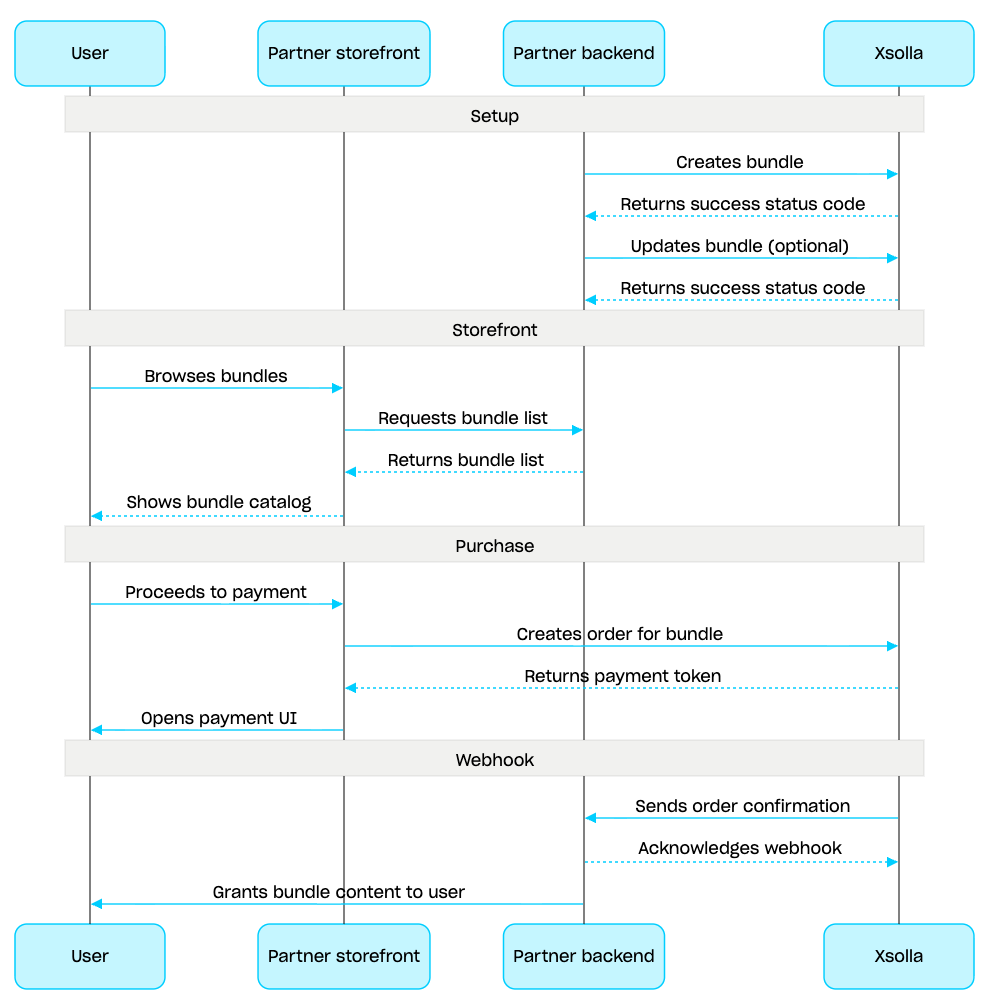
Cenário de gestão de conjuntos:
- Crie um conjunto usando a chamada de API Criar conjunto. Para verificar o conjunto criado, use a chamada de API Obter conjunto. Para recuperar todos os conjuntos no projeto, use a chamada de API Obter lista de conjuntos.
- Se necessário, use a chamada de API Atualizar conjunto para modificar o conteúdo do conjunto ou as configurações.
- Implemente a lógica de exibição do conjunto na sua vitrine usando as chamadas de API Obter lista de conjuntos, Obter conjunto específico, ou Obter lista de conjuntos por grupo especificado.
- Crie um pedido usando a seção Carrinho e pagamento. Por exemplo, para uma compra rápida, você pode usar a chamada de API Criar pedido com o item especificado, passando o SKU do conjunto. A resposta contém um token para abrir a interface de pagamento.
- Implemente usando a interface de pagamento para pagar pelo pedido.
- Configure o rastreamento de status de pedidos, por exemplo, usando webhooks para receber dados sobre itens pagos com sucesso prontamente e concedê-los ao usuário.
Visão geral
O carrinho é um mecanismo de compra que permite combinar vários itens em um único pedido. Um usuário pode comprar itens de qualquer tipo em qualquer quantidade com moedas reais, assim como usar códigos promocionais.
O carrinho é armazenado no lado da Xsolla. O salvamento do carrinho entre sessões depende do usuário estar autorizado ou não:
Para usuários autorizados, o carrinho é vinculado a um usuário específico e é salvo entre as sessões, desde que as solicitações sejam enviadas em nome do mesmo usuário.
Para usuários não autorizados, salvar o carrinho depende se o cabeçalho
x-unauthorized-idé passado. Para salvar o carrinho de um usuário não autorizado entre sessões, passe o mesmox-unauthorized-idem toda solicitação. Essa opção só está disponível para a venda de chaves de jogo.
Você pode identificar o carrinho de duas maneiras: automaticamente pelo JWT do usuário ou por ID do carrinho (cart_id).
A gestão do carrinho está disponível tanto no lado do cliente quanto no lado do servidor.
No lado do servidor, você pode preencher o carrinho com itens, por exemplo, ao restaurar uma sessão de usuário. As seguintes ações estão disponíveis no lado do cliente:
- recuperar o carrinho do usuário atual ou um carrinho por ID
- preencher o carrinho
- atualizar itens no carrinho
- excluir itens do carrinho
Para comprar itens do carrinho, são usadas chamadas do cliente e do servidor para criação de pedidos.
O tempo de vida (TTL) do carrinho é de 72 horas por padrão. Se o conteúdo for alterado, por exemplo, quando um novo item é adicionado, o TTL é estendido.
Após um pagamento bem-sucedido, o carrinho não é esvaziado automaticamente. Para limpar o carrinho, use as chamadas de API do lado do cliente:
Excluir item do carrinho por ID do carrinho e Excluir item do carrinho atual — o carrinho é limpo ao excluir o último item dele.
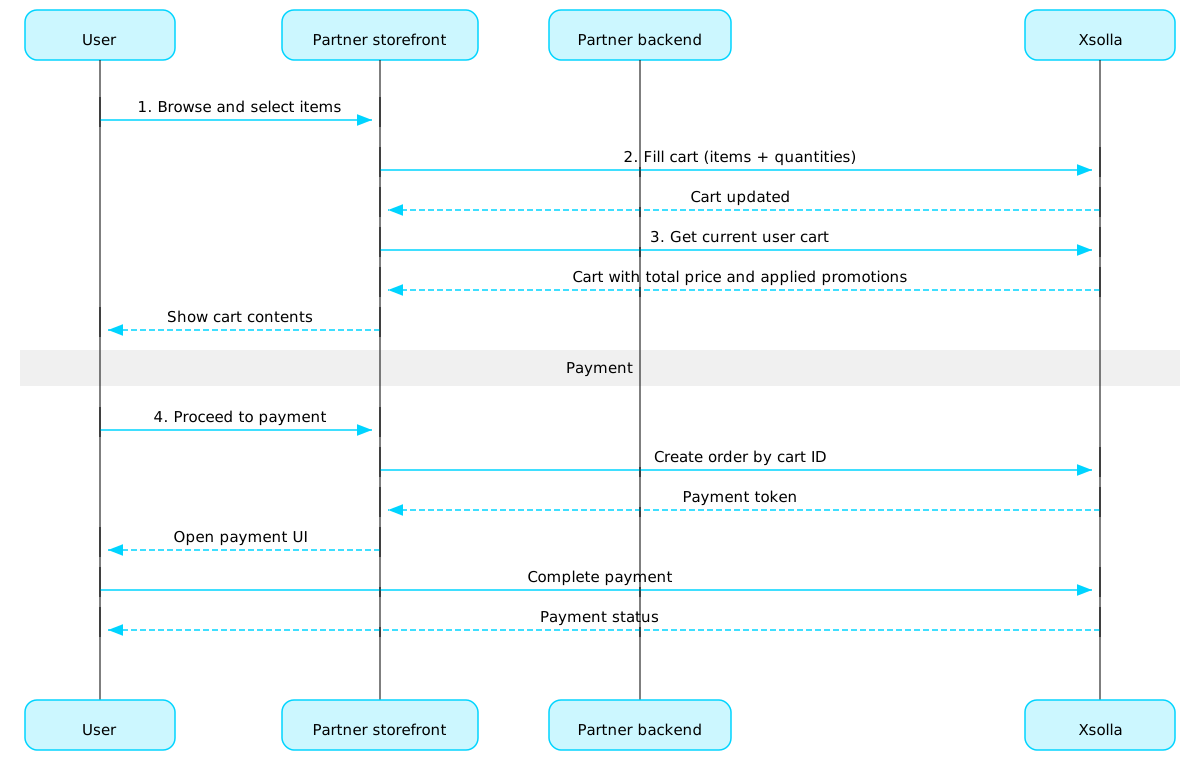
Cenário de uso do carrinho:
Implemente uma interface de loja onde o usuário selecionará os itens.
Quando o usuário seleciona itens na loja, adicione-os ao carrinho, por exemplo, usando a chamada Preenchar carrinho com itens. Na matriz de itens, você deve passar os SKUs e a quantidade necessária dos itens.
Implemente a interface de visualização do carrinho. Quando o usuário navega ao carrinho, exiba seus conteúdos usando a chamada Obter carrinho do usuário atual. A resposta retornará informações sobre o peço final dos itens, incluindo descontos e promoções aplicadas.
Implemente a abertura da interface de pagamento para pagar pelo pedido. Por exemplo, você pode usar a chamada Criar pedido com todos os itens de um carrinho em particular. A resposta retorna um token para abrir a interface de pagamento.
Configure o rastreamento de status de pedidos, por exemplo, usando webhooks para receber dados sobre itens pagos com sucesso prontamente e concedê-los ao usuário.
Nota
Para implementar a venda de itens no jogo e online, consulte o guia de integração.
Ciclo de vida do pedido
Compreender o ciclo de vida do pedido ajuda a rastrear pedidos e a implementar a lógica pós-compra corretamente, ou seja, a entrega dos itens.
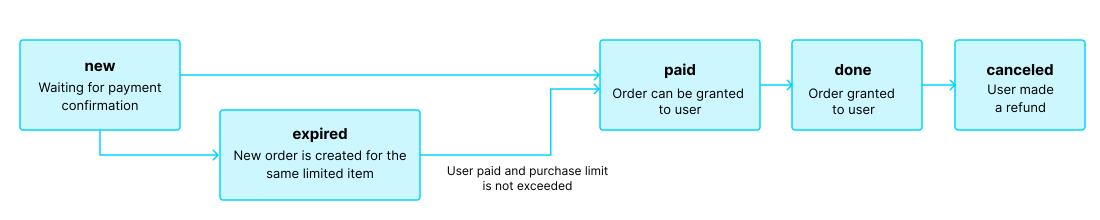
O pedido passa pelos seguintes status:
| Status | Descrição | Observações |
new | O pedido é criado. O sistema aguarda pela confirmação do pagamento. | As descrições dos status de transação podem ser encontrados na documentação Pay Station API. |
paid | O pedido é pago (a transação mudou para o status done), e o item pode ser concedido ao usuário. | O pedido permanece no status new até que o pagamento seja confirmado. |
done | O item é concedido ao usuário. | — |
canceled | O pagamento foi reembolsado. | O pedido muda para esse status quando o status da transação muda para refunded. |
expired | Criar um novo pedido para um item, código promocional ou promoção limitados move qualquer pedido não pago contendo o item para o status expired. Apenas o pedido mais recente pode ser pago. | Se um usuário tentar pagar por um pedido expirado, a interface de pagamento exibirá um erro 2002, e o pagamento falhará. |
Nota
Quando o pedido muda para o status expired enquanto o usuário conclui o pagamento, mas o pagamento é bem-sucedido, o pedido muda do status expired para paid. Isso só se aplica se o limite de compra para o item do pedido não será excedido pelo pagamento.
Itens gratuitos
Use calls from this section to grant free items to users.
Operações
Visão geral
Os limites de compra permitem restringir a quantidade de itens disponíveis para compra por um único usuário ou por todos os usuários. Você também pode configurar redefinições de limite agendadas.
Os limites são armazenados no lado da Xsolla e são configurados no nível de item individual na Conta de Distribuidor ou via o objeto limits nas seguintes chamadas de API:
As informações de limite são retornadas no objeto items.limits nas seguintes chamadas de API para recuperar o catálogo de itens:
- Obter lista de itens virtuais
- Obter lista de moedas virtuais
- Obter lista de pacotes de moedas virtuais
- Obter lista de conjuntos
- Obter lista de jogos
As chamadas de API na subseção Gestão do grupo Limites permitem que você recupere o estado atual dos limites e os atualize para um usuário específico — por exemplo, redefina o contador após a conclusão de uma missão ou ajuste manualmente a quantidade restante.
Nota
Para informações detalhadas sobre como configurar limites no catálogo, consulte a seção Limites de compra de itens.
Para informações detalhadas sobre como configurar limites no catálogo, consulte a seção Limites de compra de itens.
Regiões comuns
As restrições regionais de vendas permitem gerenciar a disponibilidade de itens em países ou grupos de países específicos. Por exemplo, você pode vender um jogo apenas em determinados países devido a restrições de licenciamento.
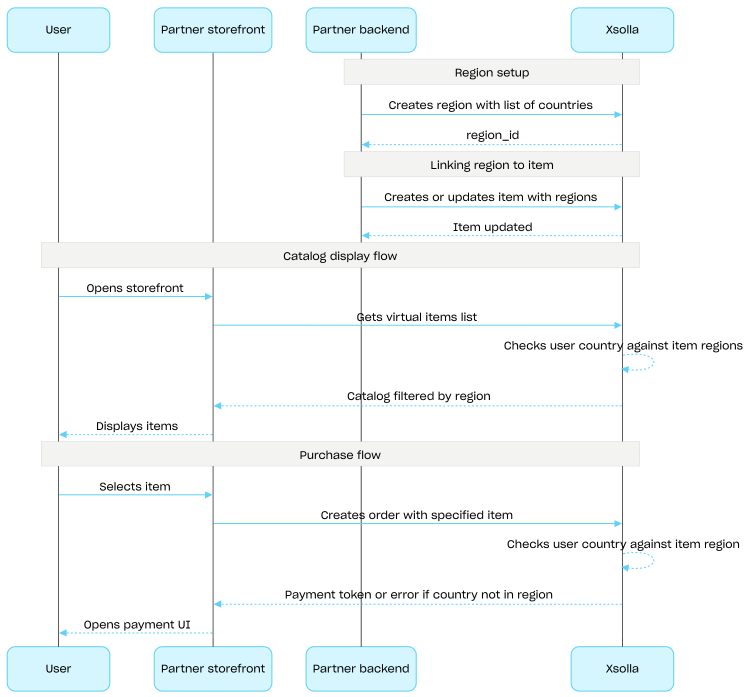
As restrições são configuradas utilizando regiões. Cada região agrupa um ou mais países sob um único identificador region_id. Você pode vincular um item a uma ou mais regiões.
A disponibilidade de itens é determinada conforme segue:
- Se nenhuma região for especificada para o item, ele estará disponível para compra em todos os países.
- Se regiões forem especificadas para o item e o país do usuário estiver incluído em uma delas, o item estará disponível para esse usuário.
- Se regiões forem especificadas para o item e o país do usuário não estiver incluído em nenhuma delas, o item não estará disponível para esse usuário.
O país do usuário é informado no parâmetro country ao solicitar o catálogo por meio de chamadas de API na subseção Catalog. Se o parâmetro não for informado, o país será determinado com base no endereço IP do usuário.
A compatibilidade entre o país do usuário e as regiões do item é verificada em dois momentos: na solicitação do catálogo e na criação do pedido. Itens indisponíveis não são incluídos na resposta do catálogo, e pedidos contendo tais itens não serão criados.
Utilize chamadas de API do grupo Common regions para criar, atualizar e excluir regiões.
Fluxo de configuração de restrições regionais de venda:
- Crie uma região usando a chamada de API Criar região, especificando a lista de países. A resposta retorna um
region_idque é necessário na etapa seguinte. - Associe um item virtual à região informando o
region_idcorrespondente na matrizregionsao criar ou atualizar o item. - Exiba o catálogo para o usuário utilizando chamadas de API da subseção Catalog, como, por exemplo, a chamada Obter lista de itens virtuais. O país do usuário é determinado pelo parâmetro
countryou, caso este não seja fornecido, com base no endereço IP do usuário. Itens indisponíveis no país do usuário não são incluídos na resposta do catálogo. - Quando o usuário prosseguir para pagar um item ou o carrinho, crie um pedido:
- Se o item tiver sido adicionado ao carrinho — utilizando a chamada de API Criar pedido com todos os itens de um carrinho específico ou Criar pedido com todos os itens do carrinho atual.
- Para uma compra rápida de um único item — utilizando a chamada de API Criar pedido com item específico e passando o SKU do item.
A resposta contém um token para abrir a interface de pagamento.
Observação
A Xsolla verifica se o país do usuário foi incluído na região especificada do item. Se o país não tiver sido incluído na região do item, o pedido não poderá ser criado.
A Xsolla verifica se o país do usuário foi incluído na região especificada do item. Se o país não tiver sido incluído na região do item, o pedido não poderá ser criado.
- Implemente a abertura da interface de pagamento para efetuar o pagamento do pedido.
Operações