商品目录API (2.0.0)
- 版本: 2.0.0
- 服务器:
https://store.xsolla.com/api - 通过电子邮件联系我们
- 联系网址: https://xsolla.com/
- 所需TLS版本: 1.2
商品目录API可用于在艾克索拉侧配置游戏内购商品目录,并在您的商店中向用户展示该商品目录。
该API可用于管理以下商品目录实体:
- 虚拟物品 — 武器、皮肤、加成道具等游戏内物品。
- 虚拟货币 — 用于购买虚拟物品的虚拟资金。
- 虚拟货币套餐 — 预定义的虚拟货币捆绑包。
- 捆绑包 — 将虚拟物品、货币或游戏Key组合后作为单个SKU销售的组合包。
- 游戏Key — 通过Steam等平台或其他DRM提供商分发的游戏和DLC密钥。
- 组 — 用于在商品目录中组织和排序商品的逻辑分组。
该API分为以下组别:
Admin — 用于创建、更新、删除和配置商品目录中的商品及分组的调用。通过基本访问身份认证方式进行身份认证,需使用您的商户或项目凭据。不适用于商店前端调用。Catalog — 用于检索商品并构建面向最终用户的自定义商店前端。专为高负载场景设计。支持可选的用户JWT授权,可返回个性化数据,例如用户限购额度和当前进行中的促销活动。
当请求从浏览器、移动应用或游戏发送时,使用用户JWT身份认证。默认情况下,应用XsollaLoginUserJWT方案。有关如何创建令牌的详细信息,请参阅艾克索拉登录管理器API文档。
令牌通过Authorization请求头按以下格式传递:Authorization: Bearer <user_JWT>,其中<user_JWT>为用户令牌。该令牌用于识别用户,并授予其访问个性化数据的权限。
或者,您也可以使用用于打开支付UI的令牌。
基本HTTP身份认证用于服务器到服务器交互,即API调用直接从您的服务器发送,而不是从用户的浏览器或移动应用发送。通常使用带有API密钥的HTTP Basic身份认证。
API密钥属于机密信息,不得在客户端应用中存储或使用。
使用基本服务器侧身份认证时,所有API请求都必须包含以下请求头:
- 对于
basicAuth—Authorization: Basic <your_authorization_basic_key>,其中your_authorization_basic_key是以Base64编码的project_id:api_key对 - 对于
basicMerchantAuth—Authorization: Basic <your_authorization_basic_key>,其中your_authorization_basic_key是以Base64编码的merchant_id:api_key对
您可以在发布商帐户中找到参数值:
merchant_id显示在:- 公司设置 > 公司中。
- 任意发布商帐户页面的浏览器地址栏URL中。URL格式为:
https://publisher.xsolla.com/<merchant_id>。
project_id显示在:- 发布商帐户中项目名称旁边。
- 发布商帐户中项目页面的浏览器地址栏URL中。URL格式为:
https://publisher.xsolla.com/<merchant_id>/projects/<project_id>。
api_key仅在创建时在发布商帐户中显示,必须在己侧安全存储。您可以在以下部分创建API密钥:
如果所需的API调用不包含
project_id路径参数,请使用对公司所有项目均有效的API密钥进行授权。有关使用API密钥的更多信息,请参阅API参考。
AuthForCart身份认证方案用于购物车购买,支持两种模式:
使用用户JWT进行身份认证。 令牌通过
Authorization请求头按以下格式传递:Authorization: Bearer <user_JWT>,其中<user_JWT>是用户令牌。该令牌用于识别用户,并提供对个性化数据的访问权限。 或者,您也可以使用用于打开支付UI的令牌。不带Authorization请求头的简化模式。 此模式仅适用于未完成身份认证的用户,且仅可用于游戏Key销售请求中不使用令牌,而必须包含以下请求头:
x-unauthorized-id,值为请求IDx-user,值为使用Base64编码的用户电子邮件地址
所有类型的商品(虚拟物品、捆绑包、虚拟货币和密钥)都使用类似的数据结构。了解基本结构有助于简化API使用,并帮助您更轻松地查阅文档。
部分调用可能包含其他字段,但这些字段不会改变基本结构。
标识信息
merchant_id— 发布商帐户中的公司IDproject_id— 发布商帐户中的项目IDsku— 商品SKU,在项目内唯一
商店显示
name— 商品名称description— 商品描述image_url— 图片URLis_enabled— 商品可用性is_show_in_store— 商品是否显示在商品目录中
有关在商品目录中管理商品可用性的更多信息,请参阅文档。
组织方式
type— 商品类型,例如虚拟物品(virtual_item)或捆绑包(bundle)groups— 商品所属的组order— 在商品目录中的显示顺序
销售条件
prices— 以真实货币或虚拟货币表示的价格limits— 购买限制periods— 可用时间段regions— 区域限制
核心实体结构示例:
{
  "attributes": [],
  "bundle_type": "virtual_currency_package",
  "content": [
    {
      "description": {
        "en": "Main in-game currency"
      },
      "image_url": "https://.../image.png",
      "name": {
        "en": "Crystals",
        "de": "Kristalle"
      },
      "quantity": 500,
      "sku": "com.xsolla.crystal_2",
      "type": "virtual_currency"
    }
  ],
  "description": {
    "en": "Crystals x500"
  },
  "groups": [],
  "image_url": "https://.../image.png",
  "is_enabled": true,
  "is_free": false,
  "is_show_in_store": true,
  "limits": {
    "per_item": null,
    "per_user": null,
    "recurrent_schedule": null
  },
  "long_description": null,
  "media_list": [],
  "name": {
    "en": "Medium crystal pack"
  },
  "order": 1,
  "periods": [
    {
      "date_from": null,
      "date_until": "2020-08-11T20:00:00+03:00"
    }
  ],
  "prices": [
    {
      "amount": 20,
      "country_iso": "US",
      "currency": "USD",
      "is_default": true,
      "is_enabled": true
    }
  ],
  "regions": [],
  "sku": "com.xsolla.crystal_pack_2",
  "type": "bundle",
  "vc_prices": []
}艾克索拉API可用于实现游戏内购商店逻辑,包括获取商品目录、管理购物车、创建订单以及跟踪订单状态。根据集成场景,API调用分为管理和商品目录子部分,使用不同的身份认证方案。
以下示例展示了从创建商品到完成购买的商店设置和运营基本流程。
在您的应用程序中配置商品显示。
API调用示例:
默认情况下,商品目录API调用会返回请求时商店中当前可用的商品。如需获取尚未可用或已不再可用的商品,请在商品目录请求中包含参数
"show_inactive_time_limited_items": 1。
您可以使用以下方法销售商品:
- 快速购买 — 多次销售同一SKU。
- 购物车购买 — 用户可在同一订单中向购物车添加商品、移除商品并更新数量。
如果商品使用虚拟货币而非真实货币购买,请使用创建包含指定商品的订单 API调用。由于扣款会在执行API调用时处理,因此无需支付UI。
如需购买免费商品,请使用使用指定商品创建订单 API调用或使用免费购物车创建订单 API调用。无需支付UI — 订单会立即设置为done状态。
可以在客户端或服务器侧设置购物车并完成购买。
在客户端设置和购买购物车商品
您需要自行实现添加和移除商品的逻辑。在调用用于设置购物车的API之前,您无法获知哪些促销活动会应用于本次购买。这意味着您无法提前获知总费用以及添加的赠品的详细信息。
实现以下购物车逻辑:
- 玩家在购物车加购后,使用向购物车添加商品 API调用。该调用会返回所选商品的当前信息(折扣前后价格、赠品)。
- 根据用户操作更新购物车内容:
- 如需添加商品或更改商品数量,请使用按购物车ID更新购物车商品 API调用。
- 如需移除商品,请使用按购物车ID删除购物车商品 API调用。
如需获取购物车的当前状态,请使用“获取当前用户的购物车”API调用。
- 使用创建包含当前购物车中所有商品的订单 API调用。该调用返回订单ID和支付令牌。新创建的订单默认设置为
new状态。
在服务器侧设置和购买购物车商品
这种设置方式可能需要更长的购物车设置时间,因为每次更改购物车都必须伴随API调用。
实现以下购物车逻辑:
- 玩家在购物车加购后,使用向购物车添加商品 API调用。该调用会返回所选商品的当前信息(折扣前后价格、赠品)。
- 使用创建包含当前购物车中所有商品的订单 API调用。该调用会返回订单ID和支付令牌。新创建的订单默认设置为
new状态。
使用返回的令牌在新窗口中打开支付UI。有关打开支付UI的其他方式,请参阅文档。
| 操作 | 接口 |
|---|---|
| 在生产环境中打开。 | https://secure.xsolla.com/paystation4/?token={token} |
| 在沙盒模式中打开。 | https://sandbox-secure.xsolla.com/paystation4/?token={token} |
请在开发和测试期间使用沙盒模式。测试购买不会对真实帐户扣款。您可以使用测试银行卡。
完成第一笔真实支付后,严格的沙盒支付策略将生效。沙盒模式下的支付仅对发布商帐户 > 公司设置 > 用户中指定的用户可用。
只有在与艾克索拉签署许可协议后,才能使用真实货币购买虚拟货币和商品。如需签署协议,请在发布商帐户中前往协议与税务 > 合同与协议,填写协议表单并等待确认。协议审核最多可能需要3个工作日。
如需启用或禁用沙盒模式,请在快速购买和购物车购买请求中更改sandbox参数的值。沙盒模式默认关闭。
可能的订单状态:
new— 订单已创建paid— 已收到付款done— 商品已交付canceled— 订单已取消expired— 订单已过期
使用以下任一方式跟踪订单状态:
返回大量记录的API调用(例如构建商品目录时)会按页返回数据。分页是一种限制单个API响应中返回商品数量的机制,并允许您按顺序获取后续页面。
使用以下参数控制返回的商品数量:
limit— 每页商品数量offset— 页面中第一个商品的索引(从0开始编号)has_more— 指示是否还有下一页total_items_count— 商品总数
请求示例:
GET /items?limit=20&offset=40响应示例:
{
  "items": [...],
  "has_more": true,
  "total_items_count": 135
}建议发送后续请求,直到响应返回has_more = false。
日期和时间值以ISO 8601格式传递。
支持以下内容:
- UTC偏移量
- 当商品显示没有时间限制时使用
null值 - 部分字段使用的Unix时间戳(以秒为单位)
格式:YYYY-MM-DDTHH:MM:SS±HH:MM
示例:2026-03-16T10:00:00+03:00
艾克索拉支持对商品名称、描述等面向用户的字段进行本地化。本地化值以对象形式传递,其中语言代码作为键。支持的完整语言列表,请参阅文档。
支持的字段
可为以下参数指定本地化内容:
namedescriptionlong_description
区域格式
语言区域键可使用以下任一格式指定:
- 两字母语言代码:
en、ru - 五字母语言代码:
en-US、ru-RU、de-DE
示例
两字母语言代码示例:
{
  "name": {
    "en": "Starter Pack",
    "ru": "Стартовый набор"
  }
}
五字母语言代码示例:
{
  "description": {
    "en-US": "Premium bundle",
    "de-DE": "Premium-Paket"
  }
}如果发生错误,API会返回HTTP状态和JSON响应正文。商店相关错误的完整列表,请参阅文档。
响应示例:
{
  "errorCode": 1102,
  "errorMessage": "Validation error",
  "statusCode": 422,
  "transactionId": "c9e1a..."
}errorCode— 错误代码。errorMessage— 简短的错误描述。statusCode— HTTP响应状态。transactionId— 请求ID。仅在部分情况下返回。errorMessageExtended— 其他错误详情,例如请求参数。仅在某些情况下返回。
扩展响应示例:
{
  "errorCode": 7001,
  "errorMessage": "Chain not found",
  "errorMessageExtended": {
    "chain_id": "test_chain_id",
    "project_id": "test_project_id",
    "step_number": 2
  },
  "statusCode": 404
}
常见HTTP状态代码
400— 请求无效401— 身份认证错误403— 权限不足404— 资源未找到422— 验证错误429— 超出速率限制
建议
- 结合HTTP状态和响应正文一起处理。
- 使用
errorCode处理与应用程序逻辑相关的错误。 - 分析错误时,使用
transactionId更快定位请求。
概述
您可以使用虚拟物品和虚拟货币构建游戏内购商店,并配置其向用户展示的方式。可使用以下商品类型:
- 虚拟物品 — 武器、皮肤、加成道具等游戏内商品。可使用真实货币或虚拟货币销售。
- 虚拟货币 — 用于购买虚拟物品的游戏内货币。可使用真实货币或虚拟货币销售。
- 虚拟货币套餐 — 固定数量的虚拟货币。可使用真实货币或虚拟货币销售。
组(Group)用于组织商品目录中的商品。通过组,您可以按逻辑对商品进行分组,并管理商品的显示方式。
使用管理子部分中的API调用来创建、更新和删除商品。
使用商品目录子部分中的API调用获取商品列表,并向用户展示商品。
请勿使用管理子部分中的API调用来构建商店商品目录。
获取虚拟物品列表API调用会返回详细的商品数据,包括价格和属性,并支持分页。请使用该调用在商店前端显示商品目录页面。
获取所有虚拟物品列表API调用会返回商品SKU、名称、描述,以及组ID和组名称,且不分页。请将其用于客户端侧搜索或索引。
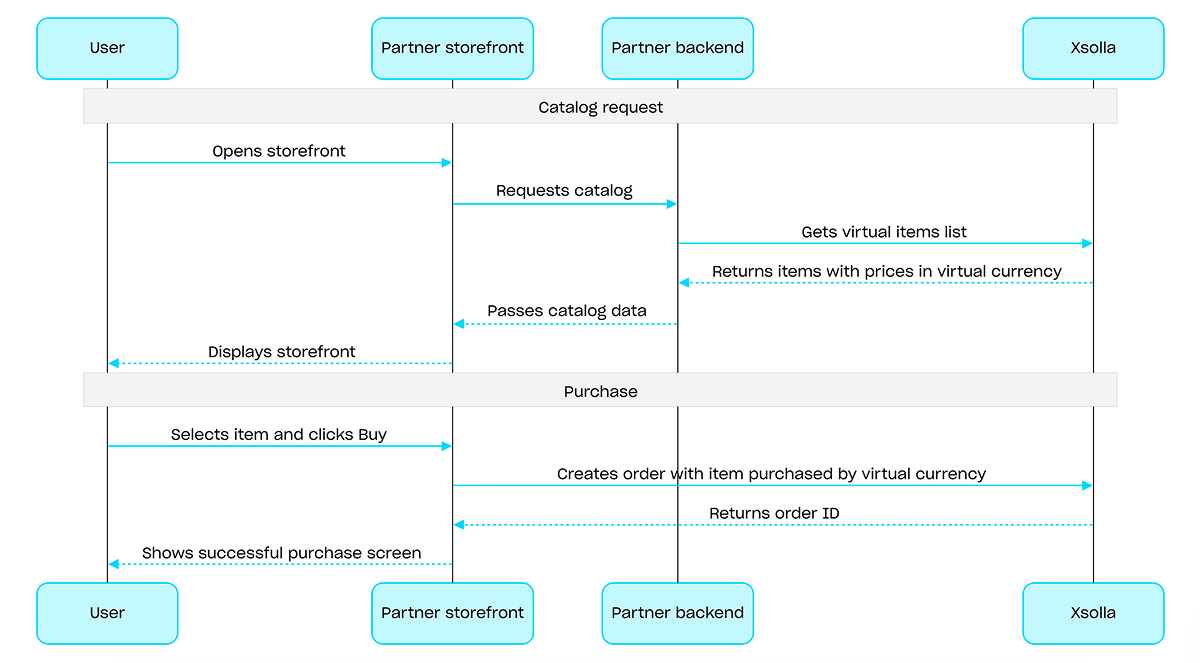
如需使用虚拟货币的购买,请使用使用以虚拟货币购买的指定商品创建订单 API调用。无需支付UI⸺扣款会在执行API调用时完成。
使用虚拟货币购买流程示例:
项目ID。您可以在发布商帐户的项目名称旁找到此参数;使用项目时,也可以在浏览器地址栏中找到此参数。URL格式如下:https://publisher.xsolla.com/<merchant_id>/projects/<project_id>。
包含商品本地化名称的对象。值接受以下两种格式之一:两个小写字母的语言代码(例如,en)或五个字符的语言代码(例如,en-US)。虽然两种格式都可作为输入接受,但响应会返回两个小写字母的语言代码。当为同一种语言提供了两种输入时(例如:en和en-US),将存储最后提供的值。您可以在文档中找到支持语言的完整列表。
两个小写字母的语言代码。
包含本地化商品描述的对象。值接受以下两种格式之一:两个小写字母的语言代码(例如,en)或五个字符的区域设置代码(例如,en-US)。虽然两种格式都可作为输入接受,但响应会返回两个小写字母的语言代码。当为同一种语言提供了两种输入时(例如:en和en-US),将存储最后提供的值。您可以在文档中找到支持语言的完整列表。
两个小写字母的语言代码。
包含商品详细本地化描述的对象。值接受以下两种格式之一:两个小写字母的语言代码(例如,en)或五个字符的区域设置代码(例如,en-US)。虽然两种格式都可作为输入接受,但响应会返回两个小写字母的语言代码。当为同一种语言提供了两种输入时(例如:en和en-US),将存储最后提供的值。您可以在文档中找到支持语言的完整列表。
两个小写字母的语言代码。
图片URL。为确保图片能在支付UI中正确显示并快速加载,请查看我们的图片和URL指南:
- 支持的格式:WebP(推荐)、PNG、JPG。
- 文件大小:≤50 KB(WebP)或≤150 KB(PNG和JPG)。
- 图片尺寸:280 x 280 px。
- 色彩空间:sRGB。
- 协议:HTTPS,并对版本化URL使用长期缓存。
商品的附加资源,例如屏幕截图、游戏视频等。
商品所属的组外部ID列表。
示例:["horror", "action"]
属性列表。
唯一属性ID。 external_id只能包含大小写英文字母、数字、短横线和下划线。
虚拟货币价格数组。
商品是否可购。如果为false,则无法在商店中购买该商品,也无法通过捆绑包或营销活动获得该商品。关于商品可购性的详细信息,请参阅我们的文档。
商品是否显示在商品目录中。如果为false且is_enabled: true,则该商品在商品目录中不可见,但可通过捆绑包或营销活动获得。关于商品可购性的详细信息,请参阅我们的文档。
虚拟货币套餐应仅包含1个对象,即虚拟货币。
商品可购区域的数组。如果数组为空或未传递,则该商品在所有区域均可购。
商品限制数。
限制数刷新周期。
按指定小时间隔执行购买限制数重置。
商品销售期。
- https://store.xsolla.com/api/v2/project/{project_id}/admin/items/virtual_currency/package
- Mock serverhttps://xsolla.redocly.app/_mock/zh/api/catalog/v2/project/{project_id}/admin/items/virtual_currency/package
- curl
- JavaScript
- Node.js
- Python
- Java
- C#
- PHP
- Go
- Ruby
- R
- Payload
curl -i -X POST \
  -u <username>:<password> \
  https://store.xsolla.com/api/v2/project/44056/admin/items/virtual_currency/package \
  -H 'Content-Type: application/json' \
  -d '{
    "sku": "com.xsolla.novigrad_crown_500",
    "name": {
      "en-US": "500x Novigradian crown",
      "ru-RU": "500x Новиградских крон"
    },
    "is_enabled": true,
    "is_free": false,
    "is_paid_randomized_reward": true,
    "groups": [
      "witcher"
    ],
    "order": 1,
    "long_description": {
      "en-US": "Long Test new",
      "ru-RU": "Длинное описание"
    },
    "description": {
      "en-US": "The Crown (also known as the Novigradian crown) is a monetary unit which is used in some Northern Kingdoms",
      "ru-RU": "Крона (Также известна как Новиградская крона) - платежная единица, используемая в северных королевствах"
    },
    "image_url": "https://vignette.wikia.nocookie.net/witcher/images/7/7c/Items_Orens.png/revision/latest?cb=20081113120917",
    "media_list": [
      {
        "type": "image",
        "url": "https://test.com/image0"
      },
      {
        "type": "image",
        "url": "https://test.com/image1"
      }
    ],
    "attributes": [
      {
        "external_id": "event",
        "name": {
          "en-US": "Event"
        },
        "values": [
          {
            "external_id": "10-anniversary",
            "value": {
              "en-US": "10th anniversary"
            }
          },
          {
            "external_id": "christmas",
            "value": {
              "en-US": "Christmas"
            }
          }
        ]
      }
    ],
    "prices": [
      {
        "currency": "USD",
        "amount": 99.99,
        "is_default": true
      },
      {
        "currency": "EUR",
        "amount": 80.03,
        "is_enabled": false
      }
    ],
    "vc_prices": null,
    "content": [
      {
        "sku": "com.xsolla.novigrad_crown",
        "quantity": 500
      }
    ],
    "limits": {
      "per_user": null,
      "per_item": null
    },
    "periods": [
      {
        "date_from": "2020-08-11T10:00:00+03:00",
        "date_until": "2020-08-11T20:00:00+03:00"
      }
    ],
    "custom_attributes": {
      "purchased": 0,
      "attr": "value"
    }
}'{ "sku": "com.xsolla.item_1" }
项目ID。您可以在发布商帐户的项目名称旁找到此参数;使用项目时,也可以在浏览器地址栏中找到此参数。URL格式如下:https://publisher.xsolla.com/<merchant_id>/projects/<project_id>。
包含商品本地化名称的对象。值接受以下两种格式之一:两个小写字母的语言代码(例如,en)或五个字符的语言代码(例如,en-US)。虽然两种格式都可作为输入接受,但响应会返回两个小写字母的语言代码。当为同一种语言提供了两种输入时(例如:en和en-US),将存储最后提供的值。您可以在文档中找到支持语言的完整列表。
两个小写字母的语言代码。
包含本地化商品描述的对象。值接受以下两种格式之一:两个小写字母的语言代码(例如,en)或五个字符的区域设置代码(例如,en-US)。虽然两种格式都可作为输入接受,但响应会返回两个小写字母的语言代码。当为同一种语言提供了两种输入时(例如:en和en-US),将存储最后提供的值。您可以在文档中找到支持语言的完整列表。
两个小写字母的语言代码。
包含商品详细本地化描述的对象。值接受以下两种格式之一:两个小写字母的语言代码(例如,en)或五个字符的区域设置代码(例如,en-US)。虽然两种格式都可作为输入接受,但响应会返回两个小写字母的语言代码。当为同一种语言提供了两种输入时(例如:en和en-US),将存储最后提供的值。您可以在文档中找到支持语言的完整列表。
两个小写字母的语言代码。
图片URL。为确保图片能在支付UI中正确显示并快速加载,请查看我们的图片和URL指南:
- 支持的格式:WebP(推荐)、PNG、JPG。
- 文件大小:≤50 KB(WebP)或≤150 KB(PNG和JPG)。
- 图片尺寸:280 x 280 px。
- 色彩空间:sRGB。
- 协议:HTTPS,并对版本化URL使用长期缓存。
商品的附加资源,例如屏幕截图、游戏视频等。
商品所属的组外部ID列表。
示例:["horror", "action"]
属性列表。
唯一属性ID。 external_id只能包含大小写英文字母、数字、短横线和下划线。
虚拟货币价格数组。
商品是否可购。如果为false,则无法在商店中购买该商品,也无法通过捆绑包或营销活动获得该商品。关于商品可购性的详细信息,请参阅我们的文档。
商品是否显示在商品目录中。如果为false且is_enabled: true,则该商品在商品目录中不可见,但可通过捆绑包或营销活动获得。关于商品可购性的详细信息,请参阅我们的文档。
虚拟货币套餐应仅包含1个对象,即虚拟货币。
商品可购区域的数组。如果数组为空或未传递,则该商品在所有区域均可购。
商品限制数。
限制数刷新周期。
按指定小时间隔执行购买限制数重置。
商品销售期。
- https://store.xsolla.com/api/v2/project/{project_id}/admin/items/virtual_currency/package/sku/{item_sku}
- Mock serverhttps://xsolla.redocly.app/_mock/zh/api/catalog/v2/project/{project_id}/admin/items/virtual_currency/package/sku/{item_sku}
- curl
- JavaScript
- Node.js
- Python
- Java
- C#
- PHP
- Go
- Ruby
- R
- Payload
curl -i -X PUT \
  -u <username>:<password> \
  https://store.xsolla.com/api/v2/project/44056/admin/items/virtual_currency/package/sku/booster_mega_1 \
  -H 'Content-Type: application/json' \
  -d '{
    "sku": "com.xsolla.novigrad_crown_500",
    "name": {
      "en-US": "500x Novigradian crown",
      "ru-RU": "500x Новиградских крон"
    },
    "is_enabled": true,
    "is_free": false,
    "is_paid_randomized_reward": true,
    "groups": [
      "witcher"
    ],
    "order": 1,
    "long_description": {
      "en-US": "Long Test new",
      "ru-RU": "Длинное описание"
    },
    "description": {
      "en-US": "The Crown (also known as the Novigradian crown) is a monetary unit which is used in some Northern Kingdoms",
      "ru-RU": "Крона (Также известна как Новиградская крона) - платежная единица, используемая в северных королевствах"
    },
    "image_url": "https://vignette.wikia.nocookie.net/witcher/images/7/7c/Items_Orens.png/revision/latest?cb=20081113120917",
    "media_list": [
      {
        "type": "image",
        "url": "https://test.com/image0"
      },
      {
        "type": "image",
        "url": "https://test.com/image1"
      }
    ],
    "attributes": [
      {
        "external_id": "event",
        "name": {
          "en-US": "Event"
        },
        "values": [
          {
            "external_id": "10-anniversary",
            "value": {
              "en-US": "10th anniversary"
            }
          },
          {
            "external_id": "christmas",
            "value": {
              "en-US": "Christmas"
            }
          }
        ]
      }
    ],
    "prices": [
      {
        "currency": "USD",
        "amount": 99.99,
        "is_default": true
      },
      {
        "currency": "EUR",
        "amount": 80.03,
        "is_enabled": false
      }
    ],
    "vc_prices": null,
    "content": [
      {
        "sku": "com.xsolla.novigrad_crown",
        "quantity": 500
      }
    ],
    "limits": {
      "per_user": null,
      "per_item": null
    },
    "periods": [
      {
        "date_from": "2020-08-11T10:00:00+03:00",
        "date_until": "2020-08-11T20:00:00+03:00"
      }
    ],
    "custom_attributes": {
      "purchased": 0,
      "attr": "value"
    }
}'项目ID。您可以在发布商帐户的项目名称旁找到此参数;使用项目时,也可以在浏览器地址栏中找到此参数。URL格式如下:https://publisher.xsolla.com/<merchant_id>/projects/<project_id>。
- https://store.xsolla.com/api/v2/project/{project_id}/admin/items/virtual_currency/package/sku/{item_sku}
- Mock serverhttps://xsolla.redocly.app/_mock/zh/api/catalog/v2/project/{project_id}/admin/items/virtual_currency/package/sku/{item_sku}
- curl
- JavaScript
- Node.js
- Python
- Java
- C#
- PHP
- Go
- Ruby
- R
- Payload
curl -i -X DELETE \
  -u <username>:<password> \
https://store.xsolla.com/api/v2/project/44056/admin/items/virtual_currency/package/sku/booster_mega_1概述
Game keys are single-use unique alphanumeric codes that grant users access to a game or DLC on gaming platforms. You can sell game keys via a direct link, through the store UI, or via a widget. You can also configure regional restrictions to sell game keys in specific countries. For detailed information, refer to the Game keys packages section.
User authentication is not required to sell game keys — the keys are sent to the email the user specified at checkout. You can configure authentication to enable additional scenarios: personalization, purchase limits, or an entitlement system. For detailed information, refer to the How to set up authentication when selling game keys section.
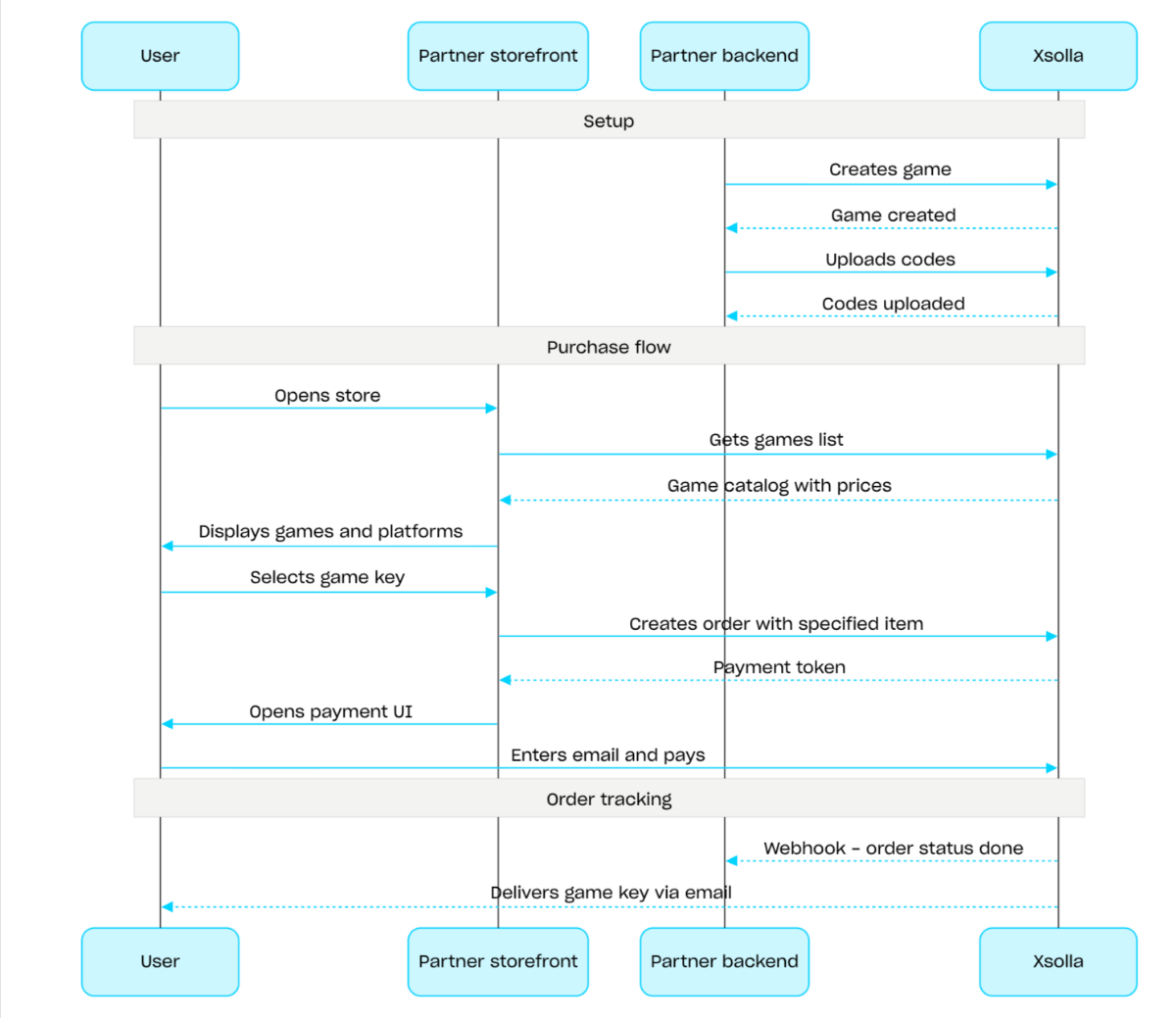
Game key sales flow:
- Create a game using the Create game API call.
- Configure regional restrictions.
- Upload keys to a game key package using the Upload codes API call to make them available for purchase.
- Display the game catalog with prices for the user's region using the Get games list API call.
- Create an order. For a fast purchase, you can use the Create order with all items from current cart API call, passing the game key SKU. The response returns a token for opening the payment UI.
- Implement the opening of the payment UI to pay for the order.
To receive timely notifications about successful payments and deliver items to the user, set up order status tracking, for example, using webhooks. The keys are sent to the email the user specified at checkout, and the order moves to the done status.
概述
Bundles are sets of items sold as a single unit. A bundle can include virtual items, virtual currency, virtual currency packages, game keys, and other bundles. Use bundles to create starter packs, seasonal offers, and special deals.
Use the following API call groups to work with bundles:
- Use API calls from the Admin subsection to create, update, delete bundles, and manage their visibility.
- Use API calls from the Catalog subsection to retrieve bundles.
Purchase limits are configured via the limits object when creating or updating a bundle. For more information, refer to the Limits overview. You can also configure regional restrictions to sell items in specific countries.
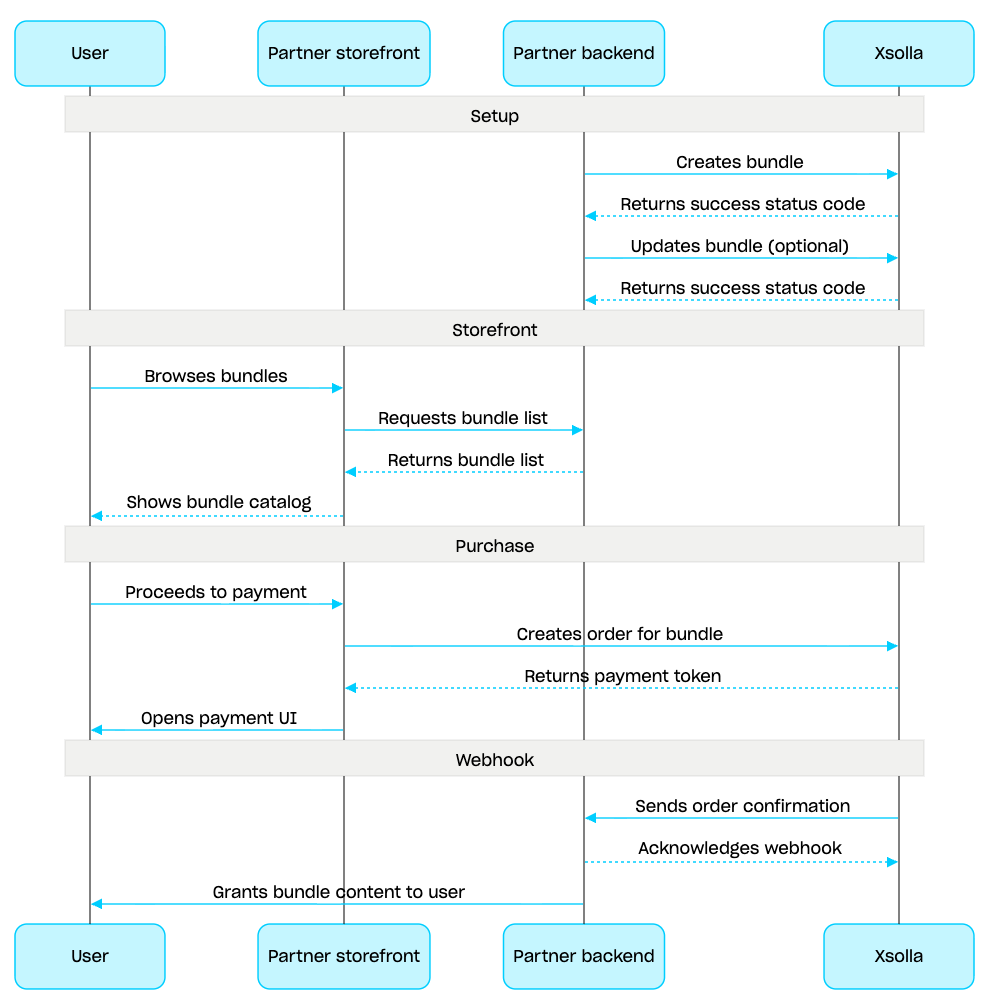
Bundle management scenario:
- Create a bundle using the Create bundle API call. To verify the created bundle, use the Get bundle API call. To retrieve all bundles in the project, use the Get list of bundles API call.
- If needed, use the Update bundle API call to modify the bundle content or settings.
- Implement bundle display logic in your storefront using the Get list of bundles, Get specified bundle, or Get list of bundles by specified group API call.
- Create an order using the Cart and payment section. For example, for a fast purchase you can use the Create order with specified item API call, passing the bundle SKU. The response contains a token for opening the payment UI.
- Implement opening the payment UI to pay for the order.
- Set up order status tracking, for example using webhooks, to promptly receive data on successfully paid items and grant them to the user.
概述
The cart is a purchasing mechanism that enables combining multiple items into a single order. A user can buy items of any type in any quantity for real currency, as well as use promo codes.
The cart is stored on the Xsolla side. Saving the cart across sessions depends on whether the user is authorized:
For authorized users, the cart is linked to a specific user and is saved across sessions as long as requests are sent on behalf of the same user.
For unauthorized users, saving the cart depends on passing the
x-unauthorized-idheader. To save the cart of an unauthorized user across sessions, pass the samex-unauthorized-idin every request. This option is available only for game key sales.
You can identify the cart in two ways: automatically by user's JWT or by cart ID (cart_id).
Cart management is available both on the client side and on the server side.
On the server side, you can fill the cart with items, e.g., when restoring a user session. The following actions are available on the client side:
- retrieve the current user's cart or a cart by ID
- fill the cart
- update items in the cart
- delete items from the cart
To purchase items from the cart, the client and server calls for order creation are used.
The cart’s time to live (TTL) is 72 hours by default. If its content changes, e.g., when a new item is added, the TTL is extended.
After successful payment, the cart isn’t cleared automatically. To clear the cart, use the following client-side API calls:
Delete cart item by cart ID and Delete cart item from current cart — the cart is cleared when you delete the last item from it.
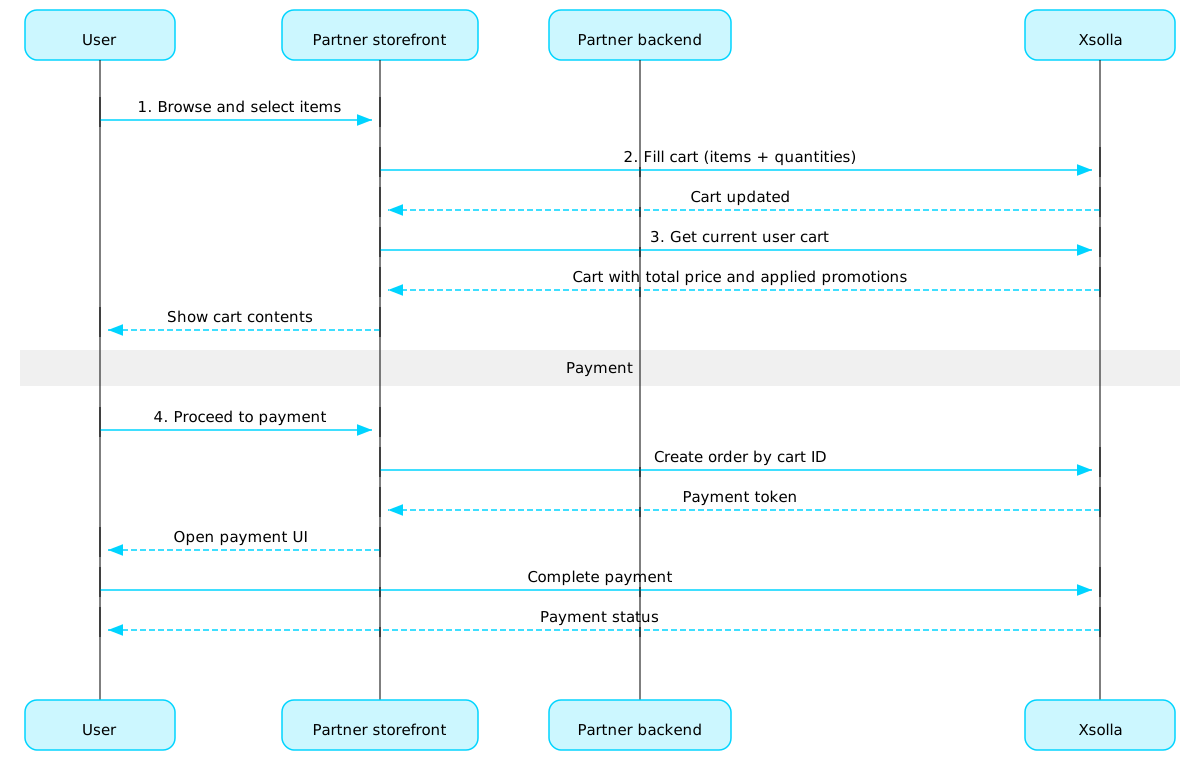
Cart usage scenario:
Implement a store UI where the user will select items.
When the user selects items in the store, add them to the cart, e.g., using the Fill cart with items call. In the items array, you need to pass the SKUs and the required quantity of items.
Implement the cart viewing UI. When the user navigates to the cart, display its contents using the Get current user's cart call. The response will return information about the final price of the items, including discounts and applied promotions.
Implement the opening of the payment UI to pay for the order. For example, you can use the Create order with all items from particular cart call. The response returns a token to open the payment UI.
Configure order status tracking, e.g., using webhooks, to promptly receive data about successfully paid items and grant them to the user.
Note
To implement selling items in-game and online, refer to the integration guide.
订单生命周期
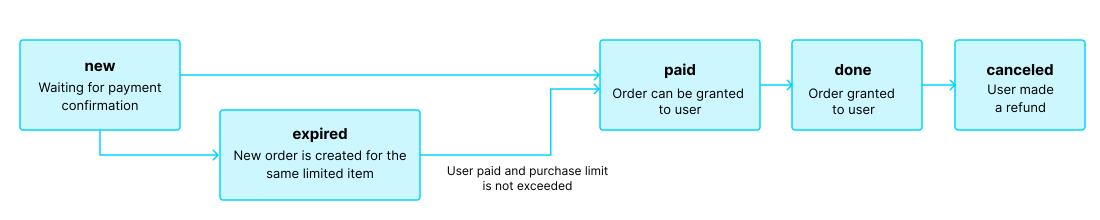
了解订单生命周期有助于您跟踪订单,并正确实现购买后逻辑,例如商品交付。
订单会经历以下状态:
| 状态 | 描述 | 备注 |
new | 订单已创建。系统正在等待付款确认。 | 交易状态说明请参阅支付收银台API文档。 |
paid | 订单已支付(交易已流转至done状态),可以向用户发放商品。 | 在付款确认前,订单会保持new状态。 |
done | 商品已发放给用户。 | — |
canceled | 付款已退款。 | 当交易状态变更为refunded时,订单会流转至此状态。 |
expired | 对于限购商品、兑换码或促销活动,创建新订单时,任何包含该商品且此前未支付的订单都会流转至expired状态。只有最新订单可以付款。 | 如果用户尝试支付已过期的订单,支付UI将显示2002错误,付款将失败。 |
注:
如果用户正在完成付款时订单流转至expired状态,但付款成功,则订单会从expired流转至paid状态。仅当付款后不会超出订单中商品的购买限制时,此规则才适用。
免费商品
使用本部分中的调用向用户发放免费商品。
概述
购买限制可用于限制单个用户或所有用户可购买的商品数量。您还可以配置定期重置限制。
限制存储在艾克索拉侧,可在发布商帐户中按单个商品进行配置,也可在以下API调用中通过limits对象进行配置:
在以下用于获取商品目录的API调用中,限制信息会在items.limits对象中返回:
限制组的管理部分中的API调用可用于获取限制的当前状态,并针对特定用户更新限制,例如在任务完成后重置计数器,或手动调整剩余数量。