LiveOps API (2.0.0)
- 버전: 2.0.0
- 서버:
https://store.xsolla.com/api - 이메일로 문의하기
- 문의 URL: https://xsolla.com/
- 필수 TLS 버전: 1.2
LiveOps는 프로모션 및 개인 맞춤형 제안을 통해 지속적인 플레이어 참여를 유도하는 도구입니다.
다음 기능을 관리하기 위해 API를 사용하십시오:
- Promotions- 쿠폰, 프로모션 코드, 할인 및 보너스 캠페인을 생성하고 관리합니다.
- Personalization - 특정 인증된 사용자에게만 아이템 카탈로그를 디스플레이하고 프로모션을 적용할 조건을 지정합니다.
- Promotion limits - 사용자가 프로모션을 사용할 수 있는 횟수를 제한하고 이러한 제한의 예약된 재설정을 구성합니다.
- Reward chains & Value points - 가치 포인트 축적에 연결된 보상 진행을 구성합니다.
- Daily chains - 정기적인 일일 보상을 설정하여 정기적인 로그인을 유도합니다.
- Offer chains - 단계별 가격 책정 및 무료 보상 옵션을 포함한 순차적 구매 제안을 구축합니다.
- Upsell - 사용자가 추가 가치를 가진 아이템을 구매하도록 제안하는 판매 방법입니다.
API는 following groups으로 구분됩니다:
Admin - 캠페인 및 체인 구성을 생성, 업데이트, 활성화 및 삭제하는 호출입니다. 판매자 또는 프로젝트 자격 증명을 사용한 기본 액세스 인증을 통해 인증됩니다.Client - 인증된 최종 사용자를 대신하여 사용 가능한 프로모션을 검색하고, 활성 체인을 가져오고, 코드를 사용하고, 보상을 청구하는 호출입니다. 사용자 JWT를 통해 인증됩니다.
사용자의 JWT 인증은 브라우저, 모바일 애플리케이션 또는 게임에서 요청이 전송될 때 사용됩니다. 기본적으로 XsollaLoginUserJWT 체계가 적용됩니다. 토큰 생성 방법에 대한 자세한 내용은 엑솔라 로그인 API 문서를 참조하십시오.
토큰은 다음 형식으로 Authorization 헤더에 전달됩니다: Authorization: Bearer <user_JWT>, 여기에서 <user_JWT>는 사용자 토큰입니다. 이 토큰은 사용자를 식별하고 개인화된 데이터에 대한 액세스를 제공합니다.
또는 결제 UI를 여는 토큰을 사용할 수 있습니다.
기본 HTTP 인증은 서버 간 상호작용에 사용되며, API 호출이 사용자의 브라우저나 모바일 애플리케이션이 아닌 서버에서 직접 전송될 때 사용됩니다. 일반적으로 API 키를 사용한 HTTP 기본 인증이 사용됩니다.
API 키는 기밀이며 클라이언트 애플리케이션에 저장하거나 사용해서는 안 됩니다.
기본 서버 측 인증을 사용하면 모든 API 요청에 다음 헤더를 포함해야 합니다:
basicAuth의 경우 -Authorization: Basic <your_authorization_basic_key>, 여기에서your_authorization_basic_key는 Base64로 인코딩된project_id:api_key쌍입니다.basicMerchantAuth의 경우 -Authorization: Basic <your_authorization_basic_key>, 여기에서your_authorization_basic_key는 Base64로 인코딩된merchant_id:api_key쌍입니다.
관리자 페이지에서 매개 변수 값을 찾을 수 있습니다:
merchant_id는 다음 위치에 표시됩니다:- Company settings > Company에서.
- 관리자 페이지의 모든 페이지에서 브라우저 주소 표시줄의 URL에. URL 형식은 다음과 같습니다:
https://publisher.xsolla.com/<merchant_id>.
project_id는 다음 위치에 표시됩니다:- 관리자 페이지에서 프로젝트 이름 옆.
- 관리자 페이지에서 프로젝트 작업 시 브라우저 주소 표시줄의 URL. URL 형식은 다음과 같습니다:
https://publisher.xsolla.com/<merchant_id>/projects/<project_id>.
api_key는 생성 시에만 관리자 페이지에 표시되며 귀하의 측에서 안전하게 저장해야 합니다. API 키는 다음 섹션에서 생성할 수 있습니다:
필수 API 호출에
project_id 경로 매개 변수가 포함되지 않은 경우, 모든 회사 프로젝트에 대해 유효한 API 키를 사용하여 인증하십시오.API 키 작업에 대한 자세한 내용은 API 참조 문서를 참조하십시오.
이 AuthForCart 인증 체계는 장바구니 구매에 사용되며 두 가지 모드를 지원합니다.
Authentication with a user's JWT. 토큰은
Authorization헤더에 다음 형식으로 전달됩니다:Authorization: Bearer <user_JWT>, 여기에서<user_JWT>는 사용자 토큰입니다. 이 토큰은 사용자를 식별하고 개인화된 데이터에 대한 액세스를 제공합니다. 또는 결제 UI를 여는 토큰을 사용할 수 있습니다.Simplified mode without Authorization header. 이 모드는 미인증 사용자만 사용하며, 게임 키 판매에만 적용할 수 있습니다. 토큰 대신 요청에 다음 헤더를 포함해야 합니다.
- 요청 ID와
x-unauthorized-id - Base64로 인코딩된 사용자의 이메일 주소와
x-user
- 요청 ID와
모든 유형의 아이템(가상 아이템, 번들, 인게임 재화, 키)은 유사한 데이터 구조를 사용합니다. 기본 구조를 이해하면 API 작업이 간소화되고 문서를 더 쉽게 탐색할 수 있습니다.
일부 호출에는 추가 입력란이 포함될 수 있지만 기본 구조는 변경되지 않습니다.
식별
merchant_id- 관리자 페이지의 회사 IDproject_id- 관리자 페이지의 프로젝트 IDsku- 프로젝트 내의 고유한 아이템 SKU
Store display
name- 아이템 이름description- 아이템 설명image_url- 이미지 URLis_enabled- 아이템 가용성is_show_in_store- 카탈로그에 아이템이 표시되는지 여부
카탈로그에서 아이템 가용성 관리에 대한 자세한 정보는 문서를 참조하세요.
Organization
type- 아이템 유형, 예를 들어 가상 아이템(virtual_item) 또는 번들(bundle)groups- 아이템이 속한 그룹order- 카탈로그 내 디스플레이 순서
판매 조건
prices- 실제 화폐 또는 인게임 재화로 된 가격limits- 구매 한도periods- 가용 기간regions- 지역 제한
핵심 엔티티 구조 예시:
{
  "attributes": [],
  "bundle_type": "virtual_currency_package",
  "content": [
    {
      "description": {
        "en": "Main in-game currency"
      },
      "image_url": "https://.../image.png",
      "name": {
        "en": "Crystals",
        "de": "Kristalle"
      },
      "quantity": 500,
      "sku": "com.xsolla.crystal_2",
      "type": "virtual_currency"
    }
  ],
  "description": {
    "en": "Crystals x500"
  },
  "groups": [],
  "image_url": "https://.../image.png",
  "is_enabled": true,
  "is_free": false,
  "is_show_in_store": true,
  "limits": {
    "per_item": null,
    "per_user": null,
    "recurrent_schedule": null
  },
  "long_description": null,
  "media_list": [],
  "name": {
    "en": "Medium crystal pack"
  },
  "order": 1,
  "periods": [
    {
      "date_from": null,
      "date_until": "2020-08-11T20:00:00+03:00"
    }
  ],
  "prices": [
    {
      "amount": 20,
      "country_iso": "US",
      "currency": "USD",
      "is_default": true,
      "is_enabled": true
    }
  ],
  "regions": [],
  "sku": "com.xsolla.crystal_pack_2",
  "type": "bundle",
  "vc_prices": []
}엑솔라 API를 사용하면 아이템 카탈로그 검색, 장바구니 관리, 주문 생성 및 상태 추적을 포함한 인게임 스토어 로직을 구현할 수 있습니다. 통합 시나리오에 따라 API 호출은 Admin와 Catalog 하위 섹션으로 구분되며, 서로 다른 인증 방식을 사용합니다.
다음 예시는 아이템 생성부터 구매까지 스토어 설정 및 운영을 위한 기본 흐름을 보여줍니다.
할인, 보너스, 일일 보상 또는 혜택 체인과 같은 사용자 획득 및 수익화 도구를 구성합니다.
예시 API 호출:
애플리케이션에서 아이템 디스플레이를 구성합니다.
API 호출 예시:
기본적으로 카탈로그 API 호출은 요청 시점에 스토어에서 현재 사용 가능한 아이템을 반환합니다. 아직 사용 가능하지 않거나 더 이상 사용 가능하지 않은 아이템을 검색하려면 카탈로그 요청에
"show_inactive_time_limited_items": 1 매개 변수를 포함하십시오.
다음 방법을 사용하여 아이템을 판매할 수 있습니다:
- 빠른 구매 - 하나의 SKU를 여러 번 판매합니다.
- 장바구니 구매 - 사용자가 장바구니에 아이템을 추가하고, 제거하고, 수량을 업데이트합니다.
아이템이 실제 돈 대신 인게임 재화로 구매된 경우, 인게임 재화로 구매한 특정 아이템으로 주문 생성 API 호출을 사용하십시오. 결제 UI는 필요하지 않으며, API 호출이 실행될 때 청구가 처리됩니다.
무료 아이템 구매의 경우, 특정 무료 아이템으로 주문 생성 API 호출 또는 무료 장바구니로 주문 생성 API 호출을 사용하십시오. 결제 UI는 필요하지 않으며, 주문은 즉시 done 상태로 설정됩니다.
클라이언트 측 API 호출을 사용하여 특정 아이템으로 주문 생성을 수행합니다. 호출은 결제 UI를 열기 위한 토큰을 반환합니다.
할인 정보는 결제 UI에서만 사용자에게 제공됩니다. 프로모션 코드는 지원되지 않습니다.
장바구니 설정 및 구매는 클라이언트 또는 서버 측에서 수행할 수 있습니다.
클라이언트에서 장바구니 설정 및 구매
아이템 추가 및 제거 로직을 직접 구현하십시오. 장바구니 설정을 위한 API 호출 전에는 구매에 적용될 프로모션에 대한 정보를 알 수 없습니다. 이는 총 비용과 추가 보너스 아이템의 세부 사항을 알 수 없음을 의미합니다.
다음 장바구니 로직을 구현하십시오:
- 플레이어가 장바구니를 채운 후, 아이템으로 장바구니 채우기 API 호출을 사용하십시오. 호출은 선택한 아이템에 대한 현재 정보를 반환합니다 (할인 전후 가격, 보너스 아이템).
- 사용자 작업에 따라 장바구니 내용을 업데이트하십시오:
- 아이템을 추가하거나 아이템 수량을 변경하려면 장바구니 ID로 장바구니 아이템 업데이트 API 호출을 사용하십시오.
- 아이템을 제거하려면 장바구니 ID로 장바구니 아이템 삭제 API 호출을 사용하십시오.
현재 장바구니 상태를 얻으려면 현재 사용자의 장바구니 가져오기 API 호출을 사용하십시오.
- 현재 장바구니의 모든 아이템으로 주문 생성 API 호출을 사용하십시오. 호출은 주문 ID와 결제 토큰을 반환합니다. 새로 생성된 주문은 기본적으로
new상태로 설정됩니다.
서버에서 장바구니 설정 및 구매
이 설정 옵션은 장바구니 설정에 더 많은 시간이 걸릴 수 있습니다. 장바구니의 각 변경 사항은 API 호출을 동반해야 하기 때문입니다.
다음 장바구니 로직을 구현하십시오:
- 플레이어가 장바구니를 채운 후, 아이템으로 장바구니 채우기 API 호출을 사용하십시오. 호출은 선택한 아이템에 대한 현재 정보를 반환합니다(할인 전후 가격, 보너스 아이템).
- 현재 장바구니의 모든 아이템으로 주문 생성 API 호출을 사용하십시오. 호출은 주문 ID와 결제 토큰을 반환합니다. 새로 생성된 주문은 기본적으로
new상태로 설정됩니다.
반환된 토큰을 사용하여 새 창에서 결제 UI를 엽니다. 결제 UI를 여는 다른 방법은 문서에 설명되어 있습니다.
| 작업 | 엔드포인트 |
|---|---|
| 프로덕션 환경에서 열기. | https://secure.xsolla.com/paystation4/?token={token} |
| 샌드박스 모드에서 열기. | https://sandbox-secure.xsolla.com/paystation4/?token={token} |
개발 및 테스트 중에는 샌드박스 모드를 사용하세요. 테스트 구매는 실제 계정에 청구되지 않습니다. 테스트 은행 카드를 사용할 수 있습니다.
첫 번째 실제 결제가 이루어진 후에는 엄격한 샌드박스 결제 정책이 적용됩니다. 샌드박스 모드에서의 결제는 관리자 페이지 > 회사 설정 > 사용자에 지정된 사용자에게만 가능합니다.
실제 통화로 인게임 재화와 아이템을 구매하려면 엑솔라와의 라이선스 계약을 체결해야 합니다. 이를 위해 관리자 페이지에서 Agreements & Taxes > Agreements으로 이동하여 계약 양식을 작성하고 확인을 기다리세요. 계약 검토에는 최대 3영업일이 소요될 수 있습니다.
샌드박스 모드를 활성화하거나 비활성화하려면 빠른 구매 및 장바구니 구매 요청에서 sandbox 매개 변수의 값을 변경하세요. 기본적으로 샌드박스 모드는 꺼져 있습니다.
가능한 주문 상태:
new- 주문 생성됨paid- 결제 완료됨done- 아이템 전달됨canceled- 주문 취소됨expired-주문 만료됨
다음 방법 중 하나를 사용하여 주문 상태를 추적하세요:
대량의 레코드를 반환하는 API 호출(예: 카탈로그 작성 시)은 데이터를 페이지 단위로 반환합니다. 페이지 매김은 단일 API 응답에서 반환되는 항목 수를 제한하고 이후 페이지를 순차적으로 검색할 수 있는 메커니즘입니다.
반환되는 아이템 수를 제어하기 위해 다음 매개 변수를 사용하세요:
limit- 페이지당 항목 수offset- 페이지의 첫 번째 항목의 인덱스(번호는 0부터 시작)has_more- 다른 페이지가 있는지 여부를 나타냄total_items_count- 총 항목 수
요청 예시:
GET /items?limit=20&offset=40응답 예시:
{
  "items": [...],
  "has_more": true,
  "total_items_count": 135
}
응답이 has_more = false를 반환할 때까지 후속 요청을 보내는 것이 좋습니다.
날짜 및 시간 값은 ISO 8601 형식으로 전달됩니다.
다음이 지원됩니다:
- UTC 오프셋
- 항목 표시 시간 제한이 없는 경우
null값 - 일부 입력란에서 사용되는 Unix 타임스탬프(초 단위)
형식: YYYY-MM-DDTHH:MM:SS±HH:MM
예시: 2026-03-16T10:00:00+03:00
엑솔라는 항목 이름 및 설명과 같은 사용자 대상 입력란의 현지화를 지원합니다. 현지화된 값은 언어 코드를 키로 사용하는 개체로 전달됩니다. 지원되는 언어의 전체 목록은 문서에서 확인할 수 있습니다.
Supported fields
다음 매개 변수에 대해 현지화를 지정할 수 있습니다:
namedescriptionlong_description
Locale format
로케일 키는 다음 형식 중 하나로 지정할 수 있습니다:
- 두 글자 언어 코드:
en,ru - 다섯 글자 언어 코드:
en-US,ru-RU,de-DE
Examples
두 글자 언어 코드 예시:
{
  "name": {
    "en": "Starter Pack",
    "ru": "Стартовый набор"
  }
}
다섯 글자 언어 코드 예시:
{
  "description": {
    "en-US": "Premium bundle",
    "de-DE": "Premium-Paket"
  }
}오류가 발생하면, API는 HTTP 상태와 JSON 응답 본문을 반환합니다. 스토어 관련 오류의 전체 목록은 문서에서 확인할 수 있습니다.
Response example:
{
  "errorCode": 1102,
  "errorMessage": "Validation error",
  "statusCode": 422,
  "transactionId": "c9e1a..."
}errorCode- 오류 코드.errorMessage- 짧은 오류 설명.statusCode- HTTP 응답 상태.transactionId- 요청 ID. 일부 경우에만 반환됩니다.errorMessageExtended- 요청 매개 변수와 같은 추가 오류 세부 정보. 일부 경우에만 반환됩니다.
Extended response example:
{
  "errorCode": 7001,
  "errorMessage": "Chain not found",
  "errorMessageExtended": {
    "chain_id": "test_chain_id",
    "project_id": "test_project_id",
    "step_number": 2
  },
  "statusCode": 404
}
Common HTTP status codes
400- 잘못된 요청401- 인증 오류403- 권한 부족404- 리소스를 찾을 수 없음422- 유효성 검사 오류429- 속도 제한 초과
Recommendations
- HTTP 상태와 응답 본문을 함께 처리하세요.
errorCode를 사용하여 애플리케이션 로직과 관련된 오류를 처리하세요.transactionId를 사용하여 오류 분석 시 요청을 더 빠르게 식별하세요.
개요
프로모션은 신규 사용자를 유치하고 매출을 높이기 위해 고안된 마케팅 도구입니다. 엑솔라 API를 사용하여 다음과 같은 프로모션을 설정할 수 있습니다.
- 할인 - 선택한 아이템의 가격을 인하.
- 보너스 - 구매 시 사용자에게 제공되는 아이템.
- 쿠폰 - 사용 시 하나 이상의 보너스 아이템을 받을 수 있는 코드.
- 프로모션 코드 - 사용자가 보너스 아이템을 받거나, 특정 상품에 대해 할인을 받거나, 장바구니 전체에 대해 할인을 받을 수 있게 해주는 코드. 사용자가 입력한 후에 사용 가능한 쿠폰과 달리, 프로모션 코드는 구매를 진행할 때(결제 시)에 사용됩니다.
- 특별 혜택 - 고유한 혜택 코드를 입력한 사용자에게만 카탈로그에 표시되는 숨겨진 아이템. 코드를 입력하지 않으면 해당 아이템은 표시되지 않습니다.
할인 프로모션을 구성하는 예시 절차:
- 가상 아이템 및 인게임 재화, 번들 또는 게임 키 그룹의 관리자 하위 섹션의 호출을 사용하여 아이템을 생성합니다.
- 아이템 할인 프로모션 생성 호출을 사용하여 프로모션을 생성합니다.
items배열에서 필요한 아이템 SKU를 전달합니다. - 프로모션 유효 기간을 설정합니다. 이를 위해 아이템 할인 프로모션 생성 또는 아이템 프로모션 업데이트 메소드를 호출하고,
promotion_periods필드를 객체 배열로 전달합니다. 여기서date_from은 유효 기간의 시작일을,date_until은 종료일을 정의합니다. - 아이템 프로모션 업데이트 호출을 사용하여 프로모션을 활성화합니다.
"is_enabled": true매개 변수를 전달합니다. - 할인 가격을 포함하여 아이템 가격 정보를 가져오려면, 일반 > 카탈로그, 가상 아이템 및 인게임 재화 > 카탈로그, 번들 > 카탈로그 하위 섹션에서 아이템 카탈로그를 가져오는 클라이언트 API 메소드를 호출합니다.
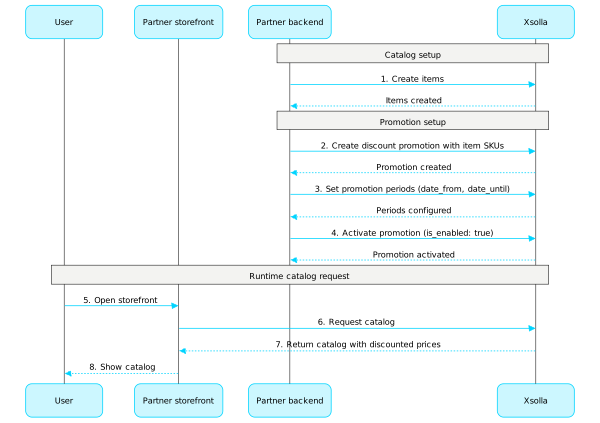
프로모션 구성에 대한 자세한 내용은 참조 문서를 참조하십시오.
쿠폰
쿠폰 프로모션을 구성하고 관리하려면 이 하위 섹션의 API 메소드를 호출합니다.
참고
쿠폰에 대한 자세한 정보는 참조 문서를 참조하십시오.
프로모션 코드
이 하위 섹션의 API 메소드를 호출하여 프로모션 코드 프로모션을 구성하고 관리합니다.
참고
프로모션 코드에 대한 자세한 정보는 참조 문서를 참조하십시오.
고유 카탈로그 혜택
고유 카탈로그 혜택을 구성하고 관리하려면 이 하위 섹션의 API 메소드를 호출합니다.
참고
고유 카탈로그 혜택에 대한 자세한 정보는 참조 문서를 참조하십시오.
할인
할인 프로모션을 구성하고 관리하려면 이 하위 섹션의 API 메소드를 호출합니다.
참고
할인에 대한 자세한 정보는 참조 문서를 참조하십시오.
보너스
보너스 프로모션을 구성하고 관리하려면 이 하위 섹션의 API 메소드를 호출합니다.
참고
보너스에 대한 자세한 정보는 참조 문서를 참조하십시오.
개인 맞춤형 카탈로그
사용자 맞춤 설정을 통해 특정 인증된 사용자에게만 아이템 카탈로그를 표시하고 프로모션을 적용할 조건을 지정할 수 있습니다. 조건은 사용자 특성에 기반하여 정의되며, 특정 사용자에게 가장 관련성 있는 아이템과 프로모션을 제공할 수 있습니다.
다음과 같은 사용자 맞춤 설정 유형이 가능합니다:
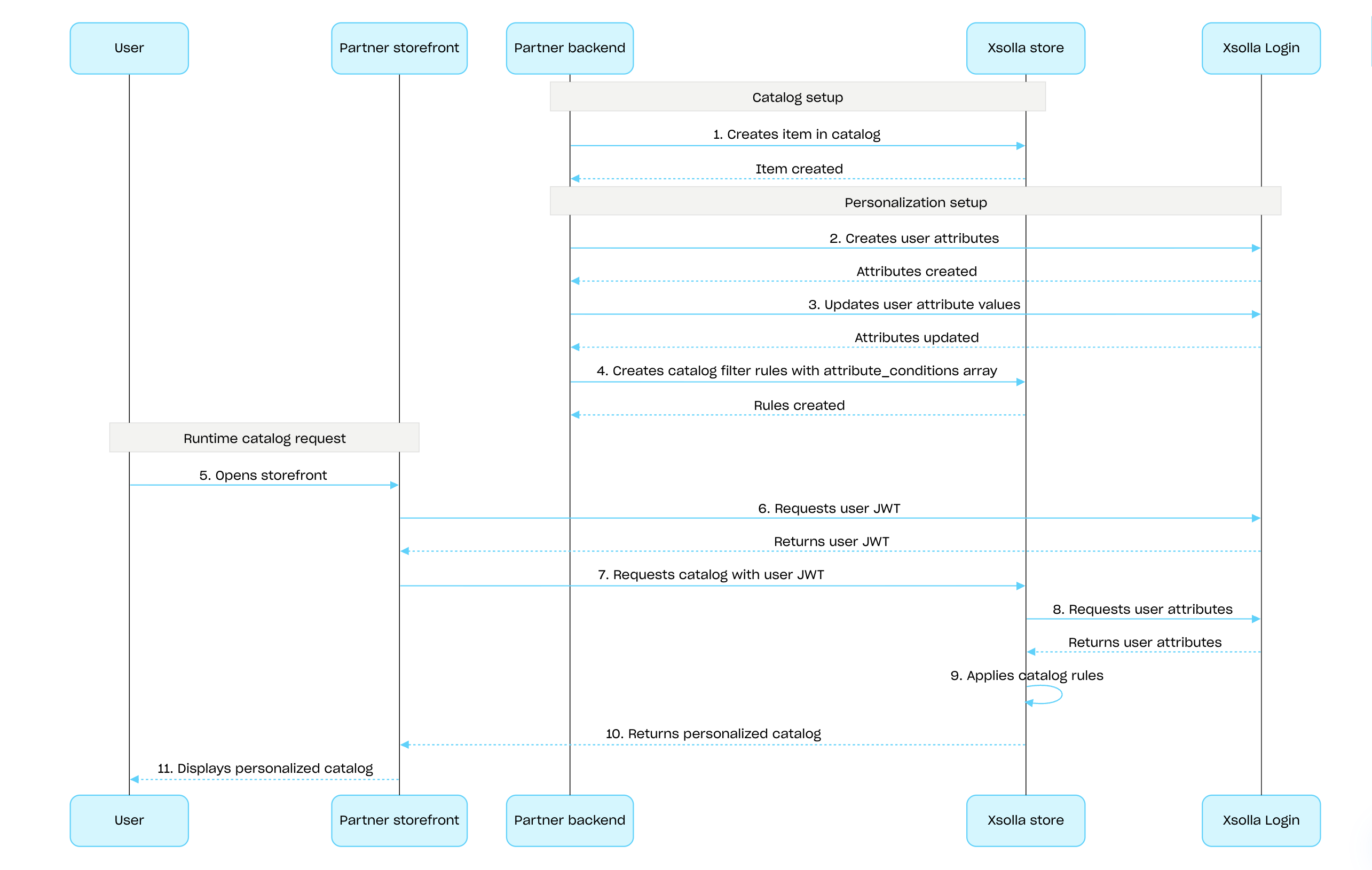
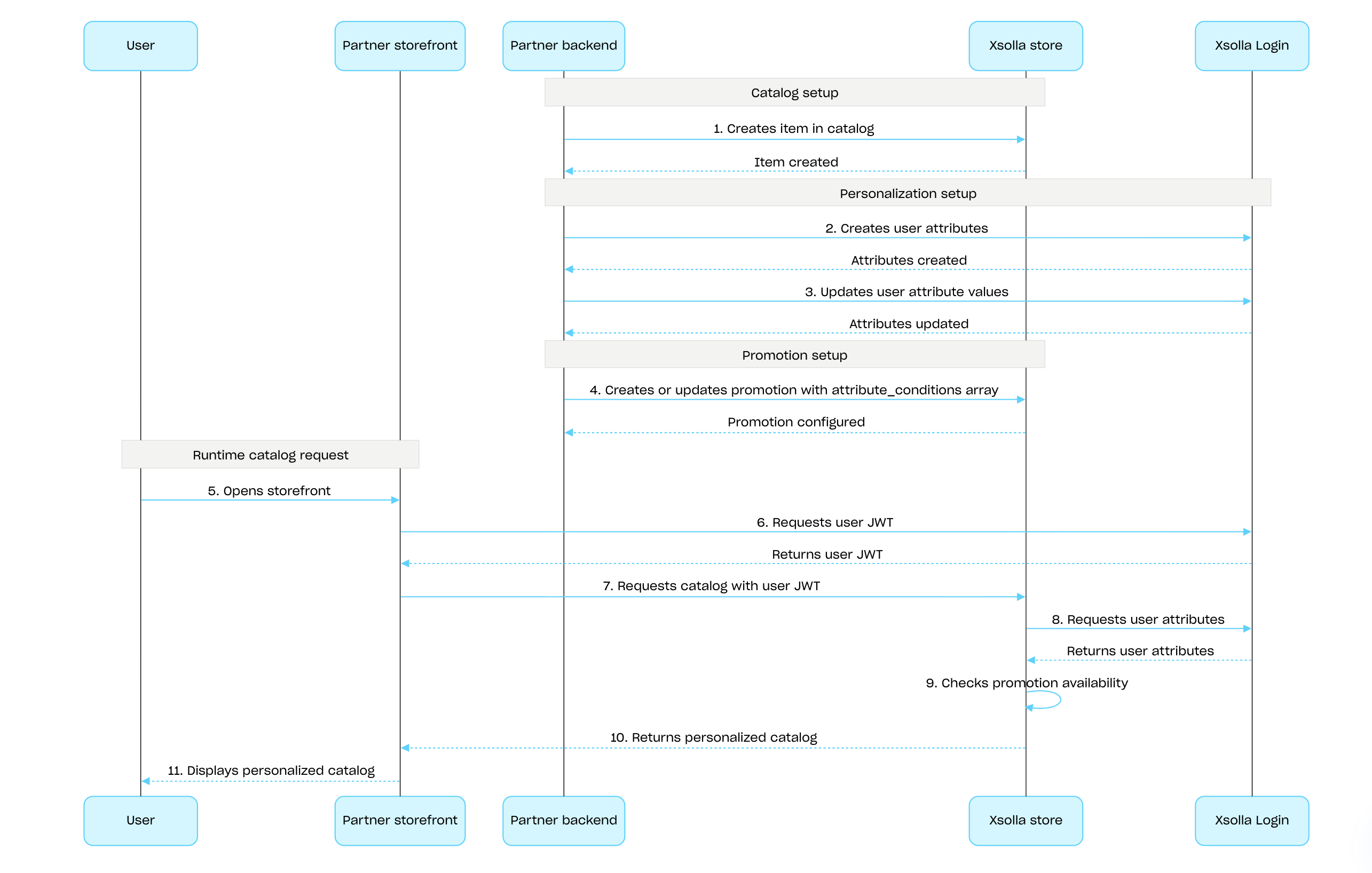
- 엑솔라 측 사용자 맞춤 설정. 사용자 맞춤 설정 규칙과 로직은 엑솔라 측에서 구성되고 저장됩니다. 사용자 특성을 전달하면 엑솔라가 이를 사용하여 개인 설정된 카탈로그를 생성합니다.
- 파트너 측 사용자 맞춤 설정. 사용자 맞춤 설정 규칙과 로직을 파트너 측에서 구성하고 특정 사용자에 대한 최종 카탈로그 페이로드를 엑솔라에 전송합니다.
엑솔라 API를 사용하여 엑솔라 측에서 사용자 맞춤 설정을 구성하는 방법:
가상 아이템 및 인게임 재화, 번들 또는 게임 키 그룹의 Admin 하위 섹션의 API 호출을 사용하여 아이템을 생성합니다.
엑솔라 로그인 API를 사용하여 사용자 특성을 설정하고, 게임 내에서 변경이 발생할 때마다 엑솔라에 데이터를 업데이트하여 동기화 상태를 유지합니다.
아이템 또는 프로모션에 대한 사용자 맞춤 설정을 구성합니다:
- 아이템 카탈로그를 개인 설정하려면 카탈로그 필터 규칙 생성 API 호출을 사용하여 카탈로그 표시 규칙을 정의합니다:
- attribute_conditions 목록에서 사용자 특성에 기반하여 아이템 가용성을 결정하는 조건을 지정합니다.
- items 목록에서 사용자의 특성이 지정된 조건과 일치할 경우 표시되어야 하는 아이템 목록을 제공합니다.
- 개인 설정한 프로모션을 구성하려면 필요한 프로모션 유형에 대한 생성 및 업데이트 API 호출을 사용합니다. attribute_conditions 목록에서 사용자 특성에 기반하여 프로모션 가용성을 결정하는 조건을 지정합니다.
- 아이템 카탈로그를 개인 설정하려면 카탈로그 필터 규칙 생성 API 호출을 사용하여 카탈로그 표시 규칙을 정의합니다:
사용자 특성을 포함한 사용자 JWT를 카탈로그 검색 API 호출에 전달하여 개인 설정된 카탈로그를 받습니다.
아이템 카탈로그에 대한 엑솔라 측 사용자 맞춤 설정 구성 및 적용 순서:
프로모션에 대한 엑솔라 측 사용자 맞춤 설정 구성 및 적용 순서:
개요
프로모션 사용 한도를 통해 특정 사용자가 프로모션을 사용할 수 있는 횟수를 제한할 수 있습니다. 또한 예약된 한도 재설정을 구성할 수 있습니다.
한도는 엑솔라 측에 저장되며, 관리자 페이지 또는 다음 API 호출의 limits 개체를 통해 프로모션 설정에서 구성됩니다:
한도 정보는 다음 API 호출에서 아이템 카탈로그를 가져올 때 items.promotions.limits 개체에 반환됩니다:
한도 그룹의 관리 하위 섹션에 있는 API 호출은 현재 한도의 상태를 검색하고 특정 사용자에 대해 업데이트할 수 있도록 합니다. 예를 들어, 퀘스트 완료 후 카운터를 재설정하거나 남은 수량을 수동으로 조정할 수 있습니다.
limits.per_user - 단일 사용자가 프로모션을 사용할 수 있는 횟수에 대한 한도를 구성할 수 있습니다.
인증되지 않은 사용자에게는 항상 최대 프로모션 사용 횟수가 표시됩니다.
활성 한도가 적용된 사용자의 남은 프로모션 사용 횟수를 표시하려면 아이템 카탈로그를 요청할 때 사용자 인증 데이터를 전달하세요.
일일, 주간 또는 월간으로 예약된 재설정 기간을 구성하려면 프로모션을 생성하거나 프로모션을 업데이트할 때 limits.recurrent_schedule 개체를 전달하세요.
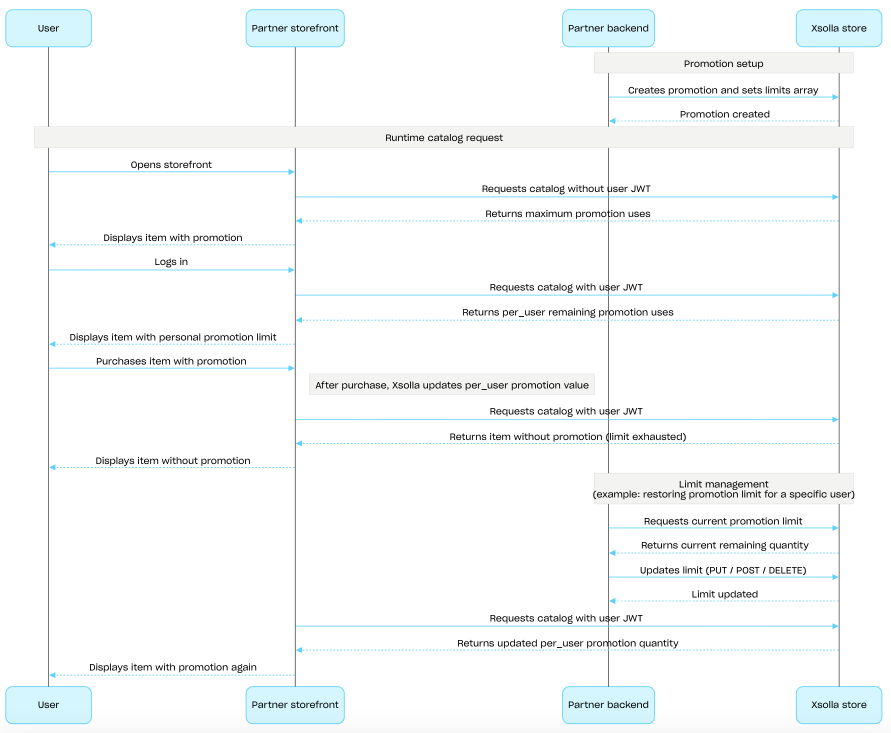
Limit configuration and enforcement scenario
- 아이템 할인 프로모션 생성 또는 보너스 프로모션 생성 API 호출을 사용하여 프로모션을 생성하고
limits개체를 전달합니다. - 인증되지 않은 사용자에 대해 카탈로그를 요청합니다 - 응답은
items.promotions.limits개체에 최대 프로모션 사용 횟수를 반환합니다. - 사용자가 로그인합니다.
- 사용자의 인증 토큰으로 카탈로그를 요청합니다 - 응답은 활성 한도가 적용된 남은 사용 횟수를 반환합니다.
- 사용자가 프로모션 아이템을 선택하고 구매합니다.
- 결제가 성공적으로 완료되면 엑솔라는
items.promotions.limits.per_user값을 업데이트합니다. 값이0에 도달하면, 해당 아이템은 카탈로그 API 호출에서 할인이나 보너스 없이 반환됩니다. - Management 하위 섹션의 API 호출을 사용하여 한도를 업데이트할 수 있습니다:
- 사용자의 인증 토큰으로 다음 카탈로그 요청을 할 때
items.promotions.limits에서 업데이트된 한도 값을 가져와 사용자에게 표시합니다.
개요
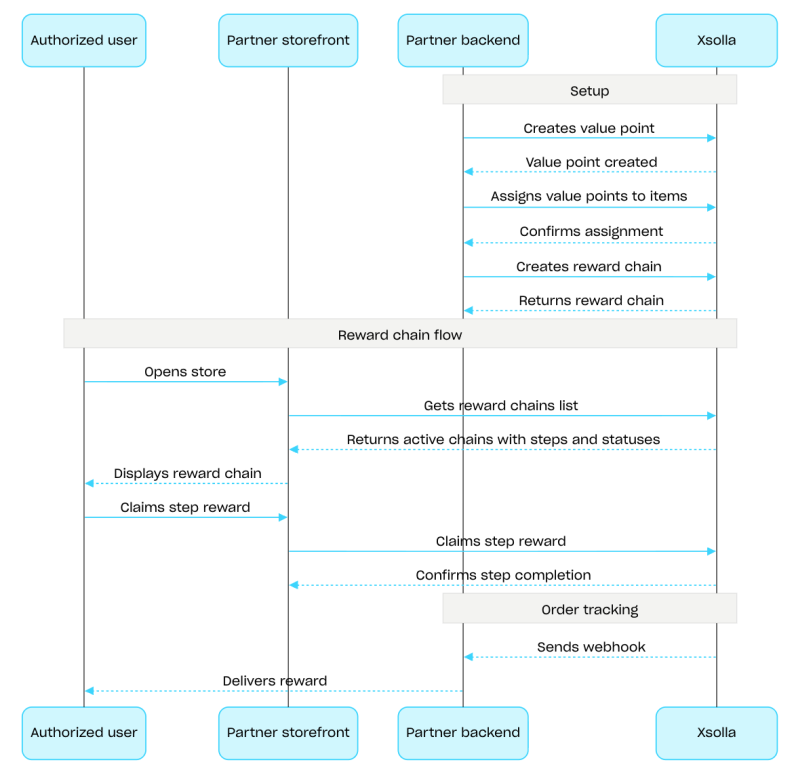
보상 체인은 사용자가 인게임 재화를 사용하여 스토어에서 구매하도록 유도합니다. 구매할 때마다 사용자는 가치 포인트를 획득하고 보상 체인을 따라 진행합니다. 사용자가 클랜에 소속되어 있는 경우, 해당 사용자의 구매 내역은 클랜 전체에 가치 포인트로 기여합니다. 보상 체인 설정에 대한 자세한 내용은 보상 시스템 섹션을 참조하십시오.
보상 체인을 구성하려면 Admin 하위 섹션의 API 호출을 사용하십시오. 체인을 표시하고 보상을 수령하려면 Client 하위 섹션의 API 호출을 사용하십시오. 클랜 보상 체인을 관리하려면 Clans client 하위 섹션의 API 호출을 사용하십시오.
보상 체인 구성 절차에 대한 예시:
- 가상 아이템 및 통화 또는 번들 그룹의 Admin 하위 섹션에 있는 API 호출을 사용하여 아이템을 생성합니다.
- 가치 포인트 생성 API 호출을 사용하여 가치 포인트를 생성합니다.
- 아이템에 가치 포인트 설정 API 호출을 사용하여 아이템에 가치 포인트를 할당합니다. 사용자는 해당 아이템을 구매한 후 가치 포인트를 받게 됩니다.
- 보상 체인 생성 API 호출을 사용하여 체인을 생성합니다. 체인을 활성화하려면
is_enabled: true매개 변수를 전달하십시오. - 보상 체인 표시 기능을 구현합니다. 이를 위해 현재 사용자의 보상 체인 가져오기 API 호출을 사용하여 사용 가능한 체인 목록을 요청합니다. 응답에는 단계 및 상태와 함께 모든 활성화된 체인이 포함됩니다.
- 가치 포인트 잔액 표시 기능을 구현합니다. 이를 위해 현재 사용자의 가치 포인트 잔액 조회 API 호출을 사용합니다.
- 단계별 보상 수령을 구현합니다. 이를 위해 단계별 보상 수령 API 호출을 사용합니다.
- 웹훅 등을 사용하여 주문 상태 추적을 구성하고, 청구된 보상에 대한 데이터를 신속하게 수신하여 사용자에게 보상을 지급합니다.
개요
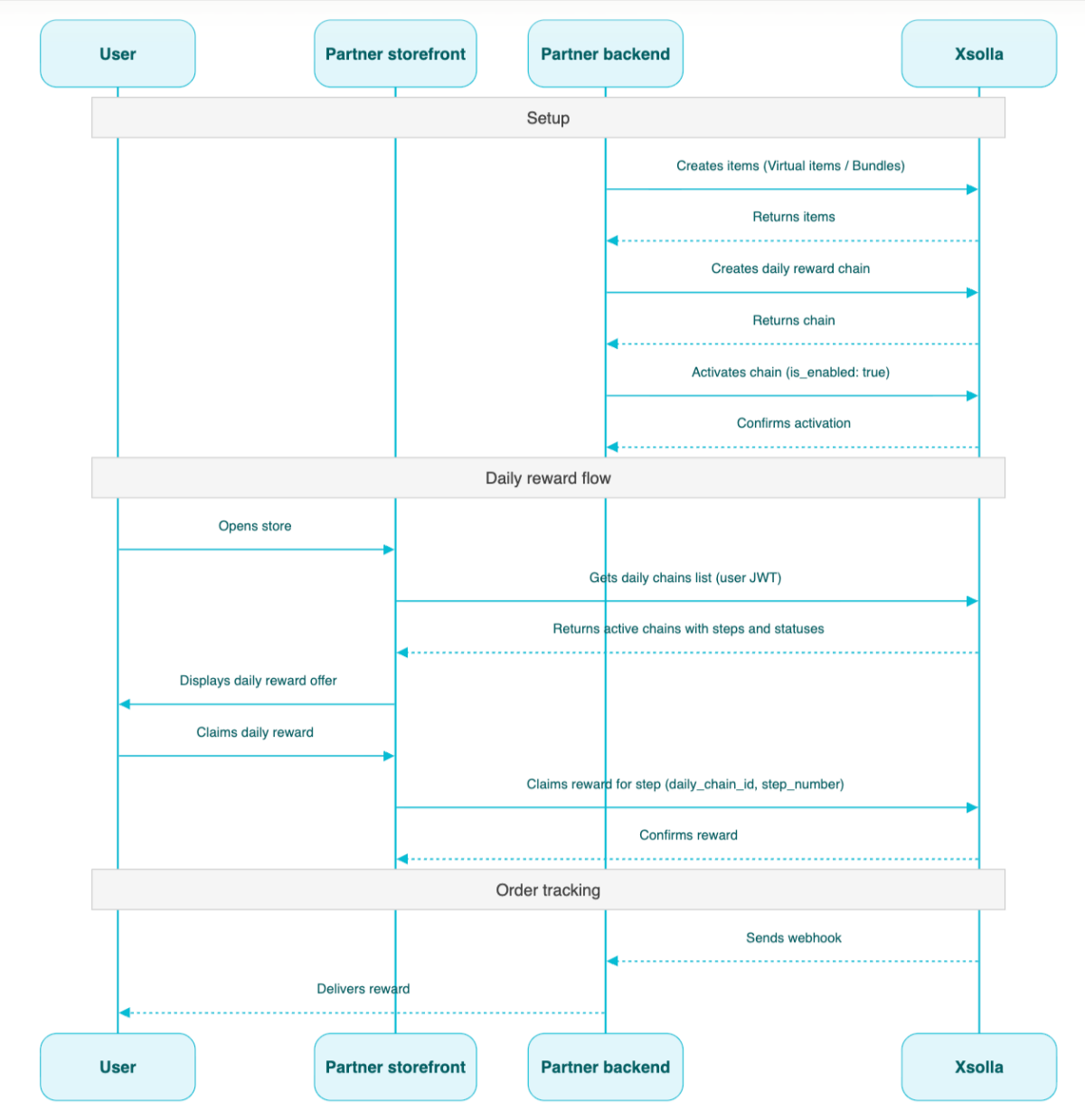
일일 보상은 사용자가 매일 스토어에 로그인하여 무료 아이템을 받도록 유도합니다. 하루를 건너뛸 경우의 동작은 체인 유형에 따라 달라집니다. 일일 보상이 올바르게 작동하려면 사용자 인증을 구성해야 합니다. 인증되지 않은 사용자는 전체 일일 리워드 체인을 볼 수는 있지만 보상을 수령할 수는 없습니다. 일일 보상 구성에 대한 자세한 내용은 일일 보상 섹션을 참조해 주세요.
체인은 관리자 하위 섹션의 API 호출을 사용하여 구성합니다. 보상을 지급하려면 클라이언트 하위 섹션의 API 호출을 사용합니다.
일일 체인 구성 시나리오:
- 관리자 하위 섹션의 가상아이템 및 인게임 재화 또는 번들 그룹에 있는 API 호출을 사용하여 아이템을 생성합니다.
- 일일 보상 생성 API 호출을 사용하여 체인을 생성합니다.
"is_enabled": true매개 변수를 전달하여 일일 보상 생성 API 호출로 체인을 활성화합니다.- 현재 사용자의 일일 보상 가져오기 API 호출을 사용하고 사용자 JWT를 전달하여 사용 가능한 체인 목록을 요청합니다. 응답에는 모든 활성 체인과 해당 단계 및 상태가 포함됩니다.
- 웹훅을 통해 아이템 지급을 설정합니다.
- 일일 보상 지급 단계 API 호출을 사용하고
daily_chain_id및step_number를 전달하여 사용자에게 일일 보상을 지급합니다.
프로젝트 ID. 이 매개 변수는 프로젝트 이름 옆의 관리자 페이지에서 또는 프로젝트 작업 시 브라우저 주소 표시줄에서 확인할 수 있습니다. URL 형식은 다음과 같습니다: https://publisher.xsolla.com/<merchant_id>/projects/<project_id>.
- https://store.xsolla.com/api/v2/project/{project_id}/admin/daily_chain
- Mock serverhttps://xsolla.redocly.app/_mock/ko/api/liveops/v2/project/{project_id}/admin/daily_chain
- curl
- JavaScript
- Node.js
- Python
- Java
- C#
- PHP
- Go
- Ruby
- R
- Payload
curl -i -X GET \
  -u <username>:<password> \
'https://store.xsolla.com/api/v2/project/44056/admin/daily_chain?limit=50&offset=0&enabled=0&is_expired=0&type=calendar_hard'일일 보상 목록이 성공적으로 검색되었습니다.
calendar_hard 일일 보상(짧은 버전).
사용자가 보상을 청구할 수 있는 시점을 결정하는 일일 보상 유형입니다.
사용 가능한 값: - calendar_hard - 24시간마다 다음 단계 보상을 해제합니다. 다음 단계 보상이 제공되기 시작하면 아직 수령하지 않은 단계 보상은 영구적으로 소멸됩니다. - rolling_skippable - date_start를 기준으로 24시간마다 다음 단계 보상을 해제합니다. 진행은 순차적으로 이루어집니다: 이전 보상을 수령한 이후에 새로운 보상이 해제됩니다. 사용자가 하루 이상을 건너뛰더라도 중단된 지점부터 계속 진행되며, 건너뛴 날에 대해 보상이 중복 지급되지 않습니다. - rolling_unskippable - date_start를 기준으로 24시간마다 다음 단계 보상을 해제합니다. 진행은 순차적으로 이루어집니다: 이전 보상을 수령하기 전까지는 새로운 보상이 해제되지 않습니다. 그러나 사용자가 하루를 건너뛰면 진행 상황이 초기화되며 첫 번째 단계부터 다시 시작해야 합니다.
일일 보상이 반복되는지 여부. true인 경우, 일일 보상은 종료일 이후 자동으로 초기화됩니다. 다음 start_date 및 end_date 일정은 일일 보상 단계 수와 start_date에 설정된 초기 시간에 기반합니다.
아이템 이름에 대한 현지화가 있는 개체입니다. 두 글자 소문자 언어 코드(예: en) 또는 다섯 글자 언어 코드(예: en-US) 두 가지 형식 중 하나로 되어 있는 값을 허용합니다. 두 형식 모두 입력으로 허용되지만 응답은 두 글자 소문자 언어 코드를 반환합니다. 동일한 언어에 대한 두 옵션(예: en 및 en-US)이 모두 제공되면 마지막으로 제공된 값이 저장됩니다. 지원되는 언어의 전체 목록은 문서에서 확인할 수 있습니다.
두 글자 소문자 언어 코드입니다.
아이템 설명에 대한 현지화가 있는 개체입니다. 두 글자 소문자 언어 코드(예: en) 또는 다섯 글자 로케일 코드(예: en-US) 두 가지 형식 중 하나로 되어 있는 값을 허용합니다. 두 형식 모두 입력으로 허용되지만 응답은 두 글자 소문자 언어 코드를 반환합니다. 동일한 언어에 대한 두 옵션(예: en 및 en-US)이 모두 제공되면 마지막으로 제공된 값이 저장됩니다. 지원되는 언어의 전체 목록은 문서에서 확인할 수 있습니다.
두 글자 소문자 언어 코드입니다.
일일 보상이 종료되는 날짜입니다. null일 수 있습니다. 유형을 calendar_hard로 설정하면 이 날짜가 추가된 걸음 수에 따라 자동으로 설정되므로 이 부분을 null로 둘 수 있습니다.
{
  "has_more": false,
  "total_items_count": 3,
  "items": [
    { … },
    { … },
    { … },
    { … },
    { … }
  ]
}
프로젝트 ID. 이 매개 변수는 프로젝트 이름 옆의 관리자 페이지에서 또는 프로젝트 작업 시 브라우저 주소 표시줄에서 확인할 수 있습니다. URL 형식은 다음과 같습니다: https://publisher.xsolla.com/<merchant_id>/projects/<project_id>.
calendar_hard 유형의 일일 보상입니다.
사용자가 보상을 청구할 수 있는 시점을 결정하는 일일 보상 유형입니다.
사용 가능한 값: - calendar_hard - 24시간마다 다음 단계 보상을 해제합니다. 다음 단계 보상이 제공되기 시작하면 아직 수령하지 않은 단계 보상은 영구적으로 소멸됩니다. - rolling_skippable - date_start를 기준으로 24시간마다 다음 단계 보상을 해제합니다. 진행은 순차적으로 이루어집니다: 이전 보상을 수령한 이후에 새로운 보상이 해제됩니다. 사용자가 하루 이상을 건너뛰더라도 중단된 지점부터 계속 진행되며, 건너뛴 날에 대해 보상이 중복 지급되지 않습니다. - rolling_unskippable - date_start를 기준으로 24시간마다 다음 단계 보상을 해제합니다. 진행은 순차적으로 이루어집니다: 이전 보상을 수령하기 전까지는 새로운 보상이 해제되지 않습니다. 그러나 사용자가 하루를 건너뛰면 진행 상황이 초기화되며 첫 번째 단계부터 다시 시작해야 합니다.
일일 보상이 반복되는지 여부. true인 경우, 일일 보상은 종료일 이후 자동으로 초기화됩니다. 다음 start_date 및 end_date 일정은 일일 보상 단계 수와 start_date에 설정된 초기 시간에 기반합니다.
아이템 이름에 대한 현지화가 있는 개체입니다. 두 글자 소문자 언어 코드(예: en) 또는 다섯 글자 언어 코드(예: en-US) 두 가지 형식 중 하나로 되어 있는 값을 허용합니다. 두 형식 모두 입력으로 허용되지만 응답은 두 글자 소문자 언어 코드를 반환합니다. 동일한 언어에 대한 두 옵션(예: en 및 en-US)이 모두 제공되면 마지막으로 제공된 값이 저장됩니다. 지원되는 언어의 전체 목록은 문서에서 확인할 수 있습니다.
두 글자 소문자 언어 코드입니다.
아이템 설명에 대한 현지화가 있는 개체입니다. 두 글자 소문자 언어 코드(예: en) 또는 다섯 글자 로케일 코드(예: en-US) 두 가지 형식 중 하나로 되어 있는 값을 허용합니다. 두 형식 모두 입력으로 허용되지만 응답은 두 글자 소문자 언어 코드를 반환합니다. 동일한 언어에 대한 두 옵션(예: en 및 en-US)이 모두 제공되면 마지막으로 제공된 값이 저장됩니다. 지원되는 언어의 전체 목록은 문서에서 확인할 수 있습니다.
두 글자 소문자 언어 코드입니다.
- https://store.xsolla.com/api/v2/project/{project_id}/admin/daily_chain
- Mock serverhttps://xsolla.redocly.app/_mock/ko/api/liveops/v2/project/{project_id}/admin/daily_chain
- curl
- JavaScript
- Node.js
- Python
- Java
- C#
- PHP
- Go
- Ruby
- R
- Payload
curl -i -X POST \
  -u <username>:<password> \
  https://store.xsolla.com/api/v2/project/44056/admin/daily_chain \
  -H 'Content-Type: application/json' \
  -d '{
    "name": {
      "en": "New daily reward",
      "ru": "Новая ежедневная награда"
    },
    "description": {
      "en": "New daily reward short description"
    },
    "order": 4,
    "date_start": "2023-04-15T18:16:00+05:00",
    "is_enabled": true,
    "steps": [
      {
        "step_number": 1,
        "items": [
          {
            "sku": "vg_enabled_shown_in_store_1",
            "quantity": 2
          }
        ]
      },
      {
        "step_number": 2,
        "items": [
          {
            "sku": "bundle_enabled_shown_in_store_with_2_enabled_shown_in_store_vg",
            "quantity": 2
          }
        ]
      },
      {
        "step_number": 3,
        "items": [
          {
            "sku": "vcp_enabled_shown_in_store_1_of_10_vc_enabled_shown_in_store_1",
            "quantity": 2
          }
        ]
      },
      {
        "step_number": 4,
        "items": [
          {
            "sku": "vg_enabled_shown_in_store_1",
            "quantity": 1
          }
        ]
      },
      {
        "step_number": 5,
        "items": [
          {
            "sku": "bundle_enabled_shown_in_store_with_2_enabled_shown_in_store_vg",
            "quantity": 1
          }
        ]
      },
      {
        "step_number": 6,
        "items": [
          {
            "sku": "vcp_enabled_shown_in_store_1_of_10_vc_enabled_shown_in_store_1",
            "quantity": 1
          }
        ]
      }
    ],
    "type": "calendar_hard"
}'{ "daily_chain_id": 10 }
프로젝트 ID. 이 매개 변수는 프로젝트 이름 옆의 관리자 페이지에서 또는 프로젝트 작업 시 브라우저 주소 표시줄에서 확인할 수 있습니다. URL 형식은 다음과 같습니다: https://publisher.xsolla.com/<merchant_id>/projects/<project_id>.
- https://store.xsolla.com/api/v2/project/{project_id}/admin/daily_chain/id/{daily_chain_id}
- Mock serverhttps://xsolla.redocly.app/_mock/ko/api/liveops/v2/project/{project_id}/admin/daily_chain/id/{daily_chain_id}
- curl
- JavaScript
- Node.js
- Python
- Java
- C#
- PHP
- Go
- Ruby
- R
- Payload
curl -i -X GET \
  -u <username>:<password> \
https://store.xsolla.com/api/v2/project/44056/admin/daily_chain/id/101일일 보상 데이터를 성공적으로 조회했습니다.
사용자가 보상을 청구할 수 있는 시점을 결정하는 일일 보상 유형입니다.
사용 가능한 값: - calendar_hard - 24시간마다 다음 단계 보상을 해제합니다. 다음 단계 보상이 제공되기 시작하면 아직 수령하지 않은 단계 보상은 영구적으로 소멸됩니다. - rolling_skippable - date_start를 기준으로 24시간마다 다음 단계 보상을 해제합니다. 진행은 순차적으로 이루어집니다: 이전 보상을 수령한 이후에 새로운 보상이 해제됩니다. 사용자가 하루 이상을 건너뛰더라도 중단된 지점부터 계속 진행되며, 건너뛴 날에 대해 보상이 중복 지급되지 않습니다. - rolling_unskippable - date_start를 기준으로 24시간마다 다음 단계 보상을 해제합니다. 진행은 순차적으로 이루어집니다: 이전 보상을 수령하기 전까지는 새로운 보상이 해제되지 않습니다. 그러나 사용자가 하루를 건너뛰면 진행 상황이 초기화되며 첫 번째 단계부터 다시 시작해야 합니다.
일일 보상이 반복되는지 여부. true인 경우, 일일 보상은 종료일 이후 자동으로 초기화됩니다. 다음 start_date 및 end_date 일정은 일일 보상 단계 수와 start_date에 설정된 초기 시간에 기반합니다.
아이템 이름에 대한 현지화가 있는 개체입니다. 두 글자 소문자 언어 코드(예: en) 또는 다섯 글자 언어 코드(예: en-US) 두 가지 형식 중 하나로 되어 있는 값을 허용합니다. 두 형식 모두 입력으로 허용되지만 응답은 두 글자 소문자 언어 코드를 반환합니다. 동일한 언어에 대한 두 옵션(예: en 및 en-US)이 모두 제공되면 마지막으로 제공된 값이 저장됩니다. 지원되는 언어의 전체 목록은 문서에서 확인할 수 있습니다.
두 글자 소문자 언어 코드입니다.
아이템 설명에 대한 현지화가 있는 개체입니다. 두 글자 소문자 언어 코드(예: en) 또는 다섯 글자 로케일 코드(예: en-US) 두 가지 형식 중 하나로 되어 있는 값을 허용합니다. 두 형식 모두 입력으로 허용되지만 응답은 두 글자 소문자 언어 코드를 반환합니다. 동일한 언어에 대한 두 옵션(예: en 및 en-US)이 모두 제공되면 마지막으로 제공된 값이 저장됩니다. 지원되는 언어의 전체 목록은 문서에서 확인할 수 있습니다.
두 글자 소문자 언어 코드입니다.
일일 보상이 종료되는 날짜입니다. null일 수 있습니다. 유형을 calendar_hard로 설정하면 이 날짜가 추가된 걸음 수에 따라 자동으로 설정되므로 이 부분을 null로 둘 수 있습니다.
고유 아이템 ID입니다. SKU는 소문자 및 대문자 라틴 영숫자, 마침표, 대시 및 밑줄만 포함할 수 있습니다.
두 글자 소문자 언어 코드입니다.
아이템의 긴 설명에 대한 현지화가 있는 개체입니다. 두 글자 소문자 언어 코드(예: en) 또는 5자 로케일 코드(예 en-US: ) 두 가지 형식 중 하나로 값을 허용합니다. 두 형식 모두 입력으로 허용되지만 응답은 두 글자 소문자 언어 코드를 반환합니다. 동일한 언어에 대한 두 변수(예: en 및 en-US)가 모두 제공되면 마지막으로 제공된 값이 저장됩니다. 지원되는 언어의 전체 목록은 문서에서 확인할 수 있습니다.
두 글자 소문자 언어 코드입니다.
{
  "id": 3,
  "name": {
    "en": "Daily reward",
    "ru": "Ежедневная награда"
  },
  "description": {
    "en": "Daily reward short description"
  },
  "date_start": "2023-04-15T18:16:00+05:00",
  "date_end": "2025-04-25T18:16:00+05:00",
  "order": 1,
  "is_recurrent": false,
  "number_of_steps": 3,
  "steps": [
    { … },
    { … },
    { … }
  ],
  "is_enabled": true,
  "type": "calendar_hard"
}
개요
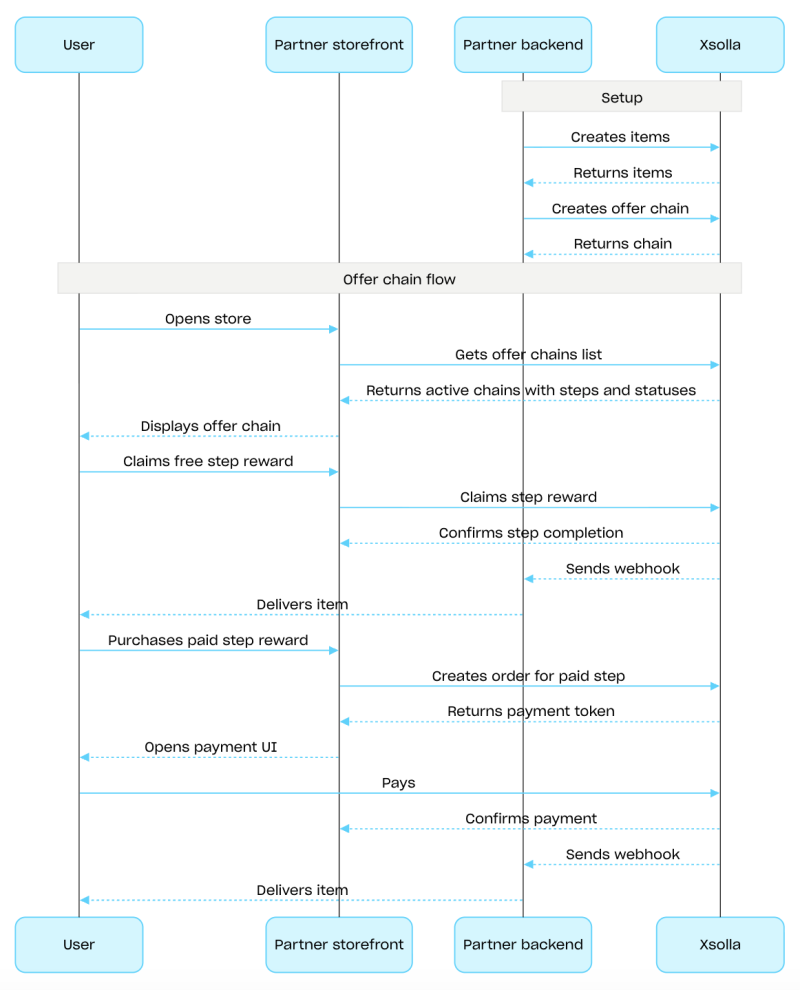
혜택 체인은 일련의 단계로 구성되며, 각 단계에는 활성 혜택의 일환으로 무료로 받거나 구매하는 아이템이 포함됩니다. 혜택 체인에는 해당 체인 내에서만 이용할 수 있는 독점 아이템은 물론, 스토어 가격보다 할인된 가격의 아이템도 포함될 수 있습니다. 이 마케팅 도구의 설정에 대한 자세한 내용은 혜택 체인 섹션을 참조하십시오.
혜택 체인을 구성하려면 Admin 하위 섹션의 API 호출을 사용하십시오. 체인을 표시하고 사용자가 수신하는 아이템을 처리하기 위한 로직을 구현하려면 Client 하위 섹션의 API 호출을 사용하십시오.
혜택 체인 구성 절차에 대한 예시:
가상 아이템 및 인게임 재화 또는 번들 그룹의 Admin 하위 섹션에 있는 API 호출을 사용하여 아이템을 생성합니다.
혜택 체인 생성API 호출을 사용하여 체인을 생성합니다. 체인을 활성화하려면
is_enabled: true매개 변수를 전달하십시오.혜택 체인 표시 기능을 구현합니다. 이를 위해 현재 사용자의 혜택 체인 가져오기 API 호출을 사용하여 사용 가능한 체인 목록을 요청합니다. 응답에는 단계 및 상태와 함께 모든 활성 체인이 포함됩니다.
사용자가 수신하는 아이템을 처리하는 로직을 구현합니다:
해당 단계 아이템이 무료인 경우, 무료 혜택 체인 단계 청구 API 호출을 사용하십시오. 요청에
offer_chain_id와step_number를 전달하십시오.단계별 아이템이 결제된 경우, 결제된 혜택 체인 단계에 대한 주문 생성 API 호출을 사용하십시오. 요청에
offer_chain_id와step_number를 전달하십시오. 응답에는order_id와 결제 UI를 열 수 있는 토큰이 반환됩니다.
예를 들어, 웹훅을 사용하여 주문 상태 추적을 설정하고, 청구되거나 구매된 상품에 대한 데이터를 신속하게 수신하여 사용자에게 해당 상품을 부여합니다.
개요
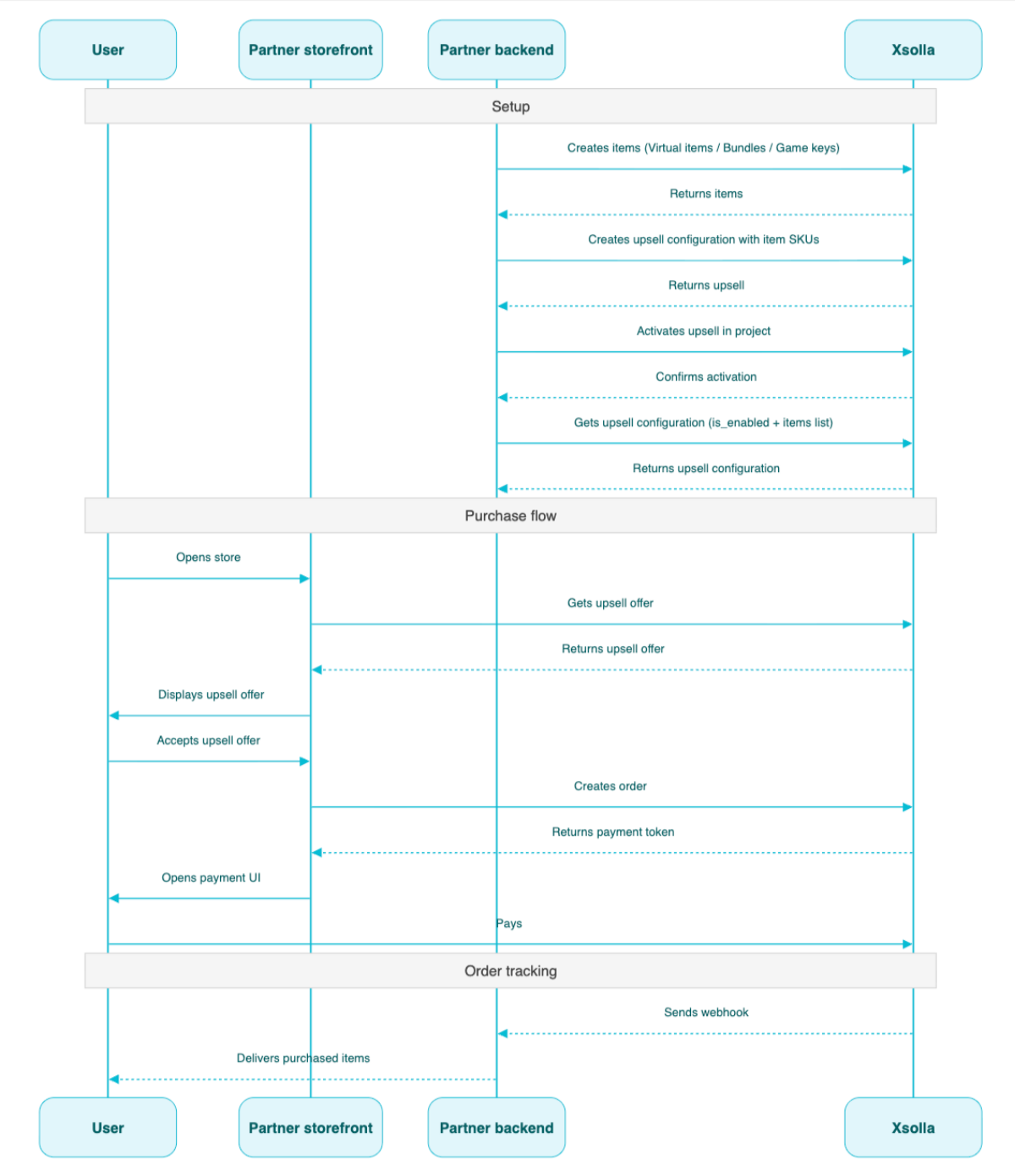
업셀링은 사용자에게 부가 가치가 있는 아이템의 구매를 제안하는 판매 방식입니다. 예를 들어 다른 사용자 사이에서 수요가 매우 높은 아이템일 수 있습니다. 업셀링 아이템에 대한 지역 제한도 구성할 수 있습니다. 자세한 내용은 업셀링 섹션을 참조해 주세요.
업셀링용으로 구성된 아이템 목록과 업셀링 상태(활성화 또는 비활성화)는 프로젝트에서 업셀링 정보 가져오기 API 메서드에서 반환합니다. 클라이언트 측에서는 프로젝트에서 업셀링 아이템 가져오기 API 메서드가 아이템 목록을 반환하며, 구매 흐름의 적절한 지점에서 사용자에게 표시됩니다.
업셀링 구성 시나리오:
- 관리자 하위 섹션의 가상 아이템 및 인게임 재화, 번들 또는 게임 키 그룹에 있는 API 호출을 사용하여 아이템을 생성합니다.
- 업셀링 생성 API 호출을 사용하여 업셀링을 설정합니다. 필수 아이템의 SKU를
items배열로 전달합니다. - 프로젝트의 업셀링 활성화/비활성화 API 호출을 사용하여 프로젝트의 업셀링을 활성화합니다.
- 구매 흐름의 적절한 지점에서 프로젝트에서 업셀링 아이템 목록 가져오기 API 호출을 사용하여 사용자에게 업셀링 제안을 표시합니다.
- 주문 결제를 위한 결제 UI가 열리도록 구현합니다. 예를 들어 특정 장바구니의 모든 아이템으로 주문 생성 API 호출을 사용할 수 있습니다. 응답으로 결제 UI를 여는 토큰이 반환됩니다.
- 예를 들어 웹훅을 사용하여 주문 상태 추적을 구성하고, 결제가 완료된 아이템의 데이터를 신속하게 받아 사용자에게 지급합니다.
개요
로열티 서비스 API를 사용하면 사용자의 로열티 포인트 잔액을 관리할 수 있습니다. 사용자의 현재 잔액을 조회하고 로열티 포인트를 적립하거나 차감할 수 있습니다.
로열티 서비스 API의 관리자 API 호출은 서버 측에서 이루어지며 기본 인증이 필요합니다.
이 API의 기본 URL은 https://loyalty-points.xsolla.com/입니다.
이 마케팅 도구 설정 방법에 대한 자세한 내용은 로열티 서비스를 참조해 주세요.