카탈로그 API (2.0.0)
- 버전: 2.0.0
- 서버:
https://store.xsolla.com/api - 이메일로 문의하기
- 연락처 URL: https://xsolla.com/
- 필수 TLS 버전: 1.2
카탈로그 API를 통해 엑솔라 측 인게임 아이템에 대한 카탈로그를 구성하고 스토어 사용자에게 카탈로그를 표시합니다.
API를 통해 다음 카탈로그 엔터티를 관리할 수 있습니다:
- 가상 아이템 - 무기, 스킨, 부스터와 같은 인게임 아이템.
- 인게임 재화 - 가상 아이템을 구매하는 데 사용되는 가상 화폐.
- 인게임 재화 패키지 - 사전 정의된 인게임 재화 번들.
- 번들 - 가상 아이템, 통화 또는 단일 SKU로 판매되는 게임 키의 결합 패키지.
- 게임 키 - Steam이나 기타 DRM 제공업체와 같은 플랫폼을 통해 배포되는 게임 및 DLC의 키.
- 그룹 - 카탈로그 내 아이템을 정리하고 분류하기 위한 로직 그룹.
API는 다음 그룹으로 구분됩니다:
Admin - 카탈로그 아이템 및 그룹 생성, 업데이트, 삭제 및 구성을 위한 호출. 상품 또는 프로젝트 자격 증명으로 기본 액세스 인증을 통해 인증됩니다. 스토어프런트 용도로 사용되지 않습니다.Catalog - 아이템 검색 및 최종 사용자를 위한 맞춤형 스토어프론트 구축을 위한 호출. 높은 부하 시나리오를 처리하도록 설계되었습니다. 사용자별 한도나 진행 중인 프로모션과 같은 개인화된 데이터를 반환하기 위해 선택적 사용자 JWT 인증을 지원합니다.
사용자의 JWT 인증은 브라우저, 모바일 애플리케이션 또는 게임에서 요청이 전송될 때 사용됩니다. 기본적으로 XsollaLoginUserJWT 체계가 적용됩니다. 토큰 생성 방법에 대한 자세한 내용은 엑솔라 로그인 API 문서를 참조하십시오.
토큰은 다음 형식으로 Authorization 헤더에 전달됩니다: Authorization: Bearer <user_JWT>, 여기에서 <user_JWT>는 사용자 토큰입니다. 이 토큰은 사용자를 식별하고 개인화된 데이터에 대한 액세스를 제공합니다.
또는 결제 UI를 여는 토큰을 사용할 수 있습니다.
기본 HTTP 인증은 서버 간 상호작용에 사용되며, API 호출이 사용자의 브라우저나 모바일 애플리케이션이 아닌 서버에서 직접 전송될 때 사용됩니다. 일반적으로 API 키를 사용한 HTTP 기본 인증이 사용됩니다.
API 키는 기밀이며 클라이언트 애플리케이션에 저장하거나 사용해서는 안 됩니다.
기본 서버 측 인증을 사용하면 모든 API 요청에 다음 헤더를 포함해야 합니다:
basicAuth의 경우 -Authorization: Basic <your_authorization_basic_key>, 여기에서your_authorization_basic_key는 Base64로 인코딩된project_id:api_key쌍입니다.basicMerchantAuth의 경우 -Authorization: Basic <your_authorization_basic_key>, 여기에서your_authorization_basic_key는 Base64로 인코딩된merchant_id:api_key쌍입니다.
관리자 페이지에서 매개 변수 값을 찾을 수 있습니다:
merchant_id는 다음 위치에 표시됩니다:- Company settings > Company에서.
- 관리자 페이지의 모든 페이지에서 브라우저 주소 표시줄의 URL에. URL 형식은 다음과 같습니다:
https://publisher.xsolla.com/<merchant_id>.
project_id는 다음 위치에 표시됩니다:- 관리자 페이지에서 프로젝트 이름 옆.
- 관리자 페이지에서 프로젝트 작업 시 브라우저 주소 표시줄의 URL. URL 형식은 다음과 같습니다:
https://publisher.xsolla.com/<merchant_id>/projects/<project_id>.
api_key는 생성 시에만 관리자 페이지에 표시되며 귀하의 측에서 안전하게 저장해야 합니다. API 키는 다음 섹션에서 생성할 수 있습니다:
필수 API 호출에
project_id 경로 매개 변수가 포함되지 않은 경우, 모든 회사 프로젝트에 대해 유효한 API 키를 사용하여 인증하십시오.API 키 작업에 대한 자세한 내용은 API 참조 문서를 참조하십시오.
이 AuthForCart 인증 체계는 장바구니 구매에 사용되며 두 가지 모드를 지원합니다.
사용자의 JWT를 사용한 인증. 토큰은 다음 형식으로
Authorization헤더에 전달됩니다:Authorization: Bearer <user_JWT>, 여기에서<user_JWT>는 사용자 토큰입니다. 이 토큰은 사용자를 식별하고 개인화된 데이터에 대한 액세스를 제공합니다. 또한, 결제 UI 열기 위한 토큰을 사용할 수 있습니다.Simplified mode without Authorization header. 이 모드는 미인증 사용자만 사용하며, 게임 키 판매에만 적용할 수 있습니다. 토큰 대신 요청에 다음 헤더를 포함해야 합니다.
- 요청 ID와
x-unauthorized-id - Base64로 인코딩된 사용자의 이메일 주소와
x-user
- 요청 ID와
모든 유형의 아이템(가상 아이템, 번들, 인게임 재화, 키)은 유사한 데이터 구조를 사용합니다. 기본 구조를 이해하면 API 작업이 간소화되고 문서를 더 쉽게 탐색할 수 있습니다.
일부 호출에는 추가 입력란이 포함될 수 있지만 기본 구조는 변경되지 않습니다.
식별
merchant_id- 관리자 페이지의 회사 IDproject_id- 관리자 페이지의 프로젝트 IDsku- 프로젝트 내의 고유한 아이템 SKU
Store display
name- 아이템 이름description- 아이템 설명image_url- 이미지 URLis_enabled- 아이템 가용성is_show_in_store- 카탈로그에 아이템이 표시되는지 여부
카탈로그에서 아이템 가용성 관리에 대한 자세한 정보는 문서를 참조하세요.
Organization
type- 아이템 유형, 예를 들어 가상 아이템(virtual_item) 또는 번들(bundle)groups- 아이템이 속한 그룹order- 카탈로그 내 디스플레이 순서
판매 조건
prices- 실제 화폐 또는 인게임 재화로 된 가격limits- 구매 한도periods- 가용 기간regions- 지역 제한
핵심 엔티티 구조 예시:
{
  "attributes": [],
  "bundle_type": "virtual_currency_package",
  "content": [
    {
      "description": {
        "en": "Main in-game currency"
      },
      "image_url": "https://.../image.png",
      "name": {
        "en": "Crystals",
        "de": "Kristalle"
      },
      "quantity": 500,
      "sku": "com.xsolla.crystal_2",
      "type": "virtual_currency"
    }
  ],
  "description": {
    "en": "Crystals x500"
  },
  "groups": [],
  "image_url": "https://.../image.png",
  "is_enabled": true,
  "is_free": false,
  "is_show_in_store": true,
  "limits": {
    "per_item": null,
    "per_user": null,
    "recurrent_schedule": null
  },
  "long_description": null,
  "media_list": [],
  "name": {
    "en": "Medium crystal pack"
  },
  "order": 1,
  "periods": [
    {
      "date_from": null,
      "date_until": "2020-08-11T20:00:00+03:00"
    }
  ],
  "prices": [
    {
      "amount": 20,
      "country_iso": "US",
      "currency": "USD",
      "is_default": true,
      "is_enabled": true
    }
  ],
  "regions": [],
  "sku": "com.xsolla.crystal_pack_2",
  "type": "bundle",
  "vc_prices": []
}엑솔라 API를 사용하면 아이템 카탈로그 검색, 장바구니 관리, 주문 생성 및 상태 추적을 포함한 인게임 스토어 로직을 구현할 수 있습니다. 통합 시나리오에 따라 API 호출은 Admin와 Catalog 하위 섹션으로 구분되며, 서로 다른 인증 방식을 사용합니다.
다음 예시는 아이템 생성부터 구매까지 스토어 설정 및 운영을 위한 기본 흐름을 보여줍니다.
할인, 보너스, 일일 보상 또는 혜택 체인과 같은 사용자 획득 및 수익화 도구를 구성합니다.
예시 API 호출:
애플리케이션에서 아이템 디스플레이를 구성합니다.
API 호출 예시:
기본적으로 카탈로그 API 호출은 요청 시점에 스토어에서 현재 사용 가능한 아이템을 반환합니다. 아직 사용 가능하지 않거나 더 이상 사용 가능하지 않은 아이템을 검색하려면 카탈로그 요청에
"show_inactive_time_limited_items": 1 매개 변수를 포함하십시오.
다음 방법을 사용하여 아이템을 판매할 수 있습니다:
- 빠른 구매 - 하나의 SKU를 여러 번 판매합니다.
- 장바구니 구매 - 사용자가 장바구니에 아이템을 추가하고, 제거하고, 수량을 업데이트합니다.
아이템이 실제 돈 대신 인게임 재화로 구매된 경우, 인게임 재화로 구매한 특정 아이템으로 주문 생성 API 호출을 사용하십시오. 결제 UI는 필요하지 않으며, API 호출이 실행될 때 청구가 처리됩니다.
무료 아이템 구매의 경우, 특정 무료 아이템으로 주문 생성 API 호출 또는 무료 장바구니로 주문 생성 API 호출을 사용하십시오. 결제 UI는 필요하지 않으며, 주문은 즉시 done 상태로 설정됩니다.
클라이언트 측 API 호출을 사용하여 특정 아이템으로 주문 생성을 수행합니다. 호출은 결제 UI를 열기 위한 토큰을 반환합니다.
할인 정보는 결제 UI에서만 사용자에게 제공됩니다. 프로모션 코드는 지원되지 않습니다.
장바구니 설정 및 구매는 클라이언트 또는 서버 측에서 수행할 수 있습니다.
클라이언트에서 장바구니 설정 및 구매
아이템 추가 및 제거 로직을 직접 구현하십시오. 장바구니 설정을 위한 API 호출 전에는 구매에 적용될 프로모션에 대한 정보를 알 수 없습니다. 이는 총 비용과 추가 보너스 아이템의 세부 사항을 알 수 없음을 의미합니다.
다음 장바구니 로직을 구현하십시오:
- 플레이어가 장바구니를 채운 후, 아이템으로 장바구니 채우기 API 호출을 사용하십시오. 호출은 선택한 아이템에 대한 현재 정보를 반환합니다 (할인 전후 가격, 보너스 아이템).
- 사용자 작업에 따라 장바구니 내용을 업데이트하십시오:
- 아이템을 추가하거나 아이템 수량을 변경하려면 장바구니 ID로 장바구니 아이템 업데이트 API 호출을 사용하십시오.
- 아이템을 제거하려면 장바구니 ID로 장바구니 아이템 삭제 API 호출을 사용하십시오.
현재 장바구니 상태를 얻으려면 현재 사용자의 장바구니 가져오기 API 호출을 사용하십시오.
- 현재 장바구니의 모든 아이템으로 주문 생성 API 호출을 사용하십시오. 호출은 주문 ID와 결제 토큰을 반환합니다. 새로 생성된 주문은 기본적으로
new상태로 설정됩니다.
서버에서 장바구니 설정 및 구매
이 설정 옵션은 장바구니 설정에 더 많은 시간이 걸릴 수 있습니다. 장바구니의 각 변경 사항은 API 호출을 동반해야 하기 때문입니다.
다음 장바구니 로직을 구현하십시오:
- 플레이어가 장바구니를 채운 후, 아이템으로 장바구니 채우기 API 호출을 사용하십시오. 호출은 선택한 아이템에 대한 현재 정보를 반환합니다(할인 전후 가격, 보너스 아이템).
- 현재 장바구니의 모든 아이템으로 주문 생성 API 호출을 사용하십시오. 호출은 주문 ID와 결제 토큰을 반환합니다. 새로 생성된 주문은 기본적으로
new상태로 설정됩니다.
반환된 토큰을 사용하여 새 창에서 결제 UI를 엽니다. 결제 UI를 여는 다른 방법은 문서에 설명되어 있습니다.
| 작업 | 엔드포인트 |
|---|---|
| 프로덕션 환경에서 열기. | https://secure.xsolla.com/paystation4/?token={token} |
| 샌드박스 모드에서 열기. | https://sandbox-secure.xsolla.com/paystation4/?token={token} |
개발 및 테스트 중에는 샌드박스 모드를 사용하세요. 테스트 구매는 실제 계정에 청구되지 않습니다. 테스트 은행 카드를 사용할 수 있습니다.
첫 번째 실제 결제가 이루어진 후에는 엄격한 샌드박스 결제 정책이 적용됩니다. 샌드박스 모드에서의 결제는 관리자 페이지 > 회사 설정 > 사용자에 지정된 사용자에게만 가능합니다.
실제 통화로 인게임 재화와 아이템을 구매하려면 엑솔라와의 라이선스 계약을 체결해야 합니다. 이를 위해 관리자 페이지에서 Agreements & Taxes > Agreements으로 이동하여 계약 양식을 작성하고 확인을 기다리세요. 계약 검토에는 최대 3영업일이 소요될 수 있습니다.
샌드박스 모드를 활성화하거나 비활성화하려면 빠른 구매 및 장바구니 구매 요청에서 sandbox 매개 변수의 값을 변경하세요. 기본적으로 샌드박스 모드는 꺼져 있습니다.
가능한 주문 상태:
new- 주문 생성됨paid- 결제 완료됨done- 아이템 전달됨canceled- 주문 취소됨expired-주문 만료됨
다음 방법 중 하나를 사용하여 주문 상태를 추적하세요:
대량의 레코드를 반환하는 API 호출(예: 카탈로그 작성 시)은 데이터를 페이지 단위로 반환합니다. 페이지 매김은 단일 API 응답에서 반환되는 항목 수를 제한하고 이후 페이지를 순차적으로 검색할 수 있는 메커니즘입니다.
반환되는 아이템 수를 제어하기 위해 다음 매개 변수를 사용하세요:
limit- 페이지당 항목 수offset- 페이지의 첫 번째 항목의 인덱스(번호는 0부터 시작)has_more- 다른 페이지가 있는지 여부를 나타냄total_items_count- 총 항목 수
요청 예시:
GET /items?limit=20&offset=40응답 예시:
{
  "items": [...],
  "has_more": true,
  "total_items_count": 135
}
응답이 has_more = false를 반환할 때까지 후속 요청을 보내는 것이 좋습니다.
날짜 및 시간 값은 ISO 8601 형식으로 전달됩니다.
다음이 지원됩니다:
- UTC 오프셋
- 항목 표시 시간 제한이 없는 경우
null값 - 일부 입력란에서 사용되는 Unix 타임스탬프(초 단위)
형식: YYYY-MM-DDTHH:MM:SS±HH:MM
예시: 2026-03-16T10:00:00+03:00
엑솔라는 항목 이름 및 설명과 같은 사용자 대상 입력란의 현지화를 지원합니다. 현지화된 값은 언어 코드를 키로 사용하는 개체로 전달됩니다. 지원되는 언어의 전체 목록은 문서에서 확인할 수 있습니다.
Supported fields
다음 매개 변수에 대해 현지화를 지정할 수 있습니다:
namedescriptionlong_description
Locale format
로케일 키는 다음 형식 중 하나로 지정할 수 있습니다:
- 두 글자 언어 코드:
en,ru - 다섯 글자 언어 코드:
en-US,ru-RU,de-DE
Examples
두 글자 언어 코드 예시:
{
  "name": {
    "en": "Starter Pack",
    "ru": "Стартовый набор"
  }
}
다섯 글자 언어 코드 예시:
{
  "description": {
    "en-US": "Premium bundle",
    "de-DE": "Premium-Paket"
  }
}사용자의 국가에 따라 카탈로그 가격, 결제 통화 및 결제 UI에서 사용 가능한 결제 수단이 결정됩니다. API 호출에 따라 국가는 다음과 같이 결정됩니다.
- 클라이언트 측 API 호출에서, 요청의 IP 주소를 기준으로 국가가 결정됩니다.
- 서버 측 API 호출,
user.country.value매개 변수 값 또는X-User-Ip헤더에 포함된 사용자의 IP 주소를 기준으로 국가가 결정됩니다. 둘 다 전달된 경우user.country.value매개 변수가 우선합니다.
오류가 발생하면, API는 HTTP 상태와 JSON 응답 본문을 반환합니다. 스토어 관련 오류의 전체 목록은 문서에서 확인할 수 있습니다.
Response example:
{
  "errorCode": 1102,
  "errorMessage": "Validation error",
  "statusCode": 422,
  "transactionId": "c9e1a..."
}errorCode- 오류 코드.errorMessage- 짧은 오류 설명.statusCode- HTTP 응답 상태.transactionId- 요청 ID. 일부 경우에만 반환됩니다.errorMessageExtended- 요청 매개 변수와 같은 추가 오류 세부 정보. 일부 경우에만 반환됩니다.
Extended response example:
{
  "errorCode": 7001,
  "errorMessage": "Chain not found",
  "errorMessageExtended": {
    "chain_id": "test_chain_id",
    "project_id": "test_project_id",
    "step_number": 2
  },
  "statusCode": 404
}
Common HTTP status codes
400- 잘못된 요청401- 인증 오류403- 권한 부족404- 리소스를 찾을 수 없음422- 유효성 검사 오류429- 속도 제한 초과
Recommendations
- HTTP 상태와 응답 본문을 함께 처리하세요.
errorCode를 사용하여 애플리케이션 로직과 관련된 오류를 처리하세요.transactionId를 사용하여 오류 분석 시 요청을 더 빠르게 식별하세요.
개요
가상 아이템과 인게임 재화를 사용하여 인게임 스토어를 구축하고 사용자에게 어떻게 디스플레이할지를 구성할 수 있습니다. 다음과 같은 아이템 유형이 제공됩니다:
- 가상 아이템 - 무기, 스킨, 부스터와 같은 인게임 상품. 실제 돈이나 가상 머니로 판매할 수 있습니다.
- 가상 머니 - 가상 아이템을 구매하는 데 사용되는 인게임 화폐. 실제 돈이나 인게임 재화로 판매할 수 있습니다.
- 인게임 재화 패키지 - 고정된 양의 인게임 재화. 실제 돈이나 인게임 재화로 판매할 수 있습니다.
그룹은 카탈로그에서 아이템을 구성하는 데 사용됩니다. 아이템을 논리적으로 그룹화하고 디스플레이 방식을 관리할 수 있습니다.
Admin 하위 섹션의 API 호출을 사용하여 아이템을 생성, 업데이트 및 삭제하세요.
Catalog 하위 섹션의 API 호출을 사용하여 아이템 목록을 검색하고 사용자에게 디스플레이하세요.
스토어 카탈로그를 작성하는 데 Admin 하위 섹션의 API 호출을 사용하지 마세요.
가상 아이템 목록 가져오기 API 호출은 가격 및 특성을 포함한 자세한 아이템 데이터를 반환하며, 페이지 매김을 지원합니다. 스토어프론트에서 카탈로그 페이지를 표시하는 데 사용하세요.
모든 가상 아이템 목록 가져오기 API 호출은 페이지 매김 없이 아이템 SKU, 이름, 설명, 그룹 ID 및 이름을 반환합니다. 클라이언트 측 검색 또는 색인에 사용하세요.
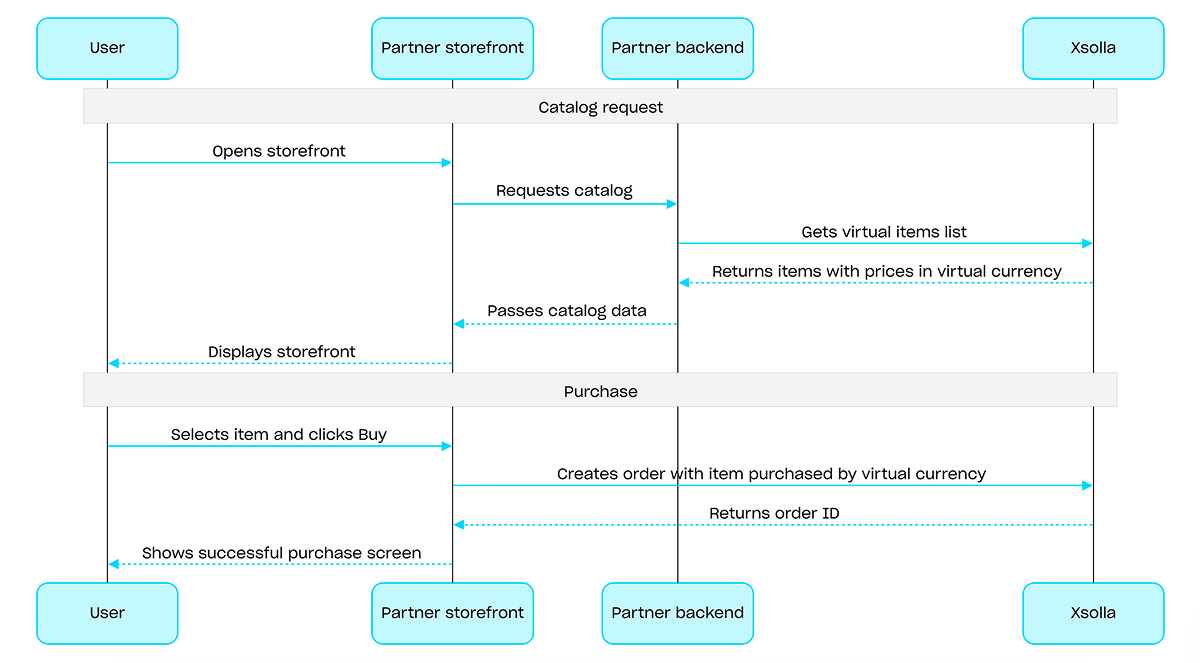
인게임 재화로 구매할 경우, 인게임 재화로 구매한 지정된 아이템으로 주문 생성 API 호출을 사용하세요. 결제 UI는 필요하지 않으며, API 호출이 실행될 때 청구가 처리됩니다.
인게임 재화를 사용한 구매 절차 예시:
프로젝트 ID. 이 매개 변수는 프로젝트 이름 옆의 관리자 페이지에서 또는 프로젝트 작업 시 브라우저 주소 표시줄에서 확인할 수 있습니다. URL 형식은 다음과 같습니다: https://publisher.xsolla.com/<merchant_id>/projects/<project_id>.
- https://store.xsolla.com/api/v2/project/{project_id}/admin/items/virtual_currency
- Mock serverhttps://xsolla.redocly.app/_mock/ko/api/catalog/v2/project/{project_id}/admin/items/virtual_currency
- curl
- JavaScript
- Node.js
- Python
- Java
- C#
- PHP
- Go
- Ruby
- R
- Payload
curl -i -X GET \
  -u <username>:<password> \
'https://store.xsolla.com/api/v2/project/44056/admin/items/virtual_currency?limit=50&offset=0'인게임 재화 목록을 성공적으로 수신했습니다.
고유 아이템 ID입니다. SKU는 소문자 및 대문자 라틴 영숫자, 마침표, 대시 및 밑줄만 포함할 수 있습니다.
아이템 이름에 대한 현지화가 있는 개체입니다. 두 글자 소문자 언어 코드(예: en) 또는 다섯 글자 언어 코드(예: en-US) 두 가지 형식 중 하나로 되어 있는 값을 허용합니다. 두 형식 모두 입력으로 허용되지만 응답은 두 글자 소문자 언어 코드를 반환합니다. 동일한 언어에 대한 두 옵션(예: en 및 en-US)이 모두 제공되면 마지막으로 제공된 값이 저장됩니다. 지원되는 언어의 전체 목록은 문서에서 확인할 수 있습니다.
두 글자 소문자 언어 코드입니다.
아이템 설명에 대한 현지화가 있는 개체입니다. 두 글자 소문자 언어 코드(예: en) 또는 다섯 글자 로케일 코드(예: en-US) 두 가지 형식 중 하나로 되어 있는 값을 허용합니다. 두 형식 모두 입력으로 허용되지만 응답은 두 글자 소문자 언어 코드를 반환합니다. 동일한 언어에 대한 두 옵션(예: en 및 en-US)이 모두 제공되면 마지막으로 제공된 값이 저장됩니다. 지원되는 언어의 전체 목록은 문서에서 확인할 수 있습니다.
두 글자 소문자 언어 코드입니다.
아이템의 긴 설명에 대한 현지화가 있는 개체입니다. 두 글자 소문자 언어 코드(예: en) 또는 5자 로케일 코드(예 en-US: ) 두 가지 형식 중 하나로 값을 허용합니다. 두 형식 모두 입력으로 허용되지만 응답은 두 글자 소문자 언어 코드를 반환합니다. 동일한 언어에 대한 두 변수(예: en 및 en-US)가 모두 제공되면 마지막으로 제공된 값이 저장됩니다. 지원되는 언어의 전체 목록은 문서에서 확인할 수 있습니다.
두 글자 소문자 언어 코드입니다.
아이템이 속한 그룹입니다.
특성 목록입니다.
고유 특성 ID입니다. external_id는 소문자 및 대문자 라틴 영숫자, 대시 및 밑줄만 포함할 수 있습니다.
특성의 이름에 대한 현지화가 있는 개체입니다. 키는 ISO 3166-1에 따라 지정되어 있습니다.
특성의 고유한 값 ID입니다. external_id에는 소문자 라틴어 영숫자, 대시, 밑줄만 사용할 수 있습니다.
스크린샷, 게임 플레이 동영상 등과 같은 아이템의 추가 자산입니다.
아이템 가격 통화입니다. ISO 4217에 따른 3자리 코드입니다. 엑솔라에서 지원하는 통화에 대한 자세한 내용은 설명서를 확인하십시오.
이 가격이 카탈로그에 표시하거나 아이템을 구매할 때 사용되는지 여부입니다. false로 설정하면 해당 가격은 사용되지 않으며 다른 가격이 적용됩니다. 가격 설정에 대한 자세한 내용은 문서를 참조하십시오.
이 가격을 사용할 수 있는 국가입니다. ISO 3166-1 alpha 2에 따른 2자리 글자 코드입니다.
이미지 URL. 결제 UI에서 이미지가 올바르게 표시되고 빠르게 로드되도록 하려면 다음 이미지 및 URL 가이드라인을 확인하세요:
- 지원되는 형식: WebP(권장), PNG, JPG.
- 파일 크기: 50KB 이하(WebP의 경우) 또는 150KB 이하(PNG 및 JPG의 경우).
- 이미지 크기: 280 x 280 픽셀.
- 색 공간: sRGB.
- 프로토콜: 버전 관리된 URL에 대해 장기 캐싱이 적용된 HTTPS.
해당 아이템이 구매 가능한지 여부입니다. false인 경우, 해당 아이템은 스토어에서 구매할 수 없으며 번들 상품이나 마케팅 캠페인을 통해서도 획득할 수 없습니다. 아이템 구매 가능 여부에 대한 자세한 내용은 문서를 참조하세요.
카탈로그 내 아이템 표시 순서입니다. 값이 클수록 목록에서 해당 아이템이 더 아래쪽에 표시됩니다. 값이 동일한 경우, 아이템이 생성 날짜 순으로 정렬되며, 보다 최근에 생성된 아이템이 더 위쪽에 표시됩니다.
해당 아이템이 카탈로그에 표시되는지 여부입니다. false이고 is_enabled: true인 경우, 해당 아이템은 카탈로그에 표시되지 않지만 번들 상품의 일부로 제공되거나 마케팅 캠페인 내에서 이용할 수 있습니다. 아이템 제공 여부에 대한 자세한 내용은 문서를 참조하십시오.
해당 아이템을 이용할 수 있는 지역 목록입니다. 목록이 비어 있거나 전달되지 않은 경우, 해당 아이템은 모든 지역에 제공됩니다.
프로젝트 내의 지역 ID입니다.
자세한 내용은 지역별 판매 제한 관련 문서와 지역 관리 API 호출을 참조하십시오.
아이템 제한 사항입니다.
개별 사용자에 대한 아이템 제한 사항입니다.
구매 한도에 도달한 후 다음 한도 재설정 때까지 카탈로그 내 아이템의 표시 여부를 결정합니다.
recurrent_schedule 배열에서 반복 한도 재설정이 구성된 아이템에 적용됩니다.
구매 한도에 도달한 후, 한도 초기화를 구성하지 않았다면limit_exceeded_visibility 값과 관계없이 해당 아이템은 카탈로그에 표시되지 않습니다.
사용 가능한 값: - show - 구매 한도에 도달한 이후에도 카탈로그 검색 API 호출 시 해당 아이템이 반환됩니다. 클라이언트 측 카탈로그 검색 API 호출에서 한도에 도달하면, 해당 아이템은 can_be_bought: false 플래그와 함께 반환됩니다. 다음 재설정 날짜는 reset_next_date에 반환됩니다. - hide - 구매 한도에 도달한 후, 한도가 재설정될 때까지 해당 아이템은 카탈로그 검색 API 호출에서 반환되지 않습니다.
전역 항목 제한 사항입니다.
새로고침 기간을 제한합니다.
사용자 제한 새로고침 기간입니다.
사용자 제한 새로고침 기간입니다.
원하는 시간대의 제한 시간 새로고침 시간입니다(시간 단위로 반올림).
새로고침 제한 설정이 적용되는 날짜 및 시간입니다(Unix 타임스탬프)
첫 번째 제한 설정을 새로고침하는 날짜 및 시간입니다(ISO 8601).
아이템 판매 기간입니다.
{
  "items": [
    { … },
    { … }
  ]
}
프로젝트 ID. 이 매개 변수는 프로젝트 이름 옆의 관리자 페이지에서 또는 프로젝트 작업 시 브라우저 주소 표시줄에서 확인할 수 있습니다. URL 형식은 다음과 같습니다: https://publisher.xsolla.com/<merchant_id>/projects/<project_id>.
고유 아이템 ID입니다. SKU는 소문자 및 대문자 라틴 영숫자, 마침표, 대시 및 밑줄만 포함할 수 있습니다.
아이템 이름에 대한 현지화가 있는 개체입니다. 두 글자 소문자 언어 코드(예: en) 또는 다섯 글자 언어 코드(예: en-US) 두 가지 형식 중 하나로 되어 있는 값을 허용합니다. 두 형식 모두 입력으로 허용되지만 응답은 두 글자 소문자 언어 코드를 반환합니다. 동일한 언어에 대한 두 옵션(예: en 및 en-US)이 모두 제공되면 마지막으로 제공된 값이 저장됩니다. 지원되는 언어의 전체 목록은 문서에서 확인할 수 있습니다.
두 글자 소문자 언어 코드입니다.
아이템 설명에 대한 현지화가 있는 개체입니다. 두 글자 소문자 언어 코드(예: en) 또는 다섯 글자 로케일 코드(예: en-US) 두 가지 형식 중 하나로 되어 있는 값을 허용합니다. 두 형식 모두 입력으로 허용되지만 응답은 두 글자 소문자 언어 코드를 반환합니다. 동일한 언어에 대한 두 옵션(예: en 및 en-US)이 모두 제공되면 마지막으로 제공된 값이 저장됩니다. 지원되는 언어의 전체 목록은 문서에서 확인할 수 있습니다.
두 글자 소문자 언어 코드입니다.
아이템의 긴 설명에 대한 현지화가 있는 개체입니다. 두 글자 소문자 언어 코드(예: en) 또는 5자 로케일 코드(예 en-US: ) 두 가지 형식 중 하나로 값을 허용합니다. 두 형식 모두 입력으로 허용되지만 응답은 두 글자 소문자 언어 코드를 반환합니다. 동일한 언어에 대한 두 변수(예: en 및 en-US)가 모두 제공되면 마지막으로 제공된 값이 저장됩니다. 지원되는 언어의 전체 목록은 문서에서 확인할 수 있습니다.
두 글자 소문자 언어 코드입니다.
이미지 URL. 결제 UI에서 이미지가 올바르게 표시되고 빠르게 로드되도록 하려면 다음 이미지 및 URL 가이드라인을 확인하세요:
- 지원되는 형식: WebP(권장), PNG, JPG.
- 파일 크기: 50KB 이하(WebP의 경우) 또는 150KB 이하(PNG 및 JPG의 경우).
- 이미지 크기: 280 x 280 픽셀.
- 색 공간: sRGB.
- 프로토콜: 버전 관리된 URL에 대해 장기 캐싱이 적용된 HTTPS.
스크린샷, 게임 플레이 동영상 등과 같은 아이템의 추가 자산입니다.
해당 아이템이 속한 그룹 외부 ID 목록입니다.
예시: ["horror", "action"]
특성 목록입니다.
고유 특성 ID입니다. external_id는 소문자 및 대문자 라틴 영숫자, 대시 및 밑줄만 포함할 수 있습니다.
특성의 이름에 대한 현지화가 있는 개체입니다. 키는 ISO 3166-1에 따라 지정되어 있습니다.
특성의 고유한 값 ID입니다. external_id에는 소문자 라틴어 영숫자, 대시, 밑줄만 사용할 수 있습니다.
아이템 가격 통화입니다. ISO 4217에 따른 3자리 코드입니다. 엑솔라에서 지원하는 통화에 대한 자세한 내용은 설명서를 확인하십시오.
이 가격이 카탈로그에 표시하거나 아이템을 구매할 때 사용되는지 여부입니다. false로 설정하면 해당 가격은 사용되지 않으며 다른 가격이 적용됩니다. 가격 설정에 대한 자세한 내용은 문서를 참조하십시오.
이 가격을 사용할 수 있는 국가입니다. ISO 3166-1 alpha 2에 따른 2자리 글자 코드입니다.
인게임 재화 가격 목록입니다.
고유 아이템 ID입니다. SKU는 소문자 및 대문자 라틴 영숫자, 마침표, 대시 및 밑줄만 포함할 수 있습니다.
해당 아이템이 구매 가능한지 여부입니다. false인 경우, 해당 아이템은 스토어에서 구매할 수 없으며 번들 상품이나 마케팅 캠페인을 통해서도 획득할 수 없습니다. 아이템 구매 가능 여부에 대한 자세한 내용은 문서를 참조하세요.
해당 아이템이 카탈로그에 표시되는지 여부입니다. false이고 is_enabled: true인 경우, 해당 아이템은 카탈로그에 표시되지 않지만 번들 상품의 일부로 제공되거나 마케팅 캠페인 내에서 이용할 수 있습니다. 아이템 제공 여부에 대한 자세한 내용은 문서를 참조하십시오.
카탈로그 내 아이템 표시 순서입니다. 값이 클수록 목록에서 해당 아이템이 더 아래쪽에 표시됩니다. 값이 동일한 경우, 아이템이 생성 날짜 순으로 정렬되며, 보다 최근에 생성된 아이템이 더 위쪽에 표시됩니다.
해당 아이템을 이용할 수 있는 지역 목록입니다. 목록이 비어 있거나 전달되지 않은 경우, 해당 아이템은 모든 지역에 제공됩니다.
아이템 제한 사항입니다.
개별 사용자에 대한 아이템 제한 사항입니다.
개별 사용자에 대한 아이템 제한 사항입니다.
새로고침 기간을 제한합니다.
지정된 시간 간격(시간 단위)마다 구매 한도가 재설정됩니다.
아이템 판매 기간입니다.
- https://store.xsolla.com/api/v2/project/{project_id}/admin/items/virtual_currency
- Mock serverhttps://xsolla.redocly.app/_mock/ko/api/catalog/v2/project/{project_id}/admin/items/virtual_currency
- curl
- JavaScript
- Node.js
- Python
- Java
- C#
- PHP
- Go
- Ruby
- R
- Payload
curl -i -X POST \
  -u <username>:<password> \
  https://store.xsolla.com/api/v2/project/44056/admin/items/virtual_currency \
  -H 'Content-Type: application/json' \
  -d '{
    "sku": "com.xsolla.coin_1",
    "name": {
      "en-US": "Gold coin",
      "de-DE": "Goldmünze"
    },
    "is_enabled": true,
    "is_free": false,
    "is_paid_randomized_reward": false,
    "groups": [
      "gold"
    ],
    "order": 1,
    "description": {
      "en-US": "The main currency of your kingdom",
      "de-DE": "Die Hauptwährung deines Königreichs"
    },
    "prices": [
      {
        "amount": 100,
        "currency": "USD",
        "is_enabled": true,
        "is_default": true
      }
    ],
    "attributes": [
      {
        "external_id": "material",
        "name": {
          "en-US": "Material"
        },
        "values": [
          {
            "external_id": "gold",
            "value": {
              "en-US": "Gold"
            }
          }
        ]
      }
    ],
    "limits": {
      "per_user": 5,
      "per_item": 10000
    },
    "periods": [
      {
        "date_from": "2020-08-11T10:00:00+03:00",
        "date_until": "2020-08-11T20:00:00+03:00"
      }
    ],
    "custom_attributes": {
      "purchased": 0,
      "attr": "value"
    }
}'{ "sku": "com.xsolla.item_1" }
프로젝트 ID. 이 매개 변수는 프로젝트 이름 옆의 관리자 페이지에서 또는 프로젝트 작업 시 브라우저 주소 표시줄에서 확인할 수 있습니다. URL 형식은 다음과 같습니다: https://publisher.xsolla.com/<merchant_id>/projects/<project_id>.
- https://store.xsolla.com/api/v2/project/{project_id}/admin/items/virtual_currency/sku/{virtual_currency_sku}
- Mock serverhttps://xsolla.redocly.app/_mock/ko/api/catalog/v2/project/{project_id}/admin/items/virtual_currency/sku/{virtual_currency_sku}
- curl
- JavaScript
- Node.js
- Python
- Java
- C#
- PHP
- Go
- Ruby
- R
- Payload
curl -i -X GET \
  -u <username>:<password> \
https://store.xsolla.com/api/v2/project/44056/admin/items/virtual_currency/sku/crystal지정한 인게임 재화를 성공적으로 수신했습니다.
고유 아이템 ID입니다. SKU는 소문자 및 대문자 라틴 영숫자, 마침표, 대시 및 밑줄만 포함할 수 있습니다.
아이템 이름에 대한 현지화가 있는 개체입니다. 두 글자 소문자 언어 코드(예: en) 또는 다섯 글자 언어 코드(예: en-US) 두 가지 형식 중 하나로 되어 있는 값을 허용합니다. 두 형식 모두 입력으로 허용되지만 응답은 두 글자 소문자 언어 코드를 반환합니다. 동일한 언어에 대한 두 옵션(예: en 및 en-US)이 모두 제공되면 마지막으로 제공된 값이 저장됩니다. 지원되는 언어의 전체 목록은 문서에서 확인할 수 있습니다.
두 글자 소문자 언어 코드입니다.
아이템 설명에 대한 현지화가 있는 개체입니다. 두 글자 소문자 언어 코드(예: en) 또는 다섯 글자 로케일 코드(예: en-US) 두 가지 형식 중 하나로 되어 있는 값을 허용합니다. 두 형식 모두 입력으로 허용되지만 응답은 두 글자 소문자 언어 코드를 반환합니다. 동일한 언어에 대한 두 옵션(예: en 및 en-US)이 모두 제공되면 마지막으로 제공된 값이 저장됩니다. 지원되는 언어의 전체 목록은 문서에서 확인할 수 있습니다.
두 글자 소문자 언어 코드입니다.
아이템의 긴 설명에 대한 현지화가 있는 개체입니다. 두 글자 소문자 언어 코드(예: en) 또는 5자 로케일 코드(예 en-US: ) 두 가지 형식 중 하나로 값을 허용합니다. 두 형식 모두 입력으로 허용되지만 응답은 두 글자 소문자 언어 코드를 반환합니다. 동일한 언어에 대한 두 변수(예: en 및 en-US)가 모두 제공되면 마지막으로 제공된 값이 저장됩니다. 지원되는 언어의 전체 목록은 문서에서 확인할 수 있습니다.
두 글자 소문자 언어 코드입니다.
아이템이 속한 그룹입니다.
특성 목록입니다.
고유 특성 ID입니다. external_id는 소문자 및 대문자 라틴 영숫자, 대시 및 밑줄만 포함할 수 있습니다.
특성의 이름에 대한 현지화가 있는 개체입니다. 키는 ISO 3166-1에 따라 지정되어 있습니다.
특성의 고유한 값 ID입니다. external_id에는 소문자 라틴어 영숫자, 대시, 밑줄만 사용할 수 있습니다.
스크린샷, 게임 플레이 동영상 등과 같은 아이템의 추가 자산입니다.
아이템 가격 통화입니다. ISO 4217에 따른 3자리 코드입니다. 엑솔라에서 지원하는 통화에 대한 자세한 내용은 설명서를 확인하십시오.
이 가격이 카탈로그에 표시하거나 아이템을 구매할 때 사용되는지 여부입니다. false로 설정하면 해당 가격은 사용되지 않으며 다른 가격이 적용됩니다. 가격 설정에 대한 자세한 내용은 문서를 참조하십시오.
이 가격을 사용할 수 있는 국가입니다. ISO 3166-1 alpha 2에 따른 2자리 글자 코드입니다.
이미지 URL. 결제 UI에서 이미지가 올바르게 표시되고 빠르게 로드되도록 하려면 다음 이미지 및 URL 가이드라인을 확인하세요:
- 지원되는 형식: WebP(권장), PNG, JPG.
- 파일 크기: 50KB 이하(WebP의 경우) 또는 150KB 이하(PNG 및 JPG의 경우).
- 이미지 크기: 280 x 280 픽셀.
- 색 공간: sRGB.
- 프로토콜: 버전 관리된 URL에 대해 장기 캐싱이 적용된 HTTPS.
해당 아이템이 구매 가능한지 여부입니다. false인 경우, 해당 아이템은 스토어에서 구매할 수 없으며 번들 상품이나 마케팅 캠페인을 통해서도 획득할 수 없습니다. 아이템 구매 가능 여부에 대한 자세한 내용은 문서를 참조하세요.
카탈로그 내 아이템 표시 순서입니다. 값이 클수록 목록에서 해당 아이템이 더 아래쪽에 표시됩니다. 값이 동일한 경우, 아이템이 생성 날짜 순으로 정렬되며, 보다 최근에 생성된 아이템이 더 위쪽에 표시됩니다.
해당 아이템이 카탈로그에 표시되는지 여부입니다. false이고 is_enabled: true인 경우, 해당 아이템은 카탈로그에 표시되지 않지만 번들 상품의 일부로 제공되거나 마케팅 캠페인 내에서 이용할 수 있습니다. 아이템 제공 여부에 대한 자세한 내용은 문서를 참조하십시오.
해당 아이템을 이용할 수 있는 지역 목록입니다. 목록이 비어 있거나 전달되지 않은 경우, 해당 아이템은 모든 지역에 제공됩니다.
아이템 제한 사항입니다.
개별 사용자에 대한 아이템 제한 사항입니다.
구매 한도에 도달한 후 다음 한도 재설정 때까지 카탈로그 내 아이템의 표시 여부를 결정합니다.
recurrent_schedule 배열에서 반복 한도 재설정이 구성된 아이템에 적용됩니다.
구매 한도에 도달한 후, 한도 초기화를 구성하지 않았다면limit_exceeded_visibility 값과 관계없이 해당 아이템은 카탈로그에 표시되지 않습니다.
사용 가능한 값: - show - 구매 한도에 도달한 이후에도 카탈로그 검색 API 호출 시 해당 아이템이 반환됩니다. 클라이언트 측 카탈로그 검색 API 호출에서 한도에 도달하면, 해당 아이템은 can_be_bought: false 플래그와 함께 반환됩니다. 다음 재설정 날짜는 reset_next_date에 반환됩니다. - hide - 구매 한도에 도달한 후, 한도가 재설정될 때까지 해당 아이템은 카탈로그 검색 API 호출에서 반환되지 않습니다.
전역 항목 제한 사항입니다.
새로고침 기간을 제한합니다.
사용자 제한 새로고침 기간입니다.
사용자 제한 새로고침 기간입니다.
원하는 시간대의 제한 시간 새로고침 시간입니다(시간 단위로 반올림).
새로고침 제한 설정이 적용되는 날짜 및 시간입니다(Unix 타임스탬프)
첫 번째 제한 설정을 새로고침하는 날짜 및 시간입니다(ISO 8601).
아이템 판매 기간입니다.
{
  "sku": "com.xsolla.crystal_1",
  "name": {
    "en": "Crystals",
    "ru": "Crystals"
  },
  "type": "virtual_currency",
  "description": {
    "en": "Main in-game currency"
  },
  "image_url": "https://cdn3.xsolla.com/img/misc/images/da33ab6cc1d7e5899cfdc5b6b6180fad.png",
  "long_description": null,
  "attributes": [
    { … }
  ],
  "is_free": false,
  "is_paid_randomized_reward": false,
  "order": 1,
  "groups": [],
  "prices": [
    { … }
  ],
  "media_list": [],
  "vc_prices": [],
  "is_enabled": true,
  "is_show_in_store": true,
  "regions": [],
  "limits": {
    "per_user": null,
    "per_item": null,
    "recurrent_schedule": null
  },
  "periods": [],
  "custom_attributes": {
    "purchased": 0,
    "attr": "value"
  }
}
개요
게임 키는 게임 플랫폼에서 사용자가 게임이나 DLC에 접근할 수 있도록 해주는 일회용 고유 영숫자 코드입니다. 직접 링크, 스토어 UI, 또는 위젯을 통해 게임 키를 판매할 수 있습니다. 또한 지역 제한 설정을 통해 특정 국가에서만 게임 키를 판매하도록 설정할 수 있습니다. 자세한 내용은 게임 키 패키지 섹션을 참조해 주세요.
게임 키를 판매하는 데 사용자 인증은 필요하지 않습니다. 키는 사용자가 결제 시 지정한 이메일 주소로 발송됩니다. 추가 시나리오를 활성화하기 위해 인증을 구성할 수 있습니다. 사용자 맞춤 설정, 구매 제한, 또는 자격 시스템. 자세한 내용은 게임 키 판매 시 인증 설정 방법 섹션을 참조해 주세요.
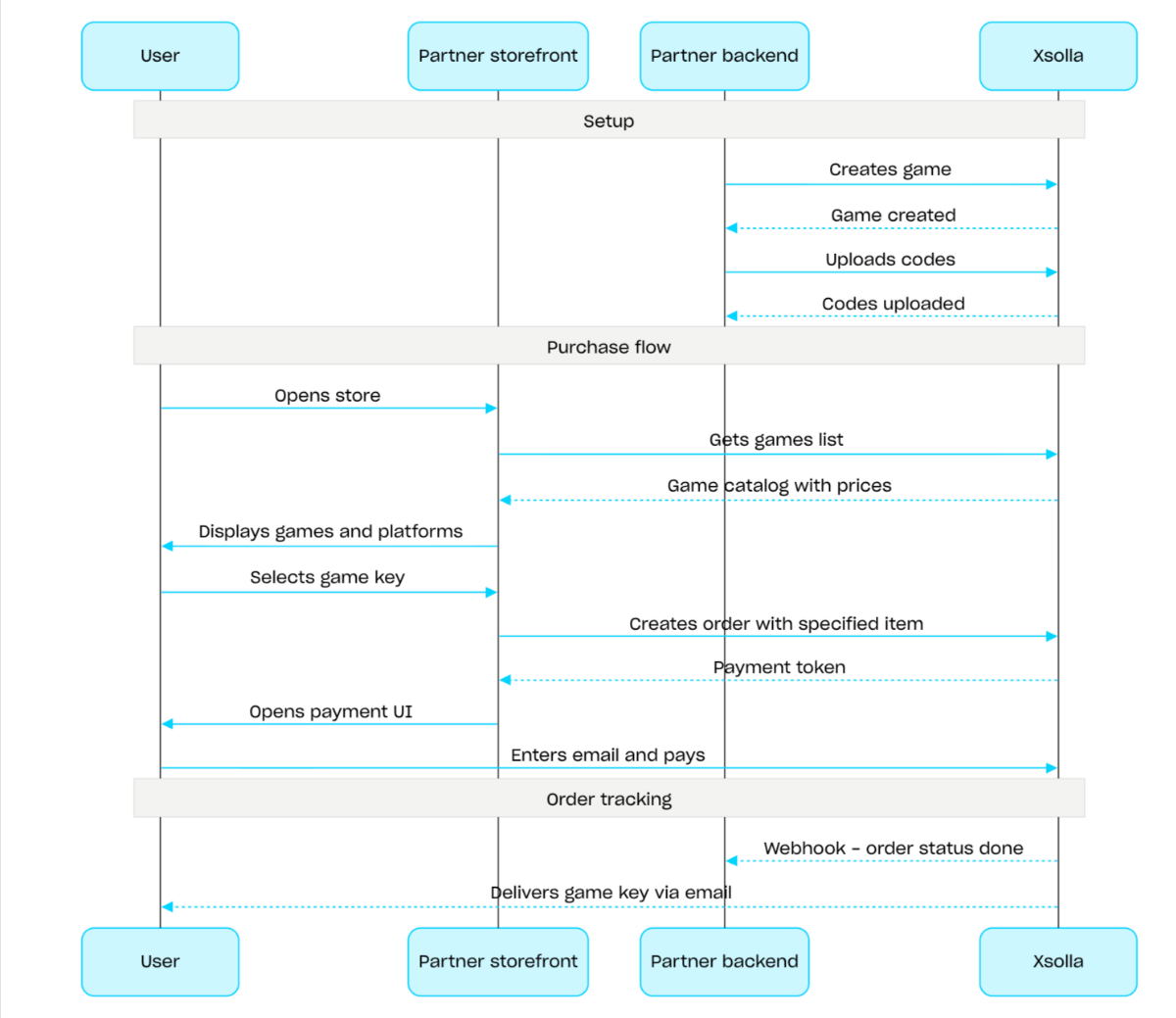
게임 키 판매 절차:
- 게임 생성 API 호출을 사용하여 게임을 생성합니다.
- 지역 제한을 구성합니다.
- 코드 업로드 API 호출을 사용하여 게임 키 패키지에 키를 업로드하고 구매가 가능하게 합니다.
- 게임 목록 가져오기 API 호출을 사용하여 사용자의 지역에 맞는 가격이 포함된 게임 카탈로그를 표시합니다.
- 주문을 생성합니다. 빠른 구매를 위해 게임 키 SKU를 전달하여 현재 장바구니의 모든 아이템으로 주문 생성 API 호출을 사용할 수 있습니다. 응답으로 결제 UI를 열기 위한 토큰이 반환됩니다.
- 주문 결제를 위해 결제 UI 열기를 구현합니다.
결제 성공 알림을 실시간으로 받고 사용자에게 아이템을 전달하려면, 웹훅 등을 사용하여 주문 상태 추적을 설정하세요. 키는 사용자가 결제 시 지정한 이메일로 전송되며, 주문 상태가 done으로 변경됩니다.
개요
번들은 하나의 단위로 판매되는 아이템 세트입니다. 번들에는 가상 아이템, 인게임 재화, 인게임 재화 패키지, 게임 키 및 기타 번들이 포함될 수 있습니다. 번들을 활용하여 스타터 팩, 시즌 한정 혜택 및 특별 상품을 구성해 보세요.
번들을 처리하려면 다음 API 호출 그룹을 사용하세요.
- 번들을 생성, 업데이트, 삭제하고 번들의 표시 여부를 관리하려면 관리자 섹션의 API 호출을 사용하세요.
- 번들을 불러오려면 카탈로그 섹션의 API 호출을 사용하세요.
구매 한도는 번들을 생성하거나 업데이트할 때 limits 개체를 통해 구성됩니다. 자세한 내용은 한도 개요를 참조해 주세요. 지역 제한을 설정하여 특정 국가에서만 아이템을 판매할 수도 있습니다.
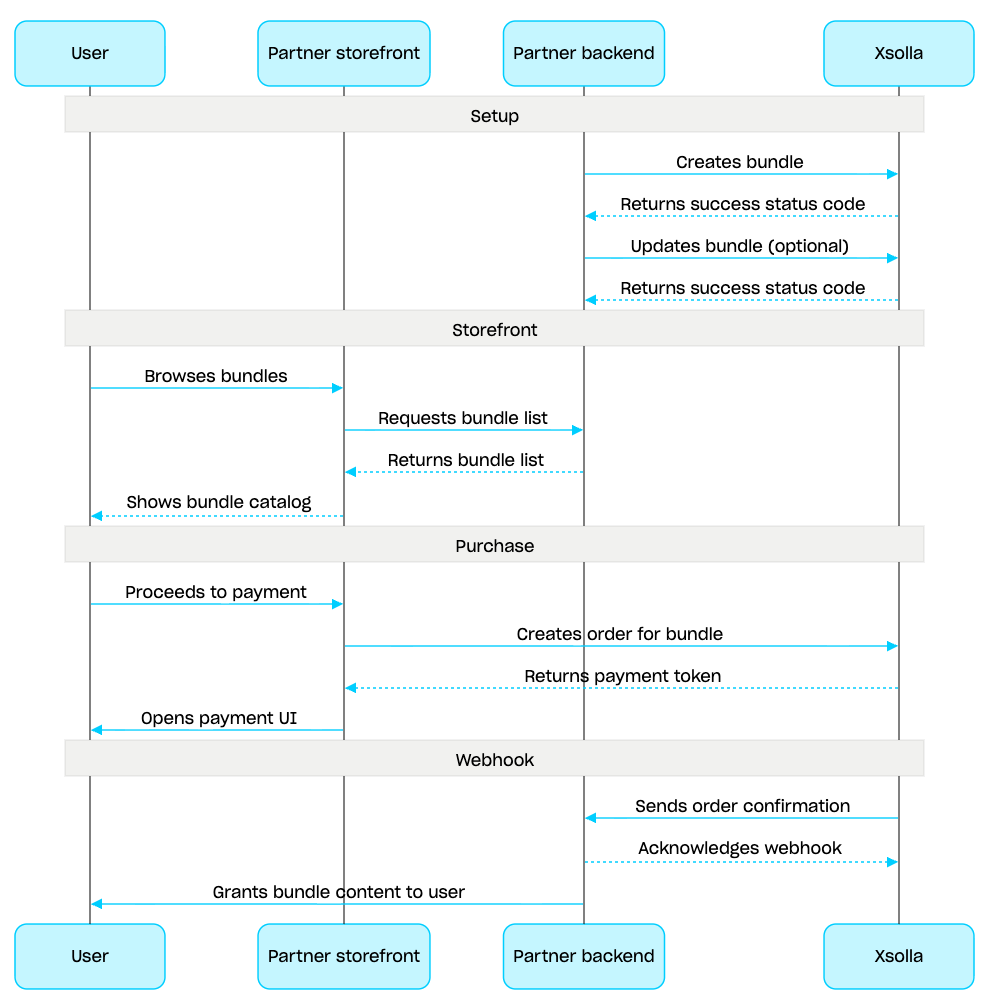
번들 관리 시나리오:
- 번들 생성 API 호출을 사용하여 번들을 생성합니다. 생성한 번들을 확인하려면 번들 가져오기 API 호출을 사용합니다. 프로젝트의 모든 번들을 검색하려면 번들 목록 가져오기 API 호출을 사용합니다.
- 필요한 경우 번들 업데이트 API 호출을 사용하여 번들 콘텐츠 또는 설정을 수정합니다.
- 번들 목록 가져오기, 지정한 번들 가져오기 또는 지정한 그룹별 번들 목록 가져오기 API 호출을 사용하여 스토어프론트에서 번들 표시 로직을 구현합니다.
- 장바구니 및 결제 섹션을 사용하여 주문을 생성합니다. 예를 들어 빠른 구매의 경우 번들 SKU를 전달하여 지정한 아이템으로 주문 생성 API 호출을 사용할 수 있습니다. 응답에는 결제 UI를 여는 데 필요한 토큰이 포함됩니다.
- 주문을 결제하기 위해 결제 UI 열기를 구현합니다.
- 웹훅 등을 사용하여 주문 상태 추적을 설정하면 성공적으로 결제된 아이템에 대한 데이터를 신속하게 수신하고 사용자에게 제공할 수 있습니다.
개요
장바구니는 여러 아이템을 하나의 주문으로 결합할 수 있는 구매 매커니즘입니다. 사용자는 실제 통화로 모든 유형의 아이템을 원하는 수량만큼 구매할 수 있으며, 프로모션 코드도 사용할 수 있습니다.
장바구니는 엑솔라 측에 저장됩니다. 세션 간 장바구니 저장은 사용자의 인증 여부에 따라 달라집니다.
인증된 사용자의 경우, 같은 사용자를 대신하여 요청이 전송되는 한 장바구니가 특정 사용자와 연결되어 세션 간에 저장됩니다.
미인증 사용자의 경우, 장바구니 저장은
x-unauthorized-id헤더 전달 여부에 따라 달라집니다. 미인증 사용자의 장바구니를 세션 간에 저장하려면 모든 요청에서 동일한x-unauthorized-id를 전달합니다. 이 옵션은 게임 키 판매에만 사용할 수 있습니다.
장바구니는 두 가지 방식, 즉 사용자의 JWT를 통해 자동으로 식별하거나 장바구니 ID(cart_id)로 식별할 수 있습니다.
장바구니 관리는 클라이언트 측과 서버 측 모두에서 가능합니다.
서버 측에서는 사용자 세션을 복원할 때와 같이 장바구니에 아이템을 채울 수 있습니다. 클라이언트 측에서 가능한 작업은 다음과 같습니다:
- 현재 사용자의 장바구니 또는 ID로 장바구니 가져오기
- 장바구니 채우기
- 장바구니의 아이템 업데이트
- 장바구니에서 아이템 삭제
장바구니에서 아이템을 구매하려면 주문 생성을 위한 클라이언트 및 서버 호출을 사용합니다.
장바구니의 유효 기간(TTL)은 기본적으로 72시간입니다. 새 아이템이 추가되는 등 콘텐츠가 변경되면 TTL이 연장됩니다.
결제가 성공적으로 완료되어도 장바구니는 자동으로 비워지지 않습니다. 장바구니를 비우려면 다음 클라이언트 측 API 호출을 사용합니다.
장바구니 ID로 장바구니 아이템 삭제하기 및 현재 장바구니에서 장바구니 아이템 삭제하기 - 장바구니에서 마지막 아이템을 삭제하면 장바구니가 비워집니다.
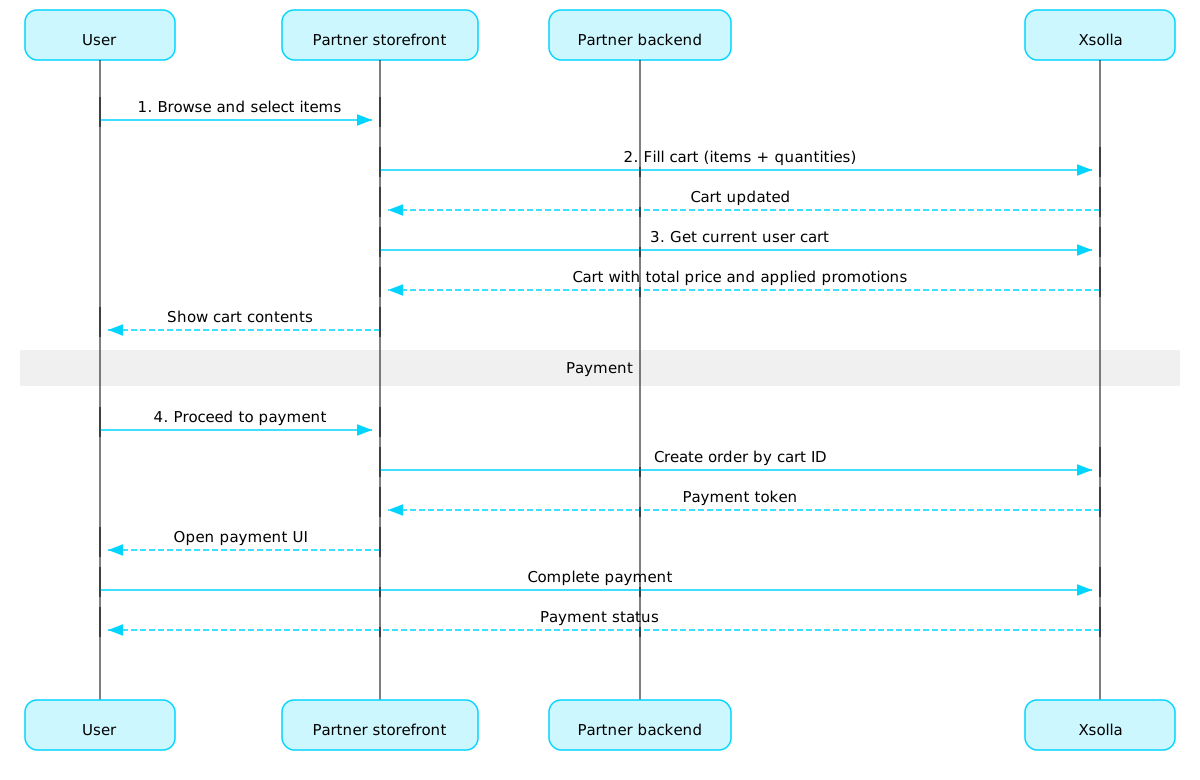
장바구니 사용 시나리오:
사용자가 아이템을 선택할 스토어 UI를 구현합니다.
사용자가 스토어에서 아이템을 선택하면 해당 아이템을 장바구니에 추가합니다(예: 아이템으로 장바구니 채우기 호출 사용). 아이템 배열에서 SKU와 필요한 아이템 수량을 전달해야 합니다.
장바구니 보기 UI를 구현합니다. 사용자가 장바구니로 이동하면 현재 사용자의 장바구니 가져오기 호출을 사용하여 장바구니의 콘텐츠를 표시합니다. 응답은 할인 및 적용된 프로모션을 포함한 아이템의 최종 가격 정보를 반환합니다.
주문을 결제하기 위해 결제 UI 열기를 구현합니다. 예를 들어 특정 장바구니의 모든 아이템으로 주문 생성 호출을 사용할 수 있습니다. 응답은 결제 UI를 여는 데 필요한 토큰을 반환합니다.
웹훅 등을 사용하여 주문 상태 추적을 구성하면 성공적으로 결제된 아이템에 대한 데이터를 신속하게 수신하고 사용자에게 제공할 수 있습니다.
참고
인게임 및 온라인에서 아이템을 판매하려면통합 가이드를 참조하세요.
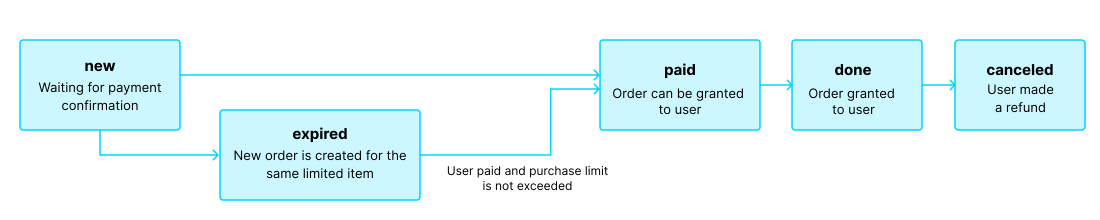
주문 수명 주기
주문 수명 주기를 이해하면 주문을 추적)하고 아이템 배송과 같은 구매 후 로직을 올바르게 구현하는 데 도움이 됩니다.
주문은 다음 단계들을 거칩니다:
| 상태 | 설명 | 참고 |
new | 주문이 생성되었습니다. 시스템은 결제 확인을 기다리고 있습니다. | 거래 상태 설명은 페이 스테이션 API 문서에서 확인할 수 있습니다. |
paid | 주문 대금이 결제되었으며(거래 상태가 done로 변경됨), 해당 아이템을 사용자에게 제공할 수 있습니다. | 결제가 확인될 때까지 주문은 new 상태로 남아 있습니다. |
done | 아이템이 사용자에게 부여됩니다. | - |
canceled | 결제가 환불됩니다. | 거래 상태가 refunded로 변경될 때 주문이 이 상태로 이동합니다. |
expired | 한정 아이템, 프로모션 코드 또는 프로모션에 대한 새 주문을 생성하면 해당 아이템이 포함된 기존 미결제 주문은 모두 expired 상태로 변경됩니다. 가장 최근에 주문한 상품에 대해서만 결제가 가능합니다. | 사용자가 만료된 주문에 대해 비용 결제를 시도하면 2002 오류가 표시되며 결제가 실패합니다. |
참고
사용자가 결제를 완료하는 도중에 주문 상태가 expired로 변경되었으나 결제가 성공적으로 완료된 경우, 주문 상태는 expired에서 paid로 변경됩니다. 이는 결제 시 해당 주문 품목의 구매 한도를 초과하지 않는 경우에만 적용됩니다.
무료 아이템
이 섹션의 호출을 사용하여 사용자에게 무료 아이템을 제공하세요.
개요
구매 한도를 통해 단일 사용자 또는 모든 사용자가 구매할 수 있는 아이템 수량을 제한할 수 있습니다. 또한 예약된 한도 재설정을 구성할 수 있습니다.
한도는 엑솔라 측에 저장되며 관리자 페이지 또는 다음 API 호출의 limits 객체를 통해 개별 아이템 수준에서 구성됩니다:
한도 정보는 아이템 카탈로그를 가져오는 다음 API 호출의 items.limits 객체에 반환됩니다:
한도 그룹의 관리 하위 섹션에 있는 API 호출은 현재 한도의 상태를 검색하고 특정 사용자에 대해 업데이트할 수 있도록 합니다. 예를 들어, 퀘스트 완료 후 카운터를 재설정하거나 남은 수량을 수동으로 조정할 수 있습니다.
공통 지역
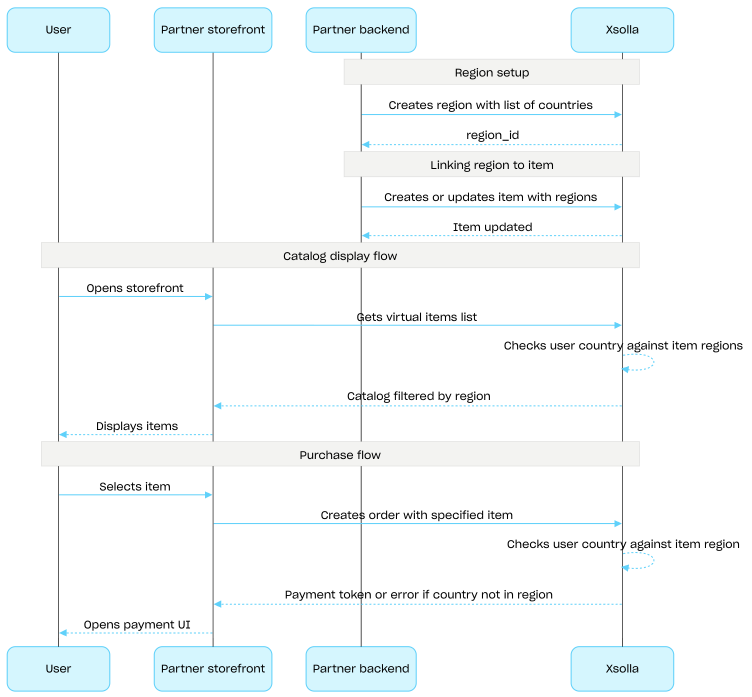
지역별 판매 제한을 사용하면 특정 국가 또는 국가 그룹에서 아이템 가용성을 관리할 수 있습니다. 예를 들어 라이선스 제한으로 특정 국가에서만 게임을 판매할 수 있습니다.
제한은 지역을 사용하여 구성합니다. 각 지역은 하나의 region_id 식별자 아래 하나 이상의 국가를 그룹화합니다. 아이템을 하나 이상의 지역에 연결할 수 있습니다.
아이템 가용성은 다음과 같이 결정됩니다.
- 아이템에 지역이 지정되지 않은 경우 모든 국가에서 구매할 수 있습니다.
- 아이템에 지역이 지정되어 있고 사용자의 국가가 해당 지역에 포함된 경우 이 사용자는 해당 아이템을 구매할 수 있습니다.
- 아이템에 지역이 지정되어 있지만 사용자의 국가가 어느 지역에도 포함되지 않은 경우 이 사용자는 해당 아이템을 구매할 수 없습니다.
카탈로그 하위 섹션의 API 호출을 통해 카탈로그를 요청할 때 사용자의 국가는 country 매개 변수로 전달됩니다. 이 매개 변수를 전달하지 않으면 사용자의 IP 주소를 기준으로 국가가 결정됩니다.
사용자의 국가는 카탈로그 요청 시와 주문 생성 시 두 번 아이템의 지역과 대조하여 확인됩니다. 구매할 수 없는 아이템은 카탈로그 응답에 포함되지 않으며, 해당 아이템이 포함된 주문은 생성되지 않습니다.
공통 지역 그룹의 API 호출을 사용하여 지역을 생성, 업데이트 및 삭제를 진행합니다.
지역별 판매 제한 설정 절차:
- 국가 목록을 지정하고 지역 생성 API 호출을 사용하여 지역을 생성합니다. 응답으로 다음 단계에 필요한
region_id가 반환됩니다. - 가상 아이템의
region_id를regions배열에 전달하여 아이템을 생성하거나 업데이트하고 지역에 연결합니다. - 카탈로그 하위 섹션의 API 호출(예: 가상 아이템 목록 가져오기 API 호출)을 사용하여 사용자에게 카탈로그를 표시합니다. 사용자의 국가는
country매개 변수로 결정되며, 이 매개 변수를 제공하지 않으면 사용자의 IP 주소를 기준으로 결정됩니다. 사용자의 국가에서 구매할 수 없는 아이템은 카탈로그 응답에 포함되지 않습니다. - 사용자가 아이템 또는 장바구니 결제를 진행하면 주문을 생성합니다:
- 아이템이 장바구니에 추가된 경우 특정 장바구니의 모든 아이템으로 주문 생성 또는 현재 장바구니의 모든 아이템으로 주문 생성 API 호출을 사용합니다.
- 단일 아이템을 바로 구매하는 경우 특정 아이템으로 주문 생성 API 호출을 사용하고 아이템 SKU를 전달합니다.
응답에는 결제 UI를 여는 데 사용할 토큰이 포함됩니다.
엑솔라는 사용자의 국가가 아이템에 지정된 지역에 포함되어 있는지 확인합니다. 해당 국가가 아이템의 지역에 포함되어 있지 않으면 주문을 생성할 수 없습니다.
- 주문 결제를 위해 결제 UI를 여는 기능을 구현합니다.