UGS de l'objet.
- Supprimer des codes par ID
Créer un jeu
Lire la liste des jeux (administrateur)
Lire un jeu (administrateur)
Mettre à jour un jeu par UGS
Supprimer un jeu par UGS
Lire un jeu par ID (administrateur)
Mettre à jour un jeu par ID
Supprimer un jeu par ID
Télécharger des codes
Télécharger des codes par ID
Lire des informations sur la session de chargement des codes
Lire des codes
Lire des codes par ID
Supprimer les codes
Supprimer des codes par I...
API Catalog (2.0.0)
- Version : 2.0.0
- Serveurs :
https://store.xsolla.com/api - Contactez-nous par e-mail
- URL de contact : https://xsolla.com/
- Version TLS requise : 1.2
L’API Catalog permet de configurer un catalogue des objets en jeu côté Xsolla et de l’afficher aux utilisateurs dans votre magasin.
L’API permet de gérer les entités de catalogue suivantes :
- Objets virtuels — objets en jeu tels que armes, skins, boosters.
- Monnaie virtuelle — monnaie utilisée pour acheter des objets virtuels.
- Packages de monnaie virtuelle — lots prédéfinis de monnaie virtuelle.
- Lots — packages combinant objets virtuels, monnaie virtuelle ou clés de jeu vendus sous un seul UGS.
- Clés de jeu — clés pour jeux et DLC distribuées via Steam ou d’autres fournisseurs DRM.
- Groupes — regroupements logiques pour organiser et trier les éléments du catalogue.
L’API est divisée en groupes suivants :
Admin — appels pour créer, mettre à jour, supprimer et configurer les objets et groupes du catalogue. Authentification via l’authentification d’accès de base avec vos identifiants marchand ou projet. Non destinés à un usage côté magasin.Catalog — appels pour récupérer des objets et construire des vitrines personnalisées pour les utilisateurs finaux. Conçue pour gérer des charges importantes. Supporte l’autorisation optionnelle par JWT utilisateur pour retourner des données personnalisées telles que des limites spécifiques à l’utilisateur et des promotions actives.
Les appels API nécessitent une authentification au nom d'un utilisateur ou d'un projet. Le schéma d'authentification à utiliser figure dans la section Security de la description de chaque appel.
L'authentification par JWT utilisateur est utilisée lorsqu'une requête provient d'un navigateur, d'une application mobile ou d'un jeu. Par défaut, le schéma XsollaLoginUserJWT s'applique. Pour savoir comment créer un jeton, consultez la documentation de l'API Xsolla Login.
Transmettez le jeton dans l'en-tête Authorization au format suivant : Authorization: Bearer <user_JWT>, où <user_JWT> représente le jeton utilisateur. Ce jeton identifie l'utilisateur et donne accès à ses données personnalisées.
Vous pouvez également utiliser un jeton pour ouvrir l’interface de paiement.
L'authentification HTTP basique est utilisée pour les interactions serveur à serveur, lorsqu'un appel API est envoyé directement depuis votre serveur plutôt que depuis le navigateur ou l'application mobile d'un utilisateur. Elle repose généralement sur une clé API.
Note
La clé API est confidentielle et ne doit jamais être stockée ni utilisée dans une application cliente.
La clé API est confidentielle et ne doit jamais être stockée ni utilisée dans une application cliente.
Avec l'authentification basique côté serveur, toutes les requêtes API doivent inclure l'en-tête suivant :
- pour
basicAuth—Authorization: Basic <your_authorization_basic_key>, oùyour_authorization_basic_keyest la paireproject_id:api_keyencodée en Base64 - pour
basicMerchantAuth—Authorization: Basic <your_authorization_basic_key>, oùyour_authorization_basic_keyest la pairemerchant_id:api_keyencodée en Base64
Vous trouverez les valeurs des paramètres dans le Compte éditeur :
merchant_ids'affiche :- Dans Company settings > Company*.
- Dans l'URL dans la barre d'adresse du navigateur sur n'importe quelle page du Compte éditeur. L'URL a le format suivant :
https://publisher.xsolla.com/<merchant_id>.
project_ids'affiche :- À côté du nom du projet dans le Compte éditeur.
- Dans l'URL dans la barre d'adresse du navigateur lors de l'utilisation d'un projet dans le Compte éditeur. L'URL a le format suivant :
https://publisher.xsolla.com/<merchant_id>/projects/<project_id>.
api_keys'affiche dans le Compte éditeur uniquement au moment de la création et doit être stockée en toute sécurité de votre côté. Vous pouvez créer une clé API dans les sections suivantes :
Remarque
Si un appel API requis n'inclut pas le paramètre de chemin
Si un appel API requis n'inclut pas le paramètre de chemin
project_id, utilisez une clé API valide pour l'ensemble des projets de l'entreprise pour l'autorisation.Pour plus d'informations sur l'utilisation des clés API, consultez les références API.
Le schéma d’authentification AuthForCart est utilisé pour les achats via le panier et prend en charge deux modes :
Authentification par JWT utilisateur. Le jeton est passé dans l'en-tête
Authorizationau format suivant :Authorization: Bearer <user_JWT>, où<user_JWT>représente le jeton utilisateur. Ce jeton identifie l'utilisateur et donne accès à ses données personnalisées. Vous pouvez également utiliser un jeton pour ouvrir l'interface de paiement.Mode simplifié sans en-tête Authorization. Ce mode est réservé aux utilisateurs non authentifiés et peut être utilisé uniquement pour la vente de clés de jeu. Au lieu d'un jeton, la requête doit inclure les en-têtes suivants :
x-unauthorized-idavec un identifiant de requêtex-useravec l'adresse e-mail de l'utilisateur encodée en Base64
Les objets de tous types (objets virtuels, lots, monnaie virtuelle et clés) partagent une structure de données similaire. Comprendre cette structure de base facilite l’utilisation de l'API et la navigation dans la documentation.
Note
Certains appels peuvent inclure des champs supplémentaires, mais ils ne modifient pas la structure de base.
Certains appels peuvent inclure des champs supplémentaires, mais ils ne modifient pas la structure de base.
Identification
merchant_id— ID de l'entreprise dans le Compte éditeurproject_id— ID de projet dans le Compte éditeursku— UGS de l'objet, unique au sein du projet
Affichage en magasin
name— nom de l'objetdescription— description de l'objetimage_url— URL de l'imageis_enabled— disponibilité de l'objetis_show_in_store— affichage de l'objet dans le catalogue
Pour plus d'informations sur la gestion de la disponibilité des objets dans le catalogue, consultez la documentation.
Organisation
type— type d'objet, par exemple, un objet virtuel (virtual_item) ou un lot (bundle)groups— groupes auxquels l'objet appartientorder— ordre d'affichage dans le catalogue
Conditions de vente
prices— prix en devise réelle ou monnaie virtuellelimits— limites d'achatperiods— périodes de disponibilitéregions— restrictions régionales
Exemple de structure d'entité principale :
{
  "attributes": [],
  "bundle_type": "virtual_currency_package",
  "content": [
    {
      "description": {
        "en": "Main in-game currency"
      },
      "image_url": "https://.../image.png",
      "name": {
        "en": "Crystals",
        "de": "Kristalle"
      },
      "quantity": 500,
      "sku": "com.xsolla.crystal_2",
      "type": "virtual_currency"
    }
  ],
  "description": {
    "en": "Crystals x500"
  },
  "groups": [],
  "image_url": "https://.../image.png",
  "is_enabled": true,
  "is_free": false,
  "is_show_in_store": true,
  "limits": {
    "per_item": null,
    "per_user": null,
    "recurrent_schedule": null
  },
  "long_description": null,
  "media_list": [],
  "name": {
    "en": "Medium crystal pack"
  },
  "order": 1,
  "periods": [
    {
      "date_from": null,
      "date_until": "2020-08-11T20:00:00+03:00"
    }
  ],
  "prices": [
    {
      "amount": 20,
      "country_iso": "US",
      "currency": "USD",
      "is_default": true,
      "is_enabled": true
    }
  ],
  "regions": [],
  "sku": "com.xsolla.crystal_pack_2",
  "type": "bundle",
  "vc_prices": []
}L'API Xsolla vous permet d'implémenter la logique de magasin en jeu, notamment la récupération du catalogue des objets, la gestion du panier, la création de commandes et le suivi de leur statut. Selon le scénario d'intégration, les appels API sont répartis en sections Administrateur et Catalogue, qui utilisent différents schémas d'authentification.
L'exemple suivant montre un processus de base pour configurer et exploiter un magasin, de la création d'objets à l'achat.
Créez un catalogue des objets pour votre magasin, tels que des objets virtuels, des lots ou de la monnaie virtuelle.
Exemples d'appels API :
Configurez des outils d'acquisition d'utilisateurs et de monétisation, tels que des remises, des bonus, des récompenses quotidiennes ou des chaînes d'offres.
Exemples d'appels API :
Configurez l'affichage des objets dans l'application.
Remarque
N'utilisez pas les appels API de la sous-section Administrateur pour créer un catalogue utilisateur. Ces appels API présentent des limites de taux et ne sont pas destinés au trafic utilisateur.
N'utilisez pas les appels API de la sous-section Administrateur pour créer un catalogue utilisateur. Ces appels API présentent des limites de taux et ne sont pas destinés au trafic utilisateur.
Exemples d'appels API :
Note
Par défaut, les appels API du catalogue renvoient les objets disponibles dans la boutique au moment de la requête. Pour récupérer les objets inactifs ou à durée limitée, ajoutez le paramètre
Par défaut, les appels API du catalogue renvoient les objets disponibles dans la boutique au moment de la requête. Pour récupérer les objets inactifs ou à durée limitée, ajoutez le paramètre
"show_inactive_time_limited_items": 1 dans la requête du catalogue.
Vous pouvez vendre des objets en utilisant les méthodes suivantes :
- Achat rapide — vendre une UGS plusieurs fois.
- Achat via le panier — l'utilisateur ajoute des objets au panier, supprime des objets et modifie les quantités dans une seule commande.
Si un objet est acheté en utilisant de la monnaie virtuelle au lieu des devises réelles, utilisez l'appel API Créer une commande à partir d'un objet spécifique en monnaie virtuelle. L'interface de paiement n'est pas requise, car le coût est traité lors de l'exécution de l'appel API.
Pour l'achat d'un objet gratuit, utilisez l'appel API Créer une commande avec un bien gratuit spécifique ou l'appel API Créer une commande à partir d'un panier gratuit. L'interface de paiement n'est pas requise, la commande est immédiatement définie sur le statut done.
Utilisez l'appel API côté client pour créer une commande à partir d'un objet spécifique. L'appel renvoie un jeton utilisé pour ouvrir l'interface de paiement.
Note
Les informations sur les remises sont disponibles pour l'utilisateur uniquement dans l'interface de paiement. Les codes promo ne sont pas pris en charge.
Les informations sur les remises sont disponibles pour l'utilisateur uniquement dans l'interface de paiement. Les codes promo ne sont pas pris en charge.
La configuration et les achats du panier peuvent être gérés côté client ou côté serveur.
Configuration et achat du panier côté client
Implémentez vous-même la logique d'ajout et de suppression des objets. Avant d'appeler l'API pour configurer un panier, vous ne disposerez pas d'informations sur les promotions qui s'appliqueront à l'achat. Le coût total ainsi que les informations des objets bonus ajoutés ne seront donc pas encore connus.
Implémentez la logique suivante pour le panier :
- Après que le joueur a rempli un panier, utilisez l'appel API Remplir le panier d'objets. L'appel renvoie les informations actuelles sur les objets sélectionnés (prix avant et après remises, objets bonus).
- Mettez à jour le contenu du panier en fonction des actions utilisateur :
- Pour ajouter un objet ou modifier la quantité de l'objet, utilisez l'appel API Mettre à jour un objet du panier par ID de panier.
- Pour supprimer un objet, utilisez l'appel API Supprimer un objet du panier par ID de panier.
Note
Pour obtenir le statut actuel du panier, utilisez l'appel API Lire le panier de l'utilisateur actuel.
Pour obtenir le statut actuel du panier, utilisez l'appel API Lire le panier de l'utilisateur actuel.
- Utilisez l'appel API Créer une commande à partir de tous les objets du panier actuel. L'appel renvoie l'ID de commande et le jeton de paiement. La commande nouvellement créée est définie sur le statut
newpar défaut.
Configuration et achat du panier côté serveur
Cette approche peut nécessiter davantage de temps pour configurer le panier, car chaque modification doit être effectuée via des appels API.
Implémentez la logique suivante pour le panier :
- Après que le joueur a rempli un panier, utilisez l'appel API Remplir le panier d'objets. L'appel renvoie les informations à jour sur les objets sélectionnés (prix avant et après remises, objets bonus).
- Utilisez l'appel API Créer une commande à partir de tous les objets du panier actuel. L'appel renvoie l'ID de commande et le jeton de paiement. La commande nouvellement créée est définie sur le statut
newpar défaut.
Utilisez le jeton renvoyé pour ouvrir l'interface de paiement dans une nouvelle fenêtre. D'autres méthodes d'ouverture de l'interface de paiement sont décrites dans la documentation.
| Action | Endpoint |
|---|---|
| Ouverture dans l'environnement de production. | https://secure.xsolla.com/paystation4/?token={token} |
| Ouverture en mode bac à sable. | https://sandbox-secure.xsolla.com/paystation4/?token={token} |
Note
Utilisez le mode bac à sable pendant le développement et les tests. Les achats de test n'entraînent aucun débit sur des comptes réels. Vous pouvez utiliser des cartes bancaires de test.
Utilisez le mode bac à sable pendant le développement et les tests. Les achats de test n'entraînent aucun débit sur des comptes réels. Vous pouvez utiliser des cartes bancaires de test.
Après le premier paiement réel, une politique stricte du mode bac à sable s'applique. Les paiements en mode bac à sable sont disponibles uniquement pour les utilisateurs spécifiés dans la section Company settings > Users du Compte éditeur.
L'achat de monnaie virtuelle et d'objets en devise réelle n'est possible qu'après la signature d'un contrat de licence avec Xsolla. Pour cela, dans le Compte éditeur, accédez à Agreements & Taxes > Agreements, complétez le formulaire et attendez la validation. Le traitement du contrat peut prendre jusqu'à 3 jours ouvrés.
Pour activer ou désactiver le mode bac à sable, modifiez la valeur du paramètre sandbox dans la requête pour l'achat rapide et l'achat via le panier. Le mode bac à sable est désactivé par défaut.
Statuts de commande possibles :
new— commande crééepaid— paiement reçudone— objet attribuécanceled— commande annuléeexpired— commande expirée
Suivez le statut de la commande en utilisant l'une des méthodes suivantes :
Les appels API qui renvoient de grands ensembles d'enregistrements (par exemple lors de la création d'un catalogue) utilisent la pagination. La pagination est un mécanisme qui limite le nombre d'objets renvoyés dans une seule réponse et permet de récupérer les pages suivantes de manière séquentielle.
Utilisez les paramètres suivants pour contrôler le nombre d'objets renvoyés :
limit— nombre d'objets par pageoffset— indice du premier objet sur la page (la numérotation commence à 0)has_more— indique si une autre page est disponibletotal_items_count— nombre total d'objets
Exemple de requête :
GET /items?limit=20&offset=40Exemple de réponse :
{
  "items": [...],
  "has_more": true,
  "total_items_count": 135
}
Il est recommandé d'envoyer des requêtes successives jusqu'à ce que la réponse renvoie has_more = false.
Les dates et les valeurs temporelles sont transmises au format ISO 8601.
Les valeurs suivantes sont prises en charge :
- Décalage UTC
- Valeur
nulllorsqu'il n'y a pas de restriction temporelle pour l'affichage d'un objet - Horodatage Unix (en secondes) utilisé dans certains champs
Format : YYYY-MM-DDTHH:MM:SS±HH:MM
Exemple : 2026-03-16T10:00:00+03:00
Xsolla prend en charge la localisation des champs destinés aux utilisateurs, tels que le nom et la description de l'objet. Les valeurs localisées sont transmises sous forme d'objet, où le code de langue est utilisé comme clé. La liste complète des langues prises en charge est disponible dans la documentation.
Champs pris en charge
Les paramètres suivants peuvent être localisés :
namedescriptionlong_description
Format de langue
La clé de la langue peut être spécifiée dans l'un des formats suivants :
- Code de langue à deux lettres :
en,ru - Code de langue à cinq lettres :
en-US,ru-RU,de-DE
Exemples
Exemple avec un code de langue à deux lettres :
{
  "name": {
    "en": "Starter Pack",
    "ru": "Стартовый набор"
  }
}
Exemple avec un code de langue à cinq lettres :
{
  "description": {
    "en-US": "Premium bundle",
    "de-DE": "Premium-Paket"
  }
}Le pays de l'utilisateur détermine les prix du catalogue, la devise de paiement et les modes de paiement disponibles dans l'interface de paiement. Selon l'appel API utilisé, le pays est déterminé comme suit :
- Pour les appels API côté client, le pays est déterminé à partir de l'adresse IP de la requête.
- Pour les appels API côté serveur,
le pays est déterminé par la valeur du paramètre
user.country.valueou par l'adresse IP de l'utilisateur transmise dans l'en-têteX-User-Ip. Si les deux valeurs sont fournies, le paramètreuser.country.valueest prioritaire.
En cas d'erreur, l'API renvoie un statut HTTP ainsi qu'un corps de réponse au format JSON. La liste complète des erreurs liées au magasin est disponible dans la documentation.
Exemple de réponse :
{
  "errorCode": 1102,
  "errorMessage": "Validation error",
  "statusCode": 422,
  "transactionId": "c9e1a..."
}errorCode— code d'erreur.errorMessage— courte description de l'erreur.statusCode— statut de la réponse HTTP.transactionId— ID de la requête. Retourné uniquement dans certains cas.errorMessageExtended— informations supplémentaires sur l'erreur, telles que les paramètres de la requête. Retournées uniquement dans certains cas.
Exemple de réponse détaillée :
{
  "errorCode": 7001,
  "errorMessage": "Chain not found",
  "errorMessageExtended": {
    "chain_id": "test_chain_id",
    "project_id": "test_project_id",
    "step_number": 2
  },
  "statusCode": 404
}
Codes de statut HTTP courants
400— requête non valide401— erreur d'authentification403— permissions insuffisantes404— ressource non trouvée422— erreur de validation429— limite de taux dépassée
Recommandations
- Gérez ensemble le statut HTTP et le corps de la réponse.
- Utilisez
errorCodepour traiter les erreurs liées à la logique de l'application. - Utilisez
transactionIdpour identifier plus rapidement les requêtes lors de l'analyse des erreurs.
Télécharger la description d'OpenAPI
Langues
Serveurs
https://store.xsolla.com/api/
Mock server
https://xsolla.redocly.app/_mock/fr/api/catalog/
Aperçu
Vous pouvez utiliser des objets virtuels et de la monnaie virtuelle pour créer un magasin en jeu et configurer son affichage pour les utilisateurs. Les types d'objets suivants sont disponibles :
- Objets virtuels — biens en jeu tels que des armes, des skins ou des boosters. Peuvent être vendus contre des devises réelles ou de la monnaie virtuelle.
- Monnaie virtuelle — monnaie en jeu utilisée pour acheter des objets virtuels. Peut être vendue contre des devises réelles ou de la monnaie virtuelle.
- Packages de monnaie virtuelle — quantité fixe de monnaie virtuelle. Peuvent être vendus contre des devises réelles ou de la monnaie virtuelle.
Les groupes sont utilisés pour organiser les objets dans le catalogue. Ils vous permettent de regrouper logiquement les objets et de gérer leur affichage.
Utilisez les appels API de la sous-section Administrateur pour créer, modifier et supprimer des objets.
Utilisez les appels API de la sous-section Catalogue pour récupérer des listes d'objets et les afficher aux utilisateurs.
Note
N'utilisez pas les appels API de la sous-section Administrateur pour créer un catalogue de magasin.
N'utilisez pas les appels API de la sous-section Administrateur pour créer un catalogue de magasin.
Note
L'appel API Lire la liste des objets virtuels renvoie des données détaillées sur les objets, y compris les prix et les attributs, et prend en charge la pagination. Utilisez-le pour afficher les pages du catalogue dans la vitrine.
L'appel API Lire la liste de tous les objets virtuels renvoie l'UGS, le nom, la description des objets, ainsi que l'ID et le nom du groupe sans pagination. Utilisez-le pour la recherche côté client ou l'indexation.
L'appel API Lire la liste des objets virtuels renvoie des données détaillées sur les objets, y compris les prix et les attributs, et prend en charge la pagination. Utilisez-le pour afficher les pages du catalogue dans la vitrine.
L'appel API Lire la liste de tous les objets virtuels renvoie l'UGS, le nom, la description des objets, ainsi que l'ID et le nom du groupe sans pagination. Utilisez-le pour la recherche côté client ou l'indexation.
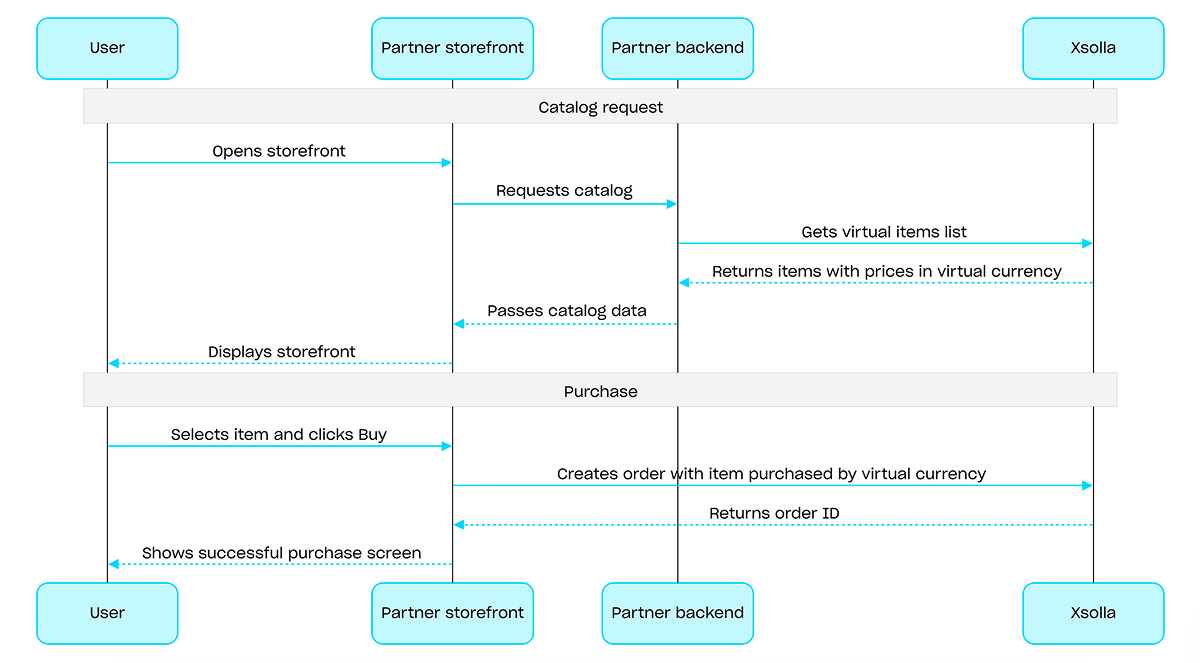
Pour les achats avec de la monnaie virtuelle, utilisez l'appel API Créer une commande à partir d'un objet spécifique en monnaie virtuelle. L'interface de paiement n'est pas requise, le coût est traité lors de l'exécution de l'appel API.
Exemple de processus d'achat avec de la monnaie virtuelle :
Aperçu
Les clés de jeu sont des codes alphanumériques uniques à usage unique permettant d’accéder à un jeu ou à un contenu téléchargeable (DLC) sur les plateformes de jeux vidéo. Vous pouvez vendre des clés de jeu via un lien direct, via l'interface du magasin, ou via un widget. Vous pouvez également configurer des restrictions régionales afin de vendre les clés de jeu dans des pays spécifiques. Pour plus d'informations, consultez la section Packs de clés de jeux.
L'authentification utilisateur n'est pas requise pour vendre des clés de jeu : elles sont envoyées à l'adresse e-mail fournie lors du paiement. Vous pouvez toutefois la configurer pour accéder à des fonctionnalités comme la personnalisation, les limites d'achat ou le système des droits. Pour en savoir plus, consultez la section Comment configurer l'authentification pour la vente de clés de jeu.
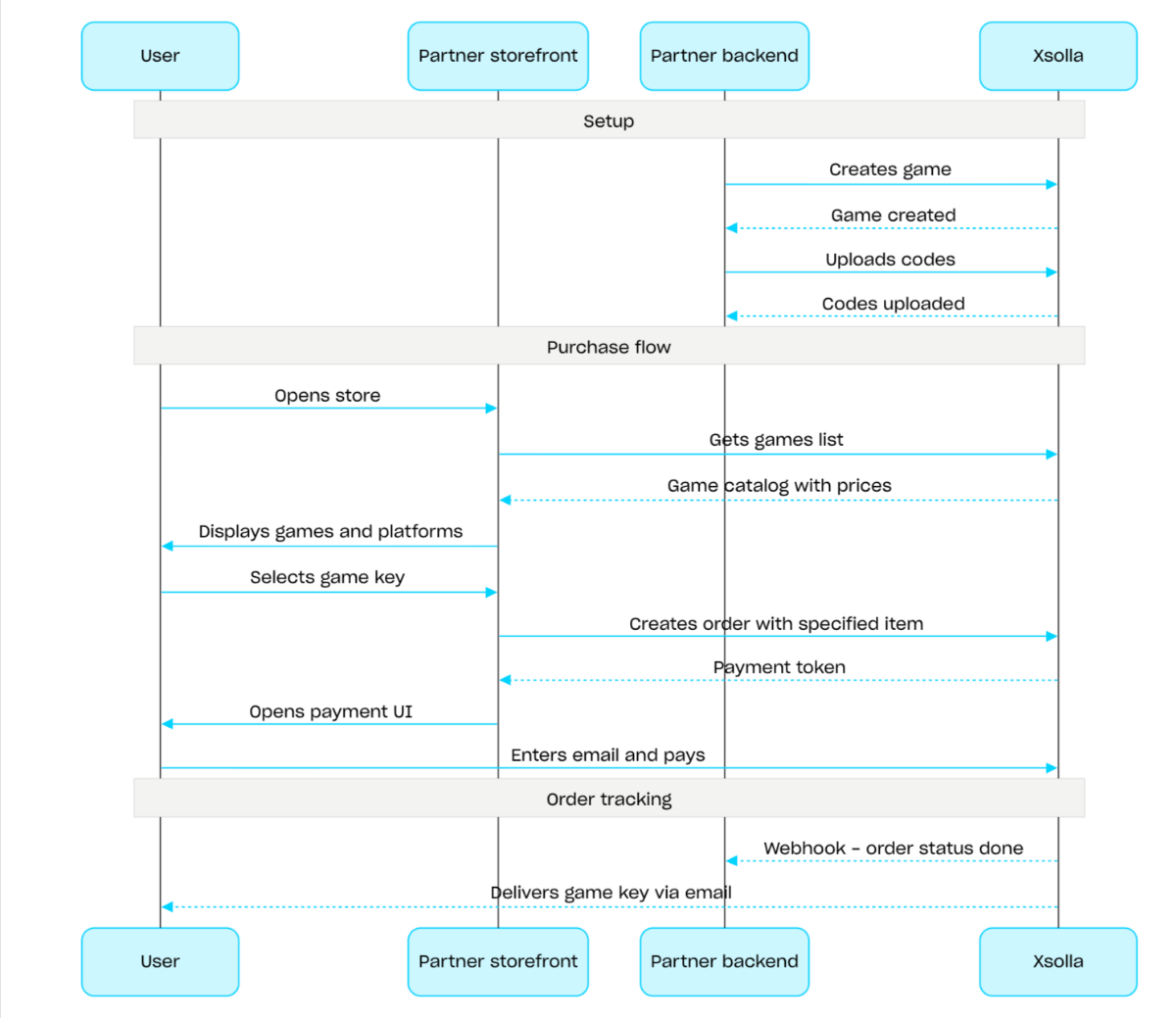
Flux de vente de clés de jeux :
- Créez un jeu en utilisant l'appel API Créer un jeu.
- Configurez les restrictions régionales.
- Téléchargez des clés dans un package de clés de jeu en utilisant l'appel API Télécharger des codes afin de les proposer à la vente.
- Affichez le catalogue des jeux avec les prix correspondant à la région de l'utilisateur à l'aide de l'appel API Lire la liste des jeux.
- Créez une commande. Pour un achat rapide, utilisez l'appel API Créer une commande à partir de tous les objets du panier actuel, en passant l'UGS de la clé de jeu. La réponse renvoie un jeton permettant d'ouvrir l'interface de paiement.
- Implémentez l'ouverture de l'interface de paiement afin de régler la commande.
Pour recevoir des notifications en temps réel sur les paiements réussis et l'attribution des objets à l'utilisateur, configurez le suivi du statut des commandes, par exemple via les webhooks. Les clés sont envoyées à l'adresse e-mail indiquée lors du paiement, et la commande passe au statut done.
Chemin
ID du projet. Vous trouverez ce paramètre dans le Compte éditeur, à côté du nom du projet, ainsi que dans l'URL affichée dans la barre d'adresse du navigateur lorsque vous utilisez ce projet. L'URL présente le format suivant : https://publisher.xsolla.com/<merchant_id>/projects/<project_id>.
Exemple: 44056
- https://store.xsolla.com/api/v2/project/{project_id}/admin/items/game/key/delete/sku/{item_sku}
- Mock serverhttps://xsolla.redocly.app/_mock/fr/api/catalog/v2/project/{project_id}/admin/items/game/key/delete/sku/{item_sku}
- curl
- JavaScript
- Node.js
- Python
- Java
- C#
- PHP
- Go
- Ruby
- R
- Payload
curl -i -X DELETE \
-u <username>:<password> \
'https://store.xsolla.com/api/v2/project/44056/admin/items/game/key/delete/sku/booster_mega_1?user_email=email%40email.com&reason=Very+important®ion_id=1'Réponse
text/plain
PIN-CODE-ALL PIN-CODE-ALL-3Chemin
ID du projet. Vous trouverez ce paramètre dans le Compte éditeur, à côté du nom du projet, ainsi que dans l'URL affichée dans la barre d'adresse du navigateur lorsque vous utilisez ce projet. L'URL présente le format suivant : https://publisher.xsolla.com/<merchant_id>/projects/<project_id>.
Exemple: 44056
- https://store.xsolla.com/api/v2/project/{project_id}/admin/items/game/key/delete/id/{item_id}
- Mock serverhttps://xsolla.redocly.app/_mock/fr/api/catalog/v2/project/{project_id}/admin/items/game/key/delete/id/{item_id}
- curl
- JavaScript
- Node.js
- Python
- Java
- C#
- PHP
- Go
- Ruby
- R
- Payload
curl -i -X DELETE \
-u <username>:<password> \
'https://store.xsolla.com/api/v2/project/44056/admin/items/game/key/delete/id/656?user_email=email%40email.com&reason=Very+important®ion_id=1'Réponse
text/plain
PIN-CODE-ALL PIN-CODE-ALL-3Aperçu
Les lots sont des ensembles d'objets vendus comme une seule unité. Un lot peut inclure des objets virtuels, de la monnaie virtuelle, des packages de monnaie virtuelle, des clés de jeu et d'autres lots. Utilisez les lots pour créer des kits de démarrage, des offres saisonnières et des offres spéciales.
Utilisez les groupes d'appels API suivants pour interagir avec les lots :
- Utilisez des appels API de la sous-section Administrateur pour créer, mettre à jour, supprimer des lots, et gérer leur visibilité.
- Utilisez des appels API de la sous-section Catalogue pour récupérer des lots.
Les limites d'achat sont configurées via l'objet limits lors de la création ou de la mise à jour d'un lot. Pour en savoir plus, consultez l'aperçu des Limites. Vous pouvez également configurer des restrictions régionales afin de vendre des objets dans des pays spécifiques.
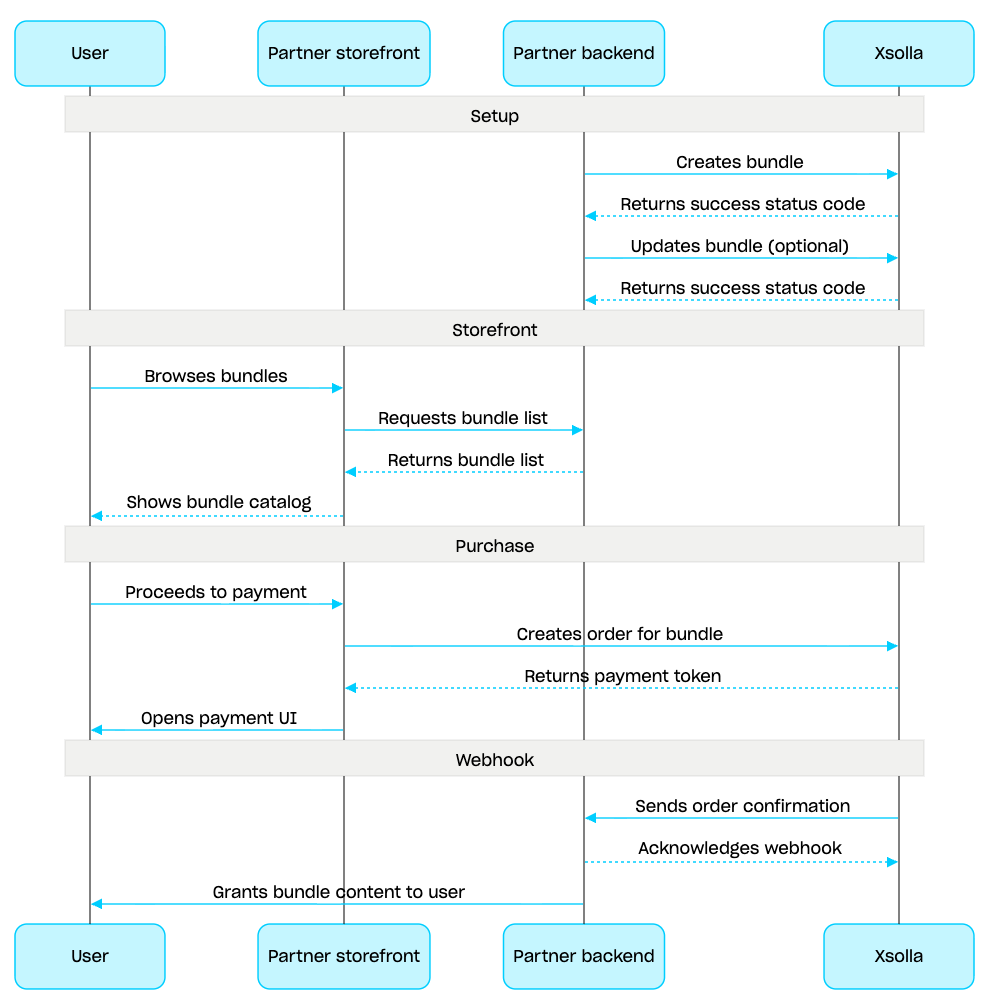
Scénario de gestion de lot :
- Créez un lot en utilisant l'appel API Créer un lot. Pour vérifier le lot créé, utilisez l'appel API Lire un lot. Pour récupérer tous les lots du projet, utilisez l'appel API Lire la liste des lots.
- Si nécessaire, utilisez l'appel API Mettre à jour un lot pour modifier le contenu ou les paramètres du lot.
- Implémentez la logique d'affichage des lots dans votre vitrine en utilisant l'appel API Lire la liste des lots, Lire un lot spécifique, ou Lire la liste des lots par groupe spécifique.
- Créez une commande en utilisant la section Panier et paiement. Par exemple, pour un achat rapide, vous pouvez utiliser l'appel API Créer une commande à partir d'un objet spécifique, en passant l'UGS du lot. La réponse contient un jeton pour ouvrir l'interface de paiement.
- Implémentez l'ouverture de l'interface de paiement pour payer la commande.
- Configurez le suivi du statut de la commande, par exemple en utilisant des webhooks, pour recevoir rapidement des données sur les objets payés avec succès et les attribuer à l'utilisateur.
Aperçu
Le panier est un mécanisme d'achat qui permet de regrouper plusieurs objets dans une seule commande. Un utilisateur peut acheter des objets de tout type et en toute quantité avec de la devise réelle, ainsi qu'utiliser des codes promo.
Le panier est stocké côté Xsolla. Sa sauvegarde d'une session à une autre dépend de l'authentification :
pour les utilisateurs authentifiés, le panier est lié à un utilisateur et conservé entre les sessions tant que les requêtes sont effectuées au nom de ce même utilisateur.
Pour les utilisateurs non authentifiés, la sauvegarde du panier dépend de la transmission de l'en-tête
x-unauthorized-id. Pour conserver le panier d'un utilisateur non authentifié d'une session à l'autre, passez le mêmex-unauthorized-iddans chaque requête. Cette option est disponible uniquement pour la vente de clés de jeu.
Vous pouvez identifier le panier de deux façons : automatiquement via le JWT utilisateur ou via l'ID du panier (cart_id).
La gestion du panier est disponible à la fois côté client et côté serveur.
Côté serveur, vous pouvez remplir le panier avec des objets, par exemple lors de la restauration d'une session utilisateur. Les actions suivantes sont disponibles côté client :
- récupérer le panier de l'utilisateur actuel ou un panier par ID
- remplir le panier
- mettre à jour les objets dans le panier
- supprimer des objets du panier
Pour acheter des objets du panier, les appels client et serveur servent à créer une commande.
La durée de vie (TTL) du panier est de 72 heures par défaut. Si son contenu change, par exemple lorsqu'un nouvel objet est ajouté, la TTL est prolongée.
Après un paiement réussi, le panier n'est pas vidé automatiquement. Pour le vider, utilisez les appels API côté client suivants :
Supprimer un objet du panier par ID de panier et Supprimer un objet du panier actuel — le panier est vidé lorsque vous supprimez le dernier objet.
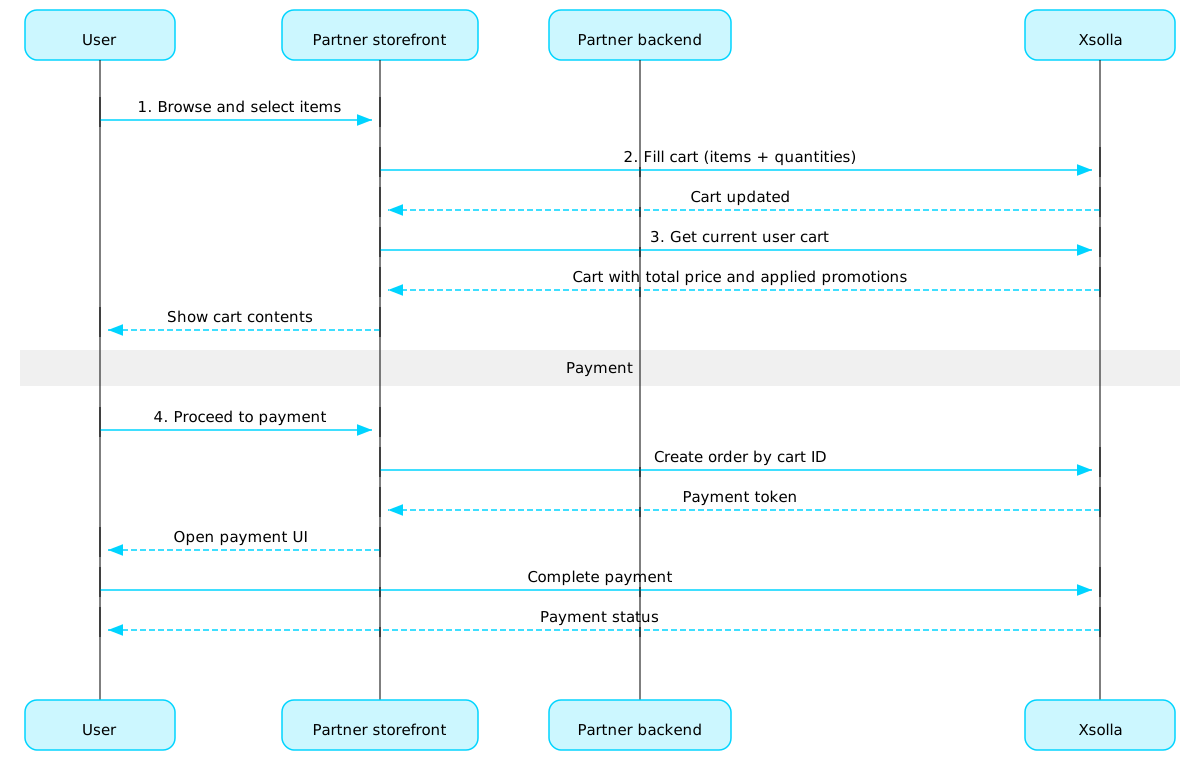
Scénario d'utilisation du panier :
Implémentez une interface de magasin permettant à l'utilisateur de sélectionner des objets.
Lorsque l'utilisateur sélectionne des objets dans le magasin, ajoutez-les au panier, par exemple via l'appel Remplir le panier d'objets. Dans le tableau des objets, indiquez les UGS et les quantités requises pour chaque objet.
Implémentez l'interface du panier. Lors de l'accès au panier, affichez son contenu via l'appel Lire le panier de l'utilisateur actuel. La réponse inclut des informations sur le prix final de l'objet, avec remises et promotions appliquées.
Implémentez l'ouverture de l'interface de paiement pour régler la commande. Vous pouvez, par exemple, utiliser l'appel Créer une commande à partir de tous les objets d'un panier spécifique. La réponse renvoie un jeton permettant d'ouvrir l'interface de paiement.
Configurez le suivi du statut des commandes, par exemple à l'aide des webhooks, afin de recevoir rapidement les informations sur les objets payés avec succès et de les attribuer à l'utilisateur.
Note
Pour implémenter la vente d'objets en jeu et en ligne, consultez le guide d'intégration.
Cycle de vie d'une commande
Comprendre le cycle de vie d'une commande vous aide à suivre les commandes et à implémenter correctement la logique post-achat, par exemple l'attribution des objets.
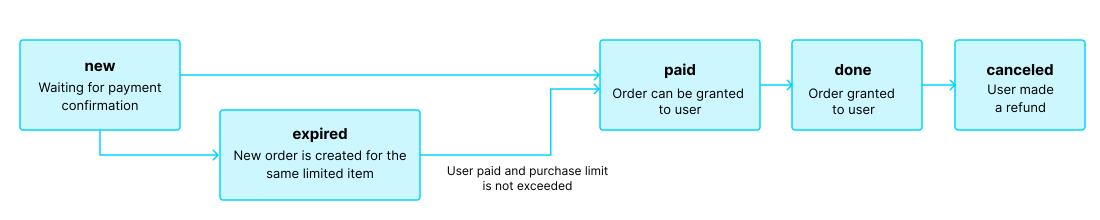
La commande passe par les statuts suivants :
| Statut | Description | Notes |
new | Commande créée. Le système attend la confirmation du paiement.. | Les descriptions des statuts de transaction se trouvent dans la documentation Pay Station API. |
paid | Commande payée (la transaction est passée au statut done), et l'objet peut être attribué à l'utilisateur. | La commande reste en statut new jusqu'à ce que le paiement soit confirmé. |
done | Objet attribué à l'utilisateur. | — |
canceled | Paiement remboursé. | La commande passe à ce statut lorsque le statut de la transaction devient refunded. |
expired | La création d'une nouvelle commande pour un objet en édition limitée, un code promo ou une promotion fait passer toute commande antérieure non réglée contenant cet objet au statut expired. Seule la commande la plus récente peut être réglée. | Si un utilisateur tente de régler une commande expirée, l'interface de paiement affichera une erreur 2002 et le paiement échouera. |
Note
Lorsque la commande passe au statut expired pendant que l'utilisateur finalise un paiement, mais que le paiement aboutit, la commande passe du statut expired au statut paid. Cela s'applique uniquement si la limite d'achat de l'objet associé à la commande n'est pas dépassée lors du paiement.
Biens gratuits
Use calls from this section to grant free items to users.
Opérations
Aperçu
Les limites d'achat vous permettent de restreindre la quantité d'objets disponibles à l'achat par un utilisateur unique ou par l'ensemble des utilisateurs. Vous pouvez également configurer des réinitialisations programmées des limites.
Les limites sont stockées côté Xsolla et sont configurées au niveau de l'objet individuel dans le Compte éditeur ou via l'objet limits dans les appels API suivants :
- Créer un objet virtuel
- Créer un jeu
- Créer une monnaie virtuelle
- Créer un package de monnaie virtuelle
- Créer un lot
Les informations sur les limites sont renvoyées dans l'objet items.limits dans les appels API suivants pour récupérer le catalogue des objets :
- Lire la liste des objets virtuels
- Lire la liste des monnaies virtuelles
- Lire la liste des packages de monnaie virtuelle
- Lire la liste des lots
- Lire la liste des jeux
Les appels API de la sous-section Gestion du groupe Limites vous permettent de récupérer l'état actuel des limites et de les mettre à jour pour un utilisateur spécifique, par exemple, réinitialiser le compteur après la fin d'une quête ou ajuster manuellement la quantité restante.
Note
Pour des informations détaillées sur la configuration des limites dans le catalogue, consultez la section Item purchase limits.
Pour des informations détaillées sur la configuration des limites dans le catalogue, consultez la section Item purchase limits.
Régions communes
Les restrictions de vente régionales vous permettent de gérer la disponibilité des objets par pays ou groupes de pays. Par exemple, vous pouvez limiter la vente d'un jeu à certains pays en raison de contraintes de licence.
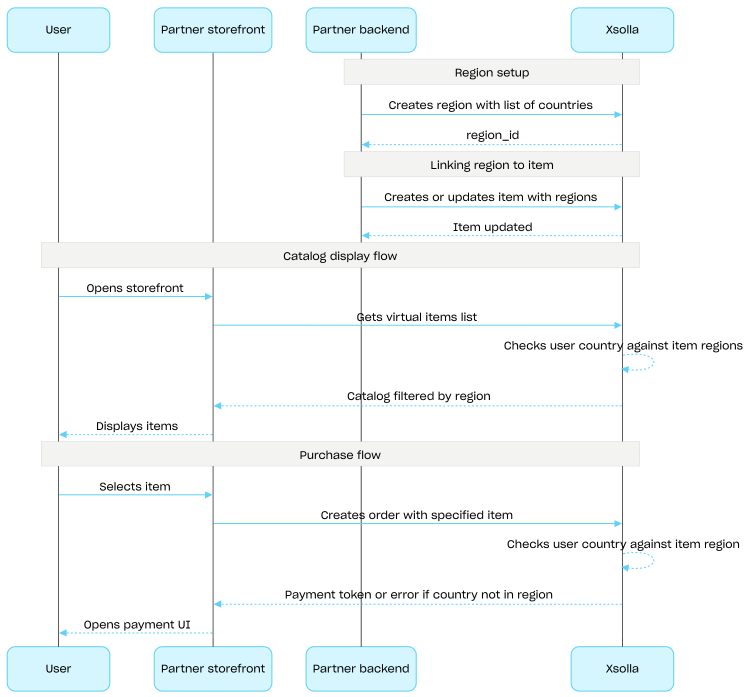
Les restrictions sont configurées par régions. Chaque région regroupe un ou plusieurs pays avec un identifiant region_id unique. Vous pouvez associer un objet à plusieurs régions.
La disponibilité des objets est déterminée comme suit :
- Sans région spécifiée, un article est disponible à l'achat dans tous les pays.
- Si le pays de l'utilisateur correspond à l'une des régions configurées, l'objet est disponible.
- Si le pays de l'utilisateur ne correspond à aucune région configurée, l'article est indisponible.
Le pays de l'utilisateur est passé dans le paramètre country lors des requêtes au catalogue via les appels API de la sous-section Catalogue. Si ce paramètre n'est pas passé, le pays est déterminé selon l'adresse IP de l'utilisateur.
Le pays de l'utilisateur est vérifié par rapport aux régions associées à l'objet à deux étapes : lors des requêtes au catalogue et lors de la création d'une commande. Les objets indisponibles ne sont pas inclus dans la réponse du catalogue, et aucune commande contenant un tel article ne sera créée.
Utilisez les appels API du groupe Régions communes pour créer, mettre à jour et supprimer des régions.
Flux de configuration des restrictions de vente régionales :
- Créez une région via l'appel API Créer une région en spécifiant les pays concernés. La réponse retourne un
region_idnécessaire à l'étape suivante. - Associez un objet virtuel à cette région en passant son
region_idau tableauregionslors de la création ou de la mise à jour de l'objet. - Affichez le catalogue via les appels API de la sous-section Catalogue, par exemple l'appel API Lire la liste des objets virtuels. Le pays de l'utilisateur est défini par le paramètre
countryou par son adresse IP si ce paramètre est absent. Les objets indisponibles dans ce pays ne sont pas renvoyés dans le catalogue. - Lorsqu'un utilisateur souhaite payer un objet ou un panier, créez une commande :
- Pour un article ajouté au panier : utilisez l'appel API Créer une commande à partir de tous les objets d'un panier spécifique ou Créer une commande à partir de tous les objets du panier actuel.
- Pour un achat rapide d'un seul objet : utilisez l'appel API Créer une commande à partir d'un objet spécifique, en passant son UGS.
La réponse contient un jeton permettant d'ouvrir l'interface de paiement.
Remarque
Xsolla vérifie si le pays de l'utilisateur est inclus dans la région associée à l'objet. Si le pays n'est pas inclus dans la région de l'onjet, la commande ne peut pas être créée.
Xsolla vérifie si le pays de l'utilisateur est inclus dans la région associée à l'objet. Si le pays n'est pas inclus dans la région de l'onjet, la commande ne peut pas être créée.
- Implémentez l'ouverture de l'interface de paiement pour payer la commande.
Opérations