카탈로그 API (2.0.0)
- Version: 2.0.0
- Servers:
https://store.xsolla.com/api - Contact Us by Email
- Contact URL: https://xsolla.com/
- Required TLS version: 1.2
The Catalog API allows you to configure a catalog of in-game items on the Xsolla side and display the catalog to users in your store.
The API allows you to manage the following catalog entities:
- Virtual items — in-game items such as weapons, skins, boosters.
- Virtual currency — virtual money used to purchase virtual goods.
- Virtual currency packages — predefined bundles of virtual currency.
- Bundles — combined packages of virtual items, currency, or game keys sold as a single SKU.
- Game keys — keys for games and DLCs distributed via platforms like Steam or other DRM providers.
- Groups — logical groupings for organizing and sorting items within the catalog.
The API is divided into the following groups:
Admin — calls for creating, updating, deleting, and configuring catalog items and groups. Authenticated via basic access authentication with your merchant or project credentials. Not intended for storefront use.Catalog — calls for retrieving items and building custom storefronts for end users. Designed to handle high-load scenarios. Support optional user JWT authorization to return personalized data such as user-specific limits and active promotions.
API calls require authentication either on behalf of a user or on behalf of a project. The authentication scheme used is specified in the Security section in the description of each call.
User's JWT authentication is used when a request is sent from a browser, mobile application, or game. By default, the XsollaLoginUserJWT scheme is applied. For details on how to create a token, see the Xsolla Login API documentation.
The token is passed in the Authorization header in the following format: Authorization: Bearer <user_JWT>, where <user_JWT> is the user token. The token identifies the user and provides access to personalized data.
또는 결제 UI를 여는 토큰을 사용할 수 있습니다.
Basic HTTP authentication is used for server-to-server interactions, when an API call is sent directly from your server rather than from a user's browser or mobile application. HTTP Basic authentication with an API key is typically used.
The API key is confidential and must not be stored or used in client applications.
With basic server-side authentication, all API requests must include the following header:
- for
basicAuth—Authorization: Basic <your_authorization_basic_key>, whereyour_authorization_basic_keyis theproject_id:api_keypair encoded in Base64 - for
basicMerchantAuth—Authorization: Basic <your_authorization_basic_key>, whereyour_authorization_basic_keyis themerchant_id:api_keypair encoded in Base64
You can find the parameter values in Publisher Account:
merchant_idis displayed:- In Company settings > Company.
- In the URL in the browser address bar on any Publisher Account page. The URL has the following format:
https://publisher.xsolla.com/<merchant_id>.
project_idis displayed:- Next to the project name in Publisher Account.
- In the URL in the browser address bar when working on a project in Publisher Account. The URL has the following format:
https://publisher.xsolla.com/<merchant_id>/projects/<project_id>.
api_keyis shown in Publisher Account only at the time of creation and must be stored securely on your side. You can create an API key in the following sections:
If a required API call doesn't include the
project_id path parameter, use an API key that is valid across all company projects for authorization.For more information about working with API keys, see the API references.
이 AuthForCart 인증 체계는 장바구니 구매에 사용되며 두 가지 모드를 지원합니다.
Authentication with a user's JWT. The token is passed in the
Authorizationheader in the following format:Authorization: Bearer <user_JWT>, where<user_JWT>is the user token. The token identifies the user and provides access to personalized data. Alternatively, you can use a token for opening the payment UI.Simplified mode without Authorization header. This mode is used only for unauthorized users and can be applied only for game key sales. Instead of a token, the request must include the following headers:
x-unauthorized-idwith a request IDx-userwith the user's email address encoded in Base64
Items of all types (virtual items, bundles, virtual currency, and keys) use a similar data structure. Understanding the basic structure simplifies working with the API and helps you navigate the documentation more easily.
Some calls may include additional fields but they don't change the basic structure.
Identification
merchant_id— company ID in Publisher Accountproject_id— project ID in Publisher Accountsku— item SKU, unique within the project
Store display
name— item namedescription— item descriptionimage_url— image URLis_enabled— item availabilityis_show_in_store— whether the item is displayed in the catalog
For more information about managing item availability in the catalog, see the documentation.
Organization
type— item type, for example, a virtual item (virtual_item) or bundle (bundle)groups— groups the item belongs toorder— display order in the catalog
Sale conditions
prices— prices in real or virtual currencylimits— purchase limitsperiods— availability periodsregions— regional restrictions
Example of core entity structure:
{
  "attributes": [],
  "bundle_type": "virtual_currency_package",
  "content": [
    {
      "description": {
        "en": "Main in-game currency"
      },
      "image_url": "https://.../image.png",
      "name": {
        "en": "Crystals",
        "de": "Kristalle"
      },
      "quantity": 500,
      "sku": "com.xsolla.crystal_2",
      "type": "virtual_currency"
    }
  ],
  "description": {
    "en": "Crystals x500"
  },
  "groups": [],
  "image_url": "https://.../image.png",
  "is_enabled": true,
  "is_free": false,
  "is_show_in_store": true,
  "limits": {
    "per_item": null,
    "per_user": null,
    "recurrent_schedule": null
  },
  "long_description": null,
  "media_list": [],
  "name": {
    "en": "Medium crystal pack"
  },
  "order": 1,
  "periods": [
    {
      "date_from": null,
      "date_until": "2020-08-11T20:00:00+03:00"
    }
  ],
  "prices": [
    {
      "amount": 20,
      "country_iso": "US",
      "currency": "USD",
      "is_default": true,
      "is_enabled": true
    }
  ],
  "regions": [],
  "sku": "com.xsolla.crystal_pack_2",
  "type": "bundle",
  "vc_prices": []
}The Xsolla API allows you to implement in-game store logic, including retrieving the item catalog, managing the cart, creating orders, and tracking their status. Depending on the integration scenario, API calls are divided into Admin and Catalog subsections, which use different authentication schemes.
The following example shows a basic flow for setting up and operating a store, from item creation to purchase.
Create an item catalog for your store, such as virtual items, bundles, or virtual currency.
Example API calls:
Configure user acquisition and monetization tools, such as discounts, bonuses, daily rewards, or offer chains.
Example API calls:
Configure item display in your application.
Do not use API calls from the Admin subsection to build a user catalog. These API calls have rate limits and aren't intended for user traffic.
Example API calls:
By default, catalog API calls return items that are currently available in the store at the time of the request. To retrieve items that are not yet available or are no longer available, include the parameter
"show_inactive_time_limited_items": 1 in the catalog request.
You can sell items using the following methods:
- Fast purchase — sell one SKU multiple times.
- Cart purchase — the user adds items to the cart, removes items, and updates quantities within a single order.
If an item is purchased using virtual currency instead of real money, use the Create order with specified item purchased by virtual currency API call. The payment UI is not required, as the charge is processed when the API call is executed.
For free item purchase, use the Create order with specified free item API call or the Create order with free cart API call. The payment UI is not required — the order is immediately set to the done status.
Use the client-side API call to create an order with a specified item. The call returns a token used to open the payment UI.
Discount information is available to the user only in the payment UI. Promo codes are not supported.
Cart setup and purchase can be performed on the client or on the server side.
Set up and purchase a cart on the client
Implement the logic of adding and removing items by yourself. Before calling the API for setting up a cart, you will not have information about which promotions will be applied to the purchase. This means that the total cost and details of the added bonus items will not be known.
Implement the following cart logic:
- After the player has filled a cart, use the Fill cart with items API call. The call returns the current information about the selected items (prices before and after discounts, bonus items).
- Update the cart contents based on user actions:
- To add an item or change item quantity, use the Update cart item by cart ID API call.
- To remove an item, use the Delete cart item by cart ID API call.
To get the current status of the cart, use the Get current user's cart API call.
- Use the Create order with all items from current cart API call. The call returns the order ID and payment token. The newly created order is set to
newstatus by default.
Set up and purchase a cart on the server
This setup option may take longer for setting the cart up, since each change to the cart must be accompanied by API calls.
Implement the following cart logic:
- After the player has filled a cart, use the Fill cart with items API call. The call returns current information about the selected items (prices before and after discounts, bonus items).
- Use the Create order with all items from current cart API call. The call returns the order ID and payment token. The newly created order is set to
newstatus by default.
Use the returned token to open the payment UI in a new window. Other ways to open the payment UI are described in the documentation.
| Action | Endpoint |
|---|---|
| Open in production environment. | https://secure.xsolla.com/paystation4/?token={token} |
| Open in sandbox mode. | https://sandbox-secure.xsolla.com/paystation4/?token={token} |
Use sandbox mode during development and testing. Test purchases don't charge real accounts. You can use test bank cards.
After the first real payment is made, a strict sandbox payment policy takes effect. A payment in sandbox mode is available only to users specified in Publisher Account > Company settings > Users.
Buying virtual currency and items for real currency is possible only after signing a license agreement with Xsolla. To do this, in Publisher Account, go to Agreements & Taxes > Agreements, complete the agreement form, and wait for confirmation. It may take up to 3 business days to review the agreement.
To enable or disable sandbox mode, change the value of the sandbox parameter in the request for fast purchase and cart purchase. Sandbox mode is off by default.
Possible order statuses:
new— order createdpaid— payment receiveddone— item deliveredcanceled— order canceledexpired— order expired
Track order status using one of the following methods:
API calls that return large sets of records (for example, when building a catalog) return data in pages. Pagination is a mechanism that limits the number of items returned in a single API response and allows you to retrieve subsequent pages sequentially.
Use the following parameters to control the number of returned items:
limit— number of items per pageoffset— index of the first item on the page (numbering starts from 0)has_more— indicates whether another page is availabletotal_items_count— total number of items
Example request:
GET /items?limit=20&offset=40Response example:
{
  "items": [...],
  "has_more": true,
  "total_items_count": 135
}
It is recommended to send subsequent requests until the response returns has_more = false.
Dates and time values are passed in the ISO 8601 format.
The following are supported:
- UTC offset
nullvalue when there is no time restriction for displaying an item- Unix timestamp (in seconds) used in some fields
Format: YYYY-MM-DDTHH:MM:SS±HH:MM
Example: 2026-03-16T10:00:00+03:00
Xsolla supports localization of user-facing fields such as item name and description. Localized values are passed as an object where the language code is used as the key. The full list of supported languages is available in the documentation.
Supported fields
Localization can be specified for the following parameters:
namedescriptionlong_description
Locale format
The locale key can be specified in one of the following formats:
- Two-letter language code:
en,ru - Five-letter language code:
en-US,ru-RU,de-DE
Examples
Example with a two-letter language code:
{
  "name": {
    "en": "Starter Pack",
    "ru": "Стартовый набор"
  }
}
Example with a five-letter language code:
{
  "description": {
    "en-US": "Premium bundle",
    "de-DE": "Premium-Paket"
  }
}The user's country determines catalog prices, the payment currency, and available payment methods in the payment UI. Depending on the API call, the country is determined as follows:
- In client-side API calls, the country is determined by the IP address of the request.
- In server-side API calls,
the country is determined by the value of the
user.country.valueparameter or by the user's IP address from theX-User-Ipheader. If both are passed, theuser.country.valueparameter takes precedence.
If an error occurs, the API returns an HTTP status and a JSON response body. The full list of store-related errors is available in the documentation.
Response example:
{
  "errorCode": 1102,
  "errorMessage": "Validation error",
  "statusCode": 422,
  "transactionId": "c9e1a..."
}errorCode— error code.errorMessage— short error description.statusCode— HTTP response status.transactionId— request ID. Returned only in some cases.errorMessageExtended— additional error details, such as request parameters. Returned only in some cases.
Extended response example:
{
  "errorCode": 7001,
  "errorMessage": "Chain not found",
  "errorMessageExtended": {
    "chain_id": "test_chain_id",
    "project_id": "test_project_id",
    "step_number": 2
  },
  "statusCode": 404
}
Common HTTP status codes
400— invalid request401— authentication error403— insufficient permissions404— resource not found422— validation error429— rate limit exceeded
Recommendations
- Handle the HTTP status and the response body together.
- Use
errorCodeto process errors related to application logic. - Use
transactionIdto identify requests more quickly when analyzing errors.
개요
가상 아이템과 인게임 재화를 사용하여 인게임 스토어를 구축하고 사용자에게 어떻게 디스플레이할지를 구성할 수 있습니다. 다음과 같은 아이템 유형이 제공됩니다:
- 가상 아이템 - 무기, 스킨, 부스터와 같은 인게임 상품. 실제 돈이나 가상 머니로 판매할 수 있습니다.
- 가상 머니 - 가상 아이템을 구매하는 데 사용되는 인게임 화폐. 실제 돈이나 인게임 재화로 판매할 수 있습니다.
- 인게임 재화 패키지 - 고정된 양의 인게임 재화. 실제 돈이나 인게임 재화로 판매할 수 있습니다.
그룹은 카탈로그에서 아이템을 구성하는 데 사용됩니다. 아이템을 논리적으로 그룹화하고 디스플레이 방식을 관리할 수 있습니다.
Admin 하위 섹션의 API 호출을 사용하여 아이템을 생성, 업데이트 및 삭제하세요.
Catalog 하위 섹션의 API 호출을 사용하여 아이템 목록을 검색하고 사용자에게 디스플레이하세요.
스토어 카탈로그를 작성하는 데 Admin 하위 섹션의 API 호출을 사용하지 마세요.
가상 아이템 목록 가져오기 API 호출은 가격 및 특성을 포함한 자세한 아이템 데이터를 반환하며, 페이지 매김을 지원합니다. 스토어프론트에서 카탈로그 페이지를 표시하는 데 사용하세요.
모든 가상 아이템 목록 가져오기 API 호출은 페이지 매김 없이 아이템 SKU, 이름, 설명, 그룹 ID 및 이름을 반환합니다. 클라이언트 측 검색 또는 색인에 사용하세요.
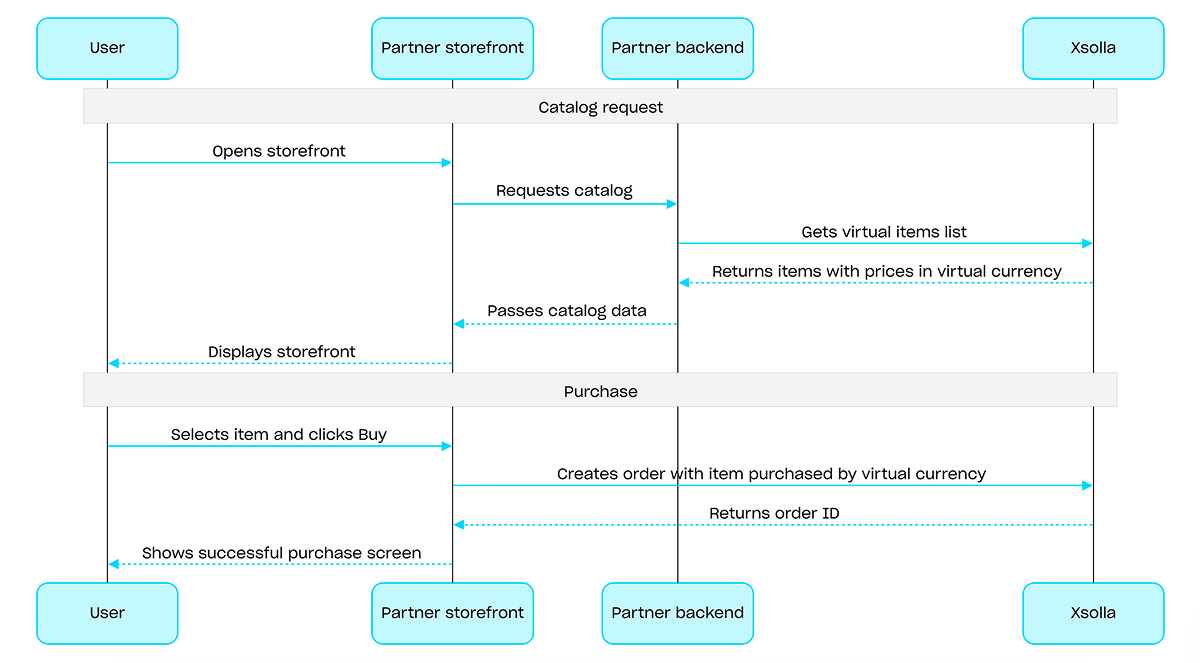
인게임 재화로 구매할 경우, 인게임 재화로 구매한 지정된 아이템으로 주문 생성 API 호출을 사용하세요. 결제 UI는 필요하지 않으며, API 호출이 실행될 때 청구가 처리됩니다.
인게임 재화를 사용한 구매 절차 예시:
프로젝트 ID. 이 매개 변수는 프로젝트 이름 옆의 관리자 페이지에서 또는 프로젝트 작업 시 브라우저 주소 표시줄에서 확인할 수 있습니다. URL 형식은 다음과 같습니다: https://publisher.xsolla.com/<merchant_id>/projects/<project_id>.
요청 본문 구조에는 지역별 가격 책정, 구매 한도, 기간 한정 가용성과 같은 고급 사용 사례를 위한 선택적 매개 변수가 포함되어 있습니다.
업데이트할 필요가 없는 매개 변수를 포함하여 모든 아이템 매개 변수를 전달하십시오. 요청에서 생략된 매개 변수는 제거됩니다.
고유 아이템 ID입니다. SKU는 소문자 및 대문자 라틴 영숫자, 마침표, 대시 및 밑줄만 포함할 수 있습니다.
아이템 이름에 대한 현지화가 있는 개체입니다. 두 글자 소문자 언어 코드(예: en) 또는 다섯 글자 언어 코드(예: en-US) 두 가지 형식 중 하나로 되어 있는 값을 허용합니다. 두 형식 모두 입력으로 허용되지만 응답은 두 글자 소문자 언어 코드를 반환합니다. 동일한 언어에 대한 두 옵션(예: en 및 en-US)이 모두 제공되면 마지막으로 제공된 값이 저장됩니다. 지원되는 언어의 전체 목록은 문서에서 확인할 수 있습니다.
두 글자 소문자 언어 코드입니다.
아이템 설명에 대한 현지화가 있는 개체입니다. 두 글자 소문자 언어 코드(예: en) 또는 다섯 글자 로케일 코드(예: en-US) 두 가지 형식 중 하나로 되어 있는 값을 허용합니다. 두 형식 모두 입력으로 허용되지만 응답은 두 글자 소문자 언어 코드를 반환합니다. 동일한 언어에 대한 두 옵션(예: en 및 en-US)이 모두 제공되면 마지막으로 제공된 값이 저장됩니다. 지원되는 언어의 전체 목록은 문서에서 확인할 수 있습니다.
두 글자 소문자 언어 코드입니다.
아이템의 긴 설명에 대한 현지화가 있는 개체입니다. 두 글자 소문자 언어 코드(예: en) 또는 5자 로케일 코드(예 en-US: ) 두 가지 형식 중 하나로 값을 허용합니다. 두 형식 모두 입력으로 허용되지만 응답은 두 글자 소문자 언어 코드를 반환합니다. 동일한 언어에 대한 두 변수(예: en 및 en-US)가 모두 제공되면 마지막으로 제공된 값이 저장됩니다. 지원되는 언어의 전체 목록은 문서에서 확인할 수 있습니다.
두 글자 소문자 언어 코드입니다.
이미지 URL. 결제 UI에서 이미지가 올바르게 표시되고 빠르게 로드되도록 하려면 다음 이미지 및 URL 가이드라인을 확인하세요:
- 지원되는 형식: WebP(권장), PNG, JPG.
- 파일 크기: 50KB 이하(WebP의 경우) 또는 150KB 이하(PNG 및 JPG의 경우).
- 이미지 크기: 280 x 280 픽셀.
- 색 공간: sRGB.
- 프로토콜: 버전 관리된 URL에 대해 장기 캐싱이 적용된 HTTPS.
스크린샷, 게임 플레이 동영상 등과 같은 아이템의 추가 자산입니다.
해당 아이템이 속한 그룹 외부 ID 목록입니다.
예시: ["horror", "action"]
특성 목록입니다.
고유 특성 ID입니다. external_id는 소문자 및 대문자 라틴 영숫자, 대시 및 밑줄만 포함할 수 있습니다.
특성의 이름에 대한 현지화가 있는 개체입니다. 키는 ISO 3166-1에 따라 지정되어 있습니다.
특성의 고유한 값 ID입니다. external_id에는 소문자 라틴어 영숫자, 대시, 밑줄만 사용할 수 있습니다.
아이템 가격 통화입니다. ISO 4217에 따른 3자리 코드입니다. 엑솔라에서 지원하는 통화에 대한 자세한 내용은 설명서를 확인하십시오.
ISO 3166-1 alpha-2에 따른 2자리 대문자 국가 코드입니다. 엑솔라에서 지원하는 국가에 대한 자세한 정보는 설명서를 확인하십시오.
예: country=US
인게임 재화 가격 목록입니다.
고유 아이템 ID입니다. SKU는 소문자 및 대문자 라틴 영숫자, 마침표, 대시 및 밑줄만 포함할 수 있습니다.
해당 아이템이 구매 가능한지 여부입니다. false인 경우, 해당 아이템은 스토어에서 구매할 수 없으며 번들 상품이나 마케팅 캠페인을 통해서도 획득할 수 없습니다. 아이템 구매 가능 여부에 대한 자세한 내용은 문서를 참조하세요.
해당 아이템이 카탈로그에 표시되는지 여부입니다. false이고 is_enabled: true인 경우, 해당 아이템은 카탈로그에 표시되지 않지만 번들 상품의 일부로 제공되거나 마케팅 캠페인 내에서 이용할 수 있습니다. 아이템 제공 여부에 대한 자세한 내용은 문서를 참조하십시오.
카탈로그 내 아이템 표시 순서입니다. 값이 클수록 목록에서 해당 아이템이 더 아래쪽에 표시됩니다. 값이 동일한 경우, 아이템이 생성 날짜 순으로 정렬되며, 보다 최근에 생성된 아이템이 더 위쪽에 표시됩니다.
해당 아이템을 이용할 수 있는 지역 목록입니다. 목록이 비어 있거나 전달되지 않은 경우, 해당 아이템은 모든 지역에 제공됩니다.
아이템 제한 사항입니다.
개별 사용자에 대한 아이템 제한 사항입니다.
개별 사용자에 대한 아이템 제한 사항입니다.
새로고침 기간을 제한합니다.
지정된 시간 간격(시간 단위)마다 구매 한도가 재설정됩니다.
아이템 판매 기간입니다.
- https://store.xsolla.com/api/v2/project/{project_id}/admin/items/virtual_items/sku/{item_sku}
- Mock serverhttps://xsolla.redocly.app/_mock/ko/api/catalog/v2/project/{project_id}/admin/items/virtual_items/sku/{item_sku}
- curl
- JavaScript
- Node.js
- Python
- Java
- C#
- PHP
- Go
- Ruby
- R
- Payload
curl -i -X PUT \
  -u <username>:<password> \
  https://store.xsolla.com/api/v2/project/44056/admin/items/virtual_items/sku/booster_mega_1 \
  -H 'Content-Type: application/json' \
  -d '{
    "sku": "booster_mega_1",
    "name": {
      "en": "Mega Booster"
    },
    "description": {
      "en": "Temporarily doubles the experience points earned in battle."
    }
}'프로젝트 ID. 이 매개 변수는 프로젝트 이름 옆의 관리자 페이지에서 또는 프로젝트 작업 시 브라우저 주소 표시줄에서 확인할 수 있습니다. URL 형식은 다음과 같습니다: https://publisher.xsolla.com/<merchant_id>/projects/<project_id>.
- https://store.xsolla.com/api/v2/project/{project_id}/admin/items/virtual_items/sku/{item_sku}
- Mock serverhttps://xsolla.redocly.app/_mock/ko/api/catalog/v2/project/{project_id}/admin/items/virtual_items/sku/{item_sku}
- curl
- JavaScript
- Node.js
- Python
- Java
- C#
- PHP
- Go
- Ruby
- R
- Payload
curl -i -X DELETE \
  -u <username>:<password> \
https://store.xsolla.com/api/v2/project/44056/admin/items/virtual_items/sku/booster_mega_1프로젝트 ID. 이 매개 변수는 프로젝트 이름 옆의 관리자 페이지에서 또는 프로젝트 작업 시 브라우저 주소 표시줄에서 확인할 수 있습니다. URL 형식은 다음과 같습니다: https://publisher.xsolla.com/<merchant_id>/projects/<project_id>.
- https://store.xsolla.com/api/v2/project/{project_id}/admin/items/virtual_currency
- Mock serverhttps://xsolla.redocly.app/_mock/ko/api/catalog/v2/project/{project_id}/admin/items/virtual_currency
- curl
- JavaScript
- Node.js
- Python
- Java
- C#
- PHP
- Go
- Ruby
- R
- Payload
curl -i -X GET \
  -u <username>:<password> \
'https://store.xsolla.com/api/v2/project/44056/admin/items/virtual_currency?limit=50&offset=0'인게임 재화 목록을 성공적으로 수신했습니다.
고유 아이템 ID입니다. SKU는 소문자 및 대문자 라틴 영숫자, 마침표, 대시 및 밑줄만 포함할 수 있습니다.
아이템 이름에 대한 현지화가 있는 개체입니다. 두 글자 소문자 언어 코드(예: en) 또는 다섯 글자 언어 코드(예: en-US) 두 가지 형식 중 하나로 되어 있는 값을 허용합니다. 두 형식 모두 입력으로 허용되지만 응답은 두 글자 소문자 언어 코드를 반환합니다. 동일한 언어에 대한 두 옵션(예: en 및 en-US)이 모두 제공되면 마지막으로 제공된 값이 저장됩니다. 지원되는 언어의 전체 목록은 문서에서 확인할 수 있습니다.
두 글자 소문자 언어 코드입니다.
아이템 설명에 대한 현지화가 있는 개체입니다. 두 글자 소문자 언어 코드(예: en) 또는 다섯 글자 로케일 코드(예: en-US) 두 가지 형식 중 하나로 되어 있는 값을 허용합니다. 두 형식 모두 입력으로 허용되지만 응답은 두 글자 소문자 언어 코드를 반환합니다. 동일한 언어에 대한 두 옵션(예: en 및 en-US)이 모두 제공되면 마지막으로 제공된 값이 저장됩니다. 지원되는 언어의 전체 목록은 문서에서 확인할 수 있습니다.
두 글자 소문자 언어 코드입니다.
아이템의 긴 설명에 대한 현지화가 있는 개체입니다. 두 글자 소문자 언어 코드(예: en) 또는 5자 로케일 코드(예 en-US: ) 두 가지 형식 중 하나로 값을 허용합니다. 두 형식 모두 입력으로 허용되지만 응답은 두 글자 소문자 언어 코드를 반환합니다. 동일한 언어에 대한 두 변수(예: en 및 en-US)가 모두 제공되면 마지막으로 제공된 값이 저장됩니다. 지원되는 언어의 전체 목록은 문서에서 확인할 수 있습니다.
두 글자 소문자 언어 코드입니다.
아이템이 속한 그룹입니다.
특성 목록입니다.
고유 특성 ID입니다. external_id는 소문자 및 대문자 라틴 영숫자, 대시 및 밑줄만 포함할 수 있습니다.
특성의 이름에 대한 현지화가 있는 개체입니다. 키는 ISO 3166-1에 따라 지정되어 있습니다.
특성의 고유한 값 ID입니다. external_id에는 소문자 라틴어 영숫자, 대시, 밑줄만 사용할 수 있습니다.
스크린샷, 게임 플레이 동영상 등과 같은 아이템의 추가 자산입니다.
아이템 가격 통화입니다. ISO 4217에 따른 3자리 코드입니다. 엑솔라에서 지원하는 통화에 대한 자세한 내용은 설명서를 확인하십시오.
이 가격이 카탈로그에 표시하거나 아이템을 구매할 때 사용되는지 여부입니다. false로 설정하면 해당 가격은 사용되지 않으며 다른 가격이 적용됩니다. 가격 설정에 대한 자세한 내용은 문서를 참조하십시오.
이 가격을 사용할 수 있는 국가입니다. ISO 3166-1 alpha 2에 따른 2자리 글자 코드입니다.
이미지 URL. 결제 UI에서 이미지가 올바르게 표시되고 빠르게 로드되도록 하려면 다음 이미지 및 URL 가이드라인을 확인하세요:
- 지원되는 형식: WebP(권장), PNG, JPG.
- 파일 크기: 50KB 이하(WebP의 경우) 또는 150KB 이하(PNG 및 JPG의 경우).
- 이미지 크기: 280 x 280 픽셀.
- 색 공간: sRGB.
- 프로토콜: 버전 관리된 URL에 대해 장기 캐싱이 적용된 HTTPS.
해당 아이템이 구매 가능한지 여부입니다. false인 경우, 해당 아이템은 스토어에서 구매할 수 없으며 번들 상품이나 마케팅 캠페인을 통해서도 획득할 수 없습니다. 아이템 구매 가능 여부에 대한 자세한 내용은 문서를 참조하세요.
카탈로그 내 아이템 표시 순서입니다. 값이 클수록 목록에서 해당 아이템이 더 아래쪽에 표시됩니다. 값이 동일한 경우, 아이템이 생성 날짜 순으로 정렬되며, 보다 최근에 생성된 아이템이 더 위쪽에 표시됩니다.
해당 아이템이 카탈로그에 표시되는지 여부입니다. false이고 is_enabled: true인 경우, 해당 아이템은 카탈로그에 표시되지 않지만 번들 상품의 일부로 제공되거나 마케팅 캠페인 내에서 이용할 수 있습니다. 아이템 제공 여부에 대한 자세한 내용은 문서를 참조하십시오.
해당 아이템을 이용할 수 있는 지역 목록입니다. 목록이 비어 있거나 전달되지 않은 경우, 해당 아이템은 모든 지역에 제공됩니다.
프로젝트 내의 지역 ID입니다.
자세한 내용은 지역별 판매 제한 관련 문서와 지역 관리 API 호출을 참조하십시오.
아이템 제한 사항입니다.
개별 사용자에 대한 아이템 제한 사항입니다.
구매 한도에 도달한 후 다음 한도 재설정 때까지 카탈로그 내 아이템의 표시 여부를 결정합니다.
recurrent_schedule 배열에서 반복 한도 재설정이 구성된 아이템에 적용됩니다.
구매 한도에 도달한 후, 한도 초기화를 구성하지 않았다면limit_exceeded_visibility 값과 관계없이 해당 아이템은 카탈로그에 표시되지 않습니다.
사용 가능한 값: - show - 구매 한도에 도달한 이후에도 카탈로그 검색 API 호출 시 해당 아이템이 반환됩니다. 클라이언트 측 카탈로그 검색 API 호출에서 한도에 도달하면, 해당 아이템은 can_be_bought: false 플래그와 함께 반환됩니다. 다음 재설정 날짜는 reset_next_date에 반환됩니다. - hide - 구매 한도에 도달한 후, 한도가 재설정될 때까지 해당 아이템은 카탈로그 검색 API 호출에서 반환되지 않습니다.
전역 항목 제한 사항입니다.
새로고침 기간을 제한합니다.
사용자 제한 새로고침 기간입니다.
일일 사용자 유형 제한 설정을 새로고침합니다.
원하는 시간대의 제한 시간 새로고침 시간입니다(시간 단위로 반올림).
새로고침 제한 설정이 적용되는 날짜 및 시간입니다(Unix 타임스탬프)
첫 번째 제한 설정을 새로고침하는 날짜 및 시간입니다(ISO 8601).
아이템 판매 기간입니다.
{
  "items": [
    { … },
    { … }
  ]
}
개요
게임 키는 게임 플랫폼에서 사용자가 게임이나 DLC에 접근할 수 있도록 해주는 일회용 고유 영숫자 코드입니다. 직접 링크, 스토어 UI, 또는 위젯을 통해 게임 키를 판매할 수 있습니다. 또한 지역 제한 설정을 통해 특정 국가에서만 게임 키를 판매하도록 설정할 수 있습니다. 자세한 내용은 게임 키 패키지 섹션을 참조해 주세요.
게임 키를 판매하는 데 사용자 인증은 필요하지 않습니다. 키는 사용자가 결제 시 지정한 이메일 주소로 발송됩니다. 추가 시나리오를 활성화하기 위해 인증을 구성할 수 있습니다. 사용자 맞춤 설정, 구매 제한, 또는 자격 시스템. 자세한 내용은 게임 키 판매 시 인증 설정 방법 섹션을 참조해 주세요.
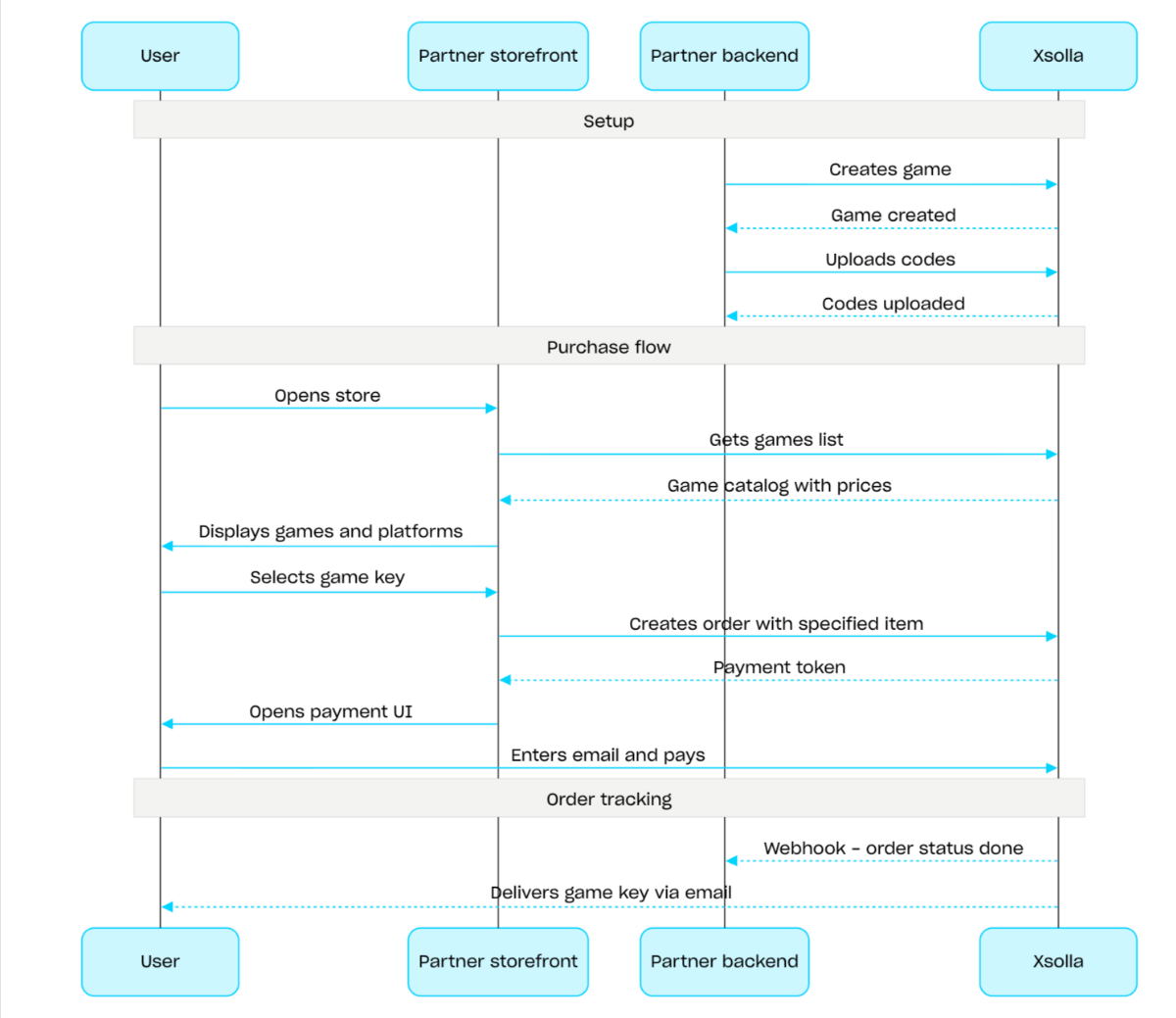
게임 키 판매 절차:
- 게임 생성 API 호출을 사용하여 게임을 생성합니다.
- 지역 제한을 구성합니다.
- 코드 업로드 API 호출을 사용하여 게임 키 패키지에 키를 업로드하고 구매가 가능하게 합니다.
- 게임 목록 가져오기 API 호출을 사용하여 사용자의 지역에 맞는 가격이 포함된 게임 카탈로그를 표시합니다.
- 주문을 생성합니다. 빠른 구매를 위해 게임 키 SKU를 전달하여 현재 장바구니의 모든 아이템으로 주문 생성 API 호출을 사용할 수 있습니다. 응답으로 결제 UI를 열기 위한 토큰이 반환됩니다.
- 주문 결제를 위해 결제 UI 열기를 구현합니다.
결제 성공 알림을 실시간으로 받고 사용자에게 아이템을 전달하려면, 웹훅 등을 사용하여 주문 상태 추적을 설정하세요. 키는 사용자가 결제 시 지정한 이메일로 전송되며, 주문 상태가 done으로 변경됩니다.
개요
번들은 하나의 단위로 판매되는 아이템 세트입니다. 번들에는 가상 아이템, 인게임 재화, 인게임 재화 패키지, 게임 키 및 기타 번들이 포함될 수 있습니다. 번들을 활용하여 스타터 팩, 시즌 한정 혜택 및 특별 상품을 구성해 보세요.
번들을 처리하려면 다음 API 호출 그룹을 사용하세요.
- 번들을 생성, 업데이트, 삭제하고 번들의 표시 여부를 관리하려면 관리자 섹션의 API 호출을 사용하세요.
- 번들을 불러오려면 카탈로그 섹션의 API 호출을 사용하세요.
구매 한도는 번들을 생성하거나 업데이트할 때 limits 개체를 통해 구성됩니다. 자세한 내용은 한도 개요를 참조해 주세요. 지역 제한을 설정하여 특정 국가에서만 아이템을 판매할 수도 있습니다.
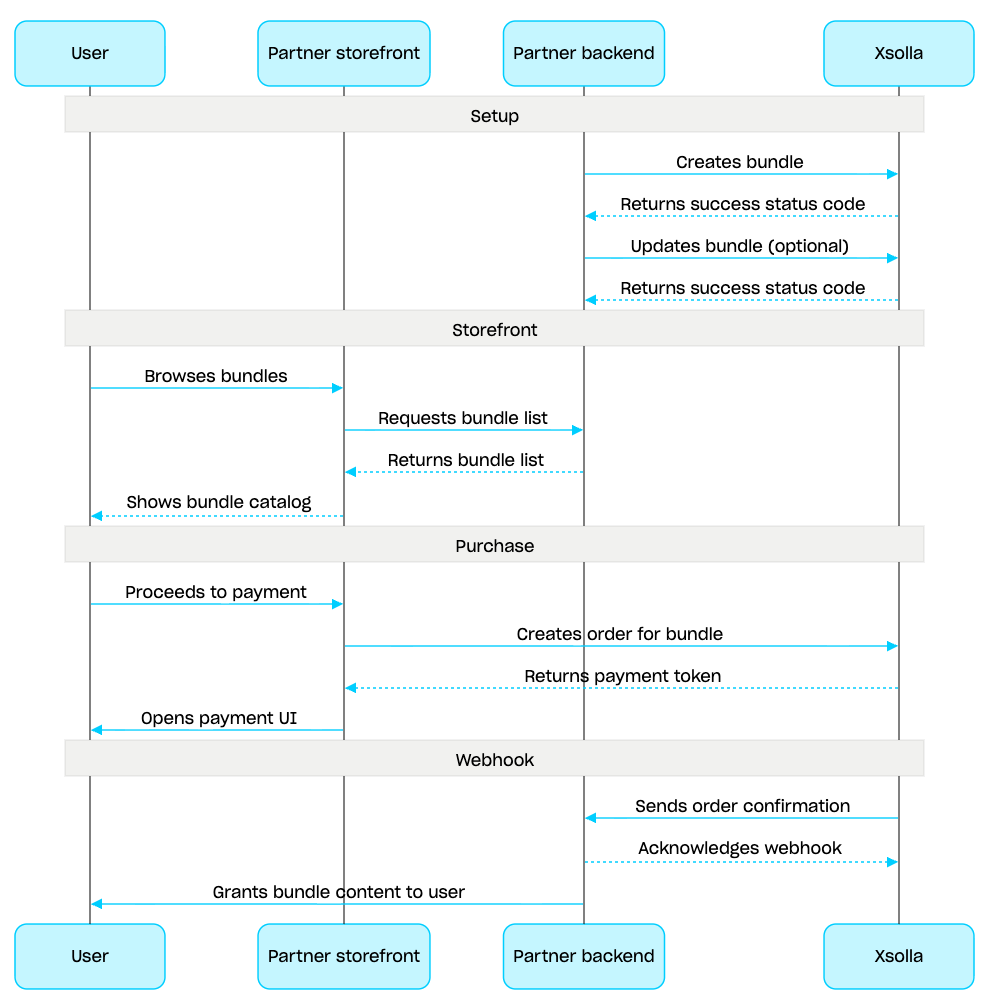
번들 관리 시나리오:
- 번들 생성 API 호출을 사용하여 번들을 생성합니다. 생성한 번들을 확인하려면 번들 가져오기 API 호출을 사용합니다. 프로젝트의 모든 번들을 검색하려면 번들 목록 가져오기 API 호출을 사용합니다.
- 필요한 경우 번들 업데이트 API 호출을 사용하여 번들 콘텐츠 또는 설정을 수정합니다.
- 번들 목록 가져오기, 지정한 번들 가져오기 또는 지정한 그룹별 번들 목록 가져오기 API 호출을 사용하여 스토어프론트에서 번들 표시 로직을 구현합니다.
- 장바구니 및 결제 섹션을 사용하여 주문을 생성합니다. 예를 들어 빠른 구매의 경우 번들 SKU를 전달하여 지정한 아이템으로 주문 생성 API 호출을 사용할 수 있습니다. 응답에는 결제 UI를 여는 데 필요한 토큰이 포함됩니다.
- 주문을 결제하기 위해 결제 UI 열기를 구현합니다.
- 웹훅 등을 사용하여 주문 상태 추적을 설정하면 성공적으로 결제된 아이템에 대한 데이터를 신속하게 수신하고 사용자에게 제공할 수 있습니다.
개요
장바구니는 여러 아이템을 하나의 주문으로 결합할 수 있는 구매 매커니즘입니다. 사용자는 실제 통화로 모든 유형의 아이템을 원하는 수량만큼 구매할 수 있으며, 프로모션 코드도 사용할 수 있습니다.
장바구니는 엑솔라 측에 저장됩니다. 세션 간 장바구니 저장은 사용자의 인증 여부에 따라 달라집니다.
인증된 사용자의 경우, 같은 사용자를 대신하여 요청이 전송되는 한 장바구니가 특정 사용자와 연결되어 세션 간에 저장됩니다.
미인증 사용자의 경우, 장바구니 저장은
x-unauthorized-id헤더 전달 여부에 따라 달라집니다. 미인증 사용자의 장바구니를 세션 간에 저장하려면 모든 요청에서 동일한x-unauthorized-id를 전달합니다. 이 옵션은 게임 키 판매에만 사용할 수 있습니다.
장바구니는 두 가지 방식, 즉 사용자의 JWT를 통해 자동으로 식별하거나 장바구니 ID(cart_id)로 식별할 수 있습니다.
장바구니 관리는 클라이언트 측과 서버 측 모두에서 가능합니다.
서버 측에서는 사용자 세션을 복원할 때와 같이 장바구니에 아이템을 채울 수 있습니다. 클라이언트 측에서 가능한 작업은 다음과 같습니다:
- 현재 사용자의 장바구니 또는 ID로 장바구니 가져오기
- 장바구니 채우기
- 장바구니의 아이템 업데이트
- 장바구니에서 아이템 삭제
장바구니에서 아이템을 구매하려면 주문 생성을 위한 클라이언트 및 서버 호출을 사용합니다.
장바구니의 유효 기간(TTL)은 기본적으로 72시간입니다. 새 아이템이 추가되는 등 콘텐츠가 변경되면 TTL이 연장됩니다.
결제가 성공적으로 완료되어도 장바구니는 자동으로 비워지지 않습니다. 장바구니를 비우려면 다음 클라이언트 측 API 호출을 사용합니다.
장바구니 ID로 장바구니 아이템 삭제하기 및 현재 장바구니에서 장바구니 아이템 삭제하기 - 장바구니에서 마지막 아이템을 삭제하면 장바구니가 비워집니다.
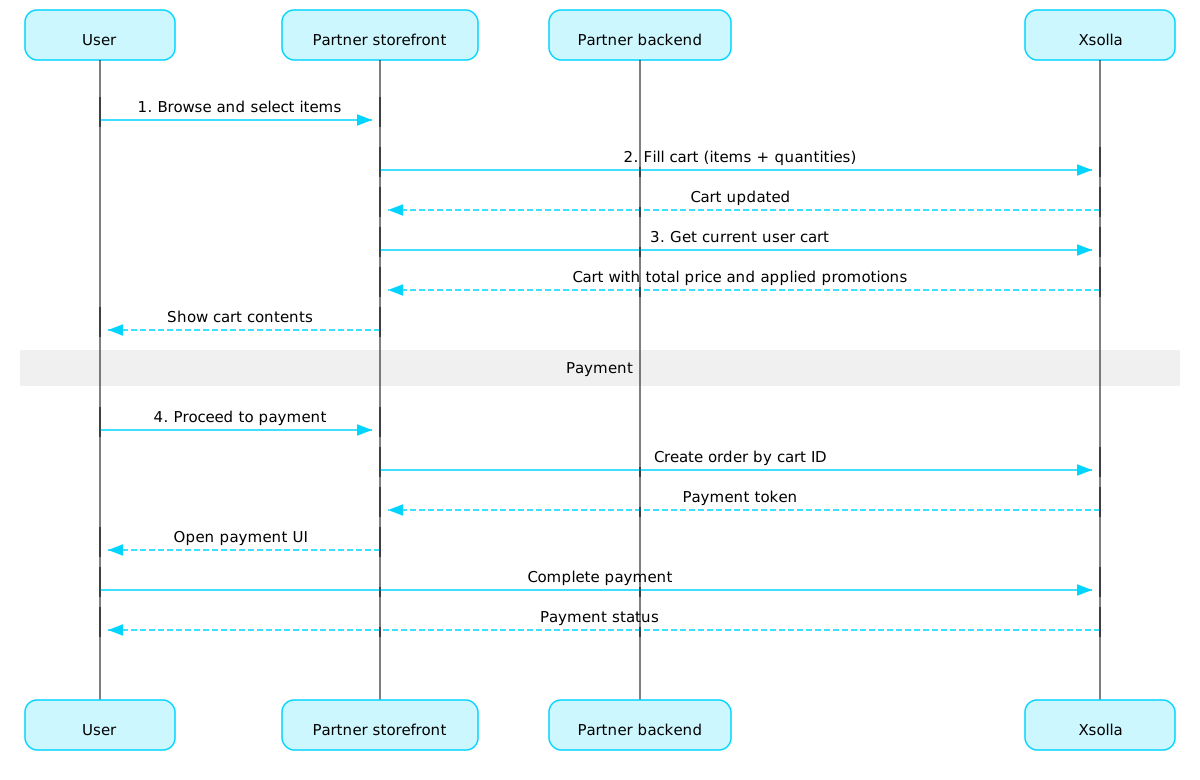
장바구니 사용 시나리오:
사용자가 아이템을 선택할 스토어 UI를 구현합니다.
사용자가 스토어에서 아이템을 선택하면 해당 아이템을 장바구니에 추가합니다(예: 아이템으로 장바구니 채우기 호출 사용). 아이템 배열에서 SKU와 필요한 아이템 수량을 전달해야 합니다.
장바구니 보기 UI를 구현합니다. 사용자가 장바구니로 이동하면 현재 사용자의 장바구니 가져오기 호출을 사용하여 장바구니의 콘텐츠를 표시합니다. 응답은 할인 및 적용된 프로모션을 포함한 아이템의 최종 가격 정보를 반환합니다.
주문을 결제하기 위해 결제 UI 열기를 구현합니다. 예를 들어 특정 장바구니의 모든 아이템으로 주문 생성 호출을 사용할 수 있습니다. 응답은 결제 UI를 여는 데 필요한 토큰을 반환합니다.
웹훅 등을 사용하여 주문 상태 추적을 구성하면 성공적으로 결제된 아이템에 대한 데이터를 신속하게 수신하고 사용자에게 제공할 수 있습니다.
참고
인게임 및 온라인에서 아이템을 판매하려면통합 가이드를 참조하세요.
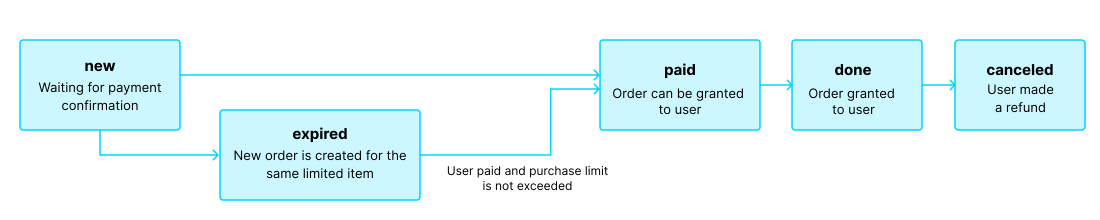
주문 수명 주기
주문 수명 주기를 이해하면 주문을 추적)하고 아이템 배송과 같은 구매 후 로직을 올바르게 구현하는 데 도움이 됩니다.
주문은 다음 단계들을 거칩니다:
| 상태 | 설명 | 참고 |
new | 주문이 생성되었습니다. 시스템은 결제 확인을 기다리고 있습니다. | 거래 상태 설명은 페이 스테이션 API 문서에서 확인할 수 있습니다. |
paid | 주문 대금이 결제되었으며(거래 상태가 done로 변경됨), 해당 아이템을 사용자에게 제공할 수 있습니다. | 결제가 확인될 때까지 주문은 new 상태로 남아 있습니다. |
done | 아이템이 사용자에게 부여됩니다. | - |
canceled | 결제가 환불됩니다. | 거래 상태가 refunded로 변경될 때 주문이 이 상태로 이동합니다. |
expired | 한정 아이템, 프로모션 코드 또는 프로모션에 대한 새 주문을 생성하면 해당 아이템이 포함된 기존 미결제 주문은 모두 expired 상태로 변경됩니다. 가장 최근에 주문한 상품에 대해서만 결제가 가능합니다. | 사용자가 만료된 주문에 대해 비용 결제를 시도하면 2002 오류가 표시되며 결제가 실패합니다. |
참고
사용자가 결제를 완료하는 도중에 주문 상태가 expired로 변경되었으나 결제가 성공적으로 완료된 경우, 주문 상태는 expired에서 paid로 변경됩니다. 이는 결제 시 해당 주문 품목의 구매 한도를 초과하지 않는 경우에만 적용됩니다.
무료 아이템
이 섹션의 호출을 사용하여 사용자에게 무료 아이템을 제공하세요.
개요
구매 한도를 통해 단일 사용자 또는 모든 사용자가 구매할 수 있는 아이템 수량을 제한할 수 있습니다. 또한 예약된 한도 재설정을 구성할 수 있습니다.
한도는 엑솔라 측에 저장되며 관리자 페이지 또는 다음 API 호출의 limits 객체를 통해 개별 아이템 수준에서 구성됩니다:
한도 정보는 아이템 카탈로그를 가져오는 다음 API 호출의 items.limits 객체에 반환됩니다:
한도 그룹의 관리 하위 섹션에 있는 API 호출은 현재 한도의 상태를 검색하고 특정 사용자에 대해 업데이트할 수 있도록 합니다. 예를 들어, 퀘스트 완료 후 카운터를 재설정하거나 남은 수량을 수동으로 조정할 수 있습니다.
공통 지역
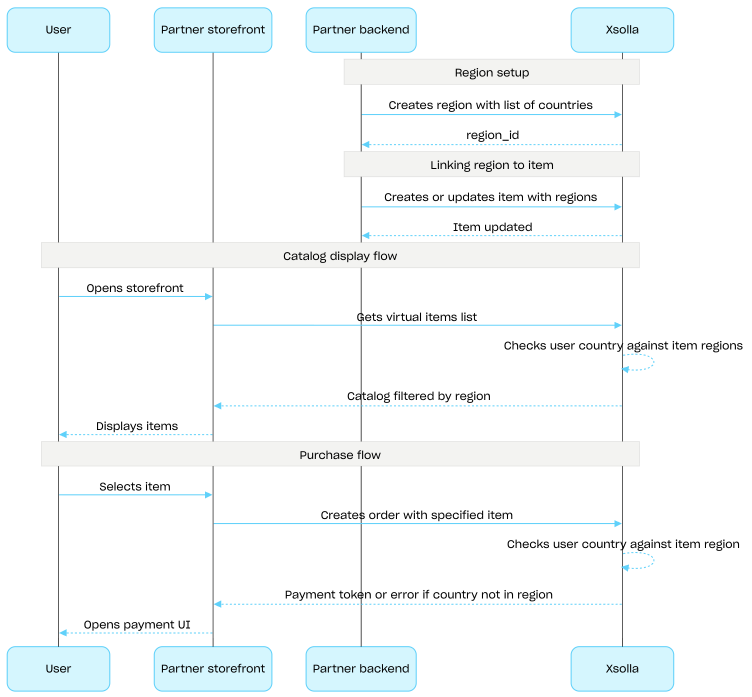
지역별 판매 제한을 사용하면 특정 국가 또는 국가 그룹에서 아이템 가용성을 관리할 수 있습니다. 예를 들어 라이선스 제한으로 특정 국가에서만 게임을 판매할 수 있습니다.
제한은 지역을 사용하여 구성합니다. 각 지역은 하나의 region_id 식별자 아래 하나 이상의 국가를 그룹화합니다. 아이템을 하나 이상의 지역에 연결할 수 있습니다.
아이템 가용성은 다음과 같이 결정됩니다.
- 아이템에 지역이 지정되지 않은 경우 모든 국가에서 구매할 수 있습니다.
- 아이템에 지역이 지정되어 있고 사용자의 국가가 해당 지역에 포함된 경우 이 사용자는 해당 아이템을 구매할 수 있습니다.
- 아이템에 지역이 지정되어 있지만 사용자의 국가가 어느 지역에도 포함되지 않은 경우 이 사용자는 해당 아이템을 구매할 수 없습니다.
카탈로그 하위 섹션의 API 호출을 통해 카탈로그를 요청할 때 사용자의 국가는 country 매개 변수로 전달됩니다. 이 매개 변수를 전달하지 않으면 사용자의 IP 주소를 기준으로 국가가 결정됩니다.
사용자의 국가는 카탈로그 요청 시와 주문 생성 시 두 번 아이템의 지역과 대조하여 확인됩니다. 구매할 수 없는 아이템은 카탈로그 응답에 포함되지 않으며, 해당 아이템이 포함된 주문은 생성되지 않습니다.
공통 지역 그룹의 API 호출을 사용하여 지역을 생성, 업데이트 및 삭제를 진행합니다.
지역별 판매 제한 설정 절차:
- 국가 목록을 지정하고 지역 생성 API 호출을 사용하여 지역을 생성합니다. 응답으로 다음 단계에 필요한
region_id가 반환됩니다. - 가상 아이템의
region_id를regions배열에 전달하여 아이템을 생성하거나 업데이트하고 지역에 연결합니다. - 카탈로그 하위 섹션의 API 호출(예: 가상 아이템 목록 가져오기 API 호출)을 사용하여 사용자에게 카탈로그를 표시합니다. 사용자의 국가는
country매개 변수로 결정되며, 이 매개 변수를 제공하지 않으면 사용자의 IP 주소를 기준으로 결정됩니다. 사용자의 국가에서 구매할 수 없는 아이템은 카탈로그 응답에 포함되지 않습니다. - 사용자가 아이템 또는 장바구니 결제를 진행하면 주문을 생성합니다:
- 아이템이 장바구니에 추가된 경우 특정 장바구니의 모든 아이템으로 주문 생성 또는 현재 장바구니의 모든 아이템으로 주문 생성 API 호출을 사용합니다.
- 단일 아이템을 바로 구매하는 경우 특정 아이템으로 주문 생성 API 호출을 사용하고 아이템 SKU를 전달합니다.
응답에는 결제 UI를 여는 데 사용할 토큰이 포함됩니다.
엑솔라는 사용자의 국가가 아이템에 지정된 지역에 포함되어 있는지 확인합니다. 해당 국가가 아이템의 지역에 포함되어 있지 않으면 주문을 생성할 수 없습니다.
- 주문 결제를 위해 결제 UI를 여는 기능을 구현합니다.